-
-
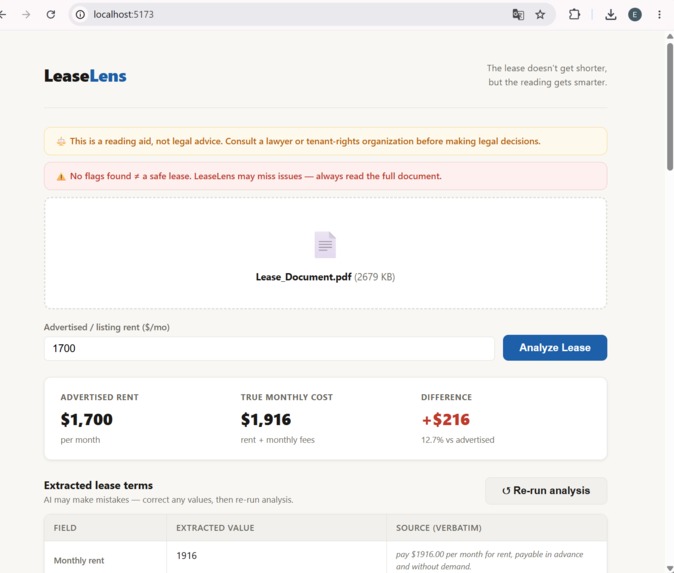
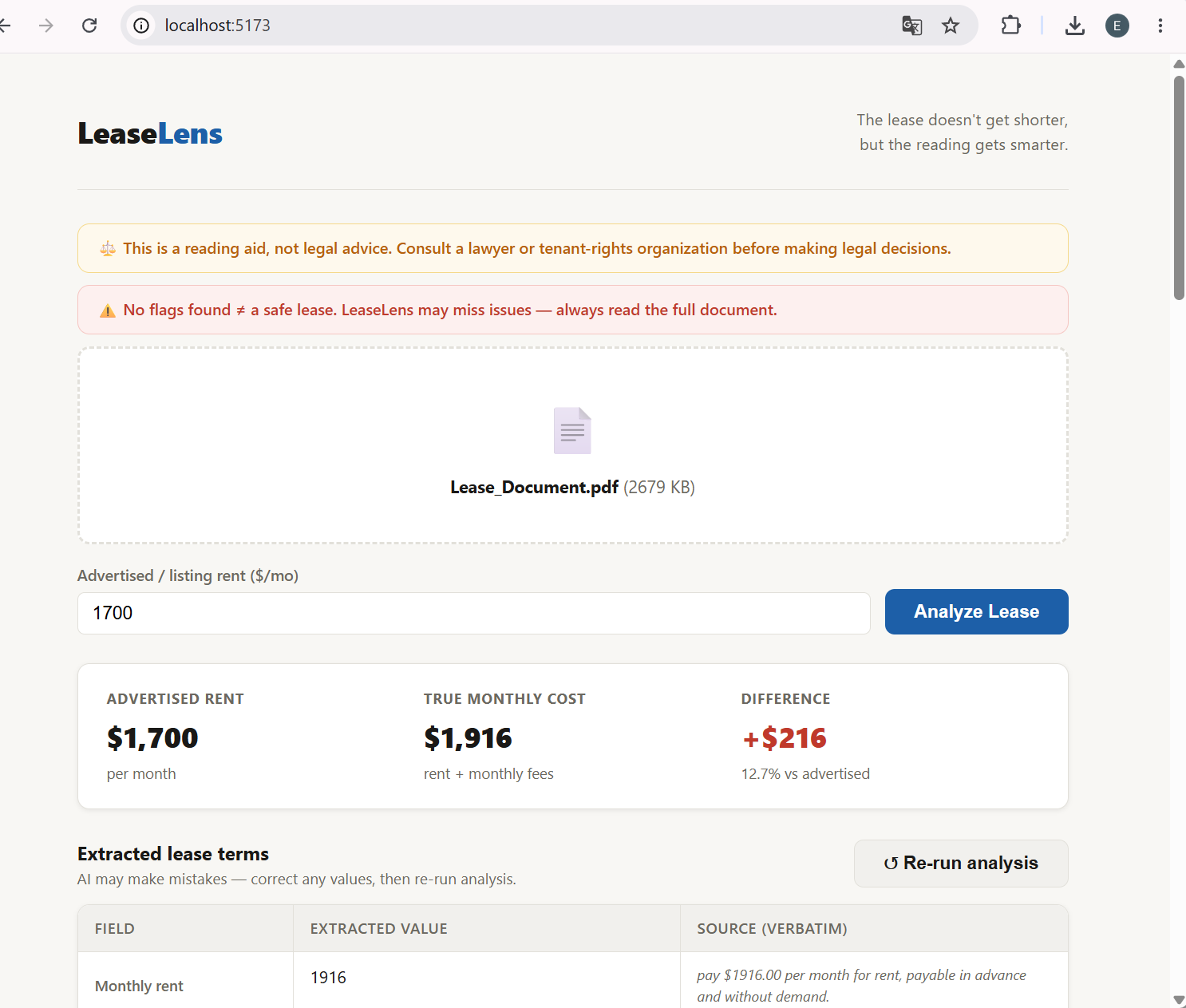
Top of website, inputs, scanned prices
-
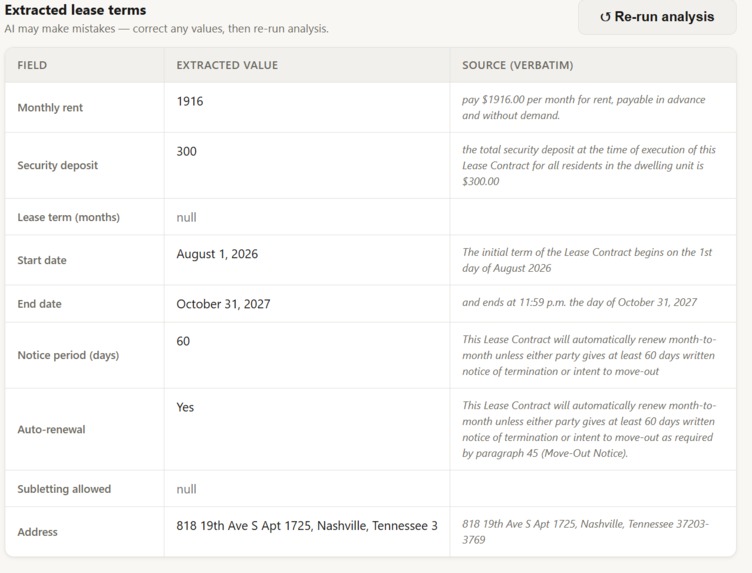
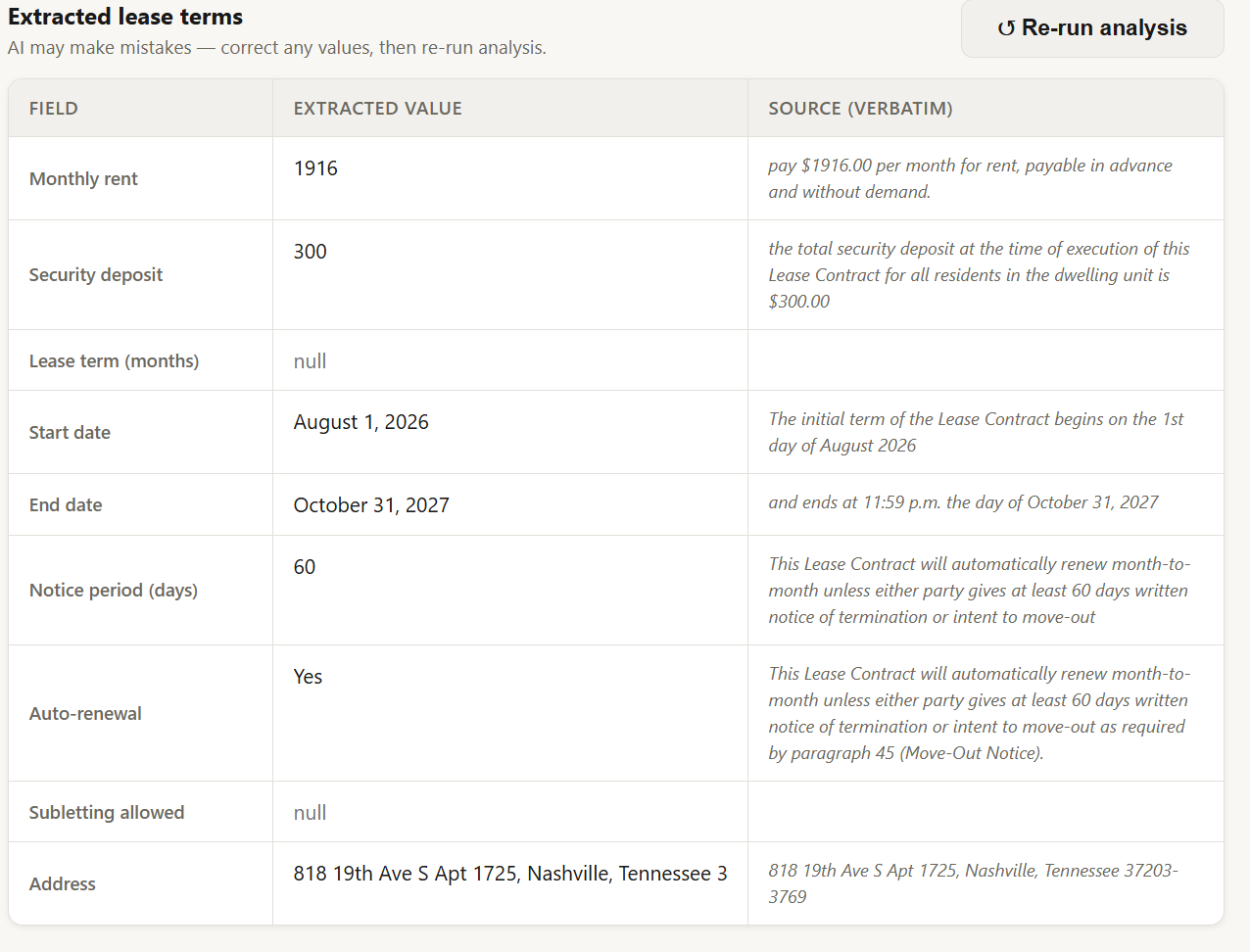
Table of important information listed in the scanned lease
-
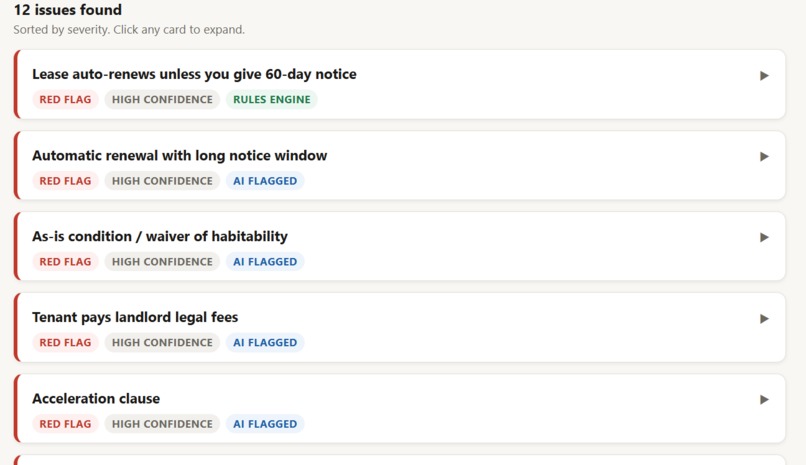
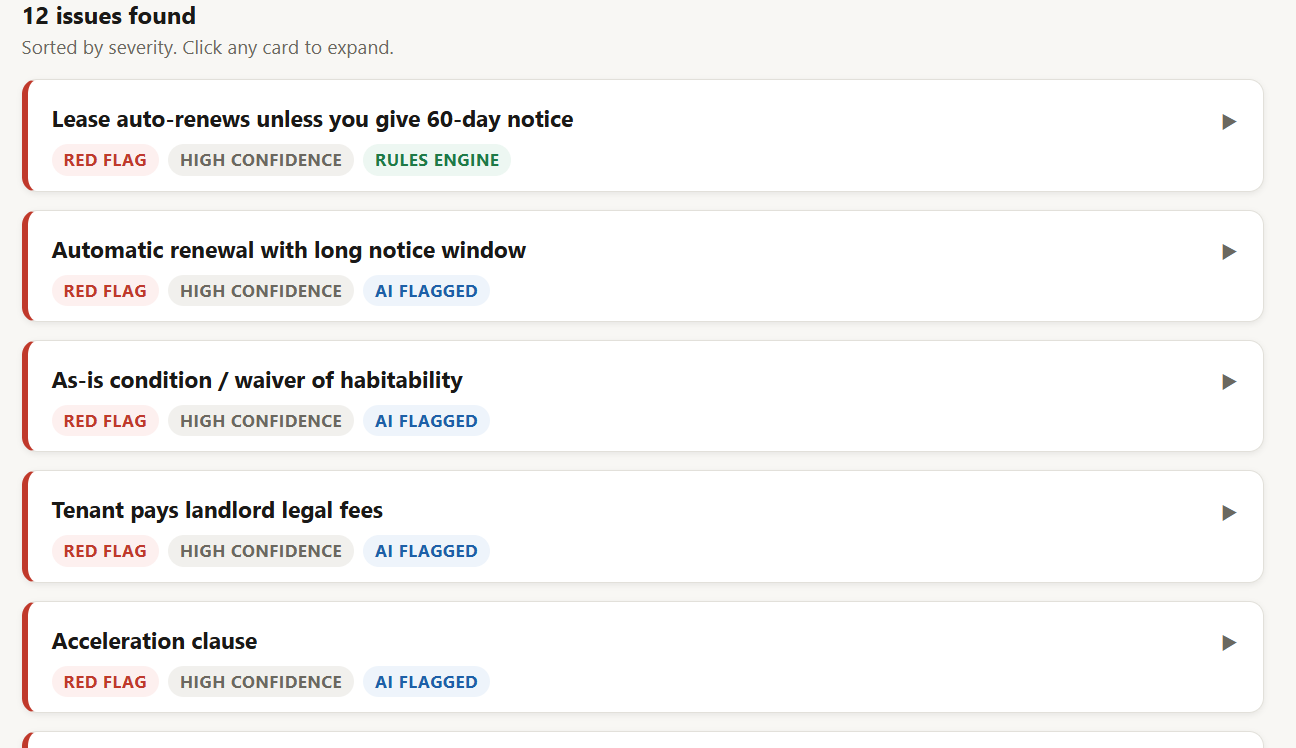
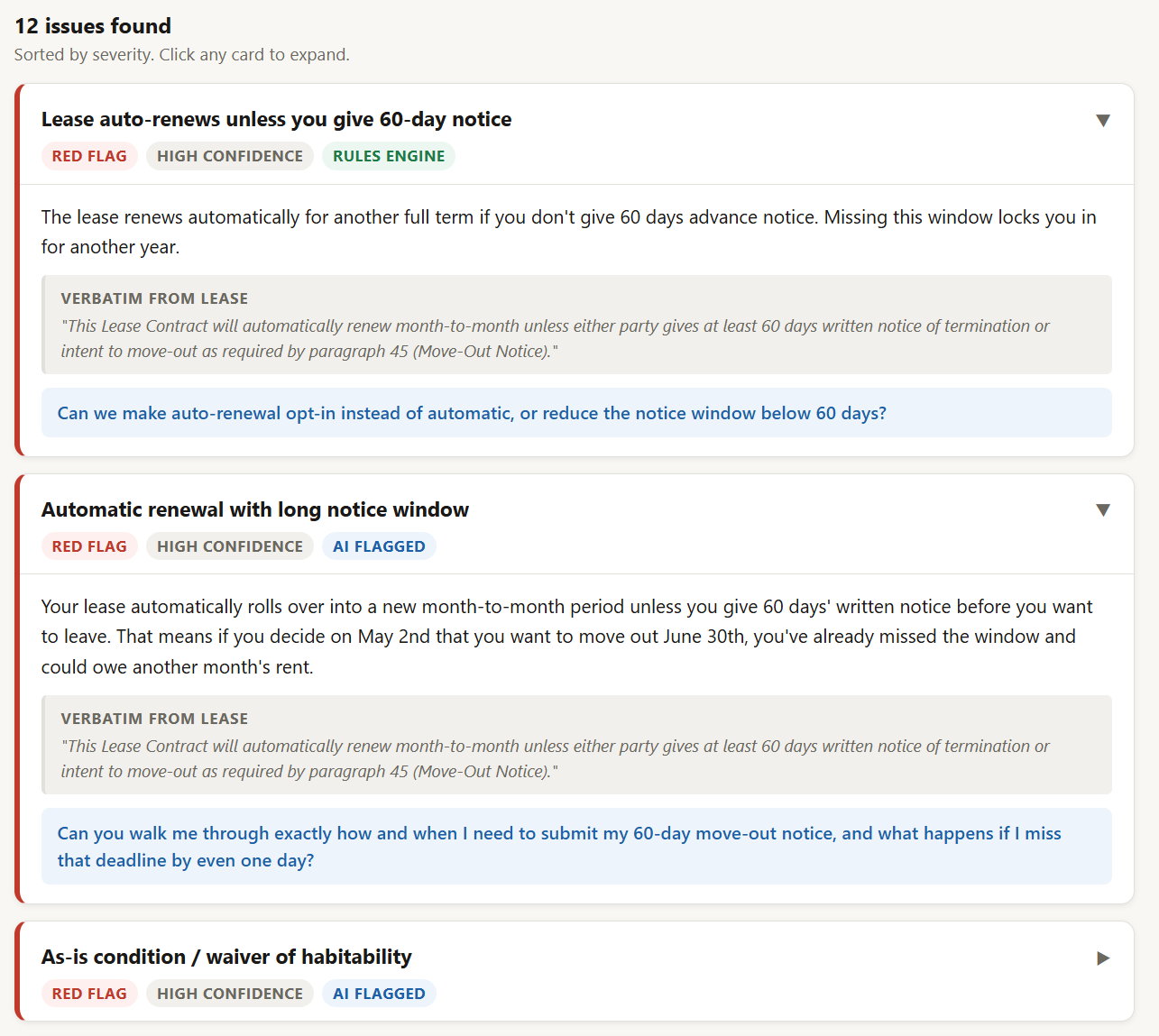
List of issues (listed in order of severity)
-
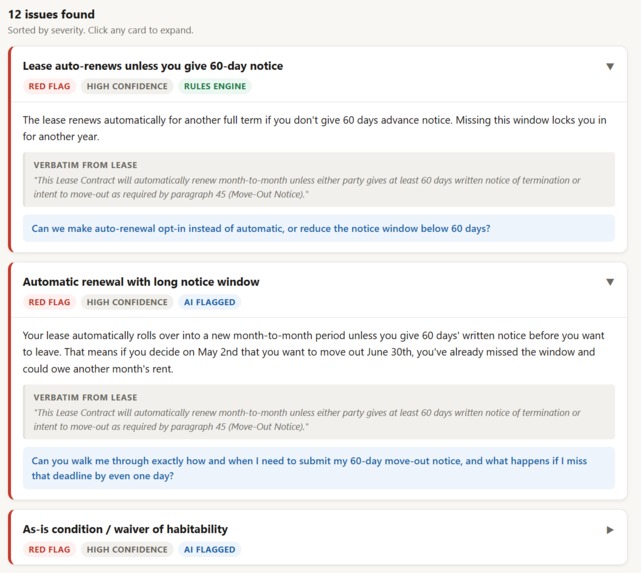
List of issues expanded for details
-
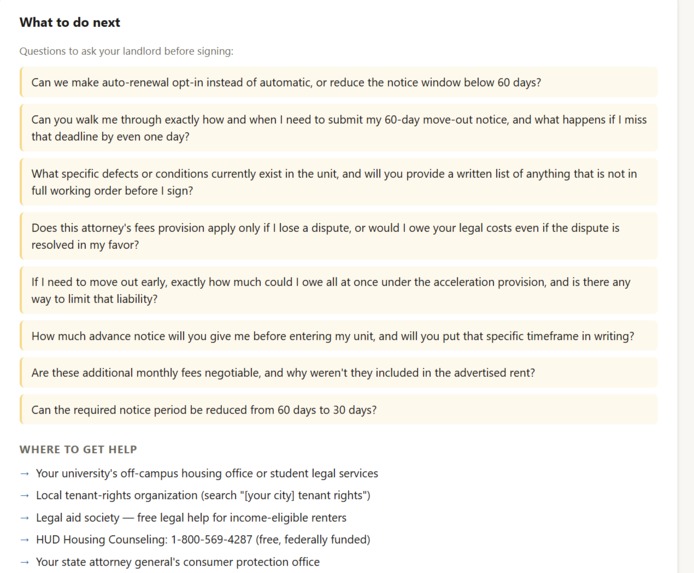
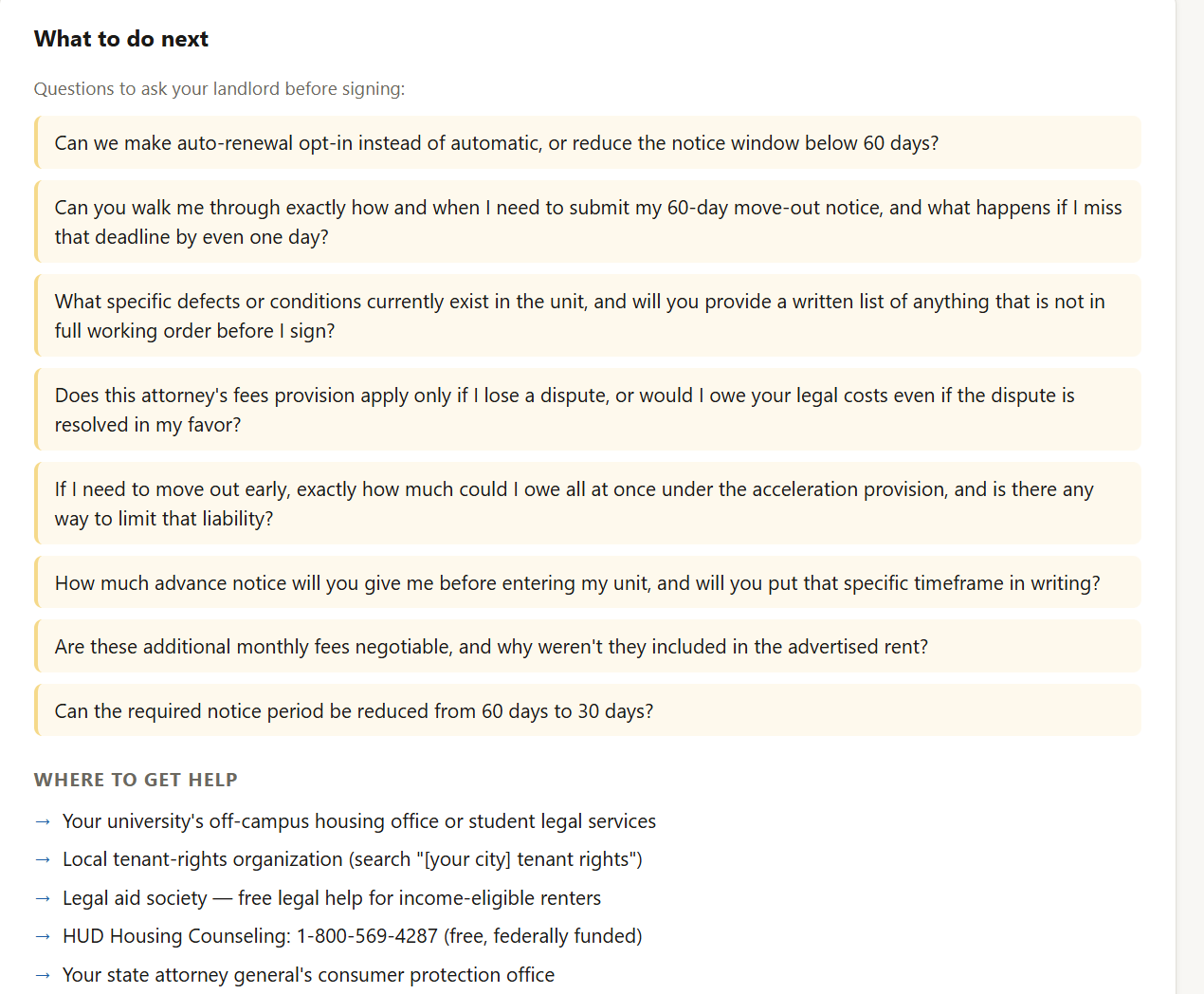
What to do next (Questions to ask and Places for help)
Inspiration
LeaseLens was inspired by a problem we personally faced as students searching for off-campus housing.
When Eddie was looking for an apartment near campus, the lease was almost 100 pages long and filled with dense legal language. Even though the apartment was a popular student housing option with more than 1000 students each year, the contract was still way too overwhelming for a first-time renter.
Eric had a similar experience. He was told his apartment would cost $1,700 per month, but after reading through the lease, the actual contract listed the rent as $1,916 per month. The difference was a $216 gap, but it revealed a bigger issue: if even the monthly rent can differ from what was advertised, what else might students miss?
Most students do not have the legal knowledge, experience, or patience to manually review every clause in a long lease. But missing one detail can lead to hidden costs, automatic renewal, strict move-out requirements, unexpected penalties, or losing a security deposit.
That is why we built LeaseLens: a structured AI lease review tool designed for students and first-time renters before they sign.
What it does
LeaseLens lets users upload a lease PDF, enter the advertised monthly rent, and receive a structured lease-risk report.
It extracts and displays key lease terms, including:
- Monthly rent
- True monthly cost
- Security deposit
- Lease start and end dates
- Address
- Notice period
- Auto-renewal status
- Potentially risky clauses
- Source snippets from the lease
- Questions to ask the landlord before signing
The core workflow is:
$$ \text{Lease PDF} \rightarrow \text{Text Extraction} \rightarrow \text{Structured Terms} \rightarrow \text{Risk Detection} \rightarrow \text{Actionable Report} $$
LeaseLens does not just summarize a lease. It converts an unstructured legal document into structured, reviewable information that students can actually use.
How we built it
We built LeaseLens as a full-stack web application with a React/Vite frontend and a FastAPI Python backend. We also used Claude Code as an AI-assisted development tool to help accelerate implementation, debugging, and iteration. The architecture, product flow, lease-analysis pipeline, prompts, rules, and final integration were designed and assembled by our team.
The frontend provides a simple flow: users upload a lease PDF, enter the advertised rent, and receive a one-screen report showing extracted terms, risk flags, source text, and next-step questions.
The backend handles the document analysis pipeline:
PDF ingestion The backend receives the uploaded lease file through a FastAPI endpoint.
Text extraction LeaseLens extracts text from the PDF so the lease can be analyzed programmatically.
Preprocessing and redaction We clean the extracted text and reduce unnecessary exposure of sensitive personal information before analysis.
Structured lease extraction We use an LLM to extract important lease fields into a predictable structure, including rent, deposit, lease dates, address, notice period, and auto-renewal.
Advertised rent comparison LeaseLens compares the advertised rent entered by the user with the rent and recurring costs found in the lease.
$$ \text{Difference} = \text{True Monthly Cost} - \text{Advertised Rent} $$
In Eric’s lease, this surfaced a mismatch between the advertised $1,700/month rent and the lease’s $1,916/month rent.
Hybrid risk detection We combine AI interpretation with deterministic rule-based checks. The AI helps understand flexible lease language, while rule checks look for known student-renter risks such as long notice periods, automatic renewal, attorney fee clauses, late fees, security deposit terms, and move-out restrictions. For the AI analysis layer, we used the Anthropic Claude API to extract structured lease terms and interpret flexible lease language. The system combines Claude-based extraction with deterministic rule checks, so LeaseLens is not only summarizing the lease but also comparing values, flagging known risk patterns, and producing actionable questions for renters.
Action generation Instead of only flagging issues, LeaseLens generates practical questions students can ask their landlord before signing.
This hybrid approach was important because leases are too flexible for simple keyword matching, but too high-stakes to rely only on a generic AI summary.
Challenges we ran into
The biggest challenge was PDF reliability. Many leases look readable to humans, but their extracted text can be incomplete, messy, or corrupted. Some pages extract cleanly, while others contain broken formatting or OCR errors. This made us realize that document processing is a major engineering challenge, not just a file-upload step.
Another challenge was structured extraction. Lease language is inconsistent, and the same concept can appear in different sections. For example, move-out notice may appear under “lease term,” “renewal,” or “move-out notice.” We had to design the system to extract useful values from unstructured legal text and return them in a consistent format.
We also had to balance AI flexibility with reliability. A pure AI summary can sound confident but miss specific financial or legal details. A pure rule-based system is more predictable but struggles with varied lease language. Our solution was to combine both approaches.
Finally, we had to be careful with responsible product design. LeaseLens analyzes legal documents, so we made it clear that the product is a reading aid, not legal advice. We included safety warnings and source snippets so users understand both the value and the limits of the tool.
Accomplishments that we're proud of
We are most proud that LeaseLens solves a real student problem we personally experienced.
In our demo, LeaseLens analyzes Eric’s actual lease and identifies that the advertised rent was $1,700, while the lease itself listed $1,916 per month. It also extracts key lease terms such as the security deposit, lease dates, 60-day notice period, auto-renewal language, and address. Before LeaseLens, Eric had to manually read the lease to catch this. With LeaseLens, the mismatch and risky clauses appear in one structured report, including many that Eric did not previously know.
We are also proud that LeaseLens found 12 potential issues and turned them into practical questions a renter can ask before signing. That makes the product more than a warning system. It gives students a plan.
Technically, we are proud of building an end-to-end system with:
- PDF upload
- FastAPI backend
- React/Vite frontend
- Lease text extraction
- LLM-based structured field extraction
- Rule-based risk checks
- Advertised-vs-actual rent comparison
- Severity-ranked issue cards
- Source snippets for transparency
- Suggested landlord questions
- Safety disclaimers for responsible use
Most importantly, LeaseLens does not just say, “This lease may be risky.” It shows what was found, where it came from, why it matters, and what the renter can do next.
What we learned
We learned that useful AI products require more than a model call. The surrounding system matters just as much: preprocessing, schemas, validation, rule checks, UI design, and safety messaging all affect whether the final product is actually trustworthy.
We also learned that legal and financial documents need explainability. Users should not just receive an answer; they should see the source text that supports it. That is why LeaseLens displays extracted values with verbatim snippets from the lease.
Another major lesson was that AI is strongest when paired with structure. The LLM is useful for interpreting flexible language, while deterministic checks are useful for consistency and reliability. Combining the two made LeaseLens more practical than a generic chatbot.
Most of all, we learned that students do not only need summaries. They need decision support. A lease summary is helpful, but a report that says “here is the issue, here is why it matters, and here is what to ask your landlord” is much more actionable.
What's next for LeaseLens
Next, we want to improve LeaseLens in three main areas: document processing, legal context, and user workflow.
For document processing, we want to add stronger OCR support so scanned leases can be converted into clean text before analysis. This would make LeaseLens more reliable across real-world PDFs.
For legal context, we want to add location-aware checks. A lease in California, Tennessee, or New York may raise different concerns, so future versions should adapt risk detection based on jurisdiction.
For user workflow, we want to add side-by-side clause highlighting so users can click a risk flag and jump directly to the relevant part of the lease.
Future improvements include:
- OCR fallback for scanned PDFs
- State-specific rental rule checks
- Side-by-side lease highlighting
- Confidence scores for extracted fields
- Better evaluation on real and synthetic leases
- Lease comparison between multiple apartments
- Exportable reports for student legal services
- A deployed public version for students to use directly
Our long-term vision is to make LeaseLens a student-first housing safety tool: not a replacement for lawyers, but a smarter first-pass review before students sign one of their first major financial contracts.
Built With
- ai
- anthropicclaudeapi
- claudecode
- css
- documentai
- fastapi
- github
- html
- javascript
- leaseanalysis
- llm
- natural-language-processing
- pdfplumber
- pdfprocessing
- pdftextextraction
- promptengineering
- python
- python-dotenv
- react
- riskdetection
- rulebasedchecks
- structureddataextraction
- uvicorn
- vite


Log in or sign up for Devpost to join the conversation.