-
-
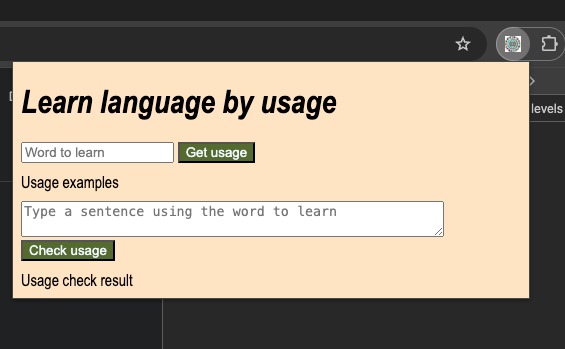
Learn-Lang-By-Use extension open
Inspiration
Trying to learn a new language and teaching my kid multiple languages.
What it does
Guides you in your efforts to learn a language through the usage of words:
- You input a word and gets its usage examples.
- Then you try using the word in a sentence and check if you used it correctly.
How we built it
Using Chrome Canary, JavaScript, HTML, and most importantly using Chrome's built-in AI. For now, only using the Prompt API.
Challenges we ran into
- Laptop/System requirements as the built-in AI is not for older laptops.
- Thankfully, this article pointed me in the right direction: Get Started with Chrome Built-in AI : Access Gemini Nano Model locally
- Making the UI and UX smooth.
Accomplishments that we're proud of
Starting and getting it all ready in less than a day.
What we learned
- The built-in AI by Chrome is awesome.
- Really surprised by the speed and accuracy of the responses. I expected it be rough initially till I get everything right, however, it was quite straightforward.
What's next for Learn-Lang-By-Use
- Future work: Add a button to translate your sentence into another language, usually the language you are more familiar and comfortable with, to solidify your understanding of the new word you are learning.
- That would mean using the Translator API when it moves out of Origin trial.

Log in or sign up for Devpost to join the conversation.