Inspiration
When I started learning Japanese, I realized the hardest part wasn’t grammar — it was recognizing hiragana instantly. At the beginning, every character looked unfamiliar, and I would hesitate trying to recall its sound. The real challenge was building a fast, automatic connection between the visual symbol and its pronunciation. I wanted to create something that focuses specifically on strengthening that symbol-to-sound mapping without overwhelming beginners with too many features.
What it does
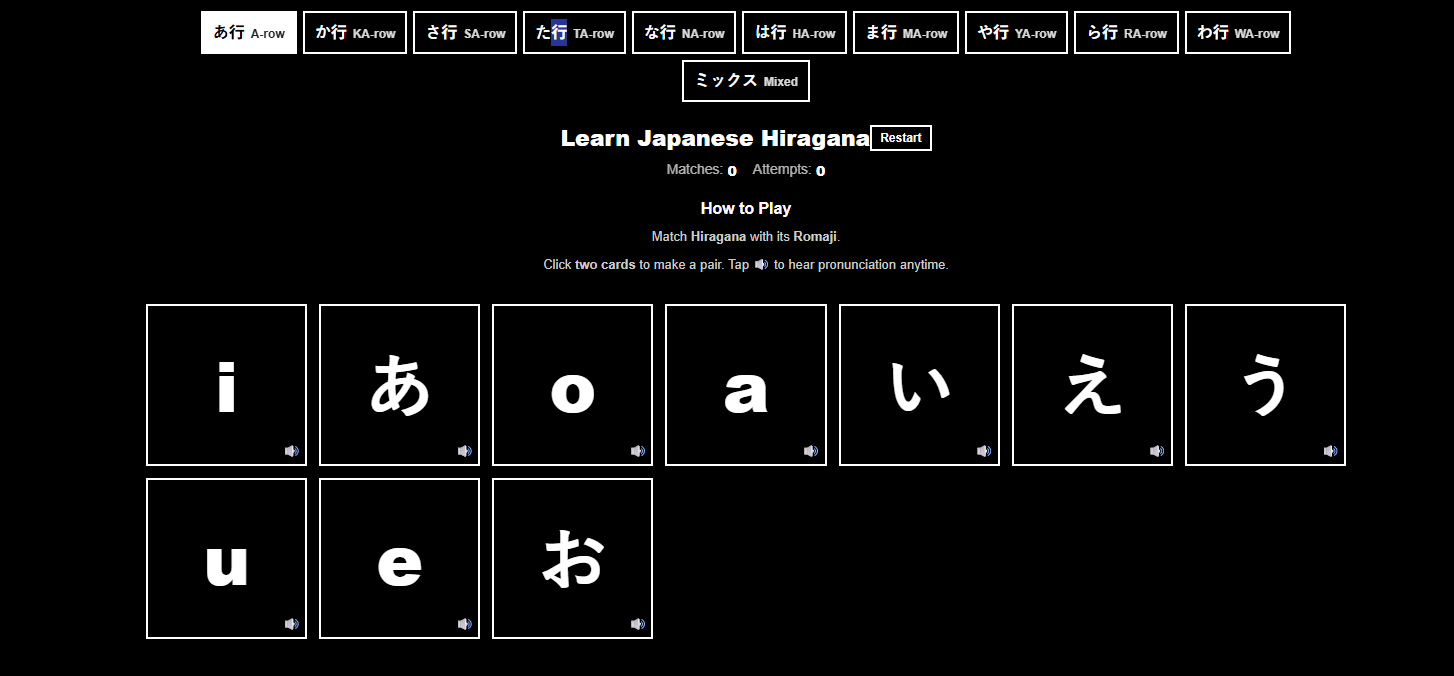
Learn Japanese Hiragana is a focused matching game that helps beginners practice recognizing hiragana and matching each character to its romaji. Users can select specific rows (A-row, KA-row, NA-row, etc.) to study systematically or switch to Mixed mode to test full recall. Each card includes audio playback so learners can hear pronunciation anytime. The app also tracks matches and attempts to give immediate feedback and measurable progress.
How I built it
I built this project using React with a Vite setup. I structured the hiragana data by rows in reusable data objects. When a row is selected, paired cards (hiragana and romaji) are dynamically generated and shuffled before rendering. I used React state management to track selected cards, matches, attempts, and game resets. The matching logic ensures correct pairs remain visible while incorrect ones flip back. I also integrated audio for each character to reinforce pronunciation learning.
Challenges I ran into
One of the biggest challenges was managing state during fast user interactions. I had to carefully control how selected cards were stored and reset to prevent multiple clicks from breaking the matching logic. Implementing shuffle functionality without losing pair consistency was another challenge. I also spent time refining the UI to keep it clean and intuitive while maintaining responsiveness.
Accomplishments that I’m proud of
I’m proud that I created a focused, distraction-free tool that solves a specific learning problem clearly and effectively. The architecture is modular, which means I can easily expand it to support katakana or additional character systems. The matching system, audio integration, and feedback tracking all work together to create a smooth learning experience.
What I learned
Through building this project, I gained a stronger understanding of React state management, conditional rendering, and interactive UI logic. I also learned that simplicity in product design can be powerful — instead of adding more features, refining one core interaction can create a more meaningful user experience.
What’s next for Learn Japanese Hiragana card game
Next, I plan to add katakana support, implement difficulty modes (such as timed challenges), improve mobile optimization, and explore spaced repetition techniques to enhance long-term retention. I’d also like to refine animations and polish the overall UI to make the experience even more engaging.
-
Built With
- javascript
- vite

Log in or sign up for Devpost to join the conversation.