Inspiration
Many people track their expenses in their head, and small daily spending like tea or snacks gets lost. I wanted logging an expense to be as easy as sending a message, with no forms to fill in.
What it does
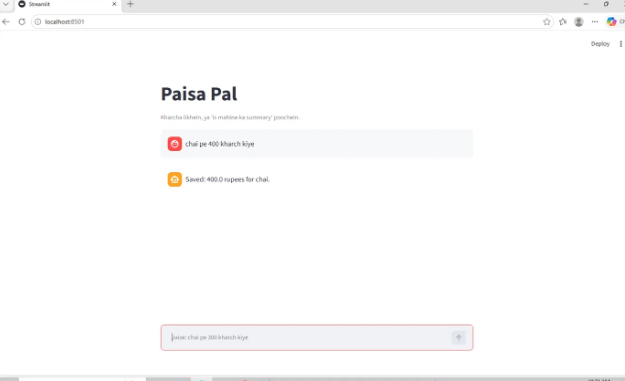
Paisa Pal is an expense tracker you control in plain language. You type "chai pe 400 kharch kiye" and the expense is saved with today's date. You can then type "is mahine ka summary do" to get the total for the month and a category-wise breakdown.
How we built it
- MCP server (Python): Built with the MCP Python SDK. It exposes two tools,
add_expenseandmonthly_summary, and runs over Streamable HTTP at/mcp(MCP spec 2025-11-25). - Data: Expenses are stored in a local JSON file.
- Chat UI: A Streamlit app (
chat_app.py) that sends each message to the MCP server over HTTP and shows the reply. - Landing page: A static page on Netlify that explains the project and shows the demo video.
- Testing: The MCP Inspector was used to test the tools, and
test_client.pycalls the server over HTTP.
Challenges we ran into
- The MCP SDK changed while we were building.
FastMCPwas renamed toMCPServer, and the HTTP client function name and return values changed too, so the imports and code had to be updated. - The server failed to start because port 8000 was held by an old process. We found it with
netstatand stopped it. - Mixed-up test data showed wrong totals, so we reset the expense file and added "tea" as a recognised word for chai.
Accomplishments that we're proud of
- A working MCP server with two tools, tested in the Inspector and over HTTP.
- A chat interface that saves an expense and returns a monthly summary end to end.
- A landing page live on Netlify, with the demo video embedded.
What we learned
- How MCP tools are defined in Python with a decorator, and how a client calls them.
- How Streamable HTTP works as a transport, compared with stdio.
- How to keep new hackathon work separate from existing work, using commits made during the submission window.
What's next for Paisa Pal
- Voice input, so the user can speak an expense instead of typing it.
- Real Alexa+ integration, by connecting the MCP server to an Alexa+ skill.
- AI-generated spending advice using Amazon Bedrock.
Built With
- alexa+
- devices
- http
- mcp
- python
- streamable

Log in or sign up for Devpost to join the conversation.