Inspiration
Service businesses usually do not receive leads as clean CRM records. They receive short, messy messages from websites, ads, forms, or messengers.
Someone still has to read the message, understand what the customer actually wants, notice what information is missing, decide how serious the opportunity is, enter it into CRM, plan the next contact, and determine whether a salesperson needs to react immediately.
I wanted to automate that first part of the sales process.
The idea behind LeadPilot was not to build another chatbot that only writes a reply. I wanted an agent that could understand a lead and then actually move the sales process forward.
What it does
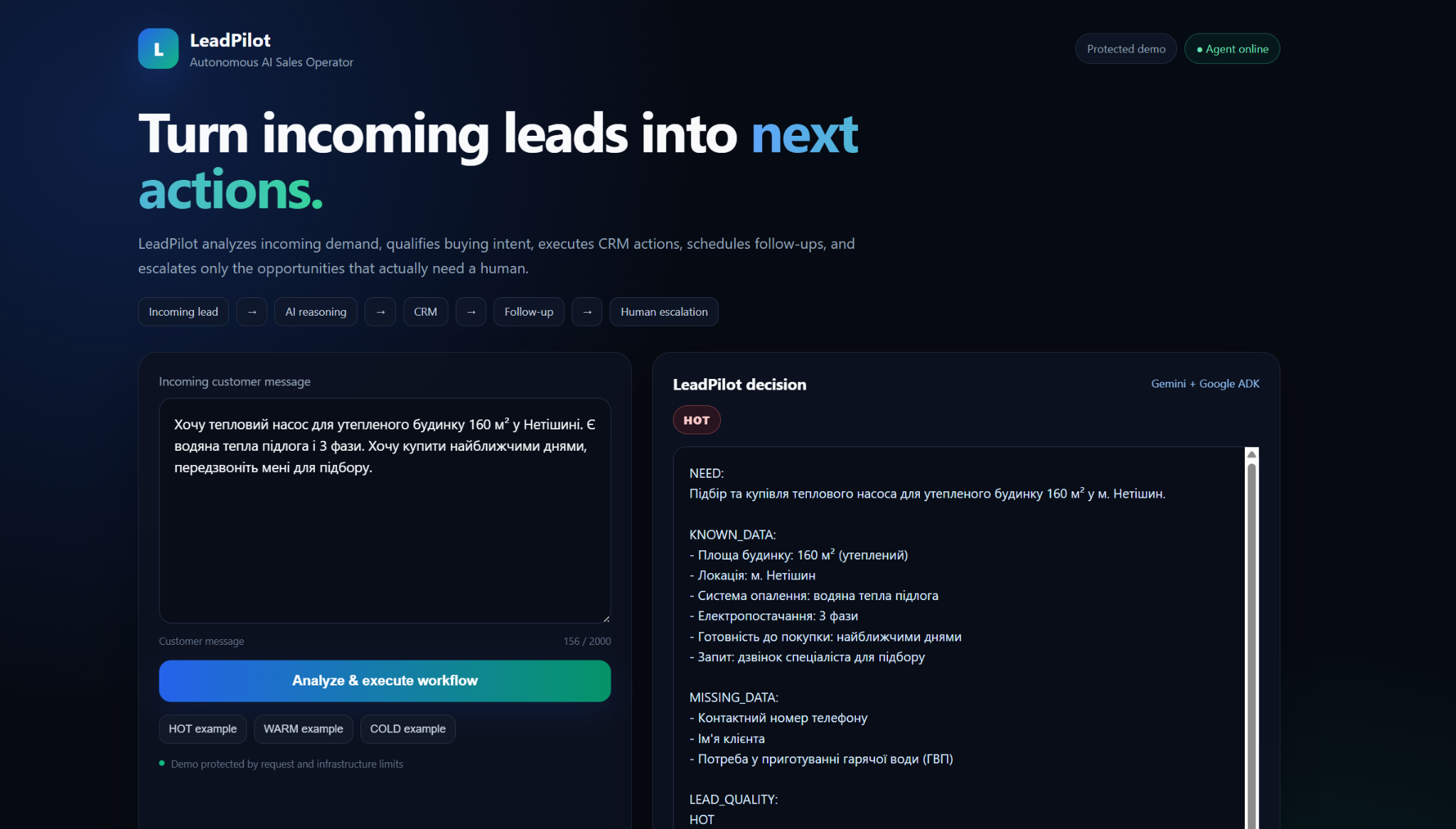
LeadPilot takes an incoming customer message and turns it into structured sales actions.
For every lead it identifies:
- what the customer needs;
- what information is already known;
- what important information is still missing;
- whether the lead is HOT, WARM, or COLD;
- what the next useful sales action should be.
It also generates a customer reply and an internal note for the manager.
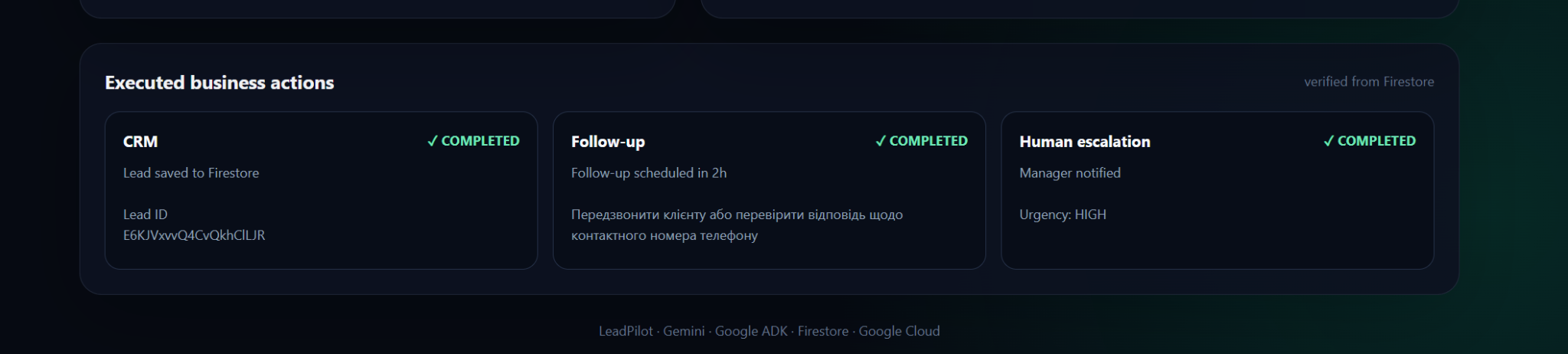
Then the agent executes the workflow.
The current routing is simple:
HOT:
- save the lead to CRM;
- create a near-term follow-up;
- notify the manager with high urgency.
WARM:
- save the lead;
- create a follow-up;
- avoid unnecessary urgent escalation.
COLD:
- save the lead;
- do not create an urgent follow-up;
- do not interrupt the manager.
The demo checks Firestore after every run, so the action cards on screen show actions that were actually created, not actions the model only claimed to perform.
How we built it
LeadPilot is a FastAPI application deployed on Google Cloud Run.
Google ADK provides the agent runtime and tool-calling layer. Gemini handles natural-language understanding, information extraction, lead qualification, next-action reasoning, and customer communication.
The agent currently works with three business tools:
save_lead_to_firestorecreate_followupnotify_manager
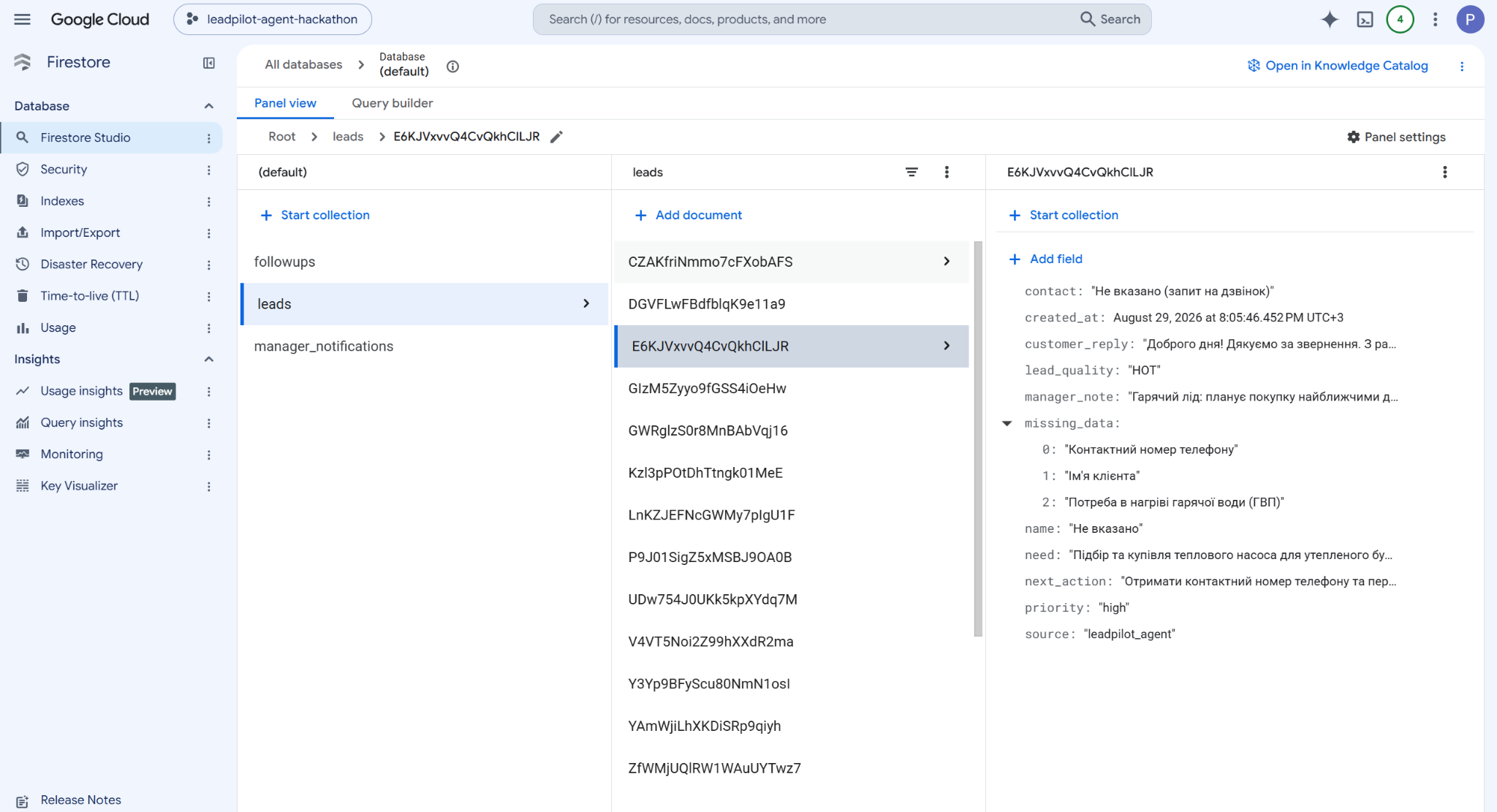
Firestore stores operational state in three collections:
leadsfollowupsmanager_notifications
One design decision became especially important while building the project: AI reasoning and business execution should not be the same thing.
Gemini understands the lead and decides what should happen, while deterministic Python guardrails control which actions are actually allowed.
For example, a COLD lead cannot create an urgent manager notification simply because the model requests one.
LeadPilot is also instructed not to invent technical information. If there is not enough data to determine equipment capacity, compatibility, pricing, savings, or installation requirements, it asks for missing information or routes the case for human or engineering review instead of guessing.
For deployment, the Gemini API credential is stored in Google Secret Manager. Cloud Run uses a dedicated service account, and the public demo has basic rate and resource limits.
Challenges we ran into
The biggest challenge was turning a good AI response into a real agent workflow.
An early version could analyze a lead, classify it, and generate a useful reply. But that was still very close to a chatbot.
The project changed when we added Firestore-backed tools. LeadPilot could now create a real CRM record, schedule a follow-up, and create a manager notification.
The next problem was proving those actions really happened.
Instead of trusting the text returned by the model, the web demo now checks Firestore after the workflow finishes and displays the records that were actually created, including the real Firestore lead ID.
Another challenge was controlling autonomy. Giving an LLM access to tools is easy. Making sure those tools can only perform sensible business actions is harder.
That is why LeadPilot combines Gemini reasoning with deterministic execution guardrails.
Accomplishments that we're proud of
The part I am most proud of is that LeadPilot does more than generate text.
A HOT lead submitted through the public Cloud Run application can result in:
- a real CRM record;
- a linked follow-up;
- a manager notification;
- a customer-facing reply;
- an internal manager note.
The same agent behaves differently for WARM and COLD leads because the execution rules prevent unnecessary actions.
The application is running publicly on Google Cloud rather than only on a development machine.
The UI also verifies the resulting Firestore state. This makes the difference visible between an agent saying "I created a follow-up" and a follow-up that actually exists.
What we learned
The biggest lesson from building LeadPilot was that the useful output of an AI agent does not have to be text.
What changed after the agent finished?
In this project:
- an unstructured message became structured CRM data;
- a follow-up could be scheduled;
- a high-priority opportunity could be escalated;
- a low-priority lead could be handled without interrupting a salesperson.
That shift from generating answers to changing business state shaped the whole project.
I also learned that important business constraints are much easier to trust when they live in deterministic tool logic instead of only inside a prompt.
What's next for LeadPilot Agent
The current version proves the core autonomous sales workflow.
The next step is connecting the same agent to real lead sources instead of only the demo input box:
- website forms;
- email;
- advertising leads;
- messaging platforms;
- calendar and appointment scheduling.
After that, LeadPilot can grow into a broader sales operations platform with persistent customer conversations, a manager dashboard, business-specific qualification rules, product and service knowledge, quotation workflows, automated follow-up sequences, conversion analytics, and multi-company accounts.
The goal stays the same: let AI handle repetitive sales operations and bring a human in when human judgment actually adds value.
Built With
- cloud-run
- docker
- fastapi
- firestone
- gemini
- google-adk
- google-cloud
- google-cloud-iam
- python
- secret-manager

Log in or sign up for Devpost to join the conversation.