-
-
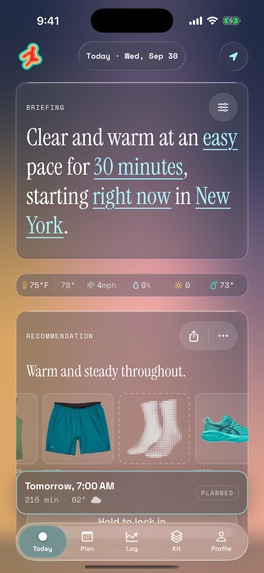
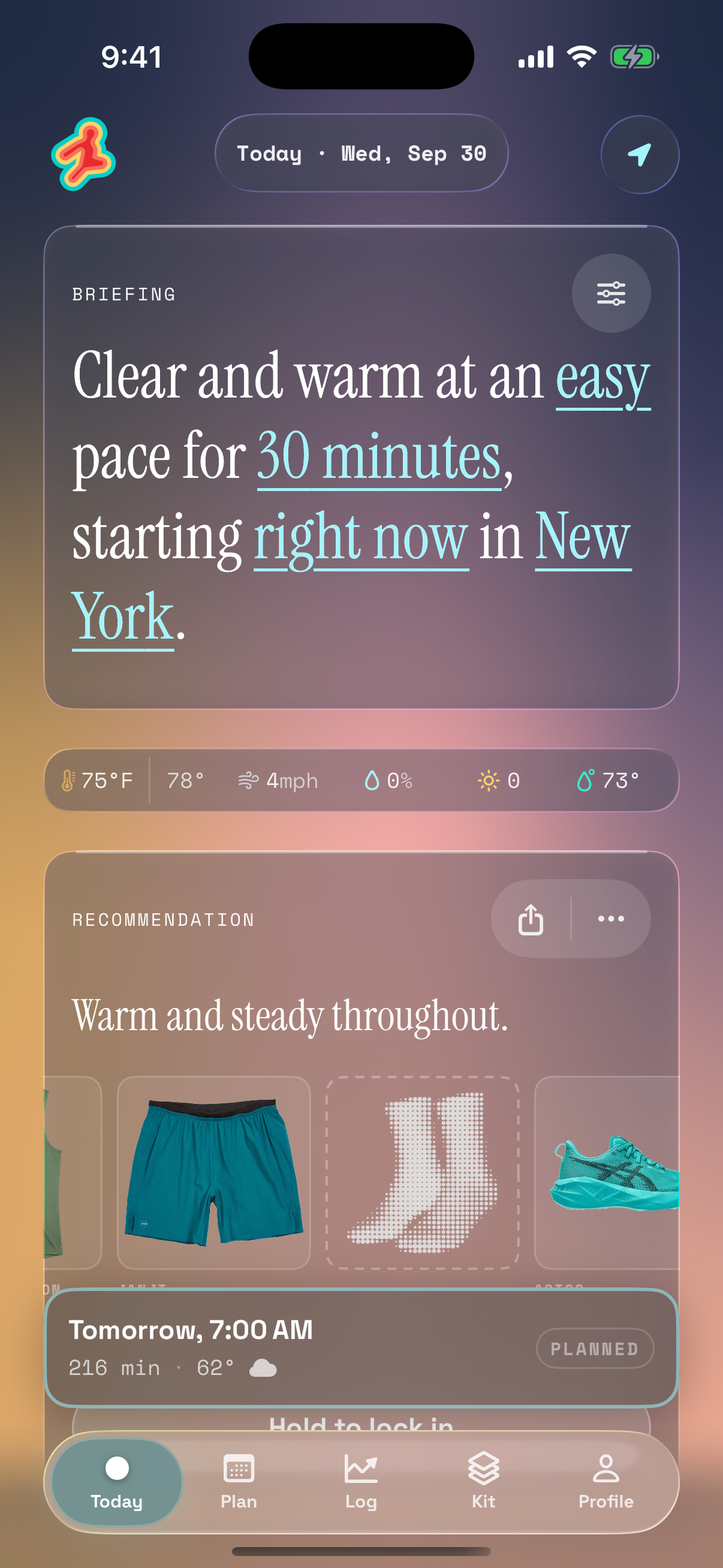
Today, full screen (1179×2556, no device frame).
-
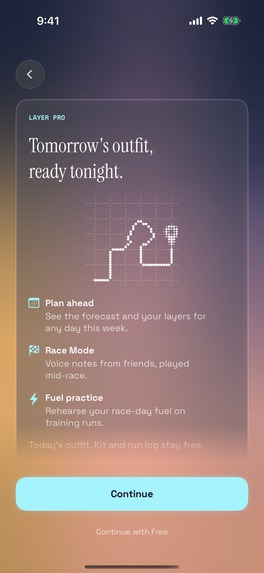
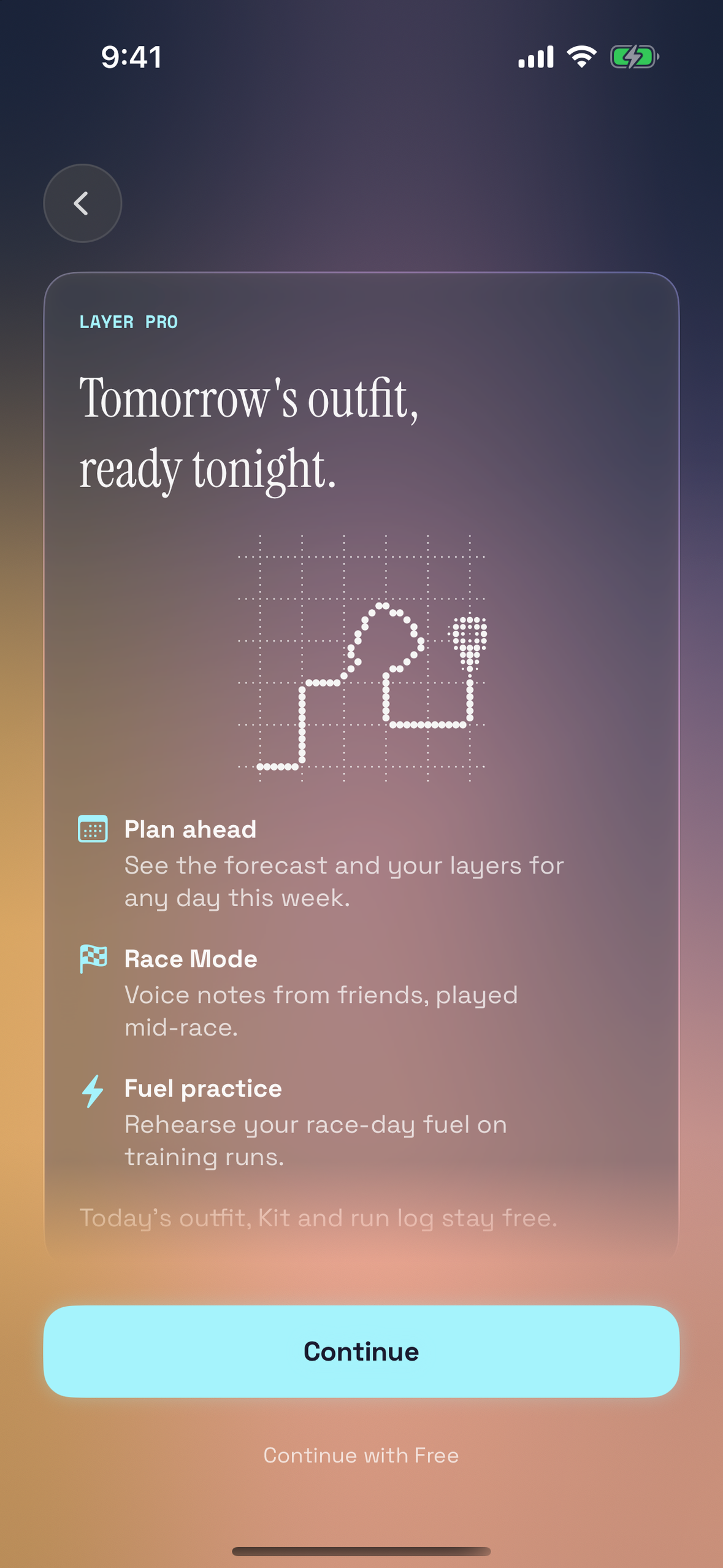
Layer Pro paywall, full screen (1179×2556, no device frame).
-

Layer’s app icon: the runner mark, drawn in layers.
-
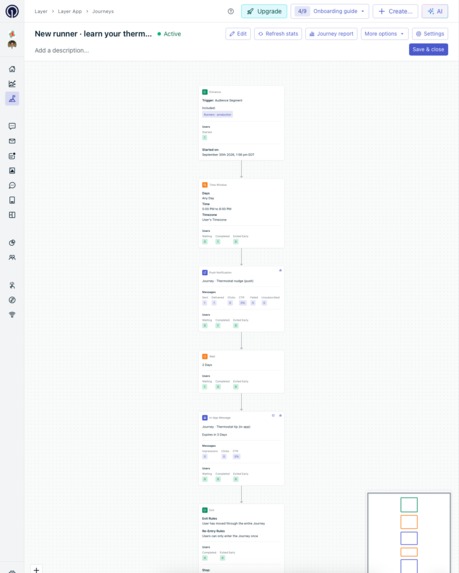
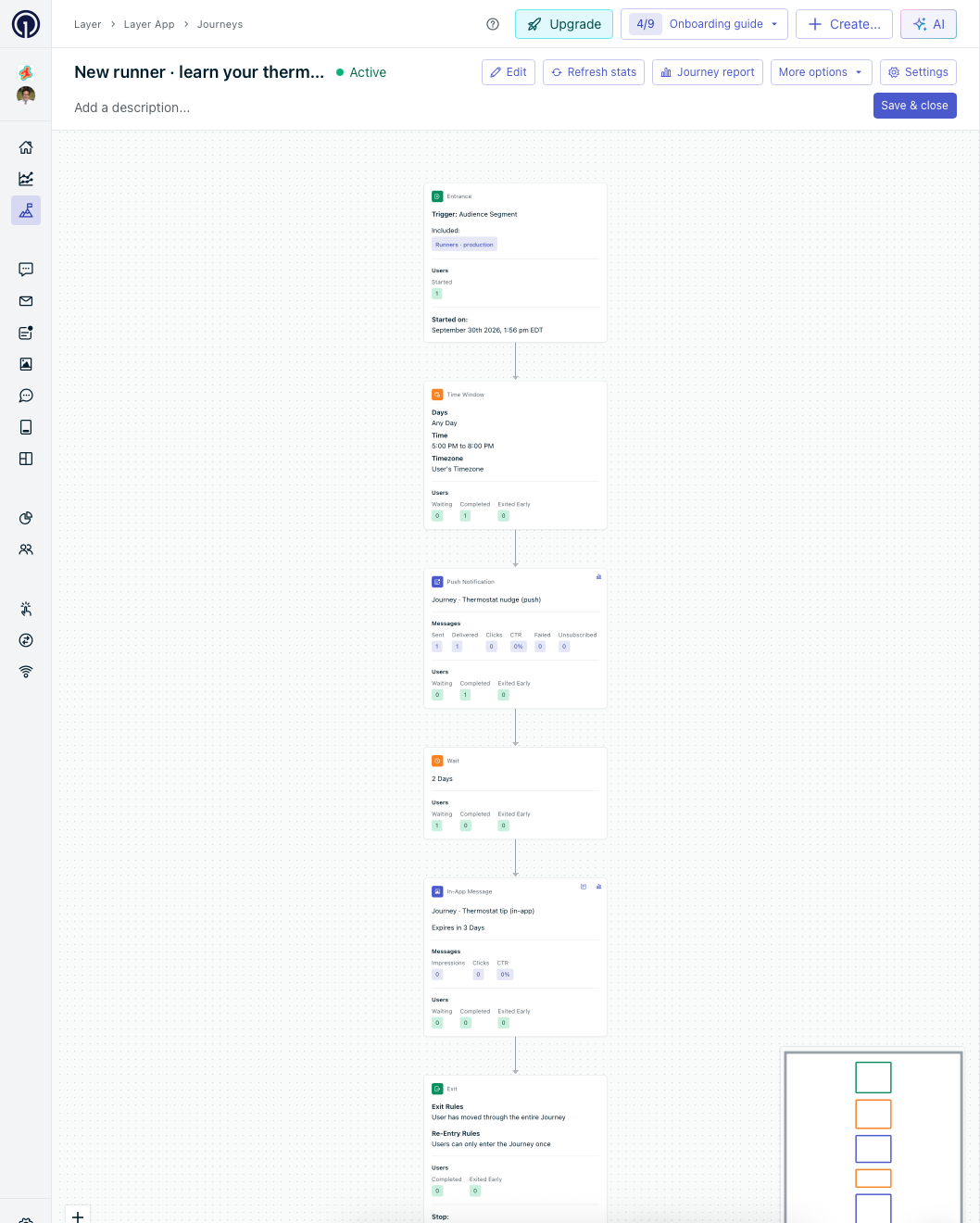
OneSignal Journey “learn your thermostat”: live since launch night, with per-step delivery stats.
-
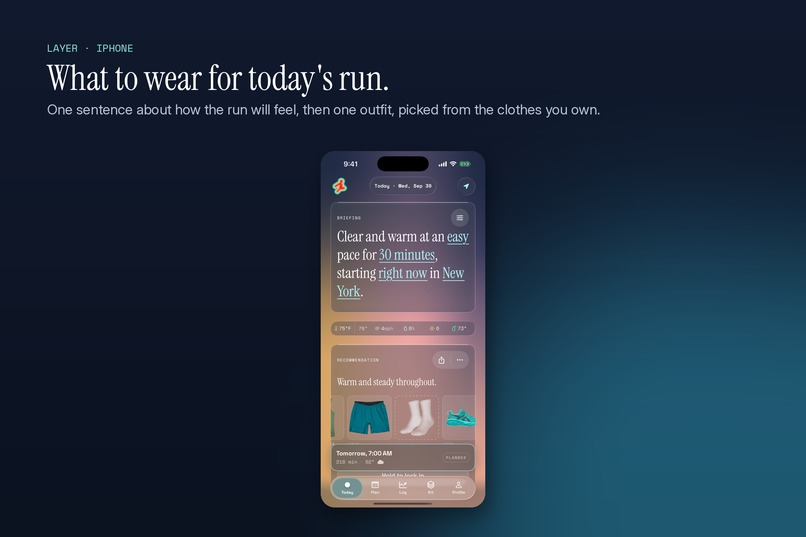
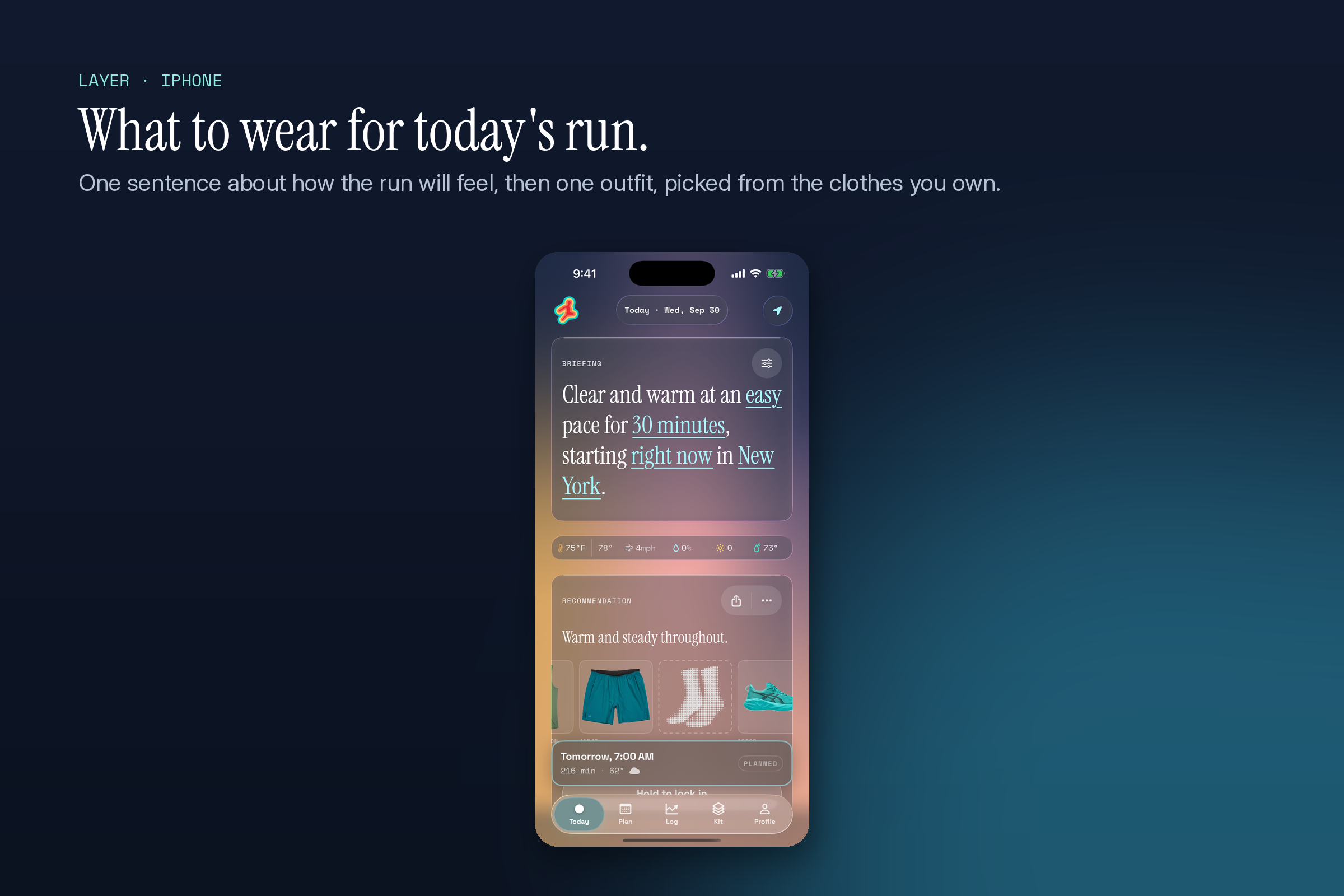
What to wear for today’s run: one sentence, then one outfit from the clothes you own.
-
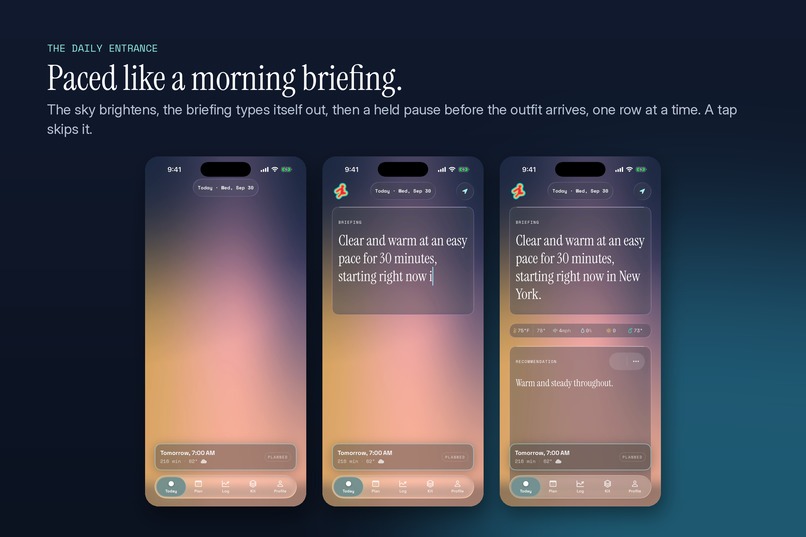
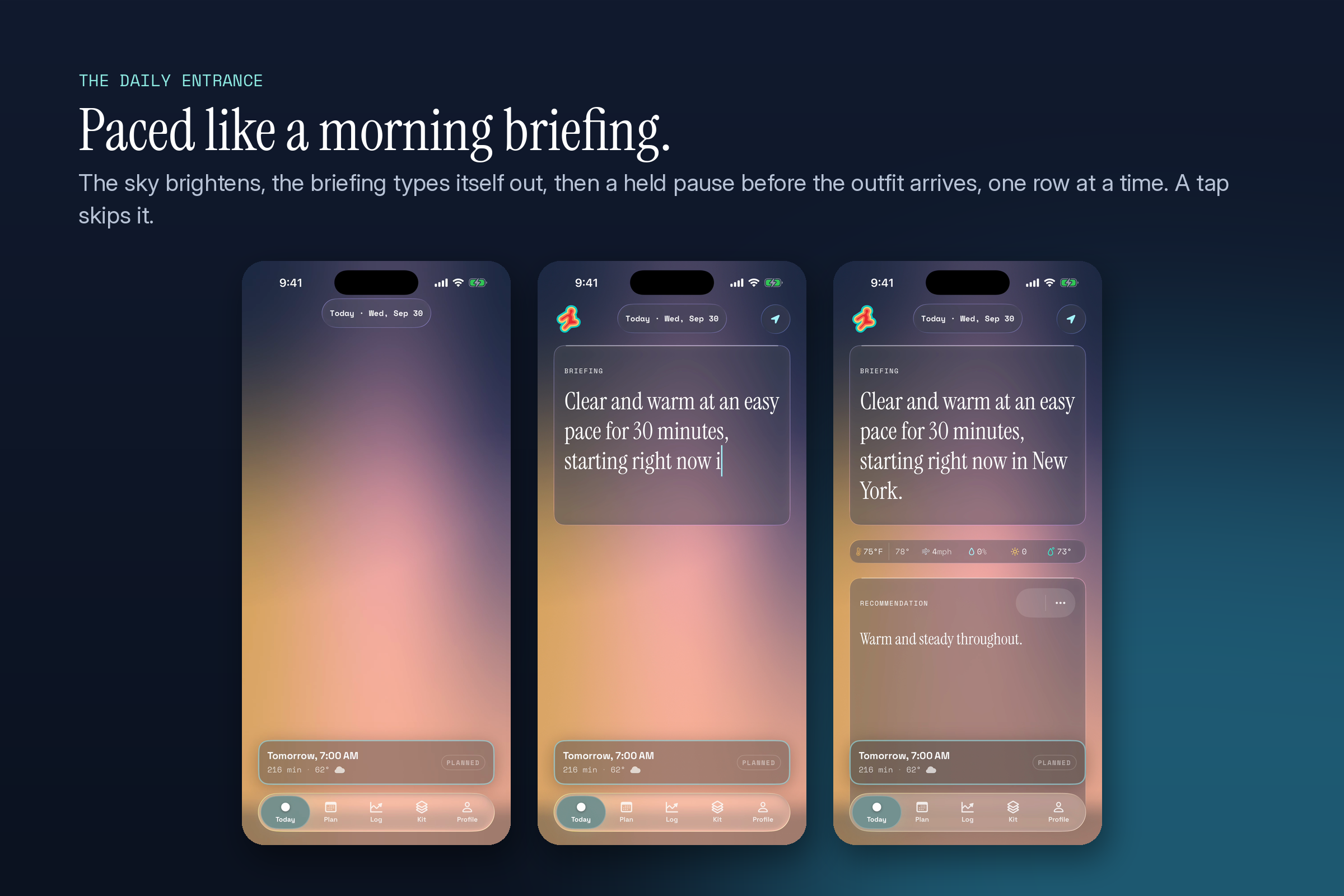
The daily entrance, paced like a morning briefing.
-
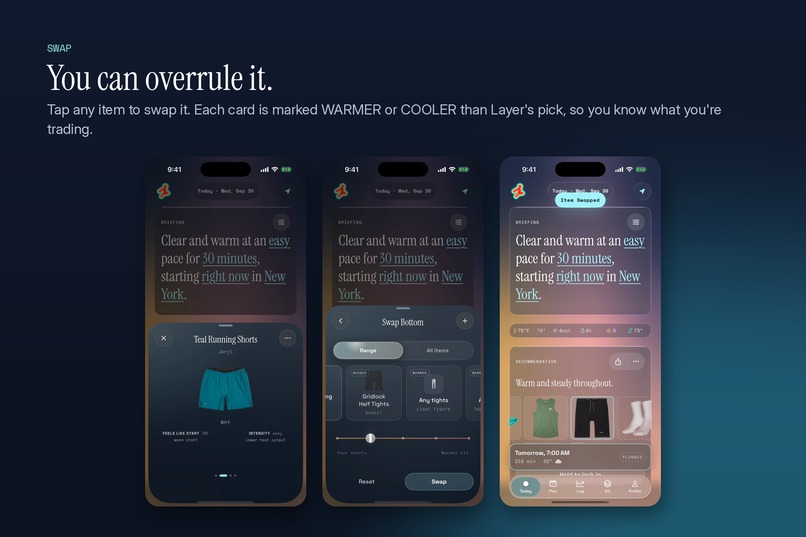
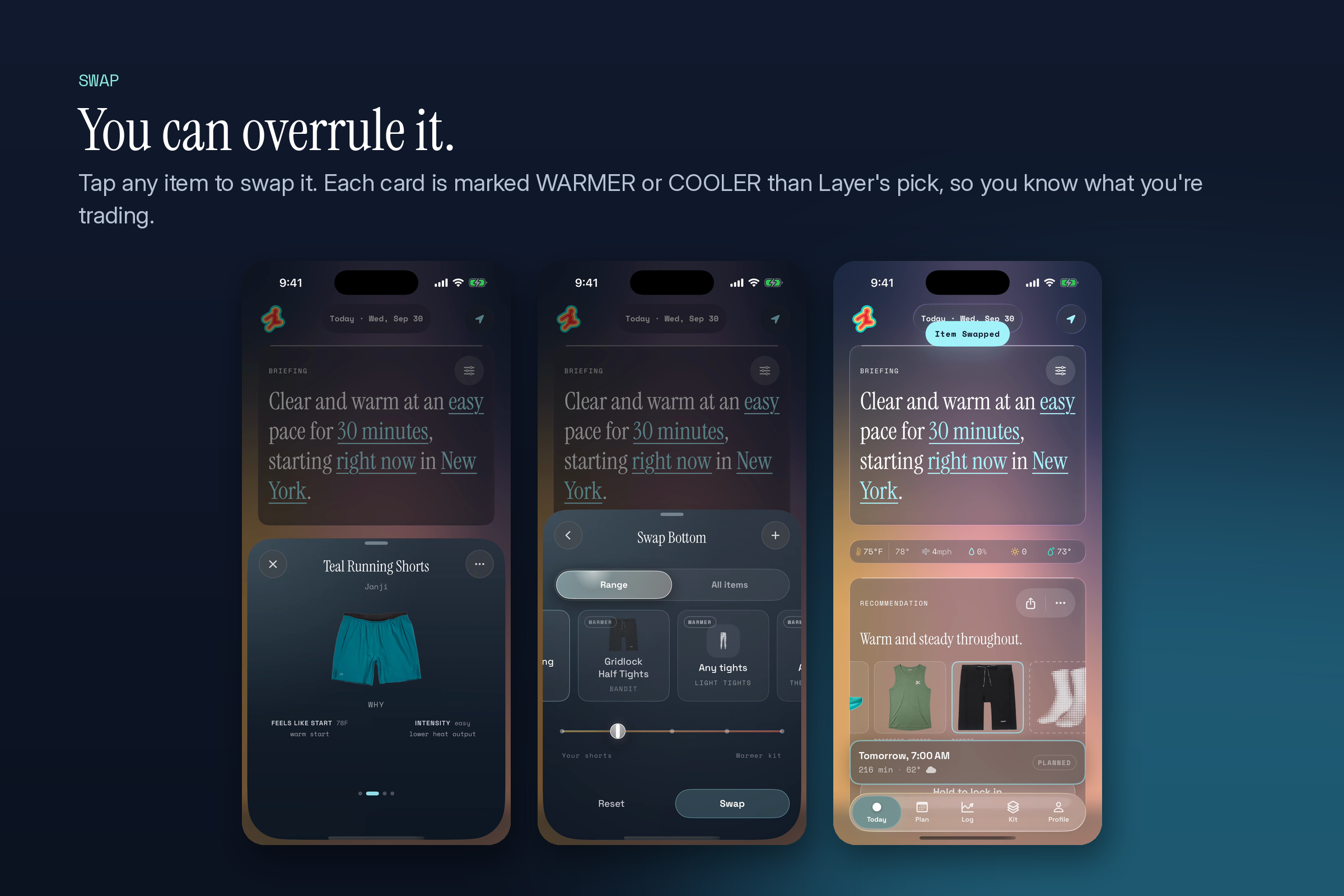
You can overrule it: every swap is marked warmer or cooler.
-
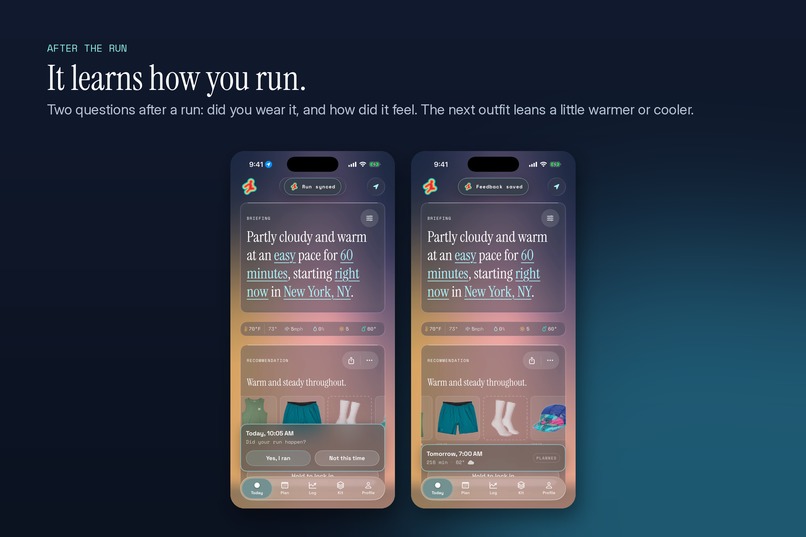
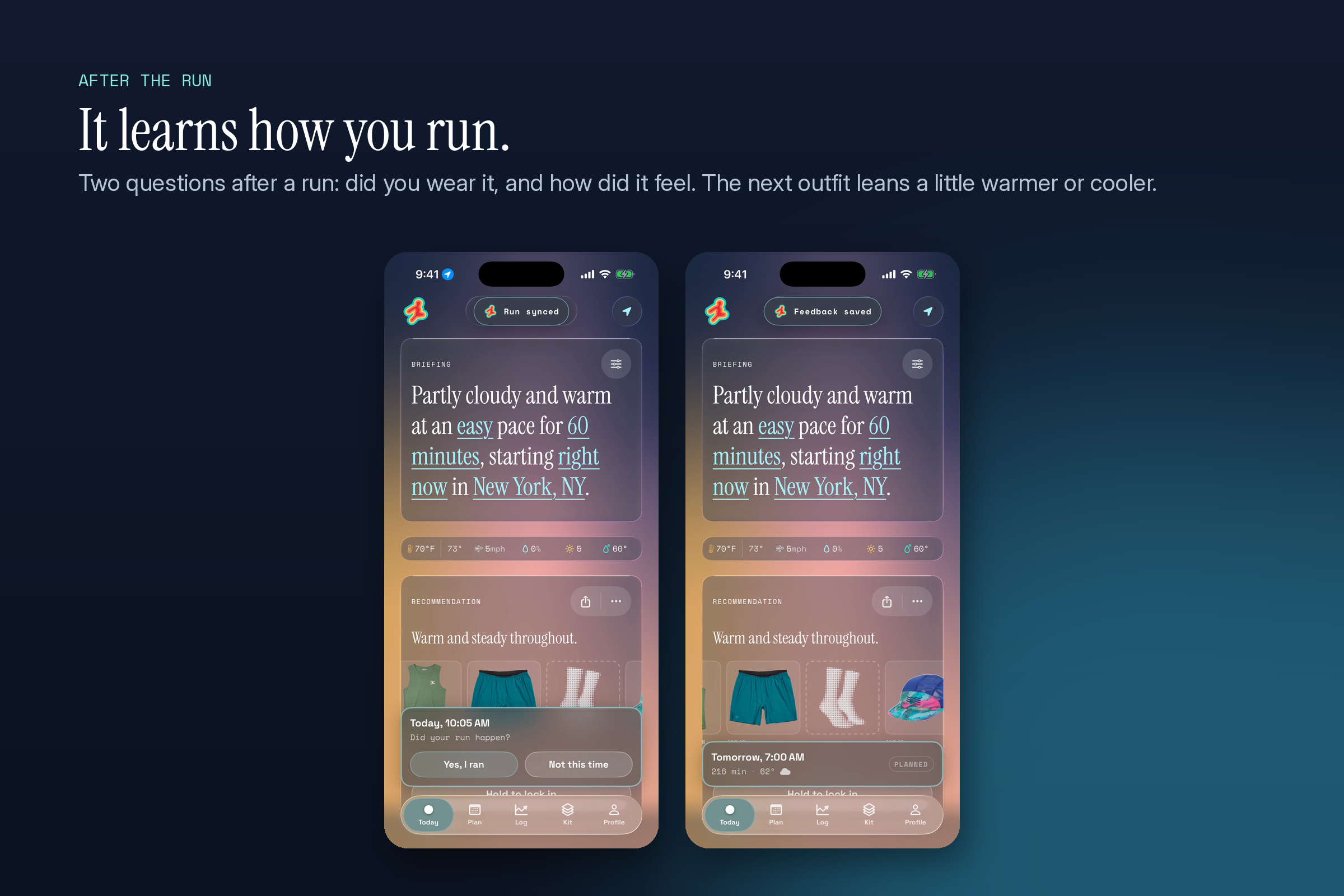
After the run, Layer learns how you run.
-
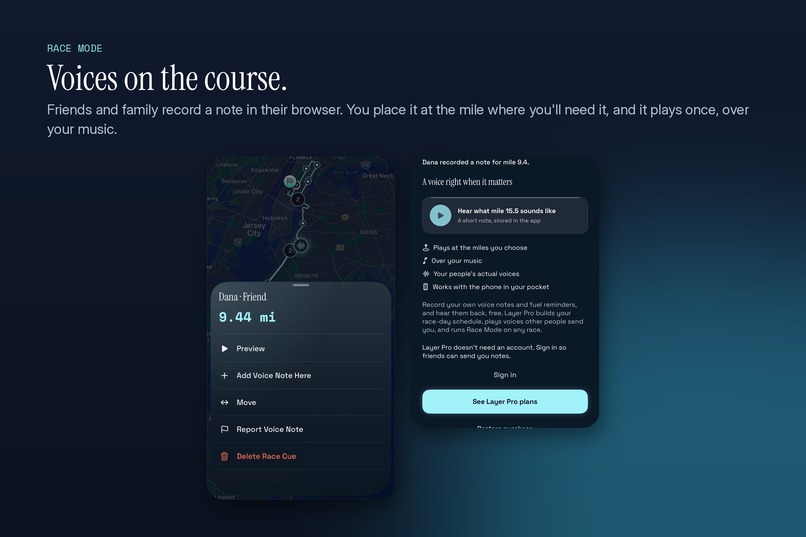
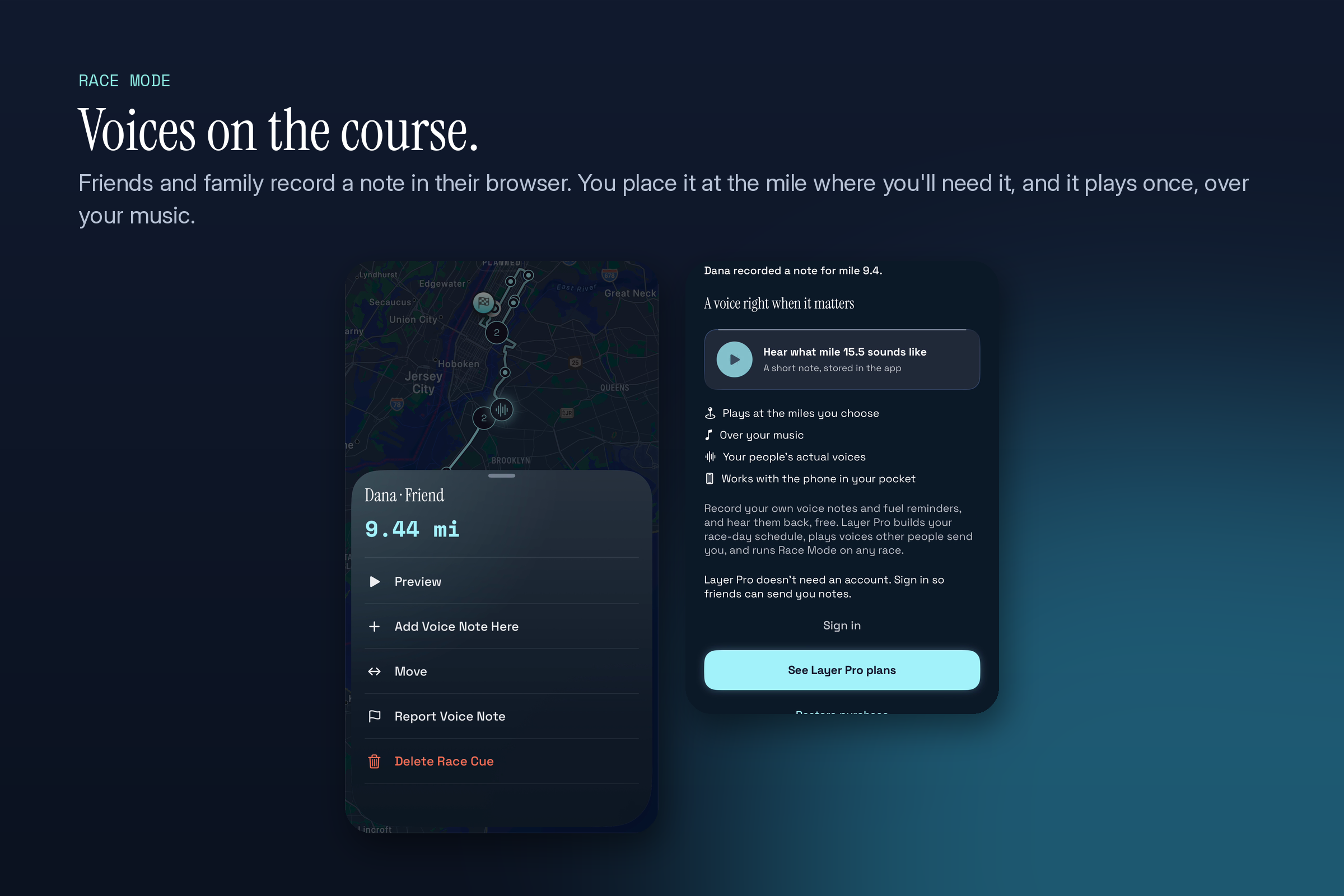
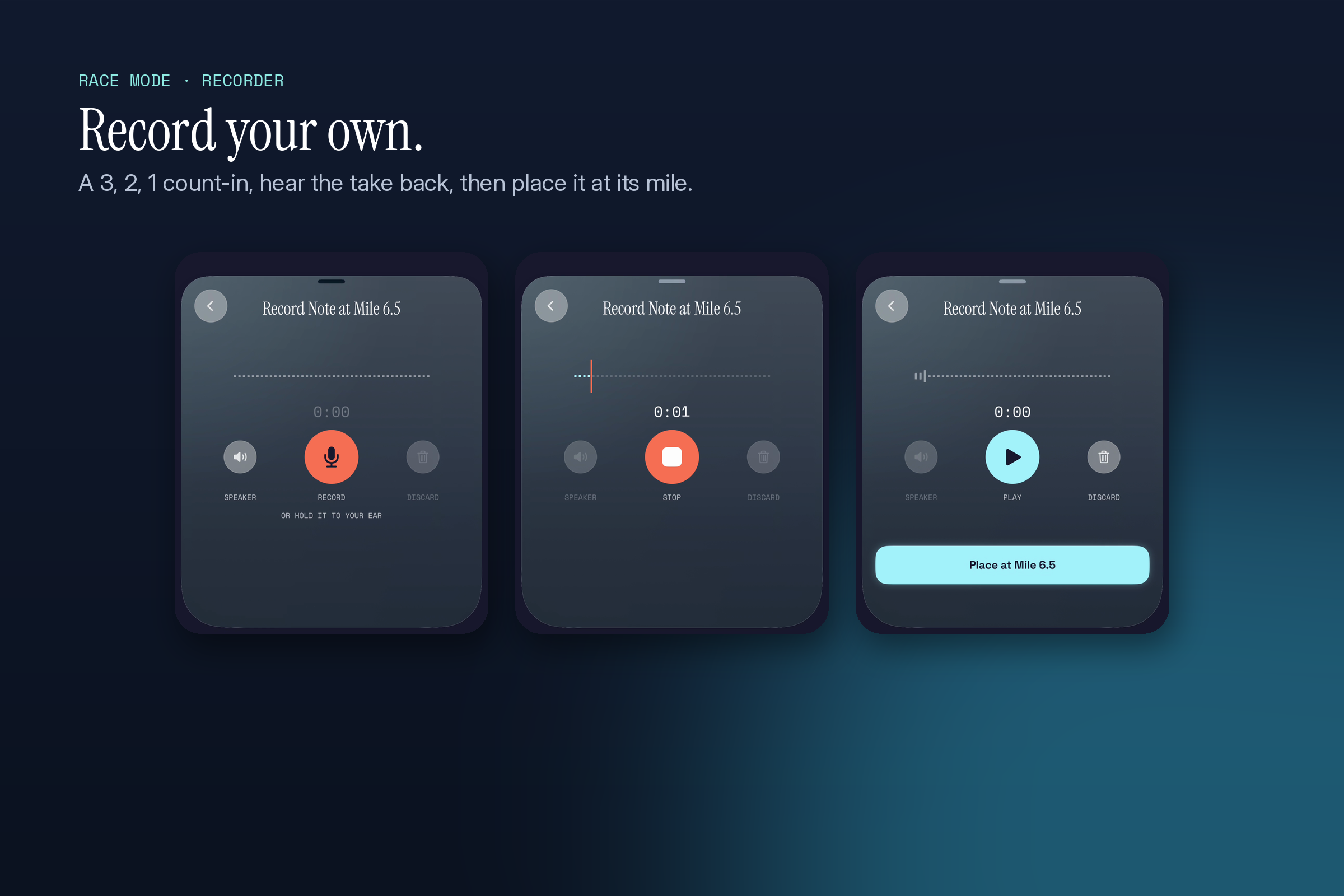
Race Mode: voices from friends and family at the mile you choose.
-
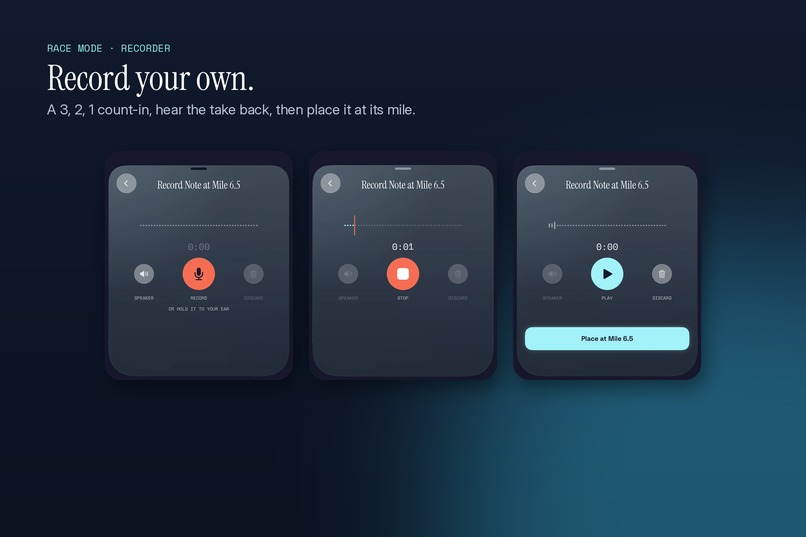
Race Mode recorder: count-in, hear the take, place it at its mile.
-
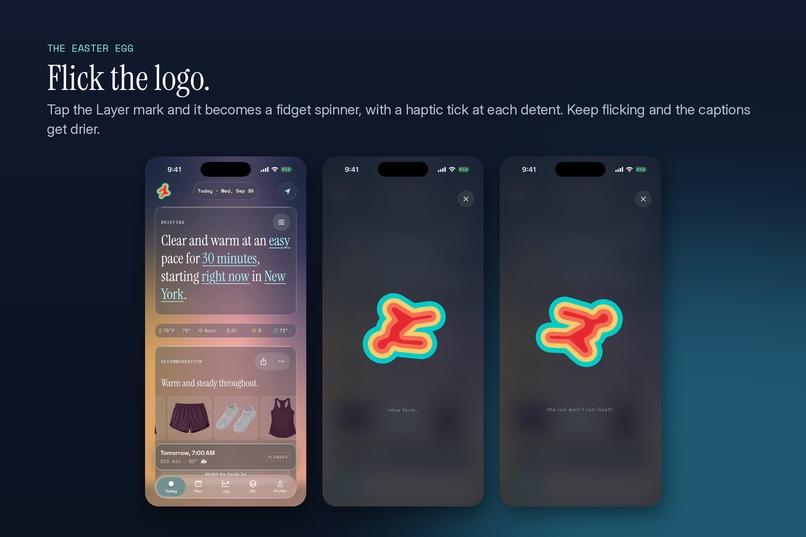
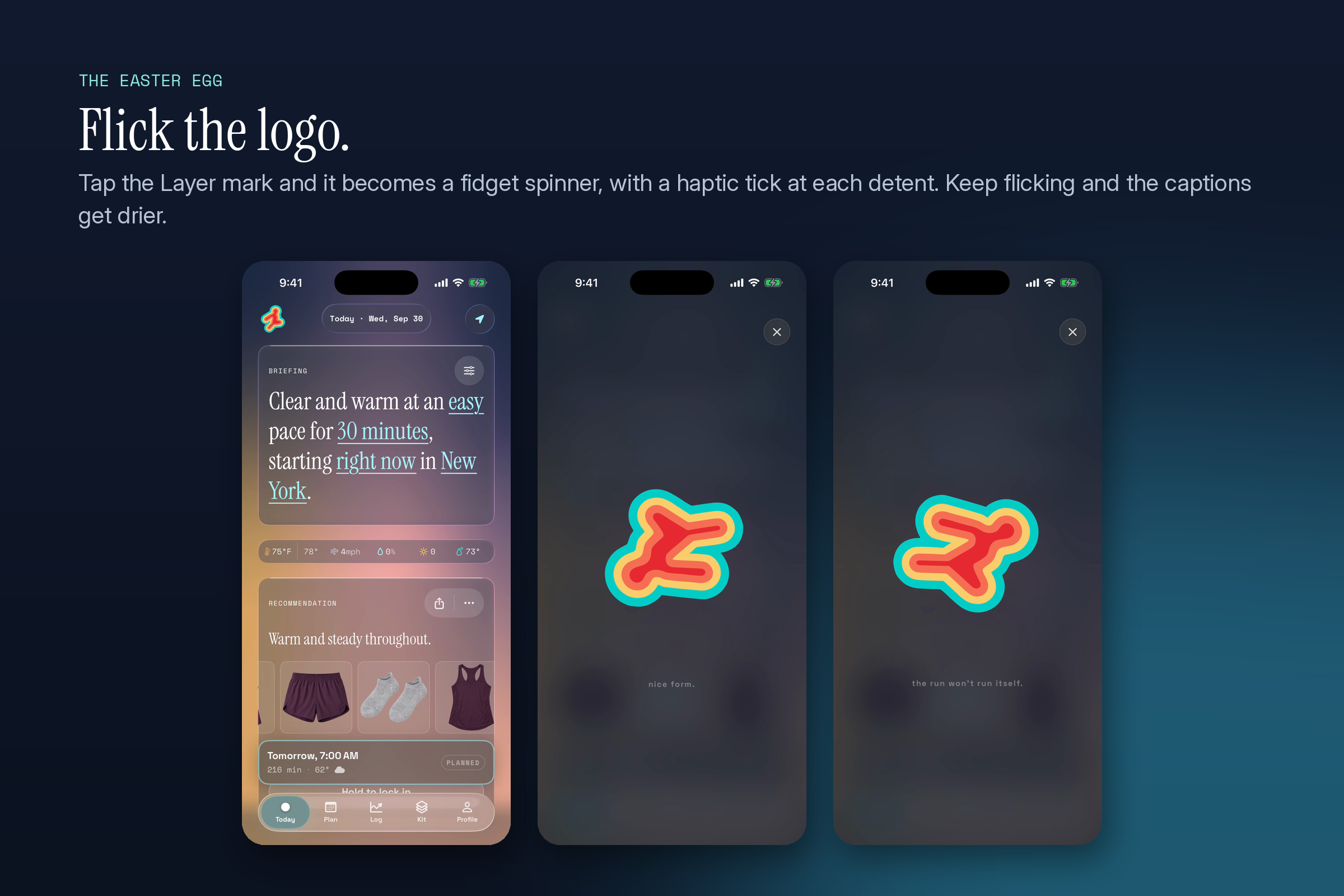
The easter egg: flick the logo.
-
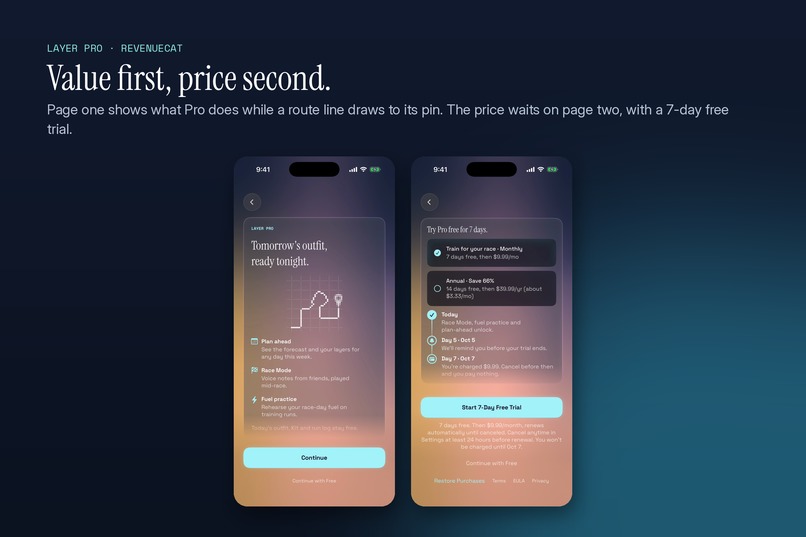
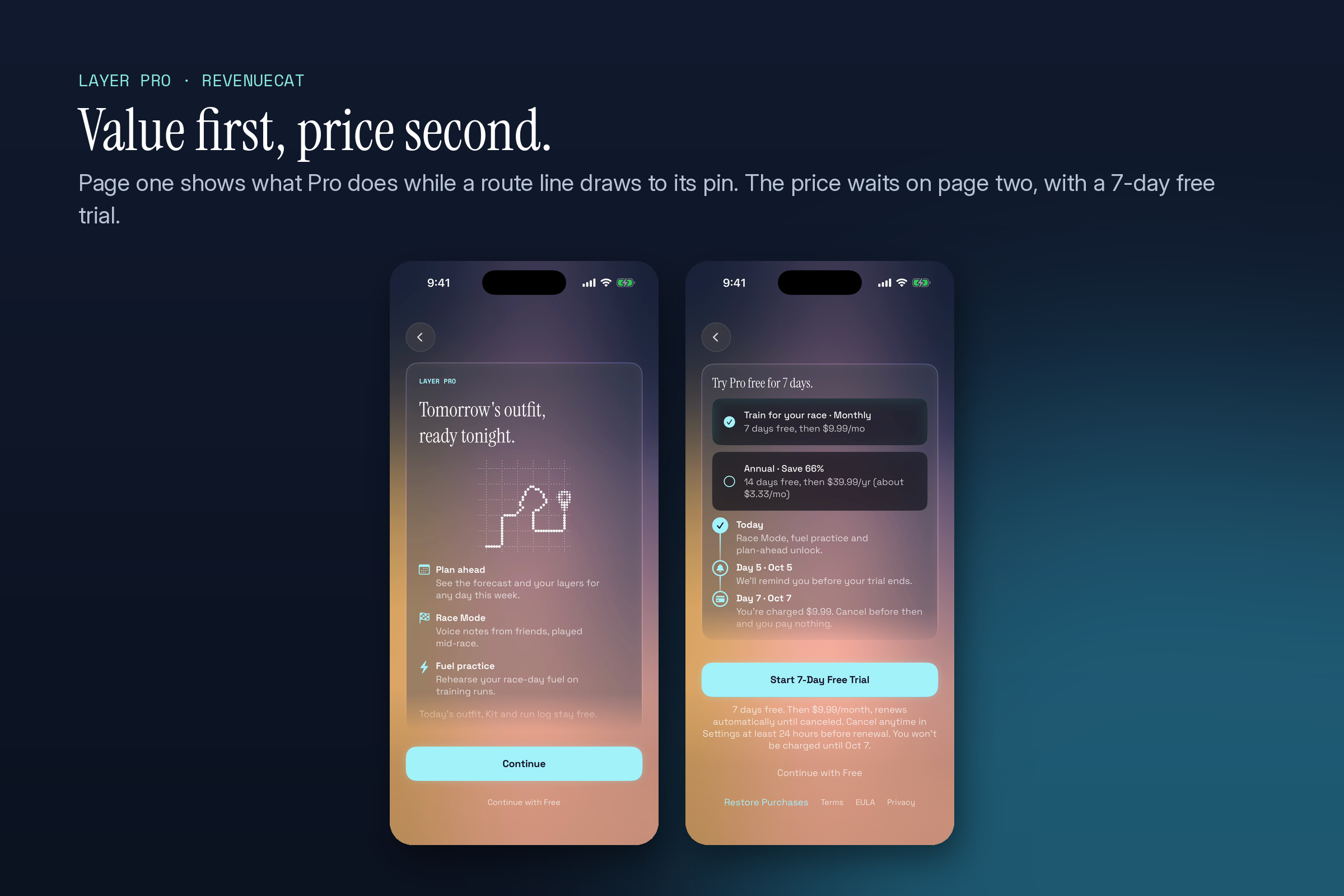
Layer Pro through RevenueCat: value first, price second.
-
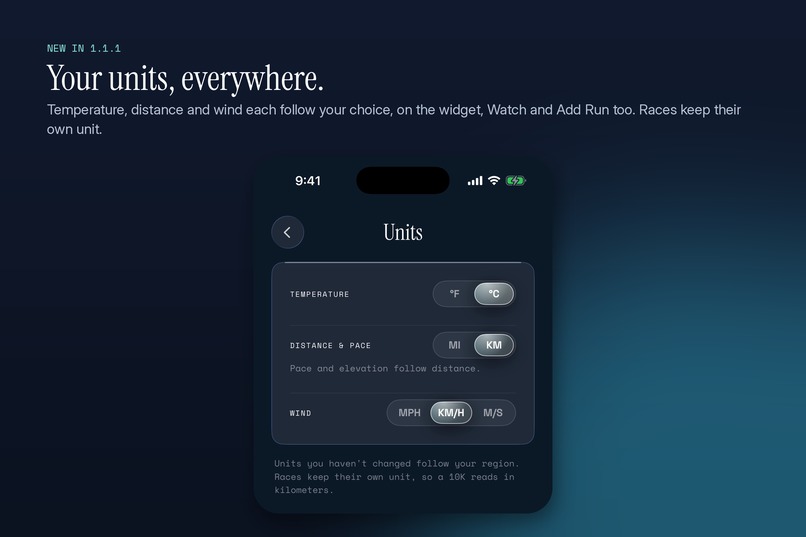
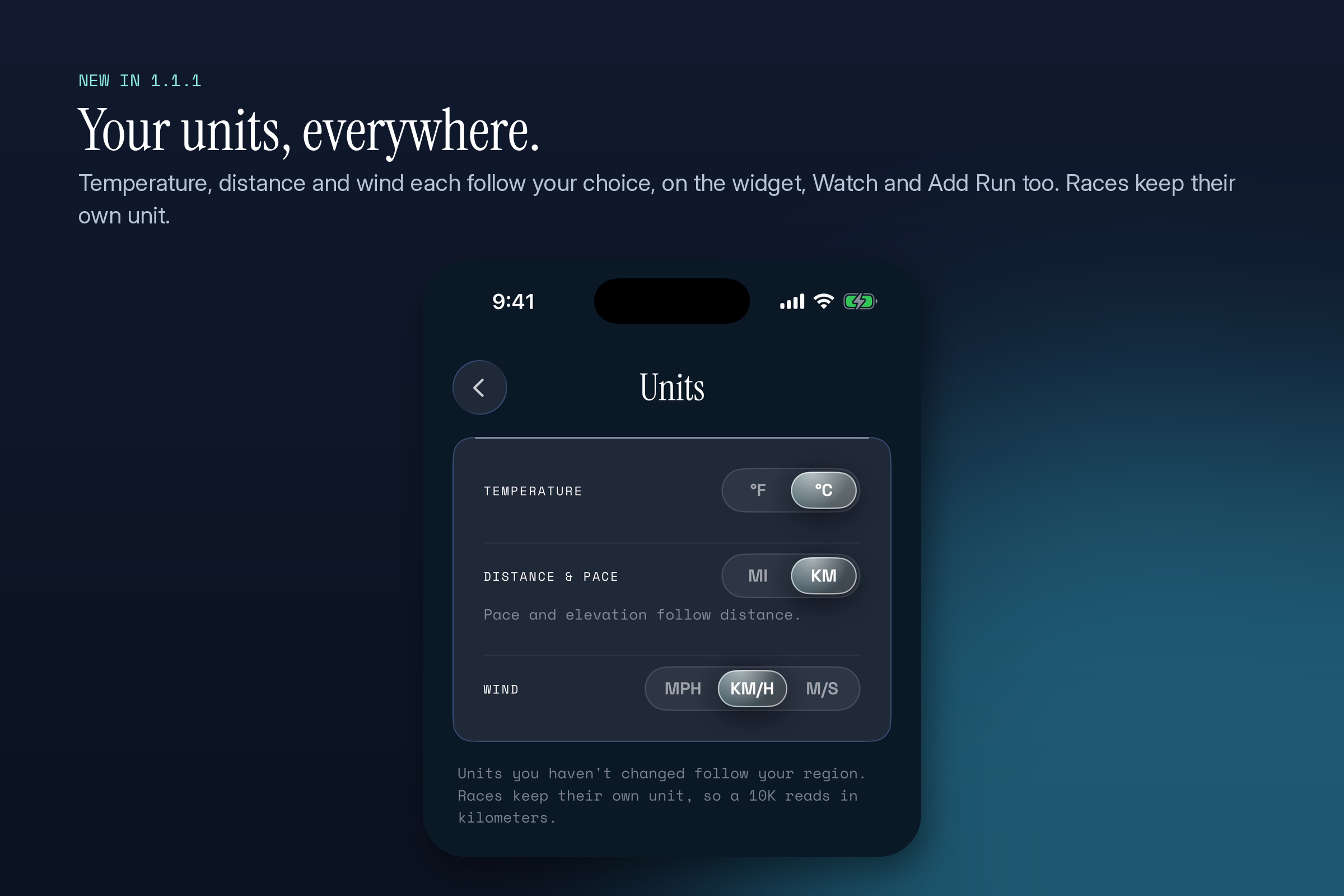
New in 1.1.1: your units, everywhere.

About me
I'm Aaron Wang, a product designer and a runner in New York City. I always wanted to make one product that was entirely mine, from the first sketch to the thing people download from the App Store. Layer is that product. I designed it, wrote the product specs, and built it working alongside AI coding agents: I made the product and design calls and reviewed every change, and the agents wrote a lot of the code. On November 1 I'm running the New York City Marathon for the first time, with Layer's Race Mode on.
Inspiration
Layer started in the middle of a deep New York winter. I'd stand at the door before a run and still not know what to wear. The forecast gave me a temperature, but the same number feels different in wind or in sun, and an easy hour dresses differently from a hard tempo. The tools I found gave generic advice from a temperature table. None of them picked from the clothes I actually owned, and none of them changed their answer after I told them I'd been cold.
So I built a proof of concept as a web app and used it on my own runs to tune a layering engine. Once I trusted it enough to stop second-guessing it, I built the iPhone app around it.
Who it's for, and what they need
While building, I took early versions to run clubs around New York and asked runners what they thought. Three needs shaped the product:
- A decision, not data. Nobody wanted another weather screen. They wanted to be told what to put on, fast, at the door.
- Their own clothes. Advice like "wear a light jacket" is useless if you don't own one. The answer has to come from what's in your drawer.
- Trust over time. If an app gets it wrong once, people stop opening it. It has to learn how you run and stay steady when the weather is close to a line.
Early on, the honest feedback was that Layer was most useful in cold or changing weather. So I built a separate hot-weather model with heat advisories and a dew point read, so it earns its place in summer too. Runners also told me they'd plan the night before, which became tomorrow's outfit, ready tonight.
The runner's day with Layer
The night before. Plan tomorrow's run: when, how long, how hard. Layer shows tomorrow's outfit tonight and the forecast and layers for any day that week (Plan ahead, in Layer Pro).
At the door. Open Layer and read one sentence about how the run will feel ("Warm and steady throughout"), then one outfit, top to bottom. Or don't open it: the Home and Lock Screen widgets show today's outfit, and you can ask Siri, "What should I wear for my run in Layer?" or "Ask Layer what to wear for an easy run." Siri answers out loud and shows a small outfit card. Easy, moderate and hard efforts all work by voice.
Heading out. Hold to lock in the run. Starting a few hours before the planned time, a Live Activity puts the outfit, the one-line forecast and the next change in conditions on the Lock Screen and in the Dynamic Island, so you can check it with gloves on, without unlocking. When you start running it switches to the in-run view, and if you've set up fuel reminders, the next one shows there too.
On race day. Race Mode plays voice notes from friends and family at the mile you chose, over your music, with a race Live Activity on the Lock Screen.
After the run. Layer asks two questions: did you wear what it suggested, and how did it feel, from too cold to too hot. If you swapped into something warmer and ran hot, that tells Layer about the swap, not about you, so your baseline doesn't move. When you did wear its pick, the next outfit leans a little warmer or cooler. Strava and Apple Health bring in runs you've already logged.
What it does
- Dresses the run, not just the weather. The engine reads temperature, feels-like at the start and end of your run, wind, rain, humidity, dew point, UV and cloud, plus how long, how hard and when you run. A two-hour long run is dressed for how conditions change across those two hours.
- Holds steady. Near a threshold, Layer remembers what it told you last time, so a one-degree change doesn't flip you from tights to shorts. When conditions will shift mid-run, it says so in one line. When they won't, it says nothing.
- Your closet. Photograph your running clothes and Layer cuts each one out on the device and sorts it. With an empty closet it falls back to general advice, so it's useful on day one.
- You can overrule it. Tap any item to swap it. Swap cards say WARMER or COOLER relative to Layer's pick.
- Best time to run. Layer ranks the day's hours and names the best window, with a plain reason.
- Units your way. New in 1.1.1: temperature, distance and wind each follow your choice, on the widget and in Add Run too.
How it learns you
Two runners in the same weather need different clothes. Layer handles that in two layers, kept apart on purpose.
1. A starting point you choose. During onboarding you say whether you run cold or warm, on a five-step scale. That shifts how Layer reads the temperature for you, by up to 6°F either way. You can change it any time, and learning never overwrites it.
2. A learned adjustment on top. After each run Layer asks two questions, in this order:
- "What did you run in?" Did you wear what Layer suggested, or swap something?
- "How did you run?" Too cold, a bit cold, just right, a bit warm, or too warm.
Then it decides whether that run is allowed to teach it anything:
- Only clean runs count. If you swapped items, your comfort was measuring your swap, not Layer's pick, so the run is thrown out. If the forecast didn't hold (the run was meant to be dry and it poured), that run is thrown out too. Learning from bad evidence would make the next outfit worse.
- Small steps, weighted toward the recent. "A bit cold" counts as a 1°F signal and "too cold" as 3°F. Each clean run moves the adjustment about a third of the way toward that signal, so recent runs matter most but no single run takes over. The adjustment never goes past 3°F either way, so it refines your starting point and never fights it.
- "Just right" leaves the dial where it is. It confirms the current setting. Treating it as zero would slowly undo what Layer has already learned.
- It earns its confidence. The adjustment fades in over your first three clean runs, so one odd morning can't swing your outfit.
You never see any of these numbers. The next outfit just leans a little warmer or cooler, which is what the runner actually feels.
Layer Pro and Race Mode
Everyday outfits, widgets, Siri, your closet, the run log and Strava are free, and always will be. Layer Pro, sold through RevenueCat, is for training toward something: Race Mode, fuel practice on training runs, and planning runs ahead. It's $9.99 a month with a 7-day free trial, or $39.99 a year with a 14-day trial. If Pro lapses, races and fuel plans you've already made keep working.
Race Mode came from one spot on one course. On the Queensboro Bridge at mile 15 of the New York marathon, spectators aren't allowed. It's quiet, it's uphill, and it's where a lot of runners fade. I wanted a voice there.
- Your course. Import a GPX file, pick a Strava route or one of your past runs, or start from the built-in New York course.
- Cues by the mile. Record your own voice for the mile you know will be hard. Send friends and family a private link: they record in their browser without installing anything, and you place their note where it will matter most. Fuel reminders repeat at the interval you choose, because by mile 18 almost nobody remembers to eat.
- On race day. Each note plays once when you reach its mile. Your music dips while it plays and comes back after, and your run tracking keeps going underneath.
I'm running New York on November 1 with Race Mode on, and there's a note from my mom waiting on the bridge.
How I built it
The iOS app is SwiftUI on iOS 26, with Liquid Glass. The recommendation engine is written once in TypeScript: the web app runs it directly, and the iPhone app runs the same bundled code inside JavaScriptCore, so the phone, the widgets, Siri and the Live Activity can never disagree about what you should wear. Siri uses App Intents with spoken and shown copy written separately. Weather comes from Open-Meteo and Apple WeatherKit. Accounts run on Supabase, and small backends (Strava token exchange, race audio uploads, feedback) are Cloudflare Workers. RevenueCat handles Layer Pro, and OneSignal handles remote messages from 1.1.1. CI runs on self-hosted runners, so every change is built and tested before it ships.
Challenges
- Trust near the line. Weather sits close to a threshold a lot. An engine that flips from tights to shorts over one degree loses a runner in a week. Layer remembers what it told you last time and holds that answer unless conditions really move, and it only mentions a mid-run change when the change matters. Getting that restraint right took more work than any single recommendation rule.
- Learning without learning the wrong thing. The first feedback question I shipped asked "Was this suggestion accurate?" It couldn't tell too warm from too cold, so it couldn't teach the model anything. The next problem was subtler: a runner who swapped into a warmer top and ran hot would have taught Layer to dress them lighter, which is backwards. That's why the wear-check comes first and only clean runs count.
- One engine, three places. The engine is TypeScript. The web app runs it directly and the iPhone app runs the same code inside JavaScriptCore. If the two ever disagreed, by a rounding difference or a date format, a runner would see one outfit on the web and another on their phone. Golden tests run the same set of conditions through both and fail the build if a single field differs.
- Race audio has one chance. A note has to fire at the right distance with the phone locked, GPS drifting and music playing, and it can play only once. Voice notes come from all kinds of phones and rooms, so they're loudness-matched before race day, and that's tested against real recordings from a built-in mic and a Bluetooth headset.
- Summer. Early versions were mostly useful when it was cold. Hot days needed their own model: dew point, humidity and sun drive comfort more than the thermometer does, and the right advice is sometimes about pace and water, not clothes.
- Live Activities have a clock. iOS ends a Live Activity after about eight hours, so a run locked in the night before shows a scheduled reminder first, and the Live Activity appears in the four hours before you head out.
How I tested it
- On my own runs first. The web prototype was my daily driver through a New York winter before the iPhone app existed.
- Automated tests. About 1,000 tests on the TypeScript engine and the web app, and about 3,900 on the iPhone app, cover hot and cold days, humidity, rain, wind, long runs where conditions change, the learning rule, and Race Mode. Continuous integration runs them on every change.
- Named weather scenarios. Seven fixed scenarios, from a cold windy tempo in Boston to a summer storm and a warm rain recovery run, can be loaded into the app on demand, so every screen can be checked against the same weather every time. The demo video uses one of them.
- Real devices and real runners. Builds went to TestFlight testers from the run clubs, and I tested push notifications on a production-signed build on my own phone before 1.1.1 shipped.
- A real-world check. I wrote a validation test for the claim the product rests on: that a stranger, on a run Layer didn't design for, gets a mid-run prediction that comes true. The New York marathon on November 1 is the biggest version of that test.
Testing Race Mode, and why I built a race simulator
Race Mode is the hardest thing in Layer to test, because the real test is a race. A note is meant to play once, at mile 15, on a phone that's locked in a pocket, with music on, while GPS drifts between tall buildings. I can't run a marathon every time I change a line of code, and a bug only shows up at the moment a runner needed the note most.
Real runs found real bugs. In one early build, a runner who left the course for a block, for example for a bathroom stop, could lose the race entirely: tracking stopped and no more notes played. Another bug came from courses that pass the same road twice. A note placed for the second pass could fire on the first, a whole lap early.
So I built a race simulator into the developer build. It takes a real race with real notes, recorded through the same path a friend's voice note takes, and replays a run along the route indoors through the app's real location pipeline. It can replay the hard cases on demand:
- a clean run from start to finish;
- the return leg of an out-and-back course, where the runner is back on a road they've already covered;
- a single bad GPS point that jumps the runner a few blocks away;
- leaving the course and rejoining it.
A test race page in the app plays the replay on screen, so I can watch each note's state change as the simulated runner passes its mile.
Each of those bugs was first pinned with a failing automated test, then fixed:
- Leaving the course is now an explicit state the race recovers from, not a dead end.
- A note now only plays inside a short window just behind and just ahead of its mile, on the pass it belongs to.
- A note the runner has clearly passed without it playing is marked as skipped instead of firing late.
The audio side has its own tests. Voice notes are loudness-matched against real recordings from an iPhone's built-in mic and a Bluetooth headset, so a quiet note recorded in a kitchen and a loud one recorded on a street both land at the same level over your music.
When you arm a race, Layer also checks the things that would silently break it and asks you to fix them while you still can: location access that keeps working with the phone locked, Live Activities being turned on, and a warning if audio is about to play out loud from the phone speaker instead of your headphones. While Race Mode is on, editing cues is locked, so a stray tap at mile 20 can't delete your mom's note.
What I learned
Running clubs and live demos were more honest than any survey. People look at the screen for about five seconds, the same time a runner gives Layer at the door. If they didn't get it in that time, it wasn't done.
What's next
- New York on November 1 is the real test of Race Mode.
- Personalization from your history. Feed imported Strava runs into the model, so Layer knows how you run before you've logged anything, and show what it has learned about you in plain words.
- Faster closet setup. Runners asked for an easier way to add their gear, down to scanning the tag. I want to hear more from them before I commit to a design.
- A night-before nudge with tomorrow's outfit, and shoe rotation for people who own more than one pair.
- Beyond running. I've started the research for cycling, where layering decisions are even harder because of wind chill at speed.

Log in or sign up for Devpost to join the conversation.