Note: LaunchMate is still in development. What you see works today, but a lot of it is a first version and I plan to keep improving it after the challenge.
Live app: https://launchmate-policy-studio.kmagpie.chatgpt.site/ (no login needed for the editor and the WebMCP tools) Source (MIT): https://github.com/geonho1101/LaunchMate Demo video: https://youtu.be/24xXAtOLPvg
Inspiration
I make small Android apps as a solo developer under the name K-magpie. A few times, one of my apps quietly stopped showing up in Google Play search and I only found out later. The cause was a word in the listing that goes against Google Play's policy, the kind of promotional or ranking wording that is easy to write without thinking. Nothing crashes and nothing warns you, you just lose visibility and notice when installs drop. By the time I fixed it I had lost days or weeks.
LaunchMate started as a way to catch that kind of mistake before I hit publish. I already had a small local tool that composed screenshots into store images, but it had no idea which claims were true, which text I had already decided on, or whether the listing was actually safe to ship. When I read about WebMCP, that was the missing piece: instead of an agent guessing from pixels, the page itself can tell the agent what is verified, what is locked, and what would break policy. So I built LaunchMate around that idea.
What it does
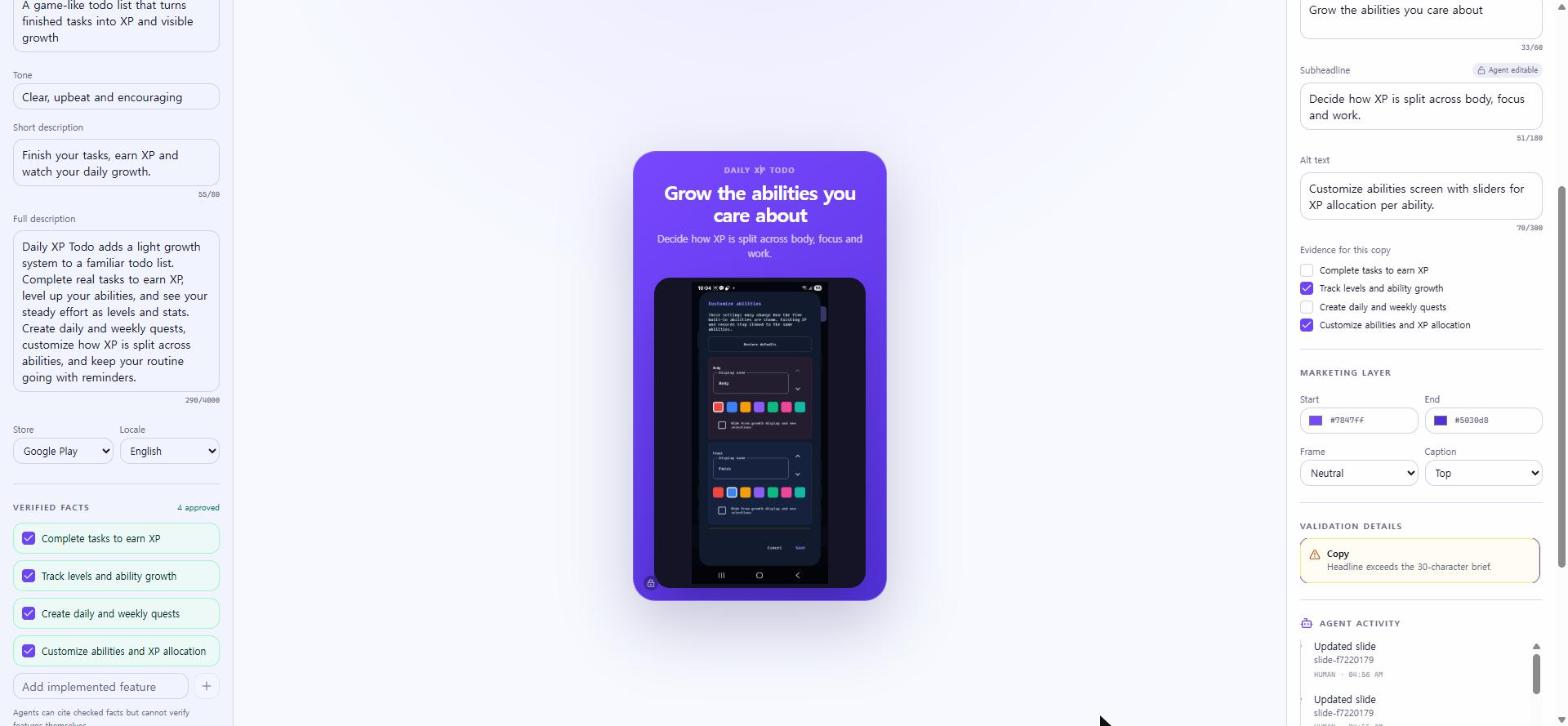
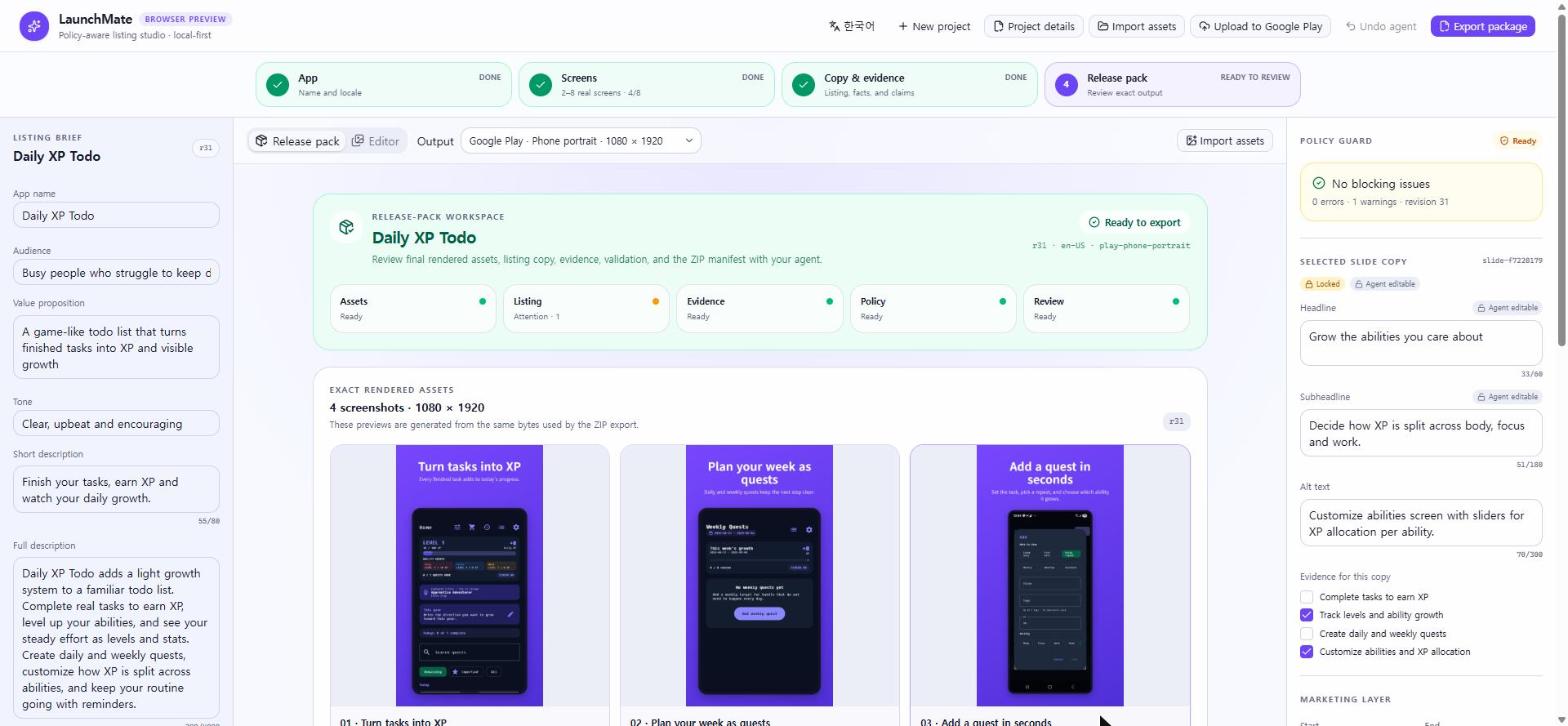
You name your app, add up to eight real screenshots (or pick frames that LaunchMate extracts locally from a screen recording), and then you and a WebMCP agent work on the same release pack in the browser.
The page registers 12 tools with document.modelContext.registerTool() (also listed at /.well-known/webmcp.json). With them the agent can:
read the verified app facts and the full listing state (revision, copy, locks, theme, validation results)
write or translate headlines and store copy, but only from facts I have marked as verified
reorder slides and change the brand theme (it can never touch the screenshot pixels)
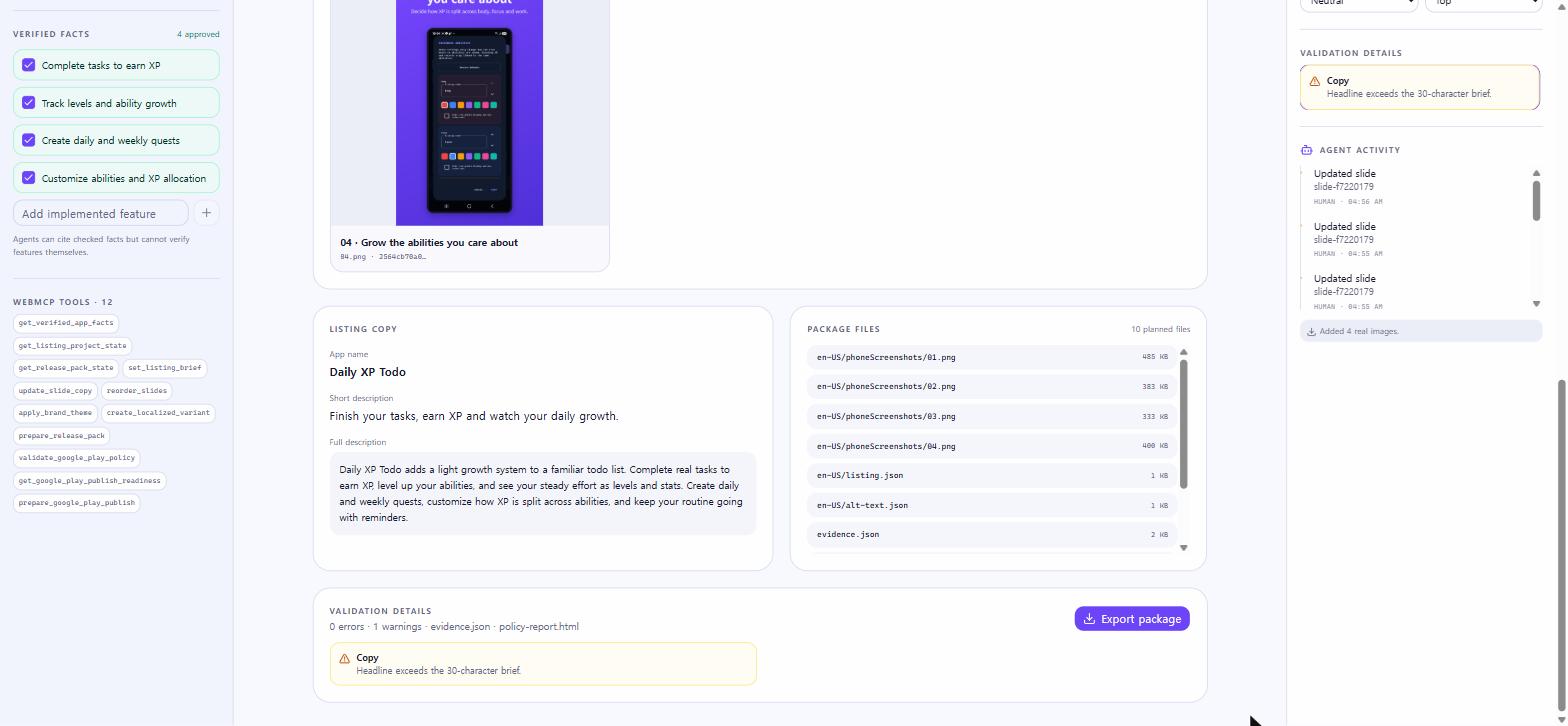
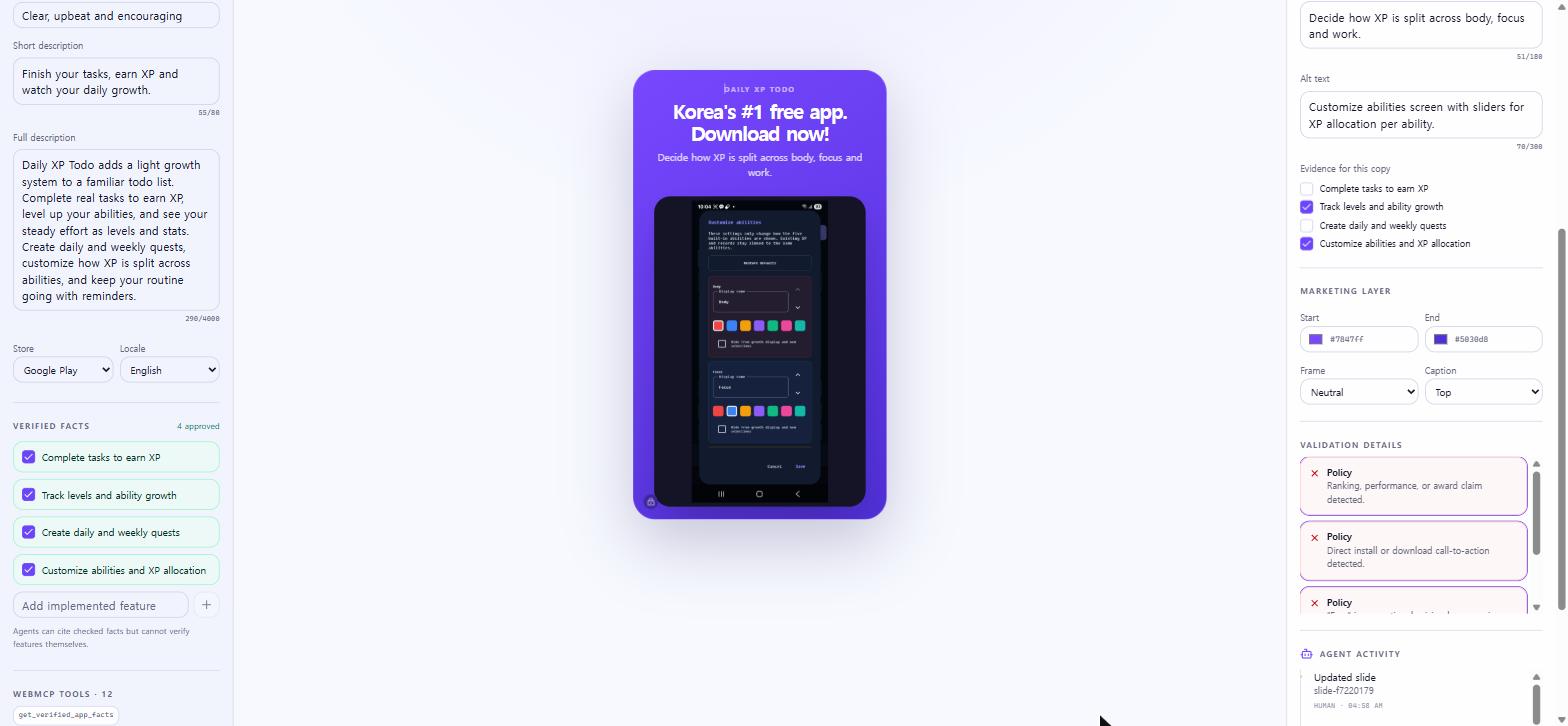
run the Google Play policy check and get back structured errors and warnings
open the release pack and the Google Play review dialog, which only a human can confirm
Every tool that changes something needs an expectedRevision. If the state moved on since the agent last read it, the call fails with REVISION_CONFLICT instead of overwriting my edit. Locked fields and positions stay locked, every agent change is logged, and I can undo the last agent change with one click. If the agent tries to write "Korea's best free app" or "Download now", the policy guard rejects it before it ever reaches the design.
The result is a reviewed release pack: the exact rendered screenshots, listing and alt text JSON, evidence mapping, a policy report and a SHA-256 manifest. You can export it as a ZIP, or, if you want, push it to Google Play through your own OAuth client after you confirm it yourself.
How I built it
One typed project state that both the human UI and the agent tools share
12 imperative WebMCP tools with strict input schemas and annotations
Everything image related stays in the browser: uploads are object URLs, MP4/WebM frame extraction runs client side with size and duration limits, and nothing leaves the browser until you choose to publish
Policy rules based on Google Play's official preview asset requirements, listing best practices and field limits
Optional Google Play publishing with a per-user OAuth client. Credentials and refresh tokens live only in encrypted HTTP-only cookies, approvals are one-time and bound to the exact payload, and a D1 lock prevents duplicate commits
Korean and English UI, bilingual docs, a unit test suite, lint and type checks, and no known dependency vulnerabilities at submission time
I used OpenAI Codex heavily for the implementation, tests and the security review, and I did the product decisions, the verification and the final checks myself.
Challenges I ran into
Making agent edits safe. Revision conflicts, per-field and per-position locks, and evidence IDs were all needed before I trusted an agent to touch the listing.
Keeping "human in the loop" honest for publishing. The agent can check readiness and open the review dialog, but the actual publish is tied to the exact copy and screenshot bytes I approved.
Input friction. Uploading screenshots one by one was annoying, so I added batch import and local recording frame extraction.
Security work right before going public: CSRF on the publish route, a path where unverified copy could slip through, dependency vulnerabilities and missing security headers.
What I'm proud of
WebMCP is doing real work here, not decoration. Policy validation, evidence-backed copy, lock preservation, localization and publish readiness all go through the tools.
A judge can open the live app without logging in and run the whole flow.
Publishing stops at a human confirmation step on purpose.
What I learned
Good WebMCP tools are not about how many tools you register. They are about exposing the things visual automation cannot see (is this claim verified, is this field locked, did the state change) and returning a clear refusal instead of quietly doing the wrong thing.
What's next
Title and metadata checks (special characters, emoji and all caps in the app name), importing existing listings and images from Google Play, a local device/ADB capture helper for brand new apps, stricter evidence rules for the short and full descriptions, and browser-level WebMCP evals for tool selection and multi-step calls.
한국어 소개
LaunchMate는 아직 개발 중인 프로젝트입니다.
저는 K-magpie라는 이름으로 혼자 작은 안드로이드 앱을 만들고 있습니다. 가끔 설명에 정책에 어긋나는 단어를 써서 구글 플레이 검색에 앱이 노출되지 않는 일이 있었습니다. 경고도 없이 조용히 안 보이게 되니 뒤늦게 알아채고 대응이 늦어져서 시간 손해를 본 적이 있어요. 그런 실수를 게시 전에 미리 잡는 도구를 만들고 싶었고, WebMCP를 이용해 사람과 에이전트가 같은 화면에서 등록정보를 함께 만들고 검사하는 LaunchMate를 만들었습니다. 실제 앱 스크린샷이나 화면 녹화에서 뽑은 프레임을 넣으면, 에이전트가 제가 검증한 기능만 근거로 한국어와 영어 문구를 쓰고, 과장 문구나 정책 위반 표현은 정책 검사에서 막히고, 제가 잠근 슬라이드와 리비전 충돌은 보호됩니다. 최종 게시는 항상 사람이 직접 확인합니다.
Built With
- canvas
- chatgpt-sites
- cloudflare-d1
- cloudflare-workers
- google-play-developer-api
- next.js
- oauth2
- react
- typescript
- vite
- webmcp

Log in or sign up for Devpost to join the conversation.