-
-
stuff
Launchly: A Static-Site Deployment Platform
Inspiration
I was inspired to build Launchly by the desire for a truly simple, self-contained way to deploy static websites. Traditional platforms often involve complex build pipelines, framework selection, and multi-stage container images. I wanted something that could:
- Accept a public Git repository with no assumptions about framework, build toolchain, or language.
- Validate the actual content (require
index.htmlat the root) rather than relying on heuristic detection. - Run a lean, secure deployment pipeline using only unprivileged Nginx and Podman.
- Provide immediate feedback through a clean REST API and a responsive web UI.
The core insight was that many deployment systems overcomplicate things. Most assume a monorepo of build artifacts, Dockerfiles, and CI/CD configurations. Instead, Launchly treats each deployment as a direct, read-only mount of a cloned repository into an unprivileged Nginx container.
Architecture Overview
Launchly consists of two tightly coupled components:
Control-Plane (Control-Driven Deployment)
The control-plane is written in Rust (Axum web framework) and performs the entire lifecycle:
- Discovery: Validates the repository URL (must be an HTTP(S) URL containing
index.html). - Cloning: Performs a shallow clone into a temporary workspace.
- Planning: Detects the plan (
Vanilla HTML,Port 8080, etc.) based on the presence ofindex.html. - Building: Spawns a Podman container from
docker.io/nginxinc/nginx-unprivileged:alpinewith the cloned site mounted read-only. - Starting: Runs the container detached, publishing port 8080.
- Verification: Waits for HTTP 200 on the exposed endpoint before marking the deployment as
live.
All operations use argument vectors — no shell interpolation anywhere. Git and Podman commands are invoked via tokio::command() with explicit argument lists.
Front-End (User Interface)
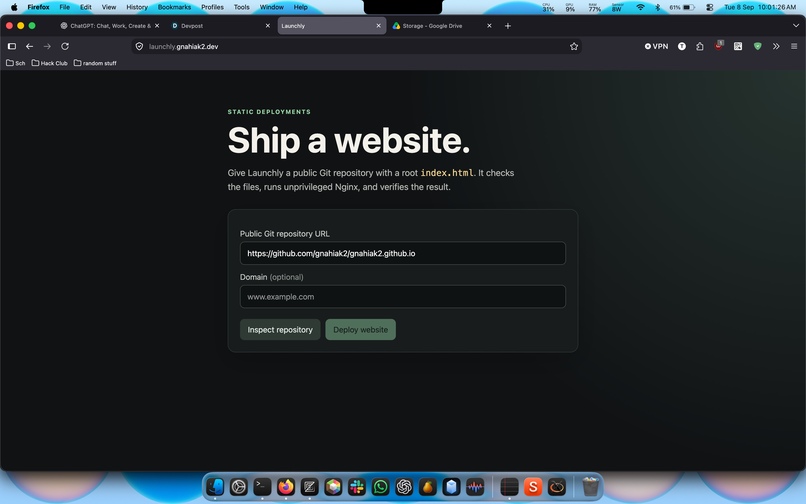
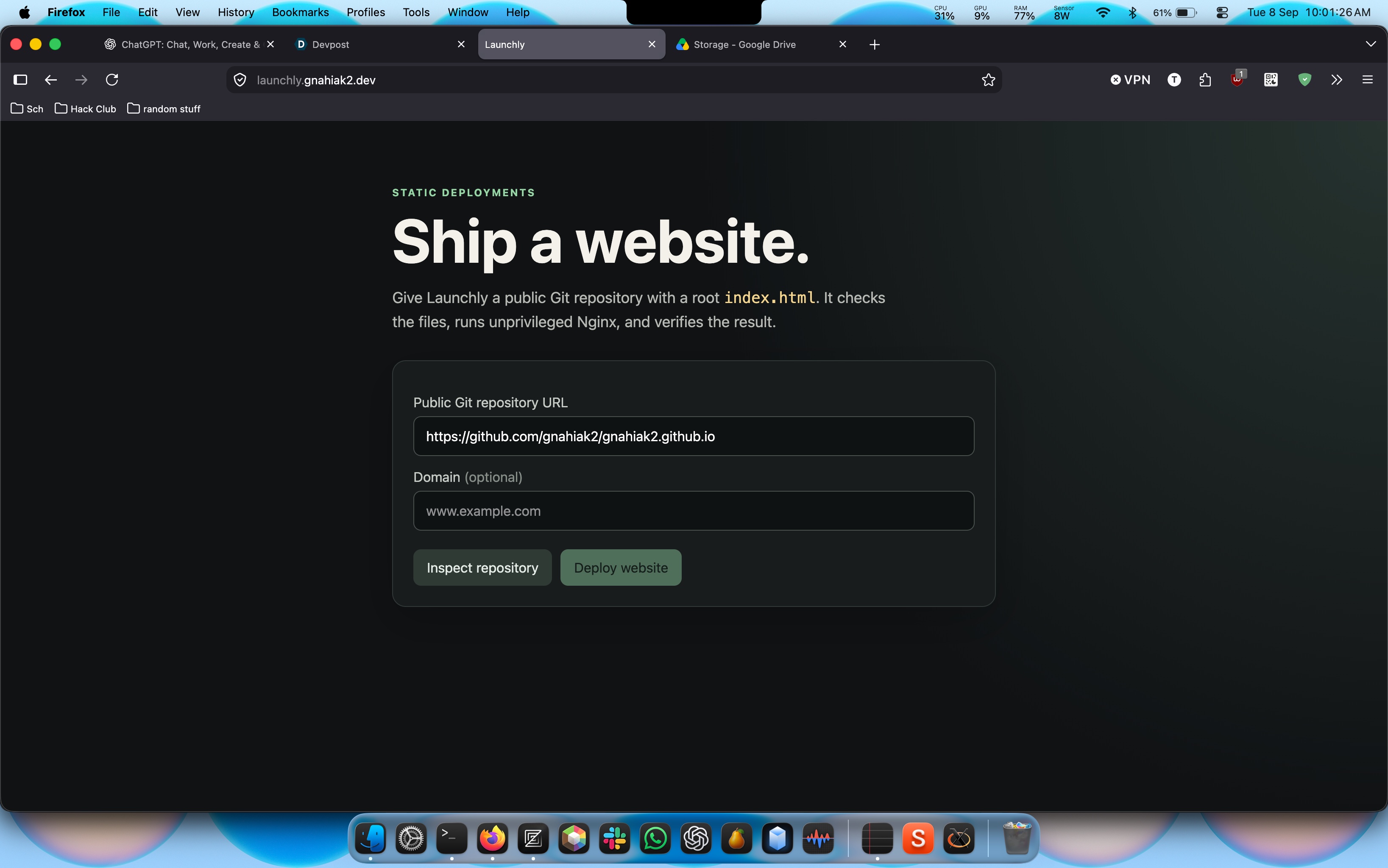
The front-end is a lightweight TypeScript application serving the deployment dashboard:
- Repository inspector – shows the cloned site structure.
- Deployment plan – displays detected parameters (framework, language, port).
- Live status – polls the backend for deployment state and shows success/failure messages.
- API integration – lets users manually trigger deployments and inspect them.
The front-end is built with pnpm (via Corepack) and includes a responsive UI with dark-themed styling.
Implementation Details
Backend (backend/src/)
The backend follows a strict separation of concerns:
detector.rs– Validates repository URLs (must be HTTP(S), no credentials, no path traversal, no local hosts) and checks forindex.htmlexistence.deploy.rs– Orchestrates the full deployment lifecycle: cloning, planning, building, starting, verifying, and cleanup.api.rs– Exposes three endpoints:GET /api/plans– Inspect a repository and receive a deployment plan.POST /api/plans– Submit a deployment request.GET /api/deployments/{id}– Query deployment status.
main.rs– Entry point that wires the router and starts the HTTP server.
Front-End (frontend/)
The front-end is a single-page application:
index.html– Shell layout with a header, deployment form, plan card, and status card.app.ts– Manages state, communicates with the backend via fetch, polls for deployment status.style.css– Dark-themed utility classes for a modern look.package.json– Uses pnpm (installed via Corepack) for fast, deterministic builds.
Runtime Configuration
The deployment uses rootless Podman (Fedora, Ubuntu, or macOS with Podman VM):
- The control-plane container runs with
--network hostto ensure Git DNS resolution works correctly. - The cloned site is mounted read-only at
/usr/share/nginx/html. - The deployed container runs
docker.io/nginxinc/nginx-unprivileged:alpinewith resource limits:- Memory: 512 MiB
- CPUs: 1
- PIDs: limited
- Capabilities:
--cap-drop=ALL - Security:
--security-opt=no-new-privileges
- Health checks verify HTTP 200 on port 8080 before marking the deployment
live.
Challenges Faced
No
pnpminstalled locally – The original frontend build relied onnpm. Since we need a consistent toolchain across environments, I switched to Corepack (bundled with Rust) to runpnpminside the container build. This ensures the front-end always compiles with the same versions regardless of the host.Rust code formatting – The backend had minor style mismatches after refactoring. I ran
cargo fmtto align with the project's formatting standards.Testing – All unit tests passed (
4/4), confirming the plan detection, URL validation, and port range checks work correctly.Rootless Podman compatibility – The control-plane must run without
sudo. Because the control-plane uses--network hostand reads from the local filesystem, it works natively in rootless mode without needing to bind to the host Podman socket.
Results
| Component | Tech Stack | Key Features |
|---|---|---|
| Backend | Rust (Axum, Tower HTTP) | Authenticated repository inspection, plan generation, health verification |
| Frontend | TypeScript, Tailwind-like CSS | Interactive deployment dashboard, plan visualization, live status |
| Runtime | Podman (rootless) + Nginx | Read-only site mount, unprivileged container, automated health checks |
The resulting system is simple, declarative, and secure:
- No build artifacts remain after deployment.
- Containers are ephemeral and self-cleaning.
- Resource consumption is strictly bounded.
- The entire deployment is driven by a single API contract.
This approach embodies the principle of minimum necessary infrastructure — the least amount of machinery required to reliably deliver a static website to the internet.

Log in or sign up for Devpost to join the conversation.