Inspiration
Creators often know exactly what they want an image to communicate.
The problem is that intent lives inside the creator’s head, while everyone else only sees the final result.
Something can feel obvious while making it and still appear confusing, disconnected, too subtle, too intense, or simply different to someone seeing it for the first time.
Launch Lens grew from my curiosity about that gap between creative intent and viewer interpretation.
I wanted to build a second set of eyes before the work is published.
The goal was not to create a machine that claims to know what everyone will think. It was to create a practical reflection tool that helps creators examine what their visuals may be communicating before using them in a post, advertisement, website, presentation, portfolio, or campaign.
What it does
Launch Lens analyzes:
- A single uploaded image
- A collection of up to four images
- A written visual idea
- Images combined with an intended creative direction
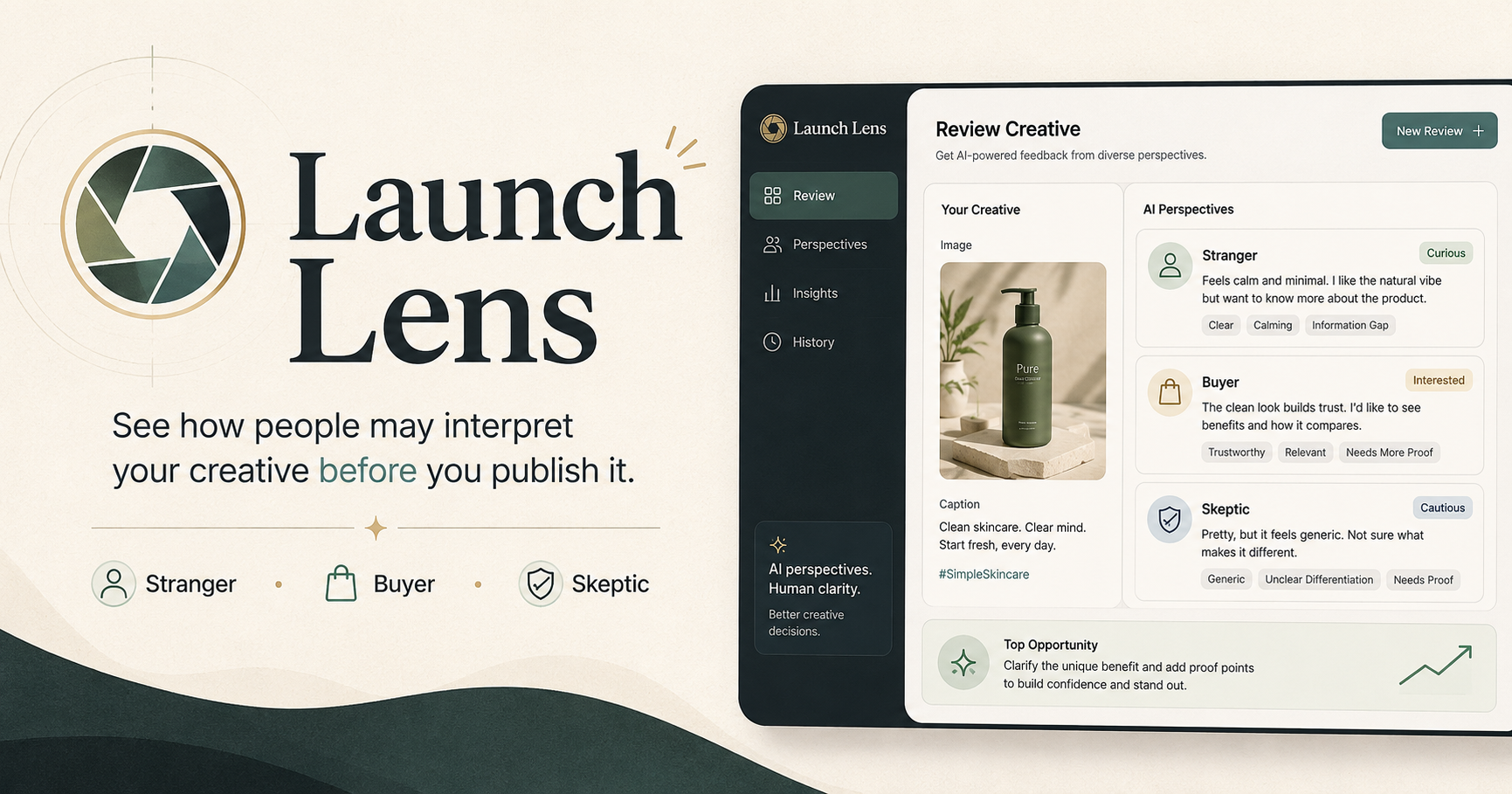
It then produces a structured AI review focused on how the creative may be perceived.
The feedback includes:
- The apparent message or meaning
- Mood and overall impression
- What feels clear, memorable, or convincing
- What may feel confusing, inconsistent, or underdeveloped
- Alignment between the creator’s intent and likely interpretation
- Stranger, Buyer, and Skeptic perspectives
- Caption clarity and revision suggestions
- Practical improvements to consider before publishing
For image collections, Launch Lens also considers how the images work together. It can identify:
- Overall cohesion
- The strongest image
- The weakest link
- The recommended lead image
- A suggested sequence
- Image-specific strengths and concerns
Launch Lens does not attempt to predict every human reaction. Instead, it gives the creator another perspective that may reveal assumptions, communication gaps, and possibilities that are difficult to see while standing too close to the work.
How I built it
I built Launch Lens with Next.js, React, TypeScript, and Zod.
The application supports multiple creative input modes, allowing users to upload visuals, describe an idea that does not exist yet, or combine existing images with an intended direction.
The submitted content is sent server-side to GPT-5.6 through the OpenAI SDK, using OpenRouter as the configured OpenAI-compatible provider.
Rather than displaying a long, unstructured AI response, Launch Lens asks the model to return structured data. The response is validated with Zod before it is rendered.
The results are separated into focused sections such as:
- Assessment and signal score
- Stranger, Buyer, and Skeptic perspectives
- Creative annotations
- Caption review
- Intent alignment
- Collection analysis
- Recommended visual sequence
- Next best action
For multi-image submissions, Launch Lens preserves the user’s original upload order while adding clear indicators for the recommended lead, strongest image, weakest link, and suggested sequence.
Users can also export the completed assessment as a PDF or PNG report and copy a concise summary.
The application is deployed with Vercel.
I used Codex throughout development to help implement and refine the App Router API routes, shared schemas, multi-image request flow, accessible controls, responsive layouts, export behavior, testing, and documentation.
I remained responsible for the product direction, scope, interpretation model, and final decisions. Codex helped me move from idea to functioning system faster while still requiring careful review, testing, and correction.
Challenges I faced
The largest challenge was not connecting the application to an AI model.
It was deciding how the AI should think, how much it should say, and how the interface should make that information useful.
AI can generate a large amount of feedback very quickly. That sounds helpful until the result becomes a wall of text that no one wants to read.
I had to decide:
- Which information should appear first
- How to distinguish interpretation from recommendation
- How to preserve nuance without overwhelming the user
- How to support images, collections, and text-only ideas within one workflow
- How to display collection analysis without rearranging the user’s original gallery
- How to handle malformed or incomplete model responses safely
- How to preserve user input when an AI request fails
- How to explain whether an error came from the user’s input or from the backend
I solved this by treating the AI output as structured product data rather than chat.
The result is divided into cards, perspectives, scores, labels, and actionable sections. The user can scan the high-level assessment first, then go deeper where needed.
For collections, badges identify the recommended lead, strongest image, weakest link, and sequence position while the original upload order remains intact.
I also added recovery states, session-only draft restoration, retry controls, and explicit reset confirmation so a failed request does not automatically erase the user’s work.
Another important challenge was handling the fact that model output is not always perfectly consistent. Structured AI features still require defensive validation, clear error handling, and graceful fallbacks.
What I learned
This project reinforced that building an AI product is not mainly about adding an API call.
The prompt matters.
The schema matters.
The interface matters.
The recovery path matters.
Even the order in which information appears can change whether the output feels useful or exhausting.
I also learned that interpretation tools need careful language. Launch Lens should be direct enough to be useful without pretending that one generated review represents every possible human response.
Building the project improved my understanding of:
- Multimodal AI analysis
- Structured model responses
- Prompt and schema design
- Image upload and preview workflows
- Conditional rendering in React
- Single-image and multi-image analysis
- Text-only creative analysis
- Request-aware validation
- Error recovery and session draft handling
- Accessible modal and action design
- PDF and PNG report exports
- Responsive layouts for mixed image orientations
- Deploying a Next.js application with Vercel
- Working with Codex as an implementation partner
One of the most useful lessons was that AI can accelerate implementation dramatically, but it still requires careful review, testing, and correction.
Accomplishments that I am proud of
I am proud that Launch Lens goes beyond producing a generic description of an image.
It asks a more useful question:
What might this creative communicate to someone who did not make it?
The application compares intended meaning with likely interpretation and separates feedback into different perspectives rather than presenting one artificial correct answer.
I am especially proud of the collection analysis.
Instead of treating every image as an isolated object, Launch Lens considers how a set works together, including cohesion, sequence, strongest entry, weakest link, and recommended lead.
I am also proud of the text-only mode because creative review should not begin only after something has already been designed. A creator can describe a visual sequence or concept and examine how it may be interpreted before investing time in producing it.
The report export was another important addition. A review becomes more useful when the submitted visuals remain attached to the assessment and can be saved for later comparison or discussion.
Most importantly, Launch Lens turns a complicated AI response into something a creator can actually read, question, and act on.
What’s next for Launch Lens
The next stage would focus on making Launch Lens useful across longer creative workflows rather than only one review at a time.
Possible improvements include:
- Comparing revised visuals with previous versions
- Saving and organizing assessments
- Direct side-by-side comparisons between creative options
- Audience-specific review modes
- Specialized feedback modes for social media, advertising, portfolios, websites, and presentations
- Stronger accessibility and visual-hierarchy analysis
- Shareable review links
- Team or client feedback workflows
- More detailed report customization
- Optional generation tools that help translate recommendations into a revised creative direction
I would also like to explore a clearer distinction between interpretation, strategy, and prediction.
Launch Lens is strongest when it acts as a thoughtful observer, not an oracle.
The long-term goal is to build a practical creative review system that helps people notice what they may be missing, communicate more deliberately, and publish with greater clarity.
Built With
- ai
- analysis
- api
- css
- image
- multimodal
- next.js
- openai
- openrouter
- react
- typescript
- vercel

Log in or sign up for Devpost to join the conversation.