-
-
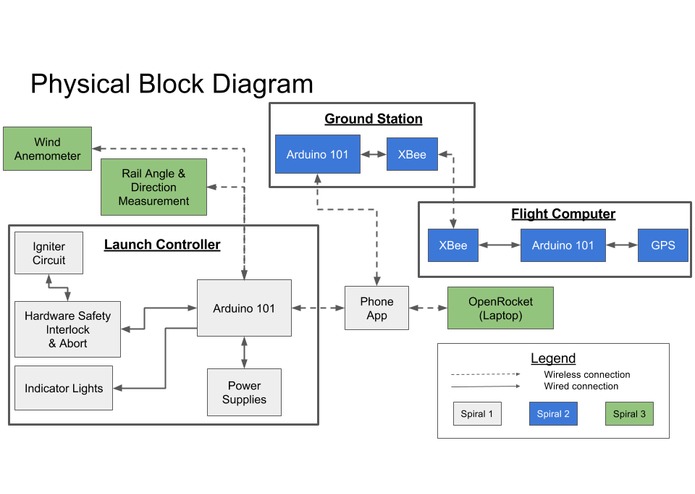
Roadmap
-
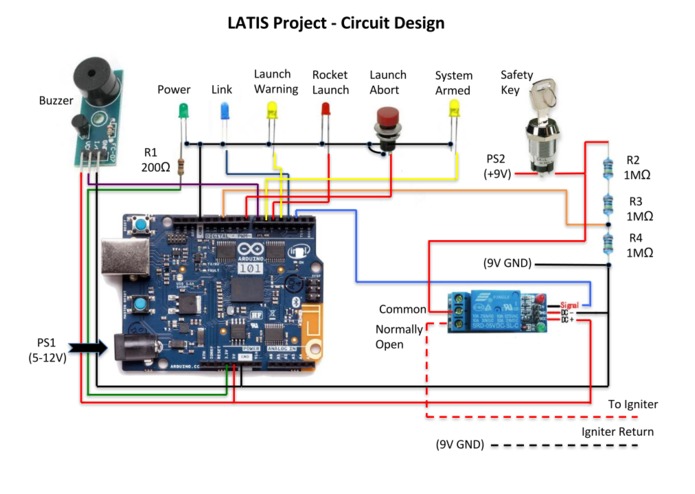
Wiring diagram

Scientific study and technological development play a crucial role in improving human lives. The skills necessary for developing new technology and discovering new knowledge require a curious, reasoning mind... and the opportunity to apply it. The prospective scientist or engineer must nurture this spark, and opportunities to do so abound.
Yet when it comes to amateur rocketry, the interested student is limited to only mastering the skill of model rocket construction; whereas professional rocketry is a multidisciplinary field involving many scientific (chemistry, physics, etc.) and engineering (aerospace, mechanical, electrical, etc.) specialties. For the young, prospective rocket scientist, opportunities to learn about these fields before college are few and far between.
Enter the LATIS Project (drumroll, please...).
What it does
The Launch And Telemetry Integrated System (LATIS) Project bridges this gap by offering a step-by-step introduction to additional aspects of rocketry more akin to their professional counterparts. The LATIS Project includes a launch controller which utilizes the Arduino 101 and a rocket launcher mobile app. The Arduino serves as the brains of the controller. It takes input values (e.g., button pushes and logic states), performs logic, and generates outputs (e.g., sounds buzzer, controls LEDs and logic states). The Prime Directive of the Arduino is to provide a control signal to a relay to send current to the igniter, launching the rocket. The mobile app connects to the launch controller via Bluetooth LE technology and allows the user to get real-time controller subsystem status updates and send launch/abort commands to the launch controller.
Challenges we ran into
Big ideas, limited time
We started the hackathon out with a simple idea and after a few brainstorming sessions, our ambitions grew. We wanted to solve the world (and who doesn’t!) but quickly realized that the real-world time constraints of the hackathon would lead us to doom if we didnn’t focus on the first steps. We created a roadmap and were able to start with the basics and focus on essential features (like having an app that actually launches a rocket!).
During the idea submission phase, we submitted a three-spiral development plan, promising to build Spiral 1 as a bare minimum. At that time, we were thinking we would breeze through Spiral 1 and get through Spiral 2 before the hackathon deadline (Spiral 3 was our stretch goal). About a month before the deadline, we were only half way through Spiral 1 and the Bluetooth LE connectivity was giving some problems as none of us had worked with Bluetooth code before. It dawned on us -- having full time jobs, kids, and pregnant wives (ok, only one of these) -- we couldn’t commit as much time as we wanted. So instead of trying to cram as much functionality as possible, we focused on polishing Spiral 1 and getting our documentation ducks in a row.
### Igniter current The final weekend before the hackathon deadline, we finally had Arduino and Android code ready for a field test with a live rocket. We assembled the launch pad, inserted the engine into the base of the rocket, connected the launch controller, counted down and… nothing.
The problem turned out to be the amount of current being passed into the igniter. The igniter requires at least two amps of current, and the supplied wires, along with some added components in the circuit, resulted in too much resistance in the launch controller for the 9V battery. During troubleshooting of our failed attempt, we discovered that the resistance was about 5.5 Ohms, leaving us a little less than half an amp shy of the required 2 amps. We were able to reduce some of the wire lengths and remake some of the connections to get the resistance back down. After those changes, we successfully launched the rocket twice using the controller (and then were out of igniters).
After the hackathon, we’ll continue to work on more features and spirals. And many more rocket launches (they’re the best)!
Accomplishments that we are proud of
We launched a rocket from a phone! That is seriously cool in its own right and we are proud to have succeeded in our project.
Continuous Integration for the win!
Automated build tools can catch errors that your local development environment might not. Even something like the Arduino IDE needs a bit of help from time to time. Early in the project, we set up a few tools (like PlatformIO to catch integration issues early and it payed off just a few days later. While troubleshooting a nagging bug in the code related to transmitting data over bluetooth we finally got the code to compile but things were still a bit wonky while operating the app. Deciding to call it quits for the day (night), we created a commit and pushed the latest changes to GitLab which promptly ran the code through the automated build process. Much to our surprise, the build failed. Turns out we inadvertently mixed two variables of different types and the Arduino IDE didn’t catch the error. The next day, we changed the variable type from String to char and had that section of the code running. And then we were off to the next problem.
What we learned
Give yourself plenty of time for testing!
After designing a launch controller circuit and an Android application basically from scratch, wire resistance was an unexpected problem. Fortunately for us, we had plenty of time to figure out what went wrong and then we were able to correct it and try again (successfully the second time)!
Rockets are FUN!
Well, we kind of already knew this. But it’s always fun to launch a rocket!
Android
Our Android developer was only familiar with the basics of Android development at the start of this project, but working with Bluetooth’s asynchronous operations involved some advanced level concepts. After completing this project, he feels confident in pursuing Google’s Associate Android Developers certification.
What's next for the LATIS Project
Albert Einstein used to tell a story about a compass he received from his father as a little boy. This compass fascinated him and gave him a sense of great wonderment. According to the popular myth surrounding this story, it was this first experience with his compass that set him on his path of scientific inquiry and discovery. With the LATIS project, we hope to provide the next generation of engineers with “compasses” of their own.
Here’s how we plan to do it:

Spiral 1
Spiral 1 is the starting point for this project and the thrust of our efforts for this Hackathon. The main focus is the launch controller and the phone app. At the end of this spiral, the user is able to launch a rocket using the launch controller and the app.
iOS Roadmap
We’ve got a working Android app, but now it’s time to spread the fun to iOS users.
Arduino 101 Controller Roadmap
The launch controller is able to check the safety interlock and send the interlock connection state to the Android app. Once commanded, the launcher "turns on" the igniter which launches the rocket. We’d like to add the capability to do a check on the power and igniter circuits and send those statuses to the mobile apps.
Spiral 2
Spiral 2 adds a flight computer (one that actually flies on the rocket) that will take altitude (pressure) and GPS measurements and transmits them to a ground station. The flight computer will be able to control parachute ejection events and transmit its location to more easily find the rocket after flight. Having the real-time location of the rocket is especially helpful for high altitude flights where the rocket can go beyond visual range.
Android & iOS Roadmap
The apps are able to receive live telemetry data from the rocket via the ground station.
Arduino 101 Controller Roadmap
Currently, no upgrades are planned for the launch controller in Spiral 2.
Flight Computer Roadmap
The flight computer is developed entirely in this spiral. The flight computer takes altitude, position, and velocity measurements; makes decisions on when to deploy parachutes; and transmits data to a ground station via a radio (non-Bluetooth) link.
Ground Station Roadmap
The ground station is developed entirely in this spiral. The ground station receives data from the flight computer and sends it forward to the phone app via bluetooth.
Spiral 3
Spiral 3 adds more measurements at the launch controller, mainly wind and launch rail angle. This spiral also adds OpenRocket integration. Having real-time wind measurements and launch rail angle will allow OpenRocket to provide more accurate estimates of the flight and landing area which increases safety.
Android & iOS Roadmap
The phone apps are expanded to receive additional data from the launch controller and to communicate with a laptop running OpenRocket. Alternatively, the phone apps are replaced entirely by an app running on the laptop that can more directly interface with OpenRocket.
Arduino 101 Controller Roadmap
Launch controller code is expanded to wirelessly connect (via BLE) to a wind anemometer and a launch rail angle & direction measurement device. This data is transmitted to the phone app.
Flight Computer Roadmap
Currently, no upgrades are planned for the flight computer in Spiral 3.
Ground Station Roadmap
Currently, no upgrades are planned for the ground station in Spiral 3.


Log in or sign up for Devpost to join the conversation.