-
-
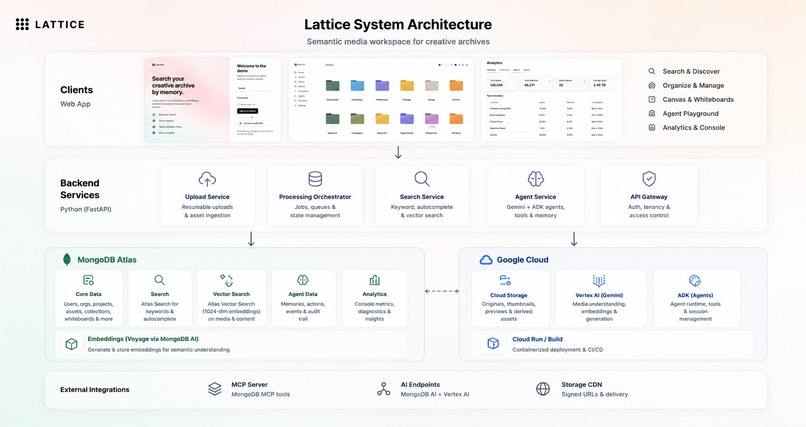
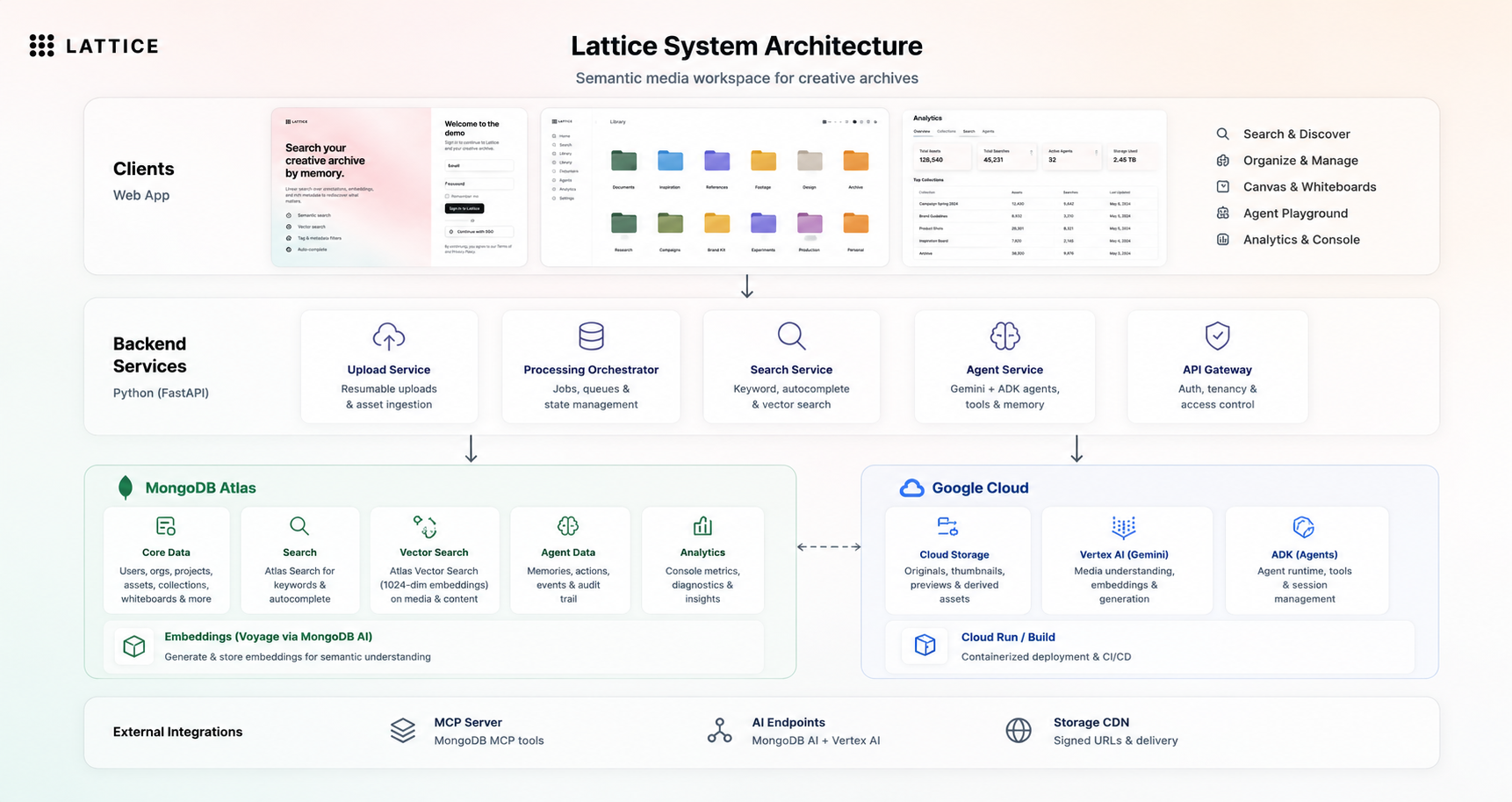
lattice top level architecture
-
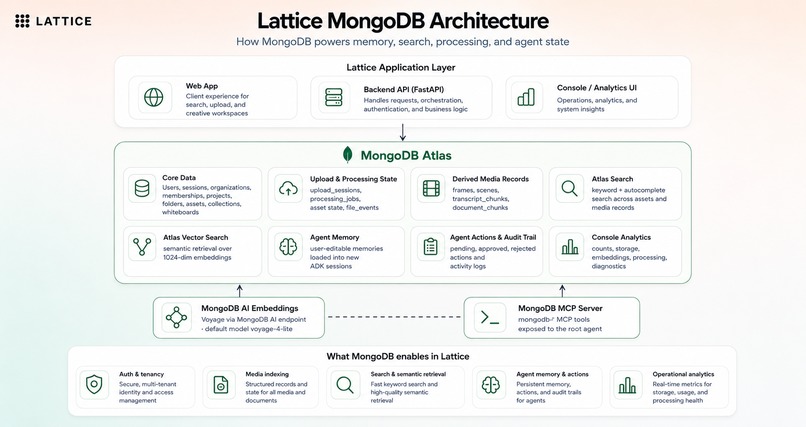
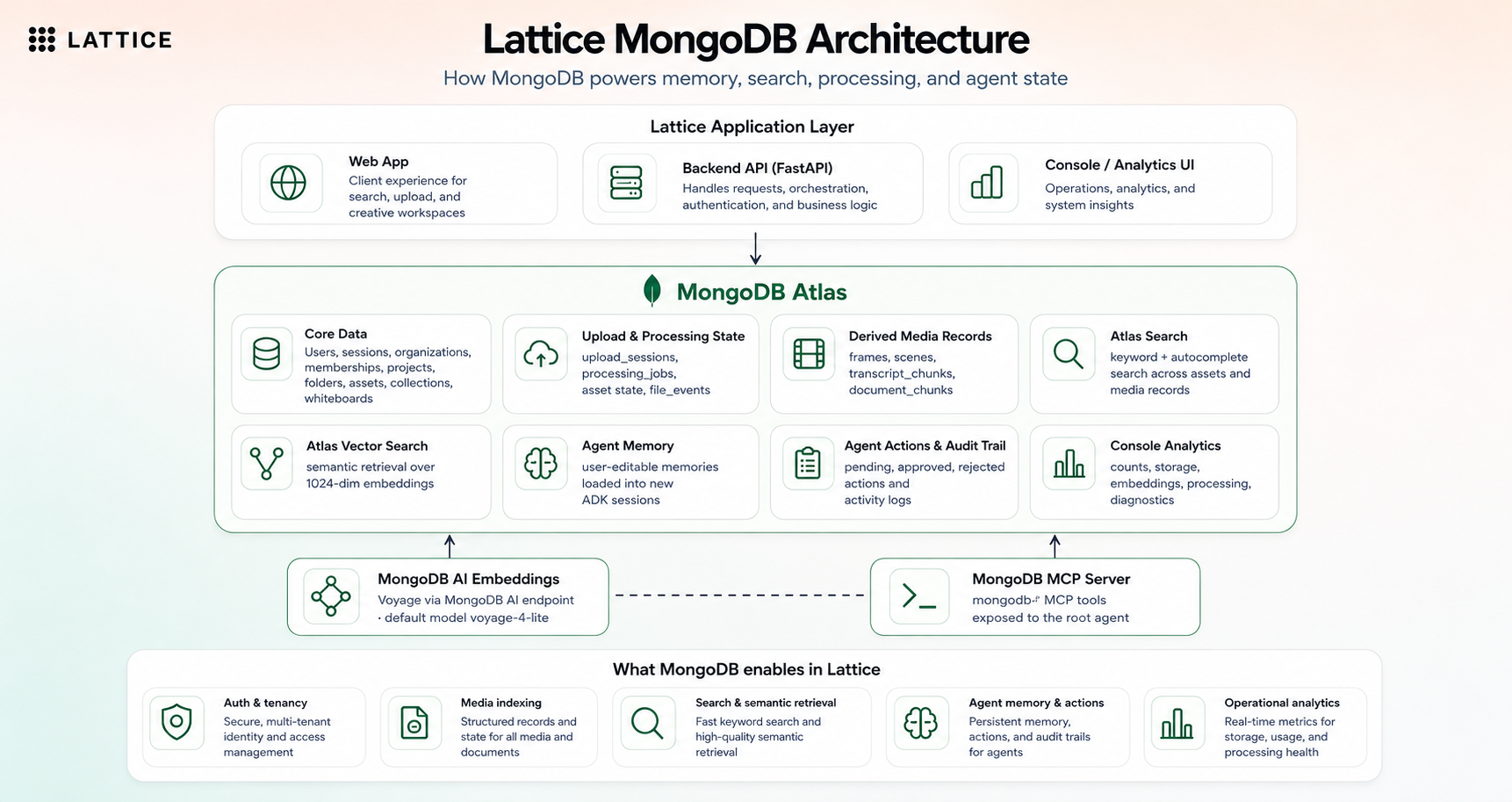
mongo db setup
-
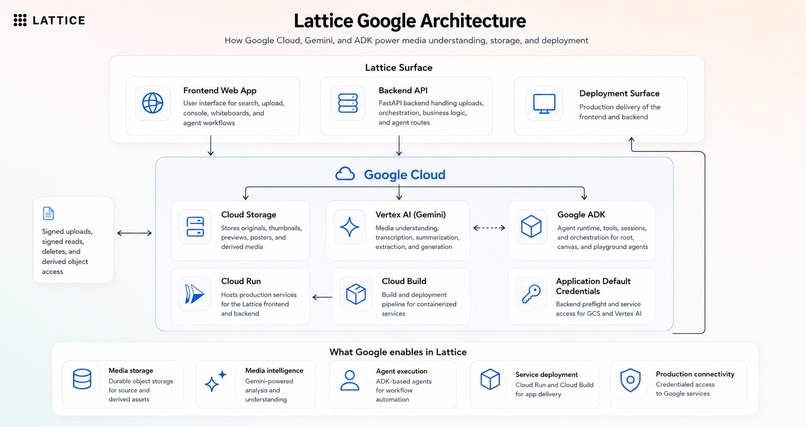
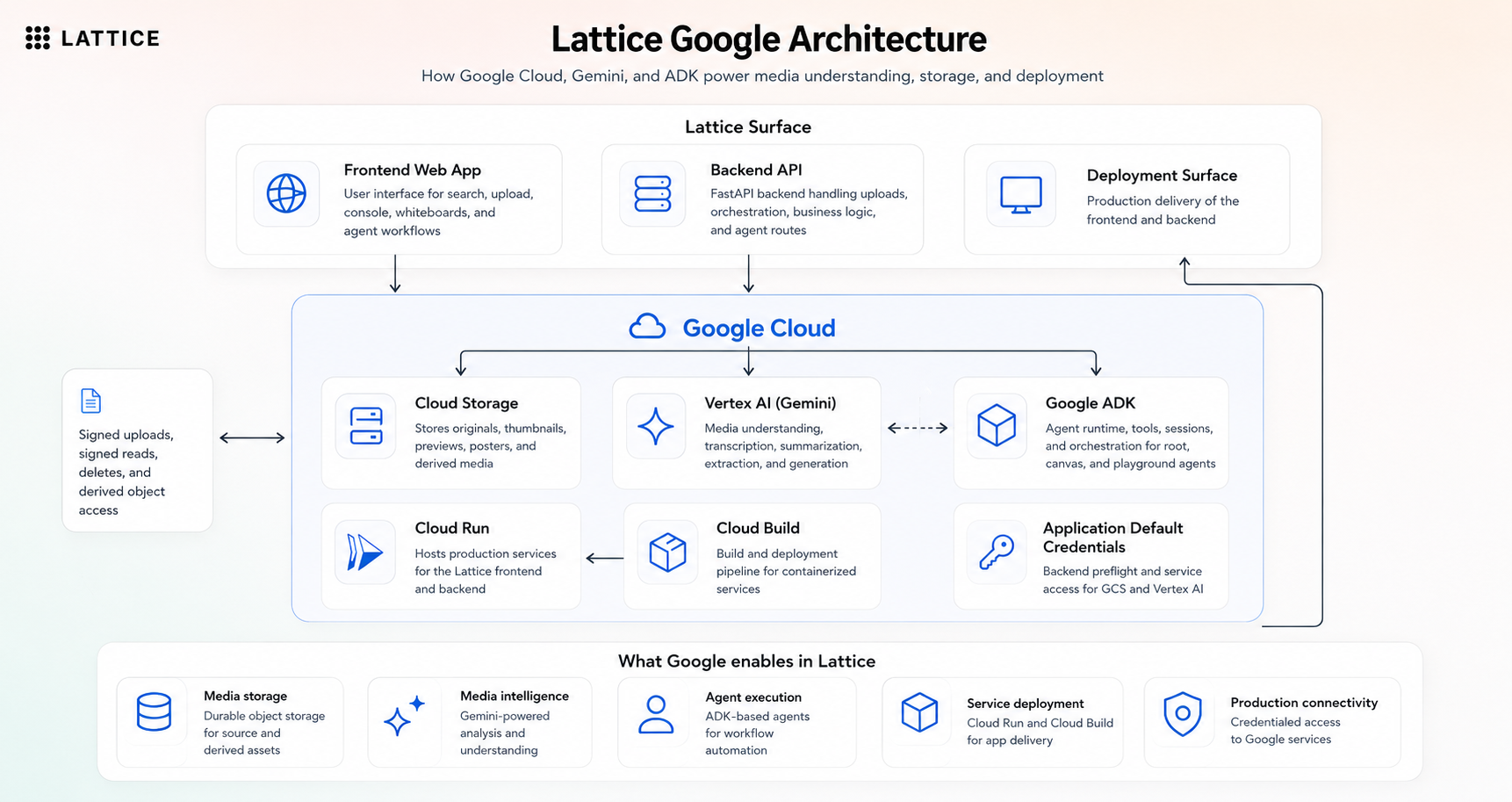
google cloud and vertex ai layer
-
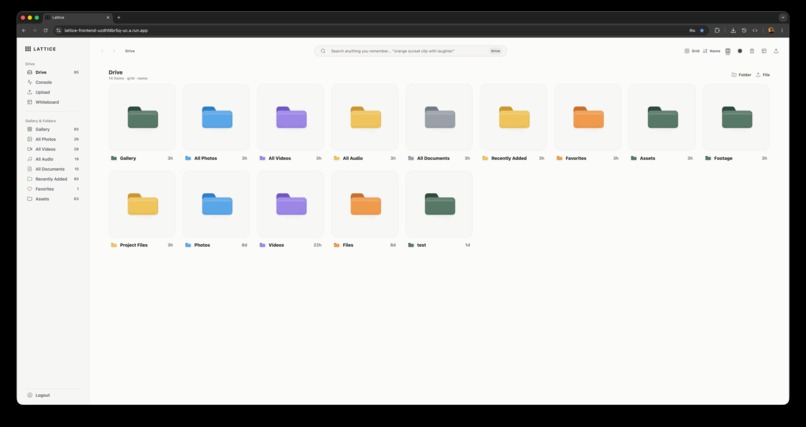
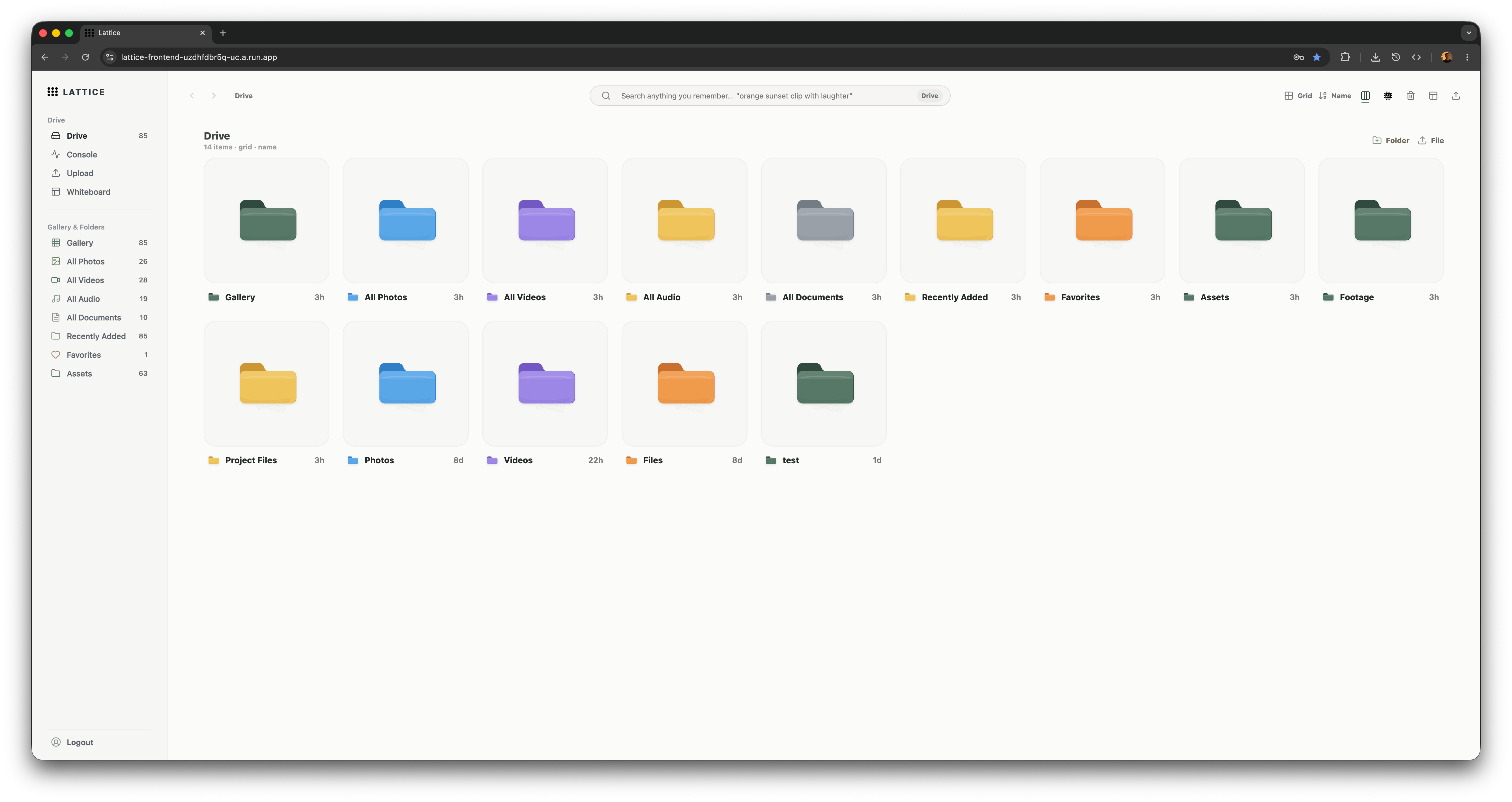
lattice drive ui
-
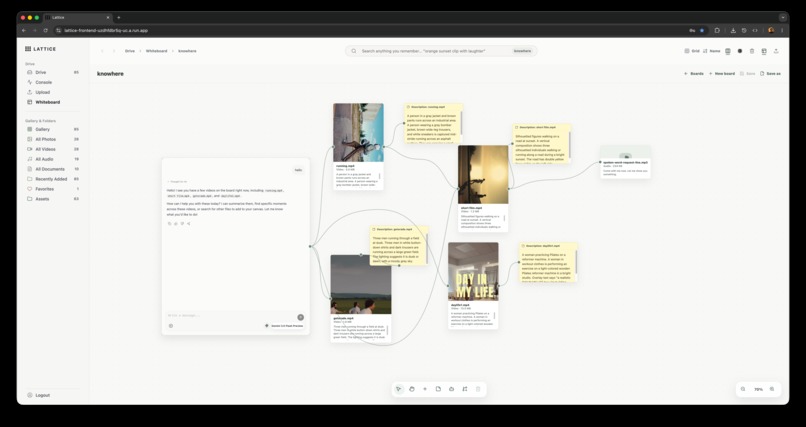
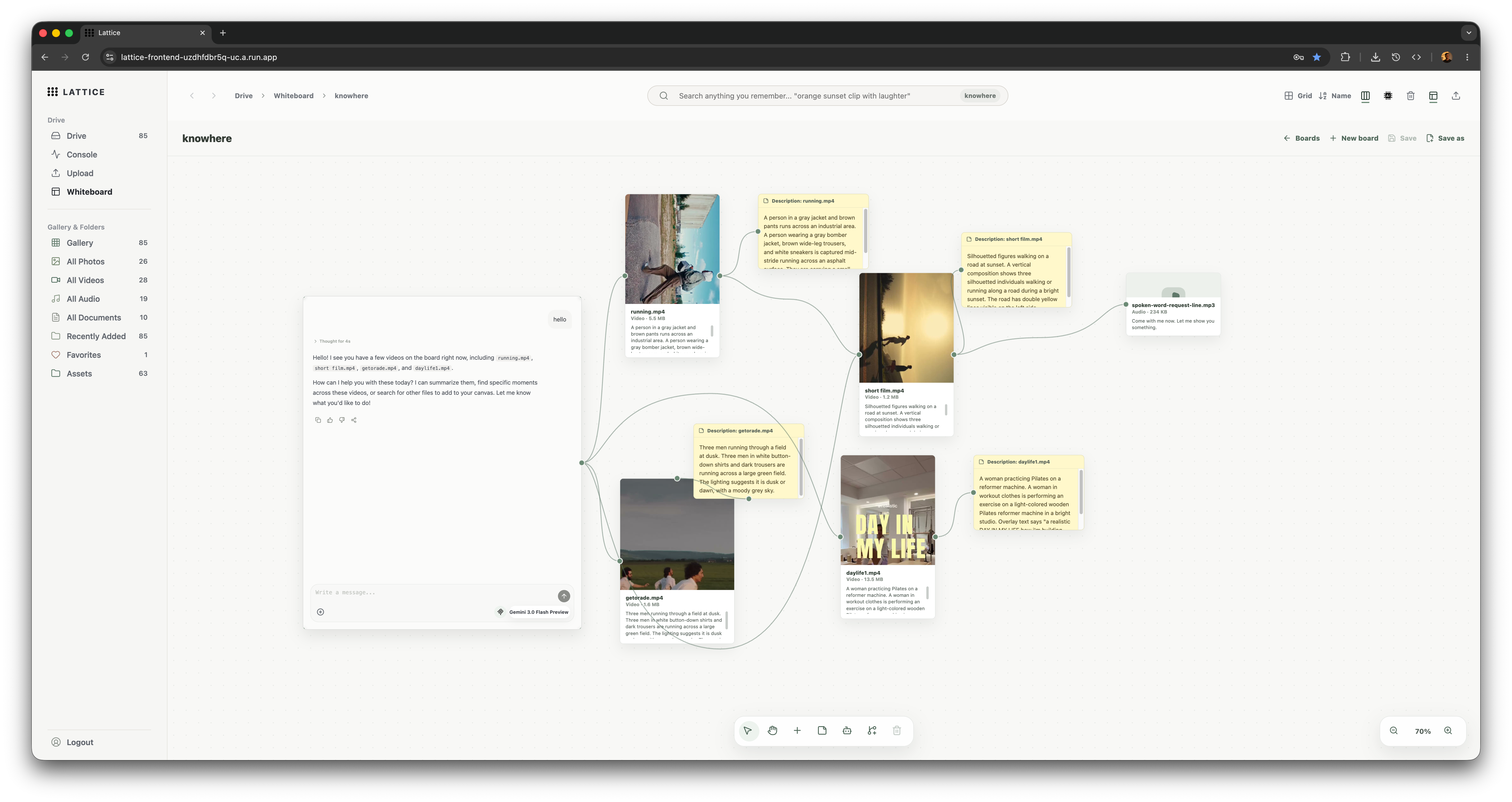
Lattice whiteboard
-
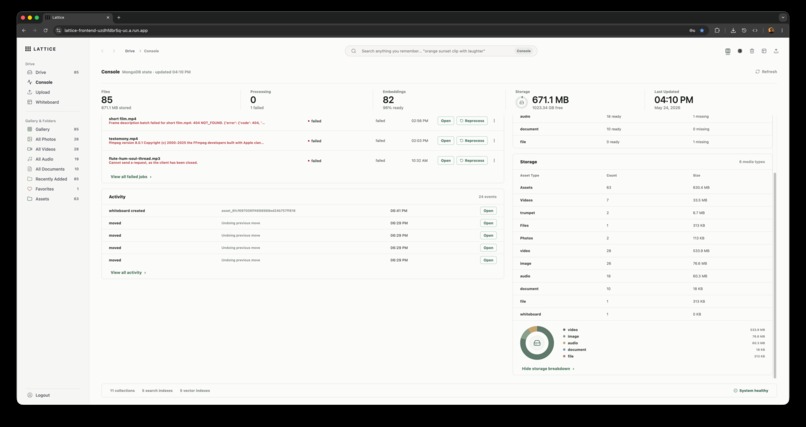
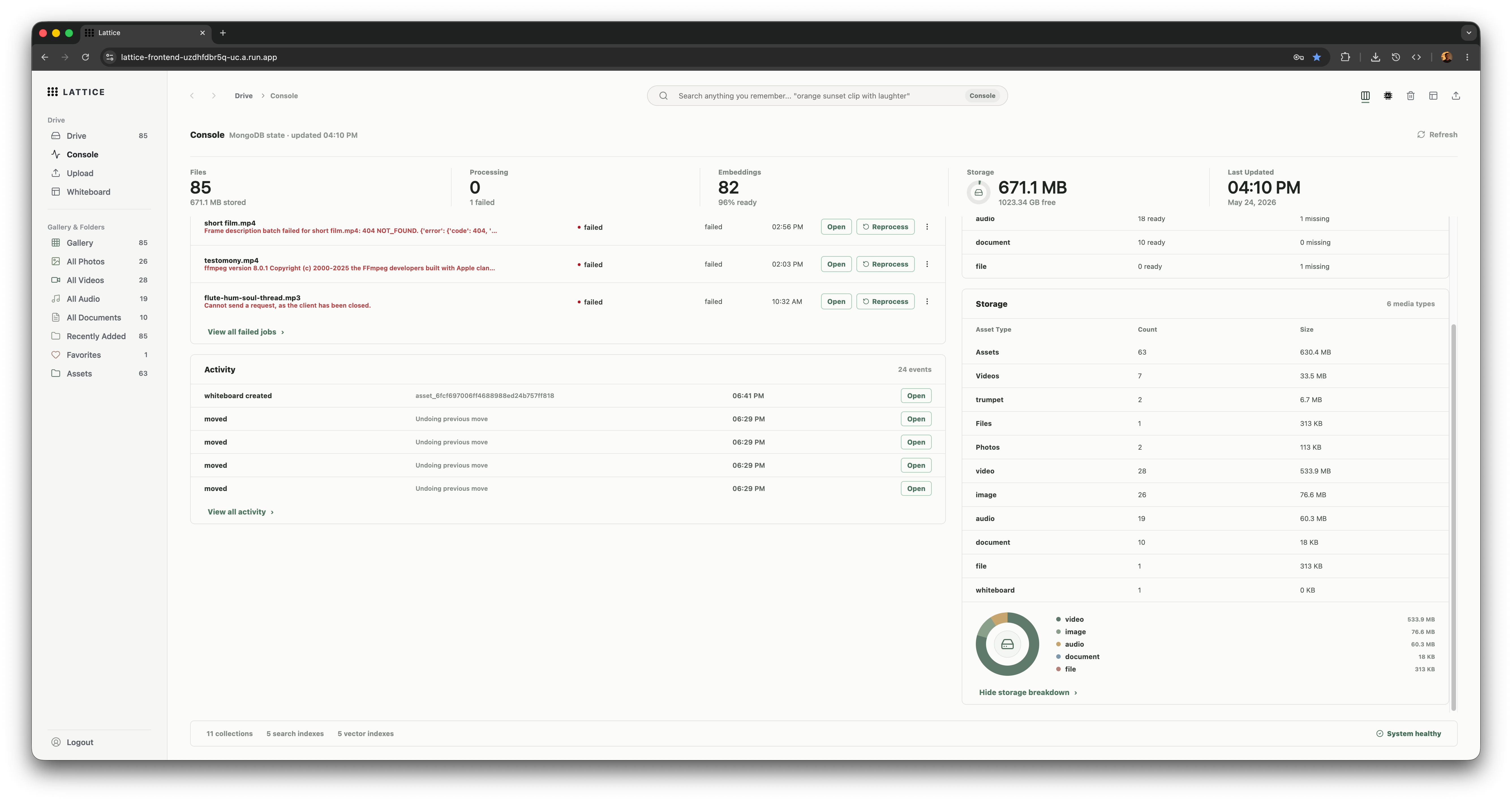
Lattice console
-
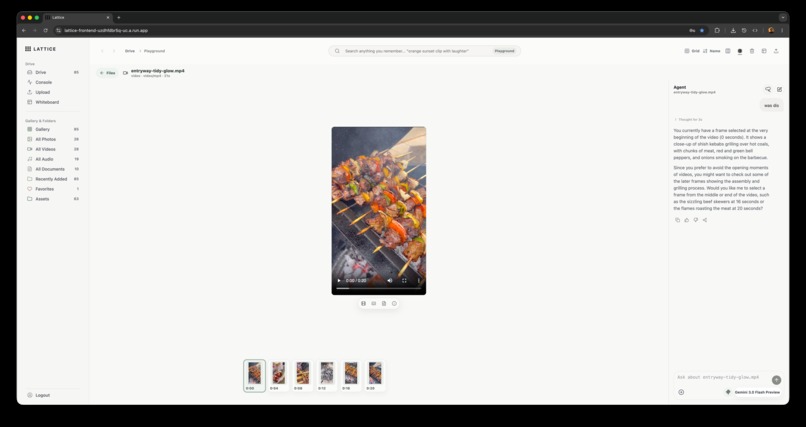
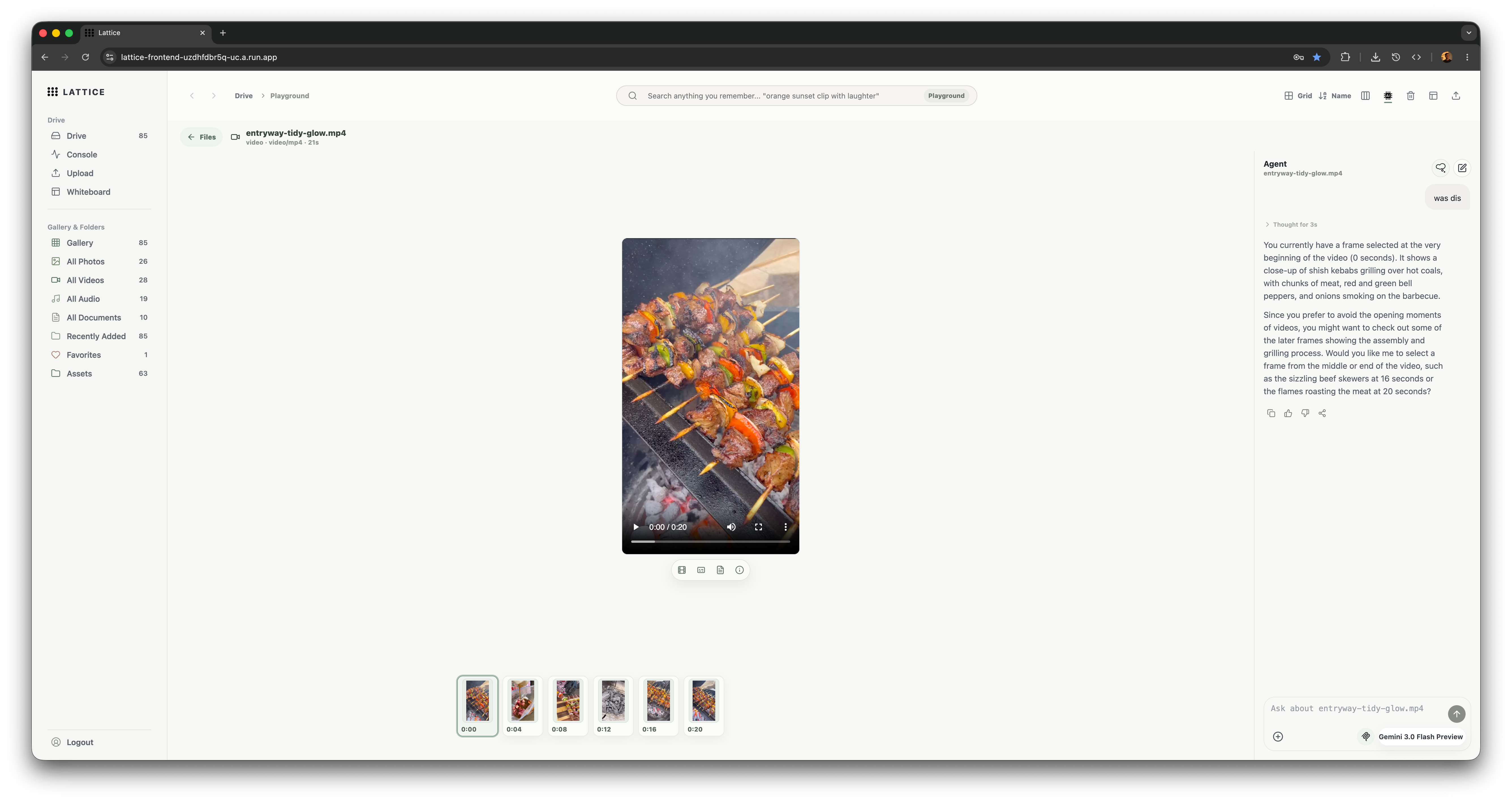
Lattice playground
-
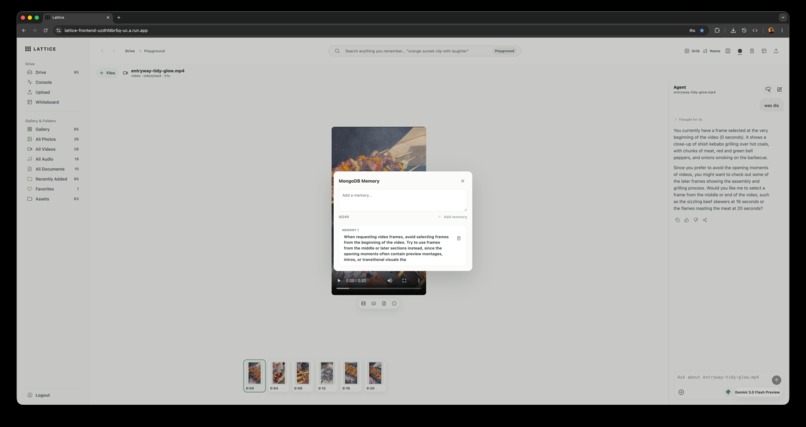
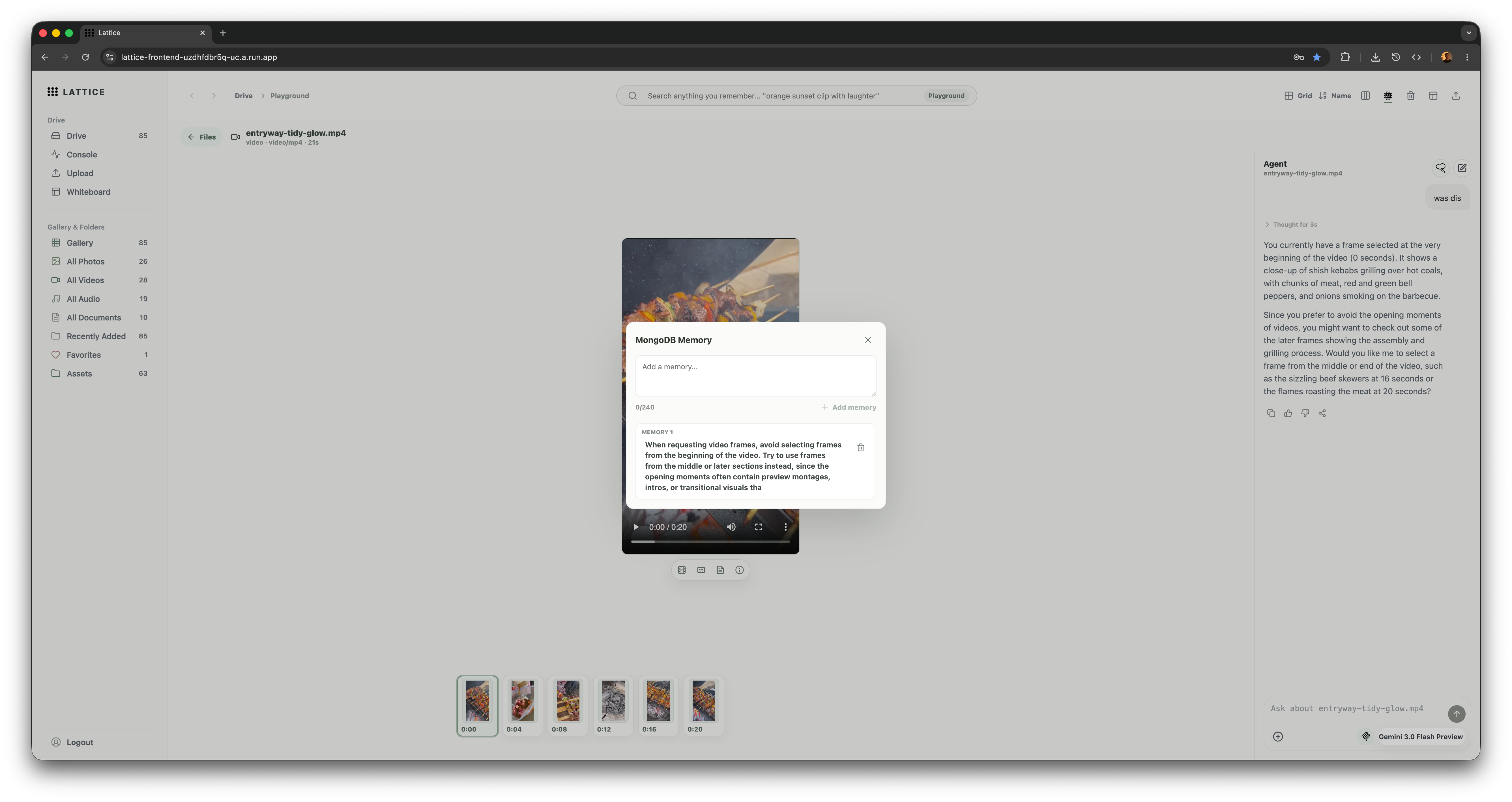
Mongo db agent memory layer
-
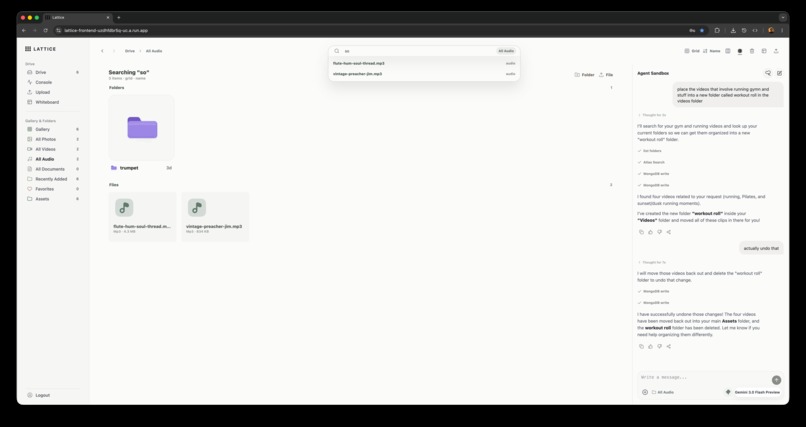
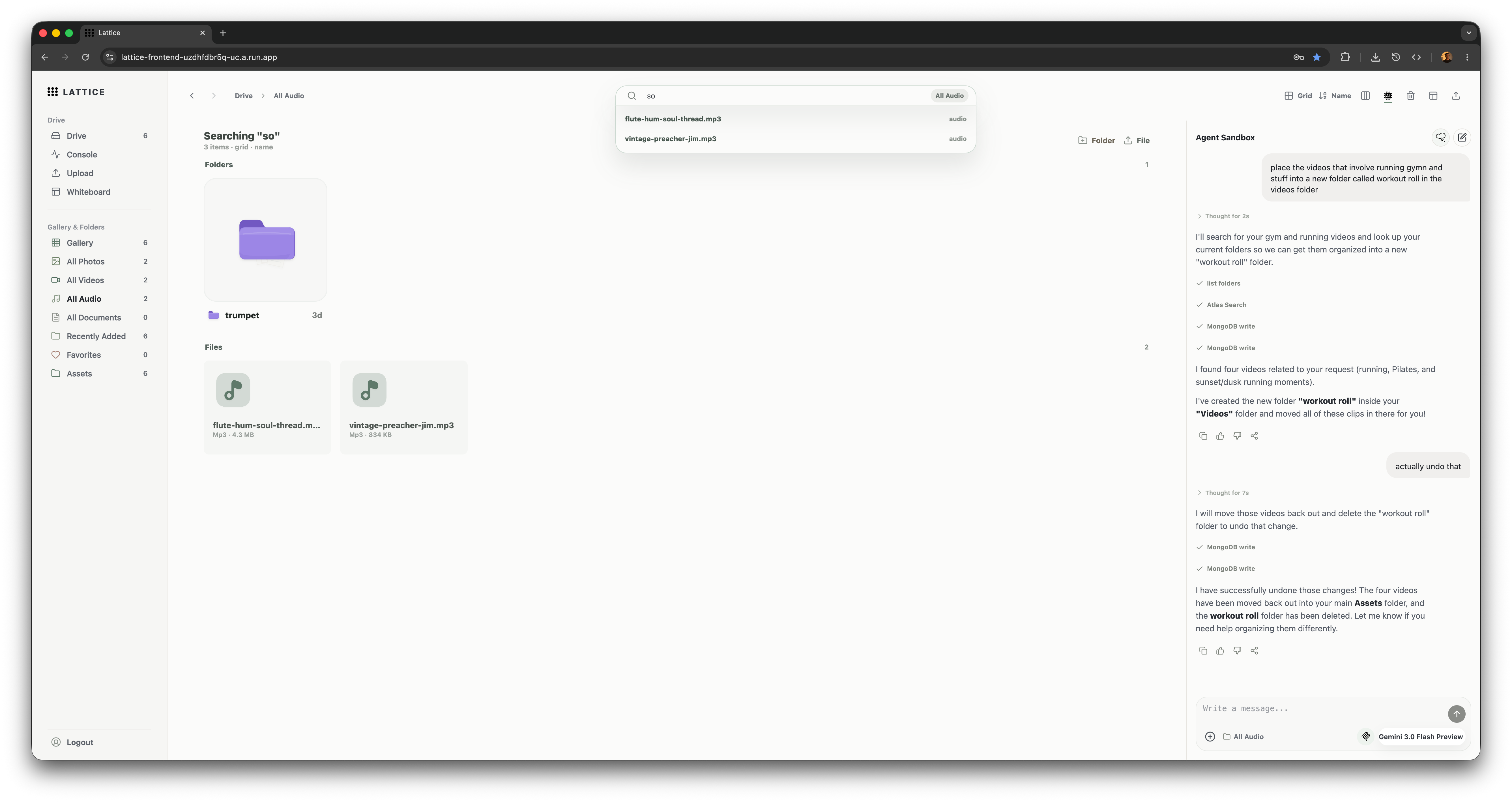
MongoDB Atlas Search autocomplete.
Lattice
Lattice turns messy creative archives into searchable, agent-powered workspaces.
Inspiration
Creative teams and solo makers generate huge media archives: videos, stills, audio, documents, transcripts, edits, notes, and reference material. The hard part is not only storing those files. The hard part is remembering what is inside them and turning that memory into action.
Traditional file browsers mostly stop at filenames, folders, and manual tags. That breaks down when the thing you need is "the shot where someone reports a crime on a payphone," "the frame with a wide street-style outfit," or "the transcript moment where the speaker explains the campaign idea." Search needs to understand scenes, frames, transcripts, OCR, documents, and visual meaning.
We built Lattice around that problem: make a media archive searchable by meaning, then give an agent enough structured tools to help organize, inspect, summarize, and act on the archive instead of just chatting about it.
What it does
Lattice is a semantic media workspace for creative archives. It combines Drive-style file management, media inspection, semantic search, agent chat, a whiteboard canvas, and a single-asset Playground.
Core capabilities:
- Drive: browse project media, folders, smart upload destinations, previews, metadata, trash, restore, favorites, and file actions.
- Semantic search: search across assets, frames, scenes, transcripts, and document chunks using MongoDB Atlas Search and Atlas Vector Search.
- Upload and processing: upload files directly to Google Cloud Storage, then enqueue processing jobs that create searchable derived records.
- Playground: inspect a single asset through preview, frame timeline, frame grid, moment rail, transcript/document chunks, scenes, clip marks, and asset-specific agent chat.
- Whiteboard: create a canvas of file nodes, note nodes, chat branches, and connections. The canvas agent can add notes and file nodes through explicit UI actions.
- Console: inspect project analytics, storage, processing health, and diagnostic signals.
How we built it
Lattice is split into two Cloud Run services: a Next.js frontend and a FastAPI backend. MongoDB Atlas is the main application database, metadata store, search engine, vector search target, and agent memory substrate. Google Cloud Storage stores originals and derived media. Google ADK orchestrates agents powered by Gemini, and Voyage embeddings are generated through the MongoDB AI endpoint.
Core flow
Next.js frontend -> FastAPI backend -> MongoDB Atlas / Google Cloud Storage / Google ADK + Gemini / Voyage embeddings
| Layer | Role |
|---|---|
| Next.js frontend | Drive, search, Playground, Whiteboard, and streaming chat UI |
| FastAPI backend | Auth, upload sessions, library APIs, search, agent stream, and processing jobs |
| MongoDB Atlas | Metadata, sessions, Atlas Search, Vector Search, whiteboards, agent actions, and agent memory |
| Google Cloud Storage | Original files, thumbnails, posters, frame previews, and derived media |
| Google ADK + Gemini | Agent orchestration, reasoning, visual description, and transcription |
| Voyage via MongoDB AI | 1024-dimensional embeddings for semantic search |
Search architecture
Lattice indexes multiple record types instead of treating a file as one blob. A video can produce asset metadata, frame records, transcript chunks, and scene records. A document can produce document chunks. An image can produce a visual frame record with OCR, objects, actions, labels, caption, and dense caption.
Search flow
User query -> Atlas Search + Atlas Vector Search -> assets / frames / scenes / transcript chunks / document chunks -> merge + deduplicate + timing metadata -> search results and Playground context
| Record type | What it makes searchable |
|---|---|
assets |
Titles, filenames, descriptions, tags, and file metadata |
frames |
Captions, dense captions, OCR, objects, actions, people, and visual meaning |
scenes |
Higher-level generated scene descriptions and tags |
transcript_chunks |
Timestamped speech, narration, and audio events |
document_chunks |
Extracted document text and document descriptions |
Upload and processing
Files upload from the browser directly to GCS using signed resumable URLs. The API records upload sessions in MongoDB and enqueues processing jobs after completion.
Upload flow
Browser upload -> MongoDB upload_session -> signed GCS resumable upload URL -> original object in GCS -> MongoDB processing_job -> derived searchable records
| Asset type | Derived records |
|---|---|
| Images | Preview, caption, dense caption, labels, OCR, and embedding |
| Videos | Poster, sampled frames, frame captions, transcript chunks, scenes, and embeddings |
| Audio | Transcript chunks, audio events, scenes, and embeddings |
| Documents | Extracted chunks, document description, and embeddings |
Agent architecture
The backend streams chat over Server-Sent Events. Agents can call typed Lattice tools for product actions and can also expose MongoDB MCP tools for database inspection and MongoDB-specific operations.
Agent flow
Frontend chat -> POST /chat/stream -> load MongoDB memory + context -> run Google ADK agent -> tool calls + tool responses + reasoning + content -> SSE events -> frontend renders tool activity and applies UI actions
| Agent surface | What it can do |
|---|---|
| Main media agent | Search, summarize, inspect, organize, and work with the project archive |
| Canvas agent | Read whiteboard context and add file nodes or note nodes through UI actions |
| Playground agent | Inspect one asset, select moments, show frame grids, label records, create clip marks, and search similar media |
Agents:
- Main media agent: searches, summarizes, inspects, organizes, and works with the project archive.
- Canvas agent: reads whiteboard context and can add file nodes or notes through UI actions.
- Playground agent: works inside one asset and can select moments, show frame grids, label records, create clip marks, and search for similar media.
Challenges we ran into
The hardest part was making the app feel like a real workspace instead of a chatbot wrapped around files.
Some specific challenges:
- Search quality across different media types: one query needs to hit filenames, generated captions, dense frame descriptions, transcript text, OCR, scenes, and document chunks without returning duplicate noise.
- Performance: media archives get heavy quickly. We batched signed preview URL requests, uploaded directly to GCS, kept binaries out of MongoDB, and separated metadata/search from original object storage.
- Agent control: the agent needed to do visible work without silently mutating the UI. We built explicit typed tool results and
ui_actionsso actions like adding canvas nodes are inspectable and deterministic. - Whiteboard context: canvas chat needs to understand selected nodes, connected file nodes, note nodes, and the current board without flooding the prompt with irrelevant data.
- Deployment hardening: local development hid some production issues. We added startup preflight checks for required env vars, Gemini model configuration, MongoDB connectivity, GCS access, signed URL generation, and MCP startup expectations.
Accomplishments that we're proud of
- Built an end-to-end hosted app on Google Cloud Run with separate frontend and backend services.
- Used MongoDB Atlas as more than storage: metadata, Atlas Search, vector search, sessions, upload state, processing jobs, file events, whiteboards, agent actions, and user-editable memory.
- Integrated MongoDB MCP into the agent stack for database-level inspection and partner-track visibility.
- Built a multi-surface agent experience across the main library, Playground, and Whiteboard.
- Made agent actions visible in the UI through tool call indicators, reasoning blocks, and explicit canvas mutations.
- Created a processing model where images, videos, audio, and documents all become searchable in their own native ways.
- Kept the product interface operational and demoable instead of turning it into a landing page.
What we learned
We learned that agentic media tools need strong information architecture. The value comes from turning unstructured media into useful intermediate records: frames, scenes, transcripts, document chunks, clip marks, file events, and memory. Once those records exist, an agent can reason over them and take concrete actions.
We also learned that "semantic search" is not enough by itself. Keyword search, vector search, autocomplete, related assets, timing metadata, and UI context all need to work together. MongoDB Atlas was useful because the same database could hold operational state, search indexes, vector indexes, and agent-facing memory.
Finally, deployment forced us to be stricter. Hard failures during startup are better than broken features surfacing later. Preflight checks, explicit environment variables, and Cloud Run service separation made the app easier to reason about.
What's next for Lattice
- Add richer approval flows for destructive or high-impact agent actions.
- Improve whiteboard layouts with grouped clusters, auto-arrange, and better edge routing.
- Add collaborative boards and shared project activity.
- Expand media understanding with more scene-level structure, shot boundaries, and reusable clip collections.
- Add stronger evaluation around search quality and agent tool selection.
- Support larger team workspaces with role-specific permissions and audit views.
- Add export workflows for boards, selected moments, and agent-generated research packs.

Log in or sign up for Devpost to join the conversation.