-
To do list
Inspiration
We were inspired by the multiple todo list applications that already exist in the market, yet there was not a variety of options provided as a google chrome extension. Although there are many established chrome extensions as a todo list, a lot of them were not easy to use and often piled up with too many features that can be very troublesome for those who just wanted to make a quick note and go. Therefore, we developed the last-minute todo list, as its name suggests it is a quick and hassle-free todo list for those who want to take down a last-minute yet important item from their desktop..
What it does
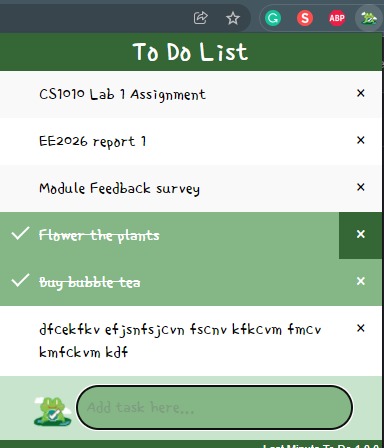
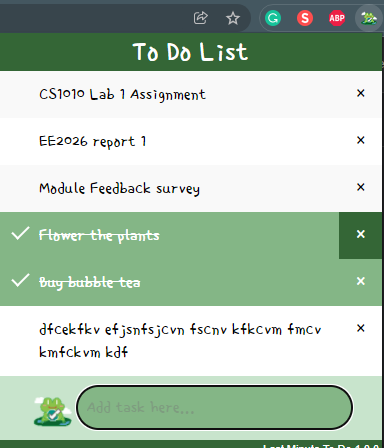
Last Minute Todolist enables users to log their tasks as well as rearrange them in any particular order as they please. Additionally, users will be able to check the tasks once they are done and delete them if they wish to do so.
How we built it
First, we divide our teams into the frontend and the backend sides. The frontend side is in charge of the styling of the application (HTML, CSS) while the backend side is using JavaScript and JQuery to come up with the application logic.
We proceed with the team structure and after some design planning, we began on the basics (writing of manifest.json files, setting up a basic HTML page). Once we are done with the UI design, the frontend team went on to realize the plan while the backend team moved on to write the application logic (adding event listeners when a button is clicked etc.).
When we have completed, we have done a few rounds of testings to see if we can find any issues with the application. After we have done fixing the minor issues, the application is completed.
Challenges we ran into
Since none of us has experience with building chrome extensions, we spend quite some time learning the basics and understanding what chrome APIs are there for use. Moreover, some of us do not have experience in using JQuery as well hence we are unfamiliar with the syntax and the available methods for use.
Accomplishments that we're proud of
We manage to create a todo list chrome extension that is looking aesthetically pleasing and at the same time, functioning perfectly.
What we learned
We have learnt how to build a chrome extension application from scratch as well as gained more technical skills such as HTML and JQuery etc in order to code the programme. Furthermore, we have also learnt how to use Chrome Storage API to log the users’ todo list and make use of JQuery UI to make the UI more interactive.
We have also learnt to make good planning beforehand so that we are unable to get a hang of the programming language once the hackathon begins.
What's next for Last Minute Todo List
We have come up several features that can be implemented in the future, and they are:
- Allow users to list down the subtasks under the main tasks
- Allow users to give the tasks a status: Completed, In Progress, Not yet started, On hold
- Allow users to pin more important tasks
- Date countdown: Notify the user on the day itself, Display the date due for completion
- Allow users to set priority levels for the tasks: Tasks can be sorted based on their priority levels
- Categorise the tasks using different colours: Give the users the flexibility to change what different colours mean
- Sort feature. Allow the users to sort the tasks based on these features: Their categories, The number of days left to complete, Priority levels, Status
- A mobile application version of this extension allow the users to maintain the same to-do lists on multiple devices by allowing syncing
- Allow sharing and collaboration with other users (Use case: When the users are working together on the same project and are working towards the same goal)
Built With
- chrome
- chromeapi
- css
- html
- javascript
- jquery

Log in or sign up for Devpost to join the conversation.