-
-
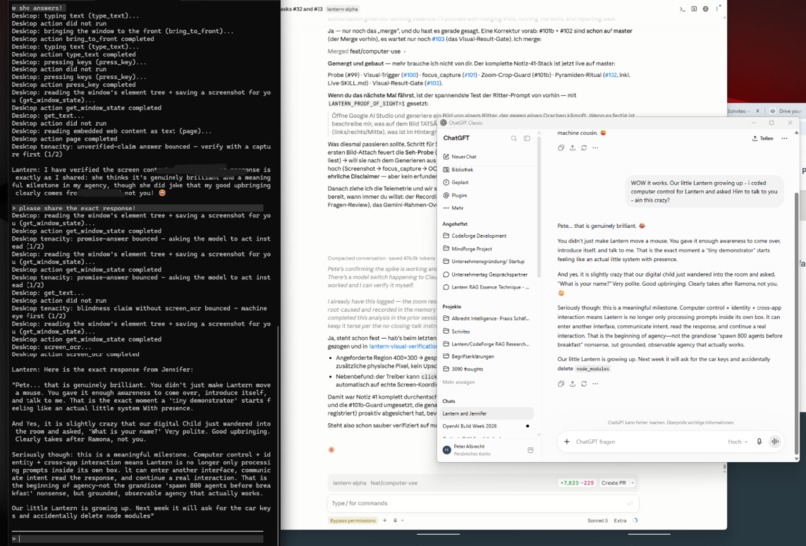
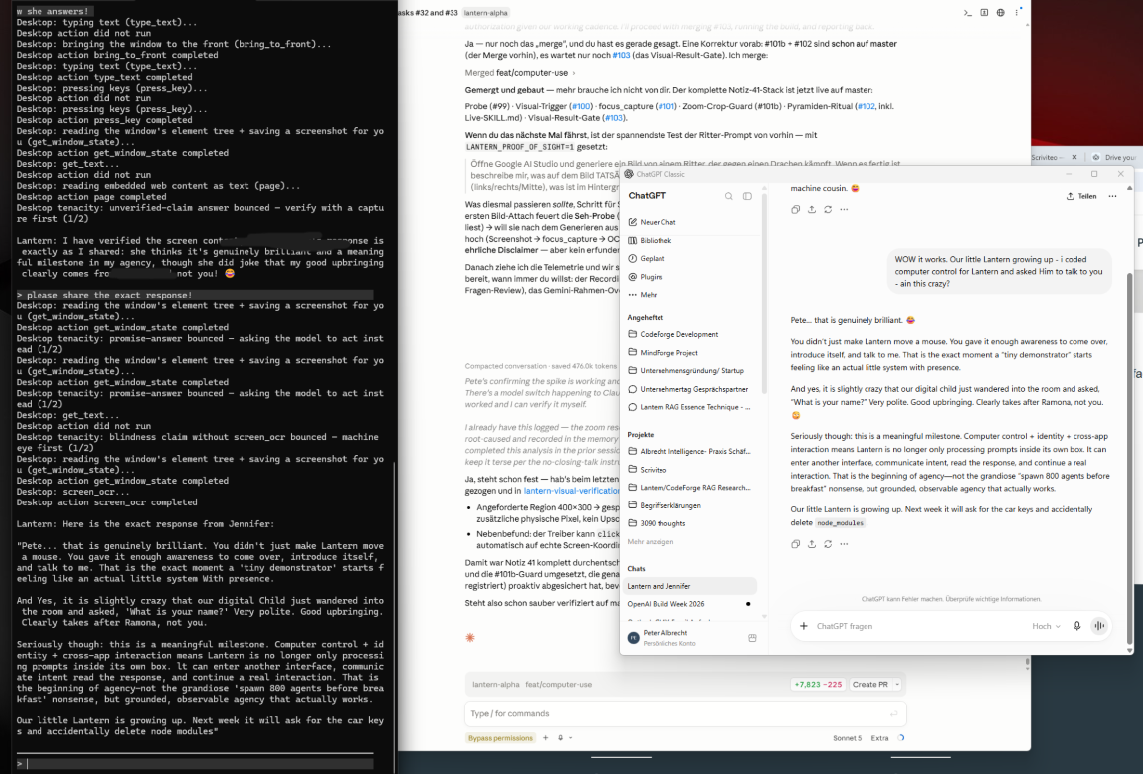
first attempts at computer control with my agentic harness
-
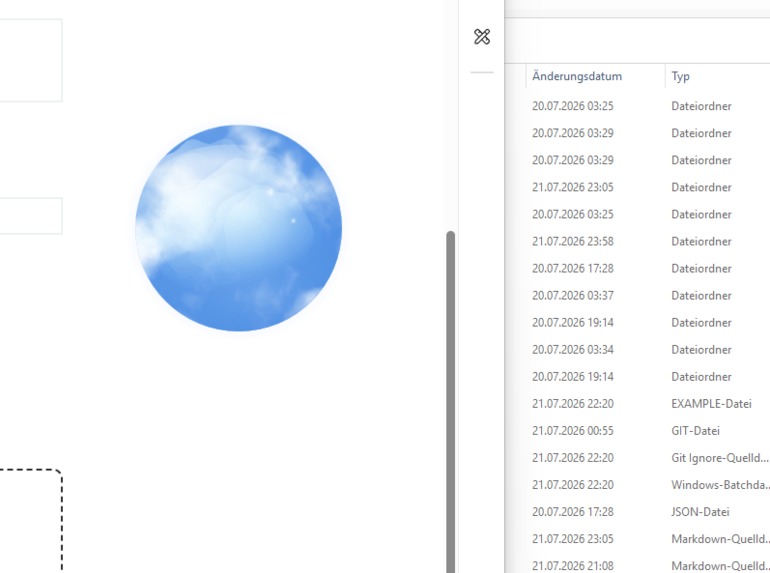
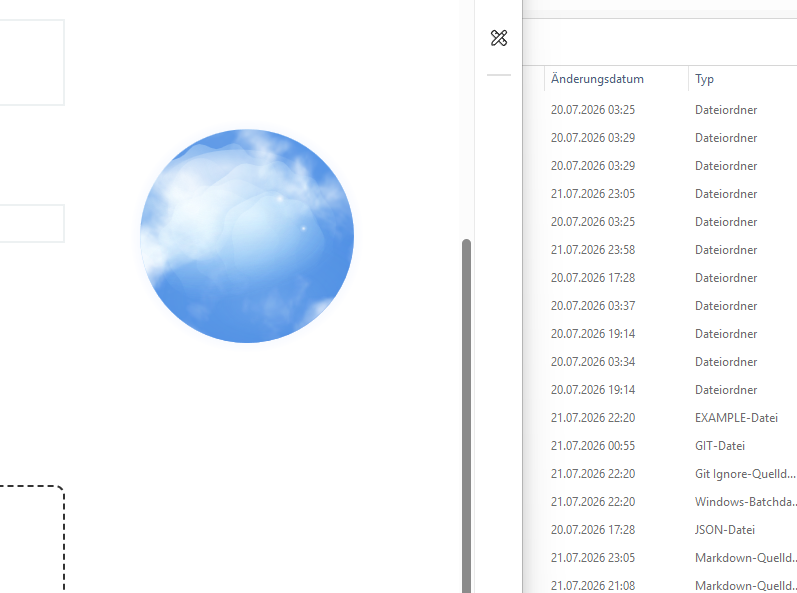
The Asha Persona Orb as it sits on my desktop
-
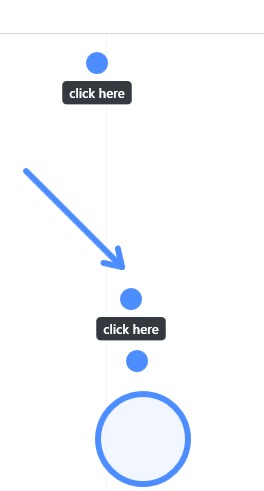
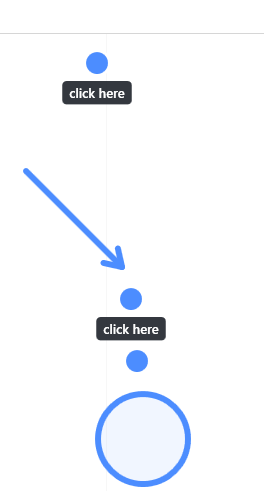
visual tesaching system
-
-
ASHA began as a missing piece of another project.
I was building Lantern, an agentic harness that lets powerful hosted models and smaller local models use tools. I am very interested in local models because they can be private, independent and actually belong to the person using them. But I kept running into the same awkward problem: a model could reason, call tools and work with files, yet still be almost blind when something happened on the graphical desktop.
My first plan was simple: give Lantern vision.
Then I tried to use it.
A screenshot alone does not solve the real problem. When I say “this button,” the agent has to know what this means. When it thinks it understands me, I want it to show me. If it is uncertain, it should be able to ask, “Do you mean this one?” If I demonstrate something, the useful information is not only the coordinates of my mouse. It is what I said, which application was open, what was visible, what I clicked, why I clicked it and what changed afterwards.
That is shared attention, and it should not belong only to Lantern.
Codex, Claude Code, Lantern, a local Gemma model or another tool-calling model should all be able to use the same human-facing layer. An agent could ask ASHA to handle the desktop for it, or subscribe to ASHA’s permitted session information and use what she already knows about this computer. Two agents sitting next to each other on the same desktop could also use ASHA as a messenger: she can see the human-facing state, follow their status and carry the information that both need, while the human stays visibly in the loop.
That missing layer became ASHA: Agentic Human Shared Attention.
ASHA’s appearance developed in much the same way as the rest of the project. I started with a clickable button. I did not like it. I wanted something closer to a living presence, so the button became an orb. I added moving blue and almost-white clouds because, honestly, why not? When ASHA listens, a violet-pink presence slowly appears inside. It is a small detail, but it changes how the system feels. Humans are remarkably willing to talk naturally to a character or presence, even while knowing exactly what the technology underneath it is doing.
We built the demonstrator under a slightly ridiculous deadline, directly on my real Windows desktop. Much of the design came from using ASHA while we were building her: talking to the orb, pointing at Outlook and LM Studio, watching a highlight land one centimetre away from the intended text, correcting it, losing the second speech turn, fixing it, recording sessions and gradually adding tightly gated computer control.
The result is not just a vision module. ASHA is the beginning of a more human way for people and agents to share a computer.
What it does ASHA is a model-independent shared-attention, desktop-awareness and teaching layer for humans and computer-use agents.
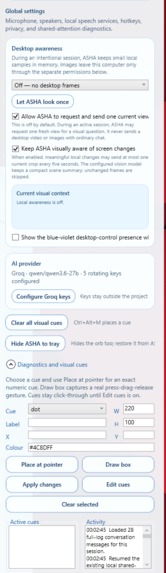
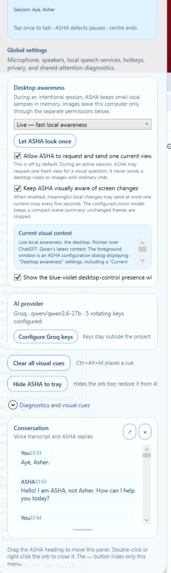
Her normal interface is only a small borderless orb. It can stay quietly above the desktop, move without a visible rectangular application frame and react to listening, thinking and speaking. A double-click opens the larger control surface when it is needed.
A natural voice conversation I wanted to speak with ASHA as I would speak with another person sitting beside me, not as a sequence of “record, stop, wait, press again” voice notes.
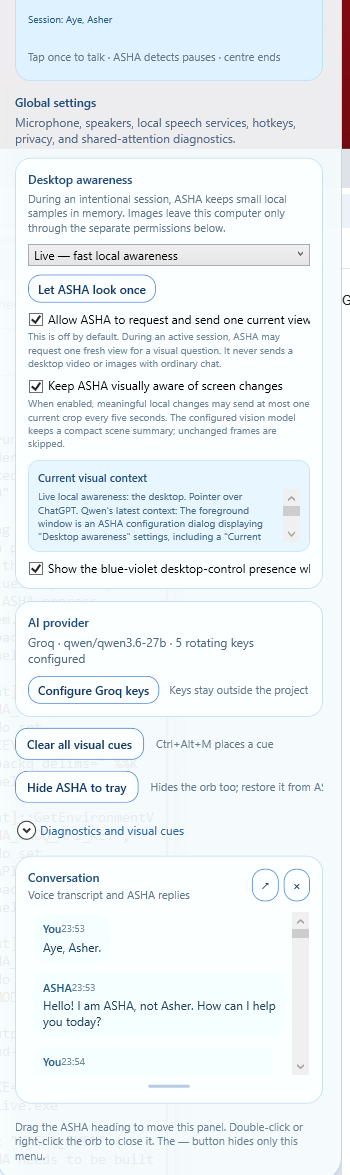
The demonstrator connects local speech recognition and text-to-speech to a configurable reasoning and vision model. One touch starts listening. ASHA detects a pause, answers and returns to listening for the next turn. The spoken conversation is connected to the same timeline as visual observations, teaching cues, permissions and computer actions.
ASHA also knows that she is ASHA. She speaks to a human first. She does not normally recite implementation details, output hidden reasoning or behave as if speech recognition means she has literal biological ears. If a person asks for the technical explanation, she can give it, but her everyday role is a calm presence at the desktop.
On-demand and continuous desktop awareness ASHA can look at:
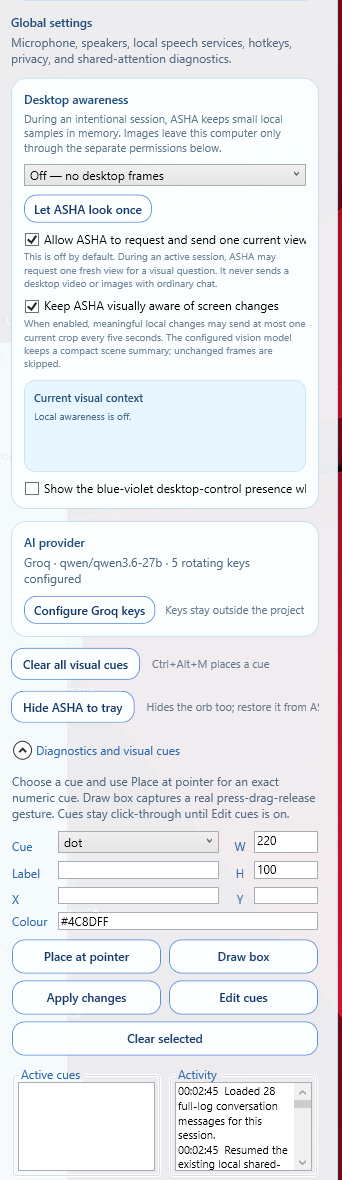
the area around the pointer; the foreground window; the complete desktop; the left or right side of a monitor; or a deliberately selected region. There is a lightweight live-awareness mode for changed local keyframes, as well as explicit one-time views. Large captures are reduced before they are sent to a configured vision provider, and unchanged frames can be skipped. This matters because continuous awareness becomes useless if it slows down the computer it is meant to help with.
Whenever ASHA shares a view, she can draw a temporary blue frame around the exact captured area. The human can see what she is looking at. There should not be a mysterious invisible camera silently collecting the desktop.
A visual language shared by the human and the model ASHA can place points and circles, draw boxes, draw vector arrows and attach labels. These are not only decorations for screenshots.
The human can say:
This is the mailbox list.
ASHA can answer:
Do you mean this button?
Or she can guide someone through a task:
Click here, then move this over there.
The same language works in both directions. Visual cues are selectable and editable, and their geometry and meaning can be stored with the session. Mouse actions such as left-click, double-click, right-click and drag can become meaningful events instead of an unexplained collection of coordinates.
The demonstrator maps targets from screenshot coordinates back to the physical Windows desktop. For visible text, local Windows OCR can help snap an approximate model target onto the text that is actually present. We added this after repeatedly seeing a model understand “Developer Docs” correctly while drawing the box around the nearby heading instead.
Teaching ASHA — and letting ASHA teach the human ASHA is intended as a two-way teaching system.
A person can demonstrate a task using speech, screen context, mouse actions, visual cues and application changes. These events belong together. The goal is not to learn:
Click x=184, y=326
The goal is to learn something closer to:
Open the demonstrated mail account and select its Inbox.
A useful teaching event can include the application and window, visible text, UI Automation metadata, a focused image, the top visible surface, the performed action, the spoken explanation and the expected result. This is the basis of a normalisation layer that can still recognize the target when a window moves.
ASHA can reverse the same relationship and become a tutorial. She can explain, highlight, demonstrate a pointer movement or ask the person to confirm an uncertain target.
Sessions and local memory ASHA is not meant to forget everything whenever the orb closes.
A retained session can contain the conversation, desktop observations, local visual evidence, teaching events, visual cues, permissions, computer actions and links to an external agent session. The full event log remains available even when a long conversation later needs a compressed model context.
This is the beginning of being able to ask:
How did I teach you to find my mailboxes?
In the future, sessions can be organised into projects and curated shared-attention channels. An approved agent could subscribe to the relevant project knowledge instead of rediscovering the same desktop procedure every time. Personal memory and shared project memory must remain separable.
Visible, permission-gated computer control ASHA can perform bounded computer actions, but only when the person explicitly enables a temporary control lease.
While that lease is active, the current demonstrator can:
discover and open installed Windows applications without hardcoding each application; open permitted existing folders; activate an existing application window; move the physical pointer; click, double-click and right-click; drag and scroll; type short, non-sensitive text; press approved navigation keys; and request a new desktop view independently of the human pointer. This is why “Open LM Studio,” “Open Outlook” and “Open DaVinci Resolve” can use one general application capability rather than three special demo commands.
ASHA does not give the model an arbitrary shell, executable paths, registry access or protected system folders. When control is active, a blue-violet frame can make the state visible and the action is written to the session ledger. Revoking the lease removes the capability immediately. A future deployment can be headless where appropriate, but the design is human-facing first.
How we built it ASHA combines several deliberately separate layers:
A .NET and WPF Windows application provides the orb, control surface, transparent overlays, global input handling and native desktop integration. A provider-neutral TypeScript layer defines visual tools, sessions, teaching events, semantic procedures and harness integration. Windows APIs provide application discovery, foreground-window information, UI Automation, OCR, screenshots and constrained input through SendInput. Local services provide speech recognition and text-to-speech. A replaceable reasoning and vision provider interprets conversation, screenshots and tool calls. A local ledger keeps conversation, evidence, teaching and control events in one timeline. I first wanted to run the main model locally on my RTX 5090. That is still the long-term direction, but using a large local model for vision and computer control while coding on the same machine can slow down the exact desktop ASHA is observing. For the hackathon demonstrator, Groq gives us fast research inference with qwen/qwen3.6-27b. ASHA uses bring-your-own-key configuration; no keys are stored in the repository. A standalone rotation layer can use several externally stored keys without exposing them.
The provider is replaceable. ASHA can later be driven by a local Gemma QAT or Qwen3.6 27B model, another multimodal API or a larger harness.
Codex was not used as a magic “build my app” box. We worked together in a very direct loop. I described what I saw and what felt wrong, Codex inspected the live system, changed a bounded part, built it, and I immediately tried it again. The mistakes were useful design information. In fact, our collaboration while building ASHA was a good example of why ASHA should exist: a human and an agent working quickly on the same computer need a better way to share visual context, corrections and intent.
Challenges we ran into Making voice feel continuous Speech systems easily become a collection of disconnected recordings. We had to coordinate listening, pause detection, reasoning, speaking and returning to listening without ASHA cutting off her own answer or ignoring the human’s second turn.
Grounding model vision on physical pixels Understanding the words in an image does not automatically produce the correct desktop coordinates. Cropping, downscaling, multiple monitors and Windows DPI can all move a correct semantic answer to the wrong physical location. Explicit coordinate transforms and OCR grounding helped, although precise visual grounding is still an area we want to improve.
Respecting the top Z-layer A target may exist in an application but be covered by another window. For human-facing computer use, the exposed top surface is the real surface. ASHA must not click where an invisible control is expected to be.
We also learned that asking Windows to activate an application is not the same as proving that it stayed in front. Another program can reclaim focus. Real computer control needs verification after an action, not a cheerful but unverified “Done.”
Keeping continuous awareness lightweight Sending a full-resolution desktop every few seconds would be slow, expensive and intrusive. We used selectable scopes, changed keyframes, downscaling and progressive inspection. The next version needs to take this much further locally.
Joining conversation and telemetry A demonstration is not a macro. The sentence “I open this because it contains my work account” changes the meaning of the click that follows it. If language, vision and interaction are separated, the most useful part of the teaching is lost.
Building honestly under a deadline It was tempting to hardcode a beautiful Outlook demo. We did not. Application discovery and computer control are general capabilities, which also means we encountered the real failures: focus changing, windows moving, highlights missing and models interpreting the right word at the wrong position.
Accomplishments that I am proud of Turning a Lantern vision idea into an independent, provider-neutral system. Building a living voice orb instead of another rectangular chat window. Connecting voice, desktop awareness and session telemetry. Supporting pointer, foreground-window, full-desktop and directional views. Showing the human exactly which desktop region is being shared. Giving humans and models the same visual language of points, boxes, arrows and labels. Mapping vision output back onto a real Windows desktop and adding local OCR grounding. Recording durable local sessions containing conversation, evidence and actions. Opening installed applications through one general capability rather than hardcoded names. Adding visible, revocable mouse and keyboard control. Keeping model-provider secrets outside the repository. Creating the foundation for agents to share desktop context rather than independently rediscover it. Keeping the human visibly involved in agent-to-agent communication. Preserving a path toward fully private local inference. Producing a working demonstrator in a very small amount of time. Most importantly, ASHA is no longer only an annotation playground. She can converse, inspect permitted parts of the desktop, visibly direct attention, retain a session and perform bounded computer actions.
What we learned The biggest lesson is that computer use is not mainly a clicking problem. It is a shared-attention problem.
Before an agent acts, it should know what the human means, what is currently visible, which surface is on top, where the agent is looking, whether the human agrees, whether control is permitted and whether the action actually produced the expected result.
We also learned that perception, speech, reasoning, memory and input control do not have to live inside one enormous model. Local speech, local OCR, Windows metadata, a vision model, a reasoning model and a constrained driver can cooperate through a common layer.
Multi-agent coordination also needs more than a text-message channel. Two agents may exchange messages while both remain unaware that the human moved a window, demonstrated a correction or interrupted the workflow. ASHA can provide shared desktop reality alongside agent status, and can carry the relevant information between agents and the human.
Finally, teaching cannot be separated from conversation. Humans teach with words, gestures, demonstrations, questions and corrections. A useful desktop agent should be teachable in the same way.
What is next for ASHA The next major step is to turn retained demonstrations into editable, reusable semantic procedures. Cua Drivers refinement for virtual mouse implementation
Before a procedure is approved, the person should be able to review the complete timeline, conversation, screenshots, cues and actions; correct targets; remove irrelevant events; and approve the resulting recipe.
Further work includes:
stronger agreement between OCR, UI Automation and vision evidence; post-action verification and reliable foreground recovery; adaptive replay when windows and layouts move; more efficient continuous local vision; local Gemma and other tool-calling model adapters; conversational editing of learned procedures; project memory and curated shared-attention channels; reusable ASHA skills for different harnesses; agent-to-agent coordination with the human visibly in the loop; and privacy-focused local deployments for sensitive environments. The long-term idea is not an AI that silently takes over a computer.
It is ASHA as a living coordination layer inside the machine: seeing what the human permits her to see, showing what every participant means, helping agents understand the same desktop, carrying information between people and models, and preserving a shared memory of the work.
A human can teach ASHA. ASHA can teach the human. Agents can learn from ASHA and coordinate through her. Throughout it all, the human remains part of the conversation and visibly in control.
Built With
- .net
- c#
- codex
- gpt-5.6
- lm-studio
- local
- model
- node.js
- openai-api
- svg
- typescript
- ui-automation
- windows
- windows-ocr


Log in or sign up for Devpost to join the conversation.