-
-
Skill architecture
Building "Language Teacher" - Alexa skill powered by AWS Polly and AWS Translate
Building Alexa skills is a fun. It's even more interesting once you acknowledge the vast amount of AWS services which could be easily integrated with Lambda function. My recent experiment was to build something interesting that can use best of both Alexa and AWS worlds, so I came up with this idea to use AWS Polly and AWS Translate to give Alexa accustomed VUI a new spin.
Test drive
"Language teacher" has recently passed the certification and has been published by Amazon. Currently the skill can talk back to you in 7 languages: Russian, Italian, French, German, Portuguese, Japanese, Spanish and output the transcription of the speech to your Alexa app: Give it a test drive to see how it works: https://www.amazon.com/dp/B07GYS433J/
Skill Architecture
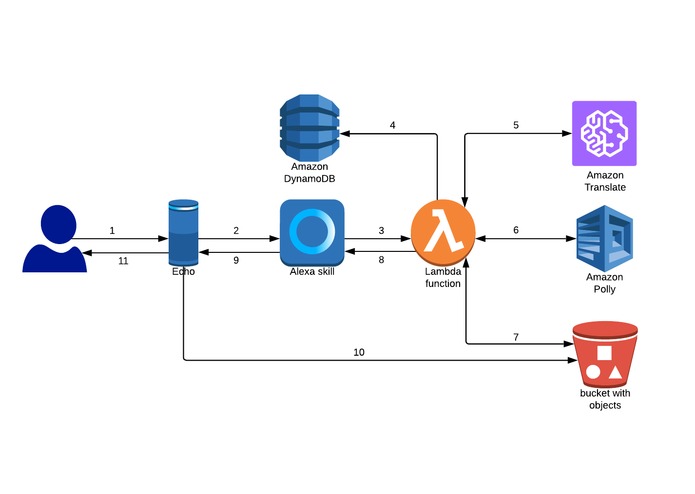
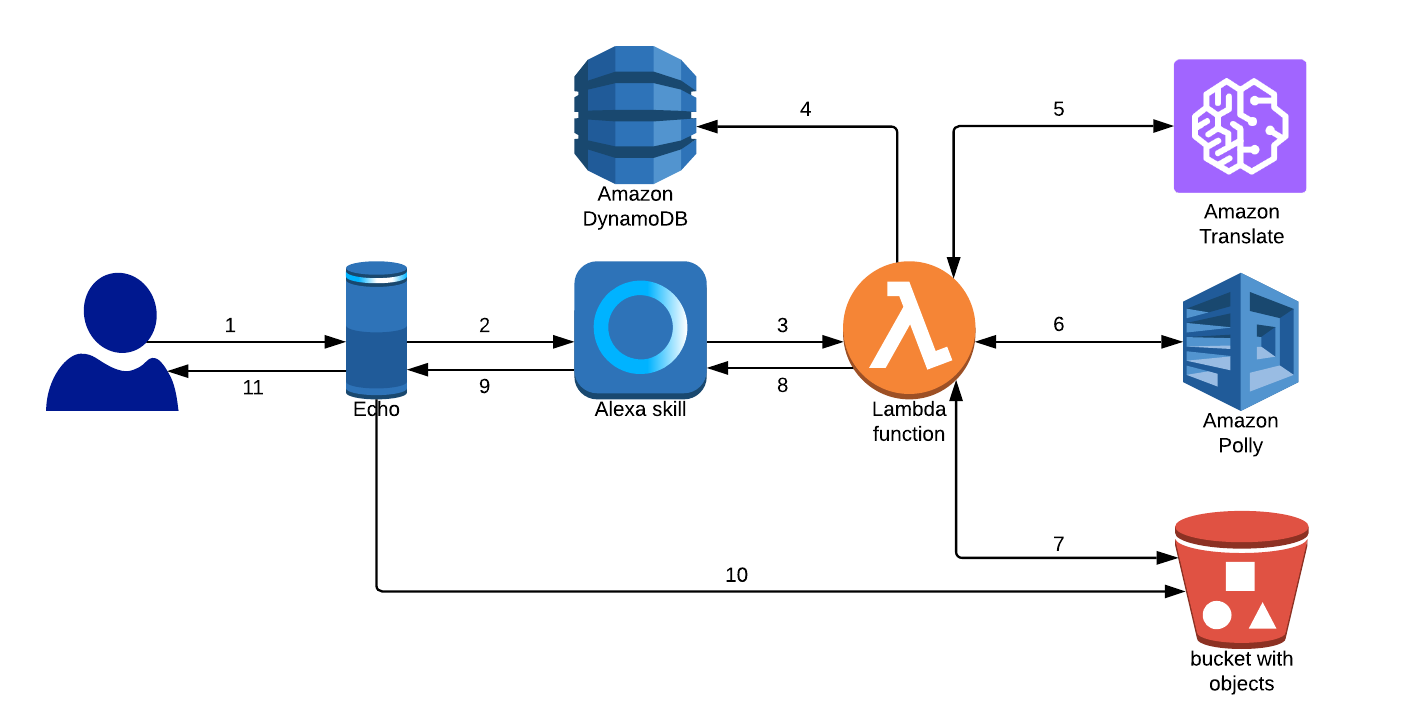
Here is how the architecture of the skill looks like:
Step 1 - User activates Echo device by using Alexa skill invocation name "language teacher" with any of available intent utterances
Step 2 - Echo device sends the request as an audio to Alexa Voice Service, where AVS through it's ASR & NLU capability recognizes the skill and intent names
Step 3 - Alexa Voice Service invokes a particular skill endpoint which in our case is defined as AWS Lambda function ARN. In the request to Lambda AVS passes an identified intent name with all the derived slot values from the Step 2
Step 4 - Lambda function takes the Device ID from the request and goes to Dynamo DB table to check if the User has defined his preferred translation language before, if language has not been defined it will use a default language
Step 5 - The slot value and a language code are passed by Lambda to AWS Translate as parameters. AWS Translate returns a translated text in the response
Step 6 - Lambda takes AWS Translate response and passes it to AWS Polly along with the Voice ID that should be used to produce the speech from the text. AWS Polly returns a stream to the Lambda function in a response
Step 7- Lambda writes the stream as an mp3 file to S3 bucket with the prefix as a hashed Device ID
Step 8 - Lambda prepares the response using SSML audio tag to reference the audio file location and sends it back to AVS
Step 9 - AVS sends the response to the Echo device
Step 10 and 11 - Echo device produces the response back to the User with audio file being streamed as part of the response
Skill Implementation
The implementation part is quite straight forward, for the full version and interaction model you can check out the source code here: https://github.com/Dlozitskiy/language-teacher/ As our lambda is dealing with asynchronous calls, the intent code has been structured as a chain of promises:
Translate:
function doTranslate(text,language) {
  let result = new Promise((resolve, reject) => {
    var inputText = text;
    var params = {
        Text: inputText,
        SourceLanguageCode: 'en',
        TargetLanguageCode: language
    };
    translate.translateText(params, function(err, data) {
      if (err) {
              console.error(err, err.stack); // an error occurred
              reject(err);
      }
      else {
              console.log(data);           // successful response
              resolve(data.TranslatedText);
      }
    });
  });
  return result;
}
Synthesize:
function doSynthesize(text,voice) {
  let result = new Promise((resolve, reject) => {
    var params = {
      OutputFormat: "mp3",
      SampleRate: "22050",
      Text: `<speak><amazon:effect name="drc"><p>${text}</p></amazon:effect>
      <prosody rate="slow"><amazon:effect name="drc"><p>${text}</p></amazon:effect></prosody></speak>`,
      TextType: "ssml",
      VoiceId: voice
    };
    polly.synthesizeSpeech(params, function(err, data) {
      if (err) {
          console.error(err, err.stack); // an error occurred
          reject(err);
      }
      else {
          resolve(data.AudioStream);
      }
    });
  });
  return result;
}
Write to S3:
function writeToS3(data,prefix) {
  let result = new Promise((resolve, reject) => {
    var putParams = {
      Bucket: `${process.env.BUCKET}`,
      Key: `${prefix}/speech.mp3`,
      Body: data,
      ACL: 'public-read',
      StorageClass: 'REDUCED_REDUNDANCY'
    };
    console.log('Uploading to S3');
    s3.putObject(putParams, function (putErr, putData) {
      if (putErr) {
          console.error(putErr);
          reject(putErr);
      } else {
          resolve(putData);
      }
    });
  });
Building the response:
    return new Promise((resolve) => {
      doTranslate(phrase, sessionAttributes.targetLanguage)
      .then((data) => {
        translation = data;
        doSynthesize(data, voices[sessionAttributes.targetLanguage])
        .then((data) => {
          writeToS3(data,prefix)
          .then(() => {
              console.log(prefix);
              resolve(handlerInput.responseBuilder
              .speak(`This is how phrase ${phrase} will sound in ${languages[sessionAttributes.targetLanguage]}:\
              <audio src="https://s3.amazonaws.com/${process.env.BUCKET}/${prefix}/speech.mp3"/>\
              Say "repeat" to listen again, or ask something else to get a new translation`)
              .reprompt('Say "repeat" to listen again, or ask something else to get a new translation')
              .withStandardCard(
              'Language Teacher',
              `Original phrase: ${phrase}\nTranslation in ${languages[sessionAttributes.targetLanguage]}: ${translation}`,
              card_small,
              card_big)
              .getResponse());
          });
        });
      });
    });
  },
};
For hashing of an Echo Device ID as an S3 object prefix, you can use md5 hash function:
const devId = handlerInput.requestEnvelope.context.System.device.deviceId;
const prefix = require('crypto').createHash('md5').update(devId).digest("hex").toString();
What's next
Currently the skill just went live and it's gathering a feedback from the customers on what can be improved in the future releases, there might be an option to learn poems in different languages repeating after native speakers or learning famous saying by famous people in their native languages!
Built With
- amazon-alexa
- amazon-polly
- amazon-translate
- aws-polly
- aws-translate
- javascript

Log in or sign up for Devpost to join the conversation.