Inspiration
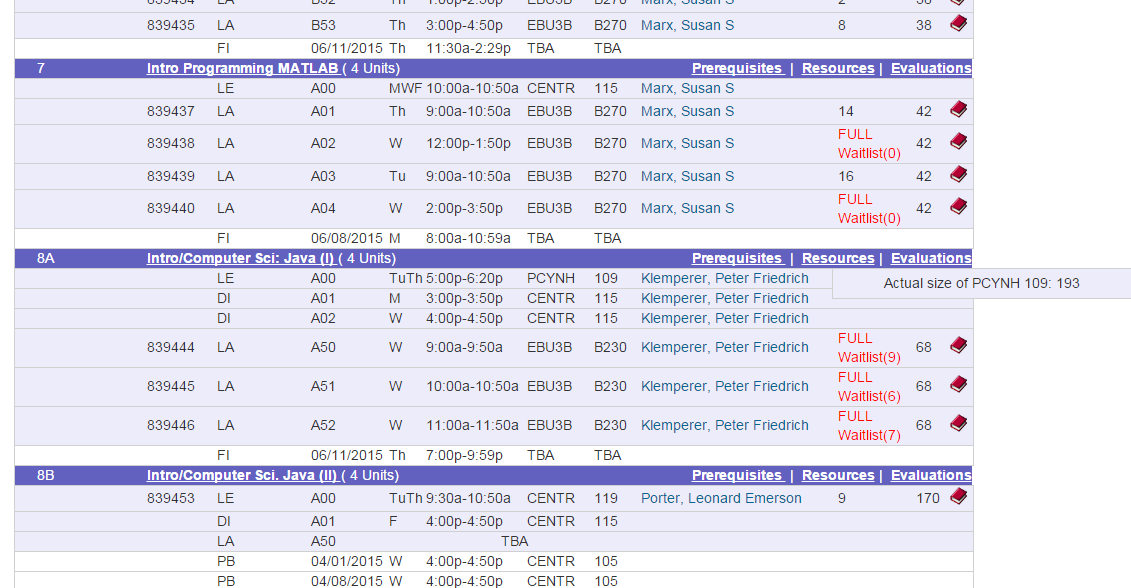
In order to have flexibility, the academic departments doesn't allow full capacity up until the beginning of the quarter. Due to this, students who waitlist for classes during registration do not have an accurate measure of how likely they will be able to get into the class. To help students with this dilemma, we created a chrome extension that shows the maximum number of seats in the classroom alongside the number of seats the department currently allows for each course.
How it works
We used a webcrawler to gather information from our school website to create a database of classroom capacities. This data was converted into a key value pair lookup table for use in the chrome extension. It uses javascript to scan the webpage to retrieve the classroom names and display the corresponding classroom capacities.
Challenges we ran into
We came into the competition with no previous experience making chrome extensions. It was most difficult to create a tooltip displaying the true classroom capacities on each hover.
Accomplishments that we're proud of
We created a tool that is useful to our entire student body as well as us. We plan to make this tool open source and share it with the rest of our peers so that they can benefit from our work.
What we learned
We learned how to work with the chrome extension API. We learned a lot about the CSS and Javascript languages.
What's next for LAHACKS2015
Our next step is to incorporate more information into our tool so that students can make better decisions about their classes.


Log in or sign up for Devpost to join the conversation.