📚 AI Homework Reviewer
🚩 Problem
Teachers spend a significant amount of time manually reviewing student homework. Each assignment must be checked carefully, mistakes must be identified, and corrections must be written for every student.
This process becomes even more challenging when teachers have to review dozens of notebooks every day.
As a result:
- Teachers spend hours checking homework.
- Students often receive feedback late.
- Immediate learning opportunities are missed.
💡 Inspiration
The idea for this project came from a very real situation.
My wife is a school teacher, and every day she brings home stacks of student notebooks to review. She spends hours checking answers, identifying mistakes, and writing corrections.
Watching this process made me realize two things:
- Teachers invest a huge amount of time in repetitive correction work.
- Students could benefit greatly from instant feedback instead of waiting for the next day.
That led to a simple question:
What if AI could help teachers by automatically reviewing homework and highlighting mistakes directly on the student's paper?
This idea became the foundation for our project.
🧠 What Our Project Does
Our application allows students to quickly receive AI-powered homework feedback.
Workflow
- 📷 Student captures a photo of their homework
- 🤖 AI analyzes the content
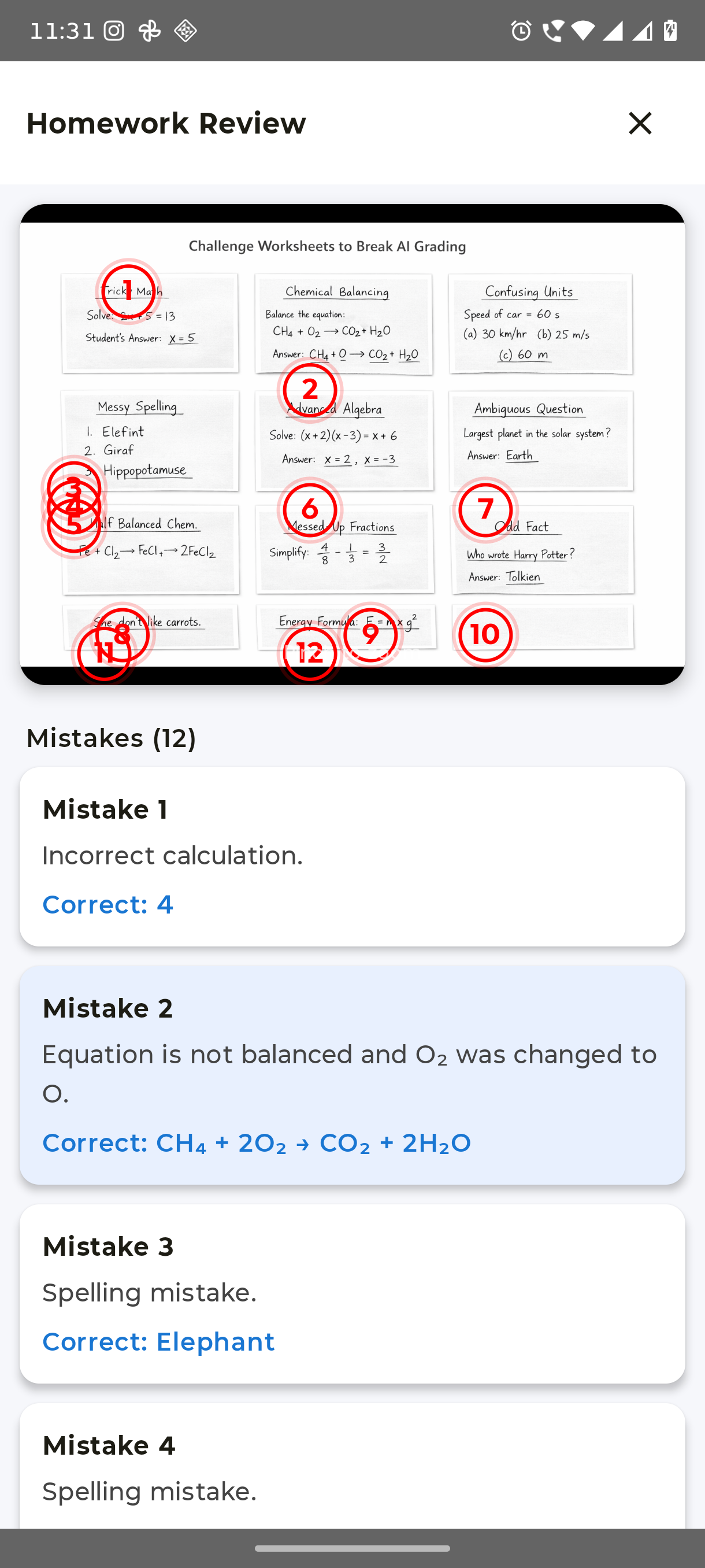
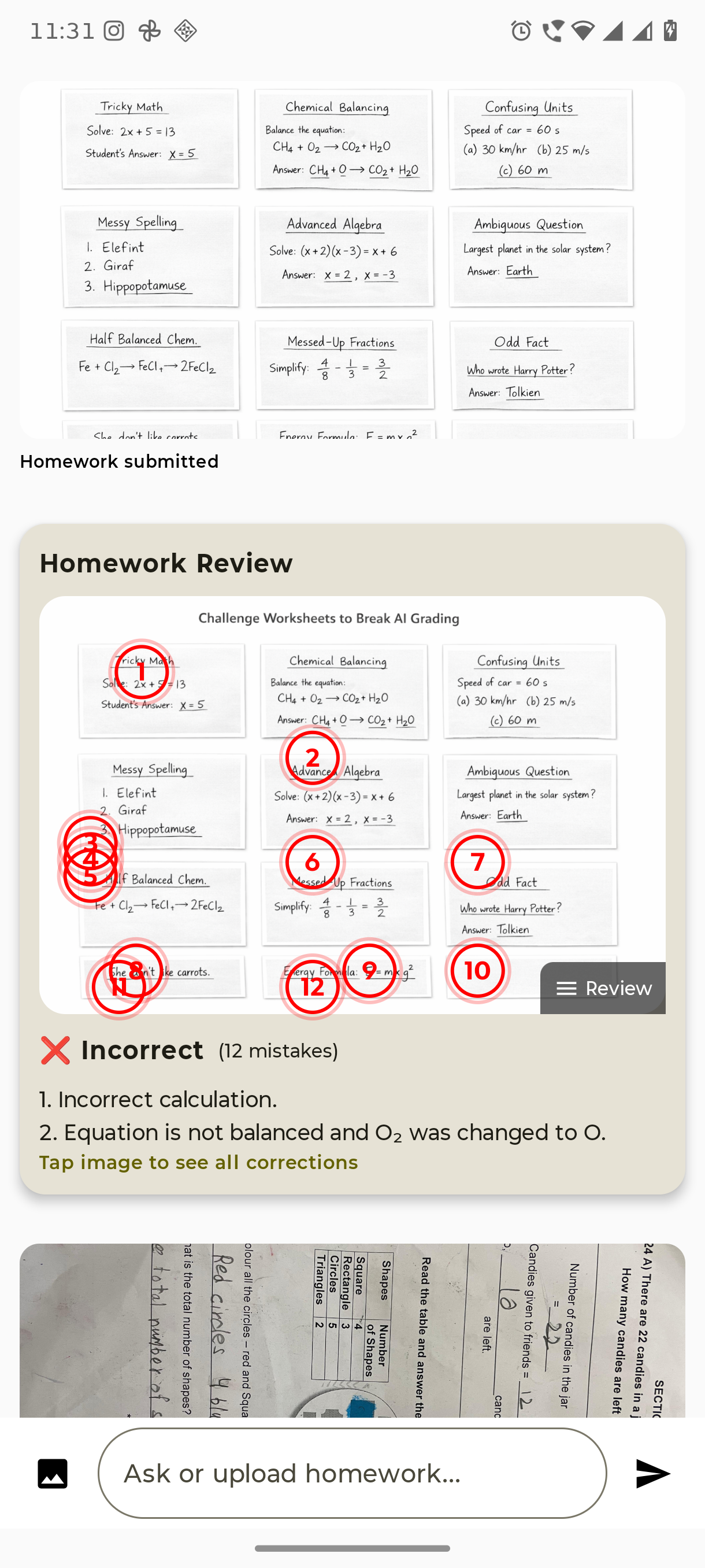
- 📍 Mistakes are marked directly on the homework image
- 📖 Each mistake includes an explanation and correction
- 🔍 Students can zoom into the image and review each correction
Instead of showing long text explanations, the system places numbered markers directly on the homework, similar to how a teacher marks papers.
Example flow:
Upload homework
      ↓
AI analyzes answers
      ↓
Mistakes appear as markers on the paper
      ↓
Tap marker → see explanation
This makes the review process visual, intuitive, and easy to understand.
🧠 Beyond Basic Homework
While the current prototype focuses on identifying incorrect answers on worksheets, the underlying AI system can analyze much more complex academic content.
Using multimodal AI models such as Gemini, the system can understand both text and visual information from homework images.
This enables support for multiple academic subjects.
📐 Mathematics
The AI can analyze mathematical expressions and verify whether the student's solution is correct.
Example:
[ 2x + 5 = 13 ]
If a student writes:
x = 3
The system detects the mistake and suggests:
Correct Answer: x = 4
Potential math capabilities include:
- arithmetic calculations
- algebra
- fractions and ratios
- unit conversions
- step-based solutions
⚗️ Chemical Equations
The AI can also evaluate chemical equations and detect incorrect or unbalanced reactions.
Example:
[ H_2 + O_2 \rightarrow H_2O ]
Correct balanced equation:
[ 2H_2 + O_2 \rightarrow 2H_2O ]
This allows the system to assist students with chemistry homework and science worksheets.
🧪 Science & Knowledge Questions
The system can check conceptual questions such as:
Question: Which planet is known as the Red Planet?
Student Answer: Jupiter
AI correction:
Correct Answer: Mars
📝 Language & Writing
The AI can also detect:
- spelling mistakes
- grammar errors
- incorrect word usage
- sentence structure problems
Example:
Student: She go to school everyday.
Correction: She goes to school every day.
🏗️ How We Built It
The application was built as an Android app using Kotlin and Jetpack Compose.
Technologies Used
- Kotlin
- Jetpack Compose
- Canvas API
- Coil (AsyncImage) for image loading
- Android Camera & Gallery APIs
- Gemini AI for homework analysis
🤖 Why Gemini Was Essential
To analyze homework images and detect mistakes, we needed an AI system capable of understanding both visual information and written academic content.
This is where Gemini played a critical role.
Unlike traditional AI systems that process only text, Gemini is a multimodal model, meaning it can analyze images, text, and structured information simultaneously.
This capability allowed our application to:
- 📷 Understand the structure of worksheets from images
- 🔍 Locate student answers on the page
- ❌ Detect incorrect answers
- ✍️ Provide corrections and explanations
- 📍 Return coordinates so mistakes can be marked directly on the homework
Instead of building a complex pipeline involving separate OCR engines, rule-based grading systems, and subject-specific parsers, Gemini enabled us to simplify the architecture by performing intelligent analysis directly from the homework image.
System Architecture
Student captures homework photo
          ↓
Gemini analyzes the worksheet image
          ↓
Identifies incorrect answers
          ↓
Returns mistake descriptions + coordinates
          ↓
App overlays correction markers on the homework
Image Annotation System
A key technical challenge was displaying AI corrections directly on the homework image.
Each detected mistake contains normalized coordinates:
[ (x, y) ]
These coordinates are converted to screen positions:
val cx = size.width * mark.x
val cy = size.height * mark.y
Using the Canvas API, we draw numbered markers at those positions.
🎨 User Experience Design
We designed the interface to feel like a digital version of a teacher reviewing homework.
Key features include:
- 📍 Numbered correction markers
- 🔎 Zoomable homework preview
- 📷 Camera or gallery upload
- ⏳ AI analysis loader
- 📖 Explanation cards for each mistake
Instead of a chat-style interface, the UI focuses on homework review cards, making feedback easier to understand.
⚠️ Challenges We Faced
OCR Integration
We initially planned to integrate OCR (Optical Character Recognition) to extract handwritten text directly from the homework images.
However, during development we encountered Gradle dependency conflicts between OCR libraries and existing project dependencies, which caused build issues.
Due to hackathon time constraints, we decided to prioritize the core homework review experience and rely on AI-based image understanding.
Future versions will integrate:
- handwriting OCR
- structured answer detection
- improved mistake localization
Image Marker Alignment
Another challenge was ensuring that correction markers stayed aligned with the homework image even when the user zoomed or panned.
We solved this by using normalized coordinates and applying the same transformations used by the zoom gesture system.
👨🎓 Student Self-Assessment
While the original motivation for the project was to help teachers review homework faster, the application can also act as a powerful self-assessment tool for students.
Students who practice additional exercises or solve worksheets at home can simply take a photo of their work and receive instant AI feedback before submitting their homework.
This allows students to:
- ✅ Check answers before submitting assignments
- 📖 Understand mistakes immediately
- 🔁 Correct errors and improve learning outcomes
- 🎯 Practice additional exercises independently
Instead of waiting until the next day for corrections, students can learn from their mistakes in real time, effectively turning the system into a personal AI tutor for homework practice.
📚 What We Learned
This project helped us learn several important things:
- Designing AI-powered educational tools
- Handling image overlays and coordinate mapping
- Building modern Android UIs with Jetpack Compose
- Managing camera permissions and image capture
- Rapid prototyping during a hackathon
We also learned how important user experience design is when presenting AI-generated feedback.
🚀 Future Improvements
Future versions of the project will include:
- ✍️ Handwriting OCR
- 📊 Student learning progress tracking
- 🧠 Mistake pattern detection
- 📚 AI-generated practice questions
- 🏫 Teacher dashboard for class analytics
🌍 Impact
By providing instant homework feedback, this tool can:
- Reduce teacher workload
- Provide faster feedback to students
- Help students learn from mistakes immediately
- Enable students to self-assess their work before submission
- Act as an AI-powered homework tutor for independent practice
Our goal is to build an AI learning assistant that supports both teachers and students.
📖 Story Illustration (Experimental)
The storytelling module currently focuses on generating a structured five-page story experience for children.
Each page contains short, easy-to-read text designed for young learners.
Image generation for story illustrations was partially implemented during development. However, due to rate limits from external image generation APIs during the hackathon environment.
Future versions will include:
AI-generated illustrations for each story page
consistent character design across slides
enhanced visual storytelling for children
Despite this limitation, the storytelling feature still demonstrates how generative AI can help encourage creativity, reading practice, and imagination for students.
Built With
- android
- android-studio
- coil
- compose
- jetpack
- kotlin

Log in or sign up for Devpost to join the conversation.