-
-
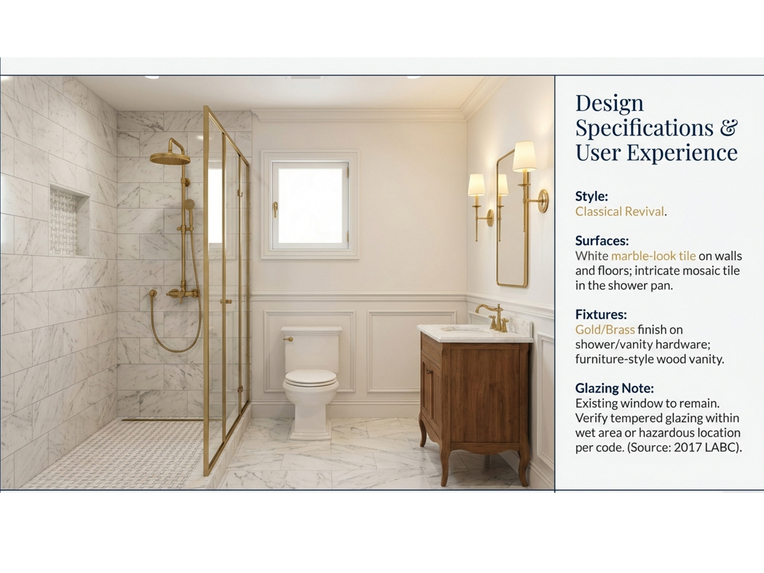
Renovation Mood Image
-
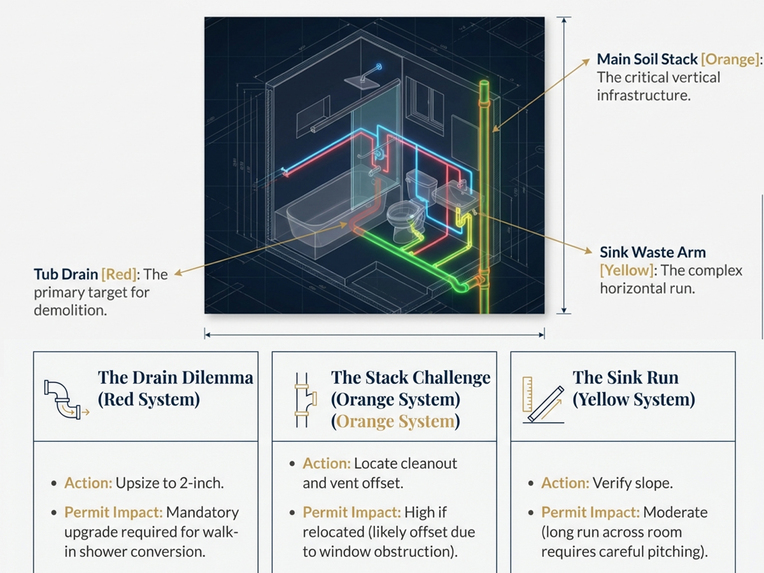
Plumbing Analysis
-
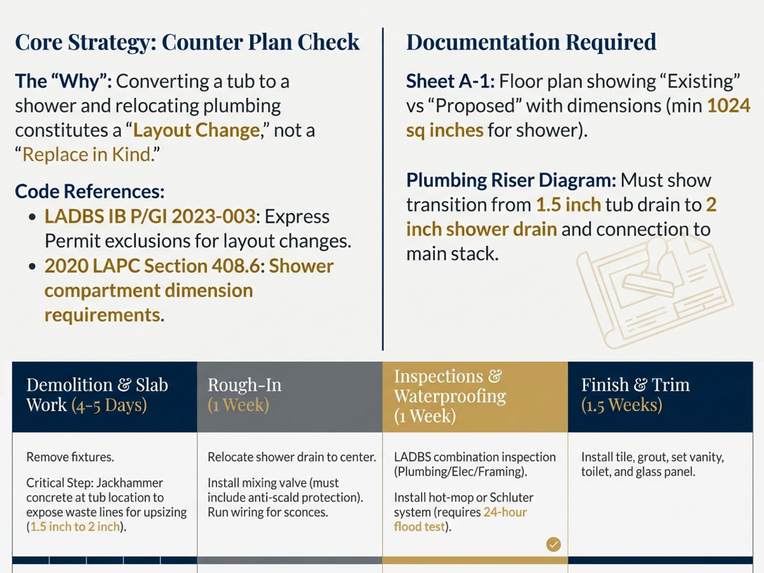
Permit Requirement
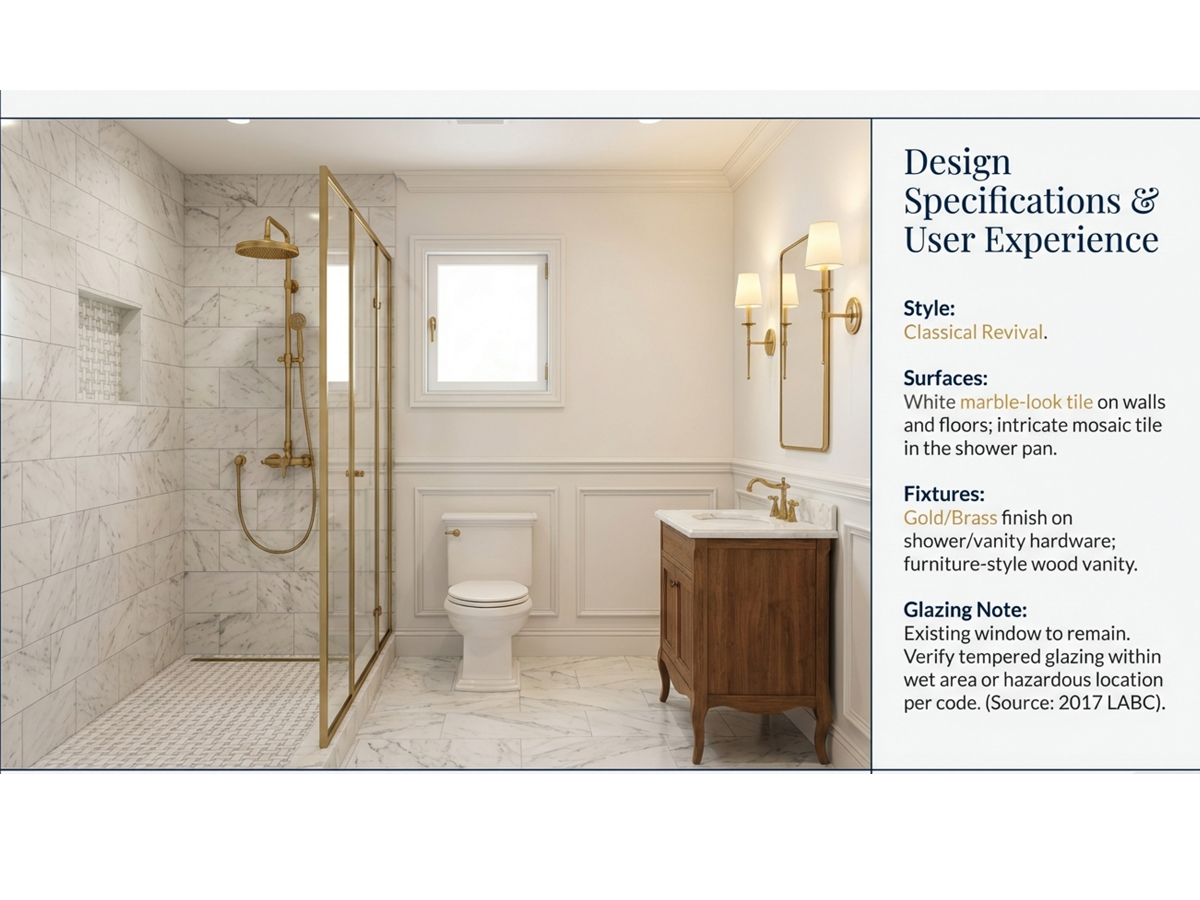
Inspiration
In Los Angeles, housing is in high demand, and many people work their whole lives toward owning a home. However, when it comes to design and build, most homeowners only have a rough idea and barely know what codes and permits need to be considered to bring the idea into reality. With many steps missing, a good idea often ends up as nothing but plain.
I have been researching and working in the AEC industry for more than 10 years on both the owner and contractor sides. I know the pain of inefficient communication between designer and owner, and how important it is for homeowners to start thinking from a high level in order to save budget and time in the later construction phase. This tool is here to bridge the knowledge gap, help homeowners make pro-level key decisions, and make DIY renovation real and cool.
What it does
MTBuddy helps LA homeowners build a project definition book and remodel with confidence:
- Intake wizard: Gathers common questions and constraints to guide AI generation.
- Video in: Uploads a video of the user’s existing bathroom for AI analysis and generation.
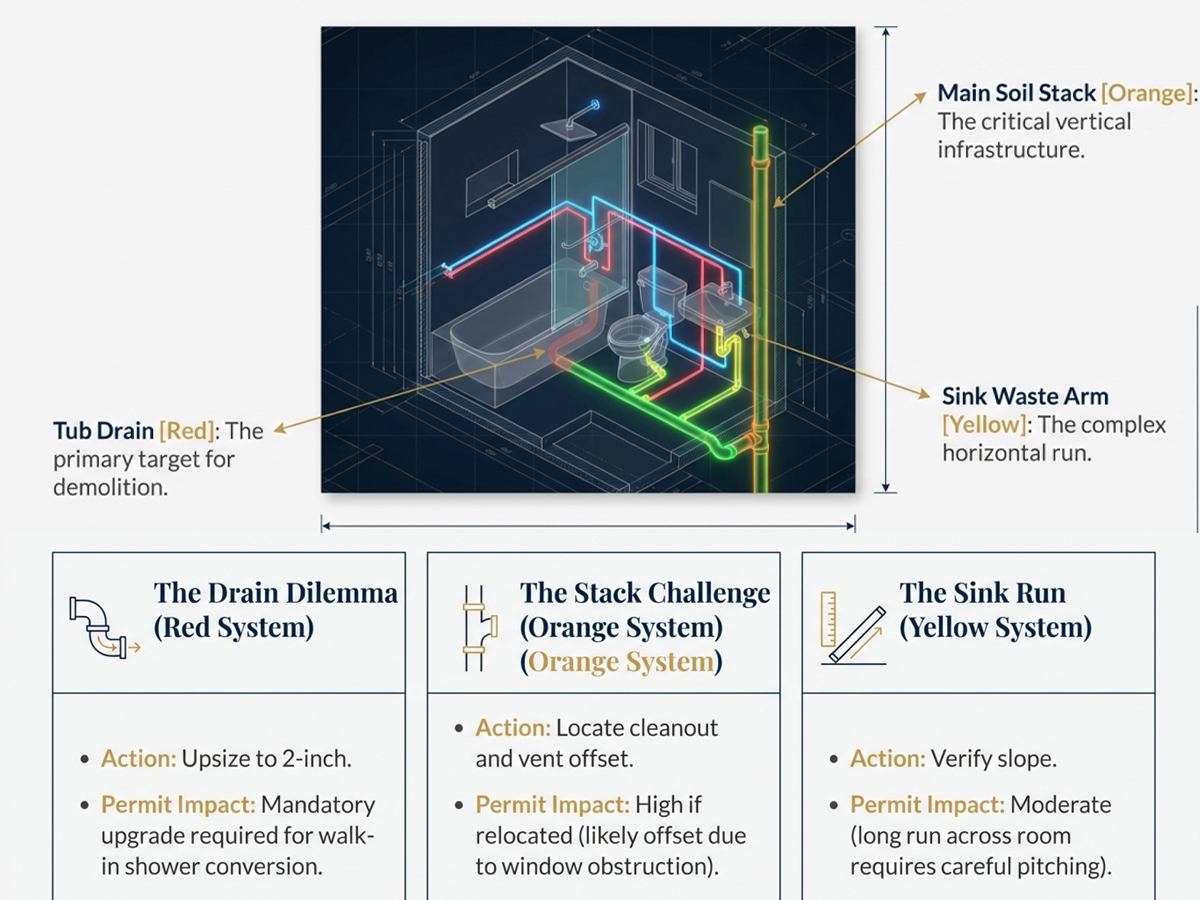
- Mood image: Selects keyframes, references the user’s keywords, re-renders the space in Classical / Modern / Transitional styles, infers the existing plumbing context, and flags potential renovation challenges.
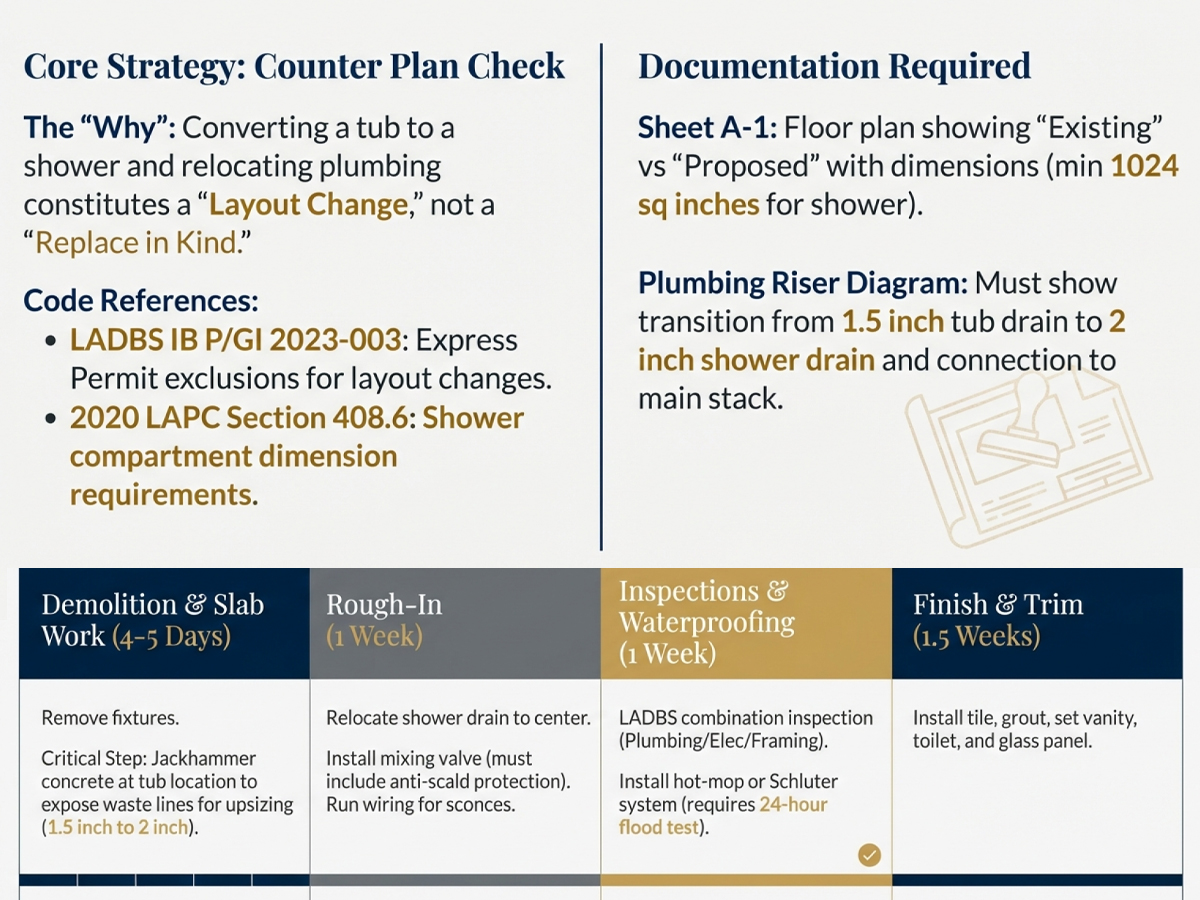
- Executive summary & handoff pack: Generates a recommended permit strategy, a timeline, a rough cost breakdown, modification impact notes, drawing requirements, and a concise scope so homeowners can understand the project holistically and consult a GC (General Contractor) or architect more effectively.
- Permit readiness (with citations): Generates a checklist of likely required drawings and inspection-focused notes.
- Blueprint: Generates pre-planning layout concepts.
- Short virtual tour: Creates a short video walkthrough clip of the proposed new space.
How we built it
- Gemini multimodal to interpret bathroom videos, infer spatial context, extract keyframes, and generate structured findings.
- NanoBanana Pro to generate style-consistent inspiration imagery (Classical / Transitional / Modern) and help homeowners pick a design direction.
- NanoBanana Pro to generate pre-planning layout concepts and present the design as drawing-style visuals.
- Gemini Veo 3.1 to generate a short walkthrough video based on the mood image.
- Built a Retrieval-Augmented Generation (RAG) pipeline for LADBS permit readiness, rough cost/time guidance, and plumbing-aware notes.
- Built a simple chat UI for interactive Q&A and iterative refinement.
- Built an intake wizard to collect initial constraints and guide generation.
Challenges we ran into
- Visual ambiguity: Mirrors, glass, glossy tile, and tight spaces can confuse detection. We encourage users to record steady, well-lit videos and keep the camera focused only inside the bathroom (avoid capturing hallways or adjacent rooms).
- Accuracy: AI is not accurate enough for precise measurement and construction-grade annotations. More targeted training and stronger validation (and, in some cases, RAG) would be needed.
- Avoiding over-claiming: Permit requirements vary by jurisdiction and scope. We position the output as pre-planning guidance and emphasize “consult a licensed professional” when needed.
- Image regeneration drift: Regenerated images can hallucinate and drift too far from the existing layout. To reduce this, we first extract keyframes, summarize layout features, and then generate the new design based on the keyframe + feature summary—so the “before vs. after” stays comparable.
- Token/cost control: A single run can cost around $5–$10. To manage cost, we split the workflow into steps (keyframe extraction → structured analysis → optional rendering/video) and only generate expensive outputs when needed. It’s easy to hit daily limits, especially when generating video.
Accomplishments that we're proud of
- Pioneering AI + AEC: One of the first tools in the AEC space focused on homeowner-facing pre-planning and permit readiness, helping laypeople understand LADBS requirements and make high-level decisions.
- Starting with a small, high-demand scope: Bathroom renovation is common and more affordable than a full-house remodel, and the workflow can scale to broader AEC use cases.
- Video → guidance with minimal input: Turned a simple homeowner video into clear, actionable remodel guidance with only a short intake questionnaire, without the need for high-cost equipment.
- Grounded design & build planning: Aims to save homeowners time and money by outlining rough cost and timeline expectations and reducing surprises—not just pretty renderings, but guidance that supports real-world design and build decisions.
What we learned
- Gemini’s power for app building: Gemini works well for multimodal understanding, summarization, analysis, and generating images/videos for prototypes.
- Market insight: Homeowners don’t need more “pretty renders”—they need decision clarity: style options, what’s safe to DIY, what needs a pro, what might trigger permits, and rough time/cost expectations.
- Best inputs = video + intake questionnaire: Multimodal AI performs best when we start from a short video and add an intake wizard to narrow the scope and clarify needs while keeping flexibility.
- Positioning matters: It can’t solve every detailed construction problem for now. It works best as a pre-planning assistant that provides a clear frame and knowledge base for homeowners, while leaving licensed work to a GC and architect.
- High-level guidance beats fake precision: Instead of generating “accurate” plan layouts, the coach provides an executive summary and step-by-step direction—saving people hours of Googling bathroom renovation guides.
- English is the best language for interaction and for receiving the feedback we want.
What's next
Phase 1
- From B2C to B2B: Start as a consumer tool, then expand to contractors and design firms as we gather more structured user data and real renovation use cases.
- Monetization: Credit-based pricing (free 1 run, then paid bundles).
- Scalability: Expand from bathrooms to whole-house remodels and ADUs; expand from LA → CA → nationwide.
Phase 2
- iPhone/iPad LiDAR scanning: Enable more precise inputs (generate an existing layout and a basic 3D model).
- Realistic fixture/material selection: Provide more accurate market options and specs (SKU-level where possible).
- Basis of Design support: Generate BOD-style summaries and drawing requirements (pre-permit).
Phase 3
- Digital twin: Robotic scanning with 360° images and high-precision modeling so users can interact with and “walk” the space.
- Inspection simulation: Scan and flag issues before receiving RFIs (Requests for Information) from an inspector.
- Construction simulation: Step-by-step demolition and renovation sequence planning.
- Hardware expansion and IoT: A physical robot to assist with scanning (and longer-term, on-site workflows), with cameras (CCTV) and sensors to sync data.
Best practice
- Open the public demo link.
- Upload the sample bathroom video. Turn on 4K 60FPS and film steadily with a wide-angle lens. Try to avoid capturing areas outside the bathroom door.
- Complete the intake questionnaires and describe anything that helps with generation.
- In the generated preview Mood Image card, select a style (Classical / Modern / Transitional) and run. You can also click Virtual Tour at the top right of the card to experience the space. If the preview is not satisfying, keep typing commands to generate more styles of images.
- Try to use this tool on the web version.
Built With
- gemini-ai-studio
- gemini-multimodal
- gemini-veo-3.1
- html/css
- javascript
- nanobanana-pro
- notebooklm
- retrieval-augmented-generation-(rag)

Log in or sign up for Devpost to join the conversation.