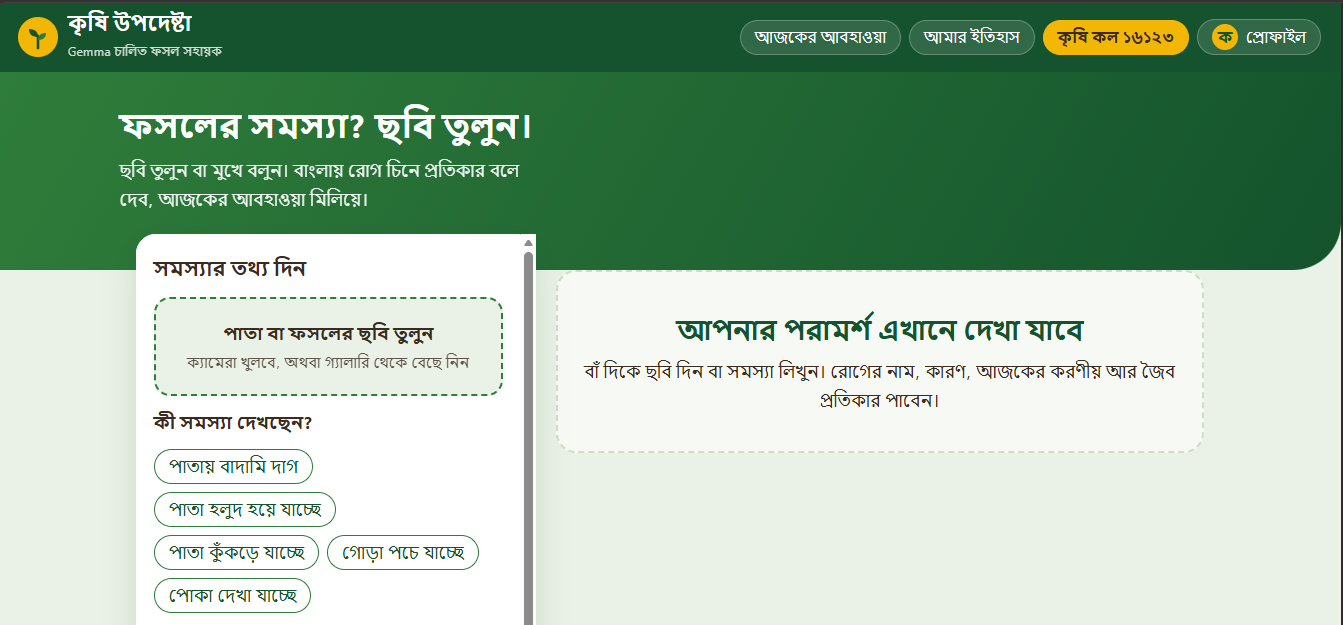
I am Dhiman, and I grew up watching farmers in my area struggle with the same problem every season: when a crop gets sick, they don't know what is wrong, why it happened, or what to do about it. The nearest agriculture officer is often hours away, and by the time help arrives, half the field is already lost.
The idea for Krishi Upodeshta (কৃষি উপদেষ্টা — "Agriculture Advisor") came from a simple observation: almost every farmer now has a smartphone, but almost none of them can read English-language agricultural manuals or navigate complicated government portals. What they can do is take a photo of a sick leaf and describe the problem in Bangla.
So I asked myself: what if a farmer could just show a picture of a diseased plant and get advice back in simple Bangla — the way a friendly agriculture officer would explain it?
That question became this project.
🧠 What I Learned Building this taught me far more than I expected. Some of the biggest lessons:
Multimodal AI is not magic — it needs careful prompting. Gemma can look at a leaf and describe it, but without a strict system prompt it answers in English, or gives a textbook-style paragraph a farmer can't use. I learned that the prompt is the product. Keeping the prompt in its own file (lib/prompts.js) so I could tweak it dozens of times without touching the UI was one of the best decisions I made.
API keys are a security boundary, not a configuration detail. I originally thought I could just drop the key anywhere. I learned the hard way that:
Anything prefixed with NEXT_PUBLIC_ is shipped to the browser and visible to anyone.
.env.local must be gitignored.
Model names change — gemma-3-27b-it worked in one doc, then Gemma 4 models appeared, and my app broke with a "model not found" error until I updated GEMMA_MODEL.
Small design details decide whether a tool is usable. A 400px-wide input panel with a banner overlapping it looks fine on a monitor and terrible on a farmer's phone. I had to learn CSS layout thinking — grid-template-columns, position: sticky, scroll-margin-top, and media queries — to make the panel stick properly and stop the page from jumping on submit.
Databases fail silently, and that's dangerous. MongoDB connected in my head but not in reality. The URI had angle brackets that were never supposed to be literal. I learned to add a /api/health endpoint that reports the actual reason — authentication failed, IP not allowed, connected — instead of letting the UI quietly say "database not connected."
Architecture matters more than cleverness. The folder structure is boring on purpose:
text app/ → pages and API routes components/ → reusable UI lib/ → pure logic (no UI) public/ → static assets Keeping gemma.js, prompts.js, and imageUtils.js separate from page.js meant that when I swapped the Gemma model, nothing in the UI changed. That is the whole point of the USE_LOCAL switch — someday I can point it at Ollama and the rest of the code won't even notice.
🔨 How I Built It Stack Next.js (App Router) — pages and API routes in one place
JavaScript only (no TypeScript) — faster to iterate during a hackathon
Google Gemini / Gemma API via @google/genai
MongoDB Atlas for storing advice history
Noto Sans Bengali for readable Bangla typography
Data Flow The whole app is one clean pipeline:
text Farmer uploads photo (page.js) ↓ Image resized + base64 (imageUtils.js) ↓ POST to /api/advice/route.js ↓ route.js calls lib/gemma.js ↓ gemma.js loads prompt from prompts.js ↓ Gemma returns JSON: { disease, cause, remedy, precaution } ↓ AdviceResult.js renders it in Bangla The key design rule: the API key never leaves the server. The browser only ever talks to /api/advice, never to Google directly.
The Advice Schema Every response is forced into four fields, so a farmer always gets the same shape of answer:
Field Meaning in Bangla disease রোগের নাম cause কারণ remedy প্রতিকার precaution সতর্কতা This is enforced by the system prompt, not by post-processing. That way even a slightly creative model output stays useful.
Image Handling Farmers take photos with 12MP cameras. Sending a 6MB image to the API is slow and burns free-tier quota. So imageUtils.js resizes every image before upload:
payload size ∝ 1 compression factor payload size∝ compression factor 1
In practice: resize to ~800px on the long edge, re-encode as JPEG at quality ~0.8, then base64. This cut my request time roughly in half and stopped me hitting rate limits during testing.
🧗 Challenges I Faced Challenge 1 — The model name moved out from under me. My first doc used gemma-3-27b-it. By the time I ran it, the API returned "model not found." Gemma 4 models (gemma-4-26b-a4b-it, gemma-4-31b-it) were now available. Lesson: model names are not stable, and hardcoding them without a fallback is fragile. The fix was to keep the name in .env.local and add a curl command to list available models.
Challenge 2 — Free-tier limits. Gemma on the free tier has tight per-minute request limits. Clicking "Get Advice" repeatedly during a demo killed the quota. I had to learn to test sparingly and demo once, carefully.
Challenge 3 — MongoDB "connected" but not connected. The URI looked fine. It wasn't. Angle brackets aren't placeholders you keep — they're placeholders you remove. Then Atlas needed 0.0.0.0/0 in Network Access, and the dhiman user needed read/write permission. I built /api/health precisely so the next person doesn't have to guess.
Challenge 4 — The layout fought back. The input panel overlapped the banner. The page scrolled on submit and hid the banner. The panel was too narrow. The modal rose above the header. Each one was a small CSS fix, but together they taught me that usable is not the same as working.
The final layout rule I settled on:
css .work { display: grid; grid-template-columns: 470px 1fr; gap: 22px; align-items: start; } — and on screens under 1000px, it collapses to a single column so the farmer's phone gets a clean vertical flow.
Challenge 5 — Vision support isn't guaranteed. Not every Gemma variant accepts images. If a model can't see, the app must degrade gracefully to text-only advice (the farmer types symptoms instead of uploading a photo). Planning for that fallback early saved me from a broken demo.
🌱 What's Next Swap USE_LOCAL=true and run Gemma through Ollama for fully offline, zero-cost inference
Save every advice session to MongoDB so farmers can revisit past diagnoses
Add sample images in public/samples/ so the demo works even without a camera
Voice input in Bangla, because typing on a phone in a field is hard
💚 Final Thought Krishi Upodeshta is not trying to replace the agriculture officer. It's trying to make sure a farmer doesn't lose a whole field while waiting for one.

Log in or sign up for Devpost to join the conversation.