-
-

Kontekst Logo
-
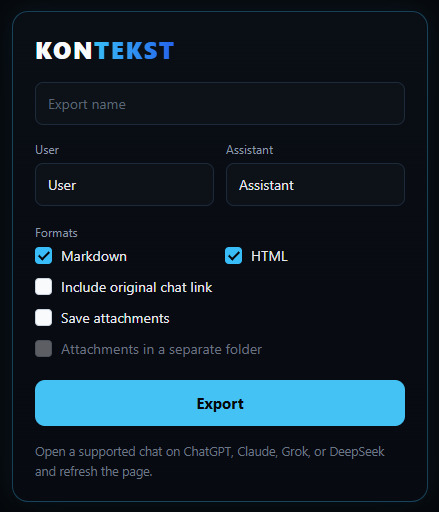
Kontekst popup

The problem
Students who use AI tutors hit usage limits mid-session. The waiting is minor; the real cost is restarting — re-explaining the assignment, the notation, and the uploaded material on a new platform, while the accumulated context stays trapped in the tab they are leaving. Students lose their place in the middle of learning something hard.
You are three hours into a physics problem. The explanations are finally clicking. Then the platform cuts you off: "You've reached your limit. Try again in 4 hours." You open another AI platform, paste the same half-finished question, and start re-teaching it everything you already explained. Your context — the definitions, the corrections, the files — stayed behind.
For students, that is not a pause. It is losing your thread.
The solution
KONTEKST is a free, local-only Manifest V3 browser extension for ChatGPT, Claude, Grok, and DeepSeek. One click exports the open conversation into a ZIP containing:
- A clean Markdown transcript (
conversation.md) — the portable format you paste into a new AI chat. - A self-contained styled HTML page (
conversation.html) — opens in any browser, no build step, no internet needed. - The session's attachments — uploaded PDFs, images, and generated files, saved alongside the transcript.
The student opens a new chat anywhere, uploads the transcript and files, and continues with the same context. No account, no server, no telemetry — every step runs entirely in the browser.
How it works in practice:
- Open a conversation on ChatGPT, Claude, Grok, or DeepSeek.
- Click the KONTEKST toolbar icon.
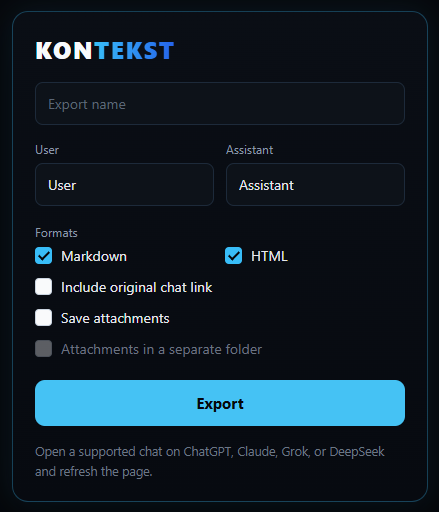
- Choose your formats and attachment options in the popup.
- Click Export. Your browser downloads a single ZIP you own.
- Unzip it, open a new chat on any other platform, and bring your context with you.
The extension auto-detects which supported site you are on, and each platform has its own extraction adapter so the result is always the same shape: Markdown, HTML, attachments.
Track
Education.
This started as a student problem — the moment your AI tutor stops answering and you are left holding nothing. KONTEKST makes sure you are always left holding your own work.
What we learned
Four platforms means four different internal models. Every provider stores conversations and files differently, and they change without notice. We learned to isolate each platform behind its own adapter so a change in one does not break the others.
The browser is more capable than we assumed. The ZIP in the demo video is assembled entirely client-side — no server was needed for any part of this.
Building for trust is a design constraint, not a feature. Every permission we request has a visible purpose, and the honest answer to "where does my data go" had to be "nowhere" — so we designed for that first instead of retrofitting it.
What we would do differently: write the automated tests alongside each adapter instead of after — provider changes would have been caught by CI instead of by users.
What we would build next
- Unified per-message selection across all four platforms.
- Broader attachment coverage (audio, expired-file fallback).
- A packaged store release (Chrome Web Store).
- Firefox support.
Tech stack
- TypeScript
- Vite (extension bundling)
- Preact (popup UI)
- fflate (ZIP generation in the browser)
- Chrome Extensions Manifest V3 (service worker, content scripts, downloads)
The exporter runs in three steps:
- A content script reads the active conversation from the platform and, when requested, downloads its attachments.
- The popup (Preact) collects export options and forwards the extracted data.
- The background service worker renders Markdown and HTML, builds the ZIP in the browser, starts the download, and reports the result.
Inspiration
AI Chat Export project by Alexey Sirotin
Built With
- css
- html
- preact
- typescript
- vite

Log in or sign up for Devpost to join the conversation.