Knit-Viz
YouTube Video Link: https://youtu.be/74EDwVXsXIw
An intelligent dependency injection analyzer for TikTok's Knit framework. This hackathon submission consists of three integrated tools: a CLI analyzer, web visualization interface, and IntelliJ IDEA plugin that work together to detect architectural issues, provide AI-powered solutions, and enable real-time development feedback.
Problem Statement
Dependency injection (DI) is crucial for modern software development, promoting loose coupling, testability, and maintainability. Knit is TikTok's open-source dependency injection framework for JVM platforms that directly modifies bytecode for better performance than traditional DI frameworks.
However, as Knit applications grow, developers face challenges:
- Hidden circular dependencies that cause runtime failures
- Architectural debt that degrades maintainability
- Performance bottlenecks from inefficient dependency patterns
- Complex debugging of injection issues
Knit-Viz solves these problems by providing intelligent analysis of Knit projects, automatically detecting 40+ types of issues, and offering AI-generated solutions for each problem.
Key Features
🔍 Intelligent Issue Detection
- 44 different issue types across 4 categories: runtime, architecture, performance, maintainability
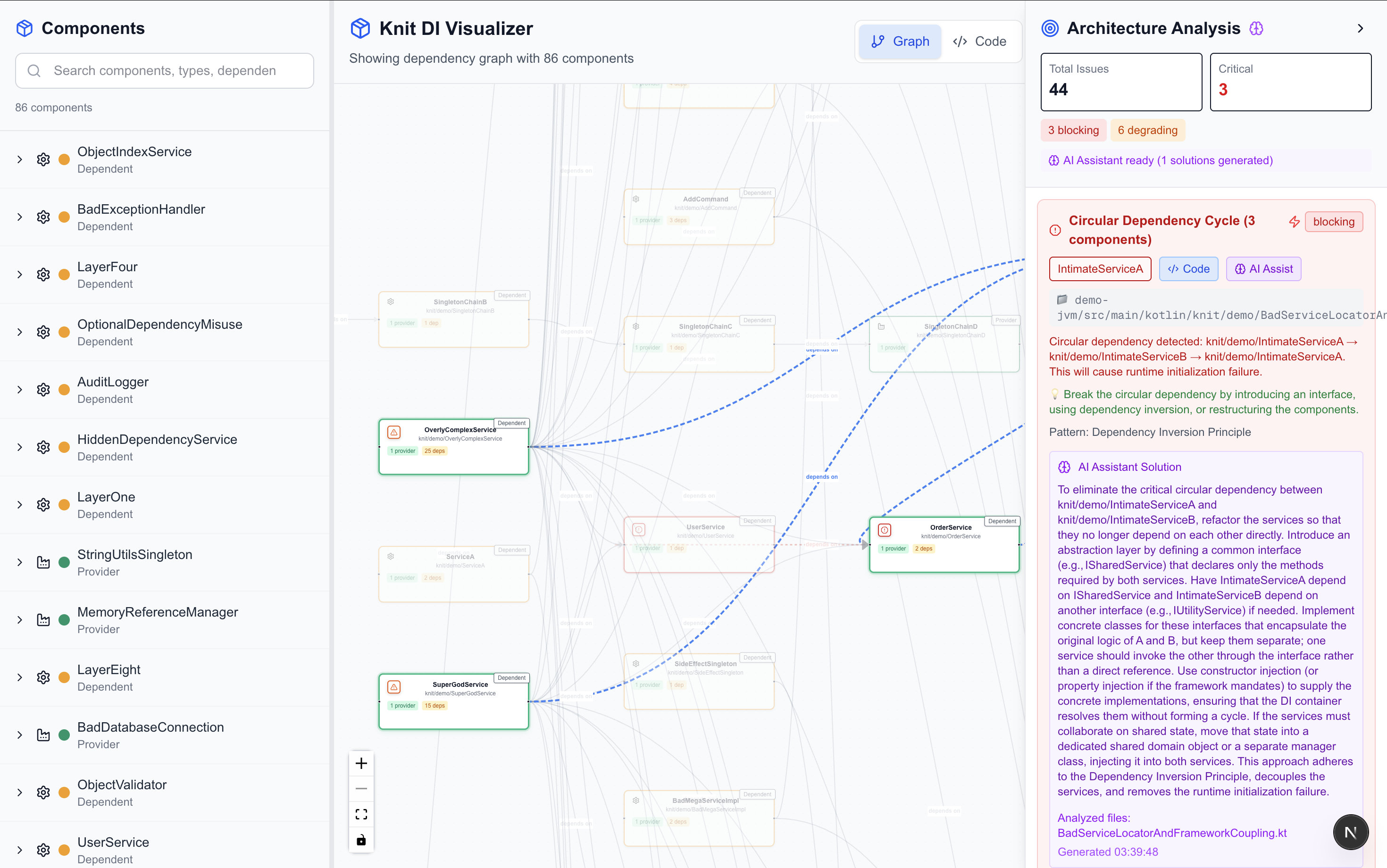
- Circular dependency detection with cycle visualization
- Architectural metrics (fan-in/out, coupling, complexity scores)
- Runtime impact assessment (blocking, degrading, warning, optimization)
🤖 AI-Powered Solutions
- Groq API integration for intelligent solution generation
- Context-aware analysis using actual source code
- Architectural pattern suggestions (Dependency Inversion, Interface Segregation, etc.)
- Confidence scoring for solution reliability
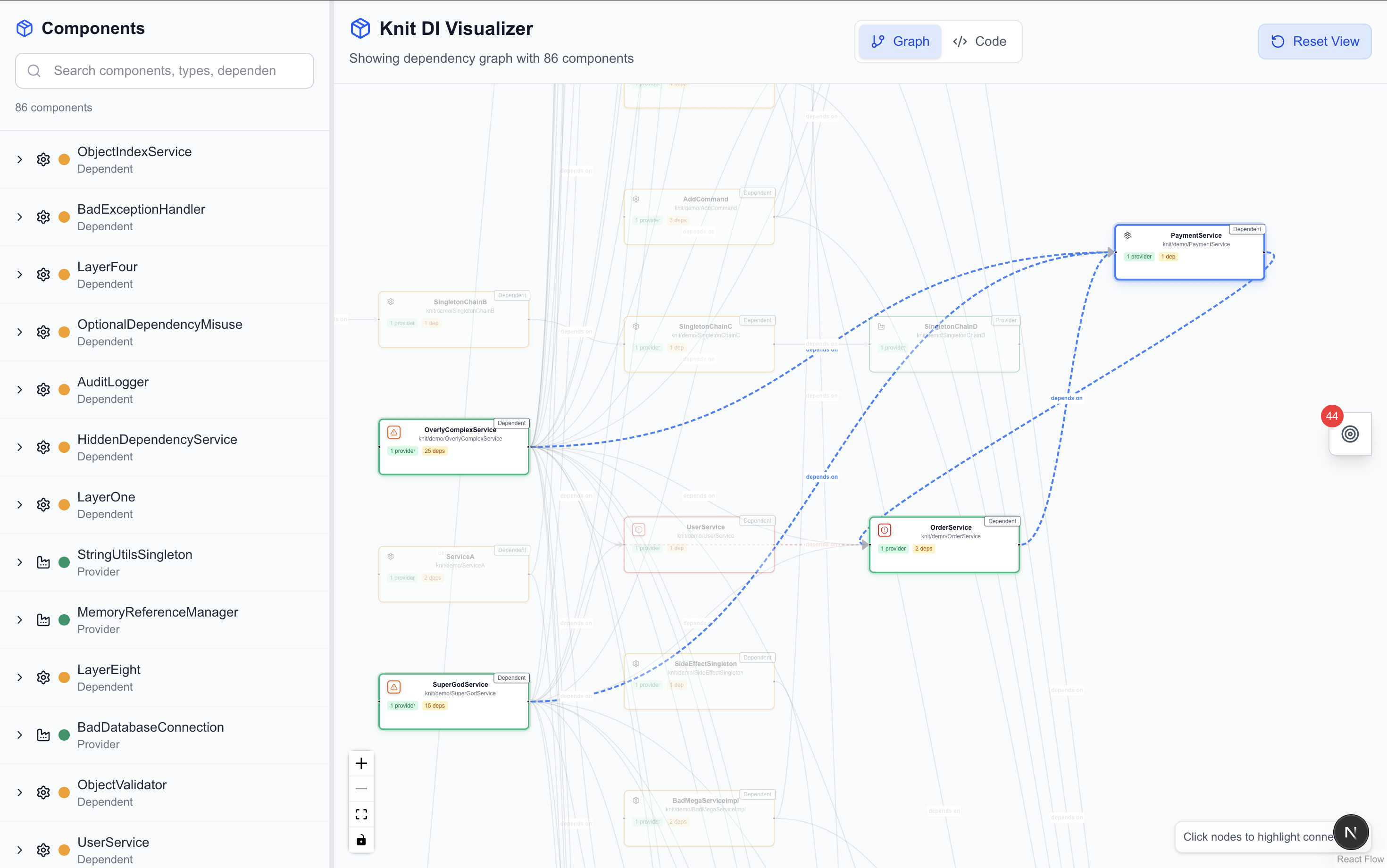
📊 Interactive Visualization
- Real-time issue exploration with severity-based filtering
- Component relationship mapping with dependency graphs
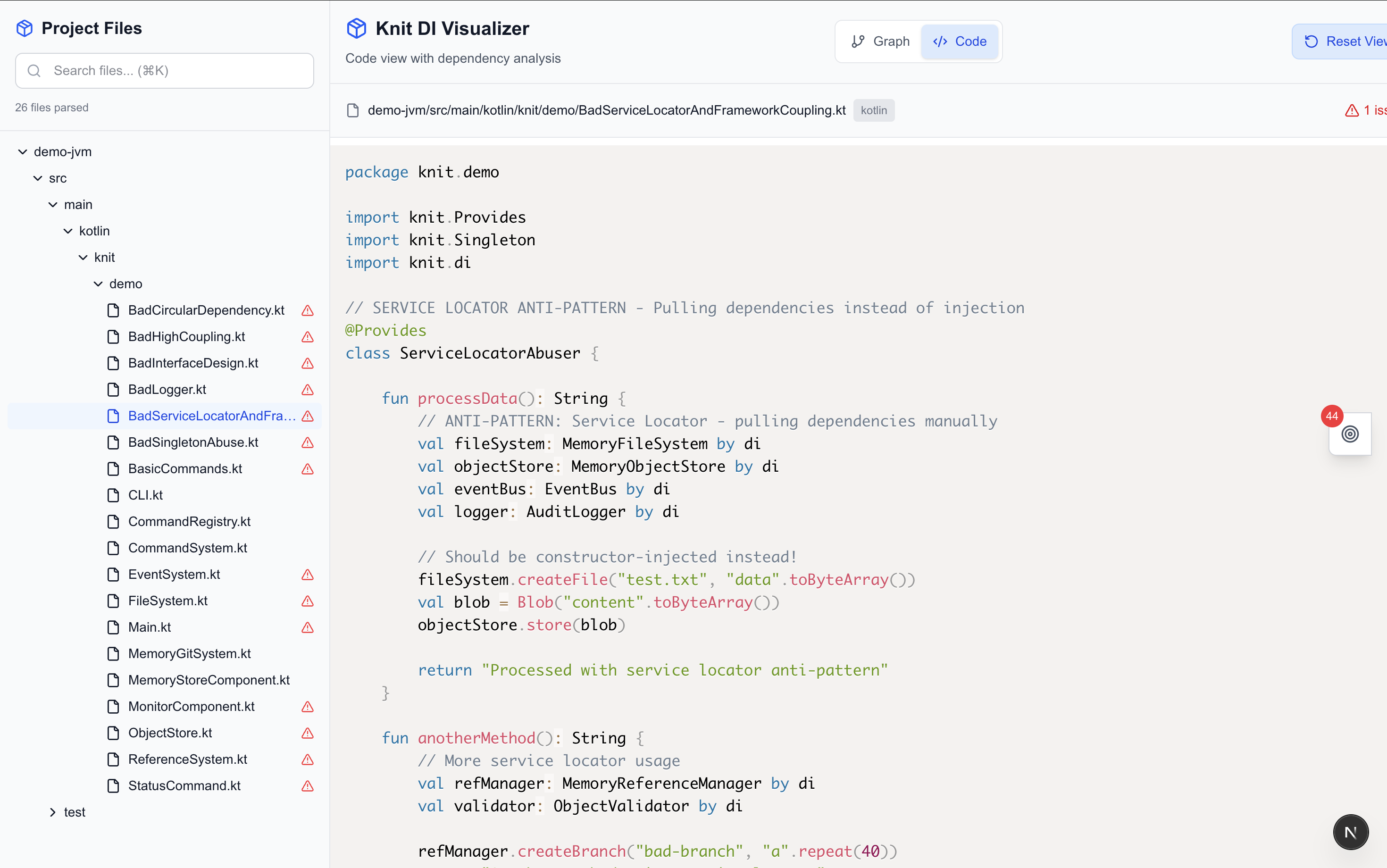
- Code navigation with syntax highlighting
- Solution management with implementation tracking
🔌 IDE Integration
- IntelliJ IDEA plugin with real-time compilation feedback
- Auto-compilation on file changes with intelligent debouncing (2s delay)
- Tool window integration showing compilation status and errors
- Keyboard shortcuts (Ctrl+Alt+K) for manual compilation triggers
- File watching with automatic Knit project building
Architecture Overview
knit-viz/
├── cli/                              # Analysis Engine
│   ├── src/
│   │   ├── index.ts                 # CLI orchestration
│   │   ├── knitAnalyzer.ts          # Core issue detection engine
│   │   ├── fileDiscovery.ts         # Project file discovery
│   │   └── treeSitterAnalyzer.ts    # Code parsing engine
│   ├── dist/                        # Compiled output
│   └── bin/knit-viz.js              # Executable
├── viz/                             # Web Interface
│   ├── app/
│   │   ├── api/
│   │   │   ├── load-data/route.ts   # Data loading API
│   │   │   └── useai/route.ts       # AI solution API
│   │   ├── components/              # React components
│   │   └── utils/                   # Analysis utilities
│   └── public/
│       ├── issues.json              # Detected issues
│       ├── solutions.json           # AI-generated solutions
│       ├── knit.json                # Raw Knit data
│       └── tree.json                # Parsed code structure
└── IJPlugin-main/                   # IntelliJ IDEA Plugin
    ├── src/main/kotlin/com/rlxlabs/ijplugin/
    │   ├── KnitWizToolWindow.kt     # Plugin UI components
    │   ├── KnitAutoCompiler.kt      # Auto-compilation engine
    │   ├── CompileKnit.kt           # Manual compilation action
    │   └── KnitWizFileListener.kt   # File change monitoring
    ├── src/main/resources/META-INF/
    │   └── plugin.xml               # Plugin configuration
    └── build.gradle.kts             # Gradle build configuration
Development Tools Used
CLI Analysis Engine
- TypeScript: Type-safe analysis engine development
- Tree-sitter: Multi-language parsing (Java, Kotlin)
- Commander.js: CLI framework with argument parsing
- Chalk: Terminal output styling and feedback
- Node.js: Runtime environment for file system operations
Web Interface
- Next.js 15: Modern React framework with App Router
- React 19: Component-based UI with hooks
- Tailwind CSS: Utility-first styling framework
- Prism.js: Syntax highlighting for Java/Kotlin
- ReactFlow: Interactive dependency graph visualization
AI Integration
- Groq SDK: High-performance AI inference
- GPT-OSS-20B: Code analysis and solution generation
- Context Building: Dynamic prompt generation from code analysis
IntelliJ Plugin Development
- Kotlin: Modern JVM language for plugin development
- IntelliJ Platform SDK: Plugin framework and APIs
- Gradle: Build automation and dependency management
- IntelliJ Platform Gradle Plugin: Plugin-specific build tooling
- Swing/AWT: UI components and event handling
APIs Used
CLI APIs
- Node.js File System API: Project file discovery and parsing
- Tree-sitter API: Abstract Syntax Tree generation for Java/Kotlin
- JSON Processing: Knit configuration parsing and validation
- Process Management: Browser launching and server coordination
Web Application APIs
/api/load-data - Project Data Loading
GET /api/load-data
Response: {
  knitData: KnitAnalysisResult,
  issuesData: ComprehensiveIssuesResult,
  solutionsData: SolutionEntry[],
  treeData: ParsedFile[]
}
/api/useai - AI Solution Generation
POST /api/useai
Request: {
  issue: ComponentIssue,
  relatedComponents: string[],
  codeFiles: { [path: string]: FileContent },
  filePaths: string[]
}
Response: {
  solution: string,
  confidence: number,
  issueId: string,
  timestamp: string
}
External APIs
- Groq AI API: Real-time solution generation for detected issues
- ReactFlow API: Interactive graph rendering and manipulation
IntelliJ Plugin APIs
- IntelliJ Platform API: Core IDE integration and project management
- VirtualFileSystem API: File change monitoring and project file access
- Action System API: Menu actions and keyboard shortcuts (Ctrl+Alt+K)
- Tool Window API: Custom UI panels and status indicators
- Process Execution API: Running Gradle builds and external commands
- Progress Manager API: Background task execution and progress indication
Assets Used
Static Assets
- Lucide React Icons: Component type indicators and UI elements
- Tailwind CSS Utilities: Responsive design and theming
- Prism.js Themes: Syntax highlighting for code display
Generated Data Assets
issues.json: Comprehensive analysis results with 44 detected issuessolutions.json: AI-generated solutions with confidence scoresknit.json: Raw Knit dependency configurationtree.json: Parsed source code structure with symbol information
Development Assets
- Source Maps: Debug information for TypeScript development
- Hot Reload: Real-time updates during development
- Build Artifacts: Optimized production bundles
Libraries Used
CLI Dependencies
{
  "tree-sitter": "^0.21.1",          // Multi-language code parsing
  "tree-sitter-java": "^0.23.5",     // Java AST generation
  "tree-sitter-kotlin": "^0.3.8",    // Kotlin AST generation
  "commander": "^9.4.1",             // CLI framework
  "chalk": "^4.1.2",                 // Terminal styling
  "glob": "^8.0.3"                   // Pattern-based file discovery
}
Web Application Dependencies
{
  "next": "15.5.2",                  // React meta-framework
  "react": "19.1.0",                 // Component framework
  "groq-sdk": "^0.30.0",             // AI inference API
  "prismjs": "^1.30.0",              // Syntax highlighting
  "lucide-react": "^0.542.0",        // Icon library
  "tailwindcss": "^4",               // CSS framework
  "tree-sitter": "^0.21.1"           // Browser-based parsing
}
Installation & Setup
Prerequisites
- Node.js 18+
- npm package manager
- Java/Kotlin project with knit.json configuration
- Groq API key (for AI features)
Setup Instructions
# 1. Setup CLI Analysis Engine
cd cli
npm install
npm run build
chmod +x bin/knit-viz.js

# 2. Setup Web Interface
cd ../viz
npm install
npm run build

# 3. Build IntelliJ Plugin
cd ../IJPlugin-main
./gradlew buildPlugin
# Plugin JAR will be generated in build/distributions/

# 4. Configure AI (optional)
export GROQ_API_KEY=your_groq_api_key
IntelliJ Plugin Installation
# Method 1: Build from source
cd IJPlugin-main
./gradlew buildPlugin

# Method 2: Install in IntelliJ IDEA
# 1. Open IntelliJ IDEA
# 2. Go to Settings > Plugins > Install Plugin from Disk
# 3. Select the generated .zip file from build/distributions/
# 4. Restart IntelliJ IDEA
# 5. The KnitWiz tool window will appear on the right side
Usage
Basic Analysis
# Navigate to your Knit project directory
cd your-knit-project

# Run comprehensive analysis
knit-viz
CLI Options
--port 3001: Custom development server port--skip-open: Skip automatic browser opening--skip-analysis: Skip issue analysis (visualization only)--json-only: Generate JSON files without starting web server
IntelliJ Plugin Usage
# After installing the plugin in IntelliJ IDEA:

# 1. Open your Knit project in IntelliJ
# 2. The KnitWiz tool window appears on the right side
# 3. Auto-compilation triggers on file changes (2-second debounce)
# 4. Manual compilation: Ctrl+Alt+K or Tools > Run KnitWiz Compiler
# 5. View compilation status and errors in the tool window
# 6. Integration with Gradle: runs './gradlew :demo-jvm:shadowJarWithKnit'
File Structure & Descriptions
CLI Analysis Engine (/cli/)
Core Source Files (/cli/src/)
src/knitAnalyzer.ts - Main Analysis Engine
- Issue Detection: Identifies 44 types of issues across runtime, architecture, performance, and maintainability
- Circular Dependency Detection: Advanced cycle detection algorithms
- Metrics Calculation: Fan-in/out, complexity scores, maintainability indices
- Component Relationship Analysis: Dependency mapping and impact assessment
- Issue Severity Assessment: Critical, high, medium, low classification
- Runtime Impact Evaluation: Blocking, degrading, warning, optimization levels
- Pattern Recognition: Identifies anti-patterns and architectural smells
- Generates:
issues.jsonwith comprehensive analysis results
src/index.ts - CLI Orchestration
- Command-line interface coordination and workflow management
- Project discovery and validation (knit.json detection)
- Analysis pipeline orchestration: file discovery → code parsing → issue analysis → web server
- Browser launching and development server management
- Error handling and user feedback with colored terminal output
- Cross-platform compatibility (macOS, Windows, Linux)
src/fileDiscovery.ts - Project File Discovery
- Intelligent Knit project structure detection
- Recursive source file discovery (.java, .kt, .kts files)
- Build artifact filtering (excludes target/, build/, .gradle/ directories)
- Multi-module project support with priority-based search
- File validation and JSON parsing verification
- Detailed discovery reporting with file distribution statistics
src/treeSitterAnalyzer.ts - Code Structure Analysis
- Tree-sitter powered parsing for Java and Kotlin
- Symbol extraction: classes, methods, interfaces, fields, constructors, enums
- Hierarchical structure analysis with parent-child relationships
- Position tracking (line/column coordinates) for code navigation
- Language detection and parser selection
- Generates:
tree.jsonwith parsed code structure
Build Output (/cli/dist/)
- Compiled TypeScript: Production-ready JavaScript with type definitions
- Optimized for Node.js: Performance-optimized execution
Executable (/cli/bin/)
bin/knit-viz.js
- Shebang executable for command-line usage
- Process argument handling and delegation to main CLI class
Web Interface (/viz/)
API Routes (/viz/app/api/)
app/api/load-data/route.ts - Data Loading Service
- Loads generated analysis files: issues.json, solutions.json, knit.json, tree.json
- Error handling for missing or corrupted data files
- JSON response formatting for client consumption
app/api/useai/route.ts - AI Solution Generation Service
- Groq AI Integration: Uses GPT-OSS-20B model for intelligent analysis
- Context Building: Creates prompts from issue details and related source code
- Solution Generation: Provides architectural guidance and refactoring suggestions
- Confidence Scoring: Calculates reliability metrics based on available context
- Solution Persistence: Saves AI responses to solutions.json
- Fallback Handling: Provides basic suggestions when AI service is unavailable
- Rate Limiting: Manages API usage and prevents abuse
React Components (/viz/app/components/)
app/components/Sidebar.tsx
- Issue browser with severity-based filtering
- Component hierarchy display with search functionality
- Category-based organization (runtime, architecture, performance, maintainability)
- Real-time filtering and selection for graph focus
app/components/AnalysisSidebar.tsx
- Detailed issue analysis with metrics display
- AI solution integration with confidence indicators
- Related component analysis and impact assessment
- Solution implementation tracking and status management
app/components/GraphVisualization.tsx
- Interactive dependency graph with ReactFlow
- Issue overlay visualization with color-coded severity
- Component relationship mapping with edge styling
- Performance optimization for large project analysis
app/components/CodeViewer.tsx
- Source code display with Prism.js syntax highlighting
- Issue location highlighting and navigation
- Symbol definition linking and cross-referencing
- Integration with tree-sitter parsed structure
Utility Modules (/viz/app/utils/)
app/utils/knitUtils.ts
- Issue processing and categorization utilities
- Severity-based color coding and icon assignment
- Component filtering and relationship extraction
- Data transformation for visualization components
Generated Data Files (/viz/public/)
public/issues.json - Comprehensive Issue Analysis
{
  "metadata": {
    "generatedAt": "ISO timestamp",
    "analysisVersion": "2.0.0",
    "projectRoot": "analyzed project path"
  },
  "summary": {
    "total": 44,
    "bySeverity": { "critical": 3, "high": 6, "medium": 19, "low": 16 },
    "byCategory": { "runtime": 13, "architecture": 15, "performance": 0, "maintainability": 16 }
  },
  "issues": [
    {
      "componentId": "knit/demo/ServiceA",
      "issueType": "circular_dependency",
      "severity": "critical",
      "category": "runtime",
      "title": "Circular Dependency Cycle",
      "description": "Detailed issue explanation",
      "suggestion": "Recommended solution approach",
      "pattern": "Architectural pattern to apply",
      "relatedComponents": ["affected components"],
      "metrics": { "fanIn": 3, "chainLength": 2 }
    }
  ]
}
public/solutions.json - AI-Generated Solutions
[
  {
    "id": "issue-identifier",
    "timestamp": "solution generation time",
    "issue": { "issue details" },
    "aiResponse": {
      "solution": "Detailed architectural guidance",
      "confidence": 0.87,
      "reasoning": "Analysis explanation",
      "suggestedActions": ["step-by-step implementation guide"]
    }
  }
]
public/knit.json - Raw Knit Configuration
- Original Knit dependency injection configuration
- Component definitions with providers and injections
- Composite relationships and hierarchical structures
public/tree.json - Parsed Code Structure
- Tree-sitter analysis results with symbol information
- File-level organization with class and method definitions
- Position tracking for code navigation integration
IntelliJ IDEA Plugin (/IJPlugin-main/)
Core Plugin Files (/IJPlugin-main/src/main/kotlin/com/rlxlabs/ijplugin/)
KnitWizToolWindow.kt - Main Plugin UI
- Creates tool window interface with compilation status indicators
- Displays real-time compilation results and error reporting
- Integrates with IntelliJ's tool window system for seamless IDE experience
- Manages compiler and analyzer tabs for comprehensive project monitoring
- Provides visual feedback through status lights and progress indicators
KnitAutoCompiler.kt - Auto-Compilation Engine
- Monitors file changes and triggers automatic Knit project compilation
- Executes
./gradlew :demo-jvm:shadowJarWithKnitin background threads - Provides compilation results with success/failure status and output parsing
- Implements intelligent error detection and reporting mechanisms
- Manages compilation timeouts and process lifecycle
CompileKnit.kt - Manual Compilation Action
- Implements IntelliJ action for manual compilation triggers
- Accessible via keyboard shortcut (Ctrl+Alt+K) and Tools menu
- Provides progress indication during long-running compilation tasks
- Displays compilation results in IDE notification system
- Integrates with IntelliJ's background task management
KnitWizFileListener.kt - File Change Monitoring
- Implements VirtualFileListener for real-time file system monitoring
- Provides intelligent debouncing (2-second delay) to prevent excessive compilation
- Filters relevant file changes (.java, .kt, .kts, knit.json)
- Manages singleton instances per project for efficient resource usage
- Coordinates with auto-compiler for seamless development workflow
KnitWizFileChangeHandler.kt - Change Event Processing
- Processes file change events and determines compilation necessity
- Coordinates between file listener and auto-compiler components
- Manages project-specific compilation settings and preferences
Configuration Files (/IJPlugin-main/)
src/main/resources/META-INF/plugin.xml - Plugin Manifest
- Defines plugin metadata: name (KnitWiz), vendor (RLX Labs), compatibility
- Configures tool window integration with IntelliJ IDE
- Registers actions and keyboard shortcuts for plugin functionality
- Specifies plugin dependencies and IntelliJ platform requirements
build.gradle.kts - Plugin Build Configuration
- Gradle build script using Kotlin DSL for plugin development
- Configures IntelliJ Platform Gradle Plugin for seamless IDE integration
- Specifies IntelliJ Community Edition 2025.1 as target platform
- Manages plugin dependencies and build artifact generation
How to Use Tool Features
1. Project Analysis
# Run in your Knit project directory
knit-viz
# Automatically detects issues and launches visualization
2. Issue Exploration
- Severity Filtering: Filter by critical, high, medium, low issues
- Category Analysis: Focus on runtime, architecture, performance, or maintainability
- Component Search: Find issues affecting specific components
- Impact Assessment: Review runtime impact levels (blocking, degrading, warning)
3. AI-Powered Solutions
- Click any issue to request AI analysis
- Review confidence scores for solution reliability
- Follow implementation steps provided by AI
- Track solution status and implementation progress
4. Code Navigation
- Issue location highlighting in source code viewer
- Symbol cross-referencing between components
- Dependency path visualization for understanding relationships
- Multi-file analysis with integrated file browser
5. Architectural Insights
- Metrics dashboard showing project health scores
- Trend analysis for identifying architectural debt
- Coupling analysis with fan-in/fan-out metrics
- Complexity assessment with maintainability indices
6. IntelliJ Plugin Integration
- Install the plugin from Settings > Plugins > Install from Disk
- Open KnitWiz tool window on the right side of IntelliJ IDEA
- Auto-compilation: Edit any .java/.kt file and watch automatic compilation (2s delay)
- Manual compilation: Press Ctrl+Alt+K or use Tools > Run KnitWiz Compiler
- Monitor status: Green/red indicators show compilation success/failure
- View build logs: Check compilation output and error details in the tool window
- Real-time feedback: Get immediate notification of Knit configuration issues
Complete Development Workflow
Knit-Viz provides a comprehensive three-tool solution for Knit development:
- Development Phase: Use the IntelliJ plugin for real-time compilation feedback and error detection during coding
- Analysis Phase: Run the CLI analyzer to detect architectural issues and generate comprehensive reports
- Visualization Phase: Explore results in the web interface with AI-powered solutions and interactive dependency graphs
This integrated approach ensures Knit projects maintain high architectural quality throughout the development lifecycle.
Built With
- groq
- intellij-idea
- kotlin
- nextjs
- node.js
- typescript


Log in or sign up for Devpost to join the conversation.