-
-
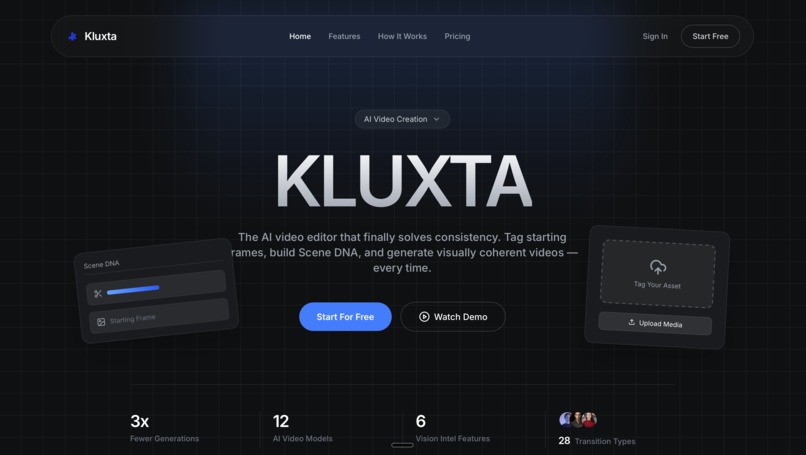
landing page
-
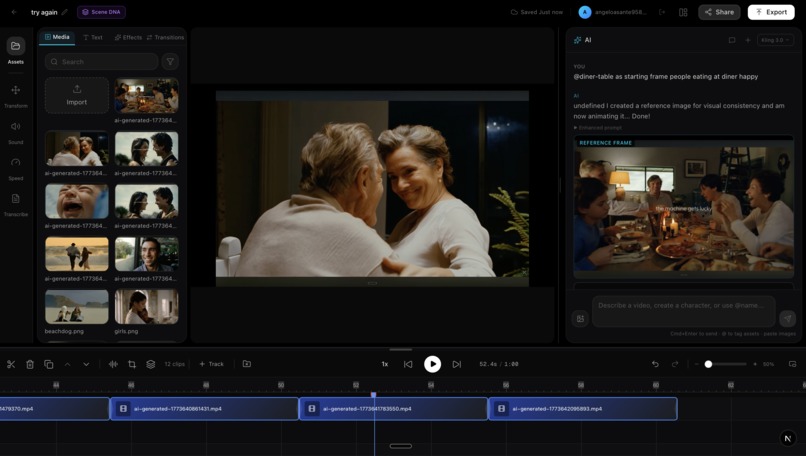
studio
-
logo
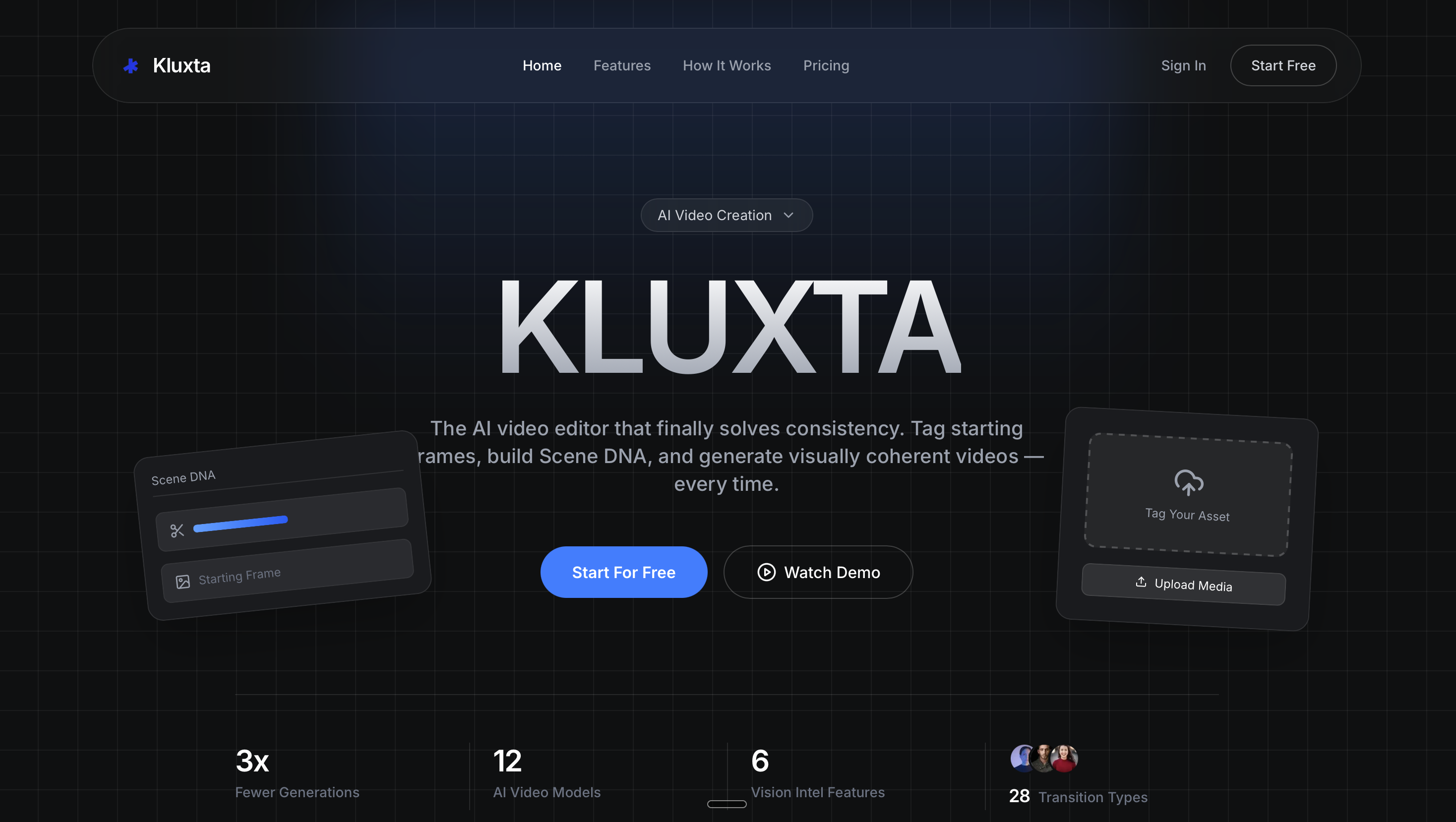

Kluxta — Gemini Live Agent Challenge Submission
Category: Creative Storyteller
Tagline: The Figma of AI Video, a context-intelligent, asset-aware video editor that solves AI video's biggest problem: consistency.
Short Description: Kluxta solves AI video's biggest problem: consistency. Using Gemini 2.5 Flash for intelligent prompt enhancement, starting frame and character reference tags for visual anchoring, Google Cloud Video Intelligence for deep scene analysis, and Scene DNA for persistent project context, every new generation matches the ones before it.
Table of Contents
- The Problem
- Our Mode — How Klusta Solves It
- Features & Functionality
- Google Cloud & Gemini Integration
- Architecture Diagram
- Tech Stack
- How It Works
- Scene DNA + Vision Intelligence
- Demo Video Script
- Setup & Deployment Instructions
- What We Learned
- Submission Checklist
The Problem
Every AI video tool is broken the same way
You prompt. A model generates a video. You want to change one thing — a shirt color, a camera angle, a character's expression. You re-prompt. The model regenerates the entire video. The result is inconsistent. The character looks different. The lighting shifted. The mood changed. You do it again. And again. Twenty generations for one good clip.
This is not a niche complaint. It is the #1 frustration across every AI video community — Twitter/X, Reddit, Discord servers for Runway, Kling, Pika, Higgsfield. Creators spend 20–30 generations trying to get a single consistent clip because there is no way to anchor the visual identity of a scene.
Why current tools fail at consistency
| The Problem | Why It Happens |
|---|---|
| Characters look different across shots | No persistent reference — each generation starts from scratch |
| Lighting/mood shifts between clips | No scene context carried forward — prompts exist in isolation |
| Starting frames are ignored | Image-to-video models receive images without proper instructions (wrong parameter names, missing frame context) |
| Prompt enhancement destroys intent | Enhancement rewrites the entire prompt, stripping user-specified references and starting frame instructions |
| Subject-heavy prompts produce generic results | Text-to-video cannot imagine specific humans — it needs a visual anchor |
Our Mode — How Kluxta Solves It
Klusta attacks the consistency problem from three angles:
1. Starting Frame & Character Reference Tags
Users tag assets from their library using @mentions in the AI chat. Klusta distinguishes between two uses:
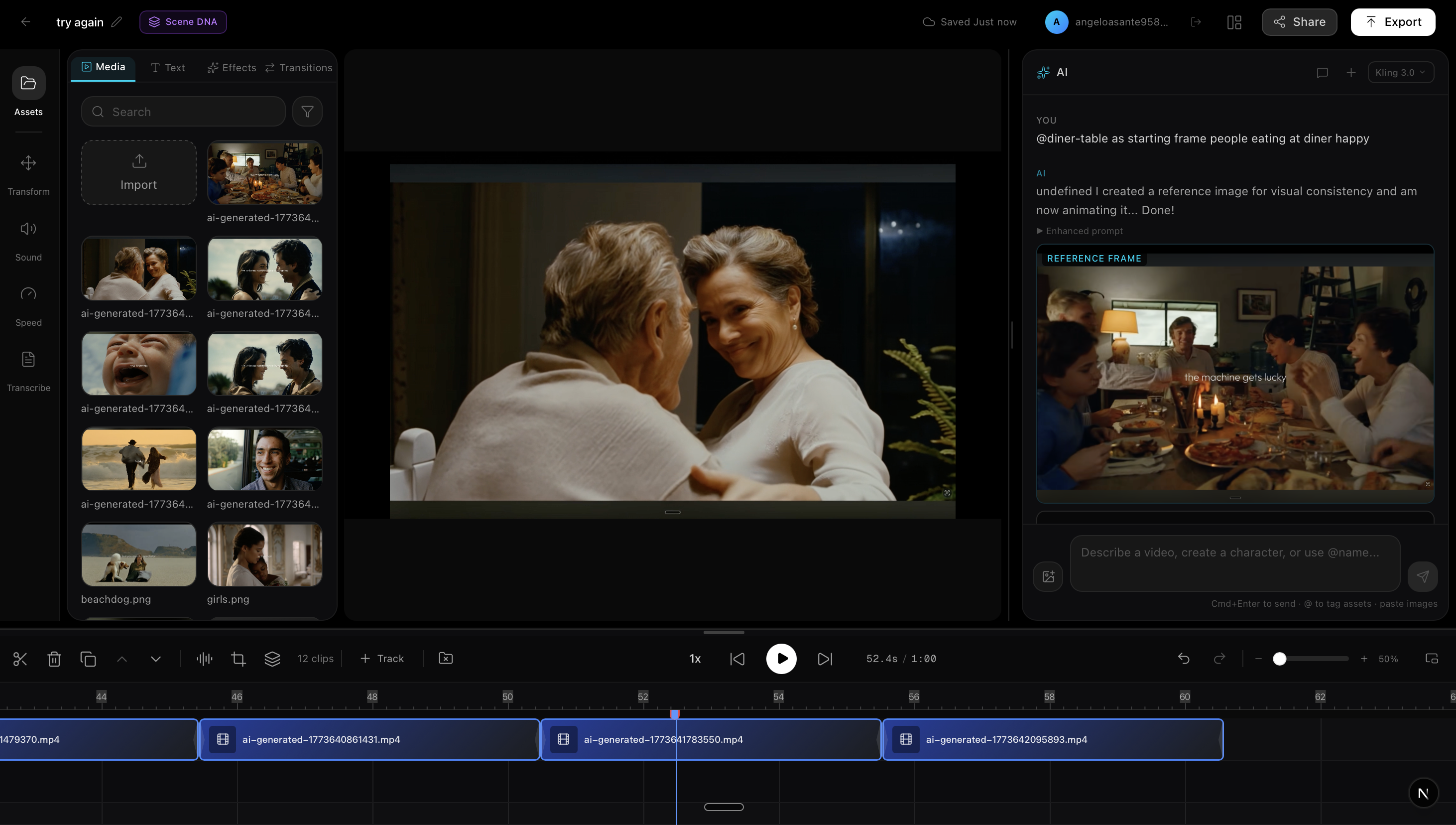
Starting Frame — "using @my_screenshot as the starting frame, animate two men crying"
- The tagged image becomes the literal first frame of the generated video
- The video model animates FROM that exact image — same people, same environment, same lighting
- The user's actual words ("two men crying") are injected into the prompt so the model knows what motion to create
- Parameter names are model-specific: Kling uses
start_image_url, others useimage_url
Character Reference — "@marcus walking through a park at sunset"
- The tagged character image is sent as a visual reference, NOT as a starting frame
- The prompt explicitly tells the video model: "THE ATTACHED IMAGE IS A CHARACTER REFERENCE — use it for appearance only, generate a new scene"
- The character's appearance stays consistent across multiple generations
This is detected via:
- Gemini intent analysis — Gemini 2.5 Flash (thinking mode) classifies the user's intent and identifies starting frame vs character reference
- Regex safety net — Backend parses the raw message for patterns like "as the starting frame", "as the first frame", "begin with @" — doesn't rely solely on Gemini
- Fallback catch — If both miss it, any tagged/uploaded image is still sent to image-to-video rather than being discarded
2. Gemini Prompt Enhancement with Scene DNA
Raw user prompts are short and vague. Kluxta uses Gemini 2.5 Flash to enhance them into production-ready descriptions — but without destroying the user's intent.
User types:   "a man walking through rain at night"

After Gemini: "A photorealistic wide shot of a Caucasian man, mid-30s, dark jacket,
              walking through heavy rain on a deserted city street at night. Wet
              asphalt reflects neon signs in cyan and magenta. Shot on ARRI Alexa
              Mini, 35mm Zeiss lens, shallow depth of field. Rain particles visible
              in volumetric street light beams. Cinematic 16:9."
Critical: when the user has provided a starting frame or character reference, the enhancement preserves those instructions. The prompt is rebuilt AFTER enhancement to ensure "THE ATTACHED IMAGE IS THE STARTING FRAME" or "THE ATTACHED IMAGE IS A CHARACTER REFERENCE" stays at the front.
Every enhancement is also injected with Scene DNA — the project's accumulated visual profile (theme, mood, color palette, lighting, camera work, characters, objects) — so new generations match existing footage.
3. Google Cloud Video Intelligence — Deep Analysis for Feedback
After every video generation, Google Cloud Video Intelligence API runs 6 parallel analysis features:
- Label Detection — scene concepts (beach, sunset, urban, indoor)
- Object Tracking — objects across frames with bounding boxes
- Shot Change Detection — cut/transition boundaries
- Text Detection (OCR) — on-screen text in video
- Logo Recognition — brand logos in footage
- Person Detection — clothing, accessories, physical attributes
These results merge into Scene DNA alongside Gemini's own analysis. The combined profile ensures that the NEXT generation knows exactly what the previous shots looked like — down to specific clothing colors and tracked objects.
This is the consistency loop: Generate → Analyze (Gemini + Vision Intelligence) → Store Scene DNA → Inject into next prompt → Generate with full context.
Features & Functionality
AI Assistant (Gemini 2.5 Flash)
- Conversational video/image generation with clarifying questions before creating
- Starting frame tagging —
@asset as the starting framesends the image as the literal first frame to the video model - Character reference tagging —
@charactersends the image as appearance reference with explicit instructions to the video model - Smart reference image detection — automatically detects human/character subjects in prompts and generates a reference image via Gemini Imagen when no user image is provided
- Natural language text overlay editing ("Change the subtitle to say Hello World")
- Multi-shot mode for consistent characters, lighting, and style across shots
- Context-aware prompt enhancement using Scene DNA (all fields including Vision Intelligence)
- Project-scoped chat history — switching projects loads different conversations
- Safety settings configured for creative content — movie scenes, dramatic content, artistic violence are not blocked
Timeline Editor
- Multi-track timeline with drag-and-drop (video/image track + audio track + overlay track)
- Per-clip editing: volume, speed, crop, mirror, rotation
- Audio extraction — extract audio from video clips onto a separate audio track
- Move clips between tracks — toolbar up/down buttons
- Video/image overlay layers — drag-and-drop overlays with position, size, opacity, rotation, crop controls
- Free-form crop tool — drag edges and corners directly on the media
- Text overlays with Google Fonts — 28+ curated fonts, weight selector, color picker, 5 animation types, drag-and-resize positioning
- 28 transition types via FFmpeg xfade (fades, wipes, slides, cover/reveal, cinematic)
- Undo/redo (Ctrl+Z / Ctrl+Shift+Z)
- Keyboard shortcuts (Space=play, Delete=remove, D=duplicate, arrow keys=scrub)
- Captions track — transcription-based captions on a dedicated timeline row
Real-Time Preview
- Remotion-based video preview with frame-accurate playback
- Multi-clip composition with transitions rendered in-browser
- Text overlay rendering with live drag positioning
- Video/image overlay rendering — draggable, resizable layers on top of clips
- Low-res proxy generation for smooth preview of large files
Audio Generation, Extraction & Transcription
- AI sound effects via ElevenLabs
- Text-to-speech with 35+ voice presets
- Audio extraction from video — pull audio onto separate track
- Audio mixing in final export
- Speech-to-text transcription via ElevenLabs Scribe v1 with word-level timestamps
- Captions auto-populate on the timeline from transcription results
Asset Library
- Upload images, videos, audio
- AI-generated content auto-saved to library
- Character creation with reference sheets
- Delete on hover — visible delete button for media items
- Filename sanitization — spaces, colons, special chars automatically cleaned for Supabase storage
Export Pipeline
- Configurable export (MP4, quality: draft/preview/HD/4K, frame rate)
- Server-side rendering via FFmpeg with xfade transitions
- Audio track mixing (ElevenLabs audio + video audio combined)
- Progress tracking via WebSocket
- Direct upload to Supabase Storage
Project Hub
- Create, list, delete projects with thumbnails
- Scene context presets on creation (mood, theme, lighting direction/intensity)
- Initial SceneDNA auto-generated from scene context settings
Auth & Persistence
- Supabase Auth (email/password, forgot password, OTP verify)
- Row Level Security — users only see their own data
- Full studio state persisted per project (clips, text overlays, transitions, video overlays, per-clip edits, extracted audio)
Google Cloud & Gemini Integration
Gemini 2.5 Flash — The AI Brain
| Usage | How |
|---|---|
| Intent Detection | Every user message analyzed with thinking mode — determines intent (generate video, edit text, conversation, create character, edit element), detects starting frame vs character reference, identifies @tagged assets |
| Prompt Enhancement | User prompts enhanced with cinematic details, camera descriptions, and full Scene DNA context. Critical: preserves starting frame / character reference instructions after enhancement |
| Reference Image Generation | Gemini Imagen generates photorealistic reference images for subject-heavy prompts when no user image is provided — ensures visual consistency when sent to image-to-video models |
| Video Analysis | Generated videos analyzed by Gemini to extract Scene DNA (theme, mood, colors, lighting, characters, camera work) |
| Conversational AI | Maintains conversation context, asks clarifying questions, handles multi-turn dialogue |
| Scene DNA Context | Every AI interaction has Scene DNA injected into Gemini's system prompt for cross-generation consistency |
| Safety Settings | BLOCK_NONE on all harm categories — enables creative/cinematic content (movie violence, dramatic scenes) without content filter blocks |
Google Cloud Video Intelligence API — Deep Analysis
When a video is generated, the API runs 6 parallel analysis features via a service account:
| Feature | What It Detects | Why It Matters for Consistency |
|---|---|---|
| Label Detection | Scene concepts (beach, sunset, urban, indoor) | Ensures new shots match the environment |
| Object Tracking | Objects across frames with bounding boxes | Maintains object presence across shots |
| Shot Change Detection | Cut/transition boundaries | Informs editing rhythm and pacing |
| Text Detection (OCR) | On-screen text in video | Prevents duplicate/conflicting text overlays |
| Logo Recognition | Brand logos in footage | Maintains brand consistency or avoids unwanted logos |
| Person Detection | Clothing, accessories, attributes | Keeps character appearance consistent across shots |
Both Gemini and Vision Intelligence run in parallel (Promise.allSettled) when a video completes. Results merge into a single SceneDNA profile that persists per project and is injected into every subsequent AI interaction.
Google GenAI SDK
The backend uses @google/generative-ai (Google GenAI SDK) for all Gemini interactions:
gemini-2.5-flashmodel for intent detection, prompt enhancement, and video analysis- Thinking mode with
thinkingConfigfor complex reasoning during intent detection - Native video understanding via
generateContent()with inline base64 video data - Image generation via
generateContent()withresponseModalities: ["IMAGE", "TEXT"] - Safety settings applied to all model instances for creative content
Google Cloud Deployment
- Google Cloud Video Intelligence API — enabled via service account credentials, runs 6 analysis features per generated video
- Backend deployable to Google Cloud Run via Docker
- Service account JSON key for authenticated API access
Architecture Diagram
Architecture Diagram
Visual version: kluxta.com/architecture
┌──────────────────────────────────────────────────────────────┐
│                    Frontend (Next.js 16)                      │
│                                                              │
│  ┌──────────────┐  ┌──────────────┐  ┌───────────────────┐  │
│  │   Remotion    │  │   Timeline   │  │   AI Chat Panel   │  │
│  │   Preview     │  │   Editor     │  │  + @Mention Tags  │  │
│  └──────┬───────┘  └──────┬───────┘  └────────┬──────────┘  │
│         │                 │                    │             │
│  ┌──────┴───────┐  ┌──────┴───────┐  ┌────────┴──────────┐  │
│  │ Asset Library │  │Export Dialog │  │ Scene DNA Panel   │  │
│  │ + Characters  │  │             │  │                   │  │
│  └──────────────┘  └─────────────┘  └───────────────────┘  │
└────────┬──────────────────┬──────────────────┬───────────────┘
         │                  │                  │
         ▼                  ▼                  ▼
   ┌──────────┐      ┌──────────────┐   ┌──────────┐
   │ Supabase │      │  Node.js API │   │WebSocket │
   │Auth + DB │      │  (Express)   │   │(Real-time│
   │+ Storage │      └──────┬───────┘   │ updates) │
   └──────────┘             │           └──────────┘
                  ┌─────────┼──────────┐
                  ▼         ▼          ▼
          ┌────────────┐ ┌────────────────────────────────┐
          │   Python   │ │    Gemini 2.5 Flash (GenAI)    │
          │  FFmpeg    │ │         — AI Brain —           │
          │  Service   │ │  Intent · Enhance · Analyze    │
          │  (FastAPI) │ └───────────────┬────────────────┘
          └────────────┘                 │
                        ┌────────┬───────┼────────┐
                        ▼        ▼       ▼        ▼
                  ┌──────────┐┌──────┐┌──────┐┌──────────┐
                  │GCP Video ││fal.ai││Repli-││ElevenLabs│
                  │Intellig- ││Kling ││cate  ││(TTS/SFX/ │
                  │ence API  ││3.0   ││(SAM2)││ Scribe)  │
                  │(6 feat.) ││(i2v/ ││      ││          │
                  │          ││ t2v) ││      ││          │
                  └──────────┘└──────┘└──────┘└──────────┘

          ┌──────────────────────────────────────────┐
          │         Nano Banana Pro                  │
          │    — Reference Image Generation —        │
          │  (independent — called directly by API)  │
          └──────────────────────────────────────────┘
Data Flow:
- User types in AI chat, optionally tagging assets with
@mentions(starting frames or character references) - Frontend resolves @mentions to asset URLs, sends
taggedAssets[]+ message to backend - Gemini 2.5 Flash (thinking mode) analyzes intent — determines if tagged assets are starting frames vs character references
- Backend safety net parses the raw message with regex to catch what Gemini might miss
- For starting frames: image URL sent to fal.ai's image-to-video endpoint with model-specific parameter names (
start_image_urlfor Kling,image_urlfor others) - For character references: image URL sent with explicit prompt instructions telling the VM to use for appearance only
- User's actual words are preserved in the final prompt — the VM knows what the user asked for, not just what Gemini hallucinated
- After generation: Gemini + Google Cloud Video Intelligence analyze the result in parallel → Scene DNA updated
- Scene DNA is injected into every subsequent AI interaction for consistency
Tech Stack
| Layer | Technology |
|---|---|
| Frontend | Next.js 16 (App Router), TypeScript, Tailwind CSS |
| Video Preview | Remotion |
| Timeline | @xzdarcy/react-timeline-editor |
| UI Components | shadcn/ui + Radix |
| Auth & DB | Supabase (Auth, Postgres, Storage, RLS) |
| AI Brain | Google Gemini 2.5 Flash (Google GenAI SDK) |
| Image Generation | Google Gemini Imagen for reference images |
| Video Analysis | Google Cloud Video Intelligence API (6 features) |
| Video Segmentation | Meta SAM2 via Replicate (element editing) |
| Video Generation | fal.ai — Kling 3.0, Veo 3, Seedance, Wan, Hailuo, LTX, Hunyuan (text-to-video + image-to-video, 12 models) |
| Audio Generation | ElevenLabs (TTS + SFX + Scribe v1 transcription) |
| Media Processing | FFmpeg (Python/FastAPI) — 28 transition types, compositing, text rendering |
| Backend API | Express + WebSocket |
| Cloud | Google Cloud (Video Intelligence API, deployable to Cloud Run) |
| Deployment | Vercel (frontend) + Railway (backends) |
How It Works
The Consistency Problem — Solved
BEFORE Klusta:
  You: "a man walking in rain"  → Model generates a random man
  You: "same man, now in a coffee shop" → Completely different man
  You: "no, the SAME man"  → Still different. 20 tries later, give up.

WITH Klusta:
  You: "create a character named Marcus — Nigerian man, 30s, red tracksuit"
       → Gemini generates photorealistic reference → saved to Asset Library

  You: "@Marcus walking in rain at night"
       → Character reference image sent to VM: "THE ATTACHED IMAGE IS A CHARACTER
         REFERENCE. Generate this scene with this character's exact appearance."
       → Marcus looks like Marcus.

  You: "using @rain_shot as starting frame, @Marcus enters a coffee shop"
       → Starting frame sent as literal first frame → same Marcus, continuous scene
       → Marcus STILL looks like Marcus.
Starting Frame Flow (End-to-End)
- User types:
"using @my_image as the starting frame, a video of two people dancing" - Frontend (
AIPanel.tsx):parseTaggedAssets()finds@my_imagevia regex/@[\w.:\-]+/g- Matches against unfiltered asset list using normalized name comparison
- Sends
taggedAssets: [{name: "my_image", url: "https://...", type: "image"}]to backend
- Backend (
ai.ts):- Logs incoming request: taggedAssets, imageUrls, message
- Gemini analyzes intent → sets
useTaggedAssetAsStartingFrame: true - Safety net regex confirms:
/using\s+@(\S+)\s+as\s+(?:the\s+)?start(?:ing)?\s+frame/i - Resolves asset by name from
taggedAssets[] - Enhances prompt with Scene DNA context
- Re-prepends starting frame instructions after enhancement (prevents stripping)
- Injects user's raw words:
"The user wants: a video of two people dancing"
- fal.ai (
fal.ts):submitImageToVideo()called with i2v model endpointbuildVideoInput()sets model-specific parameter:start_image_url(Kling) orimage_url(others)- Logs confirm:
image_in_request: YES (start_image_url)
- Result: Video animates FROM the user's image with the requested action
Natural Language Editing
You:  "Change the name from Angelo to Travis"
AI:   "Done! I updated the text overlay."
       → [Text overlay updated on timeline instantly]
Multi-Shot Consistency
Toggle multi-shot mode + Scene DNA ensures visual continuity:
- Same character designs across shots (tracked by Vision Intelligence person detection)
- Consistent color palette and lighting (analyzed by Gemini + label detection)
- Matching art style and camera language (enforced via prompt injection with Scene DNA)
Scene DNA + Vision Intelligence
Scene DNA is the core innovation that enables consistency. It's a structured JSON profile that captures everything about a project's visual identity:
{
  "theme": "cinematic (coffee shop, indoor, morning)",
  "mood": "warm and inviting",
  "colorPalette": ["#8B4513", "#F5DEB3", "#2F4F4F"],
  "lighting": {
    "type": "natural",
    "intensity": "medium",
    "direction": "side"
  },
  "cameraWork": {
    "shotTypes": ["medium", "close-up"],
    "movements": ["dolly in", "static"]
  },
  "characters": [
    {
      "description": "barista in apron",
      "appearance": "young woman, dark hair, white apron",
      "screenTime": "80%"
    }
  ],
  "objects": ["espresso machine", "latte cup", "counter", "menu board"],
  "visionIntelligence": {
    "sceneLabels": [
      { "label": "coffee shop", "confidence": 0.96 },
      { "label": "barista", "confidence": 0.92 }
    ],
    "trackedObjects": [
      { "entity": "cup", "confidence": 0.94 },
      { "entity": "person", "confidence": 0.91 }
    ],
    "shotBoundaries": [
      { "startTime": 0, "endTime": 2.1 },
      { "startTime": 2.1, "endTime": 5.0 }
    ],
    "onScreenText": ["MENU", "SPECIAL: Oat Milk Latte"],
    "logos": [],
    "personAttributes": [
      "UpperBodyClothing: apron",
      "HairColor: dark"
    ],
    "analyzedAt": 1741459200000
  }
}
The Consistency Loop
- User generates a video
- Gemini analyzes the video → extracts theme, mood, colors, lighting, characters, camera
- Google Cloud Video Intelligence runs 6 features in parallel → extracts labels, objects, text, logos, person attributes, shot boundaries
- Both results merge into Scene DNA → saved to database
- Next AI interaction: Scene DNA is injected into Gemini's system prompt
- Gemini uses it to enhance prompts with matching style, lighting, colors, characters
- Result: every new generation is visually consistent with previous ones
Demo Video Script
Target length: Under 4 minutes | Format: Screen recording with voiceover
Script Outline
[0:00–0:30] — The Problem
- "Every AI video tool has the same problem: consistency."
- Show a split screen: same prompt, 3 different generations — different people, different lighting, different mood
- "You can't build a story when every shot looks like it came from a different movie."
[0:30–1:15] — Character Creation + Starting Frame
- Create a character: "Create a character named Marcus — Nigerian man, 30s, confident"
- Show character generated and saved to Asset Library
- Tag Marcus: "@Marcus walking through a dark warehouse"
- Show the video generating with Marcus's actual appearance preserved
- "Marcus looks like Marcus. Every time."
[1:15–1:45] — Starting Frame Tag
- Take a screenshot from the generated video
- Type: "using @screenshot as the starting frame, Marcus turns around and runs"
- Show the video animating FROM that exact frame — continuous scene
- "The starting frame tag tells the video model: this is your first frame. Animate from here."
[1:45–2:15] — Scene DNA + Consistency
- Open Scene DNA panel
- Show Gemini analysis + Vision Intelligence: labels, tracked objects, person attributes
- Generate a second shot: "Close-up of Marcus's face, sweat dripping"
- Show matching lighting, mood, color palette
- "Scene DNA captures every visual detail. The next generation knows exactly what came before."
[2:15–2:45] — Editing + Audio + Transitions
- "Change the title to say 'The Warehouse'"
- Add transition between clips (zoom in, dissolve)
- Generate a sound effect: "footsteps echoing in a warehouse"
- Show multi-track timeline with video, audio, text, transitions
[2:45–3:15] — Export
- Export in HD quality
- Show FFmpeg rendering with transitions + audio mixing
- Download final video
[3:15–3:30] — Closing
- Architecture diagram
- "Klusta uses Gemini 2.5 Flash for thinking, Google Cloud Video Intelligence for deep analysis, starting frame and character reference tags for visual anchoring, and Scene DNA to maintain consistency across every shot."
- "Consistent AI video. Finally."
What We Learned
Consistency is a pipeline problem, not a model problem — No single model can guarantee consistency. The solution is a system: reference images + starting frames + Scene DNA + prompt injection + Vision Intelligence feedback. Each layer catches what the previous one missed.
Video models ignore images unless you speak their language — Kling uses
start_image_url, others useimage_url. Some models silently drop the image if the parameter name is wrong. We learned this the hard way and built model-specific parameter mapping.Gemini hallucinates scene details from chat history — When analyzing a prompt with a starting frame, Gemini would describe previous conversation topics instead of following the current instruction. We solved this by injecting the user's raw words directly into the video model prompt as a safety net.
Prompt enhancement can destroy user intent — Gemini's enhancement step would rewrite "THE ATTACHED IMAGE IS THE STARTING FRAME" into a generic description. We now re-prepend critical instructions AFTER enhancement, making them destruction-proof.
@mention parsing is harder than it looks — Filenames with colons, dots, and special characters broke regex matching. The autocomplete dropdown would close mid-type. We built normalized name comparison, fuzzy matching, and expanded the input regex to handle real-world filenames.
Google Cloud Video Intelligence fills gaps Gemini can't — Gemini is great at high-level understanding (mood, theme), but Video Intelligence catches precise details (exact clothing labels, object bounding boxes, OCR text) that make the difference between "close enough" and "exact match."
DevPost Fields Quick-Fill
Project Title: Klusta The Figma of AI Video
Short Description: Klusta solves AI video's biggest problem consistency. Using Gemini 2.5 Flash for intelligent prompt enhancement, starting frame and character reference tags for visual anchoring, Google Cloud Video Intelligence for deep scene analysis, and Scene DNA for persistent project context, every new generation matches the ones before it.
Category: Creative Storyteller
Built With: Next.js, TypeScript, Remotion, Tailwind CSS, Google Gemini 2.5 Flash (Google GenAI SDK), Google Cloud Video Intelligence API, fal.ai (Kling 3.0 + 11 other video models — text-to-video + image-to-video), Meta SAM2 (Replicate), ElevenLabs (35+ voices, Scribe v1 transcription), FFmpeg, FastAPI, Express, Supabase, Google Cloud Run
Built with Gemini 2.5 Flash, Google Cloud Video Intelligence, and a lot of FFmpeg flags. Klusta consistent AI video. Finally.
Built With
- cloud
- elevenlabs-(35+-voices
- express.js
- fal.ai-(kling-3.0-+-11-other-video-models-?-text-to-video-+-image-to-video)
- fastapi
- ffmpeg
- google-cloud-video-intelligence-api
- google-gemini-2.5-flash-(google-genai-sdk)
- meta-sam2-(replicate)
- next.js
- remotion
- scribe-v1-transcription)
- supabase
- tailwind-css
- typescript


Log in or sign up for Devpost to join the conversation.