-
-
vide editor
Inspiration
I was cutting a nine-lesson course and had to place about forty overlays across it — a keycap where the presenter presses Ctrl, a lower third where he says his name, a callout on the part of the spreadsheet he is pointing at. Every one of those placements is trivial to describe and tedious to do. "Put the keycap where he presses Ctrl" is a complete instruction. Executing it means finding the moment in the transcript, converting source time to timeline time through the clip's in-point, building the overlay, placing it, and then looking at the frame to check it did not land on top of the save dialog.
Generative video tools answer a different question. They make you a new video from a prompt. They cannot help with the video you already have and the forty small, exact decisions left in it. That work is structured, long-horizon, and needs to stay under your control — which is exactly the shape WebMCP fits.
What it does
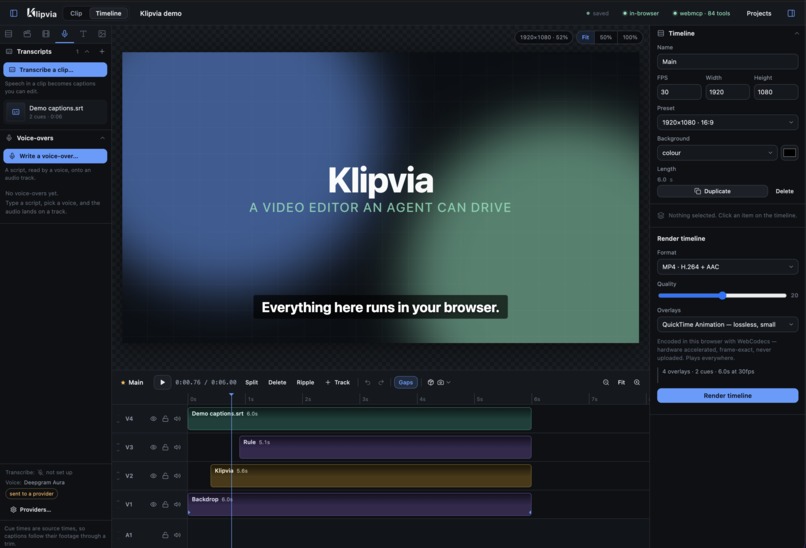
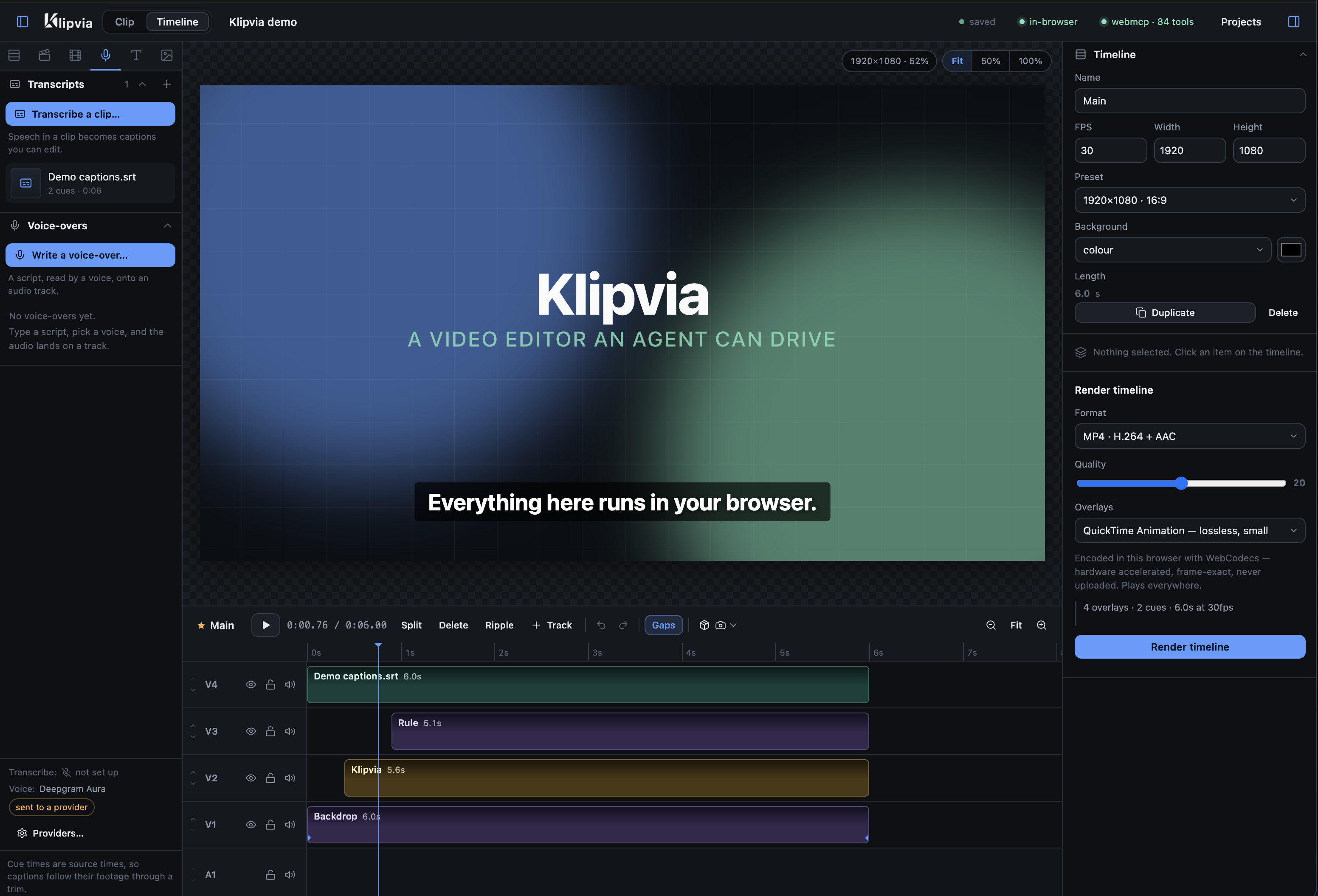
Klipvia is a browser video editor. You author animations in plain HTML, CSS and JavaScript, cut them together with footage, audio and captions on a timeline, and export either a clip with a real alpha channel or a finished film with sound.
Then it publishes itself. The editor registers 89 WebMCP tools that drive the same editor a hand drives — the same functions, the same validation, the same undo stack. An agent in ChatGPT's browser or in Chrome can read your timeline, find a phrase in a transcript, cut the filler words out of a take, build a lower third, place it at the right second, screenshot the composited frame to check its own work, and render the result. You watch it happen on the timeline in front of you, and if you disagree you press ⌘Z.
It also runs with no server at all. Point a static host at public/ and the whole application is
the browser: projects in IndexedDB, footage in the Origin Private File System, renders encoded on the
spot with WebCodecs. It decides which it is at boot by asking /api/health, and nothing above that
line knows the difference.
How I built it
No framework and no bundler. The editor is ~27,500 lines of hand-written ES modules in public/,
served unbundled. The optional server is 4,583 lines of TypeScript on Bun and Hono. There is exactly
one runtime dependency (hono, server-side only) plus a vendored mp4-muxer. The code editor, icon
set, subtitle parser, zip writer, tooltips and syntax highlighter are all hand-rolled, so the tool
keeps working offline — which is exactly when you want a local video editor.
Three pieces make the rest possible:
A virtual clock. public/runtime.js is injected into every preview iframe before your code and
replaces performance.now, Date.now, requestAnimationFrame, setTimeout, setInterval, and
drives document.getAnimations() directly. That makes arbitrary HTML/CSS/JS animation seekable,
which makes it frame-exact-exportable, which is what lets an animation be a real alpha overlay layer
on a video timeline.
One arithmetic, four render backends. public/effects.js defines crop, flip, rotate, colour,
blend and shadow as numbers, and emits the CSS half for the live preview while src/sequence.ts
reads the same numbers to emit the ffmpeg half, in the same fixed order. So the compositor preview,
the server ffmpeg render, the browser WebCodecs render and the MediaRecorder capture all place layers
identically. What you scrub is what you get.
One editor facade. Every mutating operation — from the UI, from a keyboard shortcut, or from a
WebMCP tool — goes through the same facade in public/app.js, which funnels into one refresh that
serialises the sequence, diffs it against the last snapshot, and records the difference. That is why
agent edits are undoable without a single tool having to know anything about undo.
Challenges I ran into
The preview cannot have one clock. Decoded <video>, real audio and virtual-clock iframes cannot
share a timebase. Seeking audio to keep it aligned is an audible cut, so the compositor instead eases
a wall-clock master toward the sounding footage at no more than 4ms per frame, and steers secondary
media by playbackRate a few percent — inaudible — only hard-seeking past 600ms of drift.
Hiding a layer breaks it. Layers are hidden with opacity, never display:none. Taking an iframe
out of the render tree makes Chrome cancel its CSS animations, and they come back as objects the
runtime measures from the wrong zero. That one cost an afternoon and is now a comment in
composite.js.
An agent's tab is always in the background. Chrome loads no media there and never fires
requestAnimationFrame, and clamps setTimeout to a second. Captures now ask ffmpeg for each frame
of footage, every wait has a real timer behind it, and the scheduler uses a MessageChannel macrotask
instead of setTimeout.
ffmpeg lies about alpha. Some libvpx builds accept -pix_fmt yuva420p, report no error, and
write plain yuv420p. So on startup each alpha-capable format is encoded once and read back. Alpha
is verified, not assumed.
Silent argument drops. A durationMs passed to a tool that wanted durationSeconds was quietly
ignored; every title came out at the default length and nothing said why. Unknown arguments are now
refused with the nearest real name.
Accomplishments I'm proud of
That an agent's edit and a person's edit are genuinely the same edit. Not a parallel API, not a command queue — the same function call, on the same document, in the same undo history, with the same validation. It means an agent's work is inspectable while it happens and reversible after it, which is the only way I would let one near an hour of footage.
And that the two tools I needed most did not exist in any editor I know of: get_narration, which
answers what is said when, in this timeline's seconds, and check_layout, which answers where do
my overlays actually paint, and which of them collide.
What I learned
Building with the tools as the agent is what produced the good ones. get_narration exists because
find_in_transcript spoke source seconds and converting through each item's in-point was a script
the agent kept having to write on the side. check_layout exists because the editor knew every
overlay's placement but not where the content of a full-frame transparent clip actually sits, so
every collision had to be found by capturing frames and looking; now each overlay is drawn offscreen,
the box of what it paints is measured, and the check names the pair, the seconds, and how much is
covered.
The most instructive bug: sixty patch_clip_code calls with lesson 08 open had re-saved lesson 08
sixty times — its revision read 62 while its neighbours read 5 — because one dirty flag covered both
the project and whatever timeline happened to be on screen. A second agent working that lesson would
have hit sixty stale revisions for nothing. Multi-agent editing punishes shared mutable state very
quickly.
The general lesson: a good tool surface is not a wrapper over your API. It is a set of answers to the questions an agent actually has to ask, in the units it has to ask them in.
What's next
A real /mcp Streamable HTTP endpoint, so the same tools are reachable from Codex CLI and other
out-of-page agents, not just from the page. Sandboxing agent-authored clip JS in a null-origin frame,
which is the honest gap today. Richer per-call confirmation UI for write tools. And pushing more of
the ffmpeg-only tools into WebCodecs so the serverless build loses nothing.
Required question 1 — Why is WebMCP the right fit for this use case?
Because video editing is a long, structured workflow rather than a single prompt, and because all the state that matters is already in the page.
A cut is not one decision. It is: read the timeline, find the phrase, convert source time to timeline time, trim the item, ripple everything after it, check the captions still line up, look at the frame. A chat model with a text box cannot do that. A cloud MCP server could only do it by first uploading the footage, the project and the transcripts somewhere — turning a local editing session into a data transfer.
WebMCP removes the transfer entirely. The tools run inside the page that already holds the state. The agent gets the open project, the decoded media, the transcripts, the undo stack and the live compositor, because it is standing in the same room as them. Klipvia takes that literally: a build with no server at all — footage in OPFS, projects in IndexedDB, renders through WebCodecs — is fully agent-drivable, and not one frame of video leaves the machine.
It also means the agent inherits the app's own rules rather than reimplementing them. Items on a track cannot overlap; a stale save is rejected by revision; a locked track is not written to. Those invariants hold for the agent for free, because it is calling the same code.
Required question 2 — How does it improve the user experience?
It removes the mechanical half of editing without taking the creative half away from you.
- You stay in the room. Everything the agent does appears on the timeline as it happens. This is not a job you submit and a file you get back.
- You can undo the agent. Agent edits land on the same 100-step undo history as yours, per timeline. "Remove forty silences" is one ⌘Z. That single property changes how much you are willing to let an agent try.
- The agent checks its own work.
check_layoutreports overlays that collide or fall off-frame,check_timelinecatches missing sources, opaque overlays and letterboxing, andcapture_timeline_framecomposites the real frame — ffmpeg decodes the footage, the overlays go through the export rasterizer — so the agent can look before it renders. You review a result, not a guess. - It speaks the units you think in. "Put the keycap where he presses Ctrl" works because
get_narrationhands back what is said when in timeline seconds. You do not translate. - You are asked before anything leaves. An agent cannot send your audio to a cloud speech provider on its own; that is a checkbox you tick, off by default.
- Nothing is locked behind the agent. Every tool is an operation the UI already has. If you would rather drag it yourself, drag it yourself.
Required question 3 — What can people and agents do together that was difficult or impossible before?
Edit the same timeline at the same time, and be able to take it back. Because every tool routes through the same editor facade as the UI, an agent's edit and a hand's edit are the same edit, on the same document, in the same history. You can watch an agent place forty overlays across nine lessons and undo the third one it made without unwinding the other thirty-nine. I have not seen that in an NLE — agent integrations are usually a separate lane whose output you accept or discard whole.
Split the work with more than one agent. Each timeline is its own revisioned document with
optimistic concurrency: a save carries its base revision, a stale save is refused and returns the
current document, and the client pushes your version onto the undo stack and adopts theirs
("Intro changed elsewhere — reloaded; ⌘Z keeps yours"). On top of that, claim_timeline is an
advisory lock — an agent says which section it is working on, claims lapse after fifteen minutes, and
another agent can force a takeover. So a person can cut the main timeline while two agents build
sections of it.
Leave instructions for the agent in the project itself. Tracks and items carry free-text notes an agent reads before acting — "Lower thirds only, brand blue, never over the presenter's face." The direction lives in the project rather than being re-typed into a prompt every session.
Do transcript-driven edits as one operation. find_in_transcript and get_transcript hand back
ranges that cut_source_ranges takes directly, so "drop every um" is: find the words, pass their
ranges. The footage is cut, the captions on it are cut identically, and everything after slides up —
one undo step, not four hundred.
Ask an agent for the tedious pass and keep the taste for yourself. Remove silences, place the forty overlays, time the voice-over to the script, then you decide whether the pacing is right.
Required question 4 — How is WebMCP implemented?
All 89 tools live in public/webmcp.js (2,593 lines) and are registered from
registerAgentTools() in public/app.js.
Registration. resolveContainer() prefers document.modelContext, accepts
navigator.modelContext as the deprecated alias (the API moved on 2026-08-10), and falls back to
provideContext({ tools }) for older polyfill surfaces. Each descriptor carries exactly name,
description, inputSchema and annotations, with an execute that runs the tool and formats the
result. Registration is scoped by an AbortController, so switching workspace replaces the catalog
instead of stacking a second copy on top of it.
The catalog is mode-scoped, on purpose. A catalog should describe the current page state, not every command the app has, and browser clients cap catalog size. So Timeline mode publishes 71 tools (66 timeline tools plus a five-tool navigation bridge into Clip mode) and Clip mode publishes 26 (23 clip tools plus a three-tool bridge back). The navigation tools change the mode, which re-registers the catalog. In the serverless build the five ffmpeg-backed tools are left out entirely and the remaining ones say what this build is — so a model plans around the limitation instead of discovering it as a 501 halfway through.
Annotations are real, not decorative. Every tool declares readOnlyHint — 25 read-only, 64
writes — so the agent client knows which calls to confirm. Six tools that return text originating
outside the app (get_transcript, find_in_transcript, get_narration, get_clip,
get_stage_state, check_clip) declare untrustedContentHint: true. exposedTo is deliberately
left unset so the tools stay same-origin.
Everything routes through the editor facade. No tool touches the document directly. They call the same functions the UI does, which is why agent edits inherit undo, revision checks, claim guards and track locks for free.
Argument hygiene. Before a tool runs: synonyms are resolved (timeSeconds/atSeconds), unknown
arguments are refused with the nearest real name rather than silently ignored, required fields
and types are checked and coerced, and any throw is converted into a described failure with
isError. A wrong call must say so.
Output is budgeted. Results are clamped to about 1,500 characters, so get_clip takes a fields
argument and capture_frame returns a URL rather than an inline image. Return shape is negotiated
too: native Chrome returns a bare string while W3C-shaped clients expect { content: [...] }, so the
shape is detected at init and overridable with ?mcpResult=string|content.
Consent and egress. agentMayEgress is false by default. An agent cannot transcribe to, or
synthesise speech through, a provider that leaves the machine unless a person ticks a box — because
choosing a provider is consent to your own sends, not consent to a model deciding to post an hour of
footage to one, least of all when the instruction could have arrived inside a transcript the model
was asked to read. It is enforced at four call sites, and every successful speech result states where
the audio went.
Outbound safety. An agent cannot open a file picker, so it brings media in by URL — which makes
the import route an SSRF surface. src/outbound.ts runs two policies (stricter for the rasterizer
proxy than for agent imports), parses addresses to 16 bytes and classifies them rather than matching
strings, blocks cloud-metadata hosts and non-http(s) schemes, re-validates at every redirect, and
defeats DNS rebinding by connecting to the checked IP with the hostname in the Host header. Imports
are capped at 8MB for assets and 24MB for media. The speech relay is a six-host allowlist that
forwards five headers and explicitly not cookies.
The honest caveat: clip JavaScript runs same-origin with the editor. Treat an agent-authored clip the way you would treat code you pasted in yourself. Sandboxing it is the next piece of work.
Built With
- bun
- canvas
- chrome
- docker
- ffmpeg
- hono
- indexeddb
- javascript
- model-context-protocol
- nginx
- opfs
- svg
- typescript
- web-audio-api
- webcodecs
- webmcp
- websockets

Log in or sign up for Devpost to join the conversation.