-
-
Klaw
-
Hand-Tracking and Cursor Motion
Inspiration
Klaw was inspired by the need for more intuitive, hands-free ways to interact with technology, especially for individuals with mobility or speech impairments. As technology becomes increasingly integrated into daily life, traditional input methods like keyboards and mice are sometimes insufficient for the nuanced interactions that modern applications demand. We wanted to create an accessibility tool that bridges the gap between users and their devices, allowing the former to take a more relaxed, agile approach towards making the most of their laptops.
What it does
Klaw enables seamless laptop control through hand gestures, facial expressions, and voice recognition, allowing users to navigate without a keyboard or mouse. It specifically supports features like gesture-based clicking, head-tilt volume control, and real-time speech-to-text captions, making technology more accessible and intuitive for users with mobility and speech impairments.
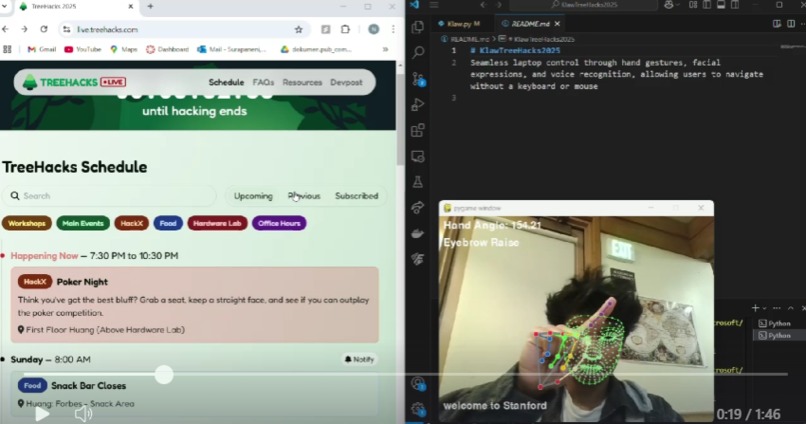
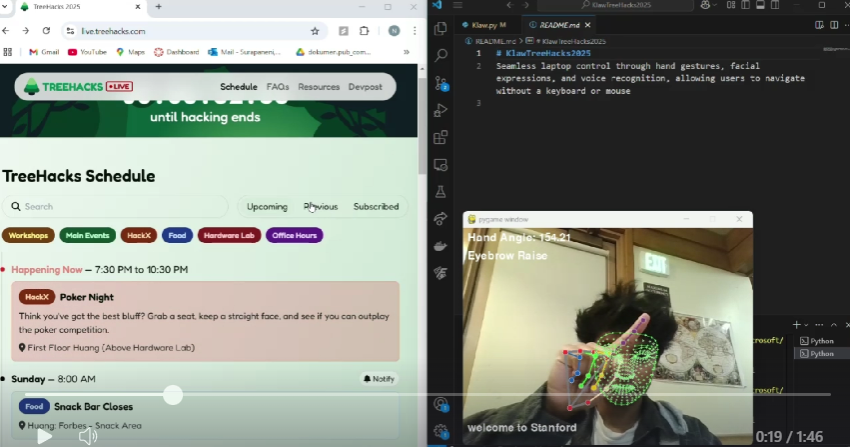
Hand Gesture Control: Move your cursor by pointing with your index finger, perform clicks by pinching your fingers together, and navigate with swipe gestures. This mechanism creates a touch-free alternative to traditional input methods and ensures smooth and responsive tracking, allowing users to interact naturally without additional hardware.
Facial Expression Detection: Tilt your head left or right to adjust volume, raise your eyebrows to trigger actions, or smile to confirm selections.
Real-Time Speech-to-Text: Converts spoken words into live subtitles, aiding users with speech impairments or those in environments where typing is difficult. This feature opens the door for more effective communication and accessibility in various settings, from workspaces to online education platforms.
Accessible Interaction: Klaw eliminates the need for a physical mouse or keyboard, making laptops more accessible for users with limited mobility.
How we built it
We used Google MediaPipe for hand and face tracking, OpenCV for image processing, SpeechRecognition for real-time subtitles, Numpy for the joint angle calculations, Pyautogui for the scrolling behavior, and Pygame to render the test interface. The project was written in Python and with the assistance of related libraries.
The core of gesture tracking relies on MediaPipe Hands, which detects hand landmarks and extracts the index finger and thumb positions to enable cursor movement and gesture-based clicking. The program continuously reads frames from the webcam using OpenCV, processes them, and updates the cursor position via PyAutoGUI. Pinch detection, which is used for clicking, is implemented by calculating the Euclidean distance between the index fingertip and thumb tip (mostly by way of Numpy functions).
For facial expression-based controls, MediaPipe Face Mesh extracts key facial landmarks to detect movements such as head tilting. The head tilt feature actually compares the vertical positions of the left and right ear landmarks to determine the direction of tilt, which then triggers volume up or down commands.
Speech recognition runs in a separate thread to prevent lag, utilizing the SpeechRecognition library to capture microphone input and convert spoken words into real-time text subtitles. This text is then rendered using Pygame, ensuring that subtitles update dynamically on-screen while other interactions remain smooth.
Also, to prevent unintended rapid gestures or speech inputs, we implemented threshold-based debouncing for clicking and volume control, as well as speech recognition cooldown timers to avoid excessive updates and oversensitive cursor activity.
Challenges we ran into
Fine-tuning gesture detection to avoid false positives.
Handling speech recognition delays and improving accuracy in noisy environments.
Preventing over-sensitive cursor clicking when user pinches.
Integrating the real-time angle calculations into the PyGame simulation
Accomplishments that we're proud of
Successfully integrating multi-modal input (gesture, face, and voice) into a single tool.
Improving gesture accuracy for seamless, hands-free control.
Making an accessible and already functional prototype that can genuinely help users right away.
What we learned
How to apply CV libraries in order to track body movements
How to fine-tune thresholds for gesture recognition to balance sensitivity with accuracy
Challenges in live speech-to-text processing and how to improve clarity
What's next for Klaw
Some type of customizable gestures for more personalized controls
Machine learning enhancements to improve speech-to-text accuracy
Less sensitive mouse controls

Log in or sign up for Devpost to join the conversation.