Inspiration
We make BeaverBot, a STEAM education robotics brand. Our teacher resource program offers 12 classroom kits — hydraulic lifts, light-and-shadow projectors, pop-up structures — organized by grade band (K-2, 3-5, 6-8) with lesson plans and downloadable blueprints.
Talking to the teachers who use them, we kept hearing the same thing: the kit is the easy part. What drains teachers is everything around it — adapting lesson plans to their class, creating differentiated versions for mixed-ability groups, and writing parent communications. In under-resourced schools with large class sizes, this invisible workload directly competes with time spent actually engaging with students.
Teachers told us they want materials that are ready to use as-is. So we built the workflow that wraps around the kit.
What it does
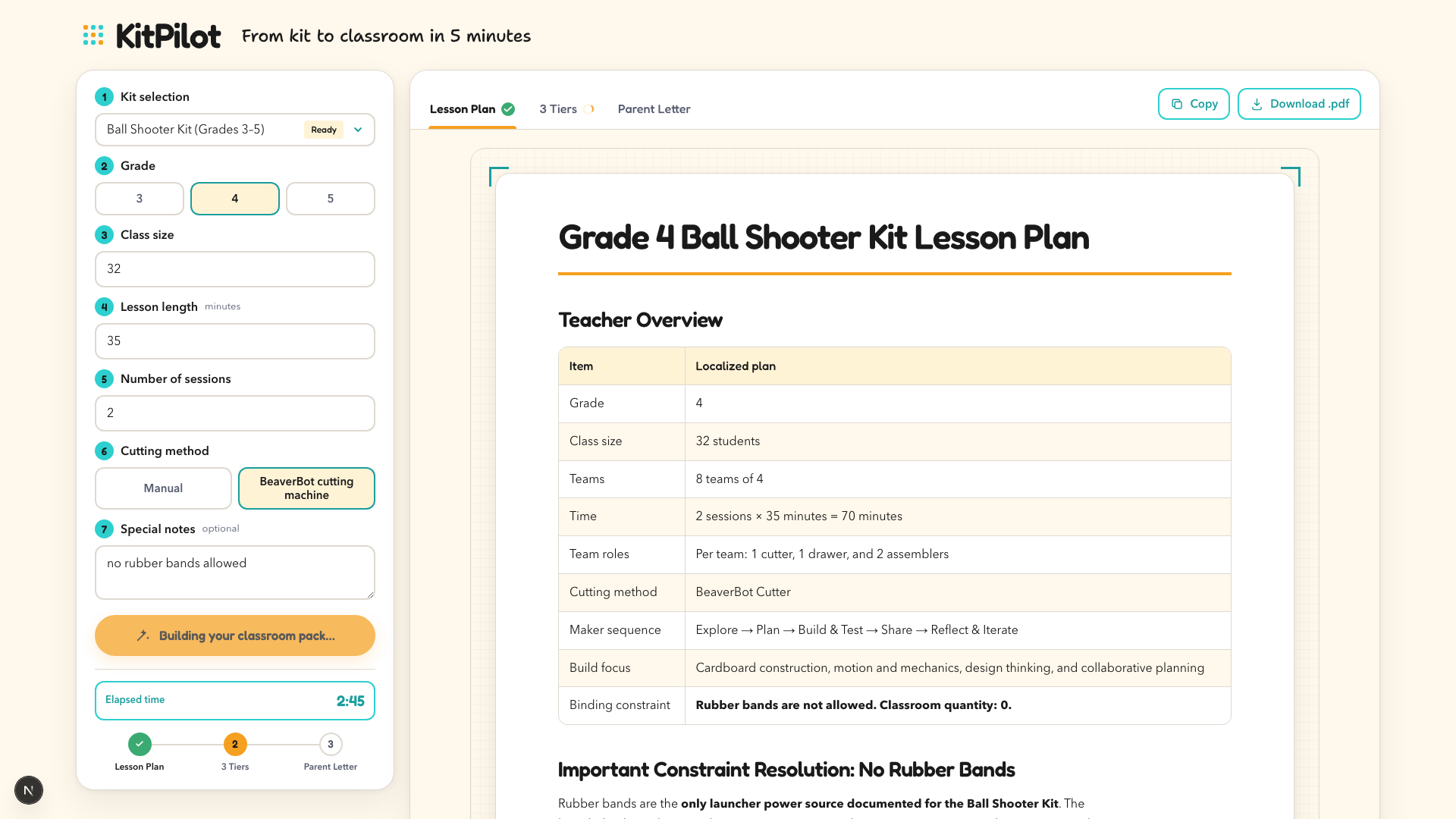
KitPilot takes one input — a BeaverBot kit — plus a teacher's real constraints (grade, class size, lesson length, available materials), and generates a complete, classroom-ready package:
- Lesson Prep — a localized lesson plan with a minute-by-minute timeline, a slide-by-slide map to the kit's included 15-slide deck, and a materials checklist, adapted to this teacher's class, not a generic template.
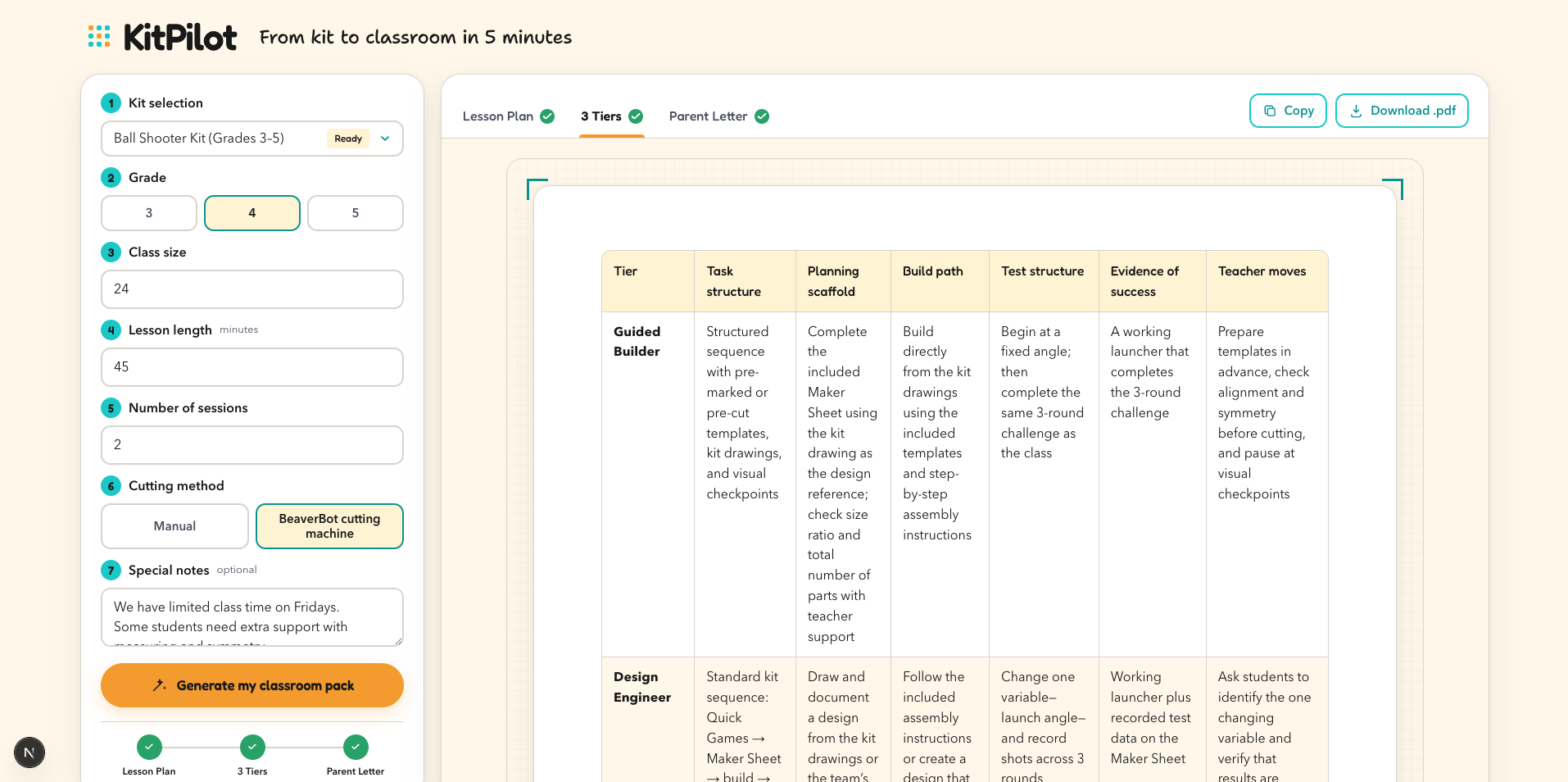
- Differentiation — the same lesson in three tiers (foundational support / core / extension challenge), plus adaptation notes for English-language learners and students with special needs. One click, three versions — the single biggest ask from teachers in large, mixed-ability classrooms.
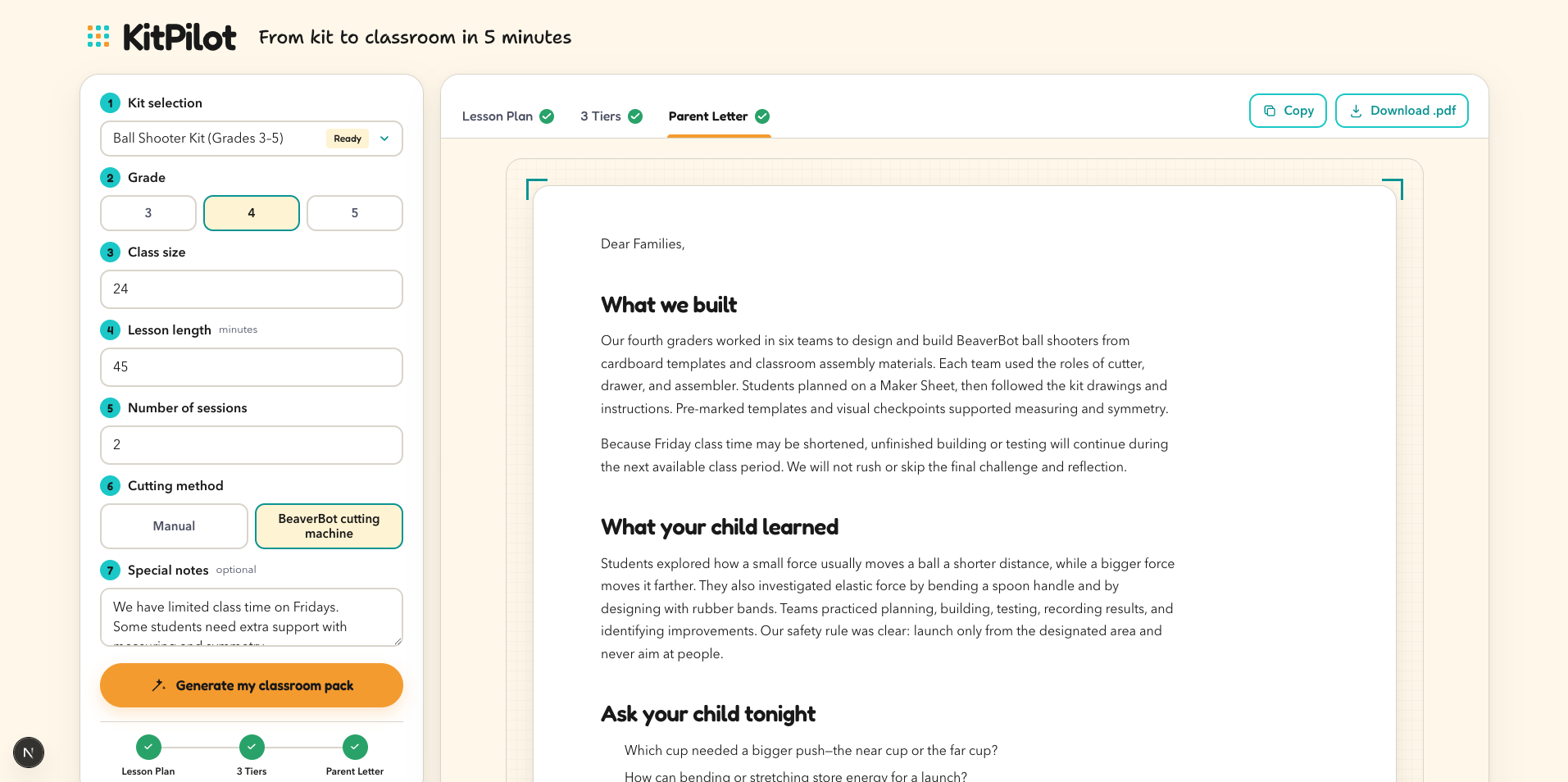
- Parent Communication — a drafted parent letter covering what students built, what they learned, and conversation starters for home. Teachers edit and send instead of writing from scratch.
Every document can be copied to the clipboard or exported as a print-ready PDF.
The demo walks through one kit end-to-end: Ball Shooter Kit (grades 3-5) — a hands-on build where students explore launch angles, elastic energy, and projectile motion by engineering their own shooter. Five minutes from kit selection to a teachable lesson, three tiers, and a parent letter.
How we built it
We worked as a two-AI team with a strict division of labor: GPT-5.6 is the product's engine, Codex was the engineering team. One person (a product manager, not a professional developer) made every product decision; Codex wrote every line of code.
- GPT-5.6 (Responses API) powers all generation through a sequential three-call pipeline: lesson plan first, then differentiation and the parent letter are generated from that lesson plan, so the three documents stay consistent with each other. The server streams progress and results to the browser as newline-delimited JSON, so each tab fills in as it finishes.
- Grounding over creativity. We extracted the kit's official 15-slide curriculum into a structured YAML knowledge base — real lesson flow, real materials, real tier definitions, proposed NGSS codes. Every call injects it as the single source of truth, under a system prompt that forbids inventing build steps, materials, or slide content. Deterministic math (team splits, total instructional minutes) is computed in code and handed to the model, so timelines always add up.
- Guarantees live in code, not hopes in prompts. Post-processing guards enforce structural contracts the model occasionally drifts on: the differentiation output must open with the side-by-side comparison table, and the parent letter is trimmed to its word cap by an algorithm that never removes safety-critical sentences.
- Codex built the entire application — Next.js (App Router) + TypeScript + Tailwind, the streaming API route, the pdfkit print-ready export — from one written product spec, then iterated through acceptance-test rounds, then restyled the whole UI to BeaverBot's brand design tokens (color roles, type system, corner-radius rhythm) in a single pass.
- Codex even built our demo video as code: a Playwright + OpenAI TTS + FFmpeg pipeline that records the real app generating live, narrates the approved script, and hard-fails the render if the video exceeds the time limit or the key proof points don't appear on screen.
Challenges we ran into
- Compressing a real product vision into a 3-day build: we deliberately cut scope from a five-stage teacher workflow down to the three stages teachers told us hurt most (prep, differentiation, parent communication).
- Making differentiation *pedagogically real* rather than "same text, three reading levels" — each tier changes the task structure, not just the vocabulary. Getting GPT-5.6 to hold that principle across all three tiers took several rounds of tightening the content contract.
- The honesty problem was the hardest prompt work. Test input: "no rubber bands allowed" — which removes this kit's only documented power source. Early outputs cheerfully invented an untested substitute launcher. We rewrote the contract so the model adapts what it can, flags what it can't, and explicitly defers powered testing instead of fabricating build steps. For education, that refusal-to-invent is the trust line.
- Real-world plumbing: the app has to run on networks it doesn't control. Node's built-in fetch silently ignores HTTP proxy environment variables, so Codex wired a proxy-aware OpenAI client that activates only when a proxy is actually configured — and replaced generic failures with specific, actionable messages for every failure mode: rejected key, exhausted quota, rate limit, model unavailable, connection timeout.
- Formatting drift: the model wouldn't reliably keep the comparison table first or stay under the letter's word cap. Instead of burning tokens on retry loops, we wrote deterministic post-processing — cheaper and faster than asking the model twice.
Accomplishments that we're proud of
- The output isn't a demo artifact — it's grounded in a real product line used by real teachers, and the generated materials are usable in an actual classroom on Monday.
- A differentiation engine that respects how teachers actually think about tiering.
- A generation pipeline that would rather say "this kit can't do that" than invent an untested activity for 9-year-olds.
What we learned
- In education, grounding beats creativity. Every constraint we added to GPT-5.6 — the YAML knowledge base, the content contracts, the "never invent" rules — made outputs more useful, not less. The model's job isn't to imagine a lesson; it's to localize a real one.
- Give Codex a spec, not vibes. Our best sessions started with a complete written product spec and explicit acceptance criteria ("timeline must sum to 70 minutes", "the special note must be addressed, not ignored"). Codex then worked like a senior engineering team: it proposed a file structure, built it, and fixed what the acceptance tests caught. A PM with a clear spec can now ship a real product in three days.
- Put contracts in prompts, guarantees in code. Prompts get you 95% structural compliance; the last 5% (table position, word caps, timeline math) belongs to deterministic code. Knowing where to draw that line is most of the engineering.
- Automate the deliverables too. Building the demo video as a scripted pipeline meant every revision was a re-render, not a re-shoot — and the video's own acceptance checks (duration, resolution, proof points visible) caught mistakes a tired human wouldn't.
What's next for KitPilot
- Extend to all 12 BeaverBot kits, then to a kit-agnostic format any hands-on STEAM curriculum can plug into.
- Add the two stages we cut for the demo: in-class support cards (troubleshooting, discussion prompts, early-finisher challenges) and assessment (NGSS-aligned rubrics, photo-based project feedback).
- Pilot with teachers in our existing educator community and Facebook group.
Built With
- codex
- ffmpeg
- gpt-5.6
- next.js
- node.js
- openai
- pdfkit
- playwright
- react
- tailwindcss
- typescript


Log in or sign up for Devpost to join the conversation.