-
-
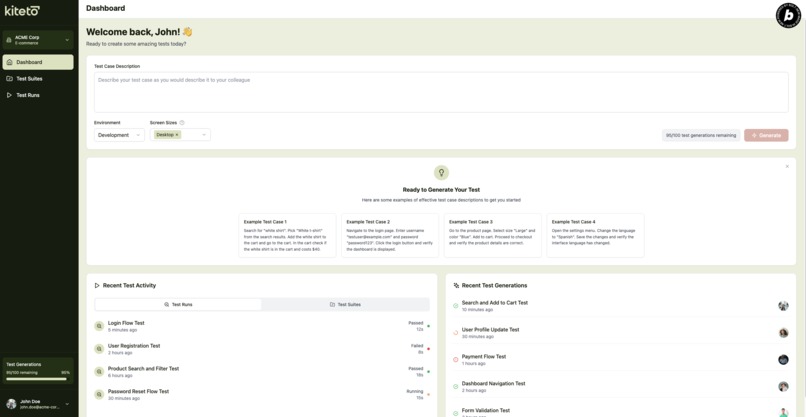
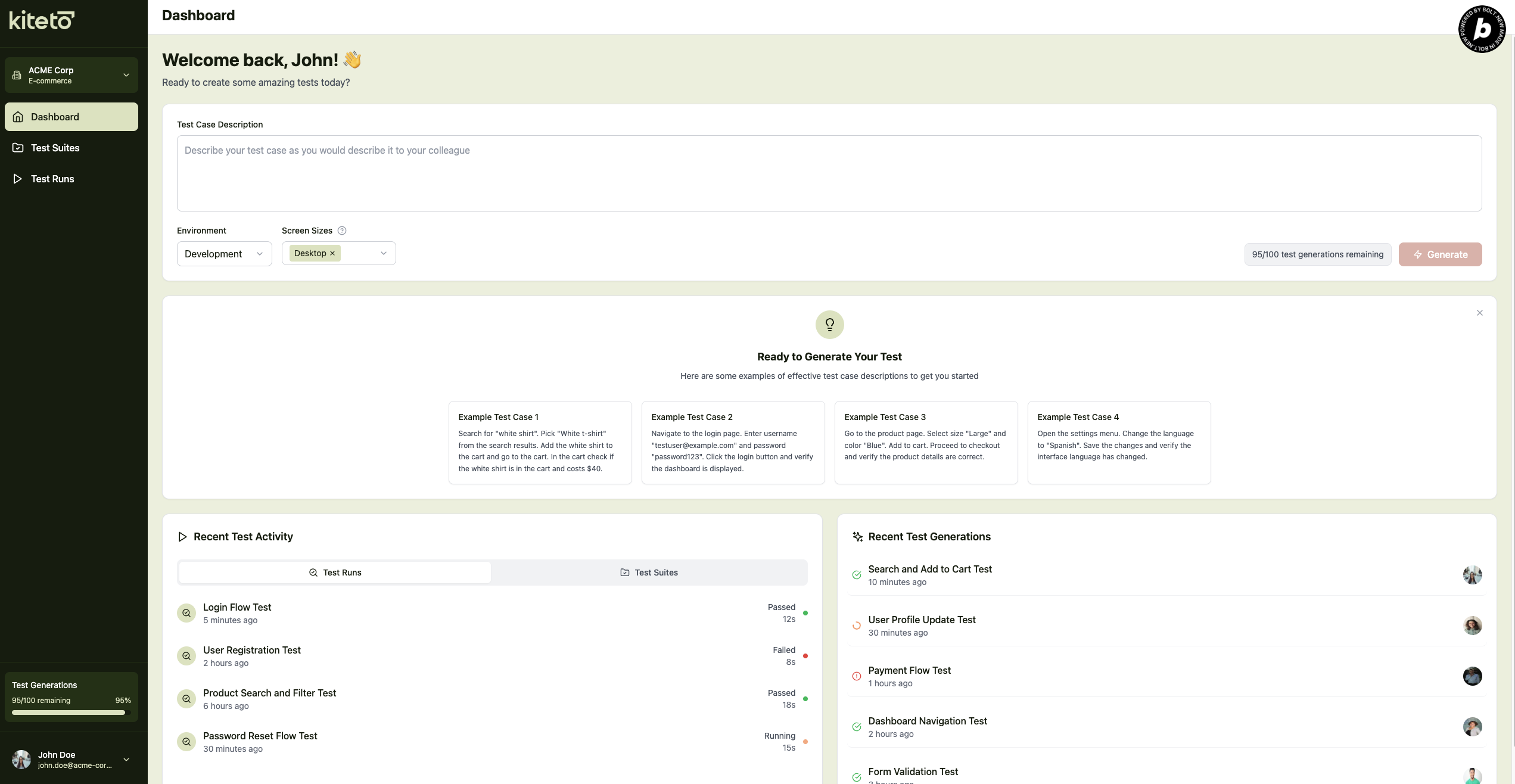
Dashboard Page
-
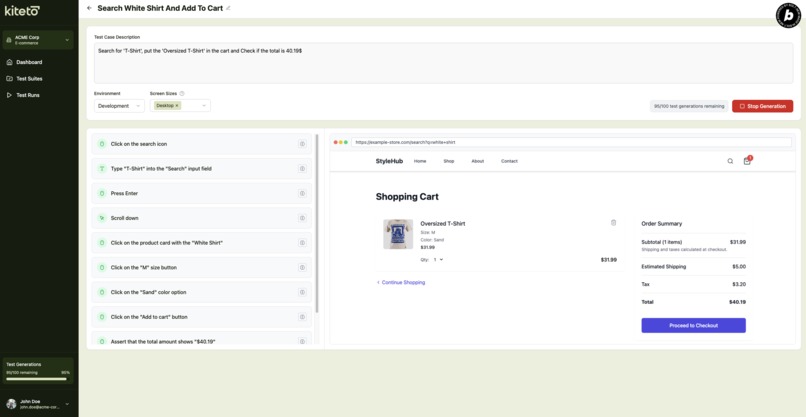
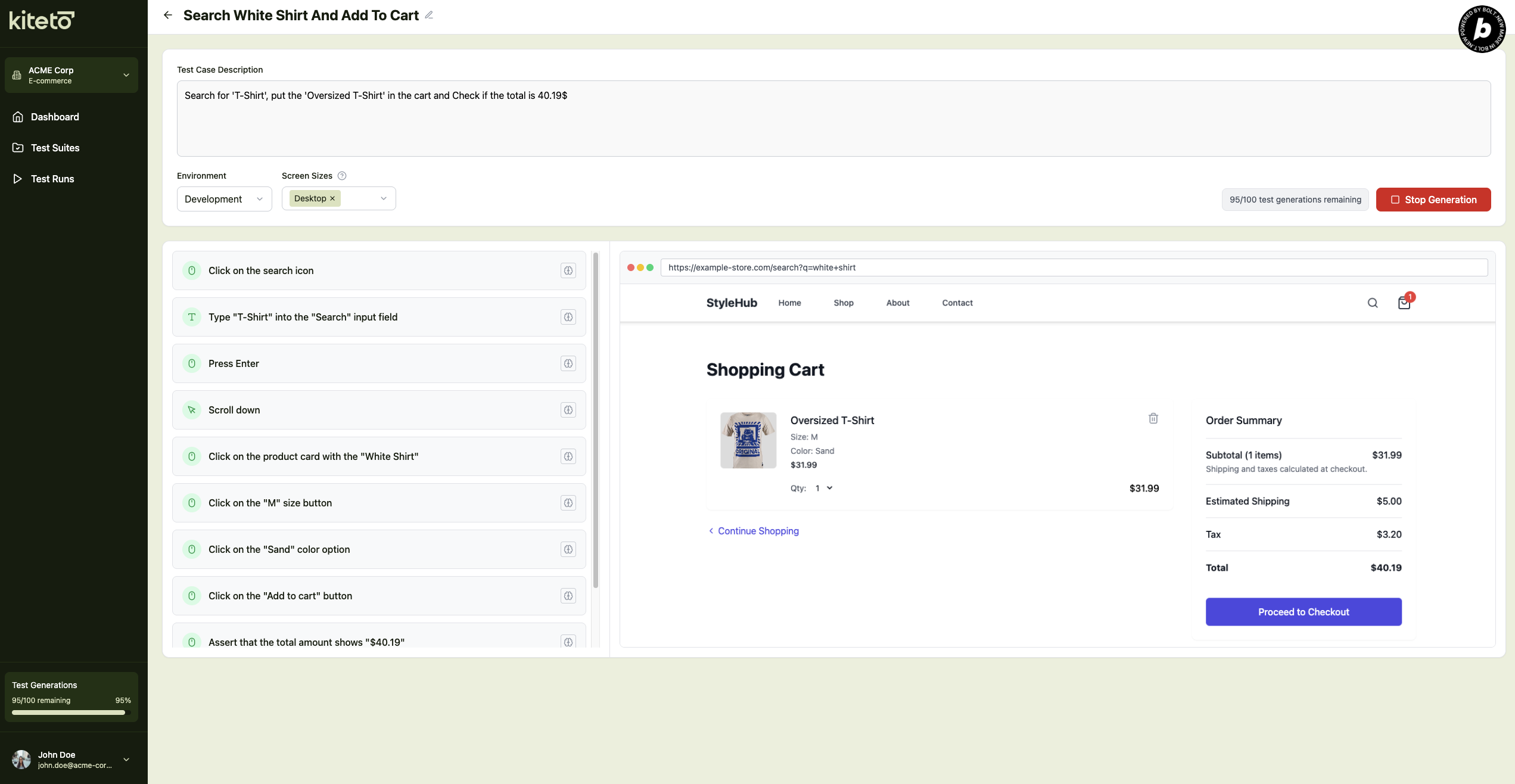
Test Generation Page
-
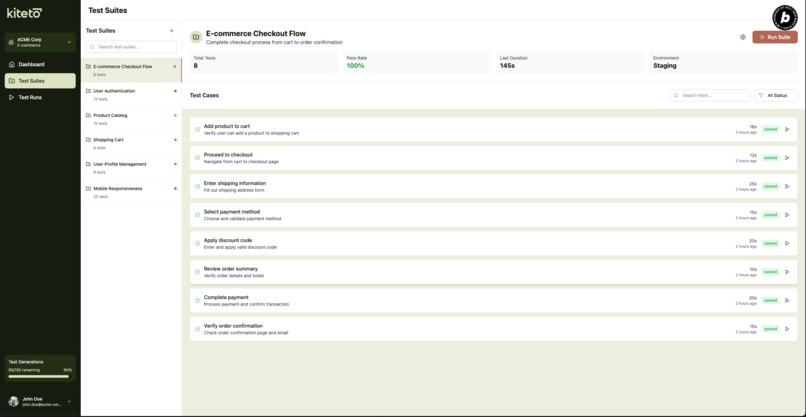
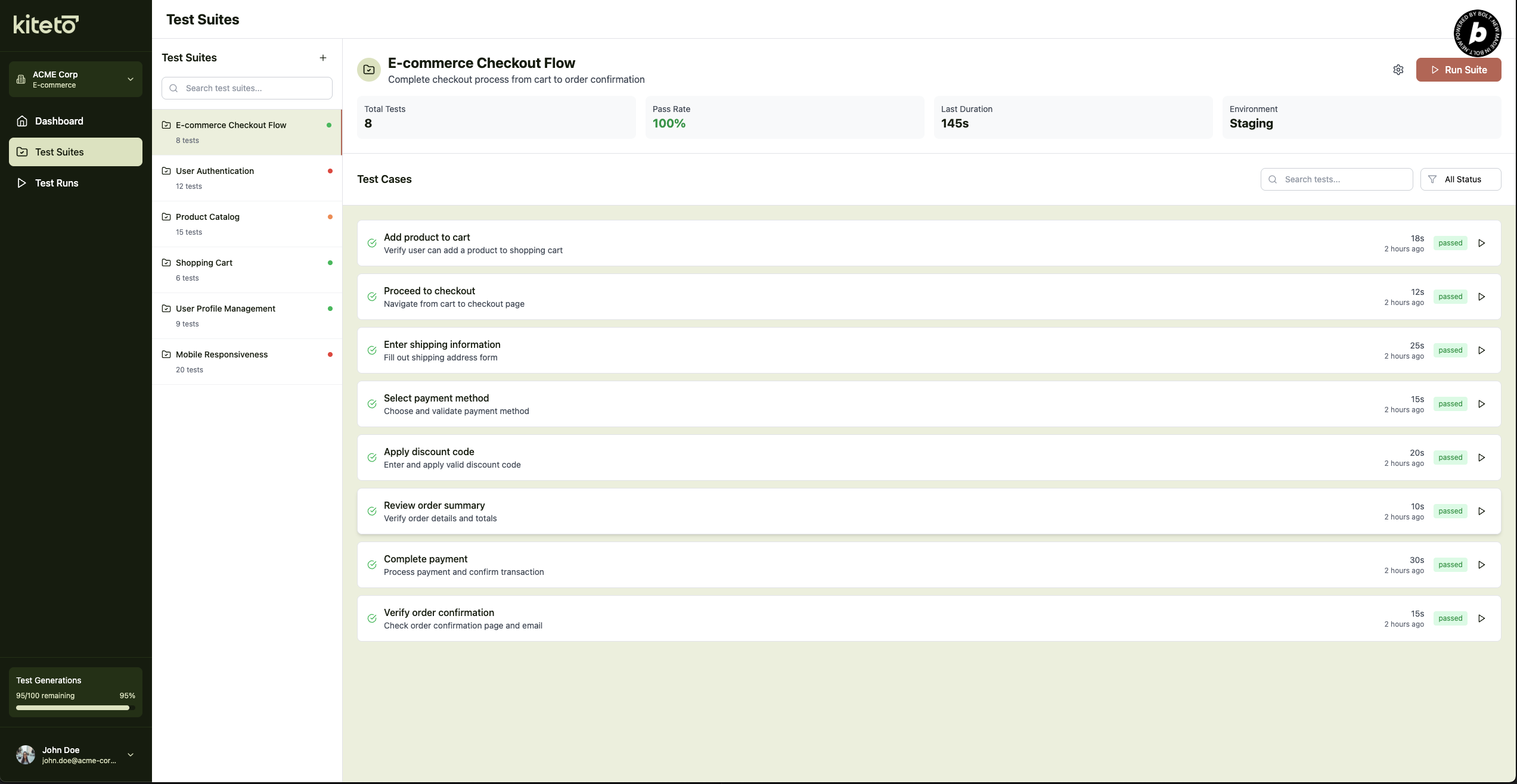
Test Suites Page
-
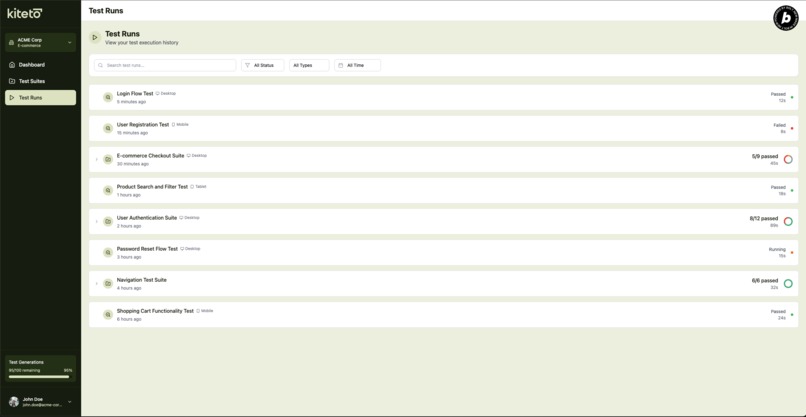
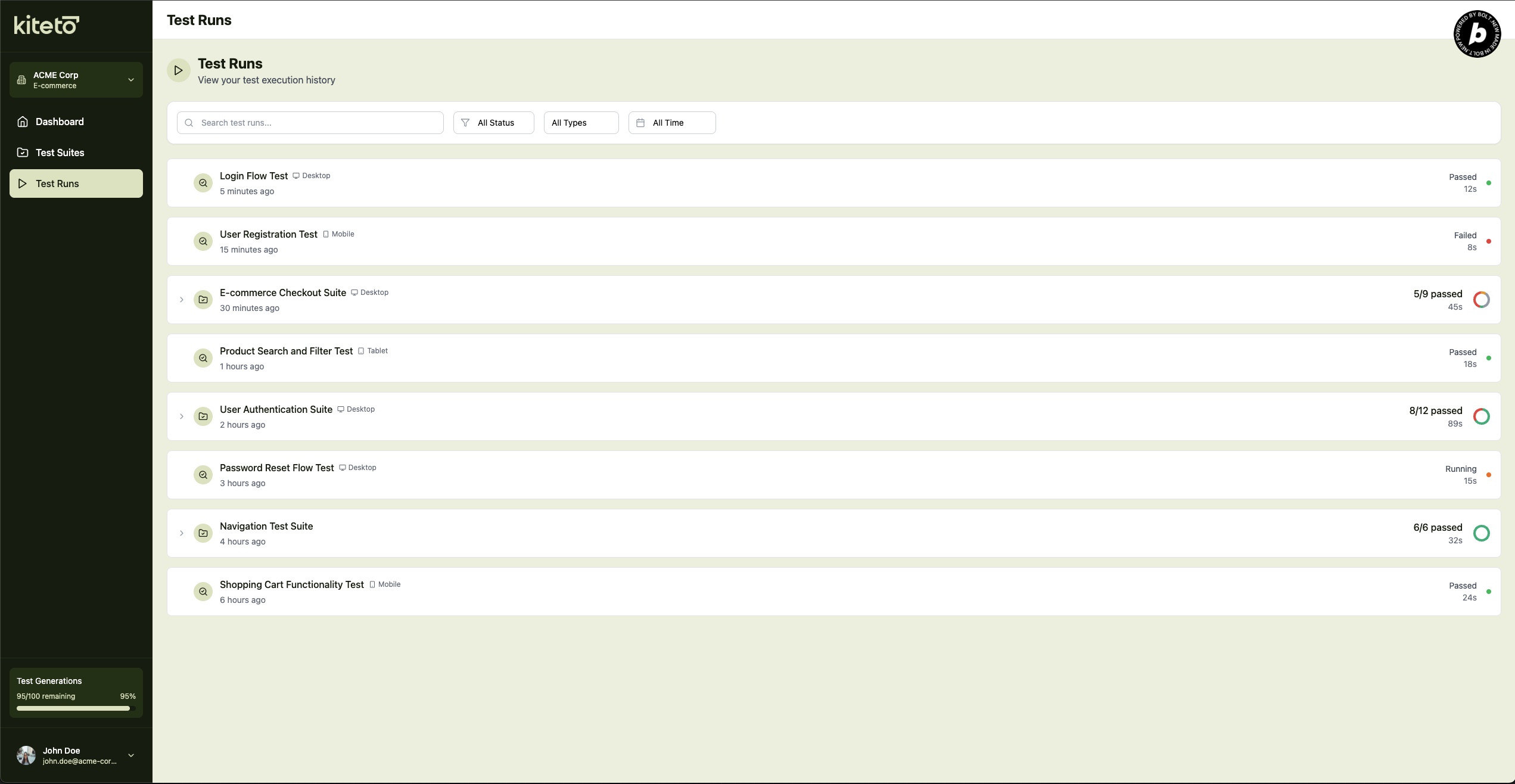
Test Runs Page
About the Project
Inspiration
The inspiration for kiteto came from a real pain point experienced across the software development industry: end-to-end (E2E) testing is essential but incredibly time-consuming and expensive to maintain. Traditional E2E test automation requires specialized developers who must write complex code for every user interaction, and when applications change, these tests often break and need manual updates.
We witnessed teams struggling with the classic dilemma: everyone agrees that comprehensive E2E testing is crucial for quality assurance, but nobody wants to write and maintain these tests. Developers prefer building new features over writing test automation, and business stakeholders who understand the requirements best lack the technical skills to create tests themselves.
The breakthrough moment came when we realized that modern AI, particularly vision-capable large language models, could potentially bridge this gap. Instead of requiring developers to code every click and input, what if business analysts and product owners could simply describe test scenarios in plain English, and AI could execute them automatically?
kiteto is currently in development and you can join the waitlist at kiteto.ai to be among the first to experience AI-powered test automation.
What it does
For this hackathon, we focused exclusively on building the user interface that would make kiteto's AI-powered testing accessible to everyone. The UI we created provides an intuitive frontend for what will become a comprehensive AI testing platform.
The kiteto platform vision (backend in development) aims to transform natural language test descriptions into executable end-to-end tests. The complete system will use multiple AI agents to analyze screenshots, navigate web applications, and generate test code automatically.
Our hackathon UI provides:
- Test case creation interface where users can write simple, conversational descriptions of what they want to test
- Project management dashboard for organizing test suites, applications, and team collaboration
- Environment configuration panels for setting up different browsers, deployment environments, and test targets
- Test execution monitoring views designed to show real-time AI progress and decision-making
- Results visualization for reviewing generated test steps and validating outcomes
- Export interfaces for integrating generated tests into existing CI/CD pipelines
The core innovation is that no programming knowledge will be required. A product owner will be able to write something like "Log in with [email protected], navigate to the shopping cart, add a product, and verify the total price is 40.19$" and the AI will autonomously perform these actions while recording reusable test scripts.
How we built it
This UI was built entirely using bolt.new as part of a university project, showcasing how modern AI-assisted development tools can rapidly prototype complex interfaces. The project leverages bolt.new's capabilities to create a sophisticated multi-page application with:
Frontend Architecture:
- React-based single-page application with modern component architecture
- State management architecture prepared for real-time test execution monitoring
Key Features Implemented:
- Project dashboard for organizing test suites and applications
- Test case creation wizard with intuitive form interfaces
- Environment configuration panels for setting up test targets
- Execution monitoring mockups with live progress tracking and screenshot display areas
- Results visualization showing test step sequences and outcomes
Design System:
- Implemented kiteto's brand colors (Pine Tree Green, Kombu Green, Pale Spring Bud, Beige, Copper Red)
- Consistent typography and spacing throughout the application
- Intuitive iconography and visual feedback for user actions
Real-World Validation:
As part of the university project, we participated in a Usability Testing Session in Frankfurt/Main (Germany) where we had potential users interact with our UI prototype. This provided invaluable insights that led to significant improvements in our interface design and user experience approach.
Challenges we ran into
1. Designing for Non-Existent Backend Creating a realistic UI for complex AI workflows without having the actual backend systems required careful planning of data structures, and user flows that would work with future AI agent integration.
2. Complexity vs. Simplicity Balance The biggest challenge was designing an interface that makes incredibly complex AI workflows feel simple and approachable. kiteto's planned backend involves multiple AI agents, browser automation, screenshot analysis, and test code generation - but users shouldn't need to understand any of this complexity.
3. User Mental Models vs. Developer Assumptions Our usability testing revealed how strongly our developer perspective had shaped the initial UI design. We learned that what seems intuitive to developers building testing tools often confuses business users who will be the primary audience.
4. Representing AI Decision-Making Designing interfaces to show how AI "thinks" and makes decisions during test execution required innovative UI patterns, even without the backend to test these concepts.
5. bolt.new Learning Curve As a university project using bolt.new, there was an initial learning curve in understanding how to best leverage the AI-assisted development environment for building a production-quality interface.
Accomplishments that we're proud of
🎨 User-Centered Design Validation Through our participation in the Frankfurt Usability Testing Session, we validated our design approach with real potential users and gathered actionable feedback that significantly improved our interface.
⚡ Rapid Prototyping with bolt.new Leveraging bolt.new, we built a comprehensive, multi-page application with sophisticated features in record time, demonstrating the power of AI-assisted development for complex UI projects.
🌍 Industry-Relevant Solution This isn't just a hackathon project - the UI addresses real workflows from business analysts and QA professionals, informed by actual industry pain points and user research.
🔄 Iterative Improvement Process The usability testing session allowed us to identify and fix critical UX issues early, showing how user feedback can dramatically improve interface design even at the prototype stage.
📱 Production-Ready Architecture Despite being a hackathon UI, the component structure and state management patterns are designed to scale, with clear separation of concerns and reusable components ready for backend integration.
What we learned
AI-Human Interface Design Requires New Patterns Building interfaces for AI-powered tools requires fundamentally different design thinking. Users need to understand what the AI can and cannot do, how to provide effective input, and how to interpret AI outputs - all without overwhelming them with technical details.
Developer Perspective ≠ User Perspective Our usability testing session provided crucial insights:
- Icons often caused confusion - what seemed visually logical to us as developers frequently needed additional context for business users (tooltips, clear labels, explanatory text)
- The dashboard met user expectations - users intuitively understood navigation and could categorize central elements effectively
- Perspective shift is crucial - we recognized how strongly our developer mindset had influenced the UI design. Future iterations will better distinguish between developer and business user needs through targeted onboarding and differentiated interface views
bolt.new's Power for Complex Applications This project demonstrated how AI-assisted development tools like bolt.new can accelerate the journey from concept to functional prototype, especially for applications with multiple interconnected features and complex user workflows.
Early User Testing is Invaluable The usability testing session showed that even without a backend, getting real user feedback on UI prototypes can reveal critical design flaws and improvement opportunities that would be expensive to fix later in development.
What's next for kiteto
🚀 Backend Integration This UI will serve as the foundation for kiteto's complete platform. The immediate next step is integrating the AI agents, browser automation backend, and test execution engines that have already been prototyped separately.
🔧 Advanced AI Features
- Multi-modal test generation combining screenshots, DOM analysis, and natural language processing
- Intelligent test maintenance that automatically updates tests when applications change
- Test case suggestion based on application analysis and common user workflows
📈 Enterprise Integration
- CI/CD pipeline integration for automatic test execution
- Jira/GitHub integration for importing requirements and creating pull requests
- Team collaboration features with role-based permissions and approval workflows
🌐 Platform Expansion
- Mobile app testing extending beyond web applications
- API test generation from OpenAPI specifications
- Cross-browser compatibility testing with parallel execution
📊 Analytics and Insights
- Test coverage analysis showing application areas that need more testing
- Quality metrics dashboard tracking test success rates and maintenance overhead
- AI performance optimization learning from successful test patterns
The vision is to make kiteto the industry standard for AI-powered test automation, democratizing quality assurance and enabling every software team to achieve comprehensive testing coverage without the traditional resource constraints.
Join the waitlist at kiteto.ai to be notified when kiteto becomes available and help shape the future of AI-powered testing.
Built With
- react
- tailwind
- vite


Log in or sign up for Devpost to join the conversation.