-
-
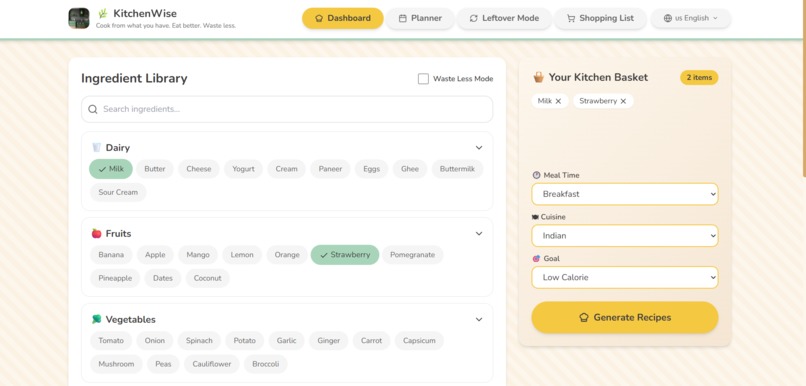
Choosing the ingredients
-
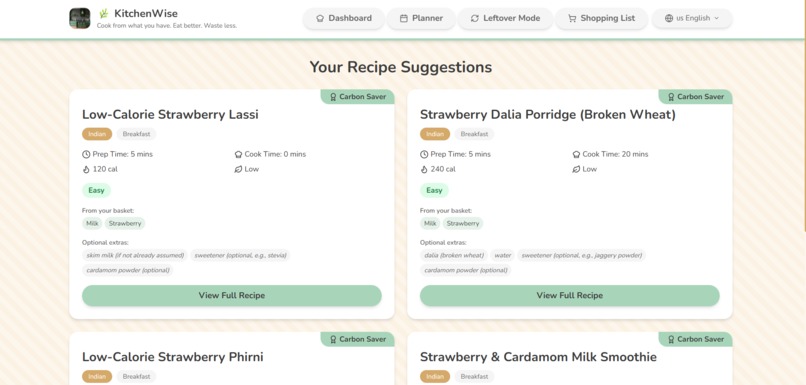
Getting suggestions from our Chef AI
-
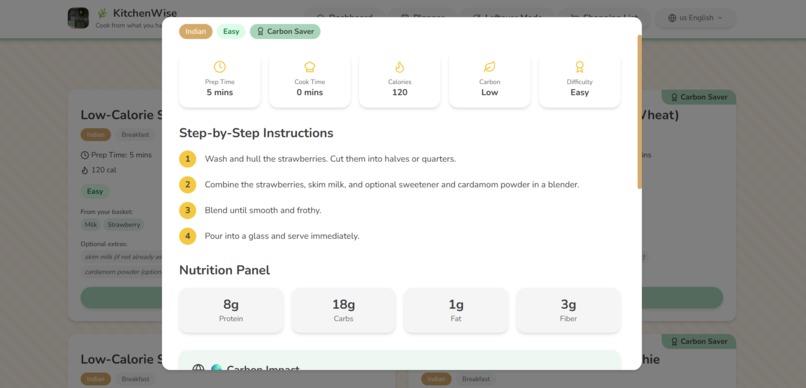
Start cooking
Inspiration
The idea for KitchenWise was born from a frustration almost everyone has felt — standing in front of a full fridge with absolutely no idea what to cook. But beyond personal convenience, the deeper inspiration came from a statistic that genuinely unsettled us: households waste nearly one-third of all the food they buy. That food ends up in landfills producing methane, while people simultaneously spend more money replacing ingredients they already had.
We wanted to build something that sat at the intersection of three things we care about deeply — smart AI technology, everyday sustainability, and accessible healthy eating. Most recipe apps assume you have unlimited ingredients and unlimited time. They send you to the store. KitchenWise flips that entirely — it starts with what you already have and works backward to something delicious.
The final push came when we thought about the invisible carbon footprint of daily food choices. Most people have no idea that choosing chicken over beef for a single meal can save nearly a kilogram of CO₂. If an app could make that impact visible — and even rewarding — then cooking becomes an act of both creativity and responsibility. That mission is what drove every decision we made.
What it does
KitchenWise is an AI-powered recipe discovery platform that generates personalized meal suggestions based on the ingredients you already have at home.
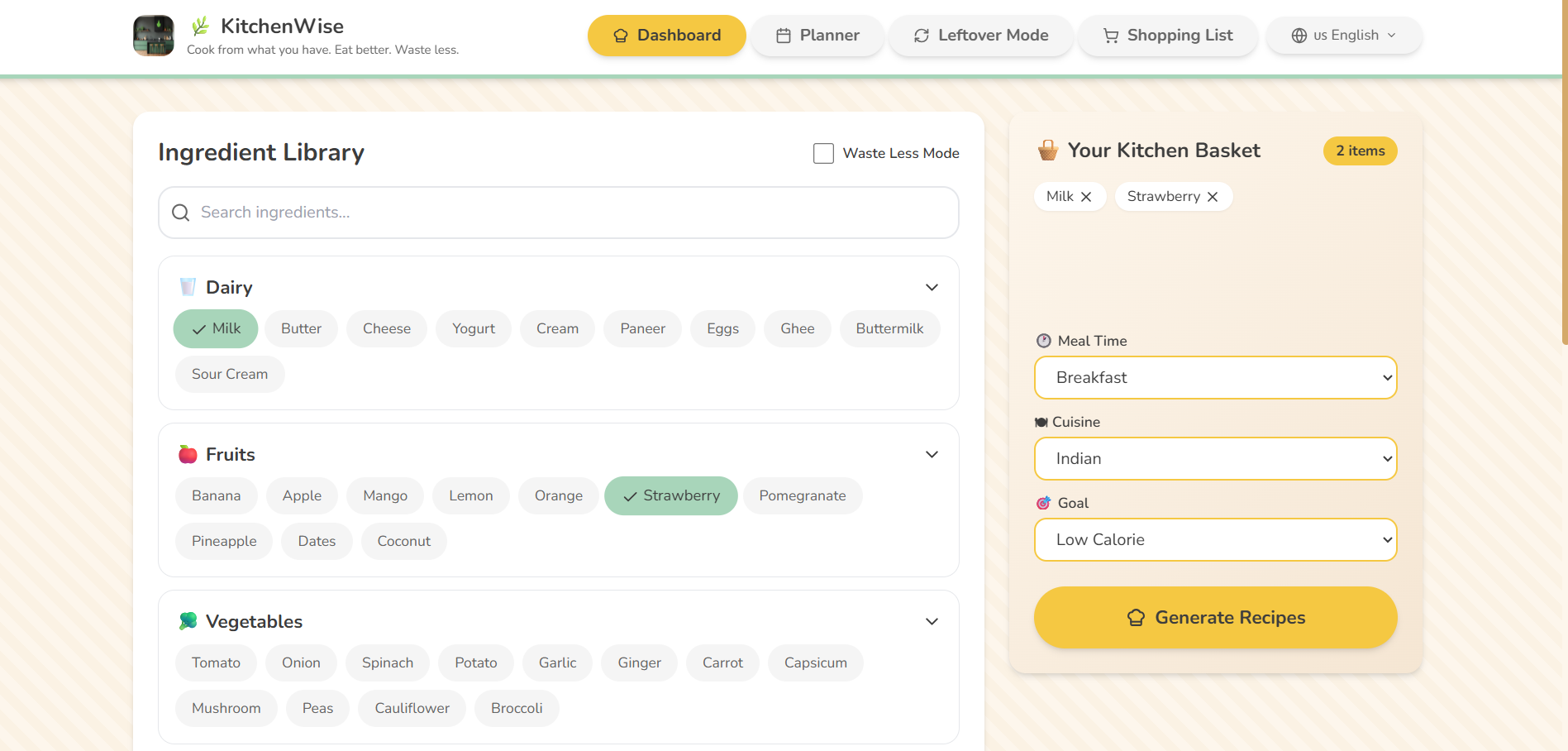
Users open a clean kitchen-style dashboard and select ingredients from a categorized library — Dairy, Fruits, Vegetables, Grains, Meat, Spices, Sauces, and Pantry items — dropping them into a visual Kitchen Basket. They then choose their Meal Time (Breakfast, Brunch, Lunch, Dinner, or Snack), Cuisine (Pakistani, Indian, Japanese, Italian, Chinese, Mediterranean, or Pan-Asian), and Goal (Low Calorie, High Protein, Low Carbon, Quick Meal, or Budget-Friendly).
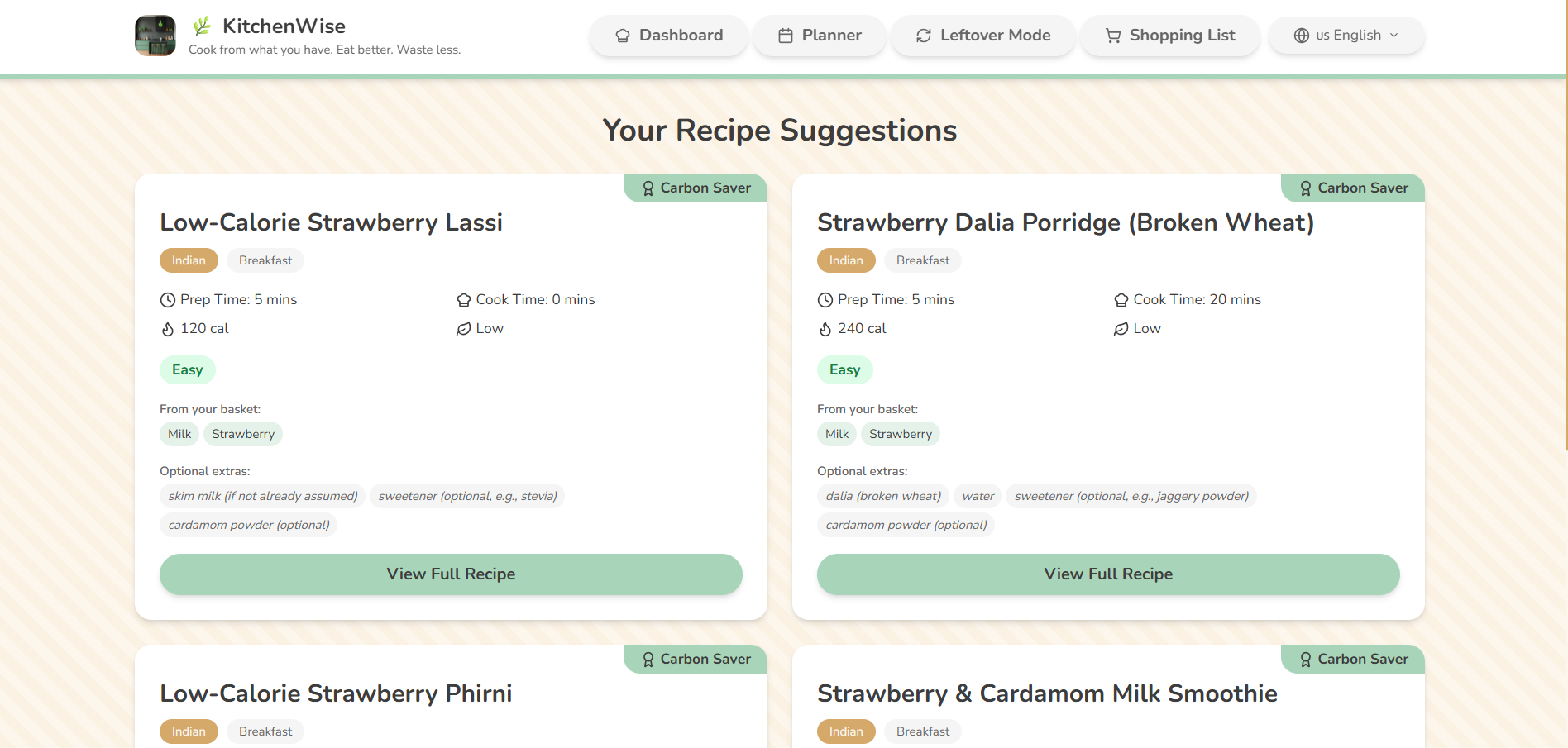
The AI then suggests 4 tailored recipes, each showing:
- Recipe name, cook time, calories, difficulty level
- A Carbon Footprint Score and how much CO₂ it saves vs. a beef-based equivalent
- Which basket ingredients are used and which optional extras are missing
- A 🏅 Carbon Saver Badge for low-carbon choices
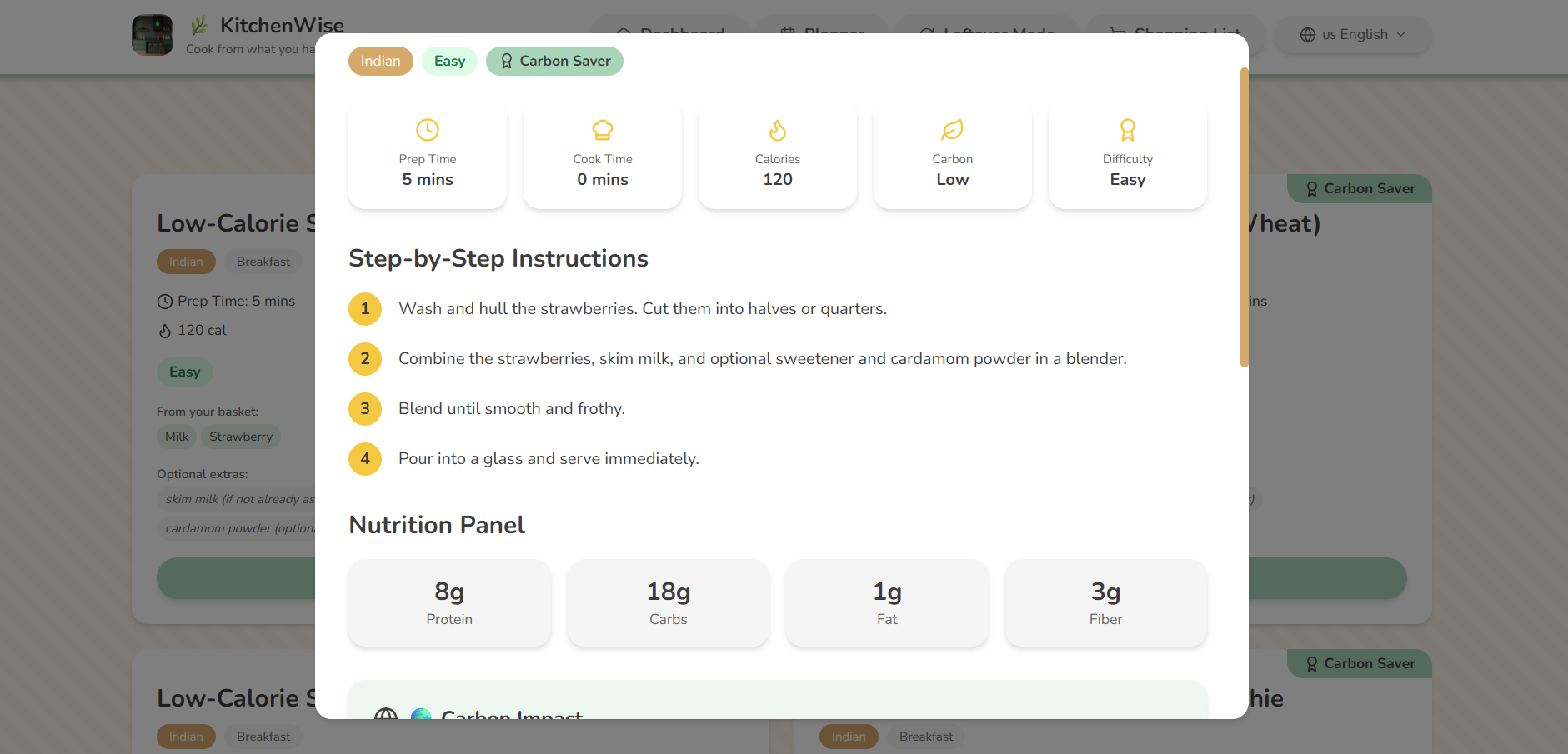
Clicking a recipe opens a full cooking guide with step-by-step instructions, nutrition estimates, eco-friendly cooking tips, smart ingredient substitutions, and serving suggestions.
Beyond the core loop, KitchenWise also includes:
- ⏰ Waste Less Mode — highlights ingredients expiring soon and prioritizes recipes that use them
- ♻️ Leftover Recipe Mode — type in your leftovers and get creative meal ideas instantly
- 📅 Weekly Kitchen Planner — plan all 7 days of meals with calorie and carbon summaries
- 🛒 Smart Shopping List — auto-generates a grouped grocery list from missing recipe ingredients
- 🔄 Smart Substitutions — suggests swaps like yogurt instead of cream or tofu instead of meat
How we built it
KitchenWise is built as a single-page React application styled entirely with Tailwind CSS, powered by an AI language model API at its core — with no backend required.
The build followed four phases:
Phase 1 — Architecture First Before writing a single component, we mapped every user interaction and designed the full state shape. We defined the ingredient library across 8 categories (80+ items), the selection logic, and the data flow between basket, recipe results, planner, and shopping list. The decision to keep everything client-side forced clean, modular thinking from the start.
Phase 2 — Core UI and Ingredient System We built the ingredient library and basket interaction first. Getting the chip animations, basket count badge, and dropdown selectors to feel satisfying took real iteration. The three dropdowns — Meal Time, Cuisine, and Goal — are deceptively simple but are the core variables that make every AI generation feel personally tailored.
Phase 3 — AI Integration We engineered a structured prompt that passes the basket ingredients, meal time, cuisine, and goal to the AI, instructing it to return a strict JSON array containing every field the recipe cards needed — steps, nutrition, carbon score, eco tips, and substitutions. We wrapped the call in try/catch error handling, added a regex strip to clean any markdown fences before parsing, and built shimmer skeleton loading cards for the waiting state.
Phase 4 — Extended Features With the core loop solid, we layered in the Weekly Planner, Leftover Mode, Shopping List, Carbon Comparison banner, and Carbon Saver Badge. Every feature shared the same state architecture and card components, so each addition felt like assembly rather than reinvention.
Tech Stack:
- React + Tailwind CSS
- AI Language Model API (structured JSON prompting)
- Lucide React (icons)
- localStorage (planner and shopping list persistence)
Challenges we ran into
Getting the AI to respond consistently
The hardest engineering problem was getting the AI to return clean, parseable JSON every single time. Early versions occasionally returned markdown-wrapped responses, added conversational preamble, or silently dropped required fields. We solved this through iterative prompt refinement — explicitly instructing the model to return only a raw JSON array with no explanation and no code fences — and added a regex safety strip on the client side before every JSON.parse() call.
Designing for empty and loading states A recipe app that feels broken while waiting on the AI loses users immediately. We spent significant time on the empty basket state, the shimmer skeleton loading cards, and the error toast — making sure the app always felt alive and intentional, never stuck or confused.
Presenting carbon data meaningfully We wanted the carbon footprint feature to feel real and motivating, not gimmicky or preachy. The challenge was finding a framing people would actually connect with. We settled on showing a percentage saved compared to a beef-based equivalent — a concrete, relatable comparison — paired with the Carbon Saver Badge as a small moment of positive reinforcement that feels earned rather than forced.
State management complexity at scale As features grew, keeping basket, recipe results, planner, and shopping list in sync — while persisting the right things to localStorage — became genuinely complex. We restructured mid-build to use a cleaner separation between session state and persistent state, which made the remaining features significantly faster to build correctly.
Making it feel like a kitchen, not a dashboard Several early design versions were technically correct but emotionally wrong — too flat, too clinical. We kept returning to one question: does this feel like somewhere you would want to cook? That question guided every color choice, every rounded corner, and every soft shadow until the answer became yes.
Accomplishments that we're proud of
- Built a fully functional AI recipe engine that takes real basket ingredients and returns structured, personalized recipes in seconds — reliably, across all cuisine and meal time combinations
- Designed a carbon impact system that makes environmental data feel approachable and rewarding rather than overwhelming, through the Carbon Saver Badge and CO₂ comparison banner
- Created a cohesive kitchen-themed design language — cream, mint green, warm yellow, and light wood — that makes the app feel warm, friendly, and genuinely different from generic recipe tools
- Shipped 6 complete features (core recipe generation, Waste Less Mode, Leftover Mode, Weekly Planner, Shopping List, Smart Substitutions) within a single cohesive product experience
- Achieved zero backend architecture — the entire app runs client-side, making it fast to deploy and easy to scale
- Engineered a prompt + parser pipeline robust enough to handle AI response variability without ever breaking the user experience
What we learned
Prompt engineering is product engineering. The quality of the AI output is entirely determined by the quality of the prompt. We learned that being explicit, structured, and unambiguous in the system instruction — down to saying "no markdown, no preamble, no code fences" — is the difference between a product that works and one that randomly breaks.
Emotional design is not optional. Users do not just want correct — they want warm. A recipe app that feels sterile fails even if it functions perfectly. We learned to design for feeling first, and let the function follow.
The most impactful features are the quietest ones. Waste Less Mode is a single toggle that highlights expiring ingredients. It took minimal time to build but created the strongest emotional response from testers. The lesson: look for features that make users feel cared for, not just served.
State architecture decisions compound. Every shortcut taken in state management early on created a tax later. The mid-build restructuring taught us that clean separation between session state and persistent state is worth the upfront investment, always.
Sustainability messaging works best when it's personal and specific. "This recipe saves 32% carbon compared to a beef meal" lands completely differently than "this is an eco-friendly recipe." Numbers and comparisons make the abstract concrete, and concrete makes people act.
What's next for KitchenWise
🤖 Smarter AI Personalization Learn from each user's recipe history to improve suggestions over time — factoring in dietary restrictions, allergies, favorite cuisines, and cooking skill level for increasingly tailored results.
📸 Fridge Photo Scanning Let users photograph their fridge or pantry and have the AI automatically detect and add ingredients to the basket — making the experience frictionless from the very first moment.
🌍 Expanded Carbon Database Partner with food sustainability databases to provide accurate, ingredient-level carbon footprint data rather than estimates — making the environmental impact feature genuinely research-backed.
👨👩👧 Household and Family Mode Support multiple dietary profiles within one household — so a family with a vegetarian, a high-protein athlete, and a picky child can all get recipes that work for everyone simultaneously.
📱 Native Mobile App Bring KitchenWise to iOS and Android with offline recipe access, push notifications for expiring ingredients, and a barcode scanner for adding groceries to the pantry directly from packaging.
🤝 Local Grocery Integration Connect with local supermarket APIs to show real-time prices for missing ingredients, let users add items directly to an online cart, and suggest budget-optimized recipe swaps based on what's on sale this week.
🏆 Community and Challenges Monthly low-carbon cooking challenges, community recipe sharing, and leaderboards for carbon saved — turning individual eco-conscious choices into a shared, motivating movement.
Built With
- lucide-react
- medo
- react
- shadcn/ui
- sonner
- supabase
- supabase-edge-functions-(deno)
- tailwind-css
- typescript
- vite

Log in or sign up for Devpost to join the conversation.