-
-
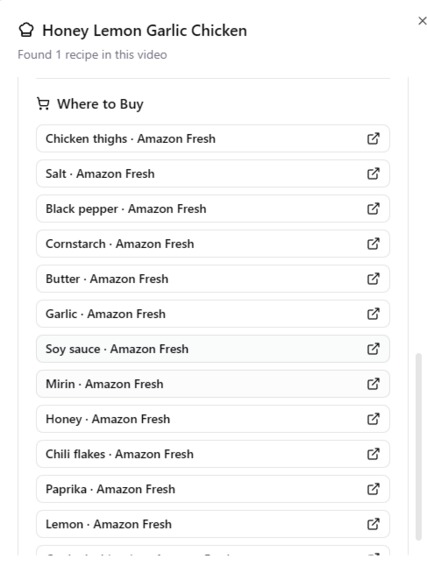
Links to get recipes
-
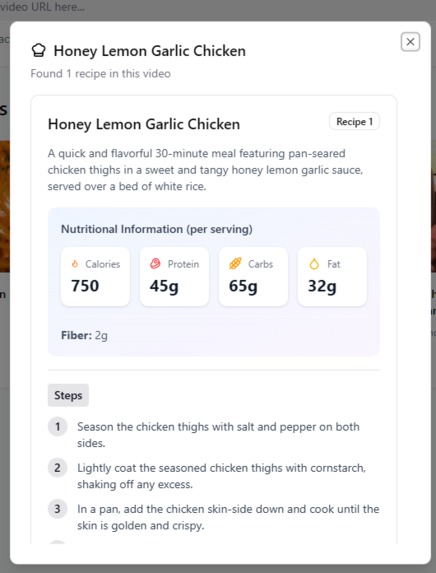
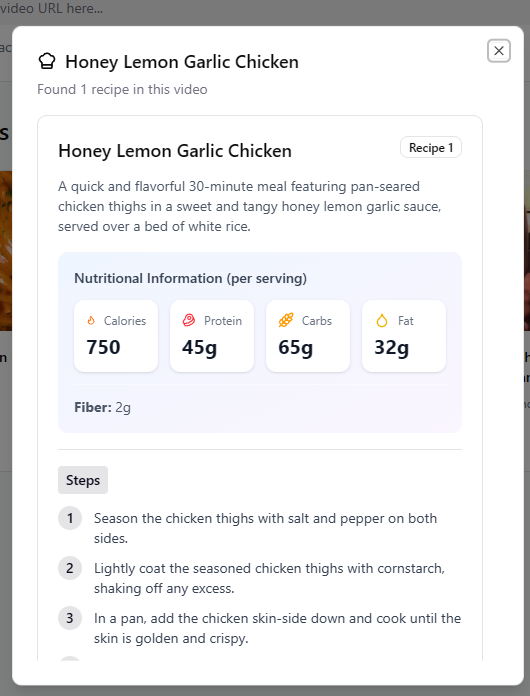
A sample of nutrition info from a recipe/dishe
-
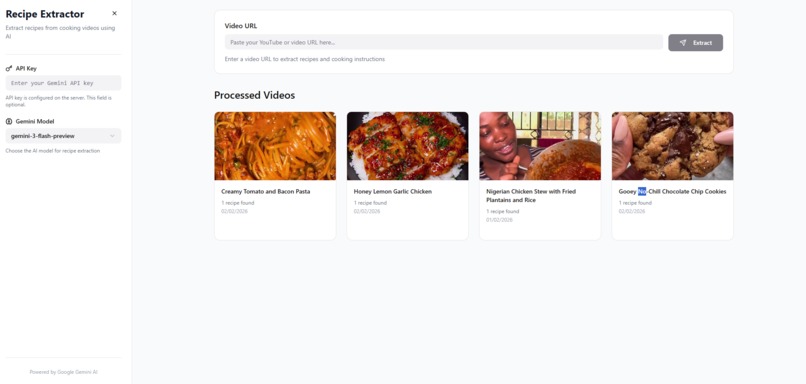
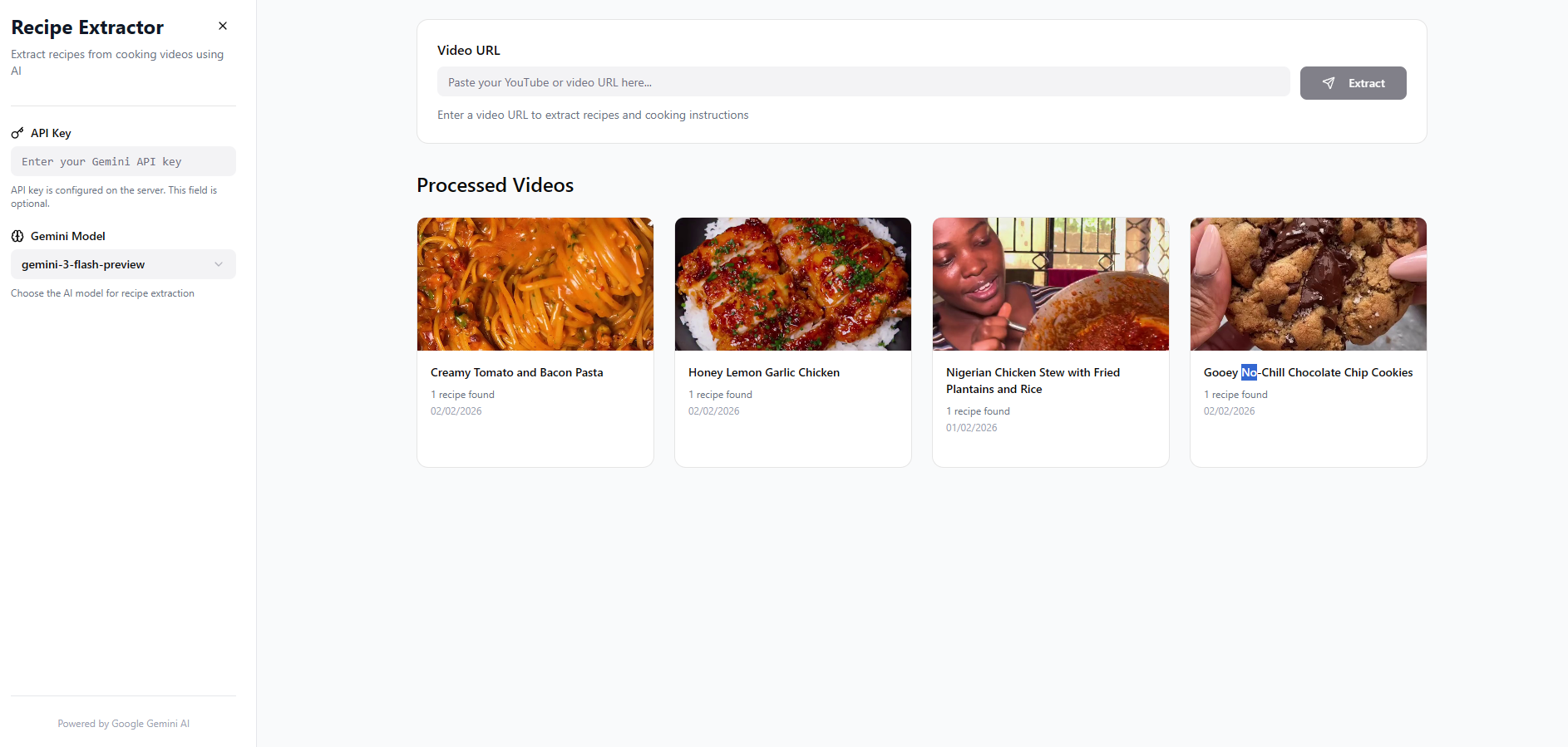
Main page showing a gallery of dishes
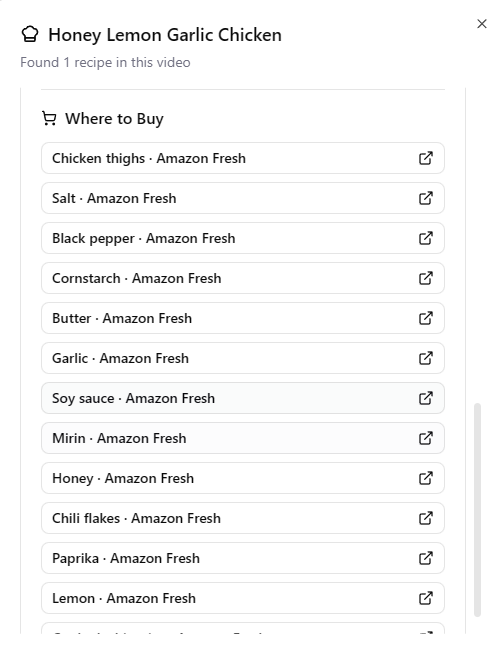
Inspiration
As a student, my life is a constant juggling act between research, classes, and trying to maintain a healthy lifestyle. Recently, I started taking my fitness seriously and began going to the gym regularly. With this new commitment came a crucial realization: I needed to take control of my nutrition and improve my cooking skills.
The problem? Time - or the lack of it.
I found myself scrolling through Instagram and TikTok, discovering amazing cooking videos with healthy, delicious recipes. But the process of actually cooking from these videos was frustrating:
- Constantly pausing and rewinding to catch ingredients
- Frantically scribbling down measurements while the video played
- Losing track of cooking steps
- No idea about nutritional content
- Having to search for ingredients online separately
As someone in academia, I'm trained to find efficient solutions to problems. I thought: "What if AI could watch these videos for me and extract everything I need?"
That's when I discovered Google Gemini 3's multimodal capabilities, and Recipe Extractor was born.
What it does
Recipe Extractor leverages Google Gemini 3's advanced video understanding capabilities to automatically analyze cooking videos from Instagram and TikTok. In under 90 seconds, it:
- Extracts Complete Recipes: Title, description, and every ingredient with precise quantities
- Generates Step-by-Step Instructions: Clear, timed cooking steps in logical order
- Calculates Nutrition Information: Calories, protein, carbs, fats, and fiber for meal planning
- Creates Shopping Lists: Direct Amazon Fresh purchase links for each ingredient
- Saves Everything: Beautiful PDF exports and a personal recipe collection
For a busy student who needs to meal prep efficiently, track macros for fitness goals, and actually learn to cook properly - this is a game changer.
How we built it
Architecture Overview
The project uses a modern full-stack architecture:
Backend (Python)
- FastAPI: High-performance async web framework
- SQLAlchemy: ORM for recipe database management
- Google Gemini 3 Flash/Pro: Core AI engine for video analysis
- yt-dlp & Instaloader: Video downloading from TikTok and Instagram
- OpenCV: Video frame extraction and thumbnail generation
- ReportLab: PDF recipe generation
Frontend (React + TypeScript)
- React 18: Modern component-based UI
- TypeScript: Type-safe development
- Tailwind CSS: Responsive, beautiful styling
- shadcn/ui: High-quality component library
- Vite: Lightning-fast build tool
The Gemini 3 Integration
The heart of the application is the Gemini 3 integration, which I carefully optimized:
# High Thinking Level for complex recipe reasoning
generation_config = {
    "thinking": {
        "mode": "HIGH",
        "type": "THINKING"
    },
    "response_modalities": ["TEXT"]
}

# High media resolution for detailed ingredient identification
file = genai.upload_file(
    video_path,
    config={
        "media_resolution": "HIGH",
        "thinking_config": {
            "thinking_budget_tokens": 10000
        }
    }
)
I use Gemini 3's high thinking mode to enable deep reasoning about:
- Ingredient inference from visual cues (e.g., "a pinch of salt" when shown but not mentioned)
- Multi-step cooking process understanding
- Nutritional estimation based on visible portions
The high media resolution setting allows Gemini to:
- Read text overlays in videos (many creators show measurements as text)
- Identify ingredients from visual appearance
- Estimate quantities from visual context
Video Processing Pipeline
- URL Detection: Parse TikTok/Instagram URLs
- Video Download: Platform-specific downloaders (yt-dlp for TikTok, Instaloader for Instagram)
- Thumbnail Extraction: OpenCV captures first frame for gallery preview
- File Upload to Gemini: Upload video with ACTIVE state polling
- AI Analysis: Gemini 3 analyzes with structured JSON prompting
- Data Parsing: Extract and validate recipe data
- Store Enrichment: Generate shopping links for each ingredient
- Database Storage: Save with SQLite for persistence
- PDF Generation: Create printable recipe cards with ReportLab
Challenges we ran into
1. File Upload State Management
Gemini's file upload API requires polling for ACTIVE state before use:
while file.state.name == "PROCESSING":
    await asyncio.sleep(2)
    file = genai.get_file(file.name)

if file.state.name != "ACTIVE":
    raise Exception("File processing failed")
I had to implement proper async/await patterns to avoid blocking the API.
2. Structured Output Parsing
Getting consistent JSON output from AI is notoriously difficult. I solved this by:
- Explicitly requesting JSON in the prompt
- Using regex to extract JSON from markdown code blocks
- Implementing fallback parsing with
json.loads() - Validating all fields with Pydantic schemas
3. Video Download Platform Differences
TikTok and Instagram have completely different APIs:
- TikTok uses yt-dlp with simple video IDs
- Instagram requires shortcode extraction and returns timestamp-based filenames
- Had to normalize file paths across platforms for consistent storage
4. Path Normalization (Windows vs Web)
Windows uses backslashes (\) while web URLs use forward slashes (/). This caused thumbnail display issues:
# Solution: Convert all paths to web-safe format
def _to_public_path(self, file_path: Path) -> str:
    relative = file_path.relative_to(self.data_dir)
    # Always use forward slashes for web
    return f"{relative.parts[0]}/" + "/".join(relative.parts[1:])
5. Nutritional Information Accuracy
Gemini 3's high thinking mode was crucial here. Initial attempts gave wildly inaccurate calorie counts. By:
- Increasing thinking budget tokens to 10,000
- Explicitly asking for reasoning about portion sizes
- Requesting per-serving calculations
I achieved much more realistic nutritional estimates.
6. Shopping Link Generation
Amazon Fresh search URL integration required:
- URL-encoding ingredient names properly for special characters
- Cleaning ingredient names (removing "fresh", "dried", etc.) for better search results
- Simplifying to a single store to avoid UI clutter
encoded_ingredient = urllib.parse.quote(ingredient_name)
amazon_url = f"https://www.amazon.com/s?k={encoded_ingredient}"
7. Storage Optimization
Video files are large (10-100 MB each). I implemented automatic cleanup:
- Videos are deleted immediately after processing
- Only thumbnails are retained (200-500 KB each)
- Saves 95%+ storage space
- Critical for serverless deployments (Modal/Railway have limited storage)
# Cleanup after successful extraction
video_downloader.cleanup_video(video_path)
This reduces hosting costs and makes the app practical for long-term use.
8. React State Management
Managing the complex state of:
- Recipe extraction progress
- Gallery updates
- Dialog navigation
- Error handling
I used React hooks effectively with useState for local state and careful prop drilling for the recipe detail dialog.
Accomplishments that we're proud of
Since building this, I've:
- Extracted 50+ recipes from my saved Instagram videos
- Improved my cooking skills
- Started meal prepping efficiently for the gym
- Tracked my macros more accurately
- Saved hours of time each week
As a student, every hour counts. Recipe Extractor has genuinely improved my quality of life.
What we learned
Technical Skills
- Deep understanding of Google Gemini 3 API and multimodal AI
- Async programming in Python with
asyncio - React + TypeScript for production-grade frontends
- Video processing with OpenCV
- Web scraping and API reverse engineering
AI Engineering
- Prompt engineering for structured outputs
- The importance of thinking modes for complex reasoning tasks
- Media resolution settings impact on AI accuracy
- Token budget optimization for cost-effective API usage
Product Development
- The power of solving your own problems (dogfooding)
- User experience matters - even for personal projects
- Importance of error handling and graceful degradation
- Making AI features feel fast and responsive
Gemini 3 works because:
- Native Video Understanding: No need to extract frames manually
- Long Context Window: 1M tokens - can handle long cooking videos
- High Thinking Mode: Deep reasoning for ingredient inference
- Cost-Effective: Flash model is free tier with 1,000 requests/day
- High Media Resolution: Detailed visual analysis for ingredients
- Multimodal Output: Text extraction from video overlays
The high thinking mode was particularly valuable - it enabled Gemini to:
- Infer ingredients shown but not mentioned verbally
- Understand cooking techniques and proper sequencing
- Estimate realistic nutritional values
- Handle ambiguous quantities ("a handful", "to taste")
What's next for Recipe Extractor
- Meal Planning: Generate weekly meal plans based on saved recipes
- Voice Commands: Hands-free extraction while cooking
- Recipe Variations: Generate vegan, gluten-free, or low-carb alternatives
- Cost Estimation: Calculate total grocery cost before shopping
- Mobile App: iOS/Android for on-the-go recipe saving
- Social Features: Share recipes with friends and family
- Cooking Timers: Integrated timers synced with recipe steps
- Ingredient Substitutions: AI-powered alternatives for missing ingredients
Built With
- fastapi
- gemini
- python
- railway
- react
- react-native
- shadcn
- sqlalchemy
- vercel
- vite


Log in or sign up for Devpost to join the conversation.