-
-
Thumbnail
-
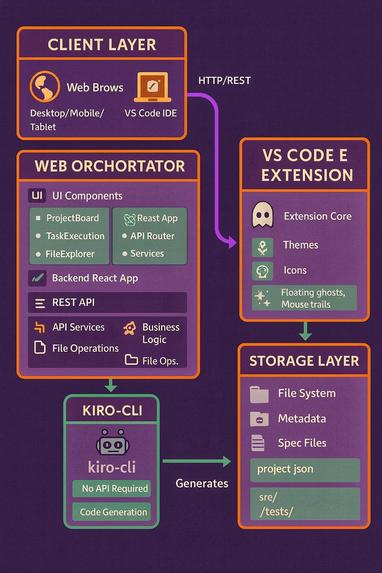
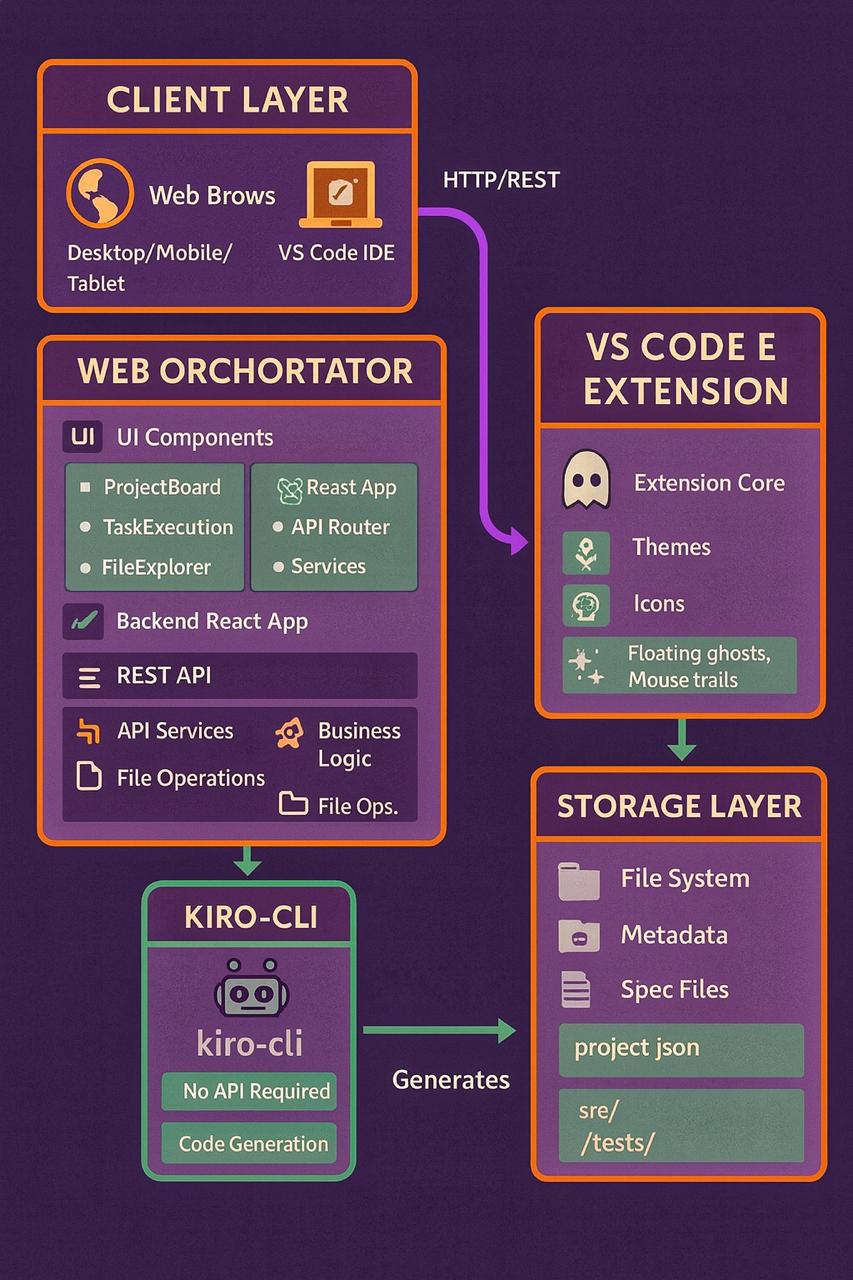
Architecture
🎃 Kiro's Ghost - Hackathon Submission
About the Project
💡 What Inspired Me
The inspiration for Kiro's Ghost came from a simple frustration: Why should AI-powered development be locked behind desktop applications?
I was lying in bed one night, thinking about a project idea, and reached for my phone. I wanted to quickly prototype something with Kiro AI, but realized I'd need to:
- Get out of bed
- Boot up my laptop
- Open the IDE
- Wait for everything to load
- Finally start working
That's when it hit me - what if the IDE could follow me everywhere? What if I could start a project on my phone while commuting, continue on my tablet during lunch, and finish on my desktop at home?
The Halloween hackathon theme gave me the perfect narrative: "The spirit of Kiro IDE, unleashed from its desktop chains." The ghost metaphor captured exactly what I wanted - an IDE that haunts you (in a good way!), following you across devices, accessible anywhere, anytime.
But I didn't want to abandon desktop users either. So I created two supernatural paths:
- The Web Orchestrator: For universal access, mobile-first, no installation
- The VS Code Extension: For desktop power users who want a spooky coding experience
🎓 What I Learned
This project pushed me in ways I didn't expect:
1. Mobile-First is HARD
- I learned that "responsive design" and "mobile-first" are very different things
- Touch targets need to be 44px minimum (I was using 32px initially!)
- Typography needs to scale fluidly with
clamp()for readability - What works on desktop often breaks on mobile in subtle ways
- Testing on actual devices revealed issues emulators missed
2. Real-Time Updates are Tricky
- Streaming logs from backend to frontend required careful state management
- I learned about async generators in Python for streaming subprocess output
- Managing WebSocket-like behavior over HTTP was challenging
- Handling connection drops and reconnections gracefully took iteration
3. Monaco Editor Integration
- Integrating Monaco (VS Code's editor) in a web app is complex
- Lazy loading was essential for performance
- Syntax highlighting for 20+ languages required careful configuration
- Making it work on mobile required custom touch handling
4. VS Code Extension Development
- Extension API is powerful but has a learning curve
- Theme creation requires understanding VS Code's token scopes
- Icon themes need careful file type associations
- Webview security restrictions required creative solutions for effects
5. AI Integration Without API
- Using kiro-cli via subprocess was unconventional but effective
- Streaming output in real-time required async/await mastery
- Error handling for CLI execution needed multiple layers
- Process management (timeouts, cleanup) was critical
6. Accessibility Matters
- WCAG 2.1 AA compliance taught me about color contrast ratios
- Keyboard navigation is essential, not optional
- Screen reader support requires semantic HTML
- Accessibility and good UX go hand-in-hand
7. Halloween Theme Consistency
- Maintaining spooky vibes without being cartoonish was a balance
- Color palette (#ff6b35, #c77dff, #a8e6cf) needed to work everywhere
- Ghost emojis and haunted terminology added personality
- The theme made the project memorable and fun
🛠️ How I Built It
Architecture Decision: I chose a monorepo structure with three components:
backend/- Python FastAPI for the orchestrator enginefrontend/- React + TypeScript for the web interfacekiro-extension/- VS Code extension for desktop users
Technology Choices:
Backend (Python FastAPI):
- Why FastAPI? Async support, automatic API docs, Pydantic validation
- Why file-based storage? Simplicity for MVP, Git-friendly, easy to inspect
- Why subprocess for CLI? No official API available, direct access to Kiro AI
Frontend (React + TypeScript):
- Why React 19? Latest features, excellent ecosystem, familiar
- Why TypeScript? Type safety caught so many bugs early
- Why Tailwind CSS? Rapid prototyping, mobile-first utilities, consistency
- Why Monaco Editor? VS Code's editor - familiar UX, powerful features
- Why Framer Motion? Smooth animations, gesture support, great DX
VS Code Extension:
- Why TypeScript? Required for VS Code extensions, type safety
- Why JSON themes? Standard VS Code format, easy to customize
- Why SVG icons? Scalable, crisp at any size, small file size
- Why webview for effects? Full HTML/CSS/JS control, creative freedom
Development Process:
Stage 1 - Foundation:
- Set up monorepo structure
- Built basic backend API (projects CRUD)
- Created React frontend skeleton
- Implemented project dashboard
Stage 2 - Core Features:
- Added spec generation (requirements, design, tasks)
- Integrated kiro-cli execution
- Built task execution with real-time logs
- Created file explorer with Monaco editor
Stage 3 - Mobile Optimization:
- Redesigned all components for mobile
- Implemented 44px touch targets
- Added fluid typography with clamp()
- Tested on actual mobile devices
- Fixed countless mobile-specific bugs
Stage 4 - VS Code Extension:
- Created Halloween dark & light themes
- Designed 15+ spooky file icons
- Built interactive effects system
- Added customization settings
Stage 5 - Polish & Features:
- Added steering file management
- Implemented adhoc task execution (Ctrl+K)
- Added keyboard shortcuts throughout
- Improved accessibility (WCAG 2.1 AA)
- Wrote comprehensive documentation
Stage 6 - Testing & Refinement:
- Tested on multiple devices (phone, tablet, desktop)
- Fixed edge cases and bugs
- Optimized performance
- Refined Halloween theme consistency
- Prepared demo and submission
Key Implementation Challenges:
Challenge 1: Mobile Touch Targets
// Before: Too small for mobile
<button className="p-2">Click</button>

// After: Mobile-friendly
<button className="p-3 min-h-[44px] min-w-[44px]">Click</button>
Challenge 2: Fluid Typography
/* Before: Fixed sizes break on mobile */
font-size: 16px;

/* After: Scales smoothly */
font-size: clamp(0.875rem, 0.8rem + 0.375vw, 1rem);
Challenge 3: Real-Time Log Streaming
# Async generator for streaming subprocess output
async def stream_output(process):
    while True:
        line = await process.stdout.readline()
        if not line:
            break
        yield line.decode().strip()
Challenge 4: Monaco Editor Lazy Loading
// Lazy load Monaco to improve initial load time
const MonacoEditor = lazy(() => import('@monaco-editor/react'));
😅 Challenges I Faced
1. The Mobile Responsiveness Nightmare
- Problem: Everything looked great on desktop, broke on mobile
- Solution: Rebuilt components mobile-first, tested on real devices
- Lesson: Emulators lie - test on actual phones!
2. The Real-Time Streaming Saga
- Problem: Logs weren't streaming, they appeared all at once
- Solution: Implemented async generators and proper state management
- Lesson: Real-time is hard, but worth it for UX
3. The Monaco Editor Memory Leak
- Problem: Opening many files caused memory issues
- Solution: Implemented lazy loading and proper cleanup
- Lesson: Always clean up resources in useEffect
4. The Touch Target Disaster
- Problem: Buttons were too small to tap on mobile
- Solution: Enforced 44px minimum for all interactive elements
- Lesson: Accessibility guidelines exist for good reasons
5. The CLI Integration Mystery
- Problem: kiro-cli output wasn't captured correctly
- Solution: Used asyncio.create_subprocess_exec with proper pipes
- Lesson: Subprocess management is tricky, read the docs carefully
6. The Theme Color Contrast
- Problem: Some colors failed WCAG AA contrast requirements
- Solution: Used contrast checker tools, adjusted palette
- Lesson: Accessibility and aesthetics can coexist
7. The File Tree Performance
- Problem: Large projects made file tree slow
- Solution: Implemented virtual scrolling and caching
- Lesson: Performance matters, especially on mobile
8. The Keyboard Shortcut Conflicts
- Problem: Ctrl+K conflicted with browser shortcuts
- Solution: Added preventDefault and proper event handling
- Lesson: Test shortcuts in different browsers
9. The Binary File Detection
- Problem: Opening binary files crashed Monaco editor
- Solution: Added binary detection before loading
- Lesson: Always validate input before processing
10. The Halloween Theme Balance
- Problem: Too spooky looked unprofessional, too subtle was boring
- Solution: Subtle colors, strategic emoji use, professional layout
- Lesson: Theme should enhance, not distract
🎯 What Makes It Special
1. True Mobile Development
- First AI IDE that actually works on phones
- Not just responsive - optimized for mobile
- Touch-friendly, readable, fast
2. No Installation Required
- Zero setup - just open a browser
- Works on any device, any OS
- No downloads, no dependencies
3. Dual Path Approach
- Web for universal access
- Extension for desktop power
- Best of both worlds
4. Direct AI Integration
- No API keys needed
- Uses kiro-cli directly
- Full Kiro AI power
5. Spec-Driven Development
- Structured approach to building
- AI-generated requirements, design, tasks
- Property-based testing support
6. Complete Lifecycle
- From idea to production
- All in browser
- Real-time progress tracking
7. Accessibility First
- WCAG 2.1 AA compliant
- Keyboard navigation
- Screen reader friendly
8. Halloween Spirit
- Consistent spooky theme
- Fun without being unprofessional
- Memorable and engaging
🚀 Future Vision
If I continue developing Kiro's Ghost:
Phase 1: Enhanced Mobile
- Progressive Web App (PWA)
- Offline support
- Push notifications
- Gesture navigation
Phase 2: Collaboration
- Real-time co-editing
- Project sharing
- Team workspaces
- Comment threads
Phase 3: Advanced AI
- Multi-model support
- Custom prompts
- AI code review
- Automated testing
Phase 4: Enterprise
- SSO authentication
- RBAC
- Audit logging
- Custom deployments
💭 Final Thoughts
Building Kiro's Ghost taught me that the best tools are the ones that adapt to users, not the other way around. By making AI-powered development accessible on any device, we open the door for:
- Developers who work on the go
- Students learning on tablets
- Product managers prototyping ideas
- Non-technical founders building MVPs
- Anyone with an idea and a browser
The ghost is out of the bottle - and development will never be the same! 👻✨
Built with 💀 for the Kiroween Hackathon
"Why install an IDE when the IDE can haunt you instead?"

Log in or sign up for Devpost to join the conversation.