


Inspiration & Problem
We’ve enjoyed building at a bunch of hackathons this year, recently hitting the road to Boston for HackHarvard and Pennsylvania for PennApps. During our experiences, we kept noticing something: tons of people had amazing ideas for creative computer-vision apps — hand-controlled games, facial-gesture tools, accessibility interfaces — but it was always a struggle to build these apps quickly.
Real-time motion tracking sounds fun… until you try to vibe-code hand, face, and head landmark detection into a fully functional app. Coding agents often hallucinate MediaPipe functions that don't exist, CV logic breaks, and suddenly a simple idea becomes hours of debugging and prompting. As we started exploring Kiro’s features for Kiroween, we realized Kiro was the perfect tool to help bridge this gap. We get how frustrating it is when you can’t quickly bring a creative idea to life, and we want to fix that. That’s why we created the InteractionKit.
What it does
InteractionKit is a clean, starter-friendly template for building gesture-controlled games, apps, and interactive experiences using MediaPipe (Google’s computer-vision framework) and Python. It gives you a flexible foundation for turning real-time hand, face, and head tracking into intuitive controls that you can plug directly into any project. Want to build a Mario-style platformer where jumping = pinch your fingers? Make music just by moving your head? Or draw in mid-air with your fingertip for a fresh twist on Pictionary? These are just a few ideas.
But the real superpower isn’t just our template alone — it’s what happens when you use it inside the Kiro IDE. We configured hooks, steering docs, and MCP so Kiro handles your app architecture, wires up gesture logic, and generates reliable CV code from your spec without hallucinations. Together, InteractionKit + Kiro let you vibe-code robust motion-tracking apps in minutes, not hours!
🎮 Featured Applications Built With InteractionKit + Kiro
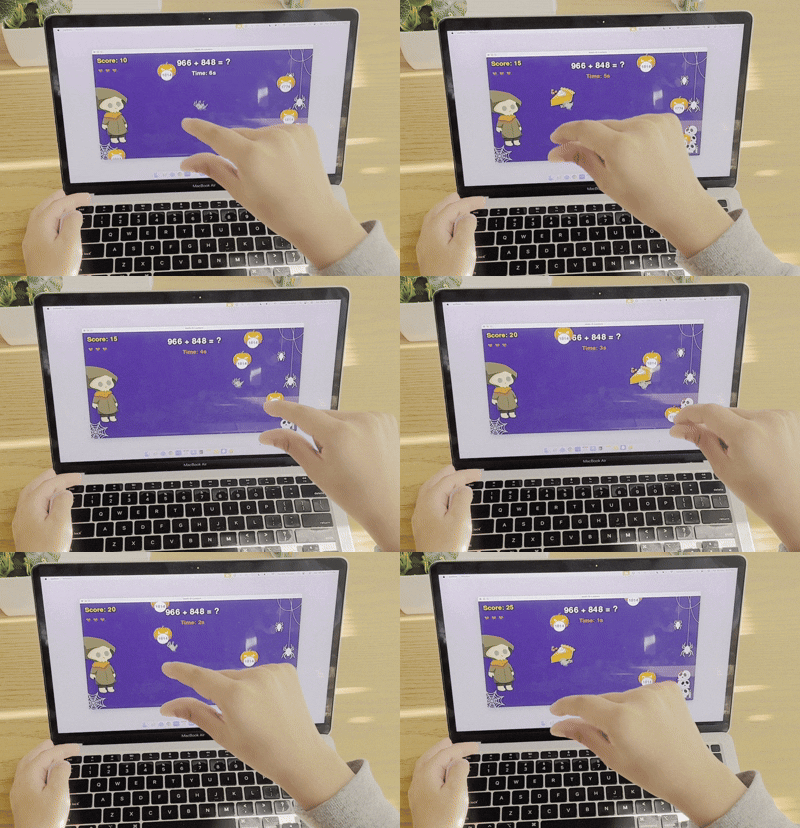
We built these two, distinct apps entirely inside the Kiro IDE using vibe-coding + spec-driven development on top of our InteractionKit template:
| 🎃 Math-O-Lantern | ✏️ Holo-Board |
|---|---|
 |
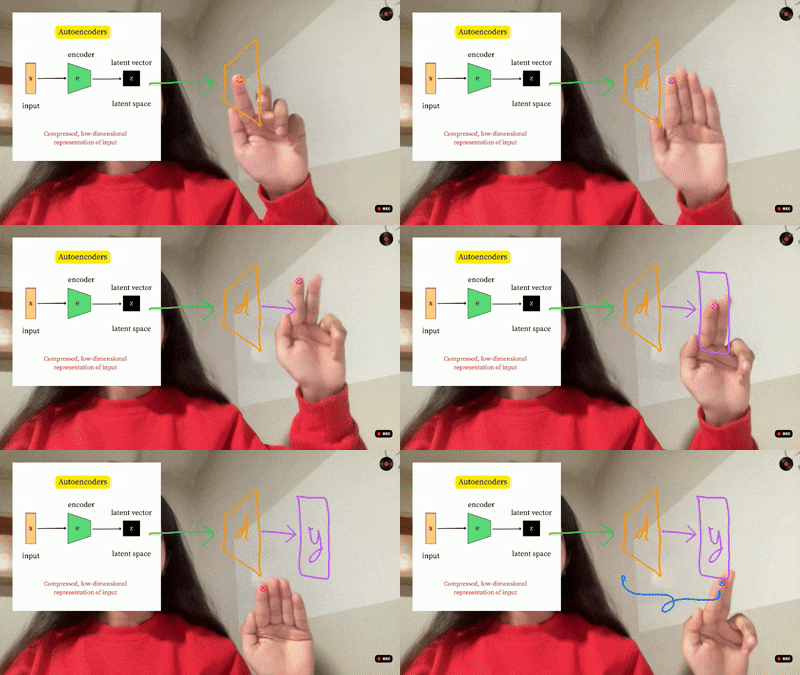 |
| Slice pumpkins & solve math problems by pinching with your hand in this fast, playful Pygame experience. | A lightboard-style recording tool that lets you draw in mid-air using hand gestures — perfect for creative content. |
What You Get in the Template
- Pre-configured environment for real-time computer vision
MediaPipe, OpenCV, PyGame, PyAutoGUI, and camera setup are handled automatically.
Clone → run setup → start building. - Scaffolded Python interaction architecture
A clean structure that separates tracking, gesture state, and app behavior so your project stays maintainable as it grows. - Robust, real-time hand, head, and face tracking out of the box
Fast detection running inside a high-performance app loop. - 17 ready-to-use gestures ✋🤘👍 🙂↔️
Pinch, cursor control, thumbs up/down, nods, blinks and more — instantly usable in any interaction.
(You can also ask Kiro to include custom gestures that integrate automatically.) - Built-in automation for your coding workflow
Hooks, steering docs, and MCP setup for Kiro to keep your architecture clean, wire gestures automatically, and fetch accurate MediaPipe + PyGame references.
How We Used Kiro
Here’s how each of Kiro’s core capabilities supercharged our project:
| Kiro Feature | How We Used It | Why It Mattered |
|---|---|---|
| Vibe-Coding | We kicked things off by chatting with Kiro through Vibe Sessions to brainstorm and design the core InteractionKit skeleton. We discussed how the MediaPipe tracking loop should run, how gesture states should transition, and where controllers should sit in the architecture. Kiro wrote full modules based on simple explanations. | It let us build fast without getting buried in boilerplate code. From natural prompts, Kiro produced a real gesture to state to action pipeline. We could iterate instantly and stay in a creative mindset. |
| Agent Hooks | We built three custom hooks that automate everything needed when a new gesture is added. Kiro detects a new gesture file, updates imports, attaches state fields, wires logic into the live tracking loop, updates test scripts and documents the gesture automatically. | It saved us from editing multiple files over and over again. Seventeen gestures were integrated in seconds and developers using InteractionKit can create custom gestures without touching the underlying architecture. |
| Spec-Driven Development | Once the template was solid, we wrote two simple specs and Kiro built complete apps on top of InteractionKit. These specs described gameplay, gesture inputs and UI structure for Math-O-Lantern and Holo-Board. Kiro handled the rest. | Specs improved code structure and accuracy while still letting us build fast. We could preview full design before generation, avoid mistakes and end up with polished apps that feel production ready. |
| Steering Docs | We created two extra steering docs inside the project. One documented clean game architecture in Python and the other explained how to test CV modules. Kiro referenced these documents during generation. | Kiro consistently followed our architectural rules. CV logic stayed separate from game logic and files remained organized across the entire project. Clean project structure was maintained automatically. |
| MCP (Context7) | We linked Kiro to Context7 MCP for real MediaPipe and PyGame documentation. Kiro used it to confirm correct landmark indices for facial gestures (like EAR, MAR) and proper PyGame design patterns during code generation. | This removed hallucinations, giving us confidence that every gesture implemented by Kiro behaves exactly as expected. |
Instant Setup for Developers
Note: A webcam is required. Don't forget to grant camera access to Kiro.
Getting started is easy — just clone the repo, open it in the Kiro IDE and run the setup script.
git clone https://github.com/Harpita-P/Kiro-InteractionKit.git
cd Kiro-InteractionKit

./setup.sh # macOS / Linux
.\setup.bat # Windows
# Test Math-O-Lantern Application 1
python my_apps/Math-O-Lantern/main.py
# Test Holo-Board Application 2
python my_apps/Holo-Board/main.py
#To customize the images in your video, please add your images to the Annotate folder.
This will set up a Python virtual environment, install MediaPipe, OpenCV, PyGame, and other required libraries, and verify that your camera is working. Once setup completes, you can instantly try the pre-defined gestures in our template or test the two demo apps we created. Then, create a Spec with Kiro to start building your app idea. For full details, see the Github Repo. Have fun building!
What we learned
We learned a lot about what it takes to build a reliable, flexible template that actually supports real-time computer vision apps. Kiro helped us design a structure where clean architecture becomes the default: computer vision detection stays separate from gesture state, and gesture state stays separate from game or UI logic. Kiro’s features – from vibe-coding and hooks to steering docs and MCP – ensured that the InteractionKit template is something others can build on with confidence.
Building Accessibility Tools
While experimenting with this template, we realized something important: not only can InteractionKit + Kiro be used to create fun gesture-controlled games – but we can build accessible experiences that genuinely help people. Accessibility tools can change someone’s daily routine in the most meaningful ways. For users who can’t rely on traditional input devices, even a nod or a subtle blink gesture can become a voice – a way to control technology and stay connected. InteractionKit showed us how quickly those simple real-time movements can be turned into real solutions and there are many opportunities for developers to build apps that help users with limited mobility or communication. We want to stress that accessibility isn’t an “extra” – it’s about giving more people the freedom to interact with the digital interfaces on their own terms.
When developers don’t have to worry about the complicated setup behind computer vision, they can focus on building innovative features and getting their ideas into people’s hands faster. And that’s the gist of why we built this template – whether you’re creating accessibility tools, gesture-based games, AR-inspired experiences, or something entirely new, InteractionKit + Kiro remove the technical friction and let you jump straight into prototyping what matters. We are proud to have built a project that supports a real need in the community, helping both beginners getting started and experienced developers who want to move from computer-vision idea to prototype more quickly. We're super excited to share the interaction kit template with the community and can't wait to see the creative ideas others build with this template & Kiro.


Log in or sign up for Devpost to join the conversation.