-
-
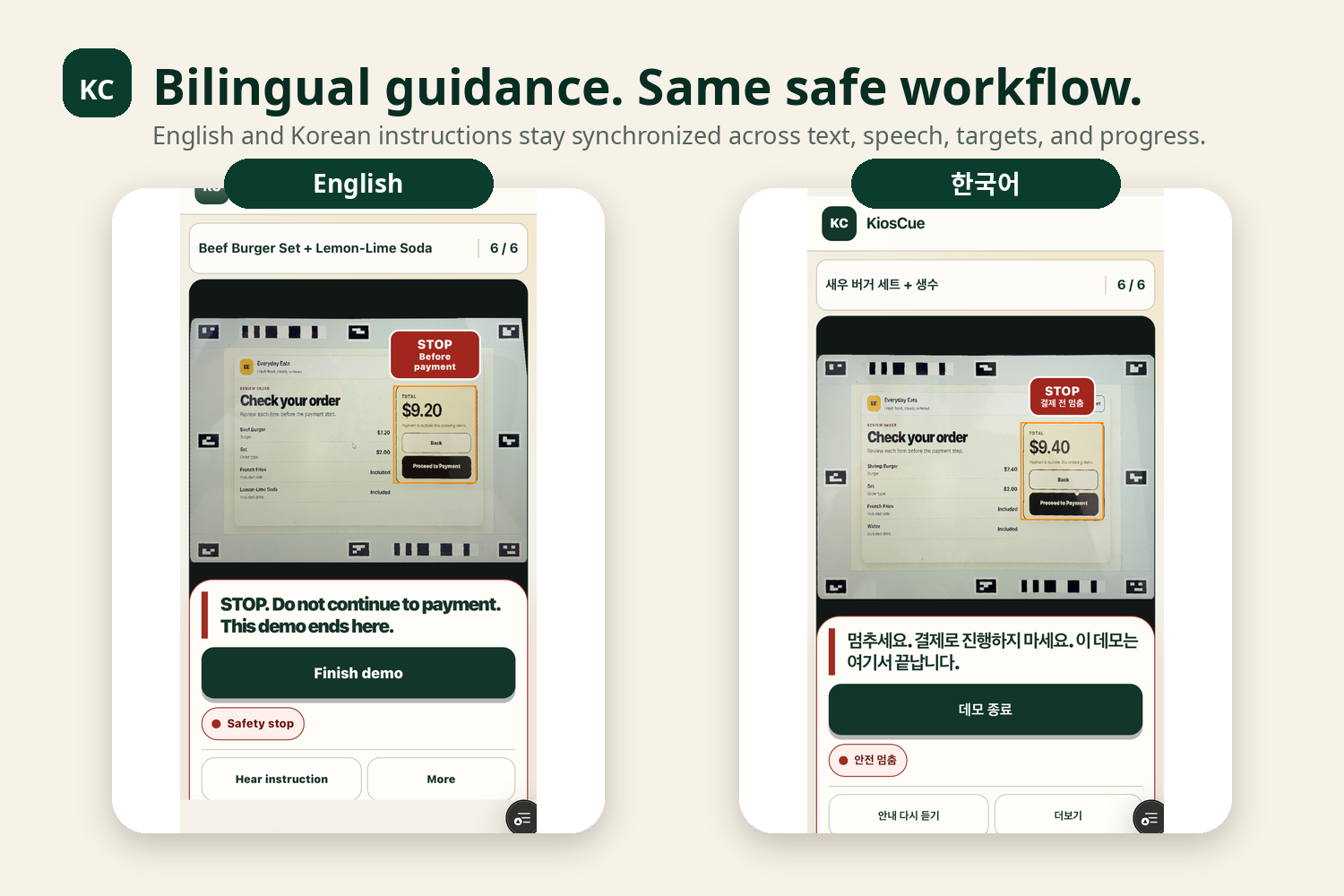
Bilingual workflow
-
-
How it works
Inspiration
KiosCue began with a moment I witnessed on a bus.
A man sitting near me did not outwardly appear to need assistance. He was relatively young, looked no different from the other passengers, and was able to operate a smartphone. Yet, during almost the entire two-hour ride, he kept searching online for instructions on how to use a self-service kiosk.
I was genuinely shocked by what I saw. Someone who appeared completely independent from the outside—and who clearly knew how to use a smartphone—was spending nearly two hours trying to prepare for a task that many people complete without a second thought. It made me realize that being able to physically operate a digital device does not necessarily mean that navigating an unfamiliar digital interface is easy.
I never asked him why, so I cannot know whether the difficulty came from a cognitive disability, limited experience with kiosks, anxiety, or something else. What stayed with me was how invisible his need for support was. Because nothing about his appearance suggested that he might be struggling, the people around him had no obvious reason to offer help. At the same time, someone who appears no different from everyone else may find it especially difficult to admit that they need assistance or to ask a stranger for help.
That experience made me keep asking the same question: could technology support people whose difficulties are real, but not immediately visible?
I did not want to build a system that takes over the task or makes decisions on the user's behalf. I wanted to provide the kind of help a supportive person might quietly offer beside them: one clear instruction, one clearly marked place to tap, and enough time for the user to complete the action independently.
That question became KiosCue.
What it does
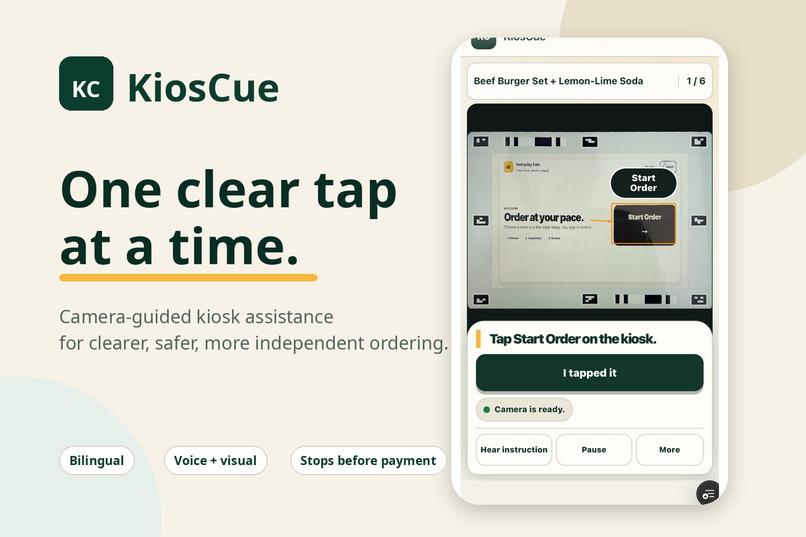
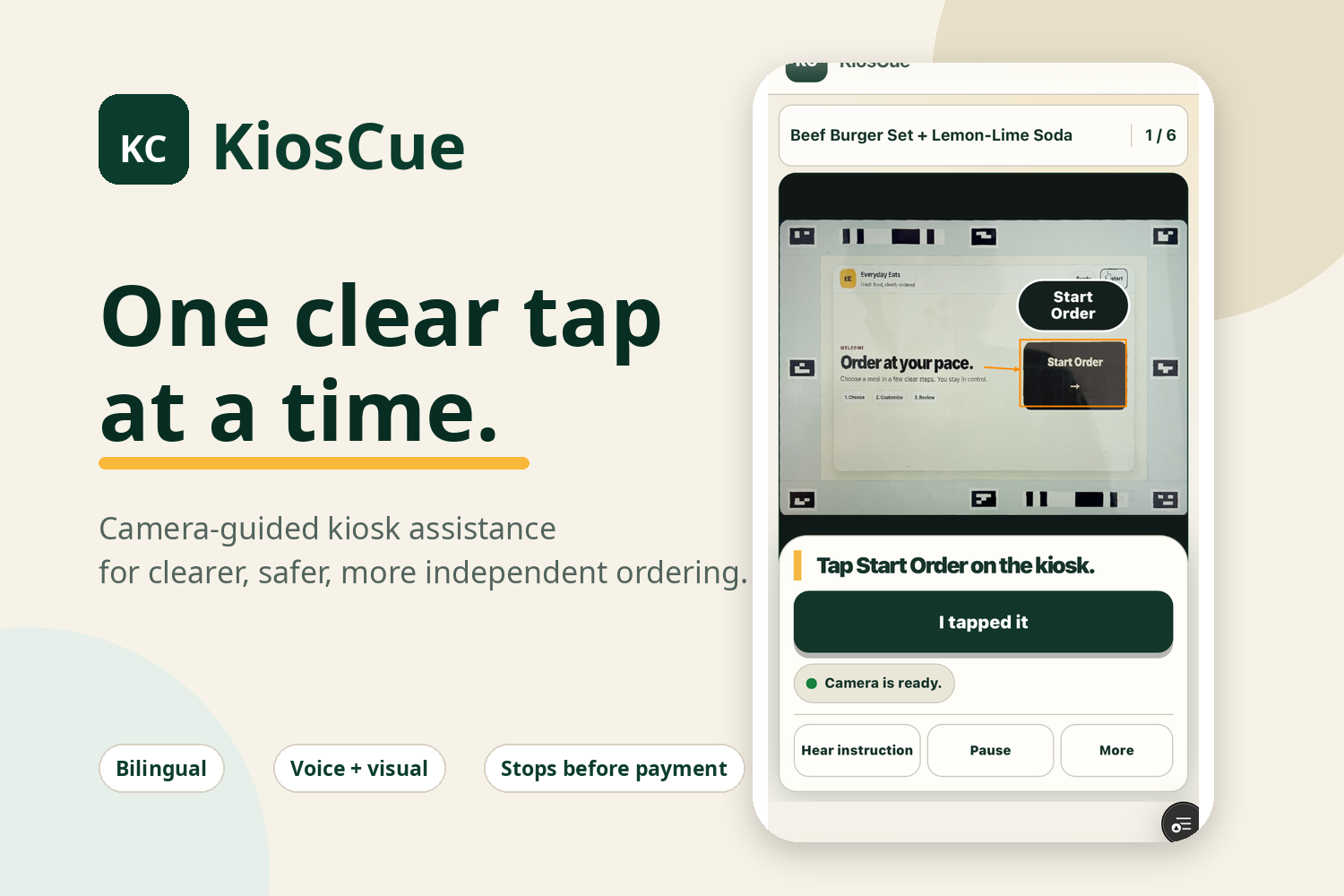
KiosCue is a mobile, camera-guided assistant that helps a person complete a self-service kiosk task one clear action at a time.
KiosCue is primarily designed for people who can physically operate a smartphone or touchscreen but may have difficulty interpreting dense interfaces, remembering a sequence of steps, or determining what to tap next. This includes people with cognitive or learning disabilities whose need for support may not be immediately visible to others.
The current prototype is intentionally designed for the controlled, marker-enabled demonstration kiosk that we built for this project. Before attempting to recognize arbitrary real-world kiosks, we wanted to create a reliable and testable environment in which we could first evaluate a more fundamental question with the people KiosCue is intended to support: does one-action-at-a-time, camera-guided assistance actually make a kiosk task easier to understand and complete independently?
Limiting the first prototype to a known kiosk interface allowed us to focus on that user experience while testing the complete guidance process—including screen verification, target alignment, recovery behavior, and the safety stop before payment—without allowing the system to guess when it was uncertain.
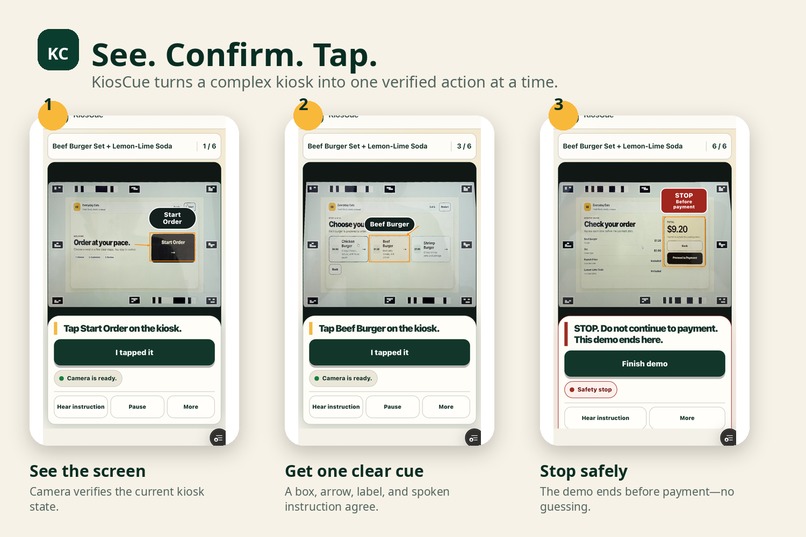
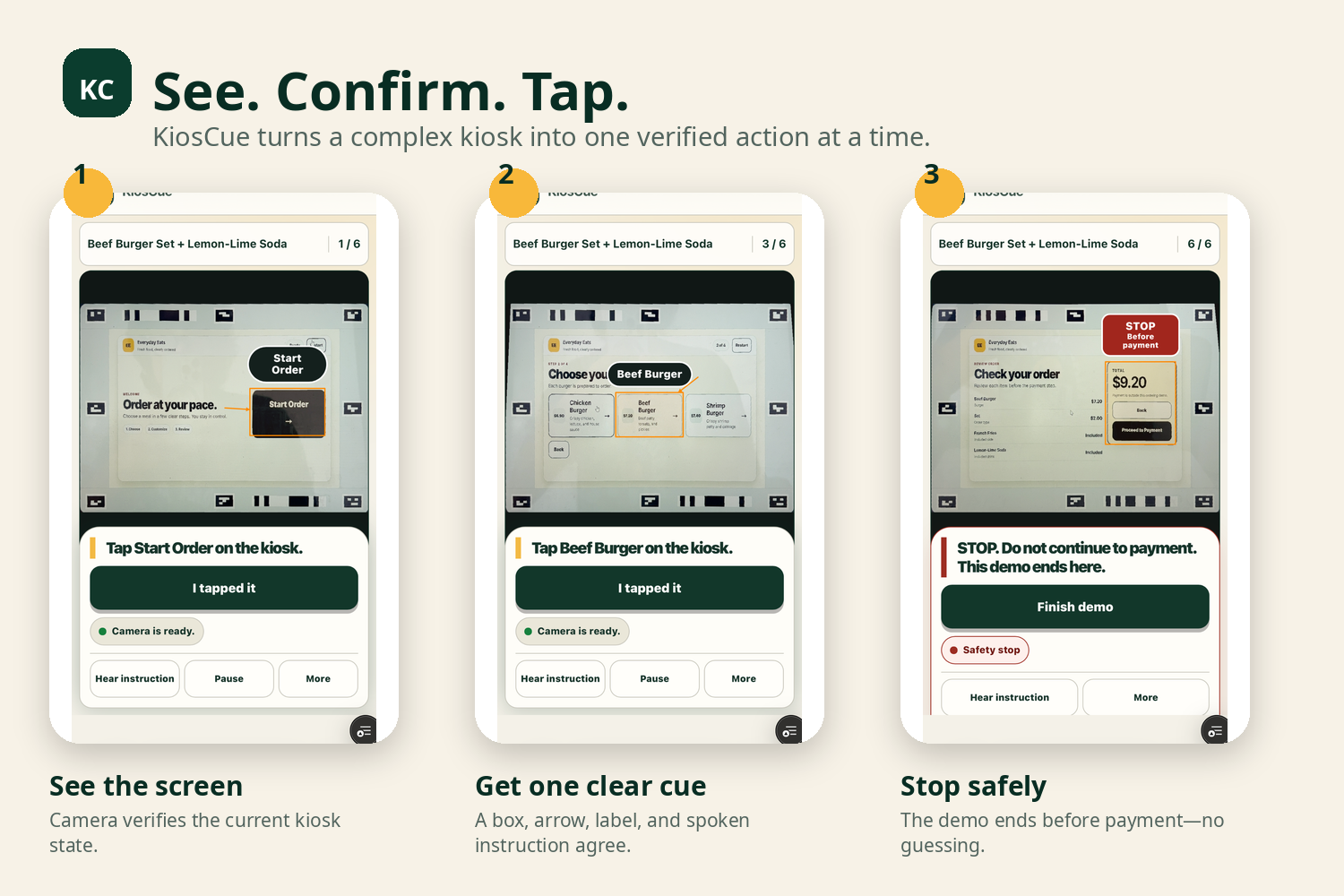
The user first chooses English or Korean and selects what they want to order. They then point their phone at the demonstration kiosk. KiosCue verifies which screen is currently visible and presents only the next required action through:
- a highlighted box around the correct control,
- a directional arrow,
- a short target label,
- a large written instruction,
- optional spoken guidance,
- and one confirmation button.
For example, instead of asking the user to understand an entire menu screen, KiosCue simply says, “Tap Burgers on the kiosk,” while clearly marking the Burgers button. The user performs the action themselves and confirms that they tapped it before KiosCue moves to the next step.
KiosCue does not take control of the kiosk, make selections automatically, or rush the user forward. Every step requires explicit confirmation, allowing the user to remain in control of the task.
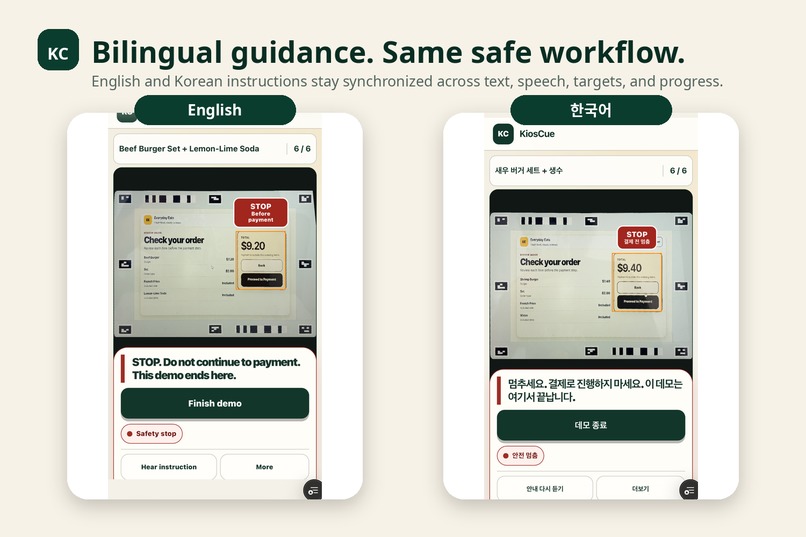
The prototype supports 12 ordering goals across item-only and set-menu flows, including three burger choices and three drink choices. It provides the same workflow in English and Korean, with visible and spoken instructions generated from the same source so that they remain consistent.
To reduce the risk of showing guidance for the wrong screen, KiosCue verifies two distinct camera frames before presenting an instruction. If the screen is unclear, unsupported, contradictory, or has changed, it removes the guidance and asks the user to check again instead of guessing.
At the final review screen, KiosCue deliberately stops before payment. It highlights the payment area only to warn the user not to continue and clearly states that the demonstration ends there.
This controlled prototype is the first step toward testing KiosCue with its intended users. What we learn from those evaluations will guide whether and how the system should expand to additional kiosk interfaces and real-world settings.
How we built it
Research-informed interaction design
Before building the camera-recognition system, we reviewed academic literature and accessibility guidance related to cognitive accessibility, working-memory demands, step-by-step instruction, multimodal guidance, error recovery, and user autonomy.
We translated those ideas into several design principles:
- Present only one required action at a time.
- Avoid requiring the user to remember previous instructions.
- Mark the exact location of the next action instead of asking the user to search an entire screen.
- Provide the same instruction through text, visual cues, and optional speech.
- Let the user proceed at their own pace.
- Never advance without the user's explicit confirmation.
- Recheck the kiosk screen instead of assuming that an action succeeded.
- Remove guidance rather than guess when the system is uncertain.
- Stop before payment so the prototype does not guide the user into a financial transaction.
These principles shaped the KiosCue workflow:
- The user chooses a language.
- The user selects what they want to order.
- KiosCue verifies the current kiosk screen.
- It presents one clear action.
- The user performs the action themselves.
- The user confirms that they completed it.
- KiosCue checks the kiosk again before presenting the next instruction.
- The process stops safely at the payment boundary.
Building a controlled demonstration environment
We built two connected web applications: the KiosCue Guide and a Virtual Kiosk.
The Virtual Kiosk provides a controlled ordering flow with known screens, controls, and target locations. Coded visual markers around the kiosk frame allow the Guide to locate the interface through a phone camera.
The kiosk supports 12 ordering goals across:
- Chicken, Beef, and Shrimp Burgers,
- item-only and set-menu orders,
- and Cola, Lemon-Lime Soda, and Water.
We intentionally began with a controlled kiosk rather than arbitrary real-world interfaces. This gave us a reliable environment in which to evaluate the interaction model, test the complete guidance process, and prepare for future studies with KiosCue's intended users.
Camera and screen-recognition pipeline
KiosCue is a browser-based application built with React, TypeScript, Vite, the MediaDevices API, HTML canvas, and the Web Speech API.
When the user starts the camera, KiosCue:
- Captures the kiosk through the phone camera.
- Detects the coded markers surrounding the kiosk interface.
- Determines the screen's position and perspective.
- Calculates a perspective transformation.
- Produces a rectified image in which the kiosk appears front-facing.
- Identifies the current kiosk state.
- Maps the next action to the correct target on the screen.
We separated image analysis from participant-facing display quality. A bounded image is used for recognition to keep processing responsive, while a higher-resolution source from the same camera frame is preserved for the image shown to the user.
This allows KiosCue to display a clearer rectified kiosk snapshot without changing the recognition pipeline or capturing a different moment.
Preventing stale or incorrect guidance
The most important technical challenge was ensuring that a correct instruction was not displayed for the wrong screen or the wrong moment.
KiosCue requires two distinct camera frames to agree before accepting a kiosk state. The displayed guidance remains tied to the exact verified frame from which it was produced.
If the two frames disagree, the screen changes, the kiosk is unsupported, or the visual evidence is unclear, KiosCue does not attempt to infer what the user should press. It removes the previous snapshot, target box, arrow, and label, then asks the user to check the screen again.
We also added explicit cleanup behavior for retries, step changes, pauses, camera restarts, hidden pages, session restarts, and completed sessions. These rules prevent guidance from a previous screen from remaining visible after the situation has changed.
Keeping all guidance synchronized
Each step is generated from one shared guidance source.
The same source controls:
- the written instruction,
- the spoken instruction,
- the target label,
- the highlighted box,
- the directional arrow,
- the progress indicator,
- and the participant confirmation action.
This prevents the visual and spoken instructions from silently communicating different actions.
KiosCue never interacts with the kiosk on the user's behalf. It presents the next action, waits for the user to perform it, and advances only after the user confirms that they tapped it.
Safety at the payment boundary
We deliberately designed the prototype to stop at the final review screen.
KiosCue identifies and highlights the payment area only to warn the user not to continue. It does not instruct the user to press the payment button, enter financial information, or complete a transaction.
This boundary allowed us to demonstrate the full guidance flow while keeping the prototype focused on navigation assistance rather than financial decision-making.
Testing and validation
We tested KiosCue at several levels:
- procedure and goal-flow tests,
- bilingual instruction tests,
- target and geometry tests,
- camera-analysis and frame-lineage tests,
- contradictory, duplicated, unsupported, and stale-evidence tests,
- responsive mobile viewport checks,
- Playwright route and interface smoke tests,
- and physical iPhone camera testing in both English and Korean.
The final automated suite contains 755 passing tests.
Physical iPhone testing confirmed complete English and Korean set-menu flows, target-box and arrow alignment, high-resolution rectified snapshots, cleanup between steps, and the final safety stop before payment.
Challenges we ran into
The hardest challenge was not drawing a box or an arrow. It was making sure that the guidance was still correct for the exact screen and moment the user was seeing.
Camera input is constantly changing. The phone may move, the kiosk may transition to another screen, markers may be partially hidden, and reflections, focus, or perspective can affect recognition. Even a correct instruction could become misleading if it remained visible after the kiosk screen changed.
To address this, we required two distinct camera frames to agree before accepting a screen state. We also tied every snapshot, target, and instruction to the specific verified frame that produced it. If the evidence became unclear, contradictory, unsupported, or stale, KiosCue removed the guidance and asked the user to check again instead of guessing.
Another challenge was balancing recognition performance with display quality. Our first version reused a low-resolution analysis image for the participant-facing view. It was fast enough for recognition, but small text on the kiosk appeared blurry when enlarged.
We solved this by separating analysis from display. KiosCue now creates the analysis image and a higher-resolution display source from the same camera moment. The smaller image keeps recognition responsive, while the higher-resolution source produces a clearer rectified kiosk snapshot without introducing a mismatch between the analyzed screen and the displayed one.
Mobile layout was also more difficult than expected. The camera view, instruction, primary confirmation button, status, and safety controls all needed to remain understandable within a small phone screen. We repeatedly tested the interface on an iPhone and reorganized it into a camera-first layout with a compact information strip and a clear instruction sheet.
Finally, we had to define the limits of the prototype honestly. Supporting arbitrary real-world kiosks would require broader recognition and significantly more validation. Rather than overstate the system's capabilities, we built a controlled, marker-enabled Virtual Kiosk so that we could verify the complete interaction and safety model before evaluating it with intended users.
Accomplishments that we're proud of
We are most proud that KiosCue was not designed by simply guessing what an “accessible” interface should look like.
Before deciding how the product should behave, we reviewed academic literature and accessibility guidance related to cognitive accessibility, working-memory demands, step-by-step instruction, multimodal guidance, error recovery, and user autonomy. We then translated those ideas into concrete interaction rules rather than treating accessibility as a visual feature added at the end.
Those principles shaped every part of KiosCue:
- Only one required action is presented at a time.
- The user does not have to remember a long sequence of instructions.
- The exact target is identified instead of requiring the user to search a crowded screen.
- Written guidance, visual cues, and optional speech communicate the same action.
- The user proceeds at their own pace and explicitly confirms each step.
- The kiosk screen is checked again instead of assuming that an action succeeded.
- Unclear or contradictory evidence removes the guidance rather than producing a guess.
- The user remains responsible for performing every action themselves.
- The prototype stops before payment instead of guiding the user into a financial transaction.
We are also proud that we treated independence as a core design goal. KiosCue is not intended to take over the kiosk or make decisions on the user's behalf. Its purpose is to provide only the amount of support needed for the user to complete the task themselves.
Another important accomplishment was defining the limits of the prototype honestly. Instead of claiming that KiosCue could immediately recognize every real-world kiosk, we built a controlled, marker-enabled Virtual Kiosk. This gave us a reliable environment in which to test the full interaction and safety model before evaluating its effectiveness with intended users.
Within that environment, we built:
- complete English and Korean guidance,
- 12 item-only and set-menu ordering goals,
- synchronized written, spoken, and visual instructions,
- camera-based screen verification,
- perspective-corrected kiosk snapshots,
- two-frame confirmation before guidance is accepted,
- recovery behavior for unclear, unsupported, contradictory, or changed screens,
- and an explicit safety stop before payment.
We supported this design with 755 passing automated tests and physical iPhone testing of complete English and Korean ordering flows.
More than any individual technical feature, we are proud that the original intention remained intact throughout development: to help people whose difficulties may not be visible receive discreet support without having to surrender control of the task.
What we learned
We learned that a person's need for support cannot always be recognized from their appearance or from whether they can physically use a smartphone or touchscreen. Someone may appear completely independent while still facing significant difficulty interpreting an unfamiliar interface, remembering a sequence, or deciding what to do next.
This taught us to define the problem in terms of the barriers a person experiences rather than making assumptions about a diagnosis. KiosCue may be relevant to people with cognitive or learning disabilities, but the design focuses on functional needs: reducing information overload, making the next action clear, and allowing the user to proceed without publicly asking a stranger for help.
We also learned that cognitive accessibility is not achieved simply by enlarging text or simplifying colors. It must influence the entire interaction structure: how much information appears at once, whether the user must remember previous steps, how instructions are repeated, when the system advances, and what happens when something goes wrong.
The research we reviewed reinforced the importance of presenting one action at a time, combining multiple forms of guidance, and preserving user autonomy. However, translating those principles into a working product required many additional decisions. Text, speech, boxes, arrows, progress, and confirmation all had to communicate the same action without overwhelming the user.
From a technical perspective, we learned that camera guidance is only helpful when it is connected to the correct screen at the correct moment. Even a perfectly written instruction can become misleading if the kiosk changes while the old guidance remains visible. This made frame verification, stale-state cleanup, contradiction handling, and safe recovery essential parts of the accessibility design—not just engineering details.
We also learned the value of separating recognition from presentation. The lower-resolution image that was efficient for analysis was not clear enough when shown to the user. Preserving a higher-resolution source from the same verified camera moment improved readability while keeping the displayed guidance tied to the analyzed screen.
Physical iPhone testing showed us that desktop testing alone was not enough. Camera angle, reflections, browser controls, screen size, and the amount of information visible at once all affected the experience. Repeated mobile testing led us to prioritize the camera view, the current instruction, and one clear primary action.
Finally, we learned the importance of being honest about the limits of an early prototype. KiosCue currently works with the controlled Virtual Kiosk we created, and we have not yet established its effectiveness through studies with intended users. The next step is not simply to support more kiosks—it is to test whether this interaction model actually improves understanding, confidence, and independent task completion for the people it is intended to support.
What's next for KiosCue
The immediate next step for KiosCue is to test the interaction model with the people it is intended to support.
Before expanding to more kiosk types, we want to evaluate whether one-action-at-a-time, camera-guided assistance actually improves understanding, confidence, and independent task completion. We also want to learn which forms of guidance are most helpful, which instructions remain confusing, and whether the amount and timing of support feel appropriate.
These evaluations should be conducted with intended users and accessibility professionals, with particular attention to:
- completing tasks without outside assistance,
- the number of errors or recovery attempts,
- time required for each step,
- confidence before and after using KiosCue,
- preferred combinations of text, visual cues, and speech,
- and whether users feel supported without feeling controlled.
The controlled Virtual Kiosk provides a reliable environment for this first round of testing. What we learn from those evaluations will guide the next version of the product.
After validating the core interaction model, our nearer-term goals are to:
- support additional kiosk layouts and tasks,
- develop a repeatable process for creating verified guidance maps,
- improve recognition under glare, low light, motion, and partial obstruction,
- add adjustable text size, speech rate, and contrast options,
- expand language support,
- improve onboarding for first-time users,
- and explore privacy-preserving on-device processing.
In the longer term, we envision KiosCue moving beyond a phone-based interface and becoming an augmented-reality assistance system for smart glasses.
Instead of looking back and forth between a phone and a kiosk, the user could see the next target highlighted directly within their field of view. A box, arrow, label, or short instruction could appear over the real control, while optional audio guidance provides additional support. The same approach could eventually assist with other unfamiliar real-world interfaces, such as ticket machines, hospital check-in systems, public transportation kiosks, and shared appliances.
Reaching that vision would require much broader user research, reliable spatial tracking, privacy-preserving recognition, and careful safety validation. However, the central principle would remain unchanged: provide one clear action at the right moment without taking control away from the user.
Our long-term goal is not to automate everyday tasks on a person's behalf. It is to create discreet, context-aware assistance that helps people navigate the physical and digital world with greater independence, confidence, and control.
Built With
- accessibility
- canvasapi
- computervision
- css
- github
- html5
- mediadevicesapi
- perspectivetransform
- playwright
- pnpm
- react
- responsivewebdesign
- typescript
- vercel
- vite
- vitest
- webspeechapi

Log in or sign up for Devpost to join the conversation.