

How we built it
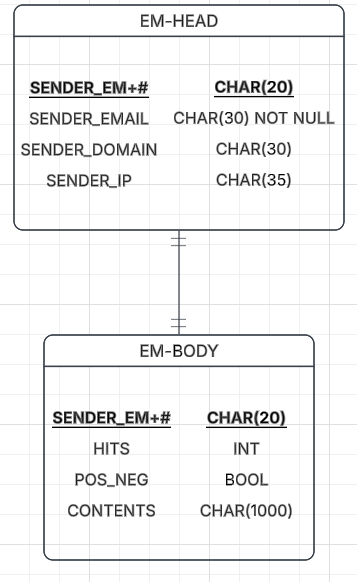
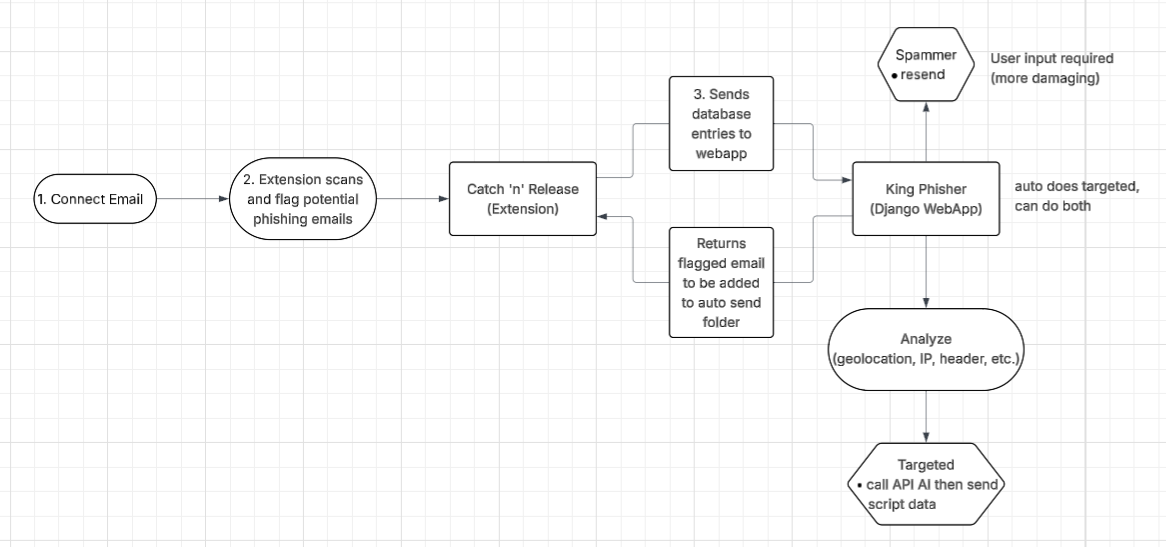
We built King Phisher as two connected pieces: a Django 4.2 backend and a Manifest V3 Chrome extension called Catch 'N' Release.
The Chrome extension authenticates with Google OAuth2 via Chrome.identity API to read a user's Gmail inbox. It fetches up to 100 recent messages and scores each one client-side using a weighted signal system, checking for urgent language (with leet-speak normalization), suspicious attachments, homograph characters, and raw IP address URLs. Any email that crosses the Medium or High Risk threshold is automatically forwarded to the Django backend along with its raw RFC 2822 headers.
The Django backend is split into three apps. The analyzer app receives those headers, then runs them through a pipeline that extracts SPF, DKIM, and DMARC authentication results, detects domain mismatches between the sender and reply-to addresses, and assigns a final risk level. The dashboard app surfaces flagged and analyzed emails in a login-protected web UI where users can trigger a full analysis or dismiss false positives, all without page reloads using fetch() and CSRF tokens. The spammer app handles the counter-attack: it streams 100 emails to a confirmed phishing sender via Gmail SMTP, rendering the live delivery status in a full-screen, terminal-style UI using Django's StreamingHttpResponse.
The extension and backend communicate over a REST API secured with per-user Bearer tokens, with CORS configured so the extension can POST cross-origin without being blocked. Everything is tied together by a shared ocean/kingfisher visual theme, animated seaweed, glowing particle GIFs, and a pixel-art splash screen.
Challenges we ran into
Connecting the web app and the Chrome extension was difficult. Getting CORS configured correctly so the extension's cross-origin POST requests weren't blocked, and wiring up Bearer token authentication so the Django backend could trust requests coming from the extension rather than the browser. Getting Django's StreamingHttpResponse to actually flush in real time during the counter-attack, rather than buffering the entire response and sending it all at once at the end. Parsing SPF, DKIM, and DMARC results reliably from Authentication-Results headers using regex, as the format varies subtly between Gmail, Microsoft, and Yahoo mail servers. Working within Manifest V3's service worker restrictions: unlike the old persistent background pages, service workers can be killed at any time, which requires careful message routing between the popup and the Gmail API calls.
Accomplishments that we're proud of
Watching the spam emails arrive in the inbox: Seeing the full counter-attack pipeline work end-to-end, where the phishing emails are detected, analyzed, and then 100 reply emails stream into the sender's inbox live in the terminal UI. Getting the extension to communicate with the Django app: Solving the CORS, OAuth2, and Bearer token challenges to make a Chrome extension talk seamlessly to a local Django backend in real time. The pixel art animation: building a cohesive ocean/kingfisher theme across both the extension popup and the web dashboard, complete with animated seaweed, layered particle GIFs, a branded splash screen, and a full-screen green-on-black terminal overlay for the counter-attack.
What we learned
How to create a Chrome extension and connect it to a web application to send data, which includes the specifics of Manifest V3 (service workers, message passing between popup and background), to Chrome.identity API for Google OAuth2, and how to POST cross-origin with CORS and Bearer tokens. How email authentication actually works: Reading and parsing SPF, DKIM, and DMARC headers gave us a real appreciation for how much of phishing detection comes down to whether a server's claimed identity matches its cryptographic signatures. How Django's StreamingHttpResponse can be used to push server-sent data to the browser incrementally, enabling a live terminal effect without WebSockets. How phishing emails are constructed: the leet-speak tricks, homograph characters, and domain spoofing techniques that attackers use, and how to write heuristics that catch them without drowning in false positives.
What's next for King Phisher
We want to add a function to read the replies from phishers, feeding all collected data (response content, timing, geo-location signals) into an AI engine to generate increasingly targeted follow-up attacks based on what the phisher reveals about themselves. Adding a feedback loop where confirmed safe emails are sent back to the extension and stored in a local folder for an AI model to analyze, so the scoring system continuously learns what legitimate email looks like for that user and stops repeatedly flagging the same benign senders.
More Info
A more technical breakdown can be found on the ReadMe.md file in the github linked below.


Log in or sign up for Devpost to join the conversation.