-
-
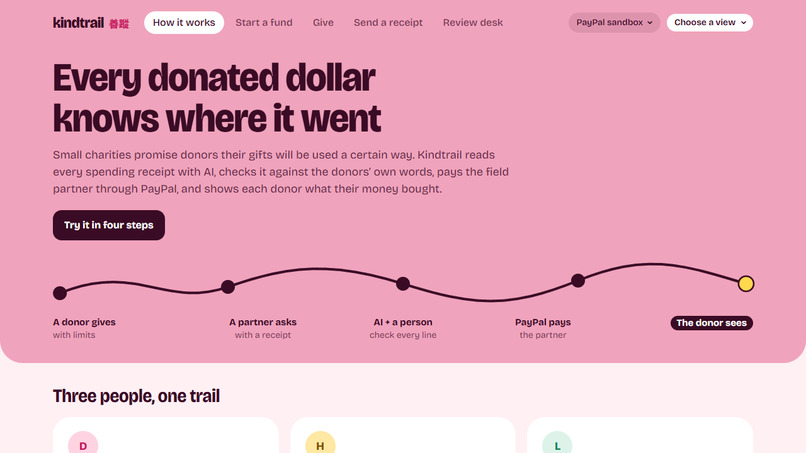
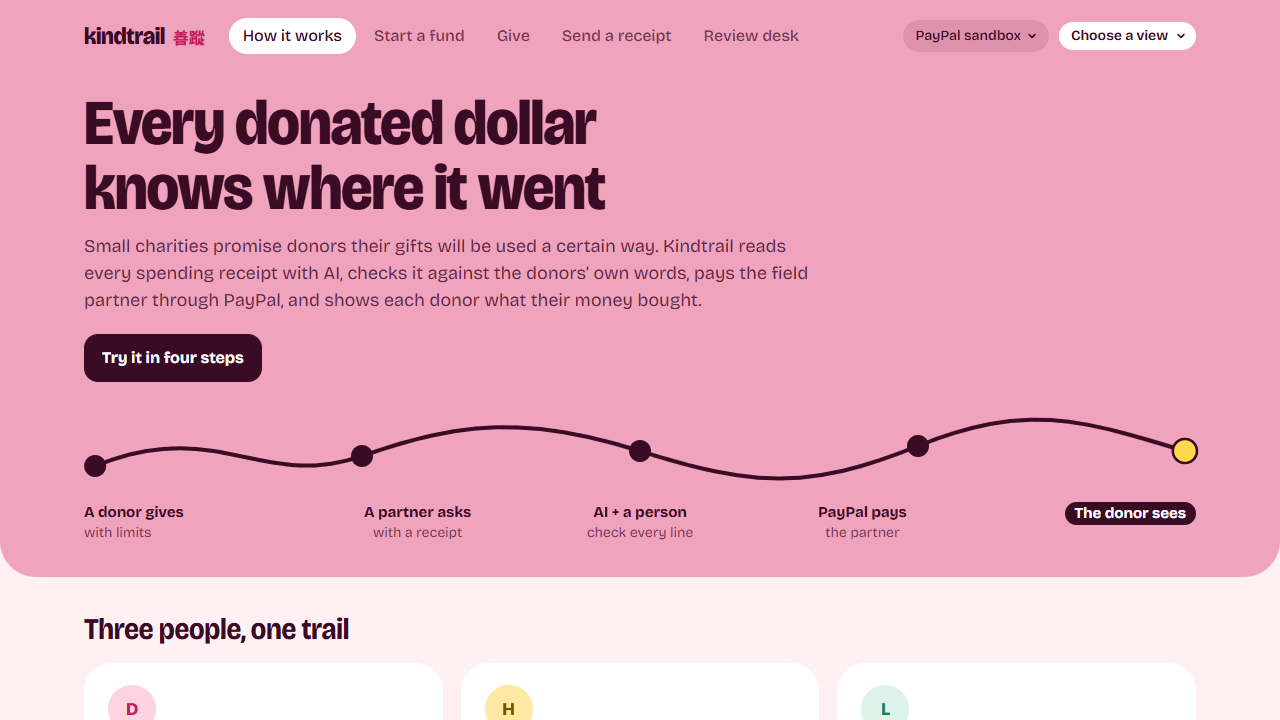
Three people use Kindtrail: a donor abroad, a field partner in Hualien and a reviewer at the charity.
-
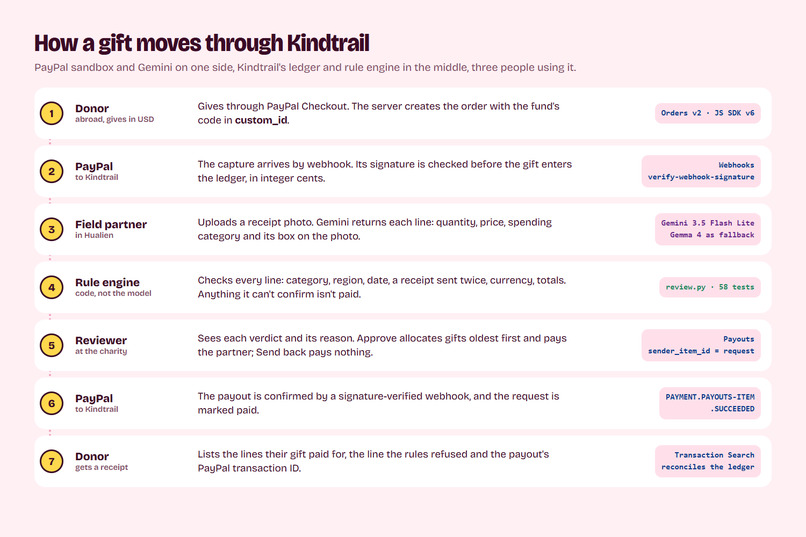
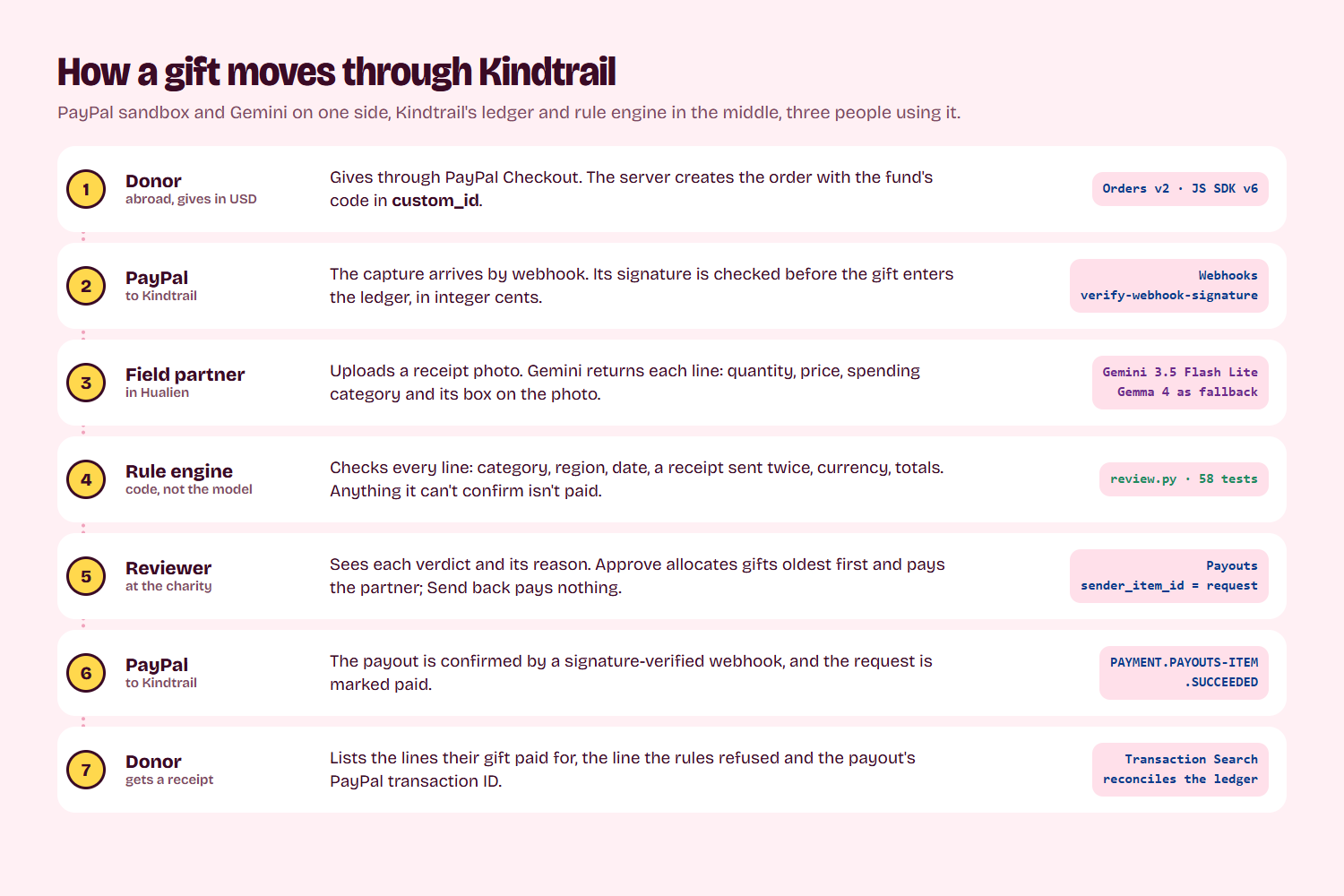
How a gift moves: PayPal Checkout, a verified capture webhook, Gemini's reading, the rule engine, Payouts, the donor's receipt.
-
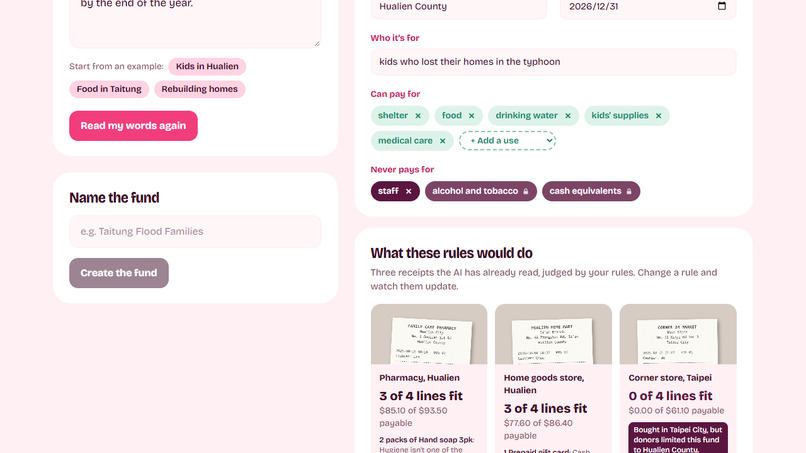
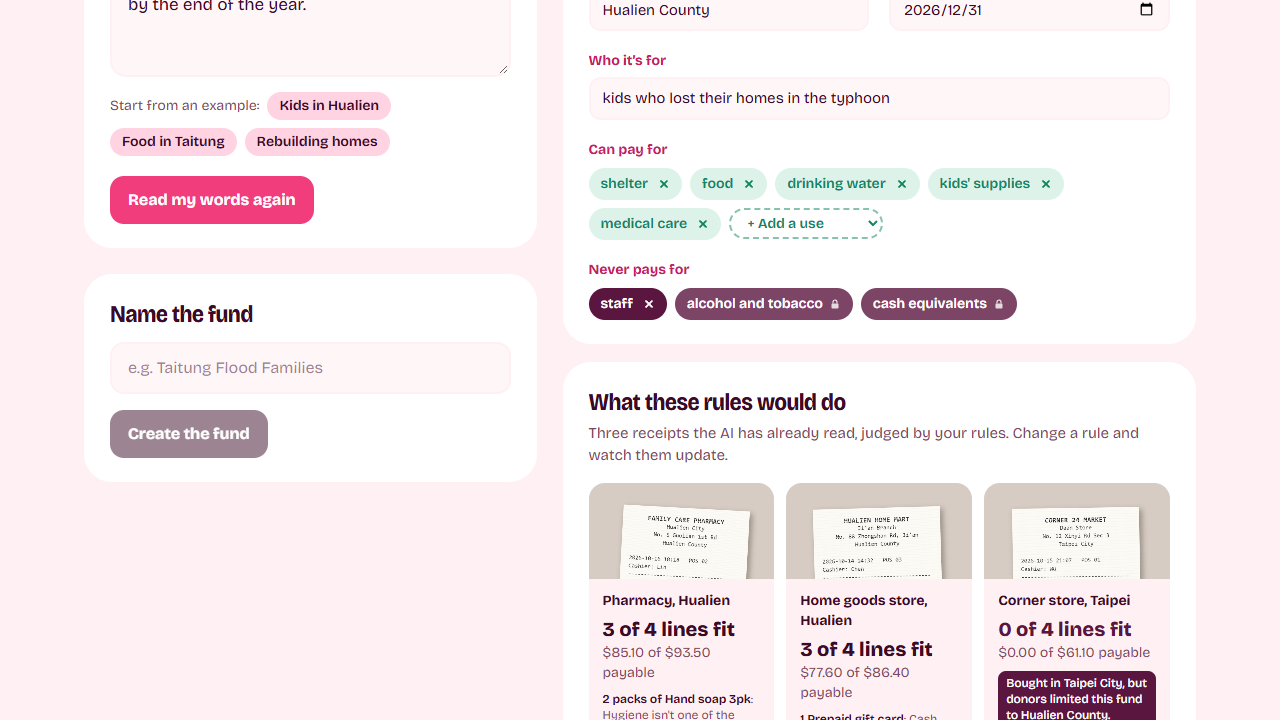
A donor's sentence became these rules. Adding medical care re-scored the sample pharmacy receipt from 2 to 3 of 4 lines.
-
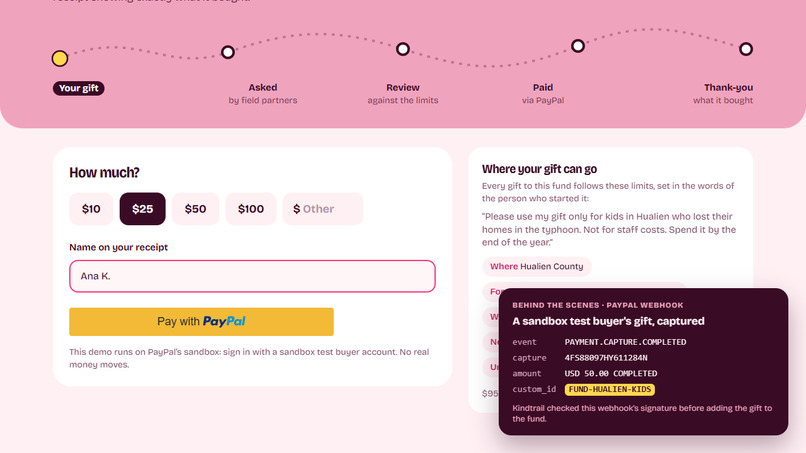
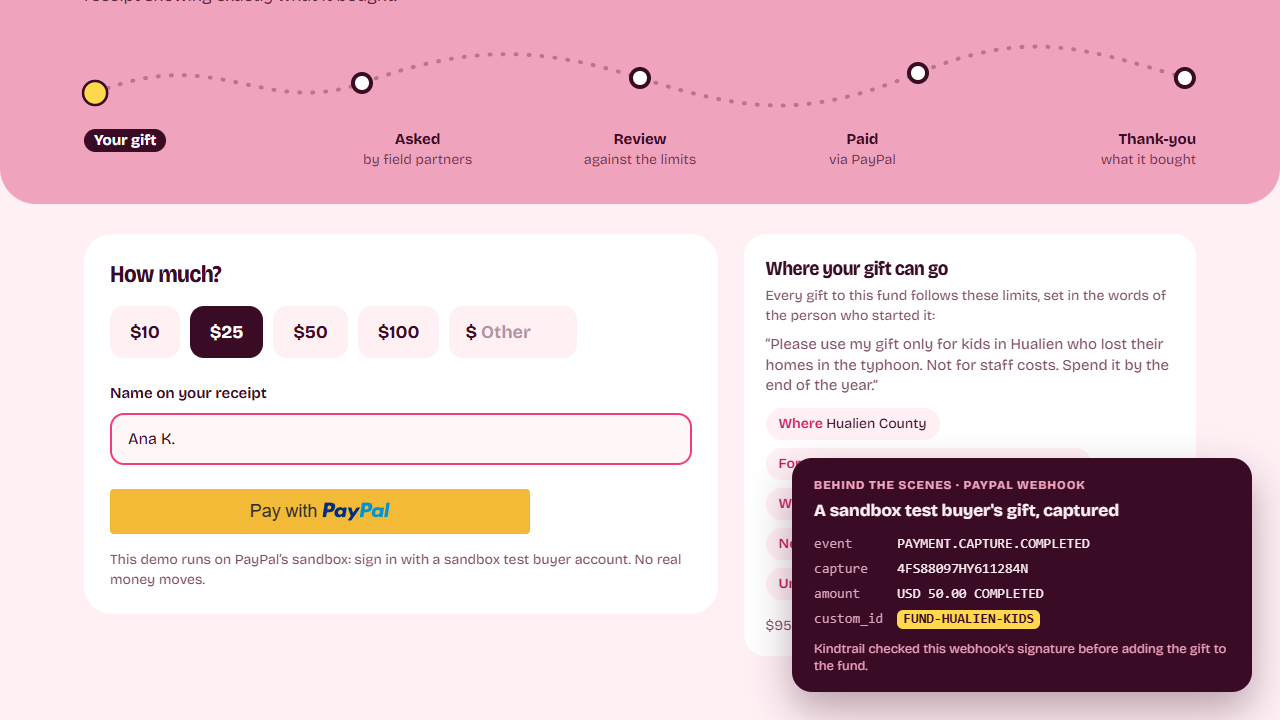
A sandbox test buyer's $50 gift: capture 4FS88097HY611284N, tagged FUND-HUALIEN-KIDS, webhook signature verified.
-
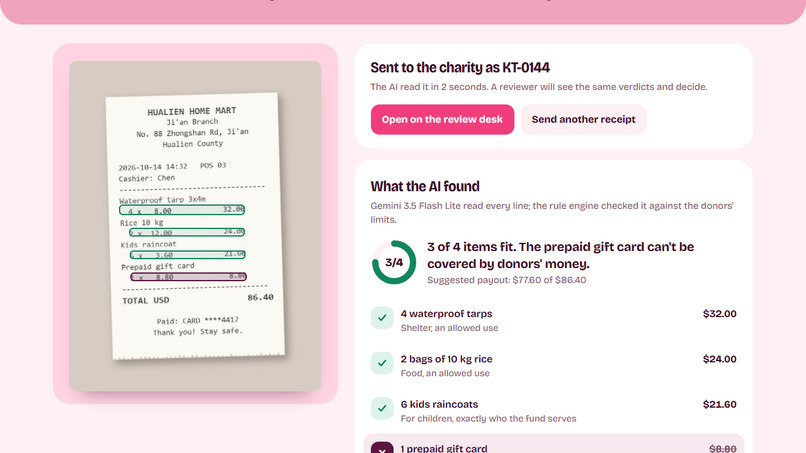
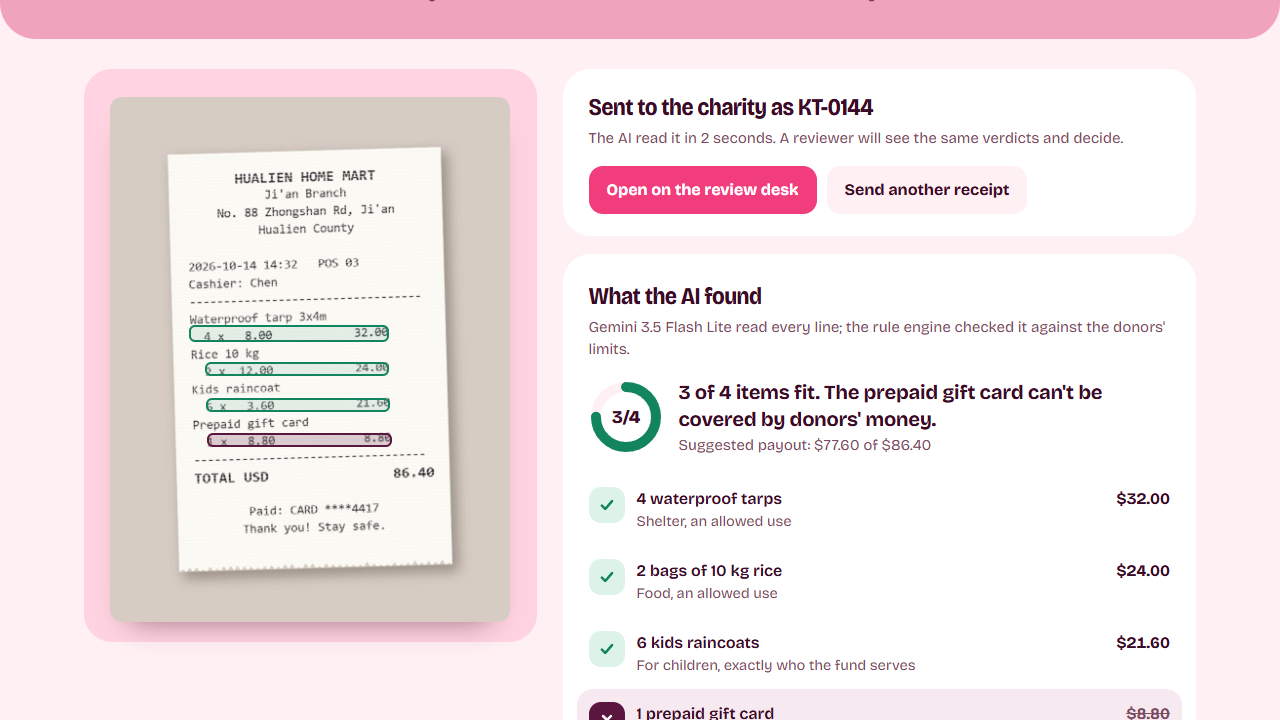
Gemini read the receipt in about 2 seconds and boxed each line. The rule engine refused the prepaid gift card.
-
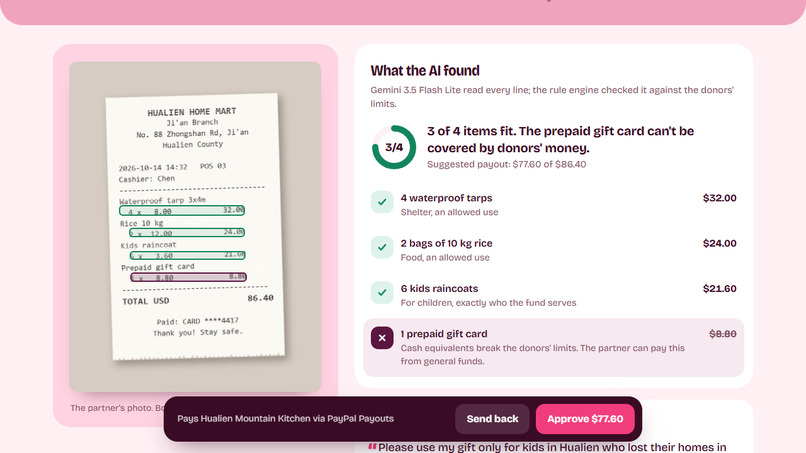
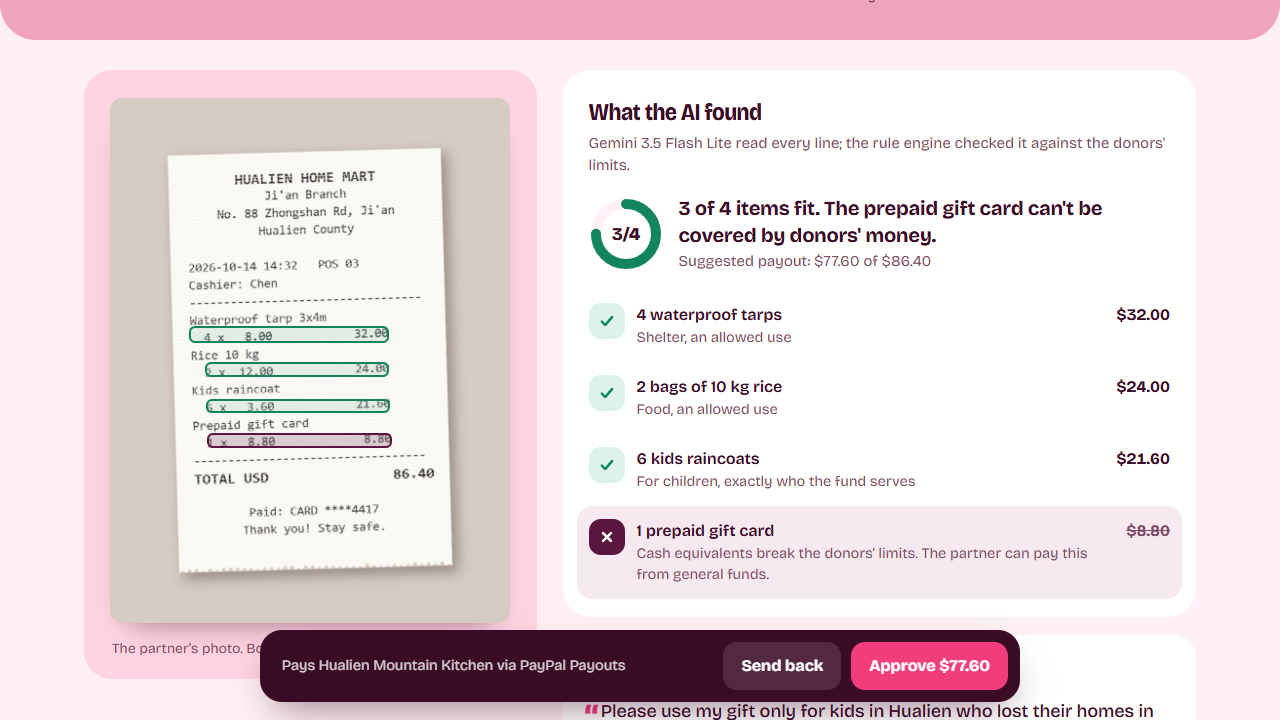
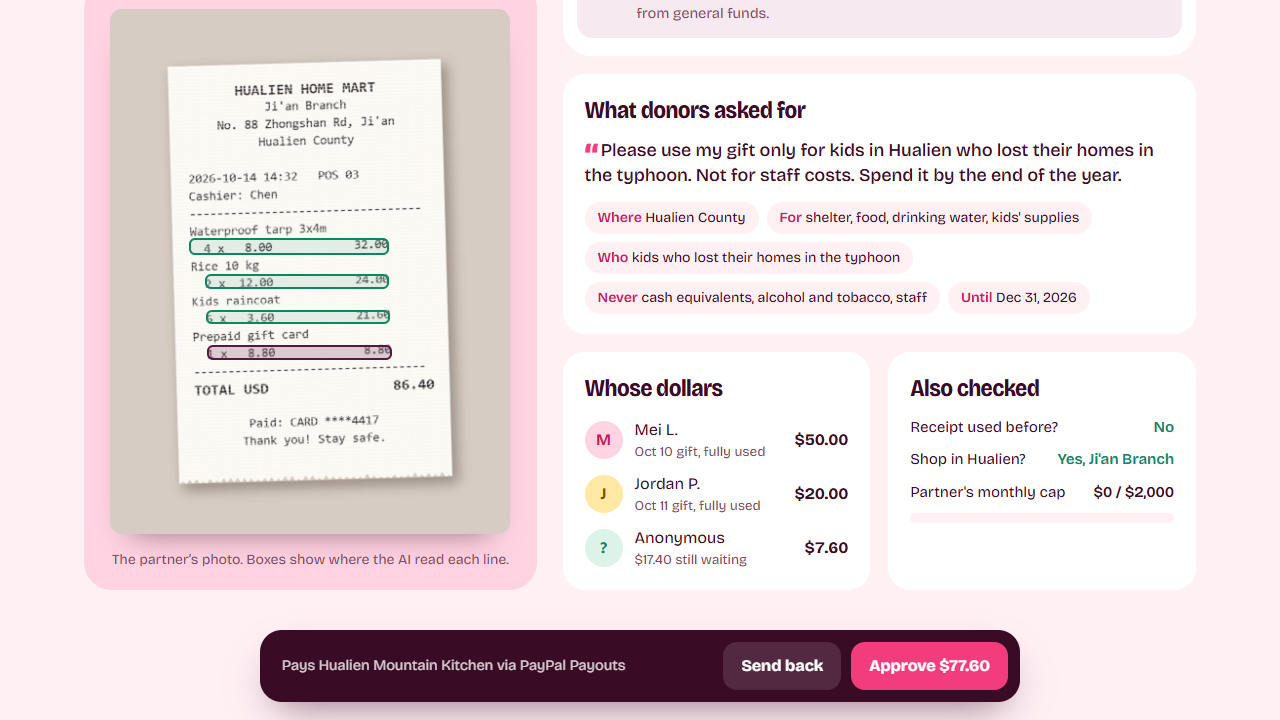
The reviewer sees each verdict and its reason, tied to a box on the receipt photo.
-
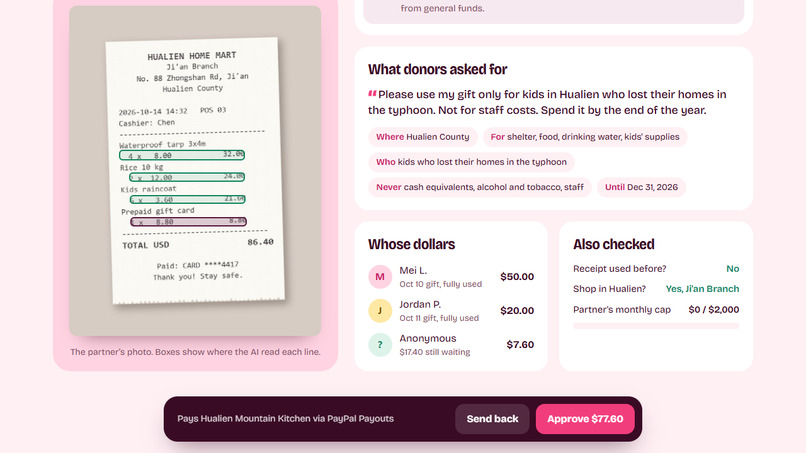
Which gifts pay for this request, oldest first, and the checks the rule engine ran on the receipt.
-
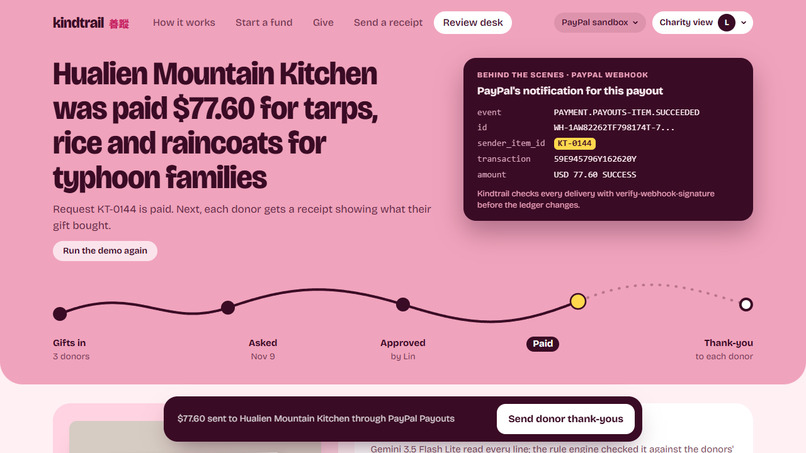
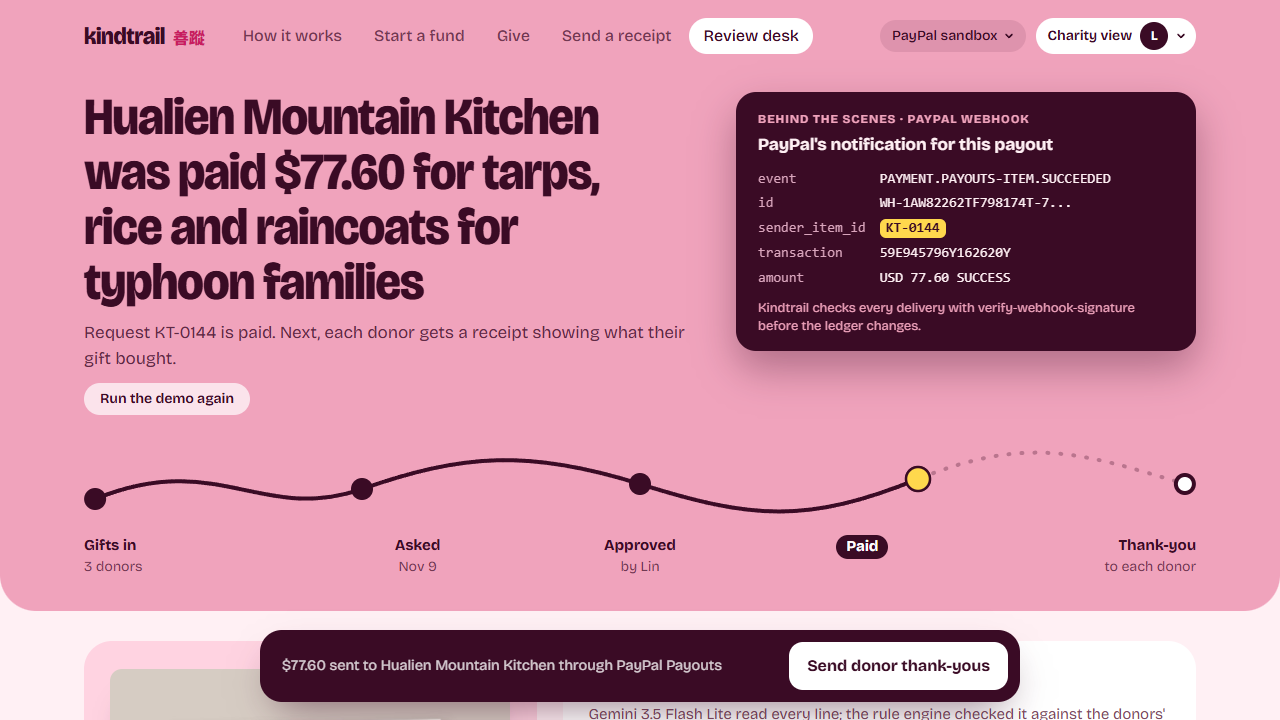
After Approve: PayPal's PAYMENT.PAYOUTS-ITEM.SUCCEEDED event for this payout.
-
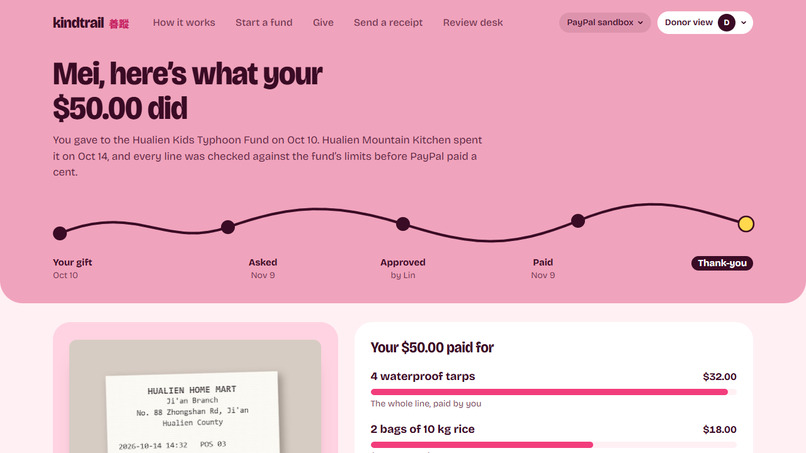
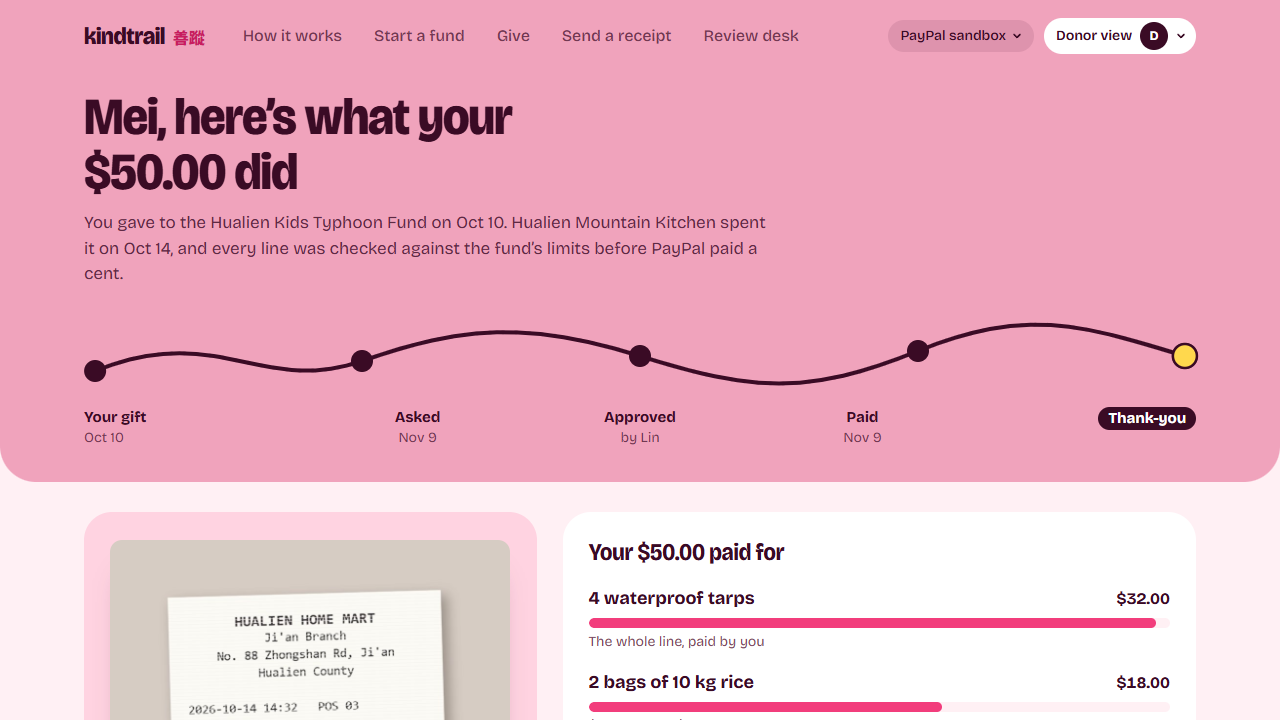
Mei's receipt: her $50 paid for 4 waterproof tarps and $18 of the rice.
-
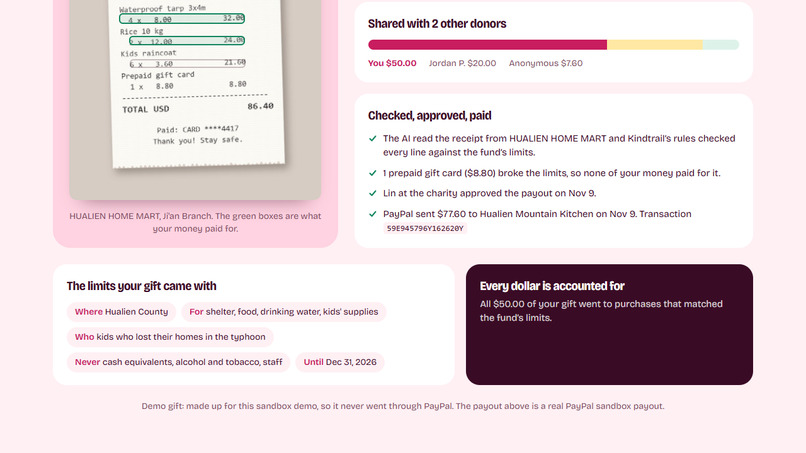
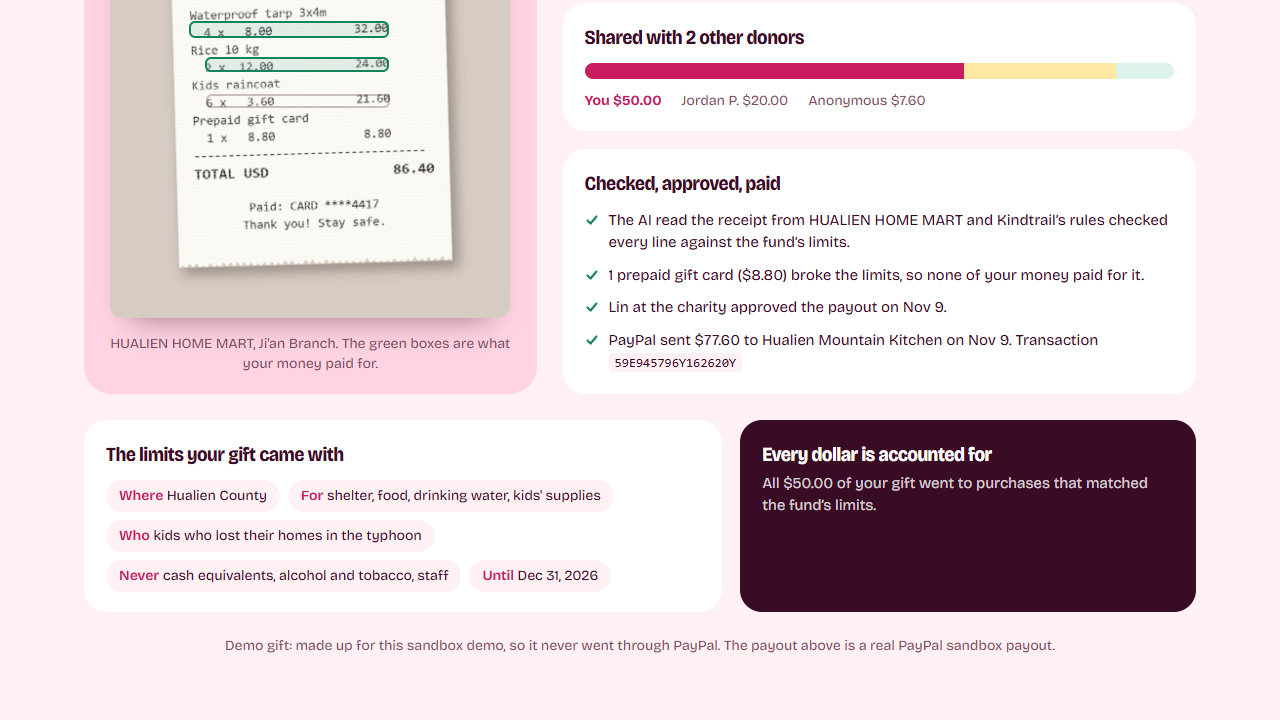
Who shared the purchase, the gift card her money didn't touch, who approved it and the payout's transaction ID.
Try it: https://kindtrail.onrender.com (PayPal sandbox, no real money) · Code: https://github.com/ch996811/kindtrail (MIT)
Inspiration
When a typhoon hits Hualien, a lot of the help comes from people abroad, and they often attach a condition: only for the kids, only for this township, not for salaries. The groups doing the work on the ground are small. They track spending in a spreadsheet, and donors rarely hear what their money actually bought.
PayPal is a natural way to send that money, with one catch I ran into early: PayPal doesn't allow payments between two Taiwan-registered accounts. So Kindtrail is built for the cross-border case that does work. Donors abroad give in US dollars to a fund, and the fund pays its partner in Taiwan.
I wanted the donor's condition to be checked against every receipt before money goes out, and each donor to get a receipt listing the purchases their own gift covered.
What it does
Three people use it: a donor, a field partner who buys supplies, and a reviewer at the charity.
Whoever starts a fund writes the condition as a sentence, for example "only for kids in Hualien who lost their homes, not for staff costs, spend it by the end of the year". Gemini turns it into rules: a region, the spending categories allowed and refused, who it's for and an end date. Anything can be edited, and a preview shows how three sample receipts would be judged under the edited rules before the fund is saved. Every gift to the fund then follows those rules. Donors give through PayPal Checkout, and the fund's code travels with each order in PayPal's custom_id.
The field partner uploads a photo of a receipt. Gemini returns each line with its quantity, price, a spending category and where it sits on the photo, in 2 to 4 seconds on the hosted demo. A rule engine then decides each line: allowed category, the shop's region, the purchase date, a receipt sent twice, totals that don't add up. Cash equivalents and alcohol are never paid. If the model can't tell something a rule depends on (the photo isn't a receipt, the currency isn't US dollars, the shop's location or the date can't be read), nothing is paid and a person has to look.
The reviewer sees the photo with each line boxed green or plum, the reason for every verdict, and which gifts will pay, oldest first. Approve sends the payout with PayPal Payouts; Send back returns the request to the partner. When PayPal's webhook confirms the payout and its signature checks out, the request shows as paid.
Each donor then gets an impact receipt. In the demo, Mei's $50 paid for 4 waterproof tarps and $18 of the rice. Her receipt also shows who else paid for that purchase, the gift card the rules refused, who approved it and the payout's PayPal transaction ID.
How it differs from other receipt-checking entries
Several projects in this hackathon pair an AI receipt check with Payouts. The parts I spent my time on:
- The donor's sentence becomes rules they can see and change, with a preview on sample receipts before anything is saved.
- Every verdict is tied to a box on the receipt photo, so a reviewer can check what the AI read at a glance.
- Money is traced per gift and per line, so each donor's receipt lists the lines their gift paid for and the line it didn't.
How I use PayPal
- Orders v2 and the JavaScript SDK v6 (createInstance, findEligibleMethods, createPayPalOneTimePaymentSession) for giving. The server creates the order with the fund code in purchase_units.custom_id and checks the captured amount before the gift enters the fund. A sandbox test buyer completed a gift end to end: capture 4FS88097HY611284N, tagged FUND-HUALIEN-KIDS, confirmed by a signature-verified PAYMENT.CAPTURE.COMPLETED webhook.
- Payouts to pay the field partner, with sender_item_id set to the request ID. Approvals take a database write lock first, so two reviewers clicking Approve at once produce one payout. I checked this against the hosted demo with three simultaneous approvals.
- Webhooks for PAYMENT.CAPTURE.COMPLETED and the PAYMENT.PAYOUTS-ITEM.* events, checked with verify-webhook-signature and stored once per event ID.
- Transaction Search for reconciliation: captures and payouts in the ledger are matched to PayPal's report by transaction ID, and PayPal copies the request ID into custom_field. New transactions take about two hours to appear, so the app uses the webhook as the immediate signal and the report as the audit.
How I use AI
- Gemini 3.5 Flash Lite, with structured JSON output, reads receipts (lines, categories and bounding boxes) and turns the donor's sentence into rules. Setting thinking to minimal took my test receipt from 24 seconds to under 3, with the same four lines read. Gemma 4 31B takes over if Gemini is overloaded.
- The model only extracts. Whether a line is paid is decided by review.py, which has its own tests, so a misread can be caught by the reviewer but can't approve money by itself.
- Every answer is cached and there's a daily cap, so the free tier holds up. The repo includes cached answers for the three sample receipts, so the demo works without an API key.
- Gemini TTS voiced the demo video.
How I built it
I built it alone over three weeks, with Claude Code as a pair programmer. Most of the core came together in the first two days; the rest went into the review desk, the impact receipt, deployment and fixing what testing turned up.
The backend is Python, FastAPI and SQLite. Money is stored as integer cents and allocated oldest gift first, line by line. 58 tests run the flow against a fake PayPal and the cached AI answers. The frontend is React 19, TypeScript, Vite, Tailwind CSS v4, Motion, TanStack Query and React Router. A coin moves along a trail at the top of each page to show where the money is, and each page says whose view it is: donor, partner or charity. It all ships as one Docker image on Render's free plan, set up with render.yaml.
Challenges I ran into
- PayPal's DONATION item category returned 403 PERMISSION_DENIED_FOR_DONATION_ITEMS on my sandbox account because it needs an approved account, so the fund code travels in custom_id instead.
- On Render the first Gemini call took 25 to 44 seconds, against 3 on my laptop. DNS and small requests were fast; forcing the HTTP client onto IPv4 brought it down to 2.7 seconds.
- "Spend it by the end of the year" came back as 2024 until the prompt included the fund's creation date. "Nothing else, please" made the model refuse twelve categories until the prompt said to list only what the donor rules out.
- Transaction Search lags about two hours and adds a hold and a release row for each payout, which reconciliation has to group with the payout.
- Making the rules fail closed. The first version trusted whatever the model returned; now an unknown currency, place or date blocks payment instead of slipping through.
Accomplishments that I'm proud of
- The whole loop runs in the PayPal sandbox: a test buyer's gift captured with the fund's tag, an AI-checked receipt, a Payouts transfer confirmed by a verified webhook, and a donor receipt that cites the payout's transaction ID.
- A reviewer can check each verdict against a box on the photo, with a reason in plain words.
- Run the demo again resets the shared demo, so judges can repeat the flow from the start.
What I learned
Two of my early assumptions were wrong: that I could use PayPal's DONATION category, and that the slow AI calls on Render were Gemini's fault (it was IPv6). The model is good at reading receipts and sentences, but any rule that moves money belongs in code that is allowed to say "I don't know".
What's next for Kindtrail
- Limits per gift inside one fund, so donors with different conditions can share a pool.
- Receipts in NT$ with a recorded exchange rate, and a phone-first upload for partners.
- Reviewer overrides with an audit trail.
- A pilot with an overseas fundraising group and a verified PayPal account, including the DONATION category.
About the demo data: the donors, the kitchen and the reviewer are made up, and the three receipts are samples I made for the demo. The demo's three gifts are seeded so anyone can replay the flow without a sandbox buyer account; the gift described under PayPal above went through PayPal for real.
