Inspiration
When a Twitch chat moves fast, good questions disappear in seconds. The streamer is busy playing and talking, so they never see them. Then the same question gets asked again in French, in Spanish, in English, and the loudest message wins. The people who waited quietly feel ignored, and first-time chatters go unnoticed. Streamers don't need more chat. They need to know what their community is really asking.
What it does
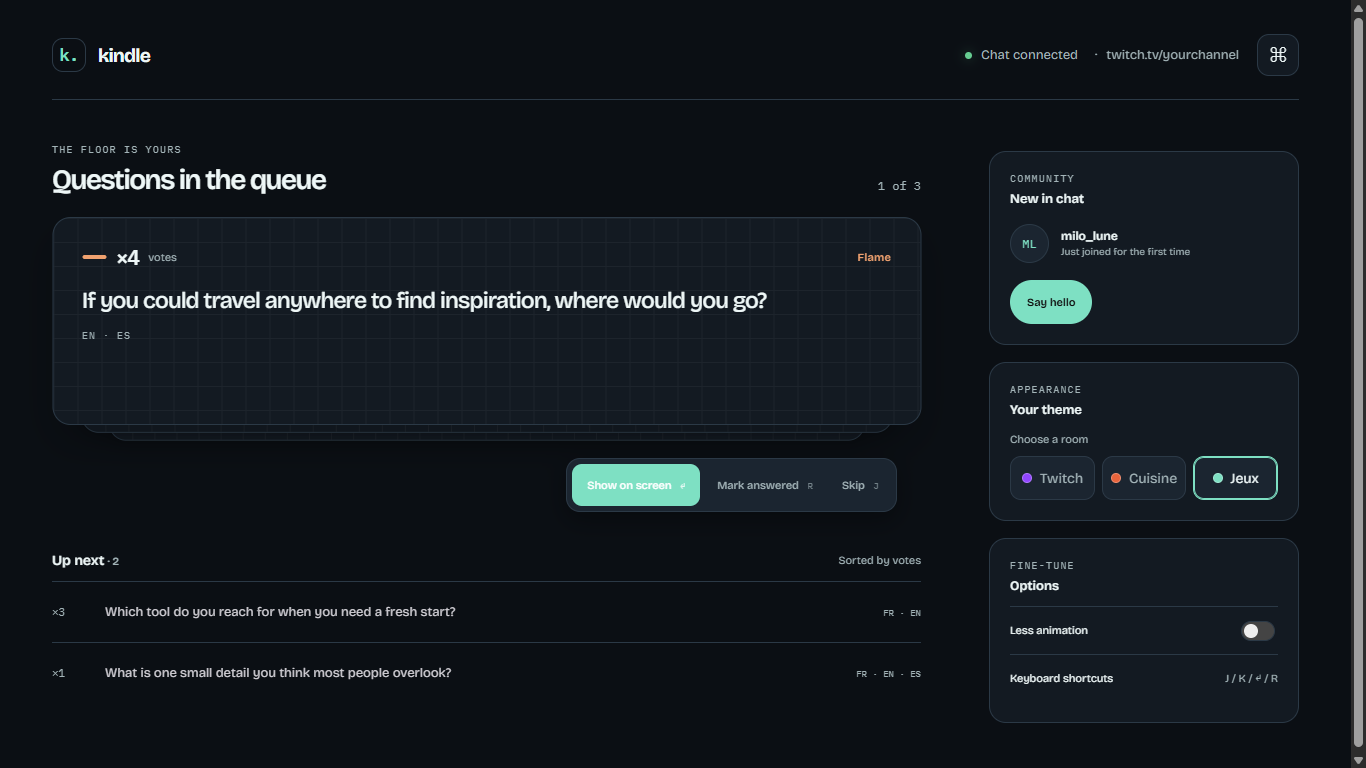
Kindle is a question queue for Twitch streamers. It reads chat, finds the questions by itself (viewers just chat normally, no commands), and merges the ones that ask the same thing, even across languages. Each repeated question adds a vote, so what many viewers want to know rises to the top.
- Automatic detection: no commands, no special syntax for viewers.
- Duplicate merging: one card per question, with a vote added each time someone asks it again. Heat levels go from Spark to Ember, Flame and Blaze, shown as a color and a number.
- Across languages: the streamer reads every question in their own language, with the original message underneath.
- On stream in one key press: the active question appears through a transparent OBS browser source, and its votes update live.
- Always reversible: every merged message is listed under the card, with a Split button to undo a wrong merge.
- Newcomers: a "New in chat" card flags first-time chatters.
- Any kind of stream: three themes (Twitch, Cuisine, Jeux).
How I built it
I built Kindle entirely with OpenAI Codex, one focused prompt at a time, testing each step in the browser: the streamer panel, a live backend, the duplicate merger, the OBS overlay, the Gemini layer and the Twitch connection.
It runs on Node.js with plain HTML, CSS and JavaScript, with no framework. Kindle reads a channel's chat through Twitch's chat interface (IRC over TLS, anonymous and read-only), and it never sends messages.
Duplicate detection has two layers:
- A local check that compares words and works offline.
- An optional Gemini call that matches questions across languages and translates them into the streamer's language.
If the AI is slow or offline, Kindle keeps working. A chat simulator feeds the same pipeline as Twitch, which made it possible to test busy chats alone.
Challenges I ran into
- Merging wrongly is worse than not merging. Every merged message stays visible with a Split button, and vague questions like "why did you do that?" only merge when they are asked within 90 seconds of each other.
- The AI can be slow or overloaded (timeouts, 503 errors). It never blocks the chat: the question appears instantly and the AI merges it afterwards.
- A network change broke the Twitch connection. The TLS certificate name was different on another network. I kept certificate validation and only accepted Twitch's own hostnames.
- Codex's context window filled up fast. I kept prompts short and precise.
Accomplishments that I'm proud of
- A real message typed in Twitch chat shows up in the panel, detected and translated, within a second or two.
- The same question asked in three languages becomes one card with a growing vote count.
- The overlay works as an OBS browser source, with a transparent background.
- The app keeps working when the AI is unavailable.
What I learned
Small, focused prompts and testing after every step beat big requests. Designing for failure (slow AI, wrong merges, network changes) mattered as much as the features themselves.
What's next for Kindle
- A Twitch extension, so the panel lives inside Twitch.
- Sending a welcome message to newcomers from the "New in chat" card.
- An end-of-stream recap of the questions that were asked.
Built With
- css
- gemini-api
- html
- javascript
- node.js
- obs
- openai-codex
- twitch-chat

Log in or sign up for Devpost to join the conversation.