-
-
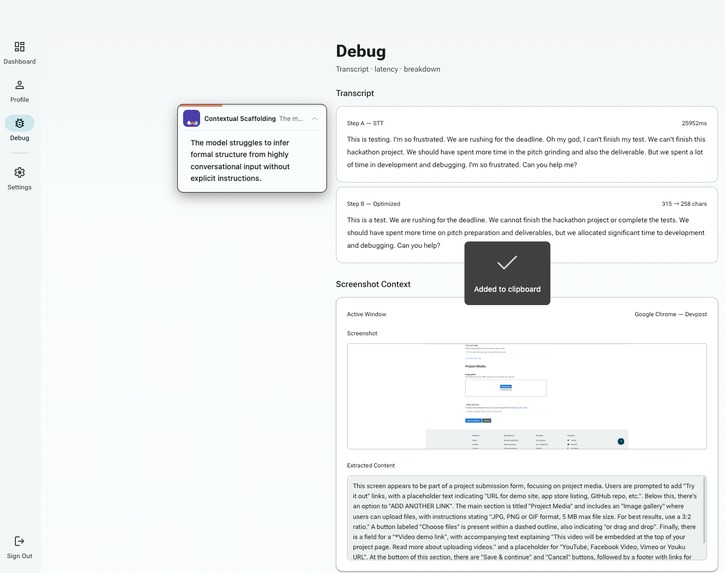
A screenshot on our app
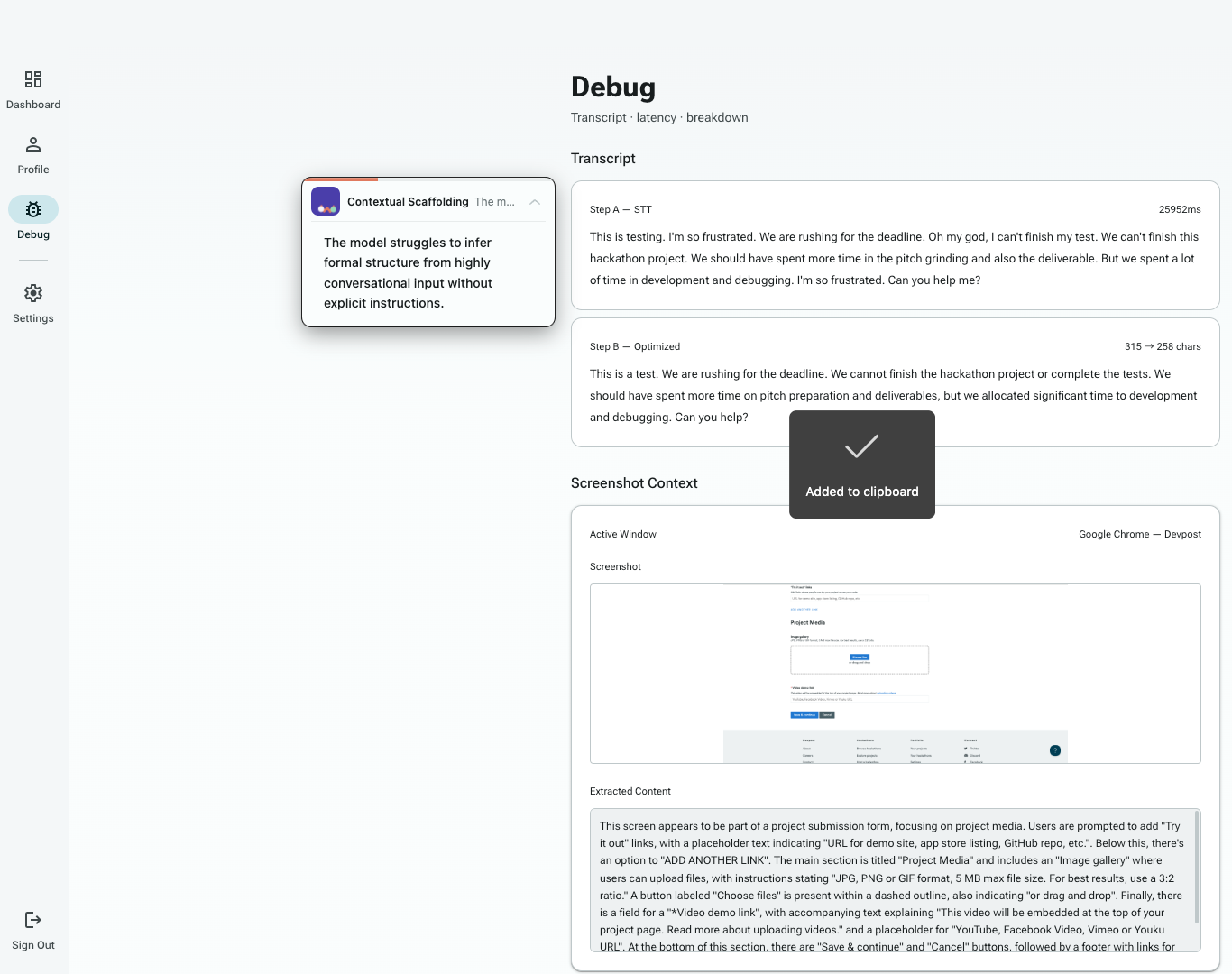
Kinapse — Project Story
Where human intent and AI understanding form a kinship at the speed of a synapse.
Inspiration
The gap that inspired Kinapse is one we hit every day: you know exactly what you want an AI to do, but the words come out wrong — too vague, too verbose, missing the context the model actually needs. The output disappoints, you iterate, you re-prompt. The friction compounds.
We started asking: what if the bottleneck isn't the AI, but the interface between human intent and machine input? Voice is the most natural way humans express ideas. But raw speech is messy — full of hedges, restarts, and implicit context the speaker takes for granted. The model never gets that context.
Kinapse was born from one question: can we make the act of talking to an AI as natural as talking to a person, while silently doing all the work of turning imperfect speech into perfect prompts?
How We Built It
Kinapse runs a two-phase pipeline triggered by a single push-to-talk key.
Step A — Voice Capture runs entirely on the user's machine. While the user speaks, Kinapse streams audio to the Gemini Live API for real-time transcription, captures a screenshot of the active window, extracts screen context via Gemini vision, and fetches the user's personalized profile from Firestore — all four tasks running in parallel so nothing blocks anything else.
Step B — Optimization begins the moment the transcript arrives. Kinapse classifies the task type (coding, writing, research, communication, etc.) with Gemini Flash-Lite, retrieves the top $k=3$ most similar past interactions via vector similarity search, assembles a six-section personalized prompt, and streams the result through Gemini 2.5 Flash. The optimized text is pasted directly into the active app via keyboard simulation.
The personalization engine learns from every interaction. Each episode is stored with a 1408-dimensional Gemini embedding. Similarity between a new transcript $q$ and stored episodes ${e_i}$ is computed as:
$$\text{score}(q, e_i) = \frac{q \cdot e_i}{|q| |e_i|}$$
The top-3 episodes become few-shot examples in the prompt. A two-layer user profile — context fields plus optimization preferences derived from rejection patterns — is updated every 5 interactions using Flash-Lite, so the system gets sharper the more you use it.
Performance is tracked across 6 dimensions adapted from the Anthropic AI Fluency Framework (Intent Clarity, Contextual Scaffolding, Iteration Efficiency, Critical Discernment, Adaptability, Domain Fluency), visualized as a radar chart with exponential moving average smoothing:
$$S_t = \alpha \cdot x_t + (1 - \alpha) \cdot S_{t-1}, \quad \alpha = 0.3$$
The stack: Electron frontend, local Python backend (PyAudio, CGEventTap, FastAPI WebSocket), and an optional Google Cloud Run service for Step B offload — returning results as Server-Sent Events with the user's own Gemini key forwarded in a request header.
Challenges
Gemini Live API session limits. The Live API caps sessions at 60 seconds. Users recording longer voice inputs would silently lose the tail of their transcript. We solved this with a rotation mechanism: after 50 seconds, a new session is pre-warmed in the background, audio is buffered during the handoff window, and transcripts from both sessions are concatenated. The user never notices.
Latency across a parallel pipeline. The perceived latency of the full pipeline — from key release to first pasted character — is the maximum of several parallel tasks, not their sum. Keeping this under one second meant profiling every component. Vision extraction was the most expensive parallel task at ~300–500ms; we pre-start it the moment recording begins rather than waiting for the transcript. We now track 20+ individual timing components per interaction in a dedicated debug panel.
macOS system integration. Global keyboard hooks, screenshot capture, and clipboard-based paste all require low-level macOS APIs that PyInstaller doesn't bundle automatically. Getting CGEventTap, CGWindowList, and osascript to survive packaging into a .dmg required custom PyInstaller hooks and entitlement configuration that took significant debugging time.
Feedback framing. Early user tests showed that quality scores framed as user mistakes ("your prompt lacked context") increased friction and caused people to disengage. We reframed all suggestions as machine-blaming ("I needed more context about X") — a small copy change that meaningfully improved acceptance rates in testing.
What We Learned
The Gemini Live API is genuinely different from batch STT. Streaming partial transcripts back to the UI while the user is still speaking means the pipeline can start warming up before the key is released — shaving hundreds of milliseconds off perceived latency in a way that batch transcription simply cannot.
Building a personalization loop that actually improves behavior — rather than just storing data — requires closing the feedback loop at every layer: capturing what the user accepts and rejects, surfacing that signal to the profile update model, and verifying that changes in the profile change the output. We learned that rejection patterns are far more signal-rich than acceptance patterns; a user reverting an optimization tells you precisely what rule was wrong.
Finally: the hardest part of building a real-time AI-augmented input tool isn't the AI. It's the plumbing — the keyboard hooks, the session rotation, the clipboard timing, the OS permissions. The model works first try. The system integration takes ten times as long.
Built for the Gemini Live Agent Challenge, March 2026.


Log in or sign up for Devpost to join the conversation.