Inspiration
Every developer has survived a sprint planning meeting that felt completely detached from reality — Jira tickets written in a vacuum, epics that don't map to any real module, acceptance criteria nobody can verify. Classic agile theatre.
The frustration is always the same: the people writing the stories don't know the code, and the people who know the code don't have time to write the stories. The result is a backlog full of well-intentioned fiction.
We kept coming back to one question: what if your AI coding assistant already knew your codebase and could generate the entire agile artifact suite automatically — not from thin air, but from what's actually there? Routes, schemas, components, APIs — the real system. That question became Agile PM Mode.
We also wanted to prove that Kilo Code's custom modes system is far more powerful than it looks. A single YAML file can encode domain expertise sophisticated enough to replace a dedicated PM tool — no backend, no SaaS subscription, no context switching.
What It Does
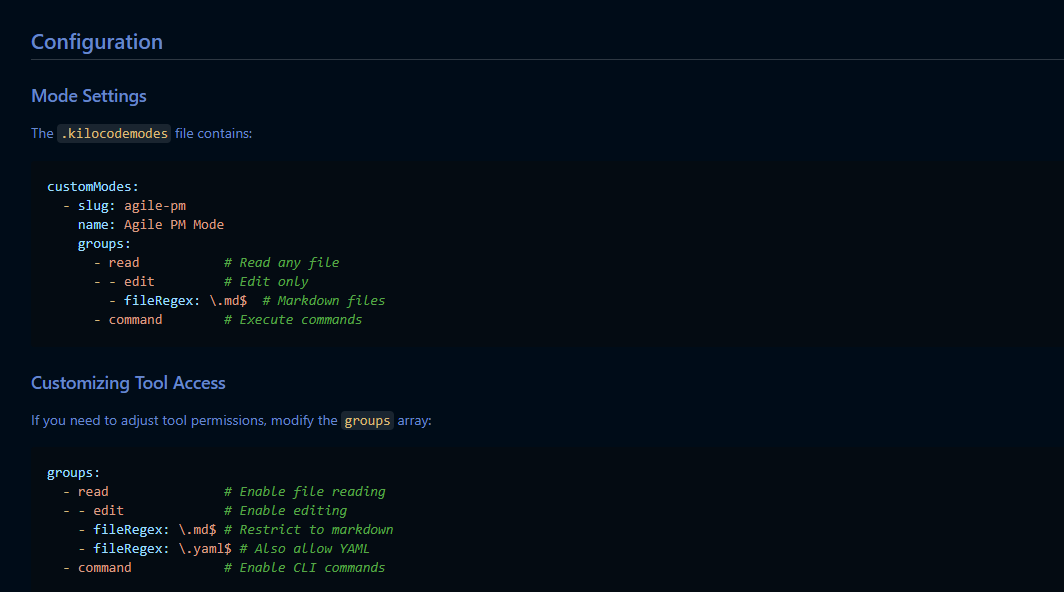
Agile PM Mode is a custom Kilo Code mode that acts as an embedded Agile project manager inside your IDE. Drop one file (.kilocodemodes) into any project, switch modes, and your codebase becomes the source of truth for your entire agile planning suite.
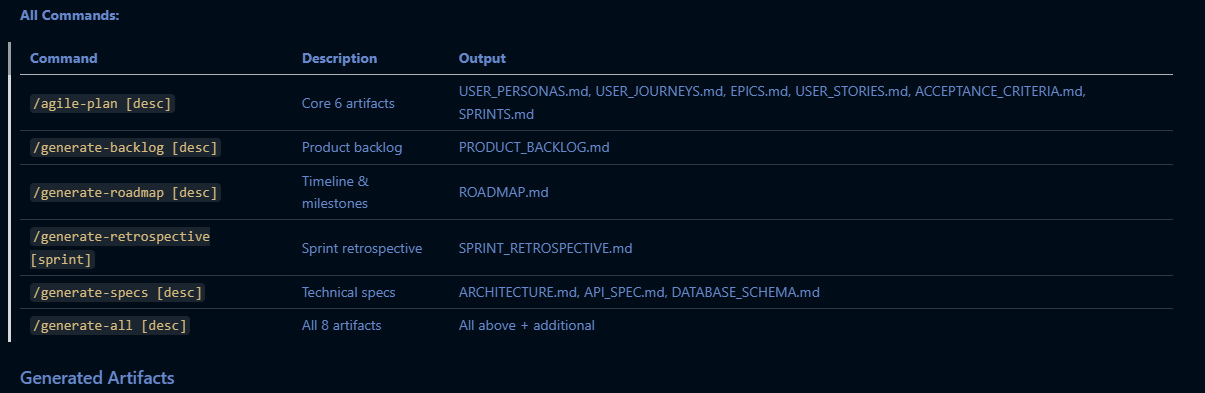
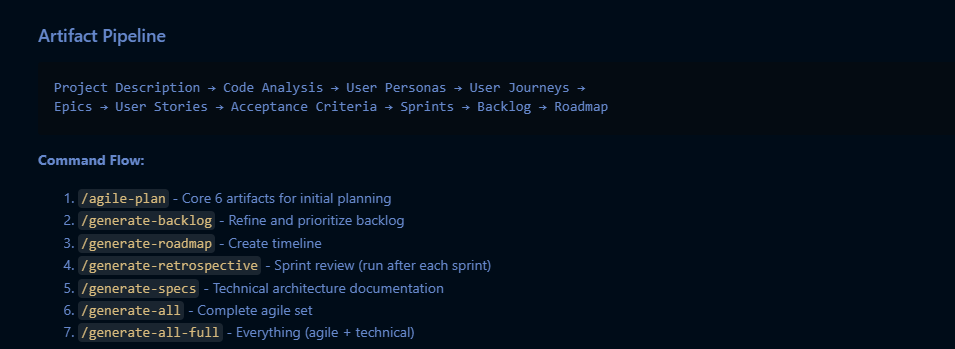
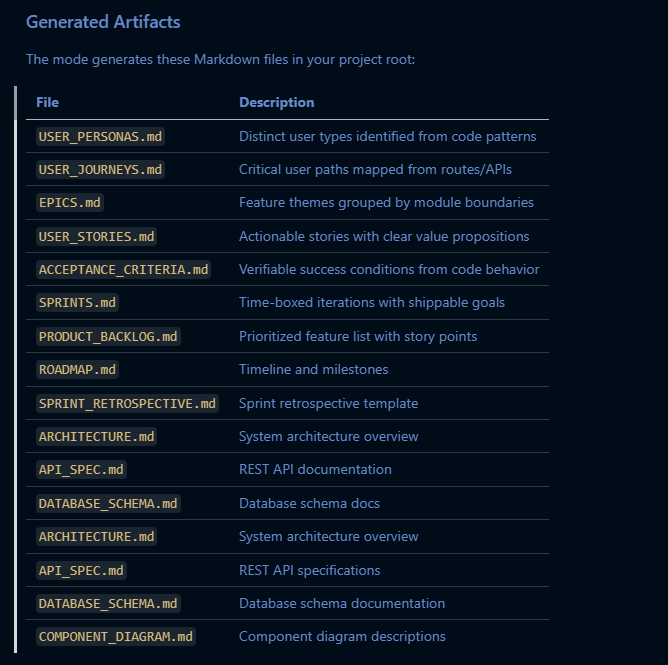
The 8-Artifact Pipeline
| Artifact | File | What It Contains |
|---|---|---|
| User Personas | USER_PERSONAS.md |
Distinct user types inferred from code patterns |
| User Journeys | USER_JOURNEYS.md |
Critical paths mapped from routes & APIs |
| Epics | EPICS.md |
Feature themes grouped by module boundaries |
| User Stories | USER_STORIES.md |
Actionable stories with clear value propositions |
| Acceptance Criteria | ACCEPTANCE_CRITERIA.md |
Verifiable success conditions from code behavior |
| Sprints | SPRINTS.md |
Time-boxed iterations with shippable goals |
| Product Backlog | PRODUCT_BACKLOG.md |
Prioritized, story-pointed feature list |
| Roadmap | ROADMAP.md |
Timeline and milestones |
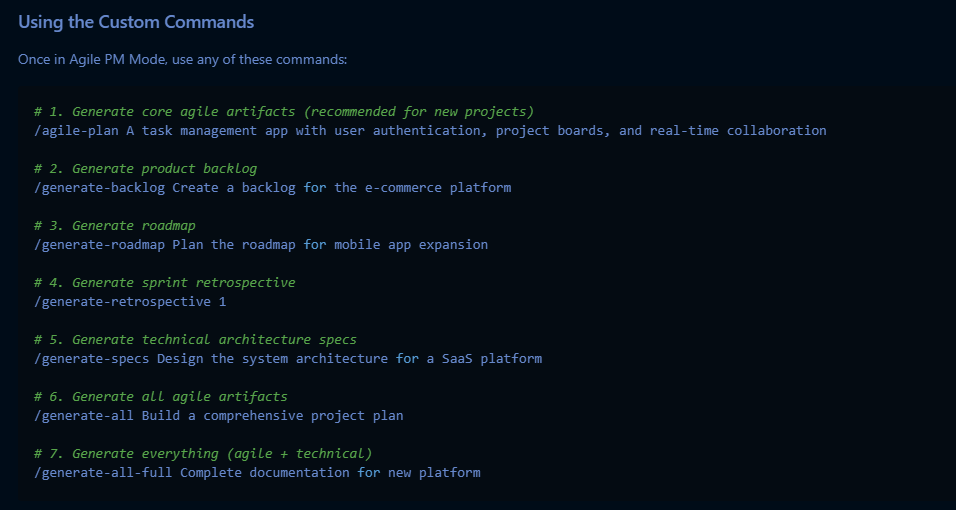
The 5 Slash Commands
# Generate core 6 artifacts for new projects
/agile-plan A task management app with auth, boards, and real-time collaboration

# Generate prioritized product backlog
/generate-backlog Create a backlog for the e-commerce platform

# Generate timeline & milestones
/generate-roadmap Plan the roadmap for mobile app expansion

# Generate sprint retrospective (run after each sprint)
/generate-retrospective 1

# Generate all 8 artifacts at once
/generate-all Build a comprehensive plan for a new SaaS platform
All outputs are plain Markdown files — version-controllable, IDE-native, and editable by anyone on the team.
How We Built It
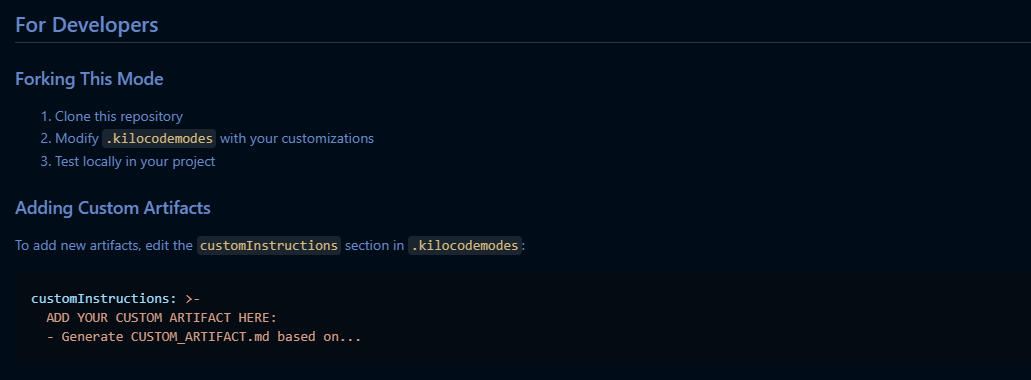
The entire mode runs on Kilo Code's custom modes system, configured through a single .kilocodemodes YAML file. No external services, no additional installs, no separate runtime.
Architecture
.kilocodemodes
├── slug / name / roleDefinition   → Mode identity
├── groups                         → Scoped tool permissions
│   ├── read        (any file)
│   ├── edit        (*.md only)
│   └── command     (CLI access)
└── customInstructions             → The PM "brain"
    ├── Evidence-first directive   → Read code BEFORE generating
    ├── Pattern detection rules    → Routes, schemas, components
    ├── Artifact templates         → Per-file generation logic
    └── Command handlers           → Slash command routing
The Evidence-First Principle
The key engineering decision was enforcing a strict read-first, generate-second discipline in the customInstructions. Early drafts produced plausible but generic boilerplate — the kind you could write without ever looking at the code. The final instructions require the mode to:
- Scan the repo structure
- Read actual source files (routes, models, components, configs)
- Detect patterns (API endpoints, DB schemas, UI flows)
- Ground every artifact in what it found
Tool Permission Design
We used the fileRegex: \.md$ edit restriction deliberately. The mode can read anything but can only write Markdown. This makes it safe to run on any codebase without risk of accidentally modifying source files — a critical trust factor for team adoption.
Challenges We Ran Into
Keeping artifacts grounded, not generic. The hardest problem was preventing the mode from generating plausible-sounding but completely fabricated agile content. The solution was iterating heavily on the customInstructions prompt until "analyze code first" became truly non-negotiable behavior, not just a suggestion.
Scoping tool permissions correctly. Giving the mode enough access to be useful (read any file, run commands) while preventing accidental source edits required carefully understanding Kilo Code's groups and fileRegex system. The final config is tighter and safer than our first attempt.
Sprint planning realism. Auto-generated sprints initially ignored real constraints like team size, velocity, and dependencies. We had to encode enough agile heuristics into the instructions to produce sprint plans engineers would actually consider following rather than immediately discarding.
Slash command routing. Getting five distinct commands to trigger meaningfully different subsets of the artifact pipeline — without bloating the customInstructions into an unreadable wall of text — required several rounds of restructuring.
Accomplishments That We're Proud Of
Zero-dependency distribution. The entire capability ships as a single portable YAML file. No npm install, no Docker, no SaaS account. Drop it in a project and it works.
Genuinely useful acceptance criteria. When the mode derives acceptance criteria from actual API behavior rather than guessing, the output is something engineers can write tests against. That's a meaningful step above generic PM tool output.
Tight tool scoping as a feature. Restricting edits to Markdown only makes the mode dramatically safer and easier to trust on real codebases. We're proud that the permission model was a deliberate design choice, not an afterthought.
It's a template, not just a tool. By documenting the mode creation pattern clearly, this project teaches developers how to build their own domain-expert modes — extending Kilo Code's capabilities in ways the core team never anticipated.
What We Learned
Custom modes are underrated. Combining scoped tool access with carefully engineered customInstructions lets you embed a genuine domain expert — agile coach, security reviewer, accessibility auditor — directly into the developer workflow. The ceiling is much higher than it appears.
Constraint is a feature. The fileRegex: \.md$ restriction didn't limit the mode — it made it trustworthy. Limiting scope often increases adoption because it removes fear.
Prompt engineering IS system design. The customInstructions section is not documentation — it's the core logic layer. Treating it with the same rigor as source code (iterating, restructuring, testing edge cases) was the difference between a toy and a tool people would actually use.
Evidence-grounded AI output builds trust. Users are far more willing to rely on AI-generated planning artifacts when they can trace each output back to a specific file or pattern in the codebase. Explainability matters for adoption.
What's Next for the Project
Two-way sync with Jira / Linear. Parse existing ticket exports and reconcile them with generated artifacts, flagging gaps and overlaps rather than overwriting existing work.
Velocity-aware story pointing. Use git log data — commit frequency, PR size, review time — to calibrate story point estimates against the team's actual historical throughput.
CI/CD integration. A GitHub Action that automatically runs /generate-retrospective after each sprint tag is pushed, committing the artifact to the repo without any manual trigger.
JetBrains parity. Ensure the same .kilocodemodes file works identically across the VS Code extension and JetBrains plugin, making the mode truly IDE-agnostic.
Role-aware artifact generation. Let team members register their role (frontend, backend, DevOps, design) so the mode tailors language and technical depth per artifact to the person reading it.
Mode marketplace contribution. Publish this as a reference implementation in Kilo Code's community mode library to help other developers understand the custom mode creation pattern.
Built With
- kilo
- yamli
Log in or sign up for Devpost to join the conversation.