Inspiration
Americans aged 60 and older reported a staggering $7.7 billion in losses to internet-enabled fraud alone in 2025
Fraud detection fails those with cognitive, visual, hearing, and motor disabilities.
- These groups are inherently more susceptible to scams or risky websites
- These groups struggle to seek help if they end up in such a situation
- These groups are vulnerable to psychological manipulation
Fraud is a big problem. Online shopping platforms are plagued with listings containing misleading information and counterfeit imitations. It is easy to make a listing look real with a convincing description, pictures of the real item, and a price tag that feels like a bargain, when in reality, an inferior product is waiting to be shipped. While there are some software protections in place, current fraud detection relies on screen-based UI, which inherently fails users with visual impairments, motor limitations, cognitive decline, or other users with disabilities. We set out to make fraud detection and safe online shopping more accessible to everyone. We kept three primary motivators in mind:
We need solutions that bypass digital literacy barriers- translating risk into real physical cues that are universal to everyone.
Current fraud detection relies on screen-based UI, which inherently fails users with visual impairments, motor limitations, cognitive decline, or other users with disabilities (for example CAPTCHAs) who can’t understand what’s being shown to them
For those who are homebound, elderly, or disabled, the physical notify button built in alerts caregivers to potentially dangerous situations
For example, say a user clicks on a website, and Google displays an error message about the site being suspicious or potentially dangerous. If the user has some form of impairment that makes it difficult to process this, they may not be stopped and proceed to the risk. Our system would prevent this by visually flagging the site as dangerous.
What it does
Our system accomplishes the above goals in several ways:
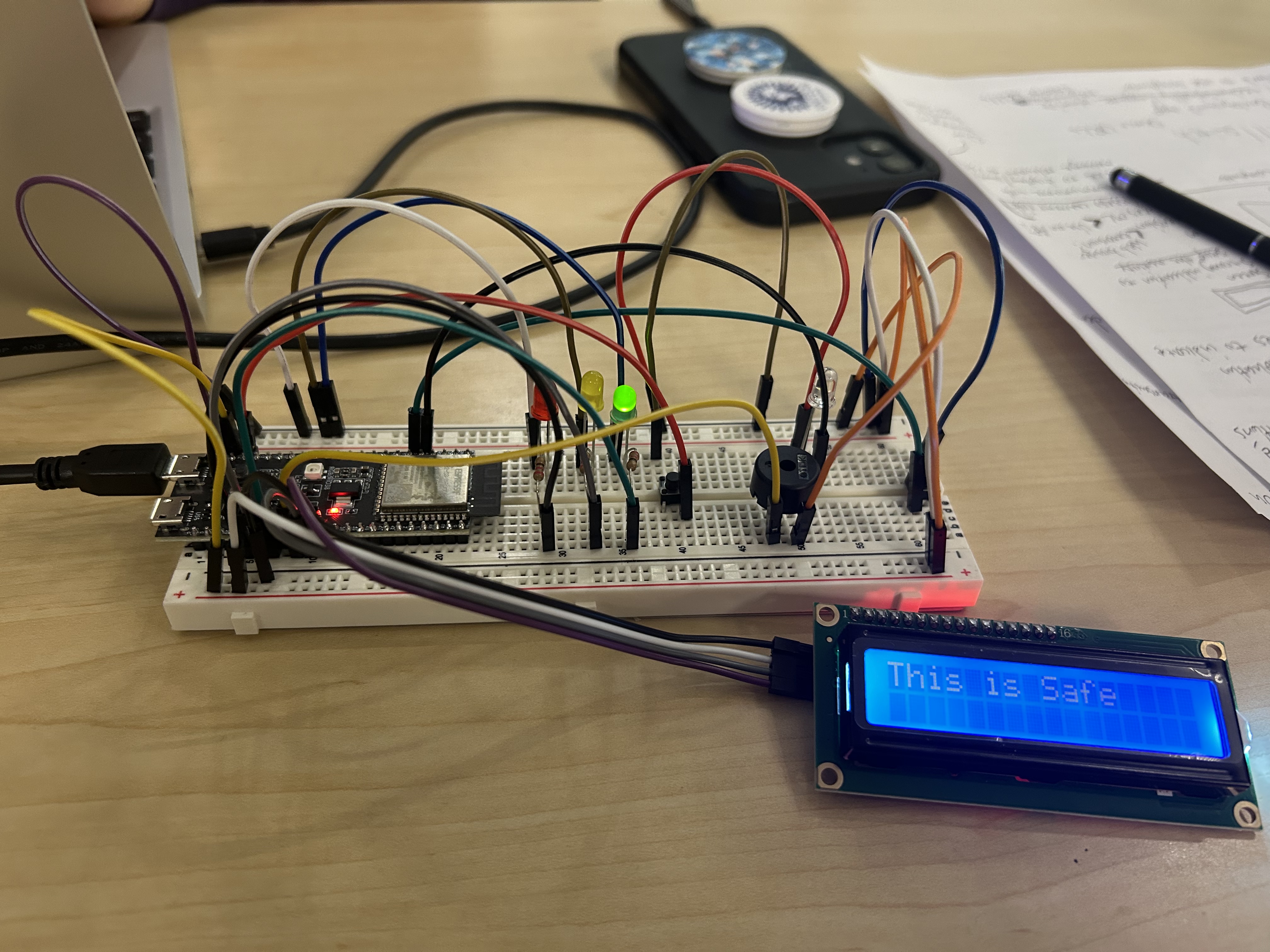
Visual Signals via LEDs- we have three LED lights corresponding to different levels of risk. We scan what is currently on the user's screen, asking AI to assess whether or not it should be trusted, and we convert that to a risk score that triggers the physical signal. In addition, we scan the user's current URL via a APIVoid service to get a risk score. Our ESP32 is able to connect to Wifi, which allows us to make API calls from it.
Audio signals via a buzzer- we play buzzer noises in addition to the visual signals to correspond to different risk levels. The higher the risk, the more intense and noticeable the signal is.
Visual, plaintext cues - we display a specific, simple message for each risk level explaining whether or not the site is safe, suspicious, or risky
A "kill-switch"- there is a kill switch button built into the circuit that when pressed, notifies a trusted caregiver or loved one that the user has identified a high-risk situation and they should consider intervening. We use Twilio, a texting service, to accomplish this. This also serves as an acknowledgement by the user that they understand the high-risk activity was detected.
How we built it
This project was built using components we had from previous hardware classes here at UW, as well as integrations with C, Python, and Gemini API. We utilized FreeRTOS to simultaneously run the LED, LCD, buzzer, URL, and various other parts of the software. The implementation is currently on a breadboard (as this is all we have access to), as its where all the hardware components live. We pass data back and forth between Python and C through a COM port.
Challenges we ran into
Seeing as we used components we received free from UW hardware classes, this meant we were limited in the types/number of components we have. Thus, our implementation here looks far more trivial than what we would expect it to look like should it become a genuine product. This also means that we were not able to implement as many features as robustly as we would have liked.
We also ran into issues with connecting C, Python, and Hardware simultaneously. It was our first time working with the Gemini API and APIvoid, so they required some troubleshooting to work. Given that we were working with multiple programming languages, APIs, and a texting service, this was rather ambitious for us, so there were a lot of minor bugs/quirks to work through to integrate all these services together.
Accomplishments that we're proud of
We are overall proud of our project. We were in this for the fun of building another hardware project together, and extending our knowledge of how to interface with many different components. Even if it isn't as software-based or as aesthetically pleasing as other submissions we are proud of how much thought went into it and how much care went into the idea.
What we learned
We learned how to interface higher level languages (python) with our ESP32, which we didn't know how to do before. We also learned how to connect our hardware to WiFi, and use that to make API calls directly on the hardware chip itself.
What's next for Kill-Switch
We're interested in reducing fraud with the device's capabilities, and given more advanced hardware components we believe we can. Our ideal future plans include:
- Procuring a larger LCD/LED scree, where we can display a clear price breakdown for any item found online, to prevent people from missing hidden fees or shady UI elements
- Automatic screen capturing/URL detection, so the user does not have to press a button to have their screen analyzed
- Better identification for large transfers of money or large purchases- require authorization from a caregiver before such actions
- Extend to scan emails to check for fraud- check for legitimacy

Log in or sign up for Devpost to join the conversation.