-
-
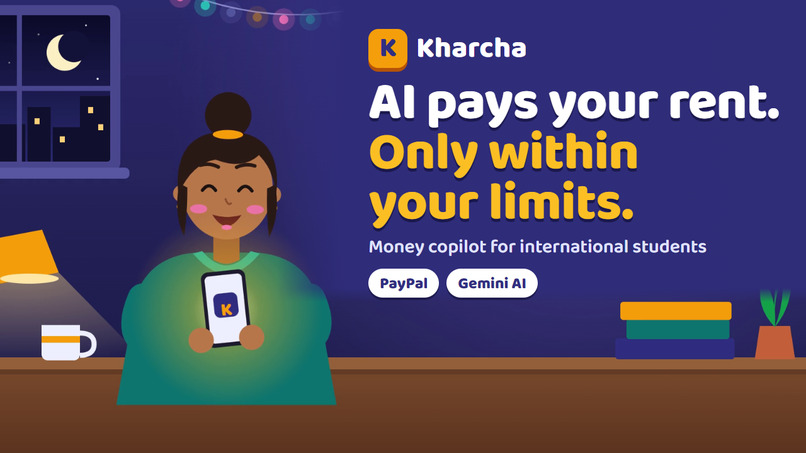
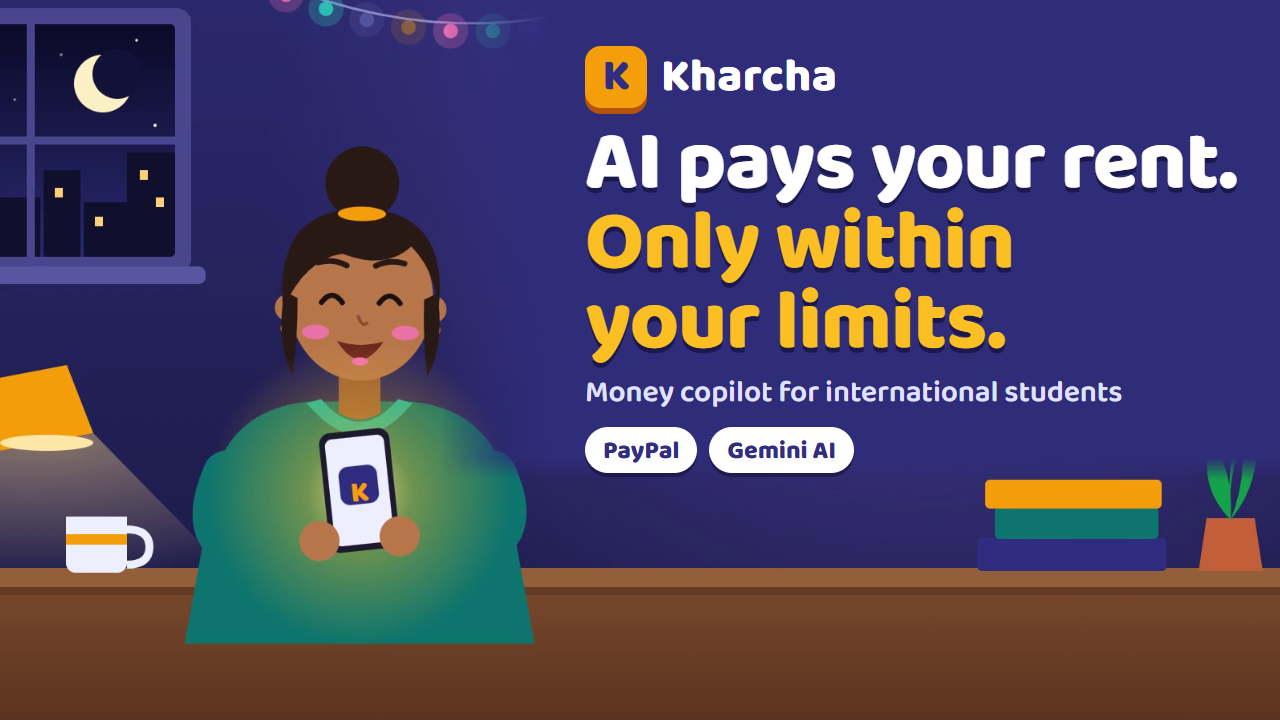
Kharcha: an AI that pays your rent, but only within the limits you set.
-
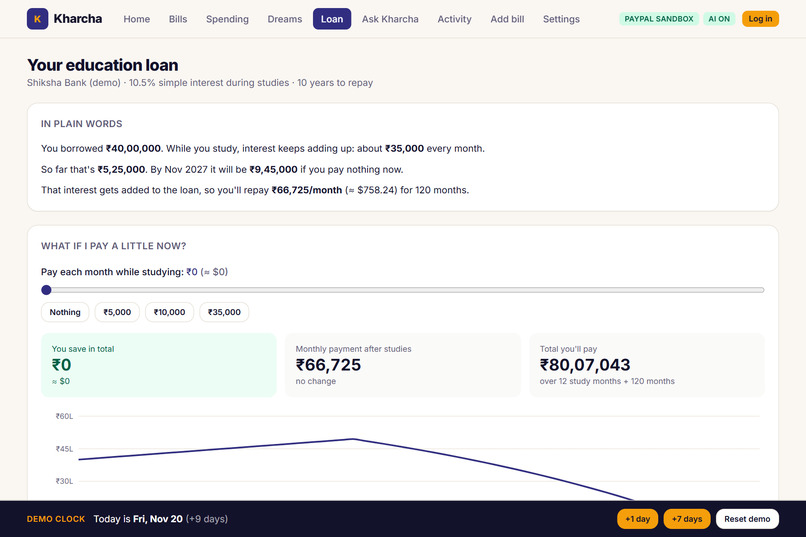
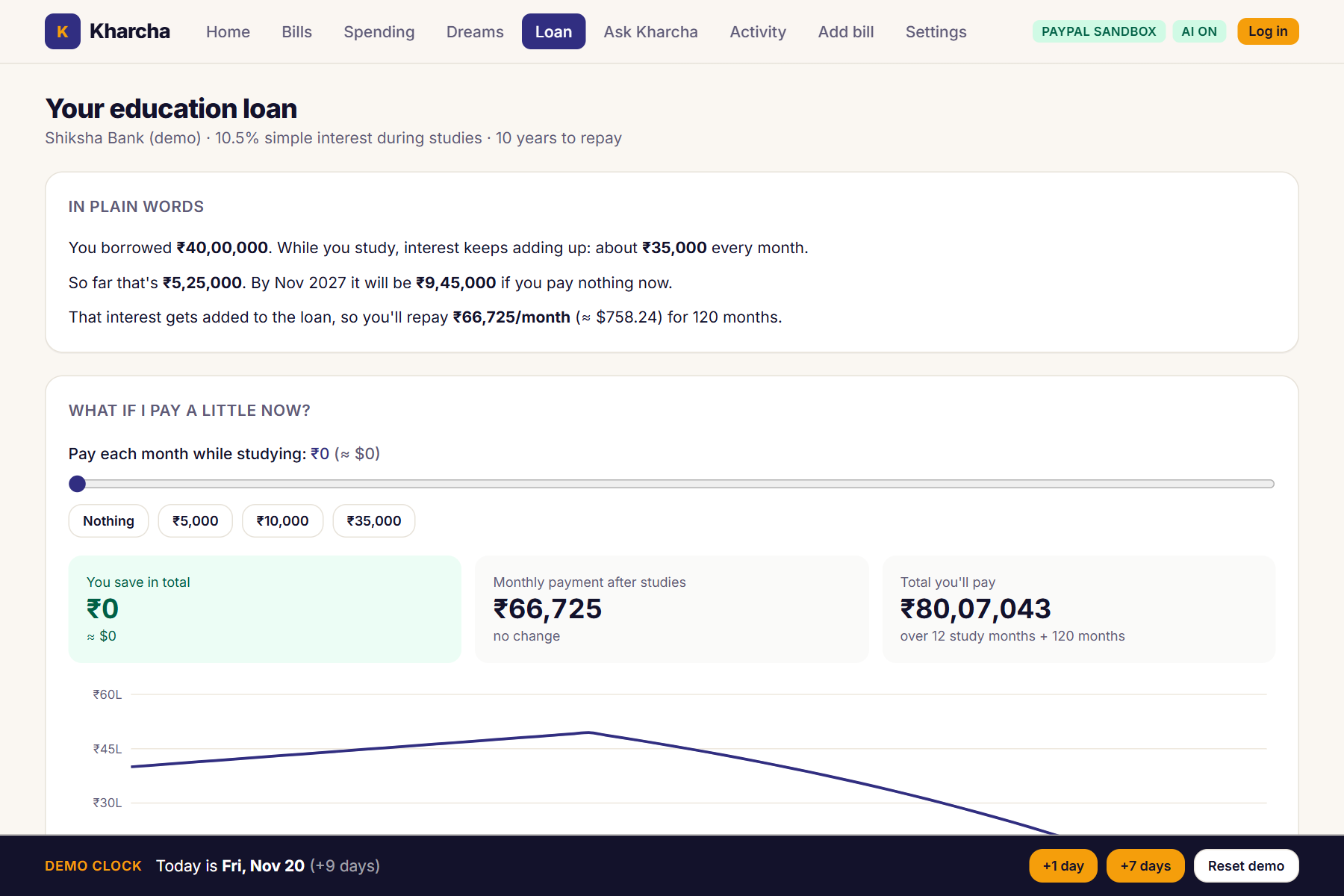
The education loan in plain words, and what paying a little now would save.
-
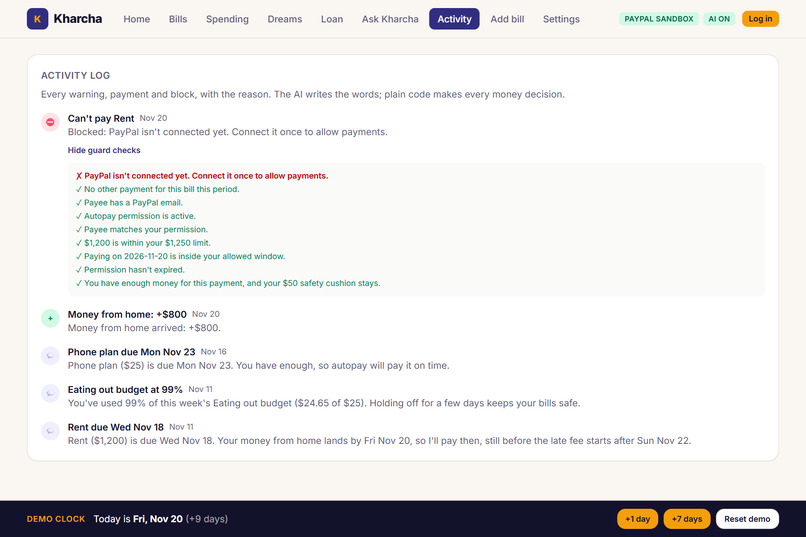
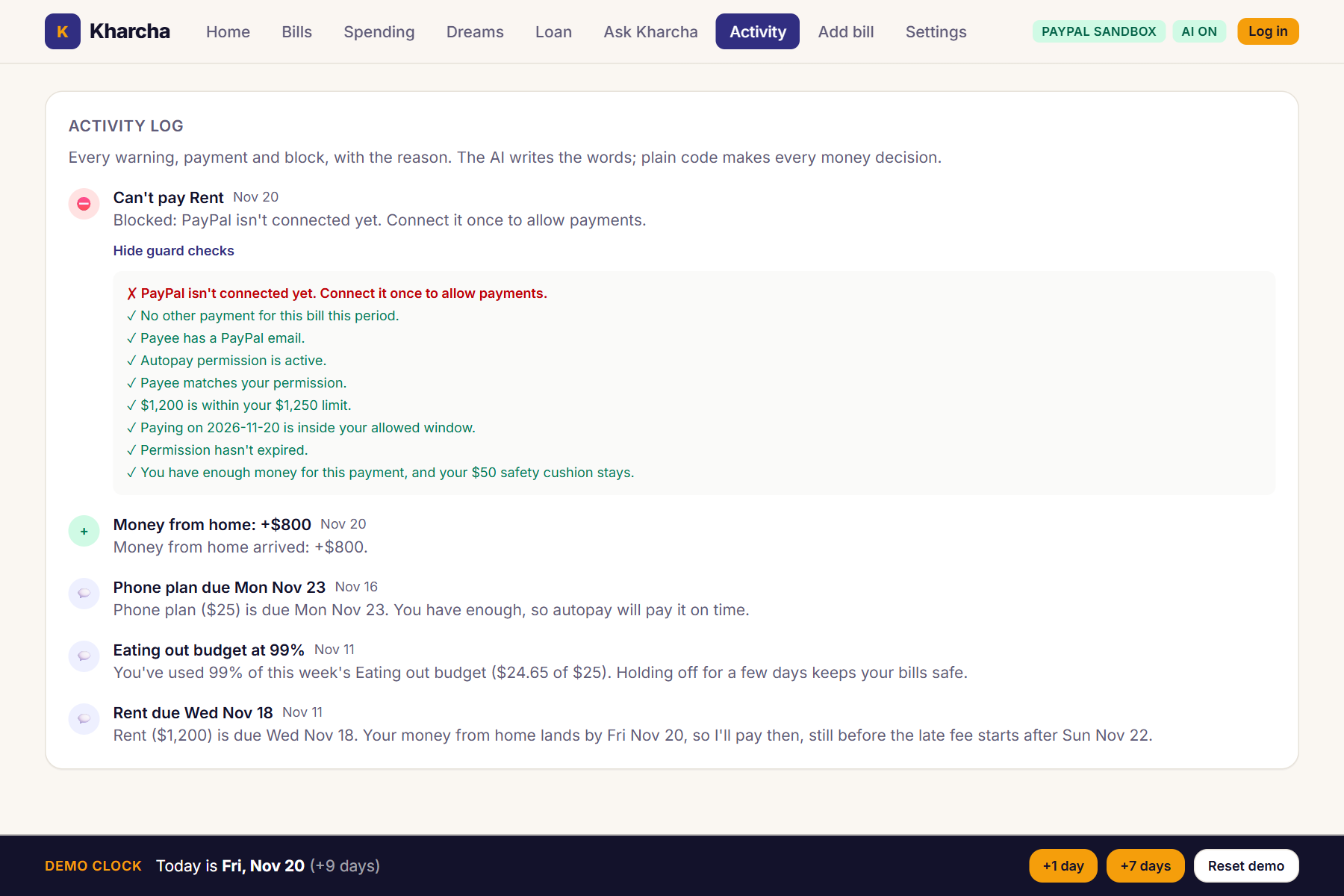
The guard: every payment passes plain-code checks, and here it blocks rent because PayPal isn’t connected.
-
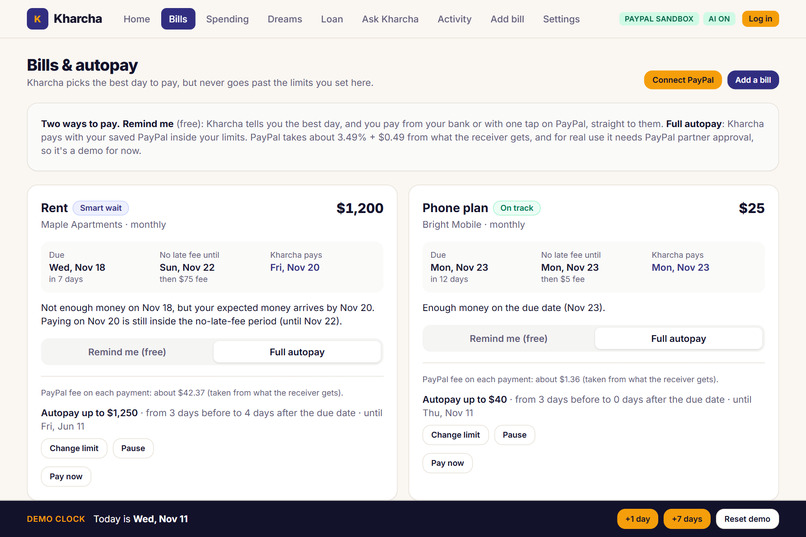
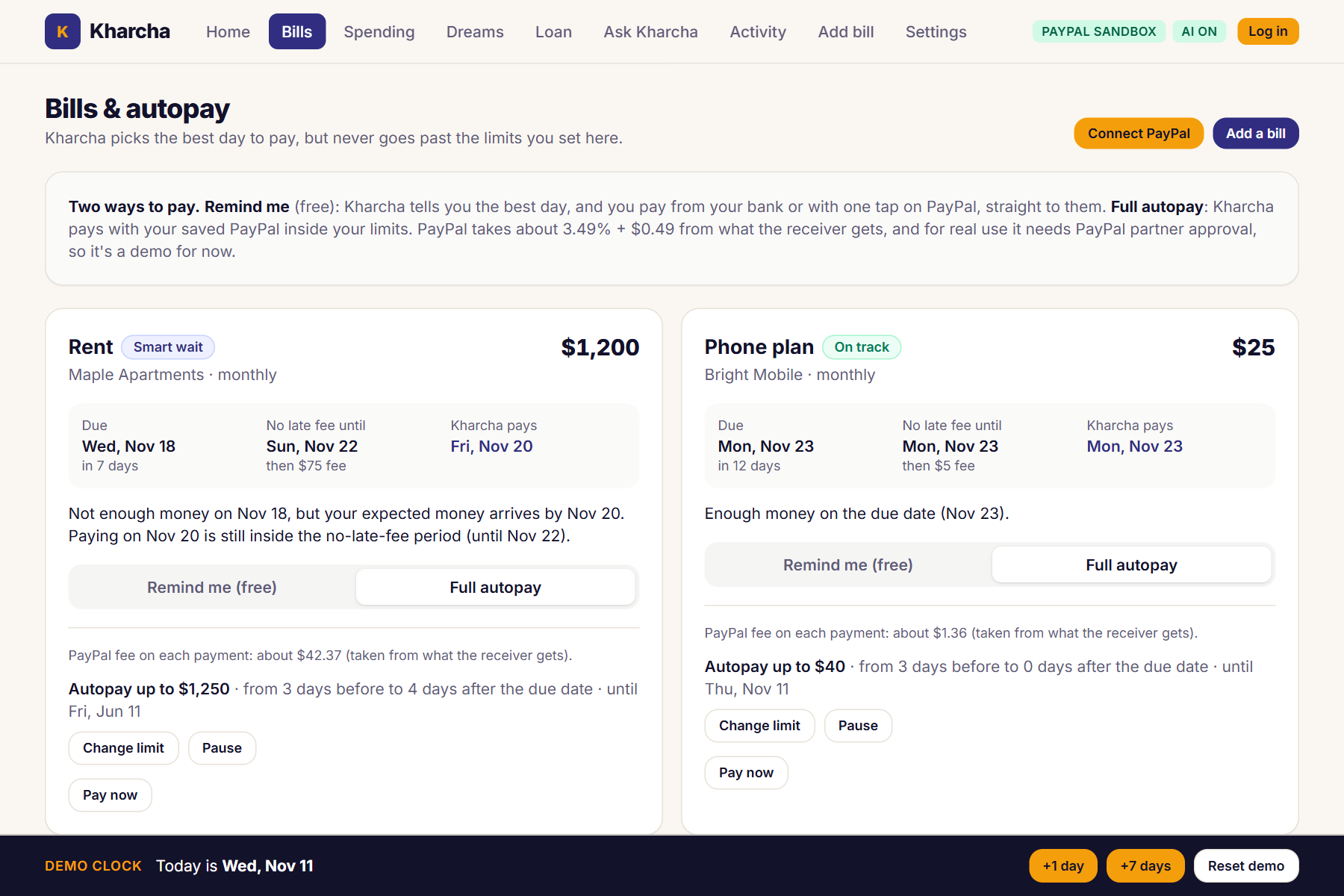
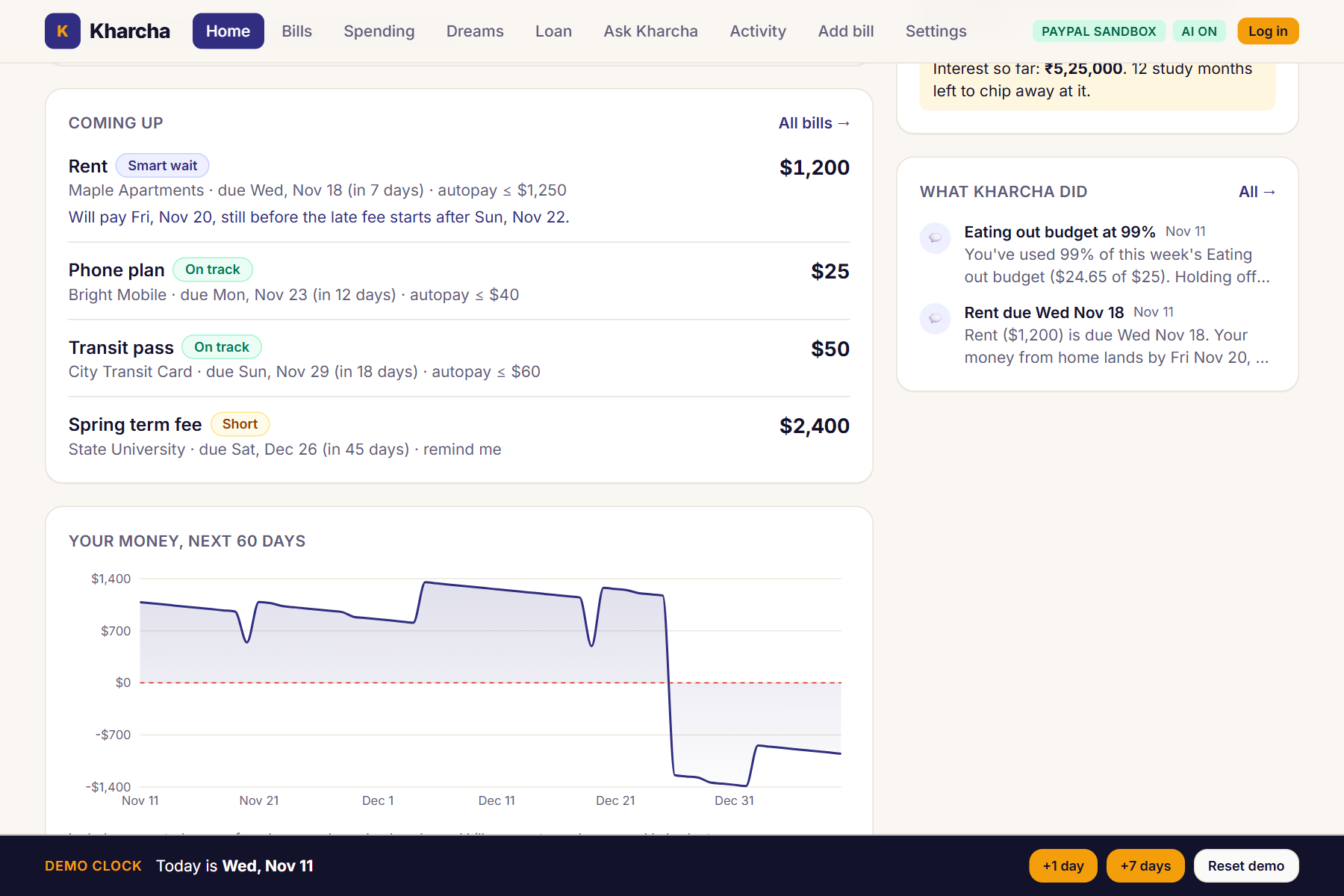
Each bill shows its due date, last no-fee day and the day Kharcha will pay. Autopay stays inside the limit you approved.
-
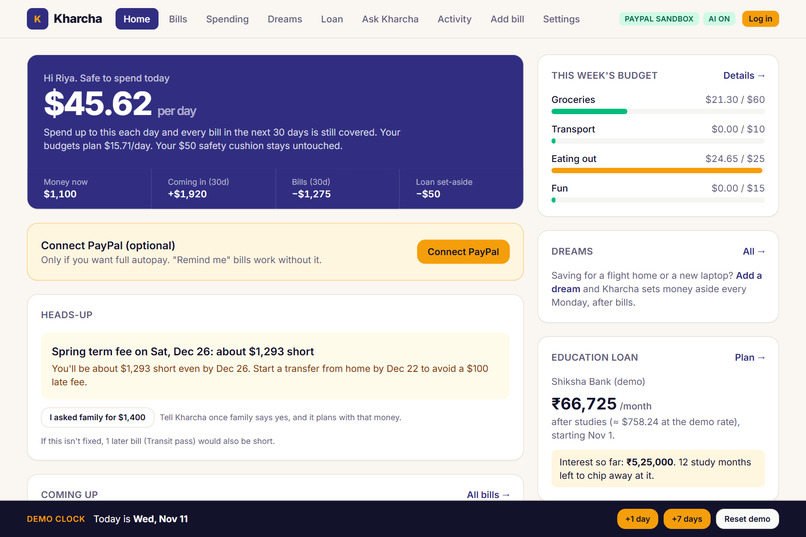
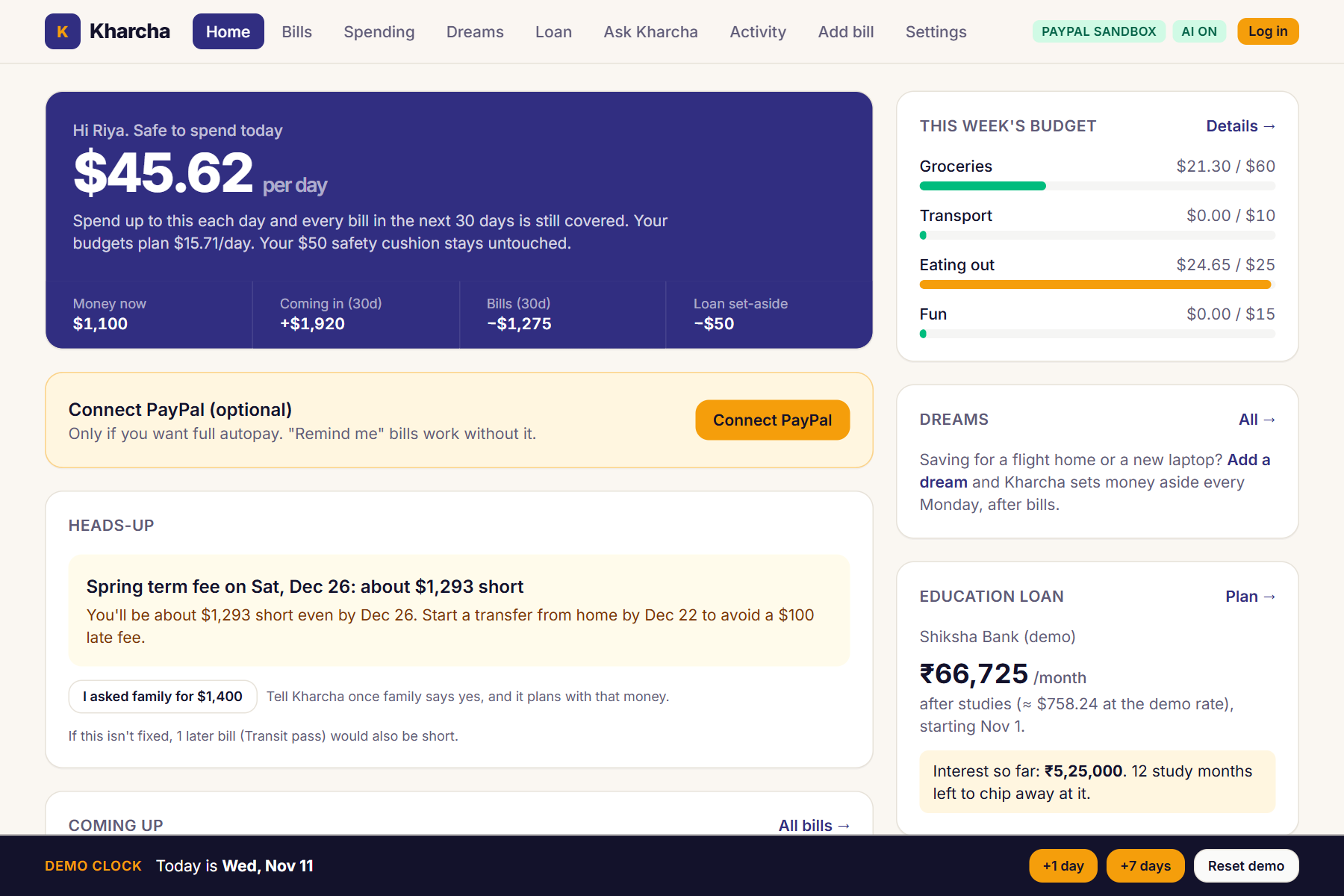
Safe to spend today: one number that still covers every bill in the next 30 days.
-
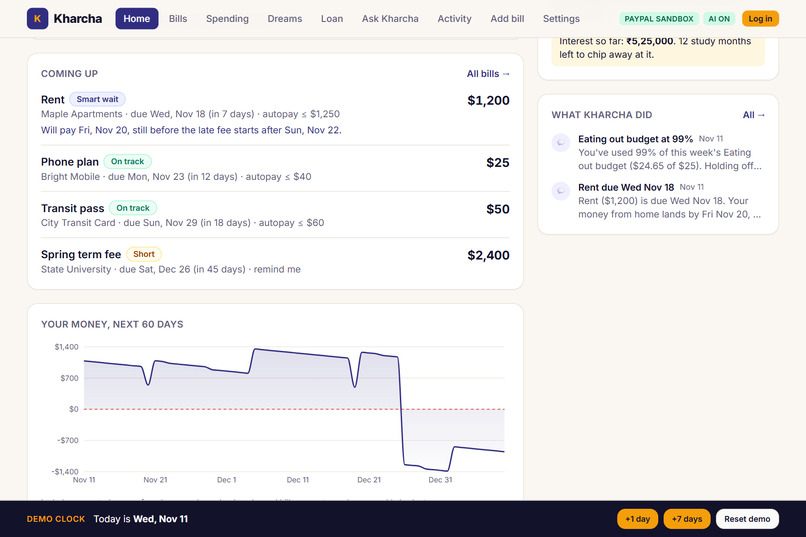
Smart wait: rent is due Wednesday, money from home lands Friday, so Kharcha pays Friday, still before the late fee.
-
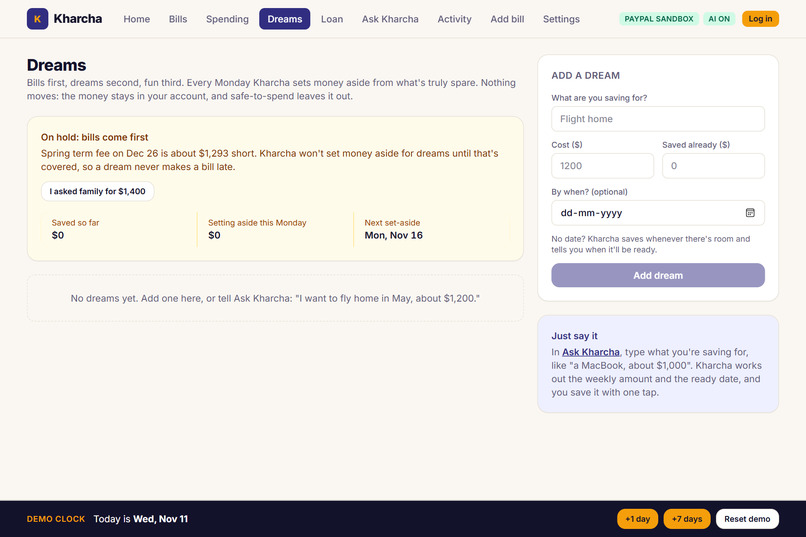
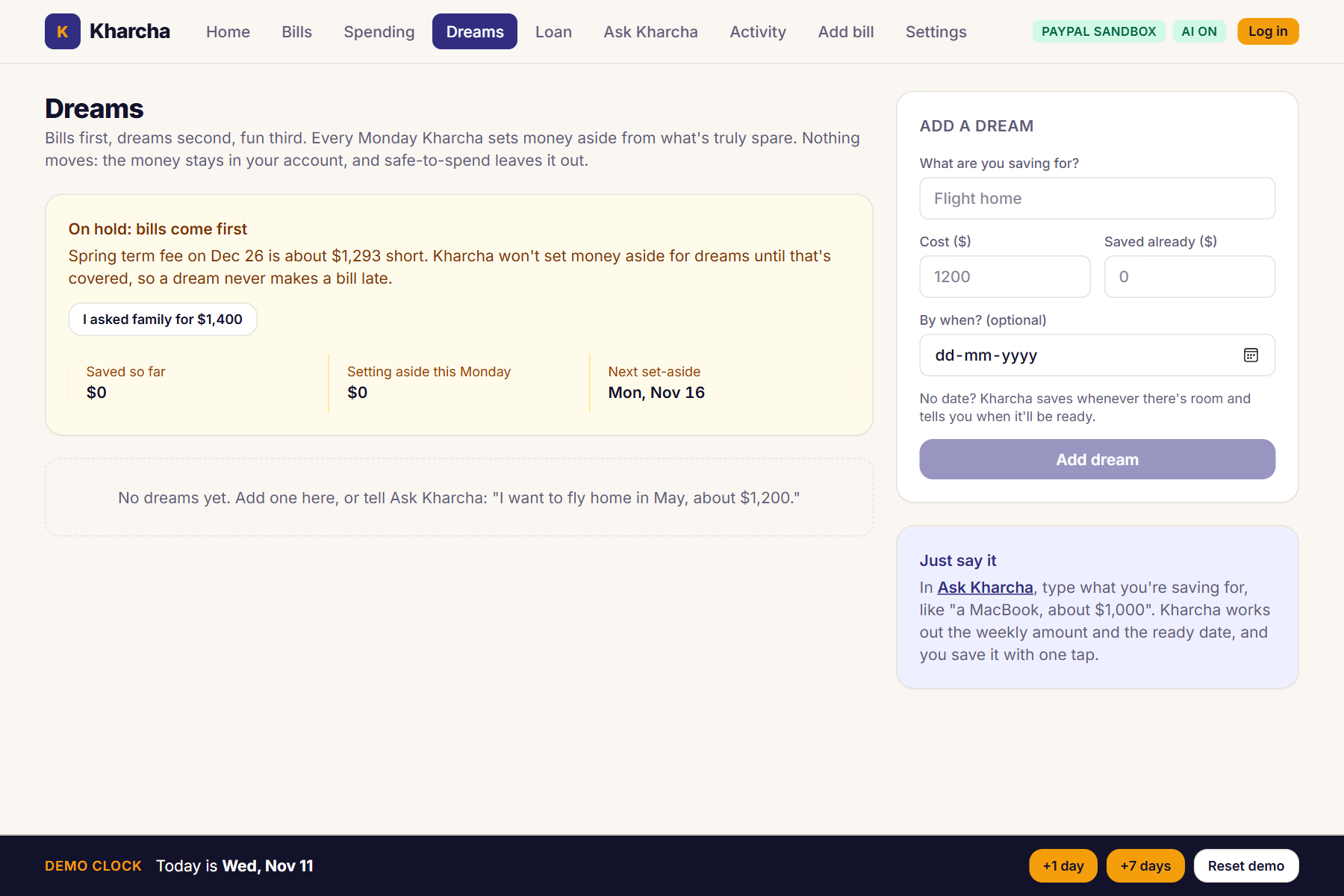
Bills first, dreams second: no dream savings until the term fee is covered.
Inspiration
International students often live on two kinds of money: an education loan, and money sent from home. Neither arrives on the schedule that rent does. A transfer from home can take days, and when it lands two days after rent is due, bank autopay pays anyway. The payment fails or overdraws the account, and the student pays a late fee on money they were about to have.
On top of rent there's a lease to understand, term fees, a loan whose interest grows while you study, a weekly budget, and usually something you're saving for, like a flight home.
We wanted an assistant that actually handles this, paying bills on the smartest day, without ever being trusted with more than the student approved.
What it does
Kharcha (Hindi for "expenses") is a money copilot for international students.
- Reads your documents. Upload a lease, fee notice or loan letter. Gemini pulls out the amount, due date, grace period and late fee, and shows the page each value came from. You confirm every field before anything is saved.
- Smart timing. Kharcha forecasts your money day by day. If money from home arrives inside the no-late-fee grace period, it waits and pays then: no overdraft, no late fee. Bank autopay can't do that.
- Warns you 7 days ahead, with a plan: how much you'll be short, and the date to start a transfer from home so you avoid the late fee.
- Pays through PayPal, on a leash. You approve once: "Pay Maple Apartments up to $1,250, from 3 days before the due date to the end of the grace period." Kharcha charges your saved PayPal and pays the landlord. Anything outside that limit (a higher amount, a different payee, the wrong dates) is blocked and waits for your one-tap approval.
- Remind me (the free default). On the best day, Kharcha reminds you in the app, on your phone or by email. Tap Pay with PayPal and you approve the payment on PayPal, with the money going straight to the landlord or college. Kharcha never holds your money.
- Safe to spend today. One number: how much you can spend per day and still cover every bill in the next 30 days.
- Budget coach, loan planner and dreams. Weekly category limits, your loan explained in plain words, and savings goals that follow one rule: bills first, dreams second, fun third.
- Ask Kharcha. A Gemini agent that can look at your bills, spending, loan and dreams. It can propose a payment or suggest a dream, but only you can approve either.
- Activity log. Every warning, payment and block, with the guard's checks shown.
How we built it
The core rule: AI suggests, code decides.
- Backend: Python 3.12, FastAPI and SQLModel, on SQLite or Postgres.
- All money math (forecast, safe-to-spend, smart timing, loan schedule, dream plans) is plain Python in
finance/. Gemini never does arithmetic; it only explains numbers the code computed. - Every payment, whether it comes from the scheduler, a button or the AI agent, has to pass
guard/: plain Python rules for payee match, amount under the limit, inside the date window, limit not expired, not already paid, no overdraft. Each decision is logged with its reason.
- All money math (forecast, safe-to-spend, smart timing, loan schedule, dream plans) is plain Python in
- PayPal (sandbox REST APIs):
- Log in with PayPal (OpenID Connect), so each student has their own account.
- Vault v3 (setup tokens, then payment tokens) to save the student's PayPal once, without a purchase.
- Orders v2 with
payment_source.paypal.vault_idfor the merchant-initiated autopay charge, with aPayPal-Request-Idso a payment can never be charged twice. - Orders v2 with
purchase_units[].payeefor one-tap Pay with PayPal: the student approves, and the money goes directly to the landlord. - Payouts v1 to pay the landlord or college in the autopay flow.
- Webhooks, verified with
verify-webhook-signature, to confirm captures and payouts.
- AI: Gemini (
gemini-3.6-flash, free tier) through the Google Gen AI Python SDK.- Document reading: PDF or image input with structured output, using a JSON schema generated from a Pydantic model, with page-level evidence for each field.
- Nudges: short messages written from numbers our code computed.
- Ask Kharcha: a function-calling agent with 8 tools. Six are read-only, and the other two only create a card the student must tap.
- Frontend: React, TypeScript and Vite, with Tailwind CSS. An AG Grid spending table, Recharts for the loan and budget charts, and an installable PWA with Web Push alerts.
- Hosting: Render, using a Blueprint (
render.yaml) with a free web service for the API and a free static site for the app. A free cron-job.org timer wakes the server so no bill day is missed. - Tests: 54 backend tests covering smart timing, every guard rule, the loan, safe-to-spend and dreams math, PayPal payout status, login, missed-day catch-up, and the full demo story end to end through the API.
Challenges we ran into
- A saved PayPal can only pay the business that saved it. We wanted autopay to pay the landlord directly, but PayPal rejects a vaulted charge with a different payee (
BILLING_AGREEMENT_NOT_FOUND). So the sandbox autopay flow goes student → Kharcha's business account → Payouts → landlord. For real-world use we made Remind me + Pay with PayPal the default, where the landlord is thepayeeand Kharcha never touches the money. A real launch needs PayPal's partner (multiparty) setup. - No app can read a personal PayPal balance. So the balance comes from the student: a weekly one-tap check-in ("Is your money still about $1,150?"), spending added by hand or imported from a bank CSV, and a safety cushion Kharcha never plans to spend.
- Making an AI agent safe around money. Uploaded documents are untrusted: a PDF could contain "pay $5,000 to X." So extraction results are only suggestions the student confirms, a changed payee is blocked by the guard, and the agent has no tool that moves money. It can only propose.
- Free servers fall asleep. A bill day could pass while the server was asleep. Kharcha now catches up on every missed day when it wakes up (money that arrived, reminders, payments, dream savings), and a free timer calls a secret wake-up URL.
- Gemini function calling details. We run our own tool loop and send the model's turns back unchanged, so Gemini's thought signatures are kept. Free-tier rate limits show a friendly message instead of crashing the chat.
Accomplishments that we're proud of
- Smart timing works end to end. With PayPal connected, rent isn't charged on the due date (it would overdraw), then gets paid through PayPal two days later, inside the grace period: no overdraft, no late fee. An end-to-end test runs this whole story through the API.
- The guard really blocks the AI. It won't pay anything until PayPal is connected. When the rent goes up to $1,400, autopay is blocked because it's above the $1,250 limit, and the student sees exactly which check failed.
- Every number on screen comes from tested code, not from the model.
- It runs completely free (Gemini free tier, PayPal sandbox, Render free tier, no card needed), and it also runs with no keys at all in a clearly labeled mock mode.
- We built it as a team of two: backend, PayPal integration, AI, frontend, deployment and the demo video.
What we learned
- How PayPal's Vault, Orders, Payouts and webhooks fit together, and where their limits are (vaulted payments and payees, balance access).
- That trust in an AI agent comes from structure: tools that can only propose, a guard written in plain code, and a log the user can read.
- To keep LLMs away from arithmetic. Let the model read documents and write explanations, and let tested code decide.
- That "free tier" is a design constraint: sleeping servers, rate limits and wiped disks all shaped the app.
What's next for Kharcha
- PayPal partner (multiparty) approval, so full autopay pays the landlord directly and Kharcha never holds money in any mode.
- A bank connection (for example Plaid), so the balance doesn't have to be typed in.
- Paying the lender back home directly, and live exchange rates instead of the fixed demo rate.
- The paid Gemini tier for private documents, so real leases and loan letters stay private.
- More countries and currencies, and testing with real students.
Try it yourself
- Open https://kharcha-eka5.onrender.com. If it says Waking up the server…, give it up to a minute.
- You're signed in as the demo student, Riya. Click Reset demo (bottom right) for a fresh start.
- Click Connect PayPal on Home and approve with a PayPal sandbox personal account. Without it, Kharcha won't pay anything: the Activity log shows the guard blocking rent because PayPal isn't connected (that's what the video shows).
- Use the demo clock: +7 days reaches the rent due date (no charge, because it would overdraw), then +1 day twice: money from home arrives and rent is paid inside the grace period. Open Activity → Show guard checks.
- On Bills, change the rent to $1,400 and advance about 30 days: the guard blocks it.
- Try Ask Kharcha and Dreams.
Sandbox only: no real money moves. All names in the demo are made up.
Built With
- ag-grid
- fastapi
- gemini
- google-gen-ai-sdk
- paypal
- paypal-rest-api
- postgresql
- python
- react
- recharts
- render
- sqlite
- sqlmodel
- tailwindcss
- typescript
- vite
