Inspiration
I wanted to keep working on my Windows desktop while bringing the tools I reach for into the space around it. The moment I designed around was simple: look at a document, pinch around the part I care about, and see the answer beside the original.
What it does
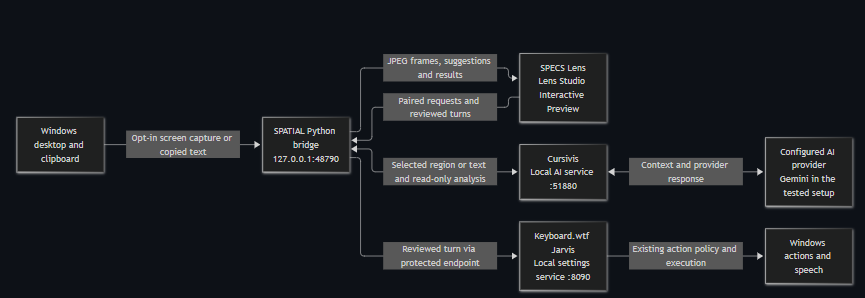
keyboard.wtf SPATIAL puts a live Windows desktop in a movable SPECS workspace. Cursivis can work with copied text or a rectangle drawn directly on the mirrored desktop. It suggests actions based on the selection and shows the result beside the source. The Jarvis orb lets me review a turn before sending it to the Windows assistant, which applies its own action permissions.
How I built it
I used the Devpost Learn skill pack to turn the idea into a design brief. Then I used Codex with CLAD and the Lens Studio MCP to build and iterate on the Lens. The Spectacles Interaction Kit handles pinch interactions, and the UI Kit provides the workspace controls. A Python companion captures Windows frames and connects the Lens to the existing Cursivis and Keyboard.wtf apps.
The snip maps a point on the mirror to pixels in the captured frame. For normalized coordinates (u,v) measured from the top-left, and a frame of width (W) and height (H), the mapping is:
$$ (x_{\mathrm{px}}, y_{\mathrm{px}}) = (uW, vH) $$
The Lens holds the displayed frame still while I draw. The companion crops that same frame and shares only the selected rectangle with Cursivis.
Challenges and what I learned
I started with Windows Snipping Tool. It interrupted the interaction because I had to leave the Lens to finish the selection. Moving the snip into the mirror let me keep the source, the gesture, and the result in one place. I also added bounded retries when the AI provider was busy, so a temporary failure would not make me redraw the selection.
I verified live Windows frames in Interactive Preview, used the in-Lens snip, and got a real Gemini result from a synthetic screen crop. A reviewed typed Jarvis command opened Calculator on Windows. Voice transcription in the Lens and physical SPECS behavior still need verification.
Pre-existing work
Keyboard.wtf and Cursivis are separate, pre-existing Windows apps. This project adds the SPECS Lens, the Windows bridge, and the spatial interactions that connect them.
Built With
- clad
- codex
- devpost
- gemini
- gitlfs
- lensstudio
- mcp
- pillow
- python
- specs
- typescript
- windows
