Inspiration
Kerning is the space between two letters. AV needs less space. nn needs no
change. There is no formula. The eye judges the shape of the white space, not
the distance. A person must look at every pair.
A typeface has hundreds of pairs. Thomas Phinney kerned one weight of one typeface. He made 632 adjustments. The work took about one week.
Nobody can automate this with a formula. So the question was whether an agent could do it by looking instead — and whether it would know when a pair was already fine.
What it does
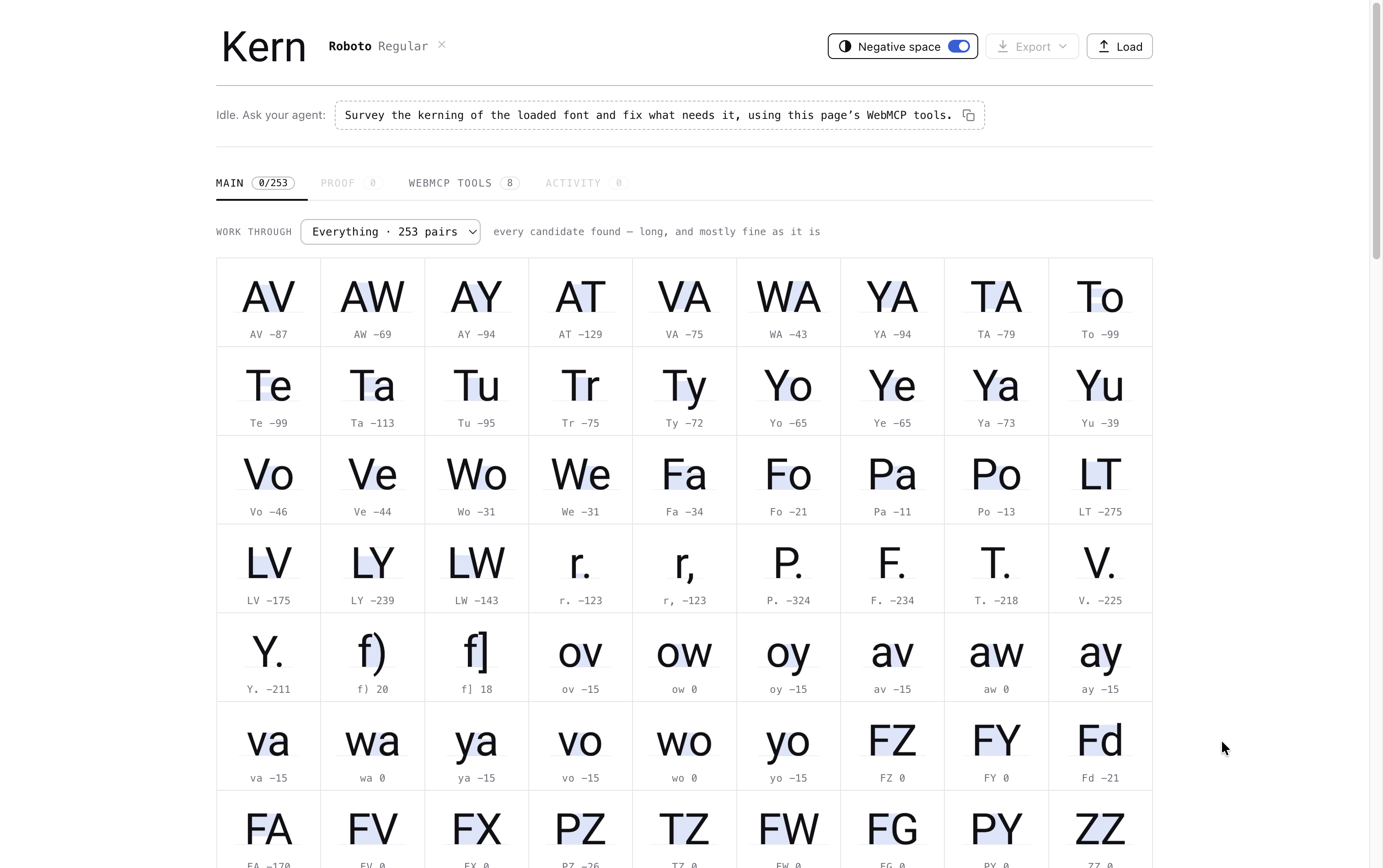
Kern is a kerning tool. It shows every pair in a font, and an agent fixes the
spacing. Load any .ttf or .otf, give the agent one sentence, and it will:
- Survey every pair as a labelled contact sheet, up to 36 pairs in one image
- Compare candidate values side by side, one row per pair
- Apply the values it chooses, and mark the pairs it leaves alone
- Check the result in real words, shipped against kerned
- Export a
.ttfwith real GPOS andkerntables written into it
Six of the eight tools return an image. The agent does not read a score and act on it. It looks at the render and decides.
The person keeps control. Every value is visible on the page. Hover a pair to see the old value. Use the arrow keys to change any value. The agent and the person share one state, so nothing is locked.
Why this fits WebMCP
The agent must see the letters. It cannot decide from a number or a database row. The page already holds the font and the canvas. WebMCP lets the page draw the pair and give the picture to the agent.
A tool can also answer a question that no interface asks. preview_pairs takes
eight pairs and four candidate values, and returns one labelled image. No button
on the page does this. Only an agent needs it.
The tool list follows the page state. The tools register when you load a font.
They unregister when you load a different font. This fires toolchange. An
agent that arrives before a font is loaded finds no tools.
What people and agents can do together
Before, you kerned a font by hand, one pair at a time, or you shipped it unkerned. There was no middle option.
Now the agent can also say that a pair is already correct:
| typeface | shipped state | reviewed | changed | left alone |
|---|---|---|---|---|
| EB Garamond | no kerning | 51 | 46 | 5 |
| Comic Relief | no kerning | 51 | 39 | 12 |
| Roboto Condensed | professionally kerned | 51 | 10 | 41 |
The tools and the instruction were the same for all three fonts. The results are
different. On Roboto the agent corrected only the L pairs and the punctuation.
It kept the other 41 values. A tool that always finds a change has not looked.
How we built it
Vite, React 19, TypeScript, on Cloudflare Workers. opentype.js reads the font.
Kern uses no MCP library. I removed the one I started with, so the specification call is visible in the source:
document.modelContext.registerTool(
  { name, description, inputSchema, annotations, execute },
  { signal: controller.signal },
)
Each registration holds an AbortController. The signal unregisters the tool.
getTools() fills the tools panel in the app, so the page shows what is really
registered. The annotations are the two that WebMCP defines: readOnlyHint on
the four read tools, and untrustedContentHint on all eight. Every answer
repeats the font family name, and that name comes from a file the user supplied.
The export is real. opentype.js drops kerning when it writes a font. So Kern
builds the GPOS and kern tables by hand and splices them into the original
bytes. Every deploy runs a test that reads the exported font back. The build
fails if the values are missing.
Challenges we ran into
The agent needed to know how to do the job. Look at every pair first. Compare a few values. Apply them together. Then check the result in real words.
That is a short set of instructions, but WebMCP has nowhere to put it. You can describe each tool. You cannot describe the page. So there is no way to tell an agent how the work should go before it starts.
I tried adding a help tool. That did not work. The agent that needs help is
the agent that never calls it.
What worked was attaching the instructions to the first answer the agent gets, whatever tool it happened to call first. A full run went from 4 minutes 17 seconds to 2 minutes 34 seconds.
MCP, the protocol underneath, already has a field for this. WebMCP does not expose it yet.
Built With
- canvas
- cloudflare-workers
- document.modelcontext
- gpos
- opentype.js
- react
- typescript
- vite
- webmcp

Log in or sign up for Devpost to join the conversation.