Inspiration
One of us lost twenty minutes of a controlled lab to a single number. Her robot's wheels kept spinning while she held it perfectly still. She checked the wiring, then the code, then put her hand up and waited, because the TA was helping four other benches. When they finally found it, the cause was tiny: she had calibrated the sensor while the robot was sitting at an angle.
That's what intro labs look like. One TA covers a whole room. When something is off, students stare at a graph, change numbers at random, and wait. When the TA gets there, they have no idea what has already been tried, so they start from zero. The time allocated for the lab is stretched, and the pattern repeats itself every week.
This issue is consistent across labs of varying educational levels. In high school, taking repeated data in a lab meant there was room for error, only to realize when you analyze it that you probably didn’t record it correctly. The frustrating part is that the answer was in the data the whole time. The sensor knew the robot was level and still reading 4 degrees. Most lab mistakes follow patterns a good lab proctor would spot in seconds, just by comparing the real readings to what the physics says should happen.
So we built Kelvin around a few rules:
- Real data, not guesses. Kelvin works from the live sensor stream and checks it against the physics of the experiment.
- No waiting. The diagnosis comes in seconds, whenever the mistake happens.
- The student stays in charge. Kelvin explains what went wrong and suggests a fix, and nothing changes until the student says so. The goal is that they understand the fix.
- The TA gets the whole story. When a person is needed, the TA gets a text saying what went wrong, what was tried, and whether it worked.
- Everything is logged. Every diagnosis, fix and result is saved, so the TA knows what happened at each bench and the student leaves with a report.
Help in a lab shouldn't depend on who raises their hand first. The student who is too unsure to ask gets the same patient explanation as everyone else, and the TA's time goes to the benches that need a person.
What it does
Kelvin sits on a real lab bench, reads the experiment through its sensors, and closes the whole loop:
- Catches the mistake from live data, within seconds.
- Explains why out loud, in plain words, with the real numbers.
- Suggests a fix and waits. Nothing changes until the student says "Kelvin, fix it."
- Applies it to the real hardware.
- Proves it worked by checking the next attempt and reporting before and after numbers.
- Brings in the TA over iMessage only when a person is needed, with the context attached.
The moment we like most: in the time constant lab, a student would throw out their odd trial as an outlier and redo the math. Kelvin tells them the math was fine and the timing wasn't.
We built it for two real labs with real hardware.
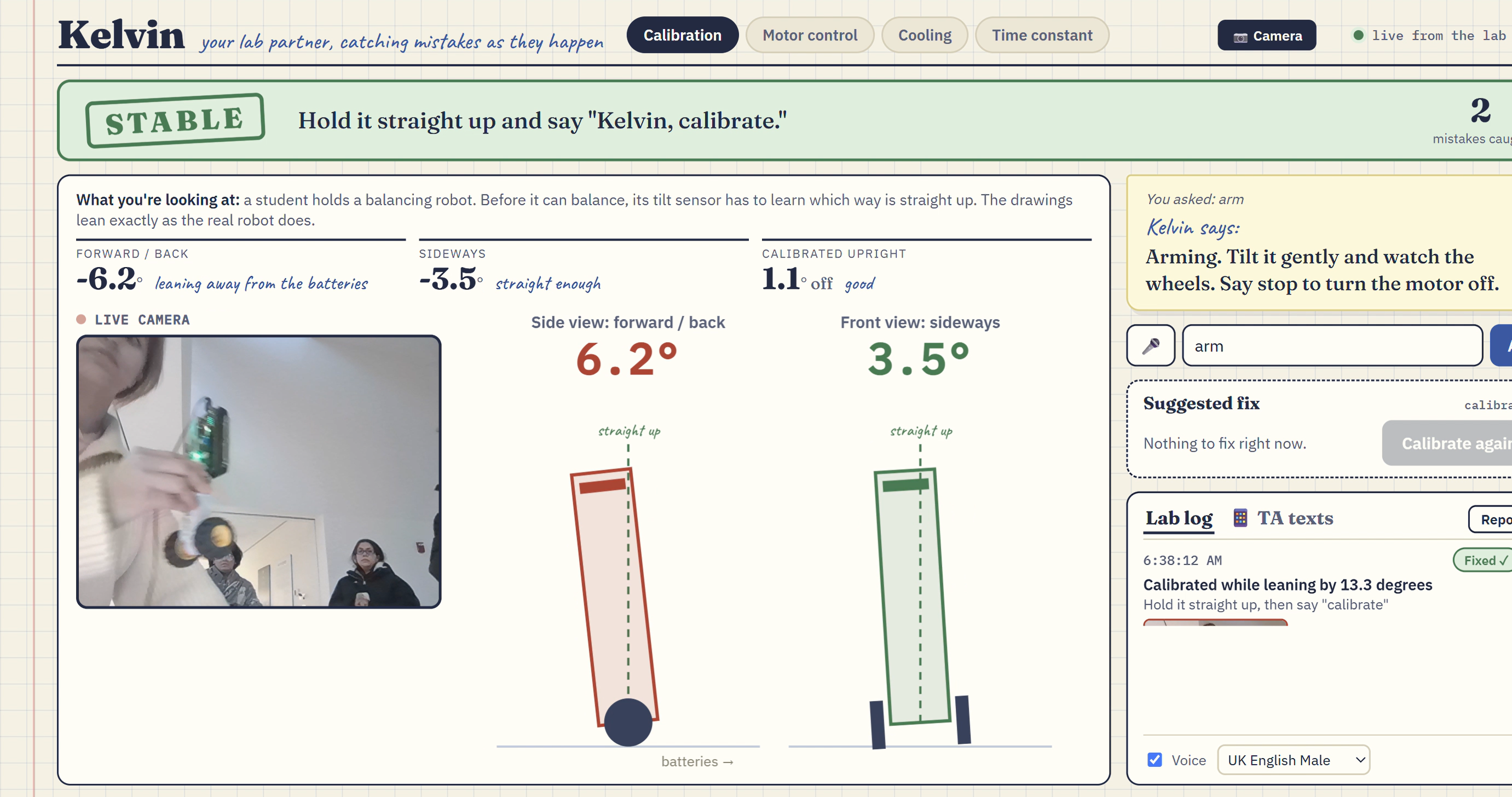
Sensor calibration lab (MinSeg robot). Before a balancing robot can balance, its tilt sensor has to learn which way is straight up. The student holds the robot and says "Kelvin, calibrate." The robot's own check only rejects a calibration past 15 degrees forward or back, and it never checks sideways, so a crooked calibration gets accepted and the robot treats that lean as upright. Kelvin reads the calibration numbers and catches it: "You held it 9 degrees toward the batteries, and the board accepted it." The dashboard draws the robot leaning exactly as it is, with a line showing where the robot now thinks "up" is. When the student holds it straight, Kelvin says so. "Kelvin, fix it" recalibrates, and Kelvin reports the before and after: [9] degrees off, now within [1]. Then "Kelvin, arm it" turns the motor on, and Kelvin confirms the wheels drive toward the lean, so the robot could catch itself.
Time constant lab (temperature probe). This is the classic first-order system lab. Dip a room-temperature probe into hot water for the time the handout gives, read the temperature, and calculate the probe's time constant τ. Kelvin times every dip, so it knows how long the probe was really in the water. If a student holds it in for 6.5 seconds but calculates with 4, Kelvin catches it: their τ comes out 38 percent too low. The fix is a beep at exactly the right second, and Kelvin checks that the next dip is on time. Kelvin also catches a probe that hadn't cooled back to room temperature before the next dip, which quietly ruins the result.
Hands-free voice. Students have their hands on the experiment, so they talk: "Kelvin, calibrate", "fix it", "arm it", "send my report to the TA". Kelvin answers out loud. Questions like "why does that matter?" go to Gemini, which answers with the live readings.
The TA stays in the loop over iMessage. Kelvin texts the TA through Photon only when it matters: a mistake has been open for two minutes, two fixes in a row failed, or a student sent a lab report. Each text says what went wrong and what was done, so the TA walks over already knowing the situation, or doesn't need to walk over at all. The TA can text Kelvin back with questions like "how is station 1 doing?" The dashboard shows every text with its delivery status.
A live camera and a lab report. A camera view sits beside the readings, and Kelvin saves a photo of the bench at the moment it catches each mistake. At the end, Kelvin writes up what went wrong, what was tried, and what fixed it, with those photos.
How we built it
Hardware and firmware (all written this weekend).
- MinSeg robot (Arduino Mega 2560) with an MPU6050 tilt sensor. Our sketch fuses the accelerometer and gyro 200 times a second, runs the balance controller, streams the tilt to Kelvin 20 times a second, and reports the numbers behind every calibration.
- DS18B20 waterproof temperature probe on an Arduino Uno. Our sketch samples 5 times a second, detects each dip, times it, and computes the time constant. It can also time dips exactly with a wire that senses the water.
- We measured our own hardware before trusting it: motor direction, the gyro's sign, and the power the motor needs before it starts turning.
Backend. A Python FastAPI server reads both boards over USB, runs the checks, and pushes everything to the dashboard over a WebSocket. Every calibration and every dip is logged to CSV.
AI with guardrails (Gemini). We split the work on purpose:
- Rules do the detecting. The calibration and dip checks are plain math on sensor data, so they are fast and give the same answer every time.
- Gemini does the talking. It answers the student's questions using the live readings, understands commands that aren't on the fixed list, and writes the lab report.
- Gemini never touches the hardware directly. It can pick at most one action from a fixed list, and every action goes through one function that checks it first. Kelvin's spoken confirmation is written from what actually happened, not from what the model said.
TA texting (Photon 2.0). Kelvin sends and receives iMessages with the Photon 2.0 Python SDK and checks each message's delivery status, which the dashboard shows.
Dashboard. One HTML file: the live tilt drawings and temperature chart, the camera, Kelvin's diagnosis, the suggested fix, a lab log, the TA text thread, and a printable report. Voice in and out uses the browser's Web Speech API.
Challenges we ran into
- The robot's own check missed the mistake we cared about. It only rejects a calibration past 15 degrees and never looks sideways, so Kelvin re-checks every calibration with tighter limits.
- Our first motor advice was wrong. In our first lab, a wheel speed controller, we assumed overshoot meant kp was too high. When we measured the real motor, the overshoot came from ki being too high for kp. An AI tutor that sounds confident and is wrong is worse than no tutor, so we rewrote the advice to match the physics.
- A runaway wheel. One firmware version read the motor direction backward and drove it to full power. We wrote a test sketch to measure direction before trusting any controller.
- A slow thermometer. The probe's sensor sits inside a steel tube, so it keeps warming for a second after it leaves the water. Timing a dip from temperature alone ran late, so we detect the moment the temperature stops rising, and added an optional wire that senses the water directly.
- Kelvin heard itself. The microphone picked up Kelvin's own voice and treated it as a command. We ignore the mic while Kelvin talks, unless someone says "Kelvin", so a student can still interrupt.
- Fragile wiring. The probe needs a 4.7k pull-up resistor and kept losing contact. Kelvin now says out loud when the probe stops answering.
- Keeping the AI in its lane. A casual "how's it going?" once made the model send a report. We added a guard so Kelvin only acts when a message clearly asks it to.
Accomplishments that we're proud of
- [The full loop runs on real hardware: catch, explain, fix by voice, verify.]
- Kelvin catches a mistake the robot's own check accepts.
- Two-way iMessage with a real phone, with delivery confirmed on screen.
- The AI cannot push anything to the hardware without a check, and the dashboard never shows simulated data once real hardware is connected.
What we learned
- Measure the hardware before writing advice about it.
- Use rules for what must be right every time, and a language model for explaining and conversation.
- Real sensors lag, drift and come loose, and a lab partner has to handle all three.
- How to build a two-way iMessage agent on Photon 2.0.
What's next for Kelvin
- More labs: circuits, pendulums, titration. A new lab is a new set of rules plus a sensor.
- One TA view across every station in the room, so the TA sees who is stuck before a hand goes up.
- A pilot in a real intro lab section.
Built with and credits
Our own code: the Arduino firmware for both boards, the detection rules, the voice command handling, the TA texting flow, and the dashboard. We used these libraries and services: FastAPI, Uvicorn, websockets, pySerial, the Google Gemini API, the Photon 2.0 Python SDK (photonhq-api), the browser Web Speech API, the OneWire and DallasTemperature Arduino libraries, and Google Fonts. We used AI coding assistants while building. Full credits are in the README.
Built With
- arduino
- c++
- css
- fastapi
- gemini
- html
- imessage
- javascript
- photon
- pyserial
- python
- uvicorn
- web-speech-api
- websockets
