-
-
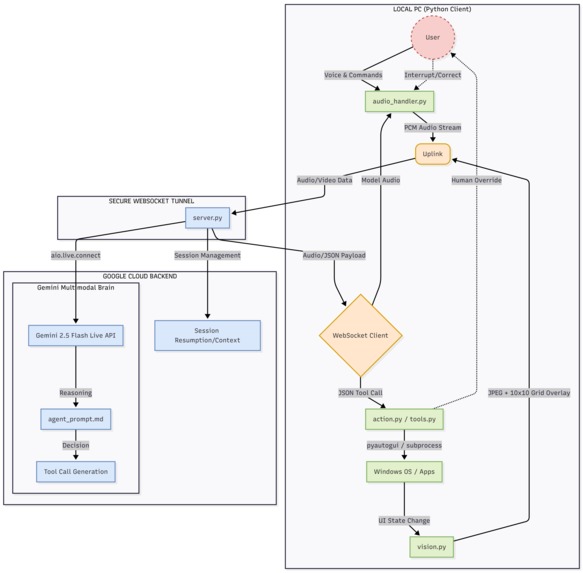
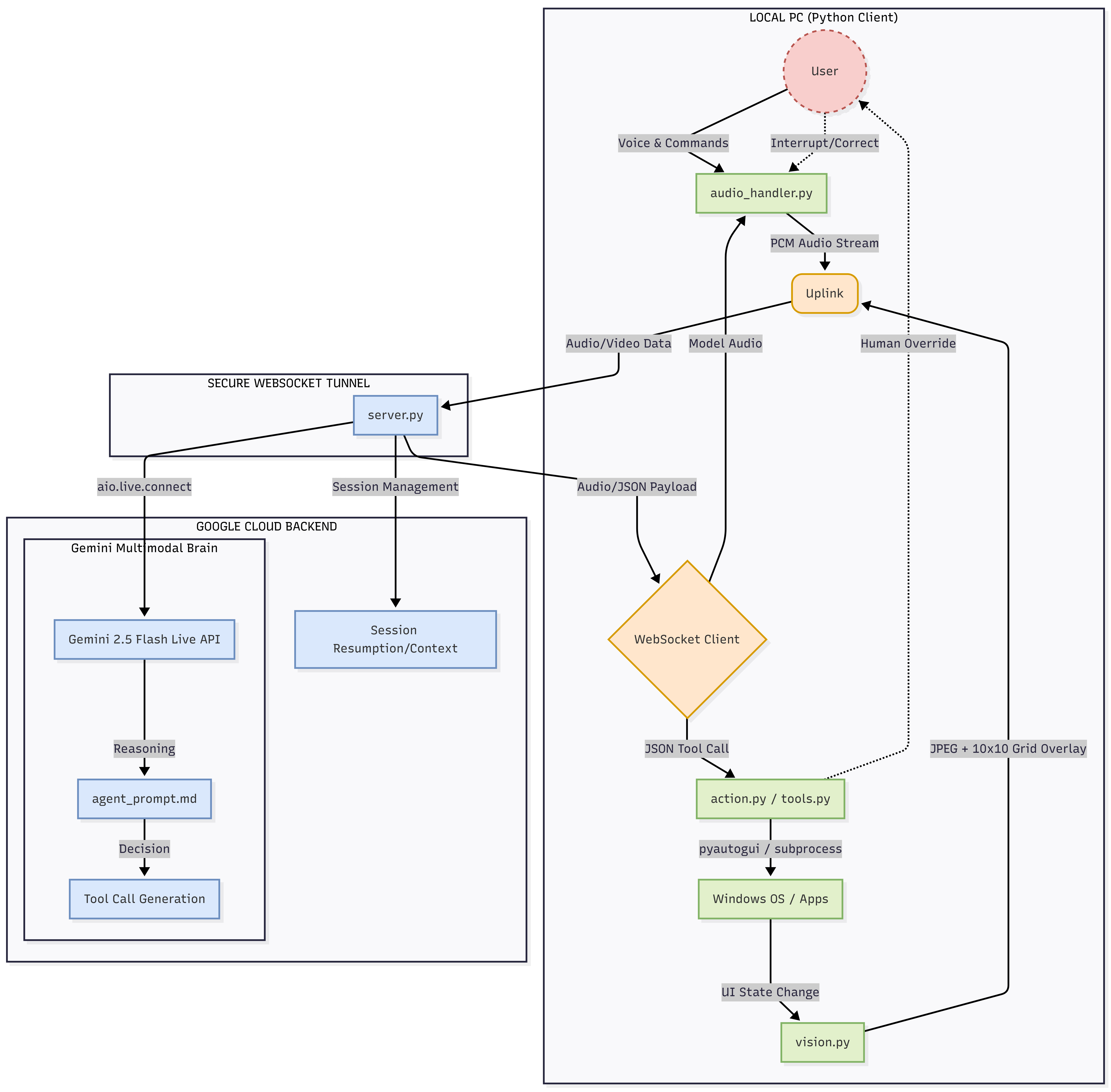
architectural diagram
Inspiration
The promise of autonomous AI agents taking over our desktop tasks is exciting, but in the real world, it is incredibly risky. Vision models can occasionally hallucinate on dynamic UIs, and handing an autonomous bot the keys to a production environment without oversight can lead to disastrous clicks. I wanted to solve the "last mile" problem of desktop automation: how do I get the speed and capability of an AI UI Navigator without sacrificing the safety of human collaboration?
My answer is Kazi-Agent, a multimodal, voice-driven co-pilot that treats the user not just as a prompt-provider, but as a real-time partner.
What it does
Kazi-Agent is a next-generation UI Navigator that acts as your hands on the screen. Unlike turn-based, text-box agents, I built Kazi-Agent using the Gemini Live API to maintain an open audio and visual stream with the user. You can verbally ask it to extract data from a local PDF and move it to a spreadsheet.
Crucially, it is designed for Continuous Multimodal Collaboration. It visually overlays a red coordinate grid on the screen so you know exactly what it is targeting. If it struggles with a complex UI, or if you spot a mistake, you can use your voice to instantly interrupt it, correct its trajectory ("No, click the button on the top right instead"), and resume the task.
How I built it
I architected the system with a strict separation of concerns, splitting the "Brain" from the "Hands":
The Cloud Brain: I built an asynchronous Python WebSocket server hosted on Google Cloud. This server bridges my local machine to the Gemini 2.5 Flash Native Audio model using the Live API.
The Visual Engine & Local Execution: My local Python client continuously captures the screen, uses OpenCV to draw a dynamic 10x10 coordinate grid, and sends it to the cloud. It receives structured JSON tool calls back from Gemini and translates them into OS-level events using pyautogui.
Challenges I ran into & How I solved them
Building a real-time visual navigator required overcoming several massive hurdles:
The Architectural Trade-Off (Live API vs. Computer Use): I initially looked at standard "Computer Use" models, but they operate on a turn-based request/response paradigm. They don't support continuous audio streaming and instant interruptibility. Because my thesis relies on a "Human-in-the-Loop" safety protocol, I chose to use the Gemini Live API and built my own custom OS execution layer from scratch.
Context Exhaustion & Session Limits: Streaming continuous high-resolution images rapidly exhausts the context window, severing the WebSocket connection. To fix this, I engineered a robust state-management system using context_window_compression and session_resumption, allowing the agent to seamlessly drop old frames and maintain its conversational state indefinitely.
Visual Hallucinations & The Programmatic Pivot: Visual clicking is inherently fragile. The model struggled to hit fine-point UI elements reliably. To bypass this vision bottleneck, I gave the agent a suite of programmatic tools (run_shell_command, read_text_file, set_clipboard_content). I strictly instructed the agent to prefer keyboard navigation (tab and enter) or direct CLI commands over visual mouse clicks whenever possible, dramatically increasing speed and reliability.
UI Latency: Vision models are faster than web browsers. The agent would frequently try to click before a page loaded. I solved this by building deliberate asynchronous sleep delays (await asyncio.sleep(2.0)) into the client, forcing the agent to let the UI settle before capturing the next frame, saving massive amounts of API tokens in the process.
What's next for Kazi-Agent
Because I separated cloud reasoning from local execution, the applications are highly scalable:
Visual QA Testing: Developers can narrate test cases and have Kazi-Agent visually navigate staging apps, reporting UI flaws via audio.
Legacy Enterprise Bridge: Kazi-Agent can visually read local documents and input data into old, non-API desktop software without writing custom integration code.
Digital Accessibility: It serves as a high-precision, voice-activated mouse and keyboard for users with motor impairments.
Built With
- gemini-live-api
- google-cloud-run
- opencv
- pyaudio
- pyautogui
- python
- websockets


Log in or sign up for Devpost to join the conversation.