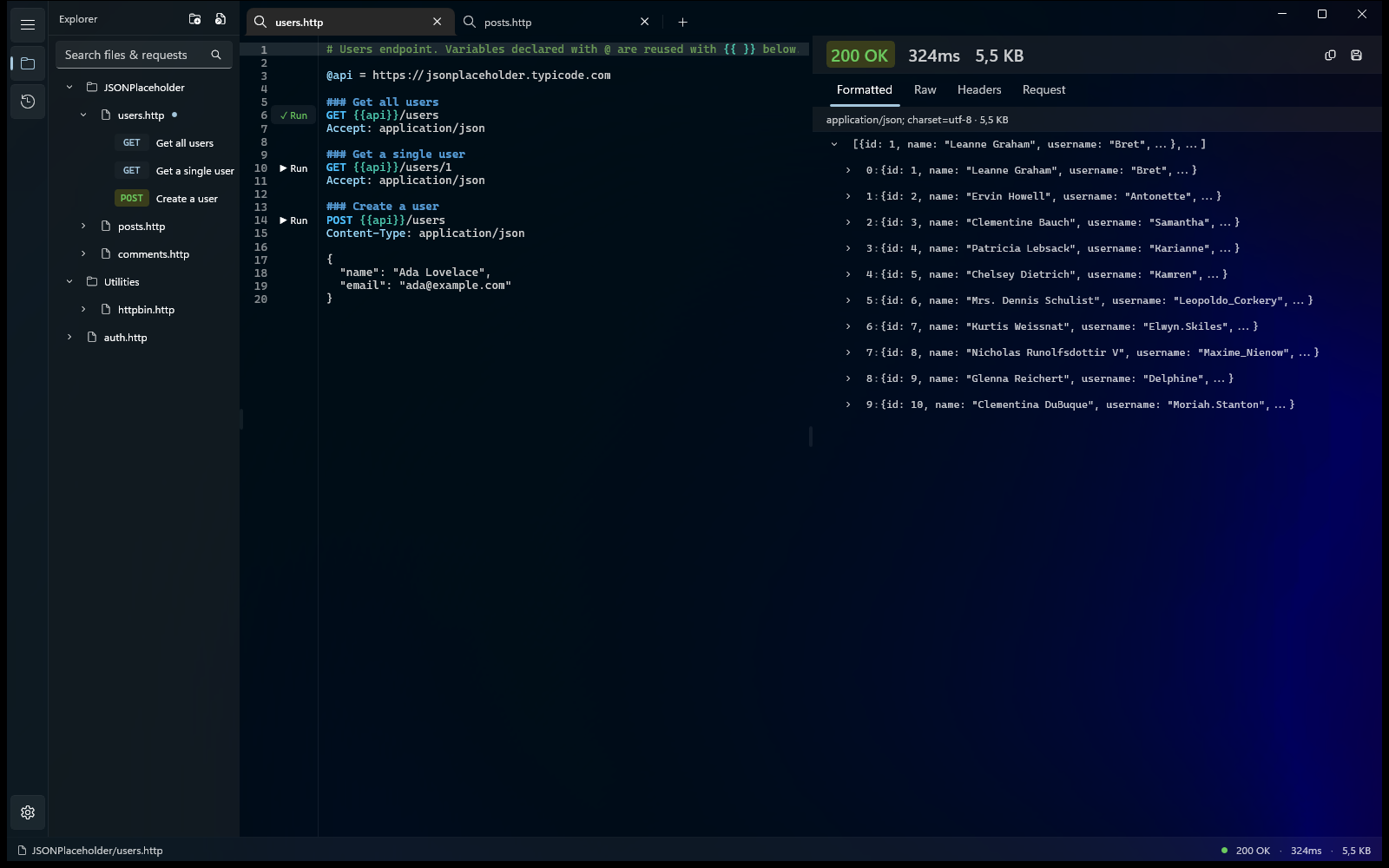
Karve
Karve is a native Windows API client built around .http and .rest files.
Instead of storing requests in a proprietary collection format, Karve works directly with the same plain-text request files developers already keep in their repositories and use with tools such as JetBrains HTTP Client and VS Code REST Client.
The goal is simple: make .http files practical as a complete API development workflow, not just something you occasionally run inside an IDE.
Inspiration
I already had .http files scattered across multiple repositories.
They worked well for keeping API requests close to the code, reviewing them in Git, and sharing them with a team. But IDE-integrated HTTP clients are still primarily request runners. Once you need persistent history, environment management, better response inspection, or organization across repositories, the experience becomes limited.
Traditional API clients solve those problems, but usually by introducing their own collection format, accounts, cloud synchronization, or subscriptions.
I wanted the middle ground:
Keep the files. Add the workspace.
That became Karve.
What it does
Karve turns folders containing .http files into a dedicated API workspace.
You can:
- Open
.httpand.restfiles directly from disk - Organize requests using normal folders and repositories
- Run REST API requests without converting them into another format
- Use variables and switch between environments
- Inspect formatted JSON, raw responses, headers, status codes, and timing
- Keep persistent request history
- Work with multiple files and requests using tabs
- Generate equivalent requests in formats such as cURL and C#
- Keep requests Git-friendly and editable in any text editor
- Use the same request files from Karve, JetBrains, VS Code, and source control
Karve is local-first. There is no account requirement and no cloud workspace that becomes the source of truth for your requests.
How I built it
Karve is built with:
- C#
- .NET
- WinUI 3
- Windows App SDK
HttpClient- SQLite
- YAML-based configuration
- Model Context Protocol (MCP)
The UI is implemented as a native Windows application rather than an Electron or WebView-based shell.
The .http parser identifies requests, methods, URLs, headers, variables, and bodies while keeping the original files on disk as the source of truth.
Request execution uses the .NET HTTP stack, while local state such as request history is persisted separately.
One of the newer parts of Karve is its MCP integration. AI coding tools can ask Karve to execute existing requests while Karve remains responsible for resolving local environments and credentials.
This creates a useful boundary: the agent can work with the API without requiring every API secret to be copied into the agent's environment.
Challenges I ran into
Treating text files as the real data model
Most API clients control their own structured collection format.
Karve does not.
A .http file can be changed in Visual Studio, JetBrains Rider, VS Code, Git, or another editor while Karve is not running. Karve therefore has to treat external files as authoritative instead of assuming it owns their state.
Compatibility
.http is simple at first glance, but different tools support different syntax for variables, metadata, request separators, scripts, and environment handling.
Supporting useful interoperability without turning Karve into an implementation of every other HTTP client is an ongoing design problem.
Building a native editor
I deliberately avoided WebView2.
That meant solving editor functionality, syntax highlighting, request detection, autocomplete, inline actions, and response visualization using native Windows technologies.
It requires more work, but native Windows behavior is an important part of what Karve is.
AI integration without leaking secrets
Giving an AI agent direct access to an API is easy if you also give it every credential.
I wanted a different model.
The agent identifies the request it wants to execute, while Karve resolves the actual environment and credentials and performs the HTTP call.
Accomplishments that I'm proud of
The main thing I'm happy with is that Karve provides a dedicated API-client experience without taking ownership of the developer's requests.
The files remain:
- Plain text
- Git-friendly
- Human-readable
- Tool-independent
- Stored wherever the developer wants
A developer can edit a request in their IDE, commit it to Git, pull it on another machine, and open exactly the same file in Karve.
I'm also happy with the MCP integration because it extends the same idea to AI tooling. Karve becomes the execution layer instead of requiring API configuration to be duplicated across every coding agent.
And finally, Karve is genuinely native WinUI 3 software. There is no Electron runtime hidden underneath it.
What I learned
Building around an open file format changes the architecture of the application.
You cannot assume that your application is the only writer. You cannot quietly introduce application-specific state into the main data format. Compatibility matters more than internal convenience.
It also reinforced something I think is increasingly important for developer tools:
AI agents do not need to replace existing tools. They can operate through them.
MCP makes it possible for Karve to expose useful capabilities to coding agents while the application continues to own execution, environments, credentials, and local developer state.
What's next
I'm continuing to expand Karve around the .http workflow, including:
- Better compatibility with JetBrains and VS Code
.httpsyntax - More authentication workflows
- Additional code-generation targets
- Improved request and response navigation
- WebSocket support
- Postman and cURL migration tools
- More powerful MCP capabilities
- Better workflows for managing requests across multiple repositories
The long-term goal is to make Karve the dedicated home for .http files on Windows.
Links
Website: https://karve.dev/
Platform: Windows 10/11
Distribution: Microsoft Store


Log in or sign up for Devpost to join the conversation.