-
-
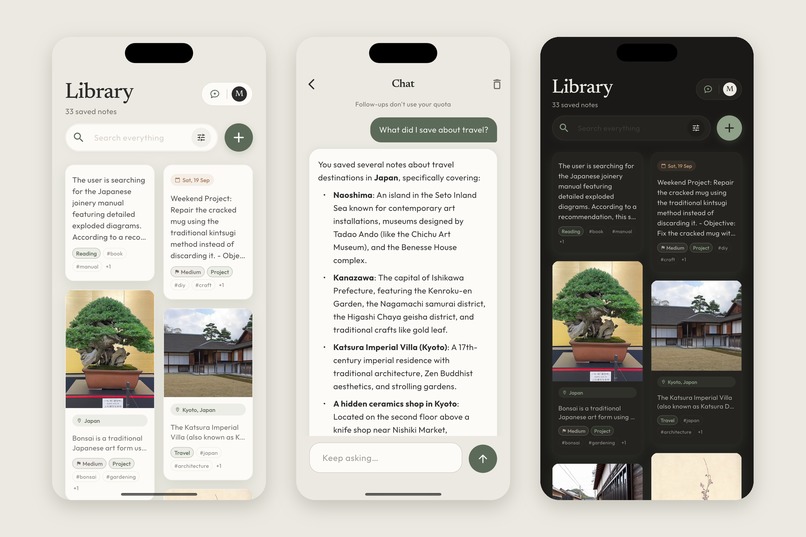
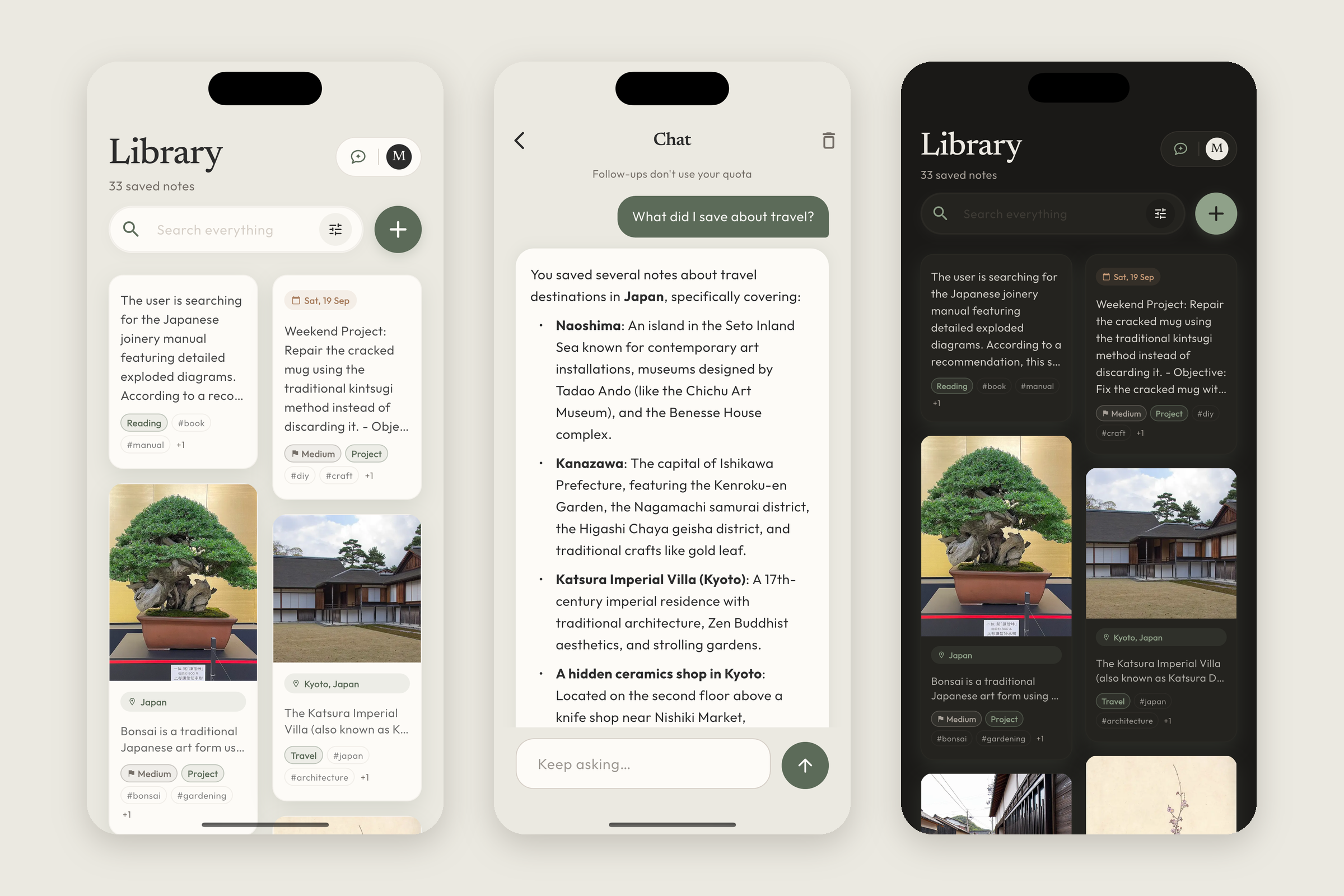
Save anything, then just ask: the library in light and dark, and an answer built from your own notes.
-
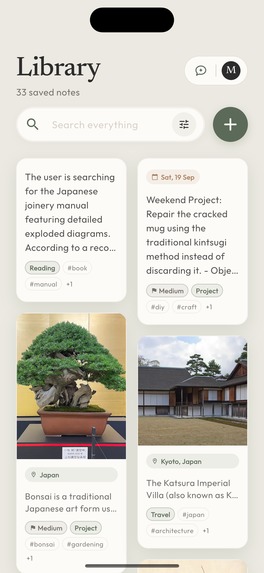
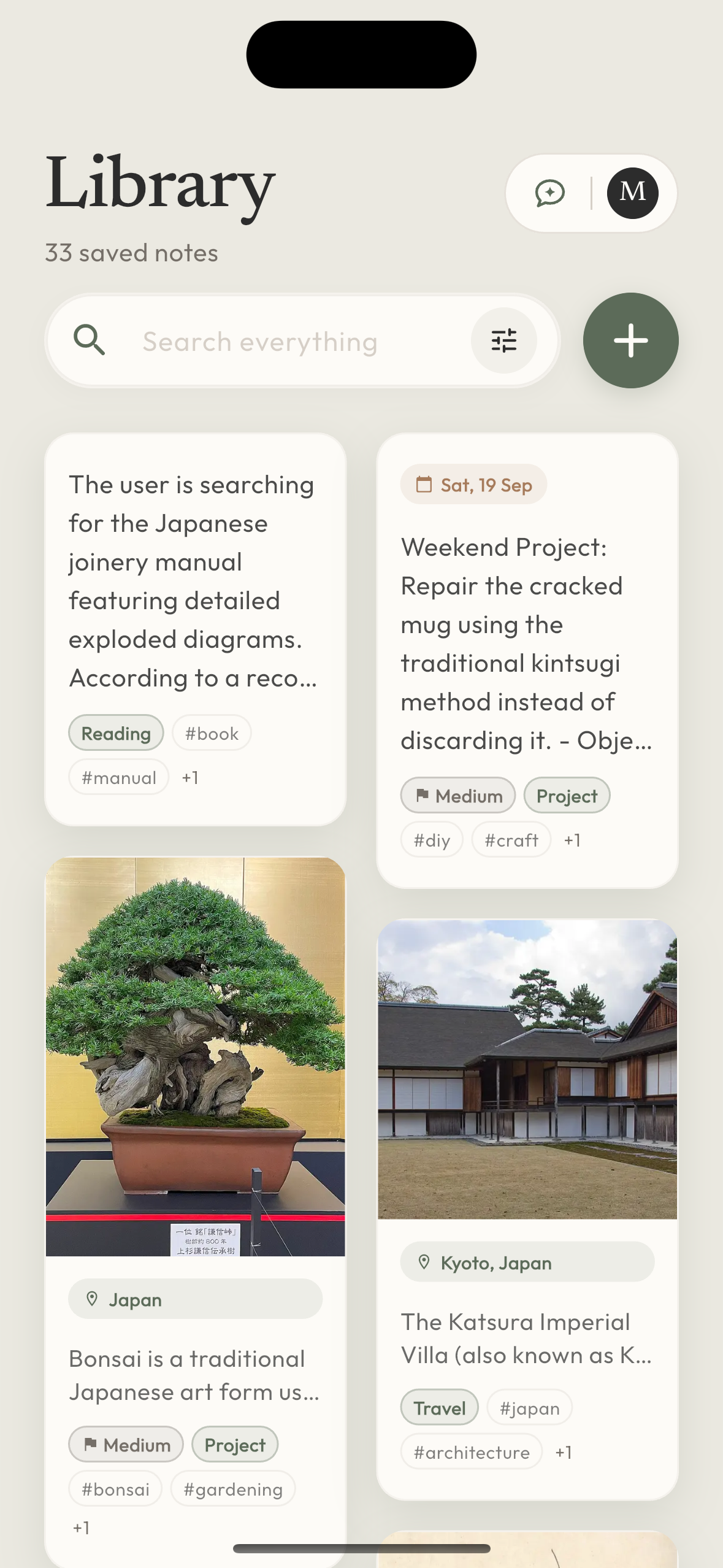
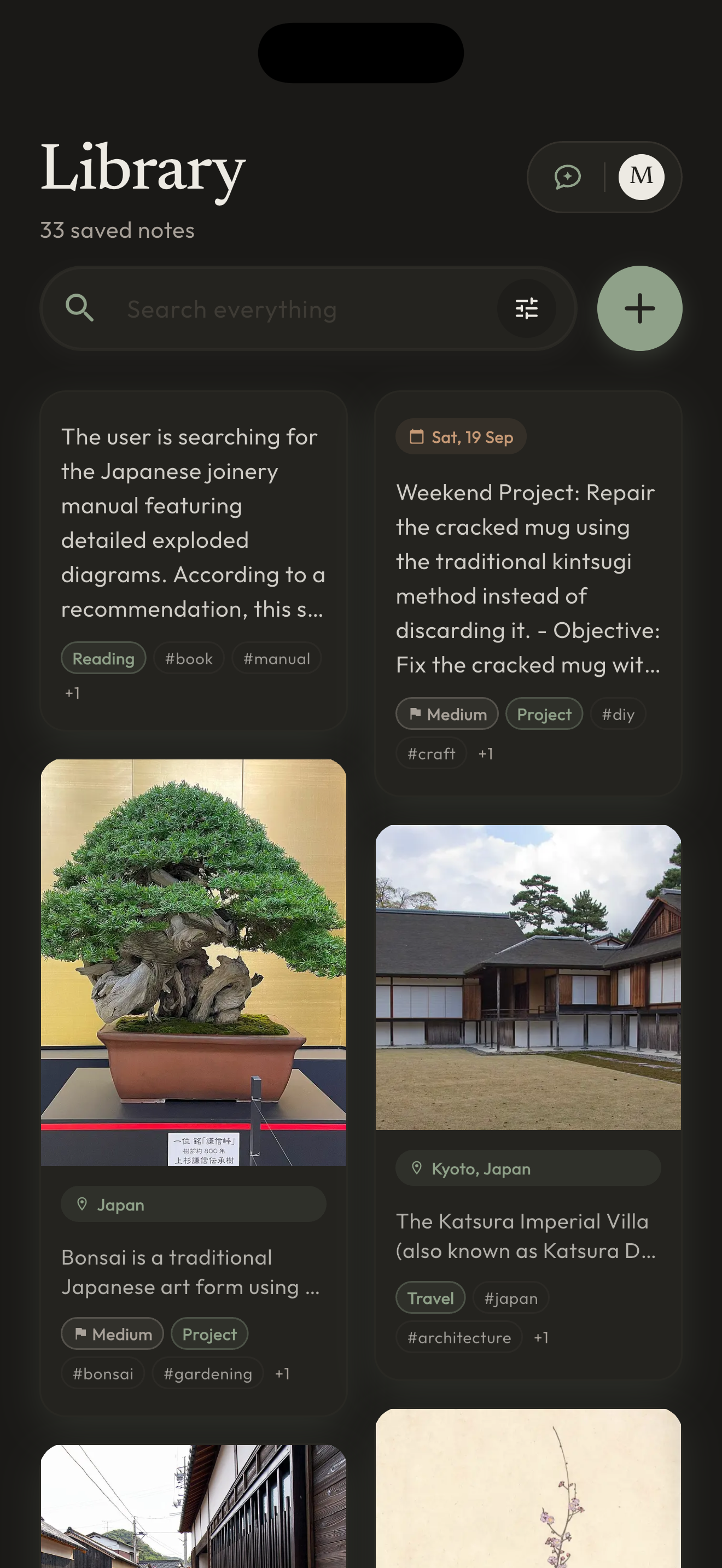
The library: every note arrives summarised, tagged, dated and placed, with no folders to choose.
-
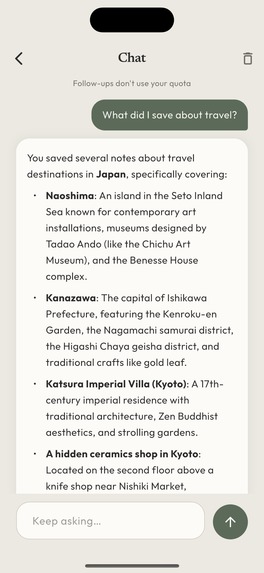
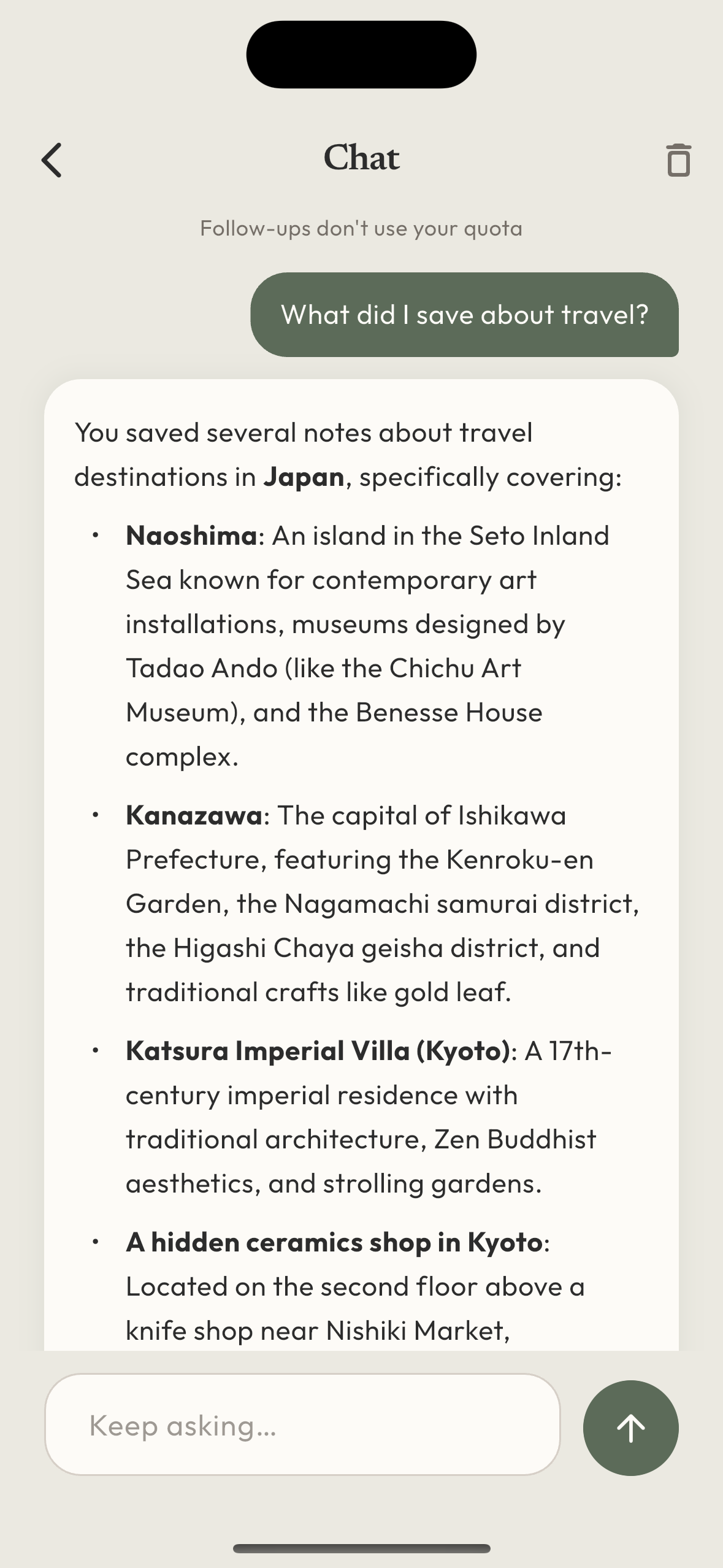
Ask your library in plain words. The answer comes from your own notes.
-
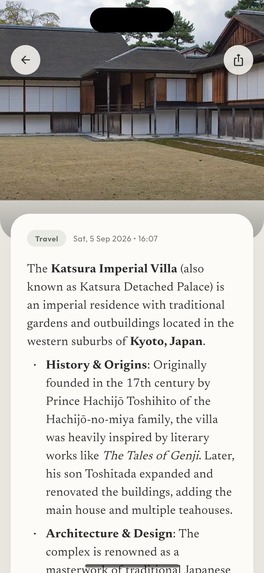
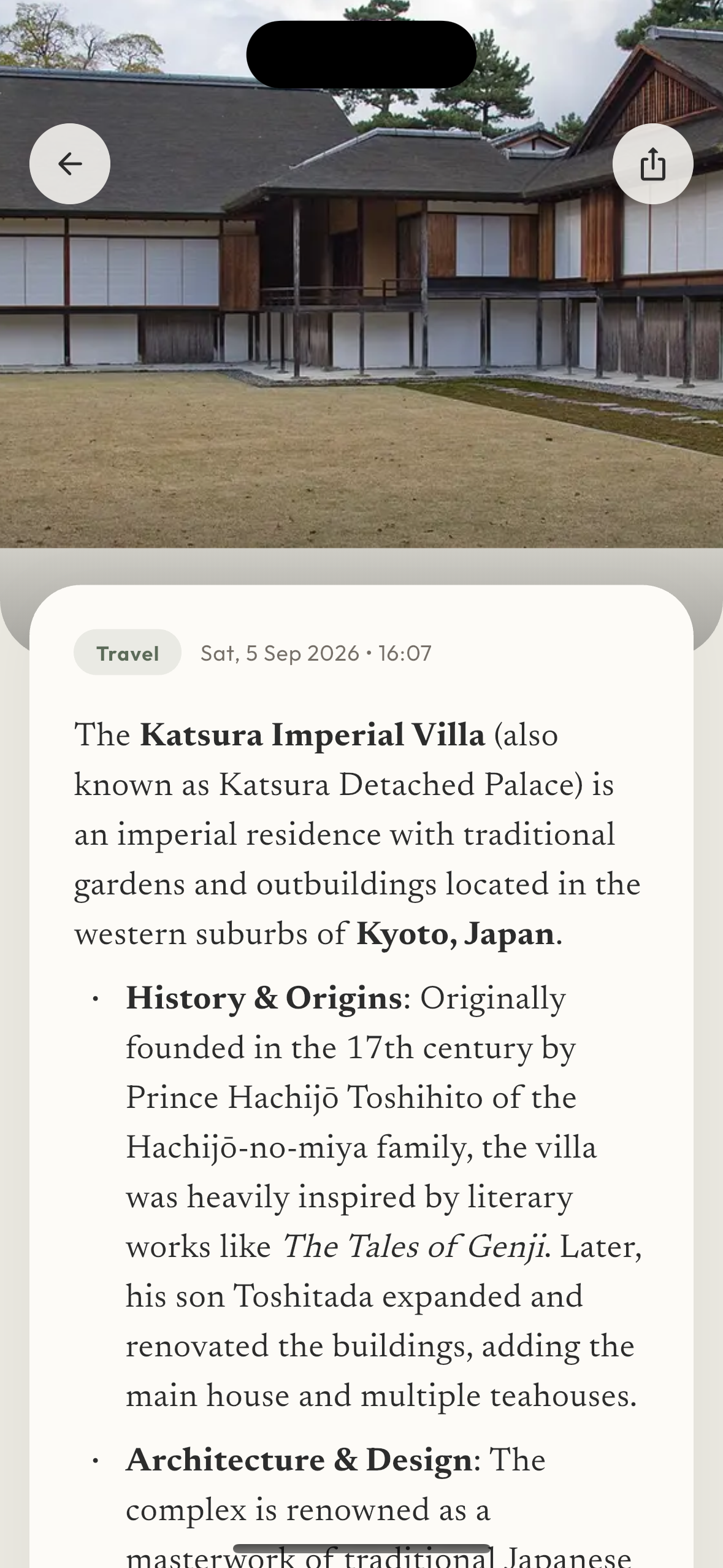
Note detail: the full summary under the image that flew in from the card.
-
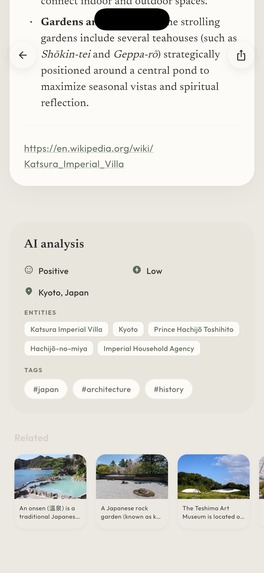
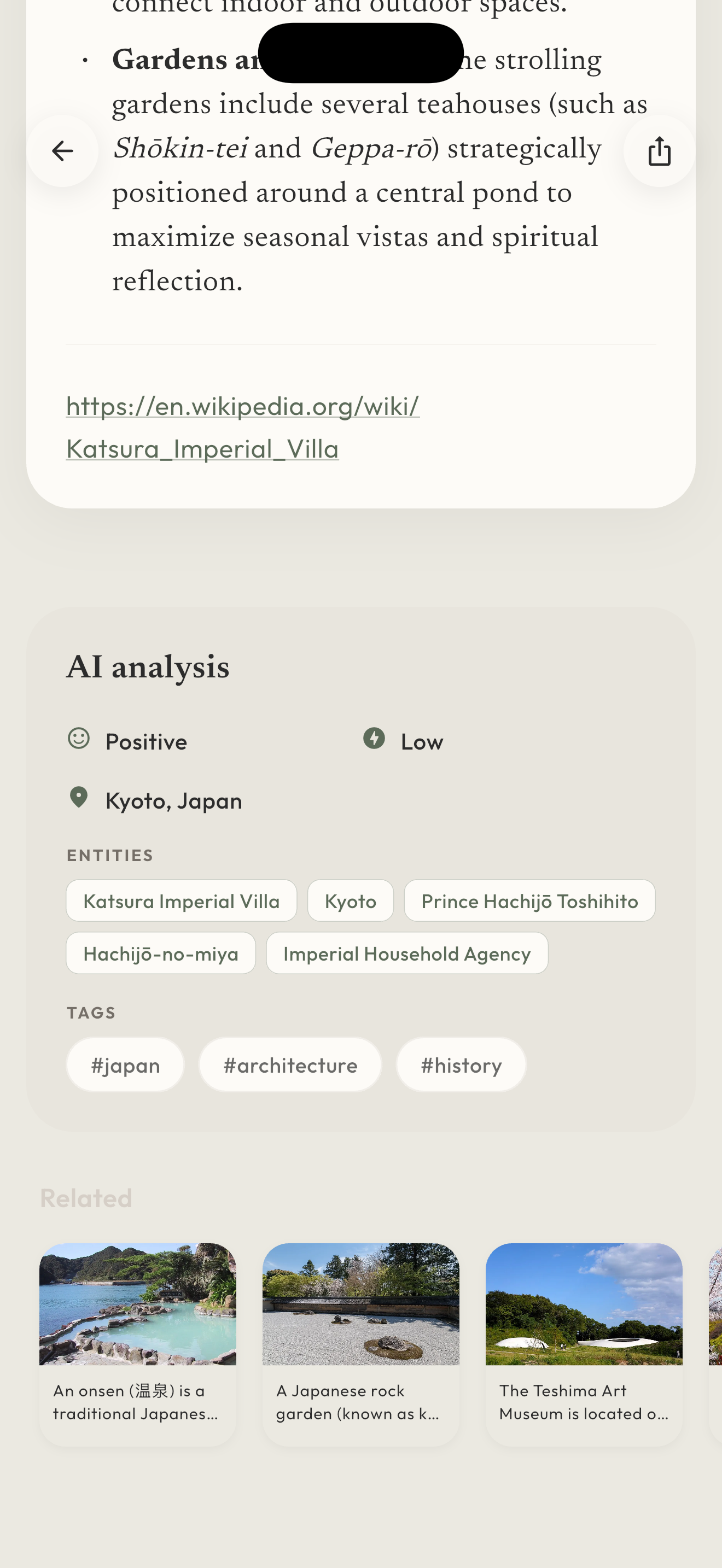
What the AI adds to each note: place, entities, tags and related notes.
-
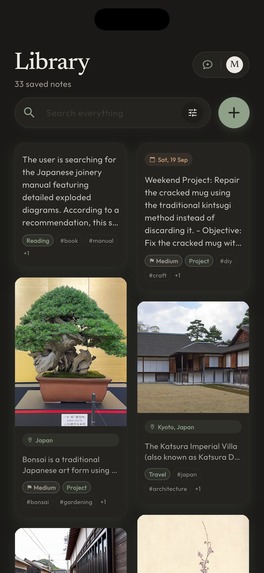
Dark theme: the same roles on a warm coal background, never pure black, with lightened accents.
-
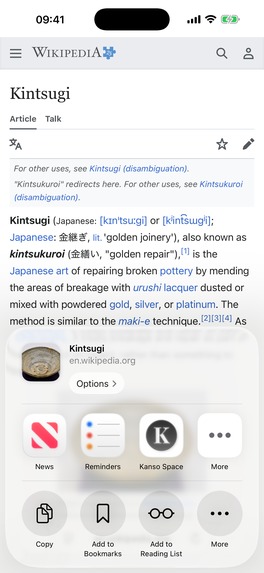
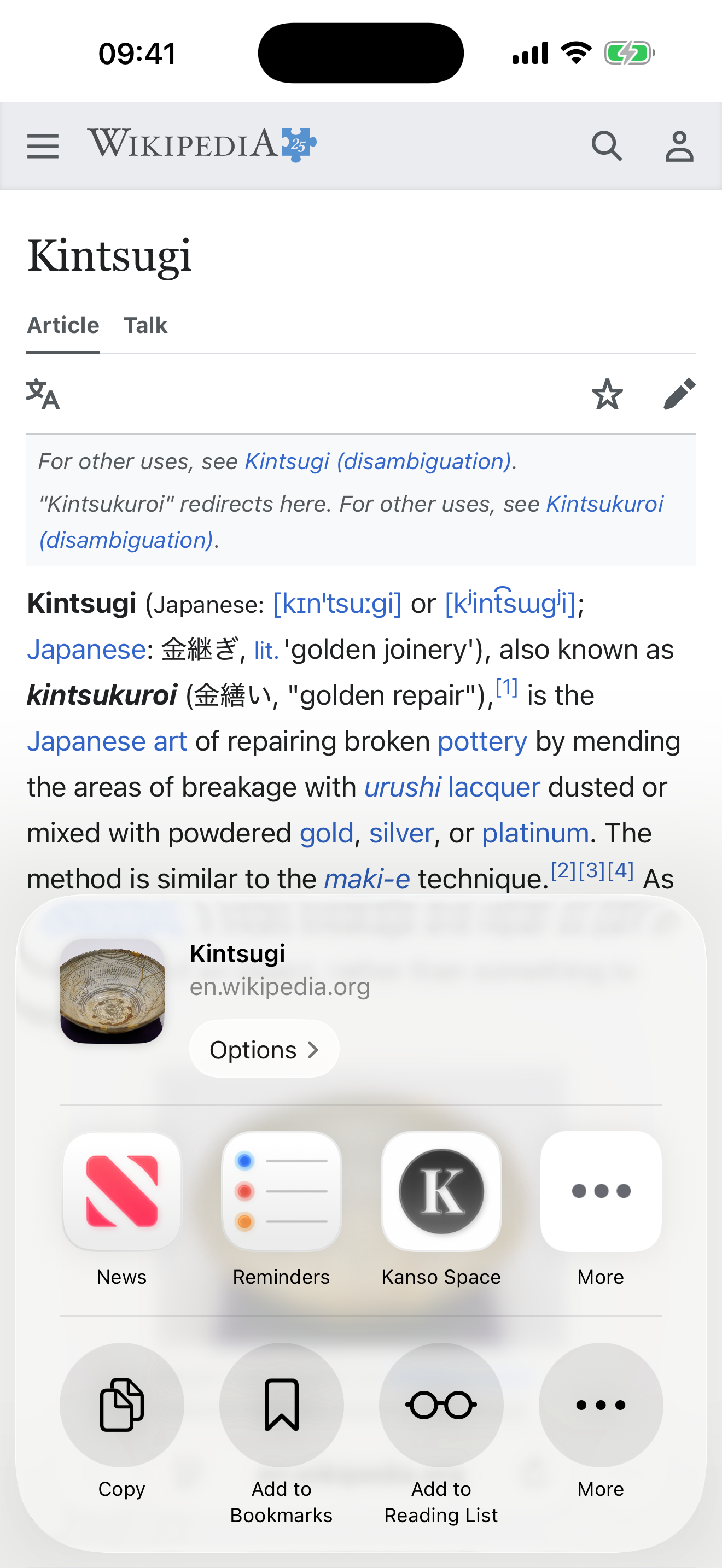
Capture from any app through the iOS share sheet.
-
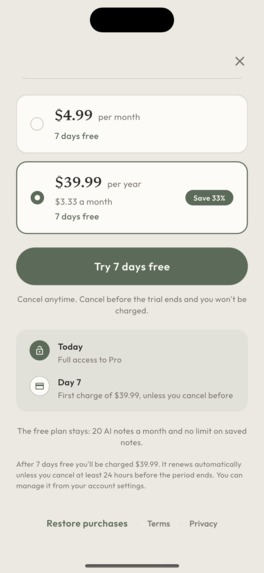
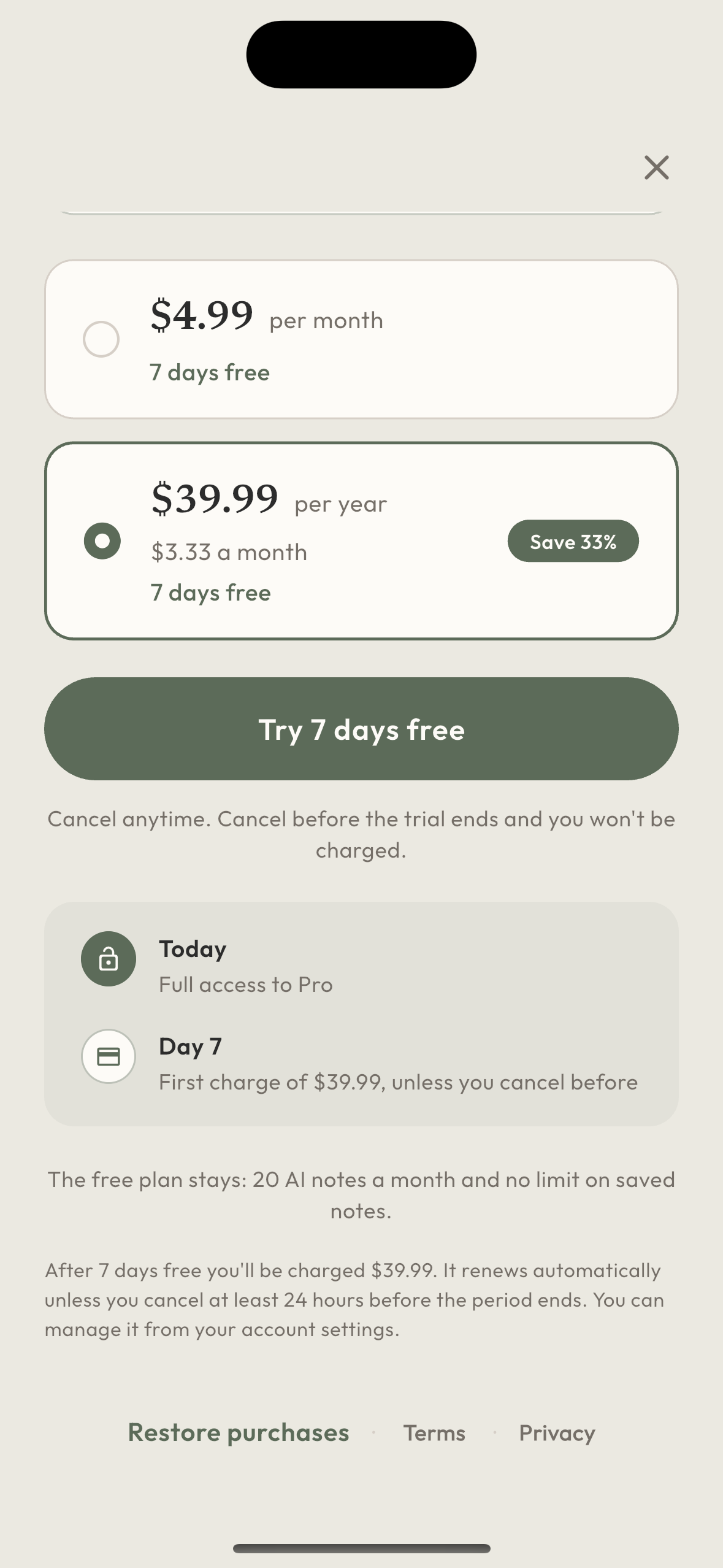
The paywall: 7 days free on both plans, a trial timeline and a reminder of what stays free.
-

App icon, 1024 × 1024.

Inspiration
We save things everywhere (links, screenshots, photos, half-formed ideas) and almost never come back to them. Saving is easy. Finding it again, or even remembering you saved it, is not.
Kanso (簡素) is the Japanese principle of simplicity: leave out everything that isn't essential. Here, that includes the work of filing.
What it does
Kanso Space is one calm place for everything you want to keep.
- Save in one tap. Share from Safari, Photos or any app with a share sheet, or type straight into the app. No folder to choose, no title, no tags.
- It sorts itself. Every note gets a summary, a primary tag and tags, the date and place it mentions, and links to related notes you saved before. Links are read in full, not just their title.
- Then just ask. "What did I save about Kyoto?" The chat answers in plain language from your own notes and shows which notes each answer came from. Tap one to open it.
- Shared spaces. Plan a trip or a renovation with someone: invite them with a QR code or a link and save into the same space.
In English and Spanish, light and dark, on iPhone and iPad, with Android in review on Google Play.
What to look at (Design Award)
Kanso's motion follows five rules: nothing bounces; one protagonist per screen; short but never abrupt (150 ms for a press, 320 ms for a page, 350 ms for content); motion explains, it doesn't decorate; and waiting breathes instead of spinning.
- Onboarding. Four scenes built from the app's real widgets rather than illustrations, with layered parallax between pages.
- Library. The masonry grid enters in a stagger capped at 12 items, so a large library never takes seconds to appear, and skeletons cross-fade into content. Save a link and watch its card go from "Processing" to a finished note on its own.
- Note detail. The card's image flies into the detail view, and the header follows the scroll with a gentle parallax.
- Chat. Three breathing dots instead of a spinner. Each answer animates in once, with its sources right underneath.
- The free plan sees the real chat, dimmed: a sample question with the shape of its answer and sources, instead of a padlock.
- Dark theme. The palette is defined by roles, not colours, so every screen keeps its hierarchy in the dark. It follows the system and switches instantly.
- Small things. Three levels of haptics (select, confirm, long press). With Reduce Motion on, ambient loops don't start at all, rather than freezing mid-frame.
Why it fits the Productivity award
- Fast. The share extension is the whole capture interface: you never leave the app you were in.
- Focused. One library, no folders. Search everything, filter by space, tag or type (links, images, places, agenda, shopping), or simply ask.
- Organised without effort. Text, links, photos and screenshots are summarised, tagged, dated, placed and connected automatically.
- At home on Apple devices. Share extension, Sign in with Apple, iPad support, and light and dark themes that follow the system.
How it makes money (HAMM)
- One subscription, two plans. Kanso Pro costs $4.99 a month or $39.99 a year on the US App Store (€4.99 or €44.99 in Spain, in both stores), with a 7-day free trial on both plans. RevenueCat serves one offering and one entitlement.
- The free plan is a quota, not a crippled app. 20 AI-organised notes a month, with unlimited saved notes and spaces. Introducing Pro took nothing away from anyone, and when we later lowered the free quota to 20 for new accounts, existing accounts kept their 50. Pro raises the quota to 500 notes and adds 100 chat conversations a month. The chat is Pro-only because it is new, not because we took it away from the free plan.
- Priced from unit costs. An AI-organised note costs us between $0.001 and $0.007 in model usage. At €4.99 we keep €3.51 after VAT and a 15% store fee, and a Pro user who maxes out the quota costs us about €2.09, so even the heaviest user stays profitable. Our first plan, €2.99 with a 1,000-note quota, lost money on exactly that user (€5.45 of cost against €2.10 of income), so we changed both before launch. For the same reason there is no lifetime plan: AI costs recur with every note, and a one-off payment would eventually run at a loss.
- The chat quota counts conversations, not messages. Follow-up questions are free: charging per message punished exactly the moment the feature hooks people.
- A paywall that knows why you are there. It opens from five places (Settings, a note out of quota, re-analysing a note, the chat, and the moment your first note appears organised), each with its own headline. It opens on its own only once, when your first note appears organised; every other time, it's because you tapped something. The paywall shows a trial timeline (today, and day 7, when the first charge happens unless you cancel), computes the annual saving from live store prices, and reminds you what stays free. Every paywall event carries its source, so conversion is measured per entry point.
- The server decides, not the client. The RevenueCat webhook writes each entitlement to Firestore, deduplicated by event ID and ordered by timestamp, so a late expiration can't revoke someone who has just renewed. Pro status is computed from the expiry date and never stored as a flag, so a lost webhook can't hand out Pro forever. Quota is charged on the server once per note per month, so a network retry never charges twice. Right after a purchase or a restore, the app asks the server to reconcile with the RevenueCat API, which closes the race with the webhook.
- No ads and no data sales. Pro is the only thing that pays for the AI.
Kanso went live on the App Store on 25 September 2026, so there is no meaningful revenue yet. What we can show today is how the model is built.
How we built it
Flutter (Riverpod, go_router) for iOS and Android. Firebase: Auth, Firestore, Cloud Functions, Storage, App Check, Remote Config, Analytics, Crashlytics and Hosting. Genkit with Gemini for note analysis, embeddings and the chat. RevenueCat (purchases_flutter), with a webhook into Firestore and RevenueCat's Firebase integration sending subscription events to Analytics.
Challenges we ran into
- App Review rejected version 1.0 because the camera permission text didn't explain what the photo is used for. We rewrote the permission texts with concrete examples, in English and Spanish, resubmitted the same evening and were approved two days later.
- Closed testers on Google Play found that "Continue with Google" did nothing on store-signed builds: R8 was stripping the resource the sign-in library looks up by name. We now pass the client ID explicitly.
- Making AI affordable on a $4.99 plan meant measuring what each kind of note costs and charging quota exactly once per note, even across retries.
What's next
A weekly digest of what you saved, reminders for the events your notes mention, and a free month for inviting someone to a shared space.
Try it
- App Store: https://apps.apple.com/us/app/kanso-space/id6756120835
- Sign in with Apple or Google. The free plan works straight away.
- To test Pro: tap the chat icon at the top of the library, then Unlock with Pro and Try 7 days free (monthly or yearly). Cancel from your App Store subscriptions before day 7 and you won't be charged.
- Website: https://kansospace.yebenes.dev
Built With
- android
- app-check
- cloud-functions
- cloud-storage
- crashlytics
- dart
- firebase
- firebase-auth
- firestore
- flutter
- freezed
- gemini
- genkit
- go-router
- ios
- node.js
- rag
- remote-config
- revenuecat
- riverpod
- typescript
