-
-
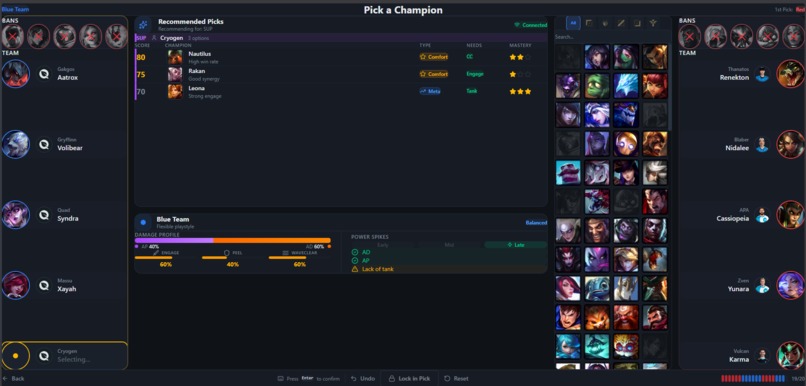
Pick Ban Screen
-
Initial Screen
-
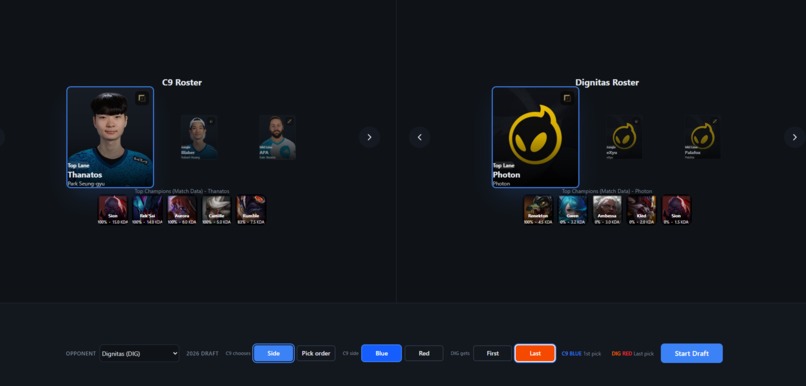
Team and Champ Pools
-
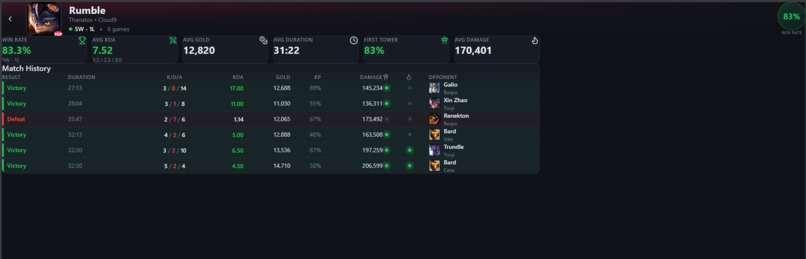
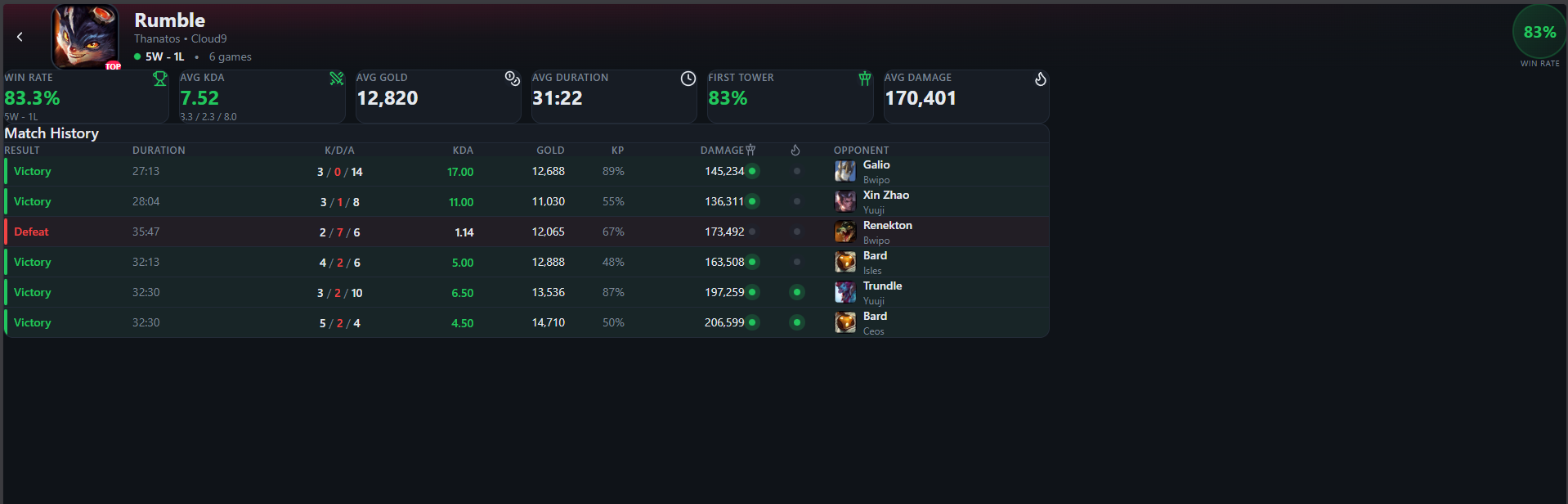
Detailed GRID stats
-
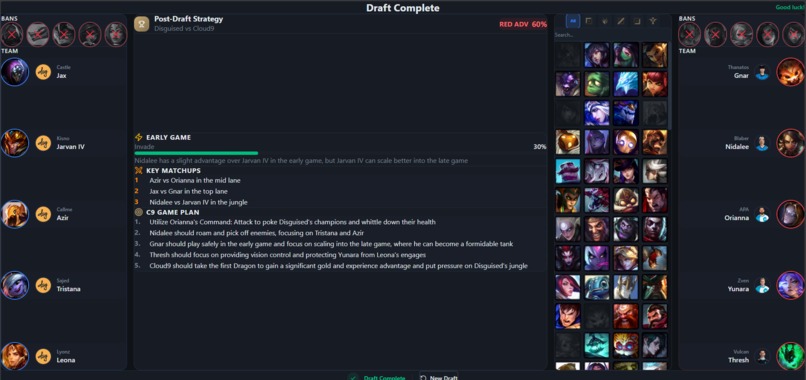
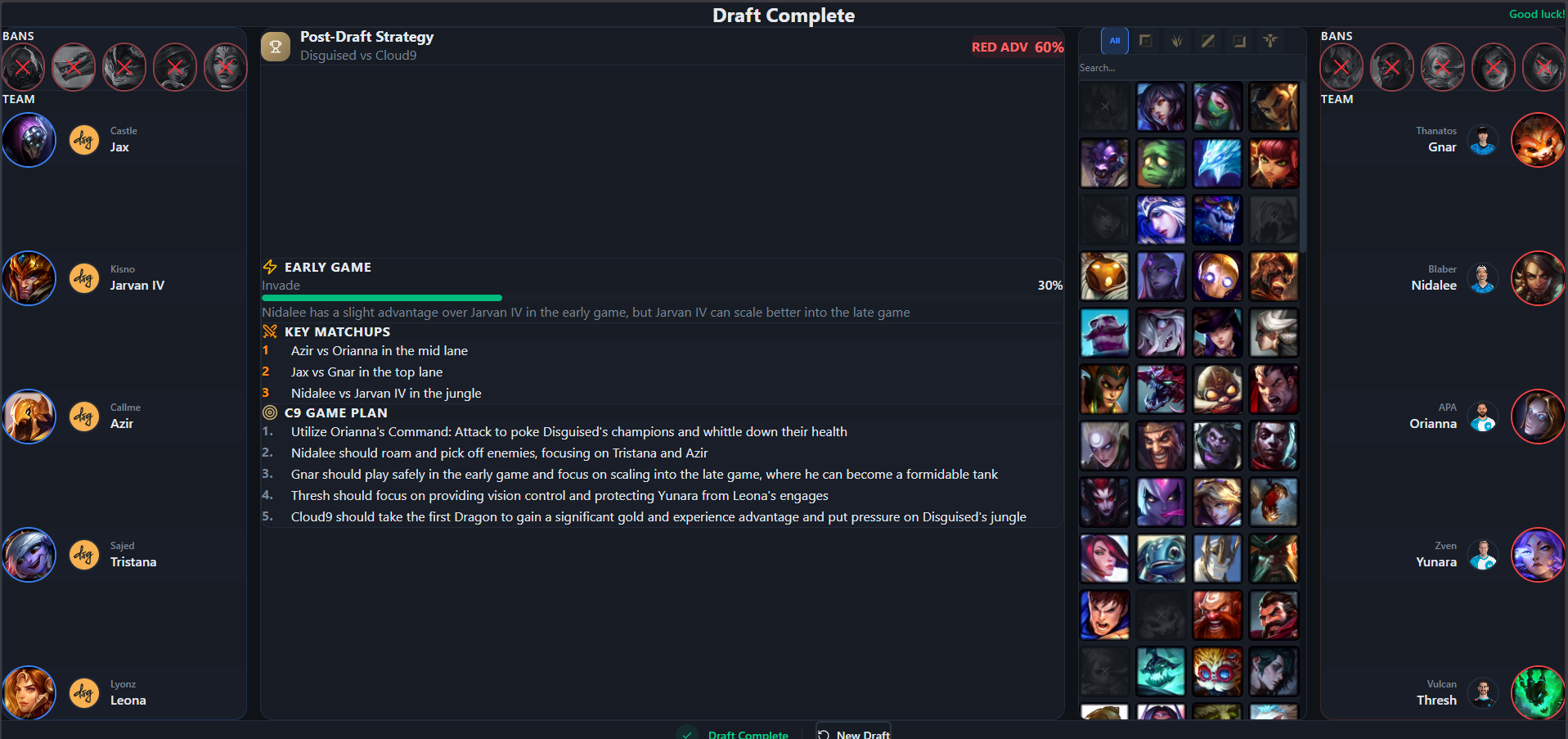
Post Draft Strategy
TeamBuilder — A Drafting Tool for C9 Coaches
How We Got Here
I've been watching C9 since the Sneaky, Meteos, and Hai days. Somewhere between then and Faker winning his 6th Worlds Title, competitive League became less about who has the better mechanics and more about who prepared better before the game even started.
Drafting is where that preparation shows up. And for a long time, the tools available for it were either built for solo queue players trying to climb ranked, or they were internal spreadsheets coaches duct-taped together between scrims. I came into this hackathon wanting to bridge that gap.
My first instinct was to build something like a real-time overlay, clean UI, the usual. Then I realized I only had access to historical data through GRID, and the flashy overlay idea fell apart pretty quickly.
But sitting with it for a bit, I started thinking about what coaches actually spend their time doing. They're not looking for pretty interfaces. They're looking for answers. Which champions does this player default to under pressure? Does this team play differently on red side? If we ban out their comfort picks, what do they fall back on?
That's what TeamBuilder tries to answer.
What It Actually Does
The tool moves through three phases: scouting, draft recommendations, and post-draft strategy.
Scouting — Know Who You're Playing
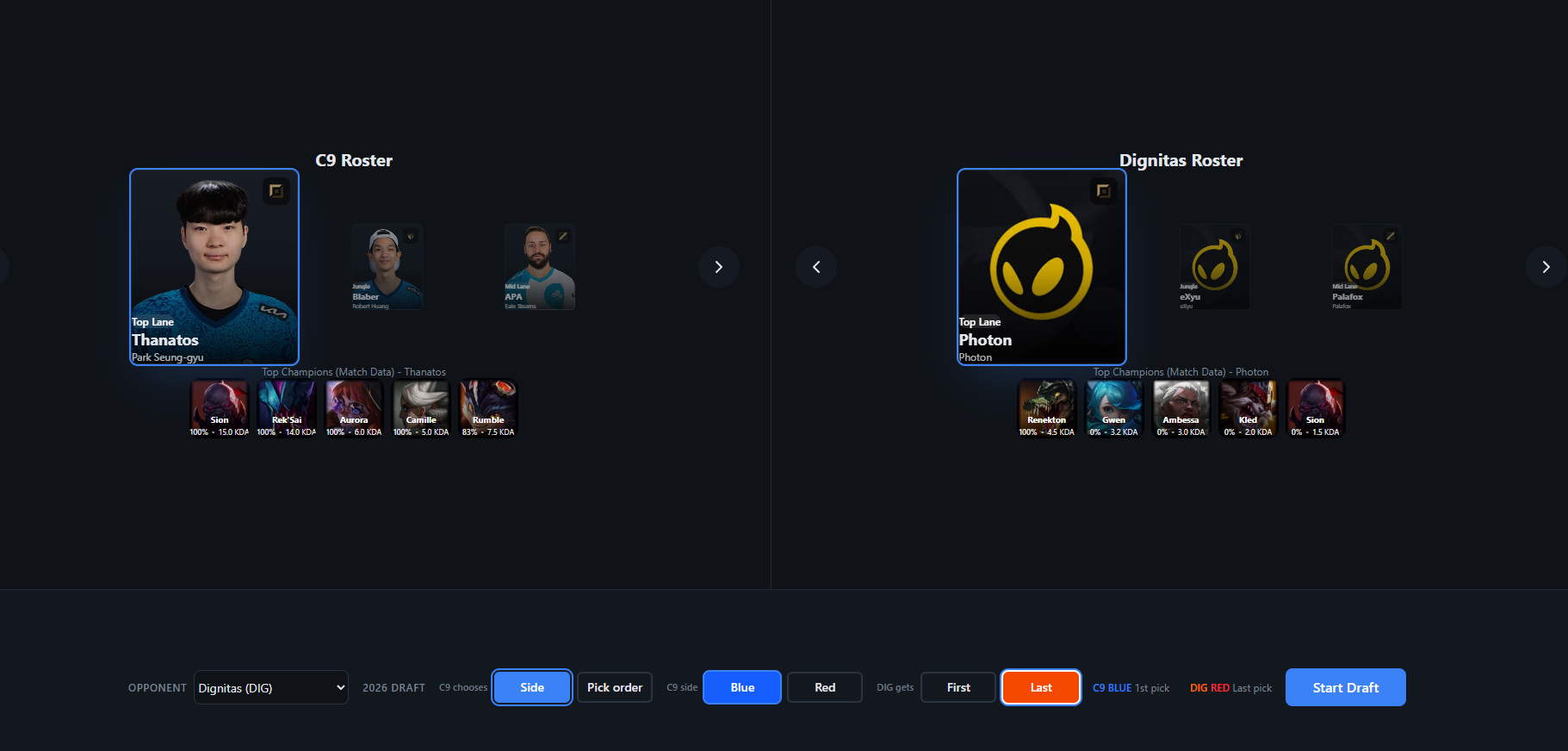
Before anything else, coaches pick the team they're going up against. Once they do, TeamBuilder lays out a bird's-eye view of every player on that roster — their champion pools, recent performance stats, comfort picks, the things you'd normally spend an hour pulling from match history tabs. It's all in one place.
From this screen, coaches also configure the draft settings. Side selection, first pick or last pick, whatever the format calls for under the current LCS 2026 rules. This is the prep work — getting a feel for what the opponent is likely to bring before stepping into the draft itself.
Draft — Recommendations
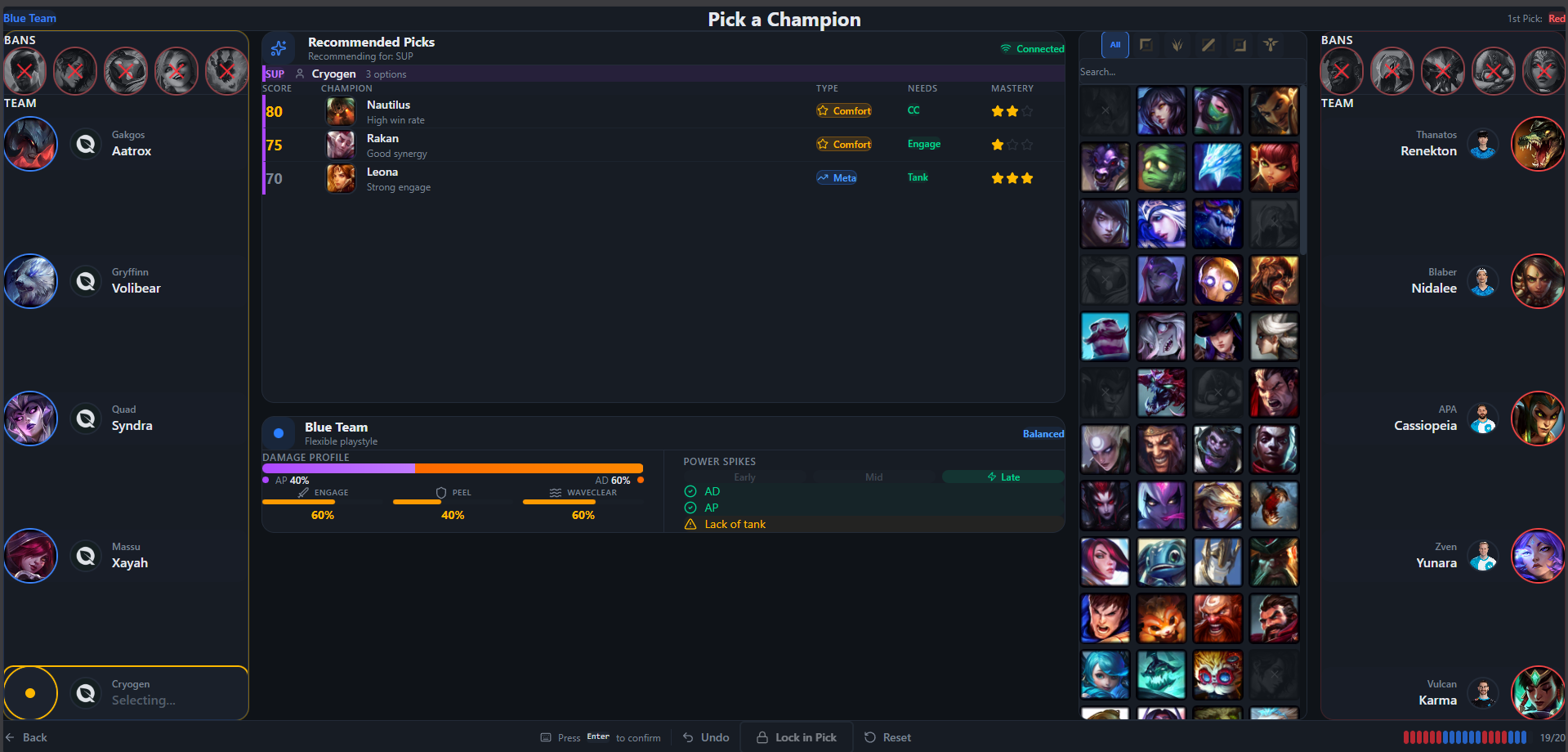
Once the scouting is done and the settings are locked in, coaches move into the draft simulation. This is where the recommendation engine does its work, suggesting bans and picks based on what it knows:
- What champions each opposing player has been picking, and how they've performed on them — KDA, win rates, gold differentials
- Historical draft orders and tendencies from recent matches
- What's already been picked or banned in the current simulation, so it doesn't recommend things that no longer make sense
Every recommendation comes with the reasoning behind it. Not just "ban this champion" but why — because a specific player has a high win rate on it, because it fits into the compositions the opponent tends to run, because it's a flex pick that complicates your later phases.
As the draft fills out, the tool also tracks the shape of each team's composition. AP/AD balance, lane matchup concerns, whether the comp is leaning toward teamfight or split push. Small things that are easy to lose track of when you're making decisions under time pressure.
After Draft — Strategy
Once both teams are locked in, TeamBuilder generates a post-draft breakdown. This covers things like what kind of team each side ended up with — whether it's an engage comp, a siege comp, a pick comp — and what the likely win conditions are for each side. It also estimates invade and counter-invade probabilities based on the early-game strength of each lineup.
The idea is that a coach can run this simulation several times, trying different draft paths, before scrims or the actual match. See what happens if you prioritize banning out their bot lane instead of mid. See how the composition changes if you flex a pick to a different role. Each run takes a couple of minutes, and you walk away with a clearer picture of what you want to do and why.
The Tech
Frontend: React + TypeScript + Vite
Backend: NestJS + GraphQL (pairs naturally with the GRID API structure)
Real-time: WebSocket integration for live draft tracking
Data: GRID API — Central Data, Series State, Stats Feed
Caching: Redis for historical stats and rate limit management
Why This Approach
There's a temptation with projects like this to just pipe everything through an LLM and call it a day. Ask Claude for five ban recommendations, get a nice paragraph back, ship it. But that doesn't hold up when a coach needs to trust the output and act on it in real time. The recommendations need to come from the data itself — from actual match history, from actual player performance — not from a language model's best guess at what sounds right.
That constraint ended up shaping the whole project. Every suggestion the tool makes traces back to something measurable, and coaches can see that chain. It's a slower, less impressive-sounding approach than "AI-powered draft assistant," but it's the one that would actually be useful in a team room.
Built With
- claude
- jetbrains
- junie


Log in or sign up for Devpost to join the conversation.