Inspiration
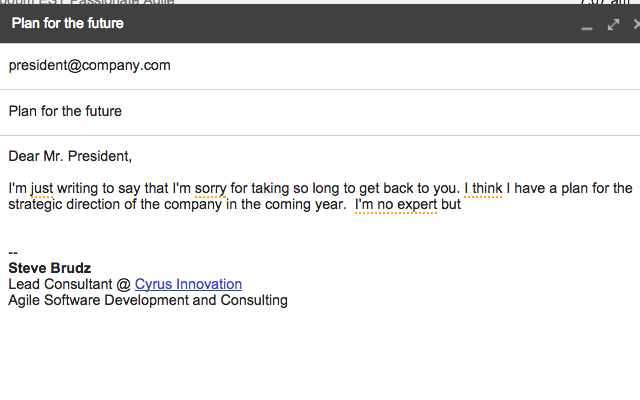
Inspired by the writings of Tara Mohr and others, this Chrome Extension for Gmail will warn you when you use words or phrases that might be undermining your message.
What it does
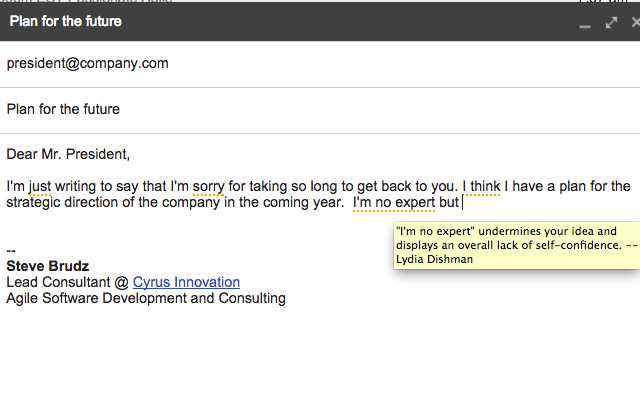
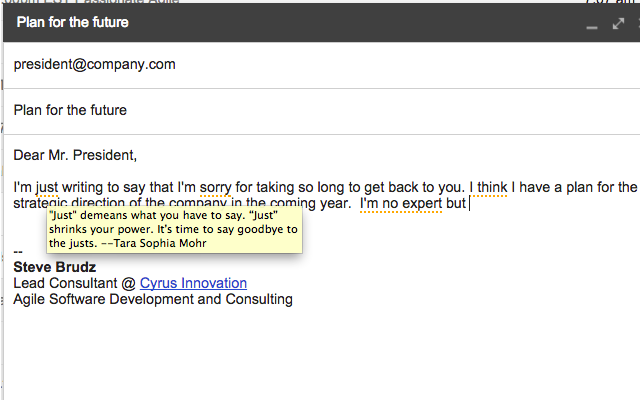
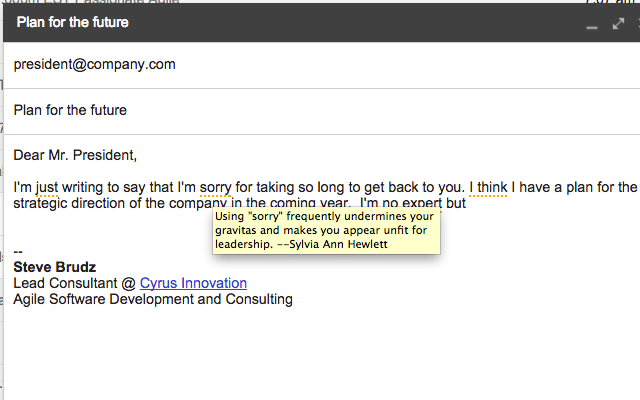
As you type an email, warning words will be underlined and if you hover over them, you'll see a tooltip with additional information about how using the word or phrase could be perceived by the recipients of your email. (Don't worry, the underline won't get sent as part of your email if you decide the warning doesn't apply.)
How we built it
It uses the gmail.js JavaScript library to hook into Gmail's DOM and identify when a compose window is opened. Then it sets up a mutation observer on the body section of the email to monitor the text as you type it. The text is run through a warning checker that wraps any keywords in a span to change the display style.
Challenges we ran into
Gmail has a very complex DOM and no official API. The gmail.js library is a huge help but we ran into some weird edge cases when mutating the DOM.
For example, the body section of a compose window is not actually a text area form element, it's a collection of div's, span's and other elements. There is a text area but it's hidden in a different part of the DOM. Our first implementation of the WarningChecker was a function that had no side effects -- it took in HTML and produced new HTML with warnings included. We then replaced the contents of the compose window with the new HTML. When we tested it, we found that the text you typed came out backwards. The problem was that the cursor position was reset to the beginning after a replacement and since we did the replacement on each key press (via the MutationObserver), it reversed your typing.
The solution we went with was to have the WarningChecker mutate the DOM instead of replacing it. Not ideal but easier than trying to reverse engineer how Gmail's cursor positioning works.
What's next for JustNotSorry
- Nicer tooltips with links to more information on tuning your language


Log in or sign up for Devpost to join the conversation.