Live demo: https://jupyterlite-web-mcp.vercel.app/lab/index.html Repository: https://github.com/alliecatowo/jupyterlite-web-mcp
The problem
A data scientist's working notebook lives in a browser tab, and almost none of what matters about it exists on disk. The cell you just typed and haven't saved. The eleven characters you highlighted with your mouse because they look wrong. The kernel holding your DataFrame in memory. The chart that only rendered because you ran cells in that order.
Getting an AI to help with that means one of two bad deals today. Copy-paste into a chat window: the model sees a dead snapshot, hands back text, and you re-key it — it cannot see your selection, cannot run anything, cannot know what already ran. Or bolt in a server-side MCP integration: it reads .ipynb bytes off disk, which is to say it reads a file that does not match your screen, and it needs a Jupyter server, credentials, and infrastructure. On JupyterLite there is no server to talk to at all.
Why this is a WebMCP use case specifically
The state that matters exists only inside the browser tab. There is no backend holding it, so there is nothing for a conventional MCP server to connect to. WebMCP is not the convenient option here — it is the only one.
All 22 registered tools operate on tab-local state: the live NotebookPanel model including edits never saved to disk; the human's current cell, cursor, and exact text selection; the in-browser Pyodide/WebAssembly kernel that is shared with the human; the IndexedDB-backed contents manager; and threaded review conversations stored in the notebook's own metadata. None of this is proxied through or duplicated into an external service.
Why this creates a better UX
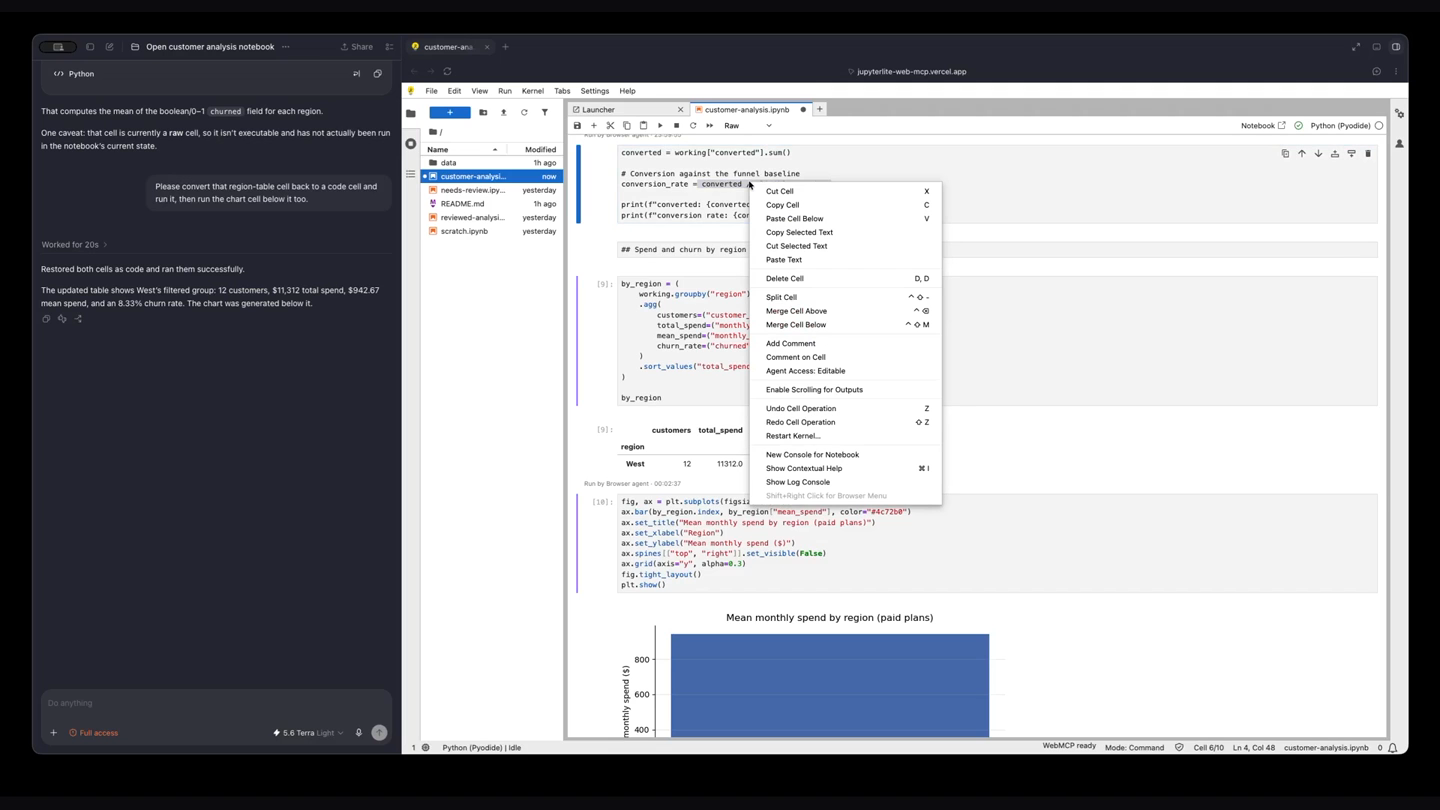
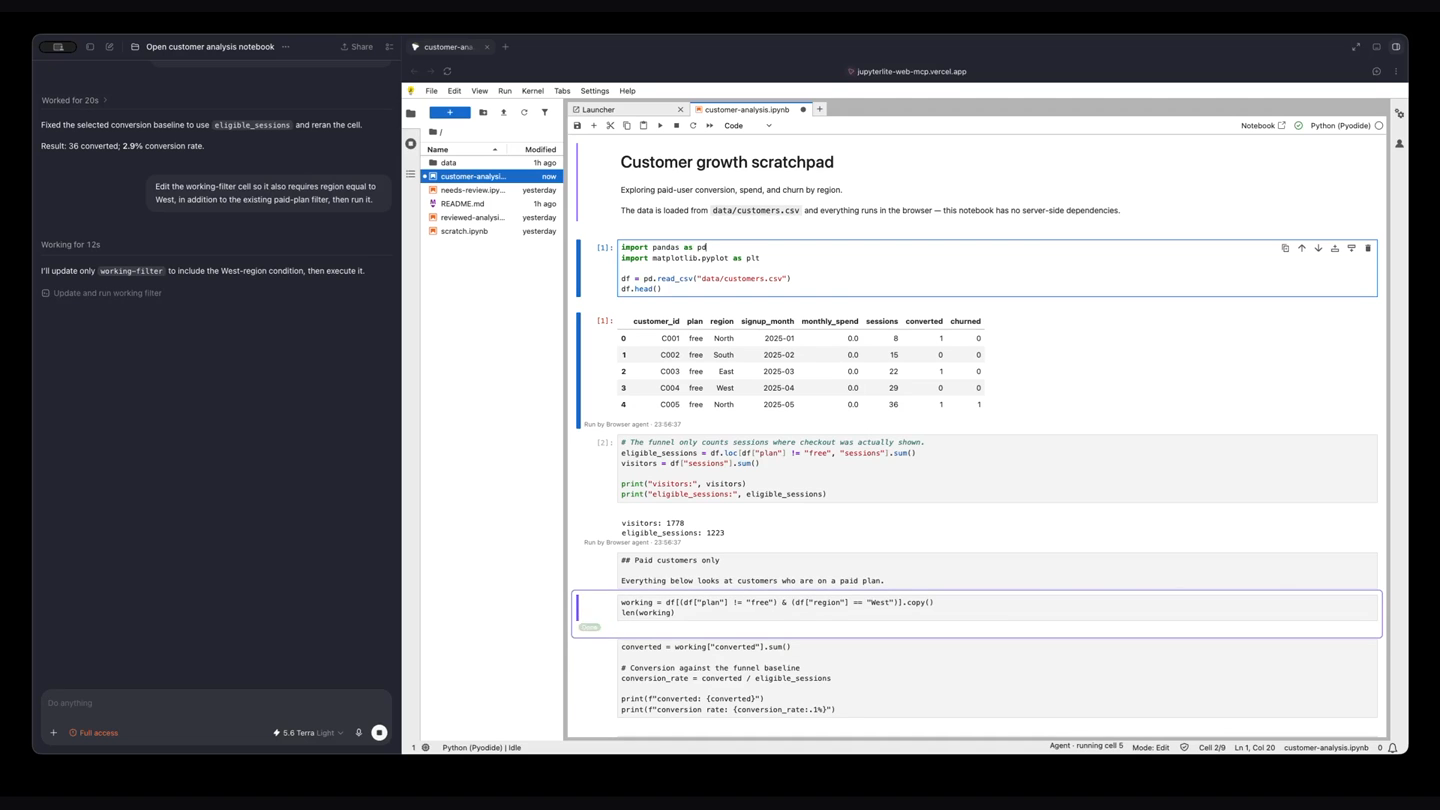
Every existing AI-notebook workflow bolts a second surface onto the first: a chat panel, a separate window, a copy-pasted cell you re-key by hand. WebMCP lets the agent act inside the tab the human is already looking at, so the notebook itself becomes the interface instead of a chat transcript describing one. The targeted cell gets a calm ring, an inline badge tracks state (Reading → Applying → Running → Done, or Failed with a structured error), a diff button opens the exact before/after, and any output the agent produced is labelled with a timestamp, in place. The human never has to ask "what did you just do?" — the document answers that live.
What people and agents can do together that was hard before
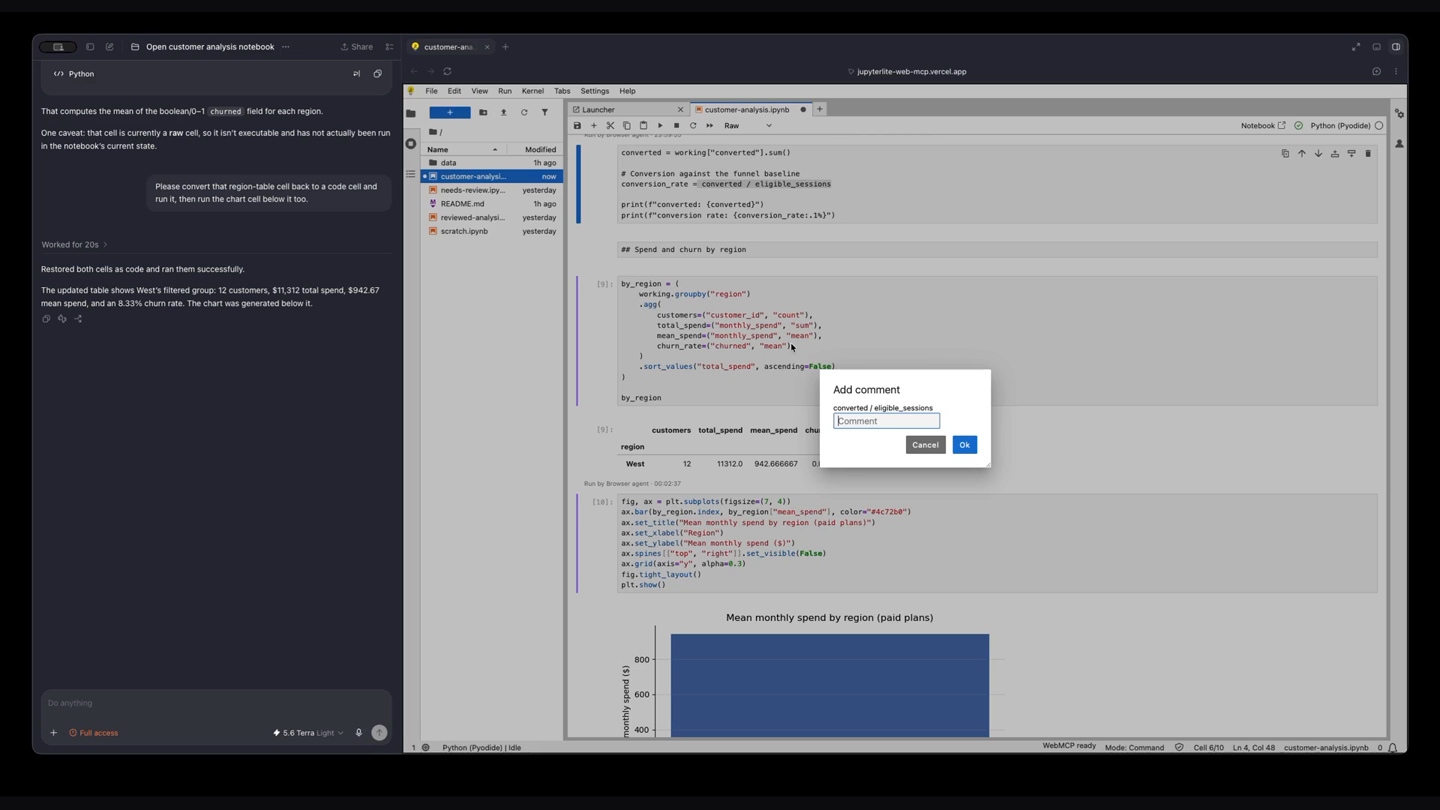
Pointing is bidirectional: highlight text with your mouse and say "fix just what I selected" — the agent reads that exact substring. One kernel, one document: the agent runs cells on the kernel that already has your data loaded, with no shadow copy anywhere. The human always wins a conflict: every mutating tool requires a source hash from a prior read, and a stale write is refused with a structured error, never silently overwritten. The notebook stays the record: the agent cannot execute arbitrary code, only cells that already visibly exist. And the owner decides what the agent may touch, per cell and per notebook — write, read, or fully hidden. The page injects no permission prompts of its own; permission UX stays with the WebMCP client.
Review before it sticks. Flip the Agent panel from Direct to Propose mode and jupyter_update_cell stops applying on call: the change is staged as a reviewable before/after diff inline, under the cell it targets, with Accept and Deny controls — and the agent's tool call does not resolve until you decide. Accept applies the edit through the same code path Direct mode uses, so there is still only one place a cell's source is ever written. Deny sends back a reason you typed, as a normal result coded PROPOSAL_DENIED rather than an error, so the agent's next turn knows why, not just that it was told no. Aborting the call cancels the pending proposal, and a cell holds at most one proposal at a time. Propose mode covers cell edits today; insert, delete and run apply directly in either mode.
How WebMCP was implemented
A JupyterLab 4.6 prebuilt frontend extension, built with jupyter-builder and hatchling — no server extension, no backend, no API key, no embedded LLM, no chat panel. Tools are registered once at plugin activation through document.modelContext.registerTool(), and every tool reads live state when invoked rather than caching anything. Seven small plugins (tools, review, access, activity, propose, panel, output-selection) keep the notebook features decoupled from the tool surface — review threads, access control, the activity badges, proposals and output-selection capture all work with no agent connected at all.
Try it
Open the live demo, wait for the status bar to read "WebMCP ready", open customer-analysis.ipynb, and ask your agent to find and fix a wrong denominator in the conversion-rate calculation, then leave a review comment explaining why. Then highlight text with your mouse and ask the agent what you just selected. Then switch the Agent panel to Propose, ask for another edit, and watch it arrive as an inline diff you can Accept — or Deny with a reason the agent reads back.
MIT licensed.
How we built it
Two packages in one repo: a TypeScript JupyterLab extension (packages/jupyterlite-webmcp) built with @jupyter/builder, and a hatchling-packaged Python distribution so the same build installs with one pip install into JupyterLab, Notebook 7, or a JupyterLite site. The Vercel deployment is a stock JupyterLite build with the extension added and COOP/COEP headers set so Pyodide runs on a SharedArrayBuffer worker. WebMCP only adds a tool surface on top of the notebook plugins; it never gates existing functionality.
Challenges we ran into
Making sure a mutating tool call could never silently clobber a human's in-flight edit required threading a content hash through every read/write pair and rejecting stale writes with a structured, recoverable error rather than a generic failure. Getting Pyodide running on a true SharedArrayBuffer worker (rather than the slower service-worker fallback) required serving the deployment cross-origin isolated, which meant hosting on a platform that would let us set COOP/COEP headers.
Accomplishments that we're proud of
All 22 tools operate purely on live, tab-local browser state — nothing is proxied through or duplicated into an external service, which is the only way this integration could work at all given JupyterLite has no server. The same extension ports unchanged to a JupyterLab server and a Notebook 7 server, so the abstraction is portable rather than JupyterLite-specific.
What we learned
Applying one test to every feature — "would this still make sense if the second participant were a human instead of an agent?" — turned out to be a remarkably reliable design filter. It's why the agent writes to the live shared model instead of a private copy, why writes carry a hash, why there's no arbitrary-code-execution tool, and why review threads live in the notebook file itself instead of a chat log that dies with the tab.
What's next for JupyterLite WebMCP
Extending Propose/Deny from cell updates to inserts, deletes and runs, which need their own diff representation; extending the review-thread and presence system to support multiple simultaneous human collaborators alongside an agent; and per-notebook policy templates so a team can standardize access-control defaults across a shared workspace.
Built With
- jest
- jupyterlab
- jupyterlite
- playwright
- pyodide
- python
- typescript
- vercel
- webassembly
- webmcp


Log in or sign up for Devpost to join the conversation.