-
-
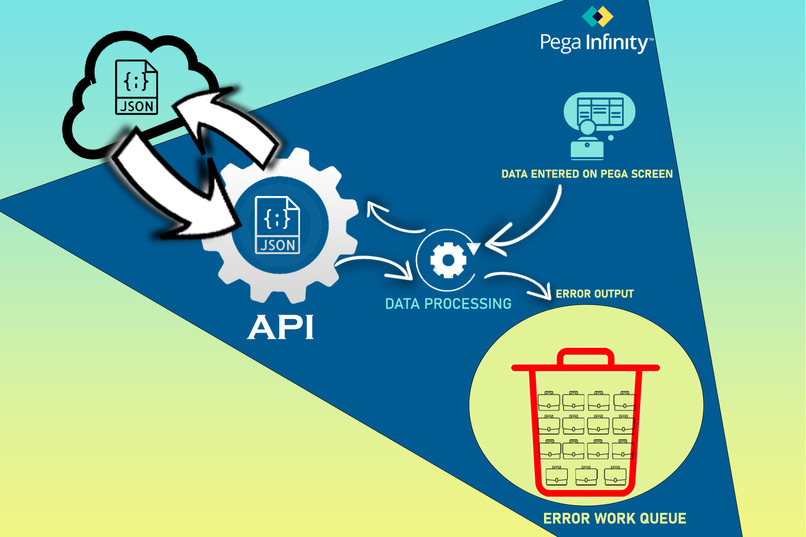
Without JSON Schema Validator tool
-
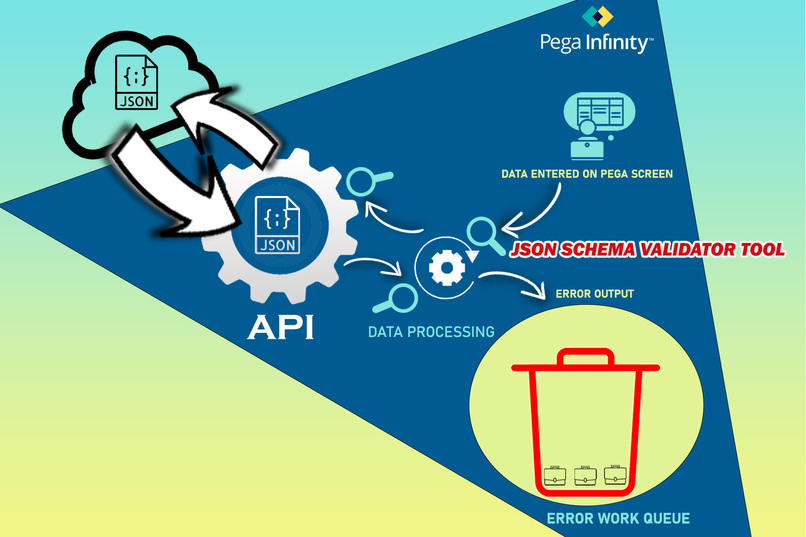
With JSON Schema Validator Tool
-
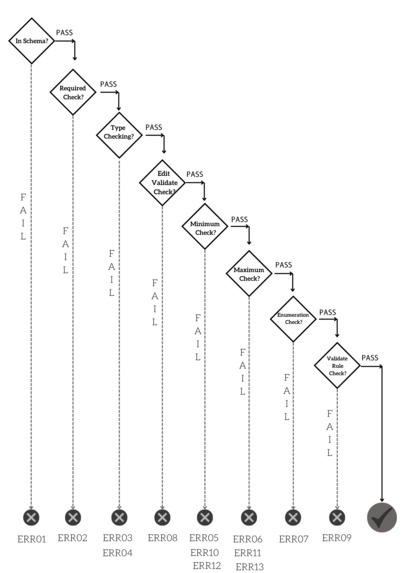
Decision Tree logic of JSON schema Validator Tool
-
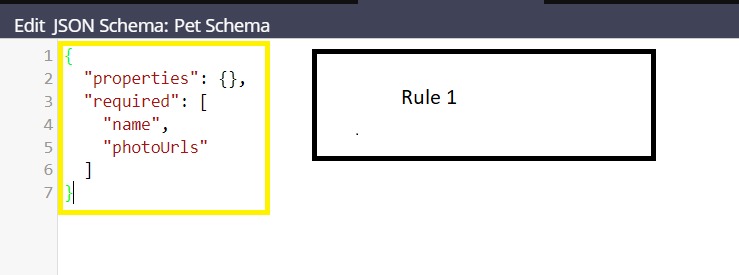
Step 1 of Creating PET Schema
-
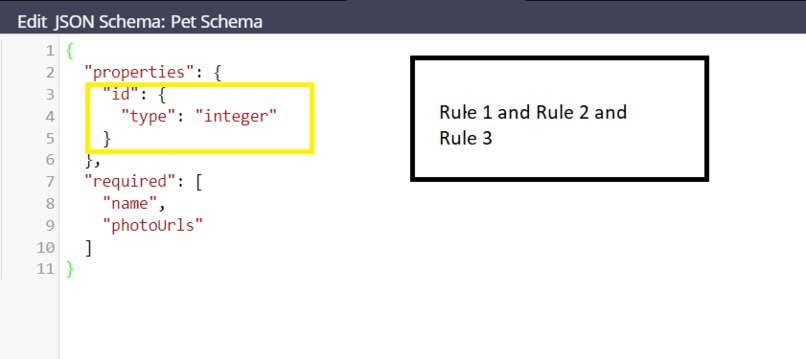
Step 2 of Creating PET Schema
-
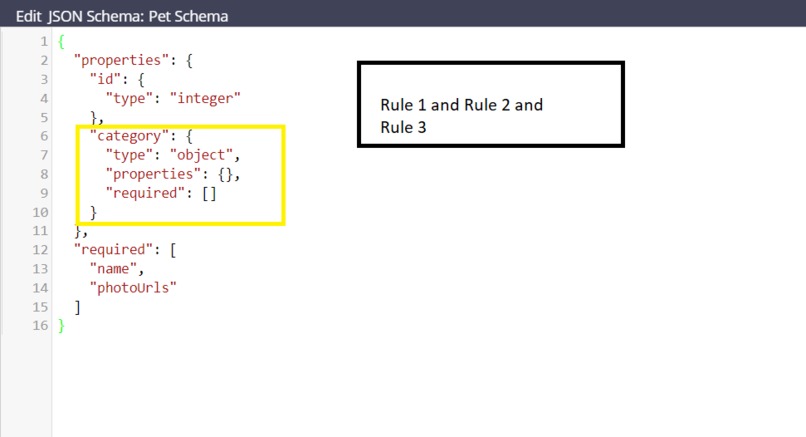
Step 3 of Creating PET Schema
-
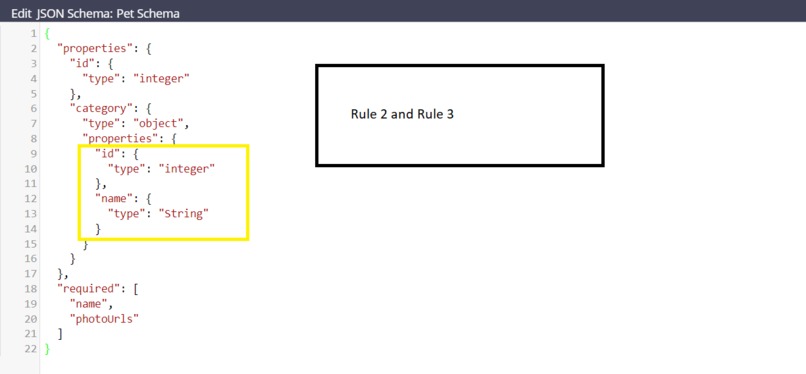
Step 4 of Creating PET Schema
-
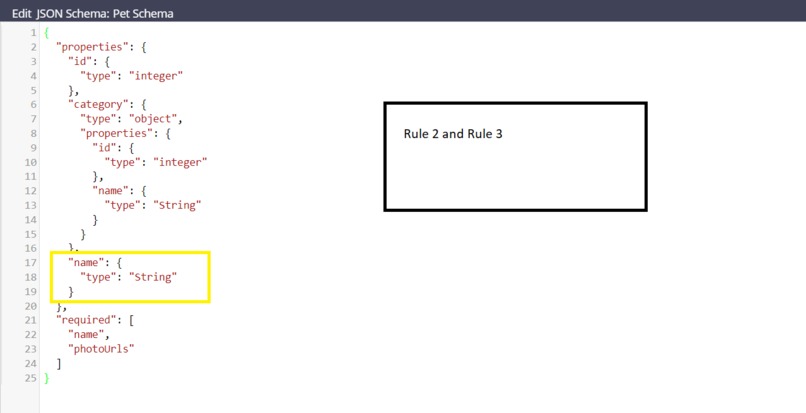
Step 5 of Creating PET Schema
-
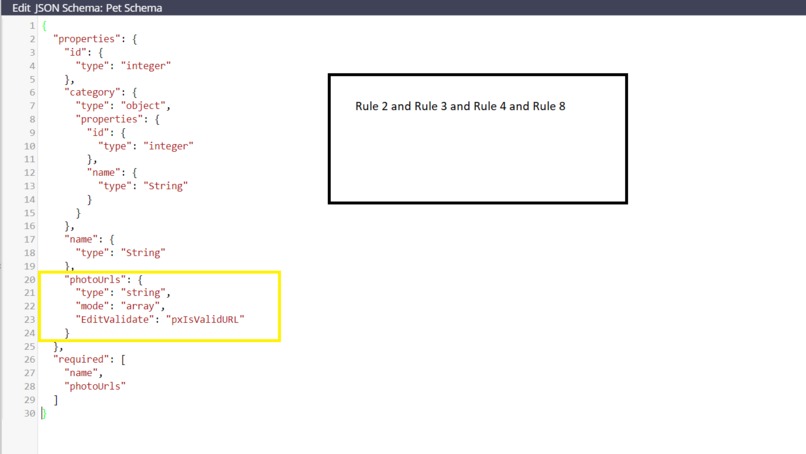
Step 6 of Creating PET Schema
-
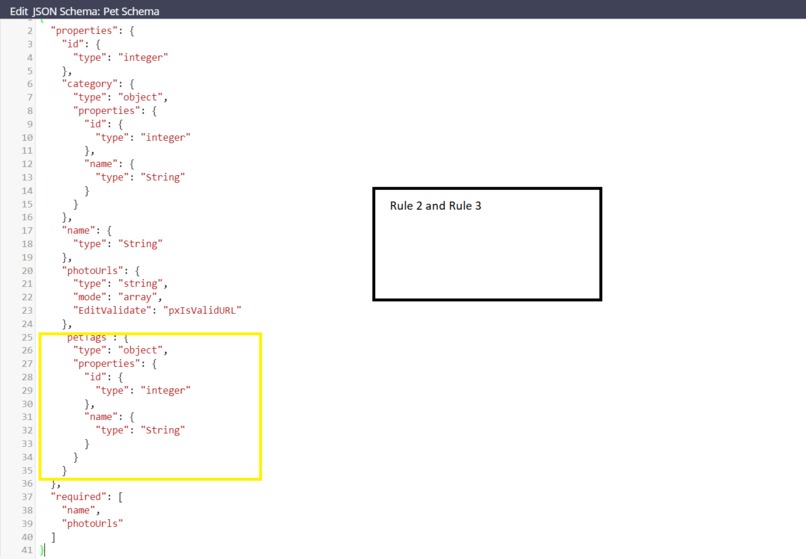
Step 7 of Creating PET Schema
-
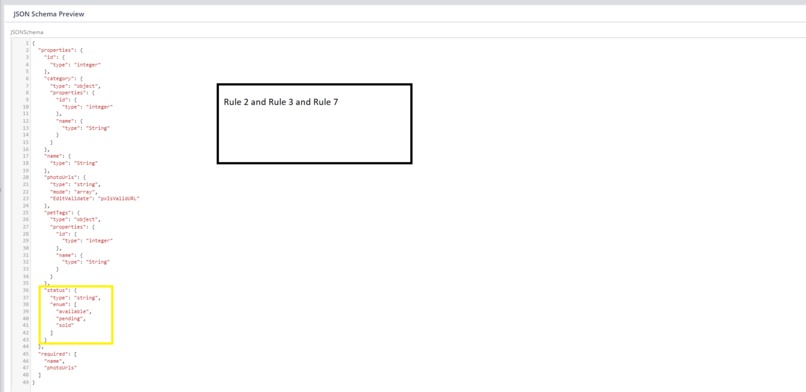
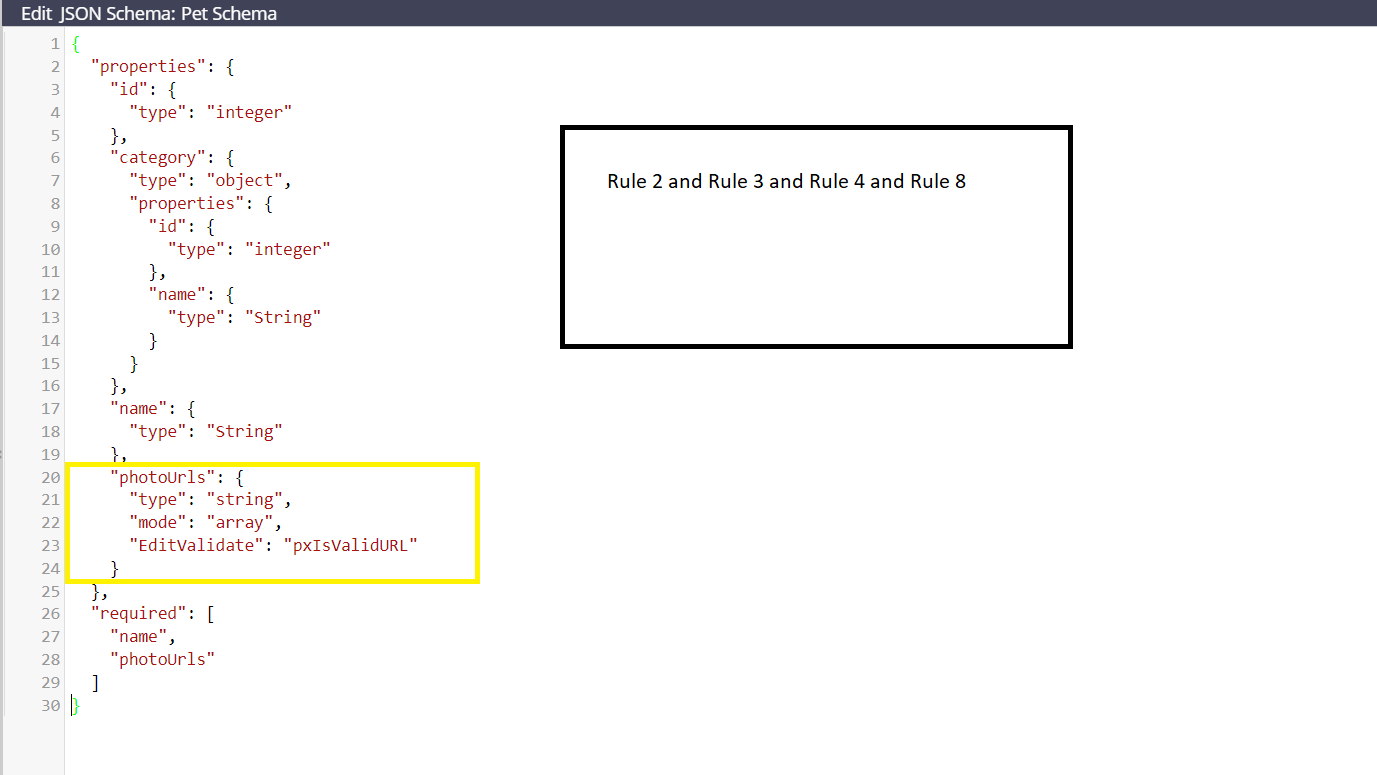
Step 8 of Creating PET Schema


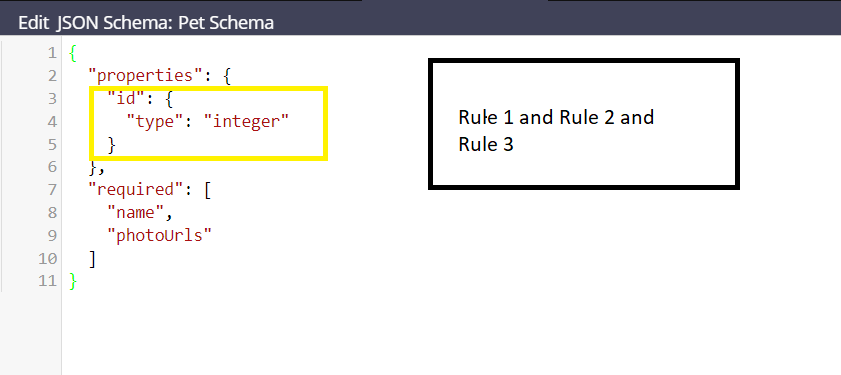




Inspiration
Today we are more focused on building AI and data-oriented solution. Data is the key for those solution. Data quality has most significant role of selecting correct NBA for customer and build more customer personalized solution. REST API and JSON is the key component for exchanging data between system. Like old days XSD for XML organization is trying to standardize the JSON schema to apply business rule on JSON schema. This tool is the way to standardize the JSON schema as per open API standard in PEGA and run validation of input JSON based on the schema structure for ensuring data quality before start processing the data. Below are some key pointers which are encourage me to build this PEGA component.
- The organization json-schema.org is trying to standardize the JSON schema syntax. I have just taken the concept form json-schema.org and tried to define JSON Schema in a way which is more inline with PEGA.
- This year PEGA hackathon theme is “Build for Change”. So concentrated on a solution which gives the correct definition of PEGA “Build for Change” for production environment.
- PEGA “Low Code” design pattern. This tool defines a new way defining the PEGA validation just using one simple JSON file.
- Few PDN community post asking for “JSON Schema validation” tool or component in PEGA.
- Noticed developers are relying on some online tool to validate JSON. But PEGA code editor for JSON is very intuitive and throws error in real time and inline.
- Represent the swagger hub schema definition in PEGA to collaborate with all business stake holders and developers.
- Want to automate and build a solution which will be helpful for all the business line and all the stake holder of the project in some way .
What it does
This tool is a framework and can be implemented in many ways. But I have identified 3 areas in PEGA where this tool can be very useful.
- PEGA screen validation.
- Request/Response validation for connector rule and case dependency injection.
- Request/Response validation for service rule and case dependency injection.
This tool currently able to 16 types of error automatically if the JSON schema define as per the rule book provide in google drive location Schema Syntax Rule. Below are the error details this tool currently catch and throw .
ERR01 --> Throws if input JSON has element not present in schema definition.
ERR02 --> Throws if required element mentioned in schema not present in input JSON or PEGA Page.
ERR03 -->Throws if corresponding PEGA property of input JSON not exists in PEGA in input class hierarchy rule resolution
ERR04 --> Throws if corresponding PEGA property of input JSON has type mis-match with Schema type definition
ERR05 --> Throws if input JSON property of type integer does not follow “minimum” attribute value mentioned in schema definition.
ERR06 --> Throws if input JSON property of type integer does not follow “maximum” attribute value mentioned in schema definition.
ERR07 --> Throws if input JSON property value does not exists “enum” attribute value mentioned in schema definition. This tool able to check static enum or dynamic enum using PEGA Data page.
ERR08 --> Throws if corresponding PEGA property of input JSON does not follow PEGA edit validate rule constrain for pattern checking etc. mentioned in PEGA in input class hierarchy rule resolution
ERR09 --> Throws if corresponding PEGA property of input JSON does not follow PEGA obj validate rule constrain mentioned in PEGA for dependency check etc. in input class hierarchy rule resolution
ERR10 --> Throws if input JSON property of type string does not follow “minimum” attribute value mentioned in schema definition.
ERR11 --> Throws if input JSON property of type string does not follow “maximum” attribute value mentioned in schema definition.
ERR12 --> Throws if input JSON property of type date-time does not follow “minimum” attribute value mentioned in schema definition.
ERR13 --> Throws if input JSON property of type date-time does not follow “maximum” attribute value mentioned in schema definition.
ERR14 --> Throws if input JSON array of scaler data type has less items than “minItems” attribute value mentioned in schema definition.
ERR15 --> Throws if input JSON array of scaler data type has more items than “maxItems” attribute value mentioned in schema definition.
ERR16 --> Throws if input JSON array of scaler data type has duplicate entry if “isUnique” attribute value set to “true” in schema definition.
Others Implementation : These tool case used creatively in other scenario as well . Below few are the example.
One of requirements in a PEGA project of my organization is like , while user submitting the screen needs to display all the fields which are mandatory for business processing but user does not fill in data for those fields. It is implemented in a way which is not scalable. If need to add/delete more fields in this mandatory fields list code changes is needed . But with this tool just changes the "required" element array list in the schema definition file in production solve the purpose . This is PEGA "Build for Change" capabilities.
Auto complete and check box validation become easy with dynamic enumeration check and static enumeration check by using this tool.
JSON schema validation case type case be used as request/response logging . Most common requirement in request/response logging masking the data in production system . As request/response can be store as PEGA case property. It is very easy to implement ABAC for request/response masking.
How we built it
This tool has 2 major components.
- Defining the JSON Schema in PEGA.
- Use the define schema to validate Pega Screen, Request/Response in connector/service rule. To define a schema, introduce a new data instance “JSON Schema” of class “Data-SchemaVal-JSON” under sys admin category. There are 2 ways we can create new json schema instance in PEGA. Edit the File externally by following “schema_syntax_rulebook” . Option 1 Create a new JSON schema instance data type by providing below details. a. JSON Schema short description Meaningful description of the JSON schema data instance. b. File Name Please Provide valid and meaningful file name that represent the purpose more . Like if the JSON is going to be used for screen validation, file name should be validation_Schema. For API request/response name should be _validation_schema c. File Type(Extension) This value should be json always . d. File path webwb e. Vesion version should be like v1,v2 etc.
Option 2 This is the recommended option. Create a instance of case type “JSON Schema Validation”. Select a existing schema name and version which suit your purpose most or Select “Master_JSON_Validation_Template” as schema name and version as v1 . “Master_JSON_Validation_Template” contains all the json schema validation syntax . The schema will be populated in JSON Schema box automatically. Changes the schema as per you need. PEGA code editor for JSON is cool. It will throw the error in real time inline if there are any syntax error. Make sure there are no syntax error before save as the modified schema . warp the whole tool inside PEGA service rule to expose the functionality to external world . In the google drive implementation guide document contain Request/Response details of the API.
Please go through the google drive implementation guide for more details about how to use JSON schema validator tool.
Challenges we ran into
- As Shema JSON structure and input structure both are dynamic. So traversing Shema JSON structure of nested data structure and apply the validation check on corresponding input json element was the key challenge of the solution.
- Converting PEGA clipboard structure into JSON based on the schema definition was the challenge for PEGA screen data validation using this tool.
- PEGA clipboard can be very complex nested data structure. Like multiple pages, page group and page list inside a top-level page. So not able to complete the unit testing of all possible combination. In theory the tool should work for complex clipboard or input json structure. But if any scenario the tool failed, need to fix as product bug.
- Initially this tool was built in PEGA 8.6. Facing few challenges while migrating the tool from PEGA 8.6 to 8.7.
- I am not expert in making video. So, my sincere apologies to all the viewers for not able to prepare a industry standard video presentation.
Accomplishments that we're proud of
- Use all the PEGA OOTB feature to implement the solution. No dependencies with external system or API. It is a plug and play functionality. PEGA has enrich engine API library. Use engine API methods of package com.pega.pegarules.pub and com.pega.pegarules.pub.clipboard to build the solution. It is a data driven solution for data validation in PEGA.
- Close the gap between business stake holders, BA, citizen developer and LSA. Anyone with basic JSON knowledge can create or modify PEGA JSON schema descriptor file.
- Reduce the manual effort of writing code for common validation in PEGA input screen.
- Case dependencies injection while sending and receiving data via PEGA connector rule or service rule.
- JSON schema descriptor file provides clear human and machine-readable document. So we can directly change the validation attribute in production as per need. This is true power of PEGA Build for change capabilities. As this is a simple JSON file share it via using electronic media is simple. If any business stake holder or developer wants to know about data model and data constrain , no need to go through the code. Just share the JSON Schema validation description file with them.
- Use traditional object-oriented programming language concept like data structure, recursion, traversing etc to build the solution.
What we learned
- We can use PEGA OOTB features to automate manual process without depending on external technology or API.
- Today we are focused on building AI and data oriented solution but still traditional object-oriented programming language concept is the heart of any complex solution in the computing world.
What's next for JSON Schema Validator Tool
- Automatic reference from PEGA Flow Action , PEGA connector , PEGA service Rule.
- Adding more validation feature
- Generate the validation schema automatically from swagger hub schema for API request/response.
- Provide user friendly UI to create JSON schema rule.
- Bug fixes of the current tool version
- Can be added as a PEGA product features.


Log in or sign up for Devpost to join the conversation.