-
-
JourneyUI
JourneyOS — Devpost Submission
About the project
Inspiration
Every trip I've planned has started the same frustrating way: one tab for flights, another for hotels, another for weather, another for "things to do in [city]," and a notes app trying to hold it all together. The information all exists — it's just scattered, and stitching it into an actual day-by-day plan is left entirely to the traveler.
I wanted to build something where an AI didn't just suggest a trip, but actually assembled and managed one — grounded in real transport prices, real hotels, real weather, and real places, not generic AI-generated text. The nature/mountain-river design direction came from my own interest in Himalayan travel — I wanted the app to feel like an expedition journal, not another SaaS dashboard wearing a travel-themed skin.
What it does
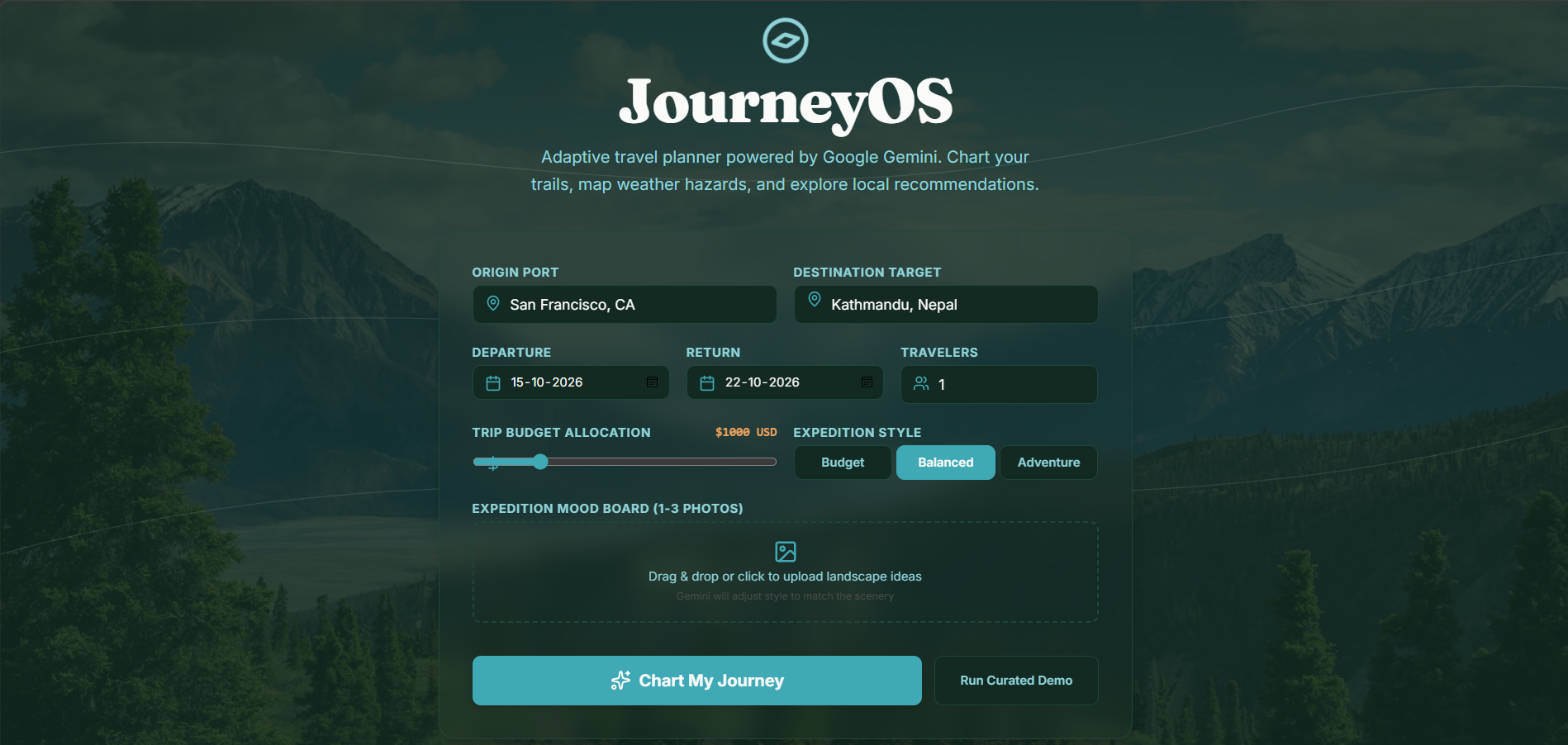
JourneyOS takes a destination, dates, budget, and travel style, then:
- Fetches real transport, hotel, weather, attraction, and restaurant data for that specific destination
- Uses Gemini to generate four distinct itinerary options — Budget, Balanced, Luxury, Adventure — each with a real daily schedule, not a random shuffle of the same data
- Renders the itinerary as a flowing river-path timeline, with breakfast, lunch, and dinner as default, editable slots alongside every activity
- Lets a Gemini-powered chat assistant actually modify the trip — moving activities, swapping hotels, adjusting budget — by calling real functions against the app's state, not just replying in text
- Tracks a live budget dashboard and exports a shareable trip summary
How I built it
- Frontend: Next.js (App Router), TypeScript, Tailwind CSS, shadcn/ui (restyled to a custom nature-inspired token system — pine greens, glacier teal, dawn amber), Framer Motion, React Hook Form, Zod, TanStack Query
- Backend: Supabase (Auth + Postgres), Next.js Server Actions/Route Handlers as a proxy layer for every external API call
- AI: Google Gemini API used across six distinct capabilities — structured JSON output for the four itinerary plans, function calling so the chat assistant mutates real app state, streaming for the chat and generation UI, multimodal input for optional trip mood-board photos, a strict grounding rule so Gemini only reasons over real fetched data rather than inventing facts, and context caching so the trip's data bundle isn't re-sent on every single request
- Data: Google Maps Platform (Places, Routes, Geocoding, Place Photos, Autocomplete) for maps, hotels, attractions, and restaurants; OpenWeather for live forecasts; Exchange Rate API for budget conversion; Unsplash for destination imagery; Wikipedia for factual place descriptions
- Design: a deliberate token system (Fraunces for headings, Inter for body, JetBrains Mono for data readouts) built around a river/trail visual metaphor — the itinerary is a literal flowing path with waypoints, not a generic vertical list
Challenges I ran into
- Destination-scoped data: early on, every destination search returned the same results. The root cause was TanStack Query cache keys that didn't include the destination and trip dates — so the first city searched got cached and reused for every city after. Fixing this meant auditing the entire data path end to end and rebuilding every query key and fetch function to require destination as an explicit, non-optional parameter.
- A premature redirect bug: after submitting trip details, the app would briefly load the next page and then bounce back to the homepage. This turned out to be a guard clause checking "is trip data present?" before the async trip creation had actually resolved — firing on the first, empty render instead of waiting for loading to finish.
- Keeping the chatbot honest: the AI assistant would sometimes give answers unrelated to the actual destination. The fix was making sure every chat call is grounded with the trip's real fetched context (destination, hotels, weather, current itinerary) via context caching, with a system instruction restricting Gemini to that real data — plus a function-calling tool so it can look up anything genuinely missing instead of guessing.
- Being honest about estimates: for local transport within a destination (auto-rickshaw, taxi fares), there's no reliable live pricing API. Rather than fabricate precise numbers the way flight prices are shown, I built a system that pairs real Google Routes distances with clearly labeled fare estimates — so the app never presents a guess as verified fact.
What I learned
- Gemini's structured output (
responseSchema) is far more reliable for generating multi-option, differently-structured plans than parsing free text ever was. - Function calling turns an AI chat from a FAQ box into an actual co-pilot — the difference between "here's what you should do" and the app just doing it is enormous for perceived product quality.
- A lot of "the AI gave a wrong answer" bugs aren't really AI problems — they're context-plumbing problems. Once every Gemini call was properly grounded in real, destination-specific data, the "wrong answers" mostly disappeared.
- Design tokens matter more than I expected for avoiding a generic AI-app look — specifying exact hex values and a signature visual element (the river-path timeline) upfront made a much bigger difference than adding decoration after the fact.
Built With
- exchangerate-api
- framer-motion
- function-calling
- gemini-api
- generative-ai
- google-gemini
- google-geocoding-api
- google-maps-platform
- google-places
- google-routes-api
- llm
- nextjs
- openweather-api
- postgresql
- react
- react-hook-form
- supabase
- tailwindcss
- tanstack-query
- typescript
- unsplash-api
- vercel
- wikipedia-api
- zod


Log in or sign up for Devpost to join the conversation.