📝 Journal App with Firebase
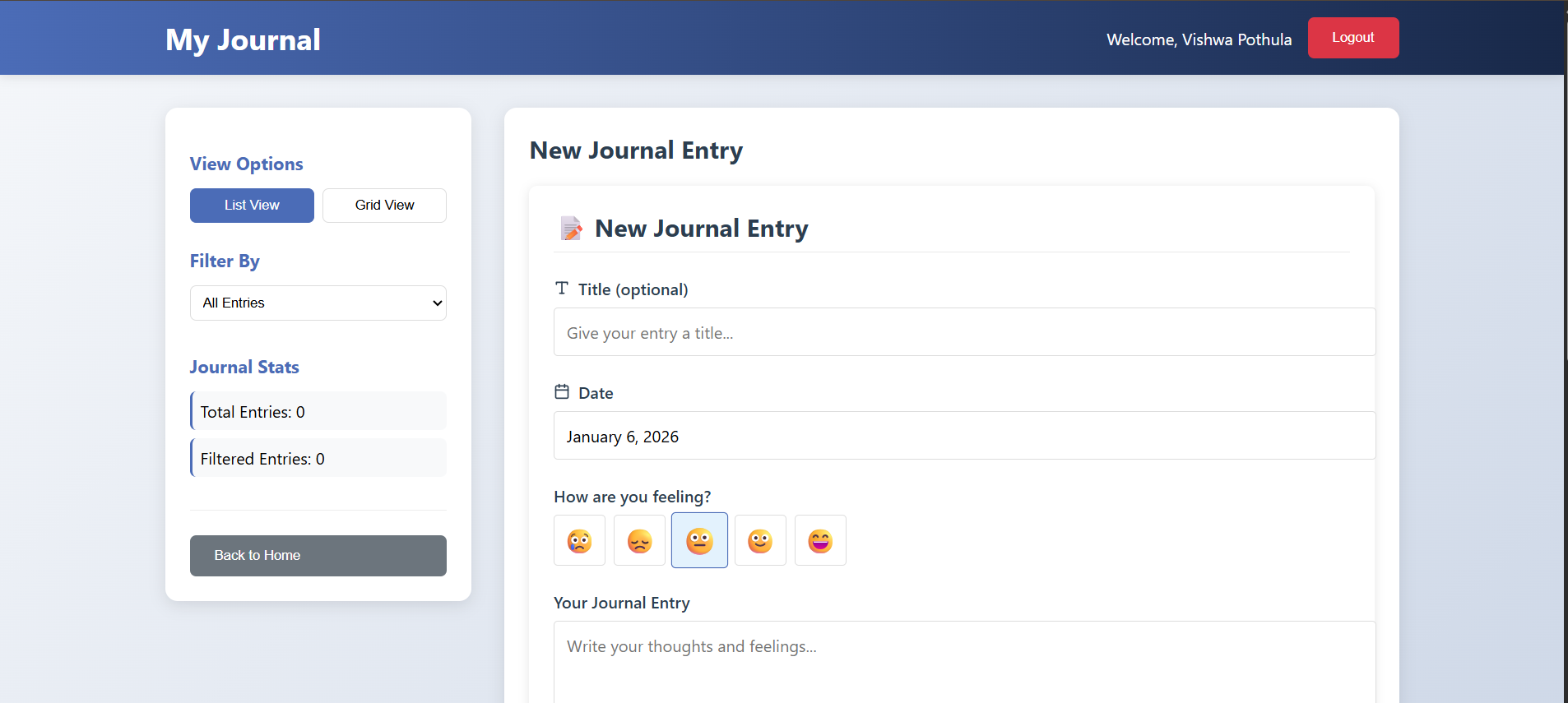
A modern journal web application built with React.js, Firebase Authentication, and Cloud Firestore. This app allows users to log in with Google, create and edit journal entries, track mood with emojis, and organize entries with tags.
🚀 Features
🔑 Google Authentication – Secure login using Firebase Auth.
📖 Create, Edit, Delete Journal Entries – Save your thoughts anytime.
😀 Mood Tracking – Select an emoji to reflect your current mood.
🏷 Tagging System – Organize entries with custom tags.
📅 Date Picker – Choose dates for journal entries.
📋 Journal List View – Displays all your past entries.
🎨 Beautiful UI – Styled with TailwindCSS + custom CSS.
⚡ Real-time Database – Powered by Firebase Firestore.
🛠️ Tech Stack
Frontend: React.js (Create React App), TailwindCSS, React Icons
Backend/Database: Firebase (Firestore, Authentication)
State Management: React Hooks (useState, useEffect)
Deployment Ready: Works locally and can be deployed to Firebase Hosting, Vercel, or Netlify
📂 Project Structure journal-app/ ├── public/ # Static files ├── src/ │ ├── App.js # Main app logic │ ├── App.css # Global custom styles │ ├── index.js # Entry point │ ├── firebase.js # Firebase configuration │ └── components/ │ ├── Home.js # Landing page │ ├── Login.js # Google login component │ ├── JournalEntry.js# Form for creating/editing entries │ └── JournalList.js # List of saved journal entries ├── package.json └── README.md
you can also add css file for every corresponding file that were present in the components files
⚙️ Setup & Installation
Clone the repository
git clone https://github.com/Vishwa231103/journal-app.git cd journal-app
Install dependencies
npm install
Setup Firebase
Go to Firebase Console
Create a new project
Enable Firestore Database (start in test mode for dev)
Enable Google Authentication under Authentication → Sign-in methods
Copy your config from Project Settings > SDK setup and configuration
Create a file src/firebase.js and add:
import { initializeApp } from "firebase/app"; import { getAuth, GoogleAuthProvider } from "firebase/auth"; import { getFirestore } from "firebase/firestore";
const firebaseConfig = { apiKey: "YOUR_API_KEY", authDomain: "YOUR_PROJECT.firebaseapp.com", projectId: "YOUR_PROJECT_ID", storageBucket: "YOUR_PROJECT.appspot.com", messagingSenderId: "YOUR_SENDER_ID", appId: "YOUR_APP_ID" };
const app = initializeApp(firebaseConfig);
export const auth = getAuth(app); export const provider = new GoogleAuthProvider(); export const db = getFirestore(app);
Start the development server
npm start
Runs the app at http://localhost:3000
🌍 Deployment
You can deploy this app easily on:
Firebase Hosting
npm run build firebase deploy
Vercel / Netlify → Just drag & drop the build folder or connect your repo.
📌 Future Enhancements
🔔 Notifications/reminders for journaling
📊 Analytics dashboard for moods/tags
📱 Mobile-friendly PWA support
🎤 Voice-to-text journal entry
👨💻 Author pothula Vishwateja [email protected]

Log in or sign up for Devpost to join the conversation.