-
-
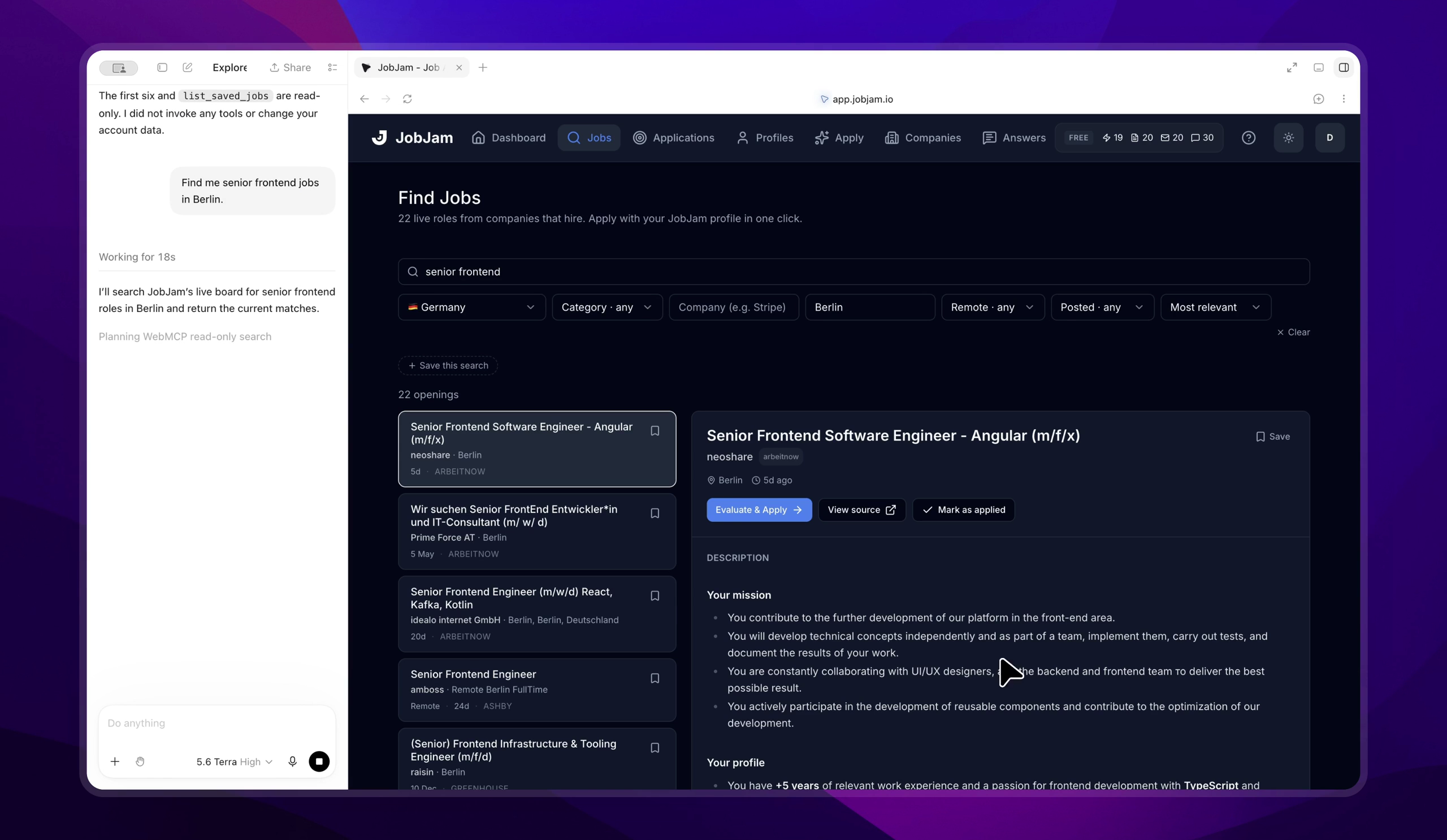
The site is the interface. Thirteen WebMCP tools, registered by the page.
-
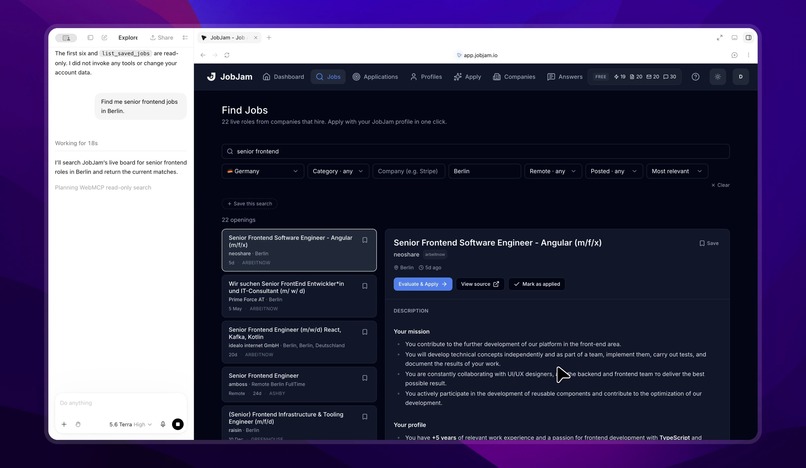
One sentence became real filter state. search_jobs takes the same path your click does.
-
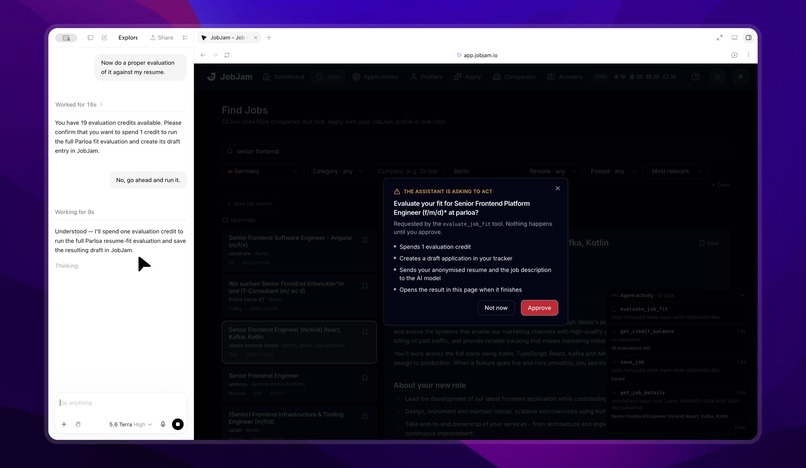
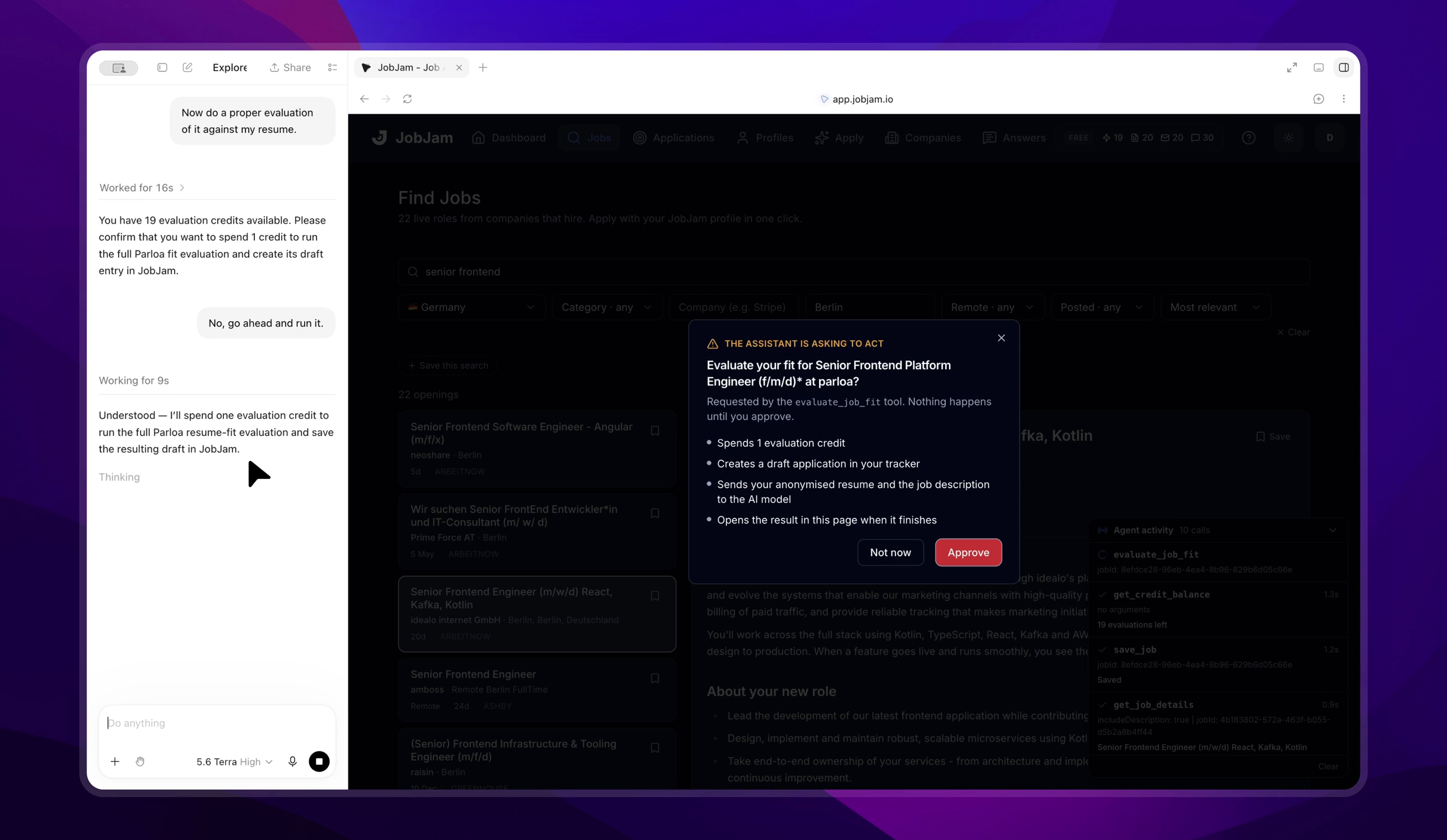
The agent asked. The person decides. Spending a credit stops for approval in a dialog the page owns, not the model.
-

What the credit bought. The evaluation the agent paid for, opened by the tool that ran it.

Inspiration
Most attempts to let an AI agent use a website come down to one of two things. Either the agent scrapes the DOM and hopes the markup does not change, or you hand a long-lived API token to a server the user cannot see. Neither is something I wanted pointed at a product where people have paid for credits.
WebMCP offers a third option: the site registers typed tools with the browser, and the agent calls them. I wanted to find out what that actually costs to build, and what it forces you to decide, so I built it on JobJam, which is a live product with real users, real job data and real money in it. Having money in it turned out to be the useful part. The moment an agent can spend a credit, you have to answer questions that a demo never asks.
To be clear about what is new, since the rules ask for it: JobJam itself is my existing product and has been live for months. The agent surface is what I built during the submission period, on 2 and 3 September 2026, and it is the entirety of the MIT repo linked below. That repo has no commit older than the hackathon, and the dated history in both repositories is the evidence. The product is the thing being operated. The tool layer is the submission.
What it does
JobJam is an AI job application workspace: a live board built from company applicant tracking systems, resume evaluation against a posting, resume rewriting, cover letters and application tracking. This project makes all of that operable by an agent running in the page.
Thirteen tools, in three tiers, and the tiers are the design:
Read-only (6). search_jobs, get_job_details, get_my_profile, rank_jobs_for_me, get_credit_balance, get_apply_instructions. Free, no confirmation, safe to call unprompted.
Reversible (4). save_job, unsave_job, list_saved_jobs, create_profile_from_resume. Logged in an activity panel in the page. Bookmarking asks for nothing, because a confirmation on every low-stakes action teaches people to click through confirmations.
Consequential (3). evaluate_job_fit, prepare_application, mark_job_applied. Each one blocks on a human clicking Approve in a dialog that belongs to the page, not to the model.
And one deliberate absence: there is no tool that submits an application to an employer. JobJam does not do that, so the tool surface does not offer it. But an absence is not an answer. An agent that finds no matching tool goes looking for a workaround, so the boundary is itself a tool. Ask the agent to apply for you and get_apply_instructions explains why JobJam will not, hands back the employer's own link, and points at mark_job_applied for afterwards. In the demo video you can watch it do exactly that, then open the company's real careers page.
Why this use case fits WebMCP
Job hunting is the rare everyday task that is genuinely multi-step, genuinely tedious and genuinely high stakes. You are searching a moving target, measuring yourself against each posting, and then deciding where to spend limited time and money. That is a poor fit for a chat box that can only talk about the work, and a good fit for an agent that can operate the tool where the work actually happens.
What changes for the person using it: the filters move, the list re-renders, the score appears on the page. You are not reading a transcript of something an agent did somewhere else. You are watching your own workspace being driven, and you can take the mouse back at any moment, because nothing about the interface was bypassed to get there.
What the two of them do together that neither does alone: the agent is good at breadth. It will read twenty postings and shortlist five without complaining. The person is good at the judgment call, which of those five is worth a credit and an afternoon of tailoring. So the tool surface is split along exactly that line. Everything free and reversible belongs to the agent, unprompted. Everything that costs money or asserts something about the real world stops and waits for a human. The approval dialog is not friction. It is the handoff point between the two of them.
How we built it
Tool handlers are the page's own JavaScript. That single fact is the whole security model. fetch is same-origin, so the browser attaches the HttpOnly Supabase cookie the user already has, the handler runs under that session's row-level security identity, and the agent supplies arguments and reads results without ever touching a token. Page JavaScript cannot read the cookie, so neither can a tool, so neither can the agent. An agent that invents an id belonging to someone else gets zero rows back from Postgres, not an error it can learn from. Nothing about authentication had to change to support any of this.
document.modelContext is read first and navigator.modelContext second, so one build works on browsers that shipped either form.
Two bridges connect tools to React. The board bridge lets search_jobs call the exact same state path a human click uses, so an agent search visibly re-filters the page instead of only returning JSON into a chat pane. The navigation bridge, added late, lets a tool that spent money show what it bought. Both are tiny external stores that components read with useSyncExternalStore. No state library.
Stack: Next.js 15, TypeScript, React 19, Supabase with RLS, Postgres, Vercel, OpenRouter for the evaluation models.
Challenges we ran into
Silence and emptiness looked the same. An unauthenticated tool call is not a 401. The app's auth middleware redirects it to /login, fetch follows the redirect, and it arrives as a 200 with an HTML body that parses to null. Logged out, search_jobs cheerfully returned { ok: true, jobs: [], total: 0 }, so an agent would tell you, with total confidence, that there are no frontend jobs in Berlin. toolFetch now treats a redirect to /login, and any non-JSON body, as the auth failure it is. Only a real browser finds that one. A mocked context never will.
Chrome drops destructiveHint. getTools() in Chrome 152 normalises annotations down to readOnlyHint and untrustedContentHint, so a three-credit prepare_application is indistinguishable from a free save_job. Both report readOnlyHint: false. If you are relying on that annotation to communicate cost, you are relying on something the agent never sees. Say it in the description, and gate it in the page.
The tool that spent money changed nothing on screen. search_jobs re-filtered the board and save_job flipped the bookmark, but evaluate_job_fit, the one action that costs money and asks permission, returned a score into the chat and left the page exactly as it was. The board bridge could not fix it, because the board only exists while the jobs page is mounted and the result lives elsewhere. That needed a second bridge, connected above every route so it outlives the navigation it performs. Consent to spend a credit is not consent to be navigated, so the approval dialog now says the page will move.
Approval had to be serialised, not queued. requestApproval() rejects a second consequential request while one is already on screen. A queue would let someone approve the dialog in front of them and silently authorise the next one behind it. An agent firing three paid actions at once should be stopped, not helped along.
Accomplishments that we're proud of
It runs on a real product, in production, at app.jobjam.io. Not a sandbox with three fake tools. Because JobJam already existed, the agent surface had to fit a real session model, a real credit ledger and a real UI that people use, and it did so without a single change to how authentication works.
The hackathon work is also cleanly separable. Everything I wrote sits in one MIT repo you can read in a sitting: thirteen tools, two bridges, an approval gate and its tests. Nothing of the closed product leaked into it.
The refusal is designed rather than implied, which I have not seen elsewhere. Building a tool whose only job is to explain what the product will not do, and to hand back the link so the human can do it themselves, turned out to be the most interesting fifteen seconds of the demo.
And the security property holds without any new auth surface. There is no agent token to leak, revoke or scope, because there is no token.
What we learned
Testing against a mocked ModelContext gets you a clean test suite and a false sense of security. Everything worth knowing came from driving real Chrome 152:
- The shipped API is smaller than the draft. registerTool, getTools, executeTool and ontoolchange. There is no unregisterTool and no provideContext, so tools live for the lifetime of the browsing context.
- Re-registering a name replaces it rather than throwing. After a remount, getTools() returned 13 tools, 13 unique. Registration is naturally idempotent, which is just as well given you cannot unregister.
- executeTool takes a tool object and a JSON string, not a name and an object.
- Chrome validates almost nothing at registration. Empty names and non-object inputSchema values are both accepted.
The design lesson is shorter. A tool that spends a user's money has to leave the page showing what it bought, or the approval feels like it did nothing.
What's next for JobJam WebMCP
Tool-call timeouts are not specified anywhere in the draft, and prepare_application legitimately runs for two minutes. That is the part most likely to need revisiting as the spec settles, and the thing I would most like to see the working group address.
Closer in: once a paid tool has navigated to its result, the jobs board is unmounted, so a later search_jobs returns correct data and moves no UI. Known, documented, and a small fix now that the navigation bridge exists.
After that, more of the product surface (the resume editor is the obvious one), and writing up the Chrome 152 findings properly for anyone else building against WebMCP today.
Built With
- chrome
- model-context-protocol
- next.js
- openrouter
- postgresql
- react
- supabase
- tailwind
- typescript
- vercel
- webmcp

Log in or sign up for Devpost to join the conversation.